
EKI-9612G-4FI-AE - Switch Advantech - Free user manual and instructions
Find the device manual for free EKI-9612G-4FI-AE Advantech in PDF.


| Product Type | Industrial Managed Ethernet Switch |
| Model | EKI-9612G-4FI-AE |
| Brand | Advantech |
| Ports | 8 x 10/100/1000Base-T(X) + 4 x 100/1000Base-SFP |
| Switching Capacity | 24 Gbps |
| Forwarding Rate | 17.9 Mpps |
| MAC Address Table | 8K entries |
| Power Input | 12-48 VDC redundant |
| Power Connector | 6-pin removable terminal block |
| Power Consumption | 15 W (max) |
| Operating Temperature | -40°C to 75°C |
| Storage Temperature | -40°C to 85°C |
| Humidity | 5% to 95% (non-condensing) |
| Dimensions (W x H x D) | 74 x 152 x 105 mm |
| Weight | 1.2 kg |
| Mounting | DIN-rail or wall-mount |
| Management | Web, SNMP v1/v2c/v3, Telnet, CLI |
| Layer 2 Features | VLAN, IGMP snooping, STP/RSTP/MSTP, Link Aggregation |
| Layer 3 Features | Static routing, RIP, OSPF |
| Security | 802.1X, ACL, Port security, SSH/SSL |
| Certifications | CE, FCC |
Frequently Asked Questions - EKI-9612G-4FI-AE Advantech
User questions about EKI-9612G-4FI-AE Advantech
0 question about this device. Answer the ones you know or ask your own.
Ask a new question about this device
Download the instructions for your Switch in PDF format for free! Find your manual EKI-9612G-4FI-AE - Advantech and take your electronic device back in hand. On this page are published all the documents necessary for the use of your device. EKI-9612G-4FI-AE by Advantech.
USER MANUAL EKI-9612G-4FI-AE Advantech
natural_image
Illustration of three network equipment units (user, switch, and server) in green outline style, no text or symbols present.EKI-9612G
EKI-9612 Ethernet Switch
Copyright
The documentation and the software included with this product are copyrighted 2006 by Advantech Co., Ltd. All rights are reserved. Advantech Co., Ltd. reserves the right to make improvements in the products described in this manual at any time without notice. No part of this manual may be reproduced, copied, translated or transmitted in any form or by any means without the prior written permission of Advantech Co., Ltd. Information provided in this manual is intended to be accurate and reliable. However, Advantech Co., Ltd. assumes no responsibility for its use, nor for any infringements of the rights of third parties, which may result from its use.
Acknowledgements
Intel and Pentium are trademarks of Intel Corporation.
Microsoft Windows and MS-DOS are registered trademarks of Microsoft Corp.
All other product names or trademarks are properties of their respective owners.
Product Warranty (5 years)
Advantech warrants to you, the original purchaser, that each of its products will be free from defects in materials and workmanship for five years from the date of purchase.
This warranty does not apply to any products which have been repaired or altered by persons other than repair personnel authorized by Advantech, or which have been subject to misuse, abuse, accident or improper installation. Advantech assumes no liability under the terms of this warranty as a consequence of such events.
Because of Advantech's high quality-control standards and rigorous testing, most of our customers never need to use our repair service. If an Advantech product is defective, it will be repaired or replaced at no charge during the warranty period. For out-of-warranty repairs, you will be billed according to the cost of replacement materials, service time and freight. Please consult your dealer for more details.
If you think you have a defective product, follow these steps:
-
Collect all the information about the problem encountered. (For example, CPU speed, Advantech products used, other hardware and software used, etc.) Note anything abnormal and list any on screen messages you get when the problem occurs.
-
Call your dealer and describe the problem. Please have your manual, product, and any helpful information readily available.
-
If your product is diagnosed as defective, obtain an RMA (return merchandize authorization) number from your dealer. This allows us to process your return more quickly.
-
Carefully pack the defective product, a fully-completed Repair and Replacement Order Card and a photocopy proof of purchase date (such as your sales receipt) in a shippable container. A product returned without proof of the purchase date is not eligible for warranty service.
-
Write the RMA number visibly on the outside of the package and ship it prepaid to your dealer.
Part No. XXXXXXXXXX Edition 1
Printed in Taiwan July 2017
Declaration of Conformity
CE
This product has passed the CE test for environmental specifications. Test conditions for passing included the equipment being operated within an industrial enclosure. In order to protect the product from being damaged by ESD (Electrostatic Discharge) and EMI leakage, we strongly recommend the use of CE-compliant industrial enclosure products.
FCC Class A
Note: This equipment has been tested and found to comply with the limits for a Class A digital device, pursuant to part 15 of the FCC Rules. These limits are designed to provide reasonable protection against harmful interference when the equipment is operated in a commercial environment. This equipment generates, uses, and can radiate radio frequency energy and, if not installed and used in accordance with the instruction manual, may cause harmful interference to radio communications. Operation of this equipment in a residential area is likely to cause harmful interference in which case the user will be required to correct the interference at his own expense.
Technical Support and Assistance
- Visit the Advantech web site at www.advantech.com/support where you can find the latest information about the product.
- Contact your distributor, sales representative, or Advantech's customer service center for technical support if you need additional assistance. Please have the following information ready before you call:
– Product name and serial number
– Description of your peripheral attachments
– Description of your software (operating system, version, application software, etc.)
– A complete description of the problem
– The exact wording of any error messages
Warnings, Cautions and Notes
Warning! Warnings indicate conditions, which if not observed, can cause personal injury!

Caution! Cautions are included to help you avoid damaging hardware or losing data. e.g.

There is a danger of a new battery exploding if it is incorrectly installed. Do not attempt to recharge, force open, or heat the battery. Replace the battery only with the same or equivalent type recommended by the manufacturer. Discard used batteries according to the manufacturer's instructions.
Note! Notes provide optional additional information.

Document Feedback
To assist us in making improvements to this manual, we would welcome comments and constructive criticism. Please send all such - in writing to: support@advantech.com
Packing List
Before setting up the system, check that the items listed below are included and in good condition. If any item does not accord with the table, please contact your dealer immediately.
■ 1 x Industrial Ethernet Switch
■ 1 x DIN-Rail mounting Bracket and Screws
1 x Startup Manual
Safety Instructions
- Read these safety instructions carefully.
- Keep this User Manual for later reference.
- Disconnect this equipment from any AC outlet before cleaning. Use a damp cloth. Do not use liquid or spray detergents for cleaning.
- For plug-in equipment, the power outlet socket must be located near the equipment and must be easily accessible.
- Keep this equipment away from humidity.
- Put this equipment on a reliable surface during installation. Dropping it or letting it fall may cause damage.
- The openings on the enclosure are for air convection. Protect the equipment from overheating. DO NOT COVER THE OPENINGS.
- Make sure the voltage of the power source is correct before connecting the equipment to the power outlet.
- Position the power cord so that people cannot step on it. Do not place anything over the power cord.
- All cautions and warnings on the equipment should be noted.
- If the equipment is not used for a long time, disconnect it from the power source to avoid damage by transient overvoltage.
- Never pour any liquid into an opening. This may cause fire or electrical shock.
- Never open the equipment. For safety reasons, the equipment should be opened only by qualified service personnel.
- If one of the following situations arises, get the equipment checked by service personnel:
- The power cord or plug is damaged.
- Liquid has penetrated into the equipment.
- The equipment has been exposed to moisture.
- The equipment does not work well, or you cannot get it to work according to the user's manual.
- The equipment has been dropped and damaged.
- The equipment has obvious signs of breakage.
- DO NOT LEAVE THIS EQUIPMENT IN AN ENVIRONMENT WHERE THE STORAGE TEMPERATURE MAY GO BELOW -20°C (-4°F) OR ABOVE 60°C (140°F). THIS COULD DAMAGE THE EQUIPMENT. THE EQUIPMENT SHOULD BE IN A CONTROLLED ENVIRONMENT.
- CAUTION: DANGER OF EXPLOSION IF BATTERY IS INCORRECTLY REPLACED. REPLACE ONLY WITH THE SAME OR EQUIVALENT TYPE RECOMMENDED BY THE MANUFACTURER, DISCARD USED BATTERIES ACCORDING TO THE MANUFACTURER'S INSTRUCTIONS.
- The sound pressure level at the operator's position according to IEC 704-1:1982 is no more than 70 dB (A).
DISCLAIMER: This set of instructions is given according to IEC 704-1. Advantech disclaims all responsibility for the accuracy of any statements contained herein.
Safety Precaution - Static Electricity
Follow these simple precautions to protect yourself from harm and the products from damage.
To avoid electrical shock, always disconnect the power from your PC chassis before you work on it. Don't touch any components on the CPU card or other cards while the PC is on.
■ Disconnect power before making any configuration changes. The sudden rush of power as you connect a jumper or install a card may damage sensitive electronic components.
Contents
Chapter 1 Product Overview ...... 1
1.1 Specifications.... 2
1.2 Hardware Views.... 3
1.2.1 Front View.... 3
1.2.2 Rear View 5
1.2.3 Top View....6
Chapter 2 Switch Installation .... 7
2.1 Installation Guidelines....8
2.1.1 Connecting Hardware....8
2.2 Verifying Switch Operation....8
2.3 Installing the Switch 9
2.3.1 DIN Rail Mounting....9
2.3.2 Wall-Mounting.... 10
2.4 Installing and Removing SFP Modules.... 12
2.4.1 Installing SFP Modules.... 13
2.4.2 Removing SFP Modules.... 14
2.5 Connecting the Switch to Ethernet Ports 15
2.5.1 RJ45 Ethernet Cable Wiring 15
2.6 Connecting the Switch to Console Port 15
2.7 Power Supply Installation.... 17
2.7.1 Overview.... 17
2.7.2 Considerations.... 17
2.7.3 Grounding the Device.... 18
2.7.4 Wiring a Relay Contact.... 19
2.7.5 Wiring the Power Inputs.... 19
2.8 Reset Button 21
Chapter 3 Configuration Utility ...... 22
3.1 First Time Setup.... 23
3.1.1 Overview....23
3.1.2 Introduction 23
3.1.3 Administrative Interface Access.... 23
3.1.4 Using the Graphical (Web) Interface 24
3.1.5 Configuring the Switch for Network Access.... 24
3.1.6 Configuring the Ethernet Ports 25
3.2 Command Line Interface Configuration 26
3.2.1 Introduction to Command-Line Interface (CLI) 26
3.2.2 Accessing the CLI.... 26
3.3 Web Browser Configuration 27
3.3.1 Preparing for Web Configuration 27
3.3.2 System Login 27
Chapter 4 Managing Switch...... 28
4.1 Log In....29
4.2 Recommended Practices.... 29
4.2.1 Changing Default Password 29
4.3 Monitoring 30
4.3.1 Device Information.... 30
4.3.2 Logging Message.... 31
4.3.3 Port Monitoring.... 32
4.3.4 Link Aggregation.... 33
4.3.5 LLDP Statistics.... 34
4.3.6 IGMP Statistics 35
4.3.7 IGMP Statistics 36
4.4 System 37
4.4.1 IP Settings.... 37
4.4.2 IPv6 Settings.... 37
4.4.3 System Time.... 38
4.4.4 Network Port 39
4.5 L2 Switching.... 40
4.5.1 Port Configuration.... 40
4.5.2 Port Mirror.... 41
4.5.3 Link Aggregation.... 42
4.5.4 802.1Q VLAN.... 44
4.5.5 Q-in-Q 48
4.5.6 GARP.... 50
4.5.7 802.3az EEE....51
4.5.8 Multicast.... 52
4.5.9 Jumbo Frame.... 56
4.5.10 Spanning Tree 57
4.5.11 X-Ring Elite.... 62
4.5.12 X-Ring Pro 63
4.5.13 Loopback Detection 64
4.6 L3 Switching.... 65
4.6.1 SNAT (Source NAT) 65
4.6.2 DNAT (Destination NAT).... 66
4.6.3 Routing.... 67
4.7 MAC Address Table.... 67
4.7.1 Static MAC.... 67
4.7.2 MAC Aging Time.... 68
4.7.3 Dynamic Forwarding Table.... 68
4.8 Security 69
4.8.1 Storm Control.... 69
4.8.2 Port Security 71
4.8.3 Protected Ports 71
4.8.4 DoS Prevention....72
4.8.5 Applications....74
4.8.6 802.1x 76
4.8.7 IP Security.... 78
4.9 QoS....79
4.9.1 General 79
4.9.2 QoS Basic Mode.... 84
4.9.3 Rate Limit 86
4.10 Management 88
4.10.1 LLDP 88
4.10.2 SNMP 91
4.10.3 TCP Modbus Settings.... 93
4.10.4 DHCP Server 94
4.10.5 SMTP Client....99
4.10.6 RMON.... 102
4.11 Diagnostics.... 105
4.11.1 Cable Diagnostics.... 105
4.11.2 Ping Test.... 106
4.11.3 IPv6 Ping Test.... 107
4.11.4 System Log.... 108
4.11.5 DDM.... 111
4.11.6 LED Indication.... 112
4.12 Tools 113
4.12.1 Backup Manager.... 113
4.12.2 Upgrade Manager.... 114
4.12.3 Dual Image 115
4.12.4 Save Configuration 115
4.12.5 User Account 115
4.12.6 Reset System 116
4.12.7 Reboot Device 116
Chapter 5 Troubleshooting.... 117
5.1 Troubleshooting 118
List of Figures
Figure 1.1 Front View .... 3
Figure 1.2 System LED Panel 4
Figure 1.3 Rear View 5
Figure 1.4 Top View....6
Figure 2.1 Installing the DIN-Rail Mounting Kit....9
Figure 2.2 Removing the DIN-Rail....10
Figure 2.3 Installing Wall Mount Plates 11
Figure 2.4 Securing Wall Mounting Screws....11
Figure 2.5 Wall Mount Installation 12
Figure 2.6 Removing the Dust Plug from an SFP Slot 13
Figure 2.7 Installing an SFP Transceiver....13
Figure 2.8 Attaching a Fiber Optic Cable to a Transceiver.... 14
Figure 2.9 Removing a Fiber Optic Cable to a Transceiver....14
Figure 2.10 Removing an SFP Transceiver....14
Figure 2.11 Ethernet Plug & Connector Pin Position....15
Figure 2.12 Serial Console Cable....16
Figure 2.13 DB 9 Pin Position.... 16
Figure 2.14 Pin Assignment.... 16
Figure 2.15 Power Wiring for EKI-9612G 17
Figure 2.16 Grounding Connection.... 19
Figure 2.17 Terminal Receptor: Relay Contact 19
Figure 2.18 Terminal Receptor: Power Input Contacts....20
Figure 2.19 Removing a Terminal Block....20
Figure 2.20 Installing DC Wires in a Terminal Block 20
Figure 2.21 Securing a Terminal Block to a Receptor 21
Figure 4.1 Login Screen 29
Figure 4.2 Changing a Default Password....30
Figure 4.3 Monitoring > Device Information....30
Figure 4.4 Monitoring > Logging Message 31
Figure 4.5 Monitoring > Port Monitoring > Port Statistics 32
Figure 4.6 Monitoring > Port Monitoring > Port Utilization ....33
Figure 4.7 Monitoring > Link Aggregation....33
Figure 4.8 Monitoring > LLDP Statistics ....34
Figure 4.9 Monitoring > IGMP Statistics .... 35
Figure 4.10 Monitoring > MLD Statistics....36
Figure 4.11 System > IP Settings 37
Figure 4.12 System > IPv6 Settings 37
Figure 4.13 System > System Time....38
Figure 4.14 System > Network Port....39
Figure 4.15 L2 Switching > Port Configuration 40
Figure 4.16 L2 Switching > Port Mirror 41
Figure 4.17 L2 Switching > Link Aggregation > Load Balance 42
Figure 4.18 L2 Switching > Link Aggregation > LAG Management.... 42
Figure 4.19 L2 Switching > Link Aggregation > LAG Port Settings 43
Figure 4.20 L2 Switching > Link Aggregation > LACP Priority Settings ....43
Figure 4.21 L2 Switching > Link Aggregation > LACP Port Settings 44
Figure 4.22 L2 Switching > 802.1Q VLAN > VLAN Management .... 45
Figure 4.23 L2 Switching > 802.1Q VLAN > PVID Settings 45
Figure 4.24 L2 Switching > 802.1Q VLAN > Port to VLAN....47
Figure 4.25 L2 Switching > 802.1Q VLAN > VLAN Interface Management .... 48
Figure 4.26 L2 Switching > Q-in-Q > Global Settings....48
Figure 4.27 L2 Switching > Q-in-Q > Port Settings....49
Figure 4.28 L2 Switching >GARP >GARP Settings....50
Figure 4.29 L2 Switching > GARP > GVRP Settings....51
Figure 4.30 L2 Switching > 802.3az EEE 51
Figure 4.31 L2 Switching > Multicast > Multicast Filtering....52
Figure 4.32 L2 Switching > Multicast > IGMP Snooping > IGMP Settings....52
Figure 4.33 L2 Switching > Multicast > IGMP Snooping > IGMP Querier.... 53
Figure 4.34 L2 Switching > Multicast > IGMP Snooping > IGMP Static Groups .... 54
Figure 4.35 L2 Switching > Multicast > MLD Snooping > MLD Settings 54
Figure 4.36 L2 Switching > Multicast > MLD Snooping > MLD Querier 55
Figure 4.37 L2 Switching > Multicast > MLD Snooping > MLD Static Group .... 56
Figure 4.38 L2 Switching > Jumbo Frame....56
Figure 4.39 L2 Switching > Spanning Tree > STP Global Settings.... 57
Figure 4.40 L2 Switching > Spanning Tree > STP Port Settings....58
Figure 4.41 L2 Switching > Spanning Tree > STP Bridge Settings....59
Figure 4.42 L2 Switching > Spanning Tree > STP Port Advanced Settings....59
Figure 4.43 L2 Switching > Spanning Tree > MST Config Identification....60
Figure 4.44 L2 Switching > Spanning Tree > MST Instance ID Settings 60
Figure 4.45 L2 Switching > Spanning Tree > MST Instance Priority Settings....61
Figure 4.46 L2 Switching > X-Ring Elite > X-Ring Elite Settings.... 62
Figure 4.47 L2 Switching > X-Ring Elite > X-Ring Elite Groups 62
Figure 4.48 L2 Switching > X-Ring Pro > X-Ring Pro Settings....63
Figure 4.49 L2 Switching > X-Ring Pro > X-Ring Pro Groups > X-Ring Pro Groups Settings ..... 63
Figure 4.50 L2 Switching > X-Ring Pro > X-Ring Pro Groups > Couple Setting .... 64
Figure 4.51 L2 Switching > Loopback Detection > Global Settings....64
Figure 4.52 L2 Switching > Loopback Detection > Port Settings 65
Figure 4.53 L3 Switching > SNAT > Global Settings....65
Figure 4.54 L3 Switching > SNAT > Entry Settings....66
Figure 4.55 L3 Switching > DNAT 66
Figure 4.56 L3 Switching > Routing 67
Figure 4.57 MAC Address Table > Static MAC 68
Figure 4.58 MAC Address Table > MAC Aging Time....68
Figure 4.59 MAC Address Table > Dynamic Forwarding Table....69
Figure 4.60 Security > Storm Control > Global Settings....69
Figure 4.61 Security > Storm Control > Port Settings 70
Figure 4.62 Security > Port Security....71
Figure 4.63 Security > Protected Ports....71
Figure 4.64 Security > DoS Prevention > DoS Global Settings....72
Figure 4.65 Security > DoS Prevention > DoS Port Settings 74
Figure 4.66 Security > Applications > TELNET 74
Figure 4.67 Security > Applications > SSH 75
Figure 4.68 Security > Applications > HTTP 75
Figure 4.69 Security > Applications > HTTPS 76
Figure 4.70 Security > 802.1x > 802.1x Settings.... 76
Figure 4.71 Security > 802.1x > 802.1x Port Configuration.... 77
Figure 4.72 Security > IP Security > Global Settings 78
Figure 4.73 Security > IP Security > Entry Settings 78
Figure 4.74 QoS > General > QoS Properties.... 79
Figure 4.75 QoS > General > QoS Settings 80
Figure 4.76 QoS > General > QoS Scheduling 81
Figure 4.77 QoS > General > CoS Mapping 82
Figure 4.78 QoS > General > DSCP Mapping 83
Figure 4.79 QoS > General > IP Precedence Mapping....84
Figure 4.80 QoS > QoS Basic Mode > Global Settings.... 85
Figure 4.81 QoS > QoS Basic Mode > Port Settings 85
Figure 4.82 QoS > Rate Limit > Ingress Bandwidth Control....86
Figure 4.83 QoS > Rate Limit > Egress Bandwidth Control 86
Figure 4.84 QoS > Rate Limit > Egress Queue....87
Figure 4.85 Management > LLDP > LLDP System Settings 88
Figure 4.86 Management > LLDP > LLDP Port Settings > LLDP Port Configuration....89
Figure 4.87 Management > LLDP > LLDP Port Settings > Optional TLVs Selection....89
Figure 4.88 Management > LLDP > LLDP Port Settings > VLAN Name TLV VLAN Selection..... 90
Figure 4.89 Management > LLDP > LLDP Remote Device Info....90
Figure 4.90 Management > SNMP > SNMP Settings 91
Figure 4.91 Management > SNMP > SNMP Community 91
Figure 4.92 Management > SNMP > SNMP User Settings.... 92
Figure 4.93 Management > SNMP > SNMP Trap 93
Figure 4.94 Management > TCP Modbus Settings > TCP Modbus Settings .... 93
Figure 4.95 Management > DHCP Server > Status Settings 94
Figure 4.96 Management > DHCP Server > Global Settings 95
Figure 4.97 Management > DHCP Server > Port Settings....96
Figure 4.98 Management > DHCP Server > VLAN Settings .... 97
Figure 4.99 Management > DHCP Server > Option 82 Settings....98
Figure 4.100 Management > SMTP Client > Global Settings....99
Figure 4.101 Management > SMTP Client > Profile Settings > Profile Settings....99
Figure 4.102 Management > SMTP Client > Profile Settings > Profile Target Mail Settings...... 100
Figure 4.103 Management > SMTP Client > Sending Message .... 101
Figure 4.104 Management > RMON > Rmon Statistics ...... 102
Figure 4.105 Management > RMON > RMON History 103
Figure 4.106 Management > RMON > Rmon Alarm 104
Figure 4.107 Management > RMON > RMON Event 105
Figure 4.108 Diagnostics > Cable Diagnostics.... 105
Figure 4.109 Diagnostics > Ping Test.... 106
Figure 4.110 Diagnostics > IPv6 Ping Test....107
Figure 4.111 Diagnostics > System Log > Logging Service 108
Figure 4.112 Diagnostics > System Log > Local Logging 109
Figure 4.113 Diagnostics > System Log > System Log Server 110
Figure 4.114 Diagnostics > DDM....111
Figure 4.115 Diagnostics > DDM....111
Figure 4.116 Diagnostics > LED Indication.... 112
Figure 4.117 Tools > Backup Manager.... 113
Figure 4.118 Tools > Upgrade Manager....114
Figure 4.119 Tools > Dual Image 115
Figure 4.120 Tools > User Account 115
Chapter 1
Product Overview
1.1 Specifications
| Specifications Description | ||
| Interface I/O Port 8 x RJ45 + 4 x Fiber | ||
| Power Connector 6-pin removable screw terminal (power & relay) | ||
| Physical Enclosure Metal Shell | ||
| Protection Class IP30 | ||
| Installation DIN-Rail and Wall mount | ||
| Dimensions 74 x 152 x 105 mm(W x H x D) | ||
| LED Display System LED SYS, R.M, PWR1, PWR2, Alarm | ||
| Port LED Speed, Link, Activity | ||
| Environment Operating Temperature | Standard Temperature: -10°C ~ 60°C (14°F ~ 140°F)Wide Temperature: -40°C ~ 75°C (-40°F ~ 167°F) | |
| Storage Temperature | -40°C ~ 85°C (-40°F ~ 185°F) | |
| Ambient Relative Humidity | 10 ~ 95% (non-condensing) | |
| Switch Properties | MAC Address | 8K-entry |
| Switching Bandwidth | 24 Gbps | |
| Power | Power Consumption | 12.1 W@48Vdc (System) |
| Power Input | 12V~48V | |
| Certifications | Safety | UL61010 |
| EMC | CE, FCC | |
| EMI | EN 55011/ 55022 Class A, EN 61000-6-4, FCC Part 15 Subpart B Class A | |
| EMS | ■ EN 55024/ EN 61000-6-2■ EN 61000-4-2 (ESD) Level 3■ EN 61000-4-3 (RS) Level 3■ EN 61000-4-4 (EFT) Level 3■ EN 61000-4-5 (Surge) Level 3■ EN 61000-4-6 (CS) Level 3■ EN 61000-4-8 (Magnetic Field) Level 3 | |
| Shock | IEC 60068-2-27 | |
| Freefall | IEC 60068-2-32 | |
| Vibration | IEC 60068-2-6 | |
1.2 Hardware Views
1.2.1 Front View

Figure 1.1 Front View
| No. Item Description | |
| 1 ETH port Fiber ports x 4 | |
| 2 ETH port RJ45 ports x 8 | |
| 3 LNK/ACT LED Link activity LED | |
| 4 Speed LED | Orange: 100MGreen: 1G |
| 5 S y s panel | See “SystemLED Panel” on page D4 for further details. |
| 6 Reset button Button allows for system soft reset or factory default reset. | |
| 7 Console serial port | Console cable port to COM port (DB9 male) on computer to RS232 managed switch (RJ45 female). |
1.2.1.1 System LED Panel
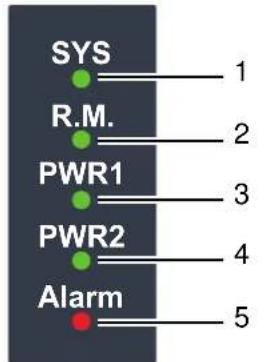
Figure 1.2 System LED Panel
No. LED Name LED Color Description
| 1 SYS Solid green System is operating normally | |
| Off System is powered down / system crash / operation initiating | |
| 2 R.M. Solid green Active when determining ring master | |
| 3 PWR1 Solid green Powered up | |
| Off Powered down or not installed | |
| 4 PWR2 Solid green Powered up | |
| Off Power down or not installed | |
| 5 Alarm Solid red Defined major policies are detected | |
| Blinking Red Defined minor policies are detected | |
| Off Powered off or system is operating normally | |
1.2.2 Rear View

Figure 1.3 Rear View
| No. Item Description | |
| 1 Wall mounting holes | Screw holes (x6) used in the installation of a wall mounting plate |
| 2 DIN-Rail mount- ing plate | Mounting plate used for the installation to a standard DIN rail |
1.2.3 Top View
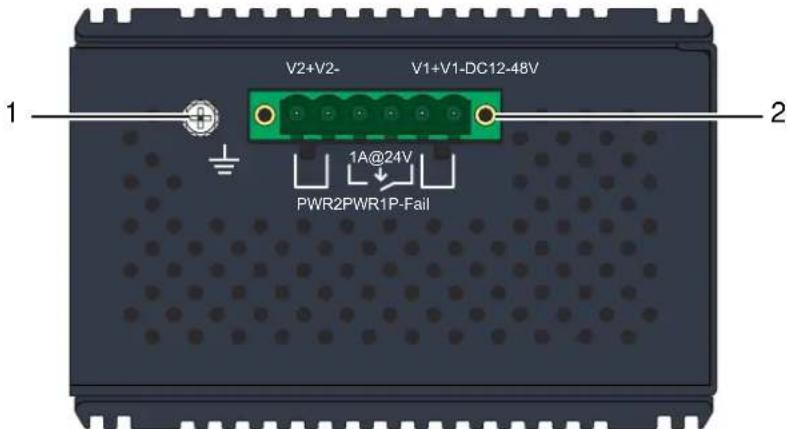
Figure 1.4 Top View
No. Item Description
1 Ground terminal Screw terminal used to ground chassis
2 Terminal block Connect cabling for power and alarm wiring
Chapter 2
Switch Installation
2.1 Installation Guidelines
The following guidelines are provided to optimize the device performance. Review the guidelines before installing the device.
■ Make sure cabling is away from sources of electrical noise. Radios, power lines, and fluorescent lighting fixtures can interference with the device performance.
■ Make sure the cabling is positioned away from equipment that can damage the cables.
- Operating environment is within the ranges listed range, see “Specifications” on page 2.
■ Relative humidity around the switch does not exceed 95 percent (noncondensing).
- Altitude at the installation site is not higher than 10,000 feet.
In 10/100 and 10/100/1000 fixed port devices, the cable length from the switch to connected devices can not exceed 100 meters (328 feet).
■ Make sure airflow around the switch and respective vents is unrestricted. Without proper airflow the switch can overheat. To prevent performance degradation and damage to the switch, make sure there is clarity at the top and bottom and around the exhaust vents.
2.1.1 Connecting Hardware
In this instruction, it will explain how to find a proper location for your Modbus Gateways, and how to connect to the network, hock up the power cable, and connect to the EKI-9612G.
2.2 Verifying Switch Operation
Before installing the device in a rack or on a wall, power on the switch to verify that the switch passes the power-on self-test (POST). To connect the cabling to the power source see “Power Supply Installation” on page 17.
At startup (POST), the System LED blinks green, while the remaining LEDs are a solidy green. Once the switch passes POST self-test, the System LED turns green. The other LEDs turn off and return to their operating status. If the switch fails POST, the System LED switches to an amber state.
After a successful self-test, power down the switch and disconnect the power cabling. The switch is now ready for installation on its final location.
2.3 Installing the Switch
2.3.1 DIN Rail Mounting
The DIN rail mount option is the quickest installation option. Additionally, it optimizes the use of rail space.
The metal DIN rail kit is secured to the rear of the switch. The device can be mounted onto a standard 35mm (1.37") x 75 mm (3") height DIN rail. The devices can be mounted vertically or horizontally. Refer to the following guidelines for further information.
Note! A corrosion-free mounting rail is advisable.

When installing, make sure to allow for enough space to properly install the cabling.
2.3.1.1 Installing the DIN-Rail Mounting Kit
- Insert the top back of the mounting bracket over the DIN rail.
- Push the bottom of the switch towards the DIN rail until it snaps into place.

Figure 2.1 Installing the DIN-Rail Mounting Kit
2.3.1.2 Removing the DIN-Rail Mounting Kit
- Push the switch down to free the bottom of the plate from the DIN rail.
- Rotate the bottom of the device towards you and away from the DIN rail.
- Once the bottom is clear of the DIN rail, lift the device straight up to unhook it from the DIN rail.

Figure 2.2 Removing the DIN-Rail
2.3.2 Wall-Mounting
The wall mounting option provides better shock and vibration resistance than the DIN rail vertical mount.
Note! When installing, make sure to allow for enough space to properly install the cabling.

Before the device can be mounted on a wall, you will need to remove the DIN rail plate.
- Rotate the device to the rear side and locate the DIN mounting plate.
- Remove the screws securing the DIN mounting plate to the rear panel of the switch.
- Remove the DIN mounting plate. Store the DIN mounting plate and provided screws for later use.
-
Align the wall mounting plates on the rear side. The screw holes on the device and the mounting plates must be aligned, see the following illustration.
-
Secure the wall mount plates with M3 screws, see the following figure.

natural_image
Diagram of an electronic device showing internal components and connection to a panel (no text or symbols present)Figure 2.3 Installing Wall Mount Plates
Once the wall mounting plates are secure on the device, you will need to attach the wall screws (x6).
- Locate the installation site and place the switch against the wall, making sure it is the final installation location.
- Use the wall mount plates as a guide to mark the locations of the screw holes.
- Drill four holes over the four marked locations on the wall, keeping in mind that the holes must accommodate wall sinks in addition to the screws.
- Insert the wall sinks into the walls.
- Insert the screws into the wall sinks. Leave a 2 mm gap between the wall and the screw head to allow for wall mount plate insertion.


Figure 2.4 Securing Wall Mounting Screws
Note!

■ Make sure the screws dimensions are suitable for use with the wall mounting plate.
Do not completely tighten the screws into the wall. A final adjustment may be needed before fully securing the wall mounting plates on the wall.
-
Align the wall mount plate over the screws on the wall.
-
Install the wall mount plate on the screws and slide it forward to lock in place, see the following figure.

Figure 2.5 Wall Mount Installation
- Once the device is installed on the wall, tighten the screws to secure the device.
2.4 Installing and Removing SFP Modules
Up to two fiber optic ports are available (dependent on model) for use in the switch. Refer to the technical specifications for details.
The Gigabit Ethernet ports on the switch are 100/1000Base SFP Fiber ports, which require using the 100M or 1G mini-GBIC fiber transceivers to work properly. Advantech provides completed transceiver models for different distance requirement.
The concept behind the LC port and cable is quite straight forward. Suppose that you are connecting devices I and II; contrary to electrical signals, optical signals do not require a circuit in order to transmit data. Consequently, one of the optical lines is used to transmit data from device I to device II, and the other optical line is used transmit data from device II to device I, for full-duplex transmission.
Remember to connect the Tx (transmit) port of device I to the Rx (receive) port of device II, and the Rx (receive) port of device I to the Tx (transmit) port of device II. If you make your own cable, we suggest labeling the two sides of the same line with the same letter (A-to-A and B-to-B, as shown below, or A1-to-A2 and B1-to-B2).
Note! This is a Class 1 Laser/LED product. To avoid causing serious damage to your eyes, do not stare directly into the Laser Beam.

2.4.1 Installing SFP Modules
To connect the fiber transceiver and LC cable, use the following guidelines:
- Remove the dust plug from the fiber optic slot chosen for the SFP transceiver.

natural_image
Technical illustration of a mechanical component with internal structure and directional arrow (no text or symbols)Figure 2.6 Removing the Dust Plug from an SFP Slot
Note! Do not remove the dust plug from the SFP slot if you are not installing the transceiver at this time. The dust plug protects hardware from dust contamination.
- Position the SFP transceiver with the handle on top, see the following figure.
- Locate the triangular marking in the slot and align it with the bottom of the transceiver.
- Insert the SFP transceiver into the slot until it clicks into place.
- Make sure the module is seated correctly before sliding the module into the slot. A click sounds when it is locked in place.
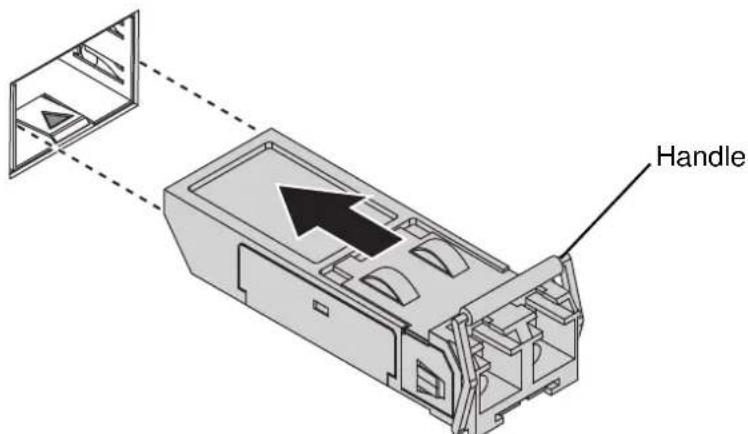
Figure 2.7 Installing an SFP Transceiver
Note! If you are attaching fiber optic cables to the transceiver, continue with the following step. Otherwise, repeat the previous steps to install the remaining SFP transceivers in the device.
- Remove the protective plug from the SFP transceiver.
Note! Do not remove the dust plug from the transceiver if you are not installing the fiber optic cable at this time. The dust plug protects hardware from dust contamination.
- Insert the fiber cable into the transceiver. The connector snaps into place and locks.

natural_image
Technical illustration of a mechanical assembly with stairs and components, no visible text or symbolsFigure 2.8 Attaching a Fiber Optic Cable to a Transceiver
- Repeat the previous procedures to install any additional SFP transceivers in the switch.
The fiber port is now setup.
2.4.2 Removing SFP Modules
To disconnect an LC connector, use the following guidelines:
-
Press down and hold the locking clips on the upper side of the optic cable.
-
Pull the optic cable out to release it from the transceiver.

natural_image
Diagram of a mechanical device with directional arrows indicating flow or movement (no text or symbols present)Figure 2.9 Removing a Fiber Optic Cable to a Transceiver
- Hold the handle on the transceiver and pull the transceiver out of the slot.
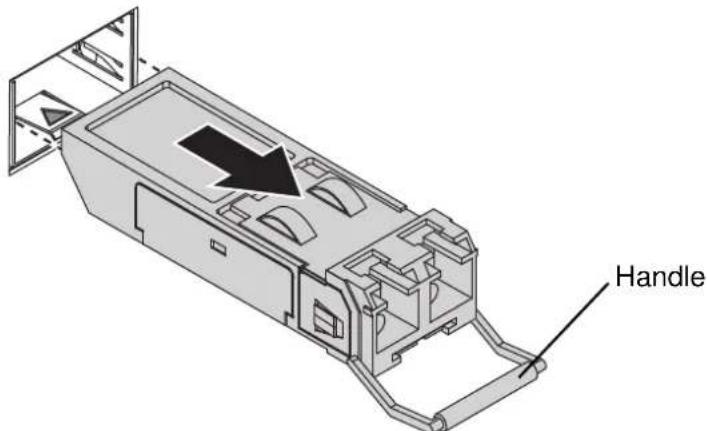
Figure 2.10 Removing an SFP Transceiver
Note!Replace the dust plug on the slot if you are not installing a transceiver.
The dust plug protects hardware from dust contamination.

2.5 Connecting the Switch to Ethernet Ports
2.5.1 RJ45 Ethernet Cable Wiring
For RJ45 connectors, data-quality, twisted pair cabling (rated CAT5 or better) is recommended. The connector bodies on the RJ45 Ethernet ports are metallic and connected to the GND terminal. For best performance, use shielded cabling. Shielded cabling may be used to provide further protection.
| Straight-thru Cable Wiring Cross-over Cable Wiring |
| Pin 1 Pin 1 Pin 1 Pin 3 |
| Pin 2 Pin 2 Pin 2 Pin 6 |
| Pin 3 Pin 3 Pin 3 Pin 1 |
| Pin 6 Pin 6 Pin 6 Pin 2 |

Figure 2.11 Ethernet Plug & Connector Pin Position
Maximum cable length: 100 meters (328 ft.) for 10/100/1000BaseT.
2.6 Connecting the Switch to Console Port
The industrial switch supports a secondary means of management. By connecting the RJ45 to RS232 serial cable between a COM port on your PC (9-pin D-sub female) and the switch's RJ45 (RJ45) port, a wired connection for management can be established.

Figure 2.12 Serial Console Cable

Figure 2.13 DB 9 Pin Position
| DB9 Connector RJ45 Connector |
| NC 1 Orange/White |
| NC 2 Orange |
| 2 3 Green/White |
| NC 4 Blue |
| 5 5 Blue/White |
| 3 6 Green |
| NC 7 Brown/White |
| NC 8 Brown |

Figure 2.14 Pin Assignment
2.7 Power Supply Installation
2.7.1 Overview
Warning! Power down and disconnect the power cord before servicing or wiring the switch.

Caution! Do not disconnect modules or cabling unless the power is first switched off.

The device only supports the voltage outlined in the type plate. Do not use any other power components except those specifically designated for the switch device.
Caution! Disconnect the power cord before installation or cable wiring.

The switches can be powered by using the same DC source used to power other devices. A DC voltage range of 12 to 48 VDC must be applied between the V1+ terminal and the V1- terminal (PW1), see the following illustrations. A Class 2 power supply is required to maintain a UL60950 panel listing. The chassis ground screw terminal should be tied to the panel or chassis ground. A redundant power configuration is supported through a secondary power supply unit to reduce network down time as a result of power loss.
EKI-9612G supports 12 to 48 VD. Dual power inputs are supported and allow you to connect a backup power source.
Single DC Power Redundant DC Power

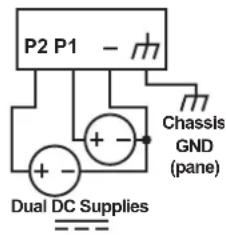
Figure 2.15 Power Wiring for EKI-9612G
2.7.2 Considerations
Take into consideration the following guidelines before wiring the device:
The Terminal Block (CN1) is suitable for 12-24 AWG (3.31 - 0.205 mm ^2 ). Torque value 7 lb-in.
The cross sectional area of the earthing conductors shall be at least 3.31 mm ^2 .
■ Calculate the maximum possible current for each power and common wire. Make sure the power draw is within limits of local electrical code regulations.
For best practices, route wiring for power and devices on separate paths.
- Do not bundle together wiring with similar electrical characteristics.
■ Make sure to separate input and output wiring.
Label all wiring and cabling to the various devices for more effective management and servicing.
Note!Routing communications and power wiring through the same conduit may cause signal interference. To avoid interference and signal degradation, route power and communications wires through separate conduits.
2.7.3 Grounding the Device
Caution! Do not disconnect modules or cabling unless the power is first switched off.

The device only supports the voltage outlined in the type plate. Do not use any other power components except those specifically designated for the switch device.
Caution! Before connecting the device properly ground the device. Lack of a proper grounding setup may result in a safety risk and could be hazardous.

Caution! Do not service equipment or cables during periods of lightning activity.

Caution! Do not service any components unless qualified and authorized to do so.

Caution! Do not block air ventilation holes.

Electromagnetic Interference (EMI) affects the transmission performance of a device. By properly grounding the device to earth ground through a drain wire, you can setup the best possible noise immunity and emissions.
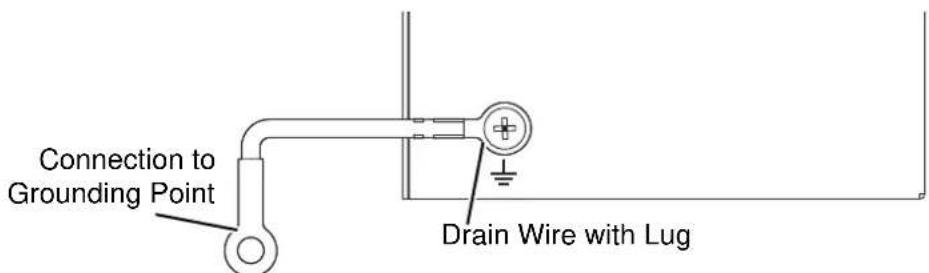
Figure 2.16 Grounding Connection
By connecting the ground terminal by drain wire to earth ground the switch and chassis can be ground.
Note!
Before applying power to the grounded switch, it is advisable to use a volt meter to ensure there is no voltage difference between the power supply's negative output terminal and the grounding point on the switch.

2.7.4 Wiring a Relay Contact
The following section details the wiring of the relay output. The terminal block on the EKI-9612G is wired and then installed onto the terminal receptor located on the EKI-9612G.

Figure 2.17 Terminal Receptor: Relay Contact
The terminal receptor includes a total of six pins: two for PWR1, two for PWR2 and two for a fault circuit.
2.7.5 Wiring the Power Inputs
Caution! Do not disconnect modules or cabling unless the power is first switched off.

The device only supports the voltage outlined in the type plate. Do not use any other power components except those specifically designated for the switch devic
Warning! Power down and disconnect the power cord before servicing or wiring the switch.

There are two power inputs for normal and redundant power configurations. The power input 2 is used for wiring a redundant power configuration. See the following for terminal block connector views.
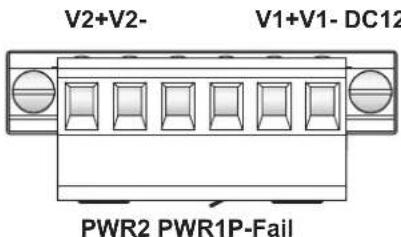
V
Figure 2.18 Terminal Receptor: Power Input Contacts
To wire the power inputs:
Make sure the power is not connected to the switch or the power converter before proceeding.
-
Loosen the screws securing terminal block to the terminal block receptor.
-
Remove the terminal block from the switch.

Figure 2.19 Removing a Terminal Block
-
Insert a small flat-bladed screwdriver in the V1+/V1- wire-clamp screws, and loosen the screws.
-
Insert the negative/positive DC wires into the V+/V- terminals of PW1. If setting up power redundancy, connect PW2 in the same manner.
-
Tighten the wire-clamp screws to secure the DC wires in place.
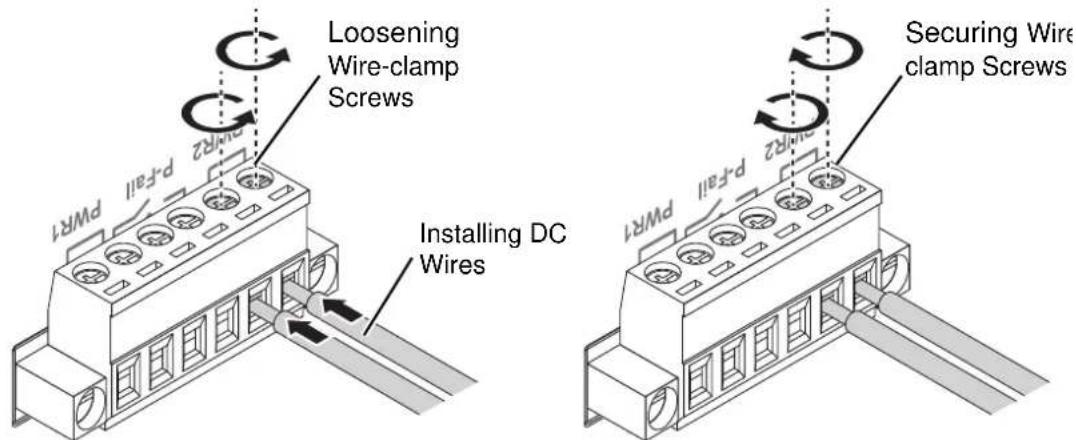
Figure 2.20 Installing DC Wires in a Terminal Block
-
Align the terminal block over the terminal block receptor on the switch.
-
Insert the terminal block and press it in until it is flush with the terminal block receptor.
-
Tighten the screws on the terminal block to secure it to the terminal block receptor.
If there is no gap between the terminal block and the terminal receptor, the terminal block is seated correctly.

Figure 2.21 Securing a Terminal Block to a Receptor
2.8 Reset Button
Reset configuration to factory default:
Press and hold Reset button for 5 seconds.
System reboot:
Press and hold Reset button for 2 seconds.
Note! Do NOT power off the Ethernet switch when loading default settings.

Chapter 3
Configuration Utility
3.1 First Time Setup
3.1.1 Overview
The Industrial Ethernet Managed Switch is a configurable device that facilitates the interconnection of Ethernet devices on an Ethernet network. This includes computers, operator interfaces, I/O, controllers, RTUs, PLCs, other switches/hubs or any device that supports the standard IEEE 802.3 protocol.
This switch has all the capabilities of a store and forward Ethernet switch plus advanced management features such as SNMP, RSTP and port mirroring. This manual details how to configure the various management parameters in this easy to use switch.
3.1.2 Introduction
To take full advantage of all the features and resources available from the switch, it must be configured for your network.
The switch implements Rapid Spanning Tree Protocol (RSTP) and Simple Network Management Protocol (SNMP) to provide most of the services offered by the switch. Rapid Spanning Tree Protocol allows managed switches to communicate with each other to ensure that there exists only one active route between each pair of network nodes and provides automatic failover to the next available redundant route. A brief explanation of how RSTP works is given in the Spanning Tree section.
The switch is capable of communicating with other SNMP capable devices on the network to exchange management information. This statistical/derived information from the network is saved in the Management Information Base (MIB) of the switch. The MIB is divided into several different information storage groups. These groups will be elaborated in detail in the Management and SNMP information section of this document. The switch implements Internet Group Management Protocol (IGMP) to optimize the flow of multicast traffic on your network.
The switch supports both port-based and tag-based Virtual LANs for flexible integration with VLAN-aware networks with support for VLAN-unaware devices.
3.1.3 Administrative Interface Access
There are several administrative interfaces to the switch:
- A graphical web interface accessible via the switch's built-in web server. Both HTTP and secure HTTPS with SSL are supported.
Note! This is the recommended method for managing the switch.

- A terminal interface via the RS232/USB port or over the network using telnet or Secure Shell (SSH).
- An SNMP interface can be used to read/write many settings.
- Command Line Interface (CLI) can be used to read/write most settings. Initial setup must be done using an Ethernet connection (recommended) or the serial port.
3.1.4 Using the Graphical (Web) Interface
The graphical interface is provided via a web server in the switch and can be accessed via a web browser such as Opera, Mozilla, or Internet Explorer.
Note!JavaScript must be supported and enabled in your browser for the graphical interface to work correctly.

HTTP and HTTPS (secure HTTP) are supported for access to the web server. By default, both protocols are enabled. Either or both may be disabled to secure the switch. (See the Remote Access Security topic in this section.)
To access the graphical interface, enter a URL like HTTP://192.168.1.1 in your browser's address bar. Replace "http" with "https" to use secure http and replace "192.168.1.1" with your switch's IP address if you've changed it from the factory default.
The web server in the switch uses a signed security certificate. When you access the server via https, you may see a warning dialog indicating that the certificate was signed by an unknown authority. This is expected and to avoid this message in the future you can choose to install the certificate on your computer.
Note!
This manual describes and depicts the web user interface in detail. The terminal interface is not specifically shown but is basically the same.

3.1.5 Configuring the Switch for Network Access
To control and monitor the switch via the network, it must be configured with basic network settings, including an IP address and subnet mask. Refer to the quick start guide in Section 1 for how to initially access your switch.
To configure the switch for network access, select [Add Menu Address Here] to reach the System Settings menu. The settings in this menu control the switch's general network configuration.
DHCP Enabled/Disabled: The switch can automatically obtain an IP address from a server using the Dynamic Host Configuration Protocol (DHCP). This can speed up initial set up, as the network administrator does not have to find an open IP address.
IP Address and subnet mask configuration: The IP address for the switch can be changed to a user-defined address along with a customized subnet mask to separate subnets.
Note! Advanced users can set the IP address to 0.0.0.0 to disable the use of an IP address for additional security. However, any features requiring an IP address (i.e., web interface, etc.) will no longer be available.
Default Gateway Selection: A Gateway Address is chosen to be the address of a router that connects two different networks. This can be an IP address or a Fully Qualified Domain Name (FQDN) such as “domainname.org”.
NTP Server: The IP address or domain name of an NTP (Network Time Protocol) server from which the switch may retrieve the current time at startup. Please note that using a domain name requires that at least one domain name server be configured.
3.1.6 Configuring the Ethernet Ports
The switch comes with default port settings that should allow you to connect to the Ethernet Ports with out any necessary configuration. Should there be a need to change the name of the ports, negotiation settings or flow control settings, you can do this in the Port Configuration menu. Access this menu by selecting Setup from the Main menu, and then selecting Main Settings.
■ Port Name: Each port in the managed switch can be identified with a custom name. Specify a name for each port here.
- Admin: Ports can be enabled or disabled in the managed switch. For ports that are disabled, they are virtually non-existent (not visible in terms of switch operation or spanning tree algorithm). Choose to enable or disable a port by selecting Enabled or Disabled, respectively.
Negotiation: All copper ports and gigabit fiber ports in the managed switch are capable of autonegotiation such that the fastest bandwidth is selected. Choose to enable auto-negotiation or use fixed settings. 100Mbps Fiber ports are Fixed speed only.
■ Speed/Duplex/Flow Control: The managed switch accepts three local area network Ethernet Standards. The first standard, 10BASE-T, runs 10Mbps with twisted pair Ethernet cable between network interfaces. The second local area network standard is 100BASE-T, which runs at 100Mbps over the same twisted pair Ethernet cable. Lastly, there is 100BASE-F, which enables fast Ethernet (100Mbps) over fiber.
These options are available:
■ 10h–10 Mbps, Half Duplex
■ 10f -10 Mbps, Full Duplex
■ 100h–100 Mbps, Half Duplex
■ 100f –100 Mbps, Full Duplex
■ 1000f–1000 Mbps, Full Duplex
On managed switches with gigabit combination ports, those ports with have two rows, a standard row of check boxes and a row labeled "SFP" with radio buttons. The SFP setting independently sets the speed at which a transceiver will operate if one is plugged in. Otherwise, the switch will use the fixed Ethernet port and the corresponding settings for it.
Note! When 100f is selected for the SFP of a gigabit combination port, the corresponding fixed Ethernet jack will be disabled unless it is changed back to 1000F.
3.2 Command Line Interface Configuration
3.2.1 Introduction to Command-Line Interface (CLI)
The command-line interface (CLI) is constructed with an eye toward automation of CLI-based configuration. The interaction is modeled on that used in many Internet protocols such as Telnet, FTP, and SMTP. After each command is entered and processed, the switch will issue a reply that consists of a numeric status code and a human-readable explanation of the status.
The general format of commands is:
section parameter [value]
where:
■ section is used to group parameters.
parameter will specify the parameter within the section. For example, the network section will have parameters for DHCP, IP address, subnet mask, and default gateway.
■ value is the new value of the parameter. If value is omitted, the current value is displayed.
Please note that new values will not take effect until explicitly committed.
Sections and parameter names are case sensitive (e.g., “Network” is not the same as “network”).
Note! Any commands in the CLI Commands section of this chapter, with the exception of the global commands, must be prefaced with the name of the section they are in. For example, to change the IP address of the switch, you would type:
network address
3.2.2 Accessing the CLI
To access the CLI interface, establish Ethernet or serial connectivity to the switch.
To connect by Ethernet, open a command prompt window and type:
telnet
At the login prompt, type "cli" for the username and "admin" for the password. The switch will respond with "Managed switch configuration CLI ready".
3.3 Web Browser Configuration
The switch has an HTML based user interface embedded in the flash memory. The interface offers an easy to use means to manage basic and advanced switch functions. The interface allows for local or remote switch configuration anywhere on the network.
The interface is designed for use with [Internet Explorer (6.0), Chrome, Firefox].
3.3.1 Preparing for Web Configuration
The interface requires the installation and connection of the switch to the existing network. A PC also connected to the network is required to connect to the switch and access the interface through a web browser. The required networking information is provided as follows:
IP address: 192.168.1.1
Subnet mask: 255.255.255.0
■ Default gateway: 192.168.1.254
■ User name: admin
■ Password: admin
3.3.2 System Login
Once the switch is installed and connected, power on the switch. The following information guides you through the logging in process.
- Launch your web browser on the PC.
- In the browser's address bar, type the switch's default IP address (192.168.1.1). The login screen displays.
- Enter the user default name and password (admin / admin).
- Click OK on the login screen to log in. The main interface displays.
Chapter 4
Managing Switch
4.1 Log In
To access the login window, connect the device to the network, see "Connecting the Switch to Ethernet Ports" on page 15. Once the switch is installed and connected, power on the switch see the following procedures to log into your switch.
When the switch is first installed, the default network configuration is set to DHCP enabled. You will need to make sure your network environment supports the switch setup before connecting it to the network.
- Launch your web browser on a computer.
- In the browser's address bar type in the switch's default IP address (192.168.1.1). The login screen displays.
-
Enter the default user name and password (admin/admin) to log into the management interface. You can change the default password after you have successfully logged in.
-
Click Login to enter the management interface.

Figure 4.1 Login Screen
4.2 Recommended Practices
One of the easiest things to do to help increase the security posture of the network infrastructure is to implement a policy and standard for secure management. This practice is an easy way to maintain a healthy and secure network.
After you have performed the basic configurations on your switches, the following is a recommendation which is considered best practice policy.
4.2.1 Changing Default Password
In keeping with good management and security practices, it is recommended that you change the default password as soon as the device is functioning and setup correctly. The following details the necessary steps to change the default password.
To change the password:
- Navigate to Tools > User Account.
- From the User drop-down menu, select the Admin (default) account.
-
In the User Name field, enter admin for this account. It is not necessary to change the user name, however, a change in the default settings increases the security settings.
-
In the Password field, type in the new password. Re-type the same password in the Retype Password field.
5. Click Apply to change the current account settings.

Figure 4.2 Changing a Default Password
After saving all the desired settings, perform a system save (Tools > Save Configuration). The changes are saved.
4.3 Monitoring
4.3.1 Device Information
The Device Information menu lists information, such as: System Name, System Location, MAC Address, Firmware version, and more, pertaining to the system. The information is for review only. To modify the device information, see the respective item within the user interface.
To access this page, click Monitoring > Device Information.
| Device Information | |
| Information Name | Information Value |
| System Name | Switch |
| System Location | Default |
| System Contact | Default |
| MAC Address | 00:0B:AB:EF:2D:E1 |
| IP Address | 192.168.1.169 |
| Subnot Mask | 255.255.255.0 |
| Gateway | 192.168.1.1 |
| Loader Version | 1.0.0.48895 |
| Loader Date | Oct 21 2016 - 09:16:07 |
| Firmware Version | 2.00.02 |
| Firmware Date | Apr 19 2017 - 11:56:55 |
| Build Version | D060419S03420 |
| System OID | 1.3.6.1.4.1.10297.202.7000 |
| System Up Time | 6 days, 16 hours, 35 mins, 22 secs |
Figure 4.3 Monitoring > Device Information
The following table describes the items in the previous figure.
| Item Description | |
| System Name | Click Switch to enter the system name: up to 128 alphanumeric characters (default is Switch). |
| System Location | Click Default to enter the location: up to 256 alphanumeric characters (default is Default). |
| System Contact | Click Default to enter the contact person: up to 128 alphanumeric characters (default is Default). |
| MAC Address Displays the MAC address of the switch. | |
| IP Address Displays the assigned IP address of the switch. | |
| Subnet Mask Displays the assigned subnet mask of the switch. | |
| Gateway Displays the assigned gateway of the switch. | |
| Loader Version Displays the current loader version of the switch. | |
| Loader Date Displays the current loader build date of the switch. | |
| Firmware Version | Displays the current firmware version of the switch. |
| Firmware Date | Displays the current firmware build date of the switch. |
| System Object ID | Displays the base object ID of the switch. |
| System Up Time | Displays the time since the last switch reboot. |
4.3.2 Logging Message
The Logging Message Filter page allows you to enable the display of logging message filter.
To access this page, click Monitoring > Logging Message.

Figure 4.4 Monitoring > Logging Message
The following table describes the items in the previous figure.
| Item Description | |
| Target | Click the drop-down menu to select a target to store the log messages.■ Buffered: Store log messages in RAM. All log messages are cleared after system reboot.■ File: Store log messages in a file. |
Item Description
| Severity The setting allows you to designate a severity level for the LoggingMessage Filter function.Click the drop-down menu to select the severity level target setting.The level options are:emerg: Indicates system is unusable. It is the highest level of severity.alert: Indicates action must be taken immediately.crit: Indicates critical conditions.error: Indicates error conditions.warning: Indicates warning conditions.notice: Indicates normal but significant conditions.info: Indicates informational messages.debug: Indicates debug-level messages. |
Category Click the drop-down menu to select the category level target setting.
| View | Click View to display all Logging Information and Logging Message information. |
| Refresh Click Refresh to update the screen. | |
| Clear buffered messages | Click Clear buffered messages to clear the logging buffer history list. |
The ensuing table for Logging Information table settings are informational only and display the following: Target, Severity and Category.
The ensuing table for Logging Message table settings are informational only and display the following: No., Time Stamp, Category, Severity and Message.
4.3.3 Port Monitoring
Port Network Monitor is a bandwidth and network monitoring tool for the purpose of capturing network traffic and measuring of network throughput. The monitoring functionality includes listing of port statistics as well as port utilization.
4.3.3.1 Port Statistics
To access this page, click Monitoring > Port Monitoring > Port Statistics.

Figure 4.5 Monitoring > Port Monitoring > Port Statistics
The following table describes the items in the previous figure.
Item Description
Port Click the drop-down menu to select a port and its captured statistical setting values.
Clear Click Clear to clear the counter selections.
The ensuing table for IF MIB Counters settings are informational only and display the following: ifInOctets, ifInUcastPkts, ifInNUcastPkts, ifInDiscards, ifOutOctets, ifOutUcastPkts, ifOutNUcastPkts, ifOutDiscards, ifInMulticastPkts, ifInBroadcastPkts, ifOutMulticastPkts and ifOutBroadcastPkts.
The ensuing table for Ether-Like MIB Counters settings are informational only and display the following: dot3StatsAlignmentErrors, dot3StatsFCSErrors, dot3StatsSingleCollisionFrames, dot3StatsMultipleCollisionFrames, dot3StatsDeferredTransmissions, dot3StatsLateCollisions, dot3StatsExcessiveCollisions, dot3StatsFrameTooLongs, dot3StatsSymbolErrors, dot3ControlInUnknownOpcodes, dot3InPauseFrames and dot3OutPauseFrames.
The ensuing table for Rmon MIB Counters settings are informational only and display the following: etherStatsDropEvents, etherStatsOctets, etherStatsPkts, etherStatsBroadcastPkts, etherStatsMulticastPkts, etherStatsCRCAlignErrors, etherStatsUnderSizePkts, etherStatsOverSizePkts, etherStatsFragments, etherStatsJabbers, etherStatsCollisions, etherStatsPkts64Octets, etherStatsPkts65to127Octets, etherStatsPkts128to255Octets, etherStatsPkts256to511Octets, etherStatsPkts512to1023Octets and etherStatsPkts1024to1518Octets.
4.3.3.2 Port Utilization
To access this page, click Monitoring > Port Monitoring > Port Utilization.

Figure 4.6 Monitoring > Port Monitoring > Port Utilization
The following table describes the items in the previous figure.
Item Description
Refresh period Click the drop-down menu to select and designate a period (second intervals) to refresh the information (TX and RX) listings.
IFG Click the drop-down menu to enable or disable the Interframe Gap (IFG) statistic.
4.3.4 Link Aggregation
The Link Aggregation function provides LAG information for each trunk. It displays membership status, link state and membership type for each port.
To access this page, click Monitoring > Link Aggregation.
| LAG | Name | Type | Link State | Active Member | Standby Member |
| Trunk1 | - | Not Present | - | - | |
| Trunk2 | - | Not Present | - | - | |
| Trunk3 | - | Not Present | - | - | |
| Trunk4 | - | Not Present | - | - | |
| Trunk5 | - | Not Present | - | - | |
| Trunk6 | - | Not Present | - | - | |
| Trunk7 | - | Not Present | - | - | |
| Trunk8 | - | Not Present | - | - |
Figure 4.7 Monitoring > Link Aggregation
The ensuing table for Link Aggregation Group Status settings are informational only and display the following: LAG, Name, Type, Link State, Active Member and Standby Member.
The ensuing table for LACP Information settings are informational only and display the following: LAG, Port, PartnerSysId, PnKey, AtKey, Sel, Mux, Receiv, PrdTx, AtState and PnState.
4.3.5 LLDP Statistics
The LLDP Statistics page displays both the global and port LLDP statistics.
To access this page, click Monitoring > LLDP Statistics.
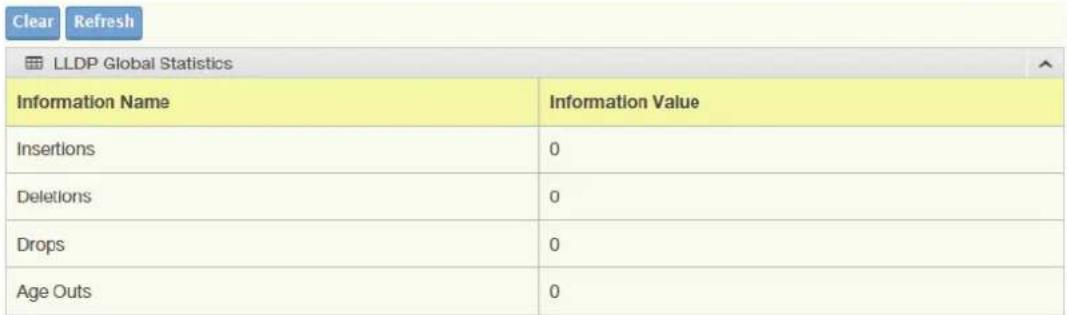
Figure 4.8 Monitoring > LLDP Statistics
The following table describes the items in the previous figure.
| Item Description | |
| Clear | Click Clear to reset the LLDP Statistics for all the interfaces. |
| Refresh | Click Refresh to update the data on the screen with the present state of the data in the switch. |
The ensuing table for LLDP Global Statistics settings are informational only and display the following: Insertions, Deletions, Drops and Age Outs.
The ensuing table for LLDP Port Statistics settings are informational only and display the following: Port, TX Frames (Total), RX Frames (Total, Discarded and Errors), RX TLVs (Discarded and Unrecognized) and RX Ageouts (Total).
4.3.6 IGMP Statistics
The IGMP Statistics function displays statistical package information for IP multicasting.
To access this page, click Monitoring > IGMP Statistics.
| IGMP Statistics | |
| Statistics Packets | Counter |
| Total RX | 0 |
| Valid RX | 0 |
| Invalid RX | 0 |
| Other RX | 0 |
| Leave RX | 0 |
| Report RX | 0 |
| General Query RX | 0 |
| Special Group Query RX | 0 |
| Special Group & Source Query RX | 0 |
| Leave TX | 0 |
| Report TX | 0 |
| General Query TX | 0 |
| Special Group Query TX | 0 |
| Special Group & Source Query TX | 0 |
Figure 4.9 Monitoring > IGMP Statistics
The following table describes the items in the previous figure.
| Item Description | |
| Clear | Click Clear to refresh IGMP Statistics of all the interfaces. |
| Refresh | Click Refresh to update the data on the screen with the present state of the data in the switch. |
The ensuing table for IGMP Statistics settings are informational only and display the following: Total RX, Valid RX, Invalid RX, Other RX, Leave RX, Report RX, General Query RX, Special Group Query RX, Special Group & Source Query RX, Leave TX, Report TX, General Query TX, Special Group Query TX and Special Group & Source Query TX.
4.3.7 IGMP Statistics
The IGMP Statistics function displays statistical package information for IP multicasting.
To access this page, click Monitoring > MLD Statistics.
| MLD Statistics | |
| Statistics Packets | Counter |
| Total RX | 0 |
| Valid RX | 0 |
| Invalid RX | 0 |
| Other RX | 0 |
| Leave RX | 0 |
| Report RX | 0 |
| General Query RX | 0 |
| Special Group Query RX | 0 |
| Special Group & Source Query RX | 0 |
| Leave TX | 0 |
| Report TX | 0 |
| General Query TX | 0 |
| Special Group Query TX | 0 |
| Special Group & Source Query TX | 0 |
Figure 4.10 Monitoring > MLD Statistics
The following table describes the items in the previous figure.
| Item Description | |
| Clear | Click Clear to refresh MLD Statistics of all the interfaces. |
| Refresh | Click Refresh to update the data on the screen with the present state of the data in the switch. |
The ensuing table for MLD Statistics settings are informational only and display the following: Total RX, Valid RX, Invalid RX, Other RX, Leave RX, Report RX, General Query RX, Special Group Query RX, Special Group & Source Query RX, Leave TX, Report TX, General Query TX, Special Group Query TX, and Special Group & Source Query TX.
4.4 System
4.4.1 IP Settings
The IP Settings menu allows you to select a static or DHCP network configuration. The Static displays the configurable settings for the static option.
To access this page, click System > IP Settings.
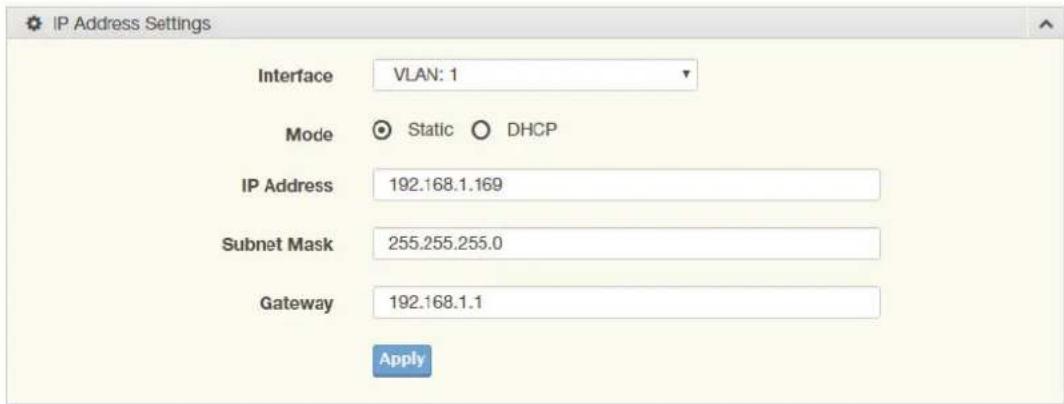
Figure 4.11 System > IP Settings
The following table describes the items in the previous figure.
| Item Description | |
| Interface Click the drop-down menu to select an available interface option to configure its settings. | |
| Mode | Click the radio button to select the IP Address Setting mode: Static or DHCP. |
| IP Address Enter a value to specify the IP address of the interface. The default is 192.168.1.1. | |
| Subnet Mask Enter a value to specify the IP subnet mask for the interface. The default is 255.255.255.0. | |
| Gateway Enter a value to specify the default gateway for the interface. The default is 192.168.1.254. | |
| Apply | Click Apply to save the values and update the screen. |
The ensuing table for IP Address Information settings are informational only and display the following: DHCP State, Static IP Address, Static Subnet Mask, Static Gateway, Static DNS Server 1 and Static DNS Server 2.
4.4.2 IPv6 Settings
To access this page, click System > IPv6 Settings.
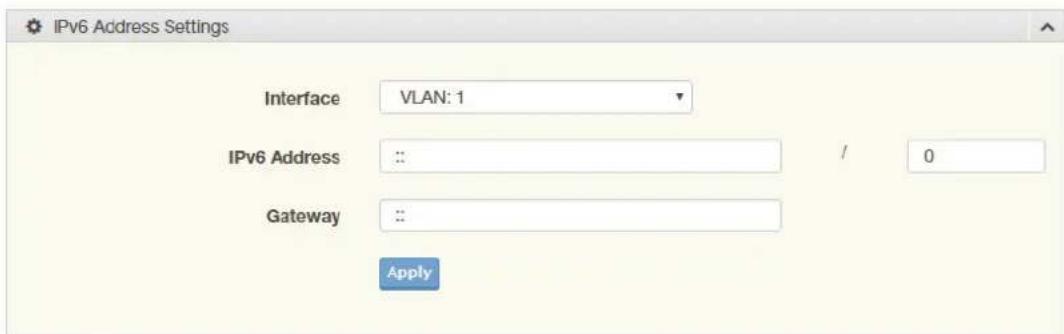
Figure 4.12 System > IPv6 Settings
The following table describes the items in the previous figure.
Item Description
| Interface | Click the drop-down menu to select an available interface option to configure its settings. |
| IPv6 Address Enter the IPv6 address for the system. | |
| Gateway Enter the gateway address for the system. | |
| Apply Click Apply to save the values and update the screen. | |
The ensuing table for IPv6 Information settings are informational only and display the following: Auto Configuration, IPv6 In Use Address, IPv6 In Use Router, IPv6 Static Address, IPv6 Static Router and DHCPv6 Client.
4.4.3 System Time
To access this page, click System > System Time.
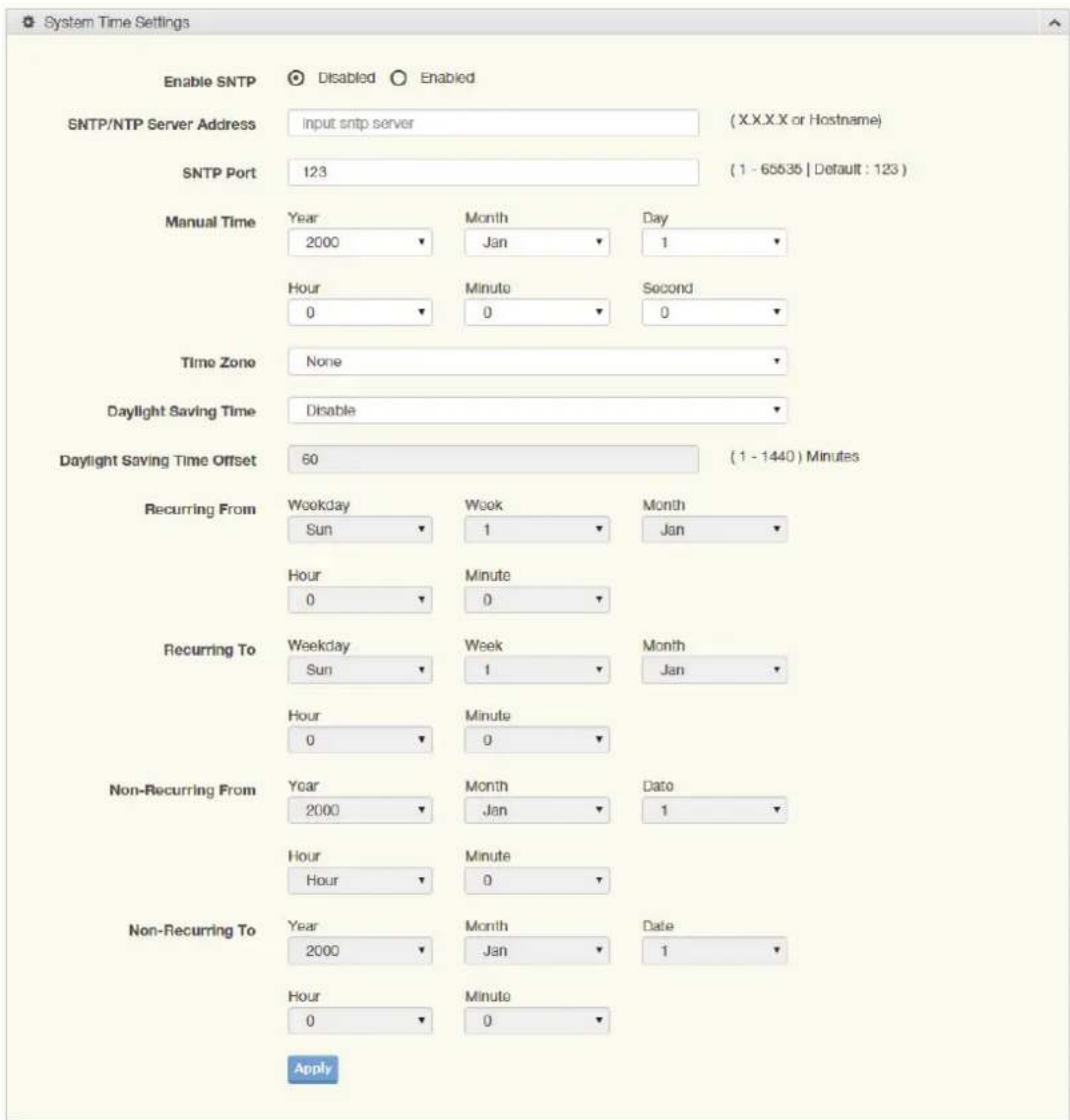
Figure 4.13 System > System Time
The following table describes the items in the previous figure.
Item Description
Enable SNTP Click the radio button to enable or disable the SNTP.
| Item | Description |
| SNTP/NTP Server Address | Enter the address of the SNTP server. This is a text string of up to 64 characters containing the encoded unicast IP address or hostname of a SNTP server. Unicast SNTP requests will be sent to this address. If this address is a DNS hostname, then that hostname should be resolved into an IP address each time a SNTP request is sent to it. |
| SNTP Port Enter the port on the server to which SNTP requests are to be sent. Allowed range is 1 to 65535 (default: 123). | |
| Manual Time Click the drop-down menus to set local date and time of the system. | |
| Time Zone Click the drop-down menu to select a system time zone. | |
| Daylight Saving Time Click the drop-down menu to enable or disable the daylight saving time settings. | |
| Daylight Saving Time Offset Enter the offsetting variable in seconds to adjust for daylight saving time. | |
| Recurring From Click the drop-down menu to designate the start date and time for daylight saving time. | |
| Recurring To Click the drop-down menu to designate the end date and time for daylight saving time. | |
| Non-Recurring From Click the drop-down menu to designate a start date and time for a non-recurring daylight saving time event. | |
| Non-Recurring To Click the drop-down menu to designate the end date and time for a non-recurring daylight saving time event. | |
| Apply | Click Apply to save the values and update the screen. |
The ensuing table for System Time Information settings are informational only and display the following: Current Date/Time, SNTP, SNTP Server Address, SNTP Server Port, Time zone, Daylight Saving Time, Daylight Saving Time Offset, From and To.
4.4.4 Network Port
To access this page, click System > Network Port.
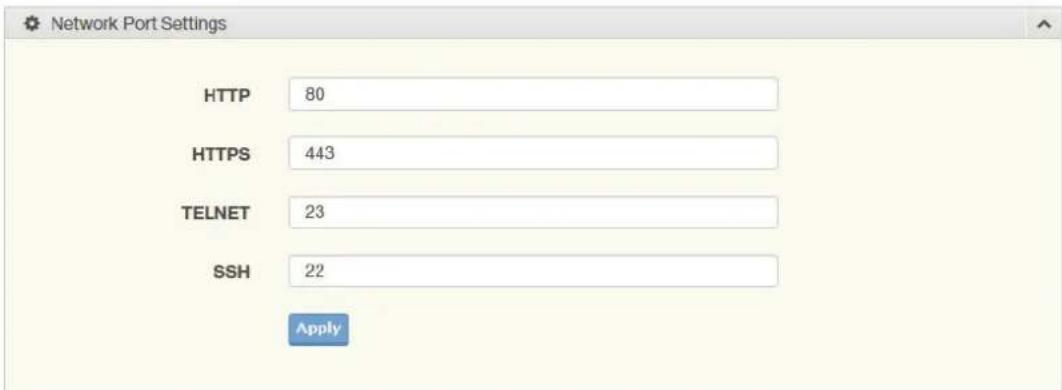
Figure 4.14 System > Network Port
The following table describes the items in the previous figure.
| Item | Description |
| HTTP | Enter the value to designate the port number for the HTTP protocol (default: 80). |
| HTTPS | Enter the value to designate the port number for the HTTPS protocol (default: 443). |
| TELNET | Enter the value to designate the port number for the Telnet protocol (default: 23). |
Item Description
SSH Enter the value to designate the port number for the Secure Shell protocol (default: 22).
Apply Click Apply to save the values and update the screen.
The ensuing table for Network Port Information settings are informational only and display the following: HTTP, HTTPS, TELNET and SSH.
4.5 L2 Switching
4.5.1 Port Configuration
Port Configuration describes how to use the user interface to configure LAN ports on the switch.
To access this page, click L2 Switching > Port Configuration.

Figure 4.15 L2 Switching > Port Configuration
The following table describes the items in the previous figure.
Item Description
Port Click the drop-down menu to select the port for the L2 Switch setting (GE1 to GE8).
Enabled Click the radio-button to enable or disable the Port Setting function.
Speed Click the drop-down menu to select the port speed: Auto, Auto-10M, Auto-100M, Auto-1000M, Auto-10/100M, 10M, 100M, or 1000M.
Duplex Click the drop-down menu to select the duplex setting: Half or Full.
Flow Control Click the radio button to enable or disable the flow control function.
Fiber Port Click the drop-down menu to designate the port to be used by the fiber ports (GE9 to GE12).
Enabled Click the radio-button to enable or disable the fiber port setting function.
Item Description
| Speed Click the drop-down menu to select the fiber port speed: Auto, Auto-10M, Auto-100M, Auto-1000M, Auto-10/100M, 10M, 100M, or 1000M. | |
| Fiber Duplex Click the drop-down menu to select the fiber duplex setting: Half or Full. | |
| Flow Control Click the radio button to enable or disable the flow control for the fiber port function. | |
| Apply | Click Apply to save the values and update the screen. |
The ensuing table for Port Status settings are informational only and display the following: Port, Edit (click to enter description), Enable State, Link Status, Speed, Duplex, FlowCtrl Config, and FlowCtrl Status.
4.5.2 Port Mirror
Port mirroring function allows the sending of a copy of network packets seen on one switch port to a network monitoring connection on another switch port. Port mirroring can be used to analyze and debug data or diagnose errors on a network or to mirror either inbound or outbound traffic (or both).
There are no preset values in the Port Mirror. The displayed values do not represent the actual setting values.
To access this page, click L2 Switching > Port Mirror.

Figure 4.16 L2 Switching > Port Mirror
The following table describes the items in the previous figure.
Item Description
| Session ID Click the drop-down menu to select a port mirroring session from the list. The number of sessions allowed is platform specific. | |
| Monitor session state Click the drop-down menu to enable or disable the session mode for a selected session ID. | |
| Destination Port Click the drop-down menu to select the destination port and receive all the traffic from configured mirrored port(s). | |
| Allow-ingress Click the drop-down menu to enable or disable the Allow-ingress function. | |
| Sniffer RX Ports Enter the variable to define the RX port. | |
| Sniffer TX Ports Enter the variable to define the TX port. | |
| Apply Click Apply to save the values and update the screen. |
The ensuing table for Mirror Status settings are informational only and display the following: Session ID, Destination Port, Ingress State, Source TX Port and Source RX Port.
4.5.3 Link Aggregation
Link Aggregation is a method for combining multiple network connections in parallel in order to increase throughput beyond the capability of a single connection, and to provide redundancy in case one of the links should fail.
4.5.3.1 Load Balance
The Load Balancing page allows you to select between a MAC Address or IP/MAC Address algorithm for the even distribution of IP traffic across two or more links.
To access this page, click L2 Switching > Link Aggregation > Load Balance.

Figure 4.17 L2 Switching > Link Aggregation > Load Balance
The following table describes the items in the previous figure.
| Item Description | |
| Load Balance Algorithm | Select the radio button to select the Load Balance Setting: MAC Address or IP/MAC Address. |
| Apply Click Apply to save the values and update the screen. | |
The ensuing table for Load Balance Information settings are informational only and display the following: Load Balance Algorithm.
Link aggregation is also known as trunking. It is a feature available on the Ethernet gateway and is used with Layer 2 Bridging. Link aggregation allows for the logical merging of multiple ports into a single link.
To access this page, click L2 Switching > Link Aggregation > LAG Management.

Figure 4.18 L2 Switching > Link Aggregation > LAG Management
The following table describes the items in the previous figure.
| Item Description |
| LAG Click the drop-down menu to select the designated trunk group: Trunk 1 ~8. |
| Name Enter an entry to specify the LAG name. |
Item Description
Type Click the radio button to specify the type mode: Static or LACP.
Ports Click the drop-down menu to select designated ports: FE1-8 or GE1-2.
Apply Click Apply to save the values and update the screen.
The ensuing table for LAG Management Information settings are informational only and display the following: LAG, Name, Type, Link State, Active Member, Standby Member, Edit (click to modify the settings) and Clear (click to load default settings).
4.5.3.3 LAG Port Settings
The LAG Port Settings page allows you to enable or disable, set LAG status, speed and flow control functions.
In this example we will configure a LAG between the following switches:
To access this page, click L2 Switching > Link Aggregation > LAG Port Settings.
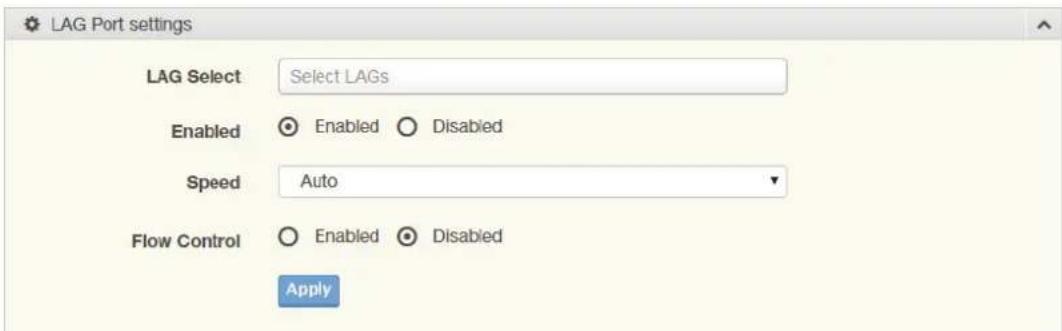
Figure 4.19 L2 Switching > Link Aggregation > LAG Port Settings
The following table describes the items in the previous figure.
Item Description
LAG Select Click the drop-down menu to select a predefined LAG trunk definition: LAG 1-8.
Enabled Click the radio button to enable or disable the LAG Port.
Speed Click the drop-down menu to select the port speed: Auto, Auto-10M, Auto-100M, Auto-1000M, Auto-10/100M, 10M, 100M, or 1000M.
Flow Control Click the radio button to enable or disable the Flow Control for the LAG Port.
Apply Click Apply to save the values and update the screen.
The ensuing table for LAG Port Status settings are informational only and display the following: LAG, Description, Port Type, Enable State, Link Status, Speed, Duplex, FlowCtrl Config and FlowCtrl Status.
4.5.3.4 LACP Priority Settings
The LACP Priority Settings page allows you to configure the system priority for LACP. To access this page, click L2 Switching > Link Aggregation > LACP Priority Settings.

Figure 4.20 L2 Switching > Link Aggregation > LACP Priority Settings
The following table describes the items in the previous figure.
Item Description
System Priority Enter the value (1-65535) to designate the LACP system priority.
Apply Click Apply to save the values and update the screen.
The ensuing table for LACP Information settings are informational only and display the following: System Priority.
4.5.3.5 LACP Port Settings
Link Aggregation Control Protocol (LACP) provides a method to control the bundling of several physical ports together to form a single logical channel. By configuring the LACP function, the switch can negotiate an automatic bundling of links by sending LACP packets to the peer device (also implementing LACP).
To access this page, click L2 Switching > Link Aggregation > LACP Port Settings.

Figure 4.21 L2 Switching > Link Aggregation > LACP Port Settings
The following table describes the items in the previous figure.
Item Description
Port Select Select a port for the LACP Port Settings. The listed available settings are: FE1-FE8, GE1-GE2.
However, the available settings are dependent on the connected
LACP device and may not be listed as displayed in the current figure.
Priority Enter a variable (1 to 65535) to assign a priority to the defined port selection.
Timeout Click the radio button to select a long or short timeout period.
Mode Click the radio button to select the setting mode: Active or Passive.
■ Active: Enables LACP unconditionally.
■ Passive: Enables LACP only when an LACP device is detected (default state).
Apply Click Apply to save the values and update the screen.
The ensuing table for LACP Port Information settings are informational only and display the following: Port Name, Priority, Timeout and Mode.
4.5.4 802.1Q VLAN
The 802.1Q VLAN feature allows for a single VLAN to support multiple VLANs. With the 802.1Q feature you can preserve VLAN IDs and segregate different VLAN traffic.
The 802.1Q VLAN tag feature encapsulates the 802.1Q VLAN tagging within another 802.1Q VLAN tag. The outer tag is assigned following the AP group, while the inner VLAN ID is assigned dynamically by the AAA server.
4.5.4.1 VLAN Management
The management of VLANs is available through the VLAN Settings page. Through this page you can add or delete VLAN listings and add a prefix name to an added entry.
To access this page, click L2 Switching > 802.1Q VLAN > VLAN Management.

Figure 4.22 L2 Switching > 802.1Q VLAN > VLAN Management
The following table describes the items in the previous figure.
Item Description
VLAN list Enter the name of the VLAN entry to setup.
VLAN Action Click the radio button to add or delete the VLAN entry (VLAN ID or VLAN list) designated in the following field.
VLAN Name Prefix Enter the prefix to be used by the VLAN list entry in the previous field.
Apply Click Apply to save the values and update the screen.
The ensuing table for VLAN Table settings are informational only and display the following: VLAN ID, VLAN Name, VLAN Type and Edit (click to enter VLAN name).
4.5.4.2 PVID Settings
The PVID Settings page allows you to designate a PVID for a selected port, define the accepted type and enable/disable the ingress filtering.
To access this page, click L2 Switching > 802.1Q VLAN > PVID Settings.

Figure 4.23 L2 Switching > 802.1Q VLAN > PVID Settings
The following table describes the items in the previous figure.
Item Description
Port Select Click the drop-down menu to select a port and edit its settings: FE1-FE8, GE1-GE2, or Trunk1 - Trunk8.
PVID Enter the VLAN ID you want assigned to untagged or priority tagged frames received on this port. The value ranges 1 to 4094. The default is 1.
| Item Description | |
| Accepted Type | Click the radio button to specify which frames to forward. Tag Only discards any untagged or priority tagged frames. Untag Only discards any tagged frames. All accepts all untagged and tagged frames. Whichever you select, VLAN tagged frames are forwarded in accordance with the IEEE 802.1Q VLAN standard. The default is All. |
| Ingress Filtering | Click the radio button to specify how you want the port to handle tagged frames. If you enable Ingress Filtering, a tagged frame will be discarded if this port is not a member of the VLAN identified by the VLAN ID in the tag. If you select Disabled, all tagged frames will be accepted. The default is Disabled. |
Apply Click Apply to save the values and update the screen.
The ensuing table for Port VLAN Status settings are informational only and display the following: Port, Interface VLAN Mode, PVID, Accept Frame Type and Ingress Filtering.
4.5.4.3 Port to VLAN
The Port to VLAN page allows you to add a port to a VLAN and select the related parameters.
To access this page, click L2 Switching > 802.1Q VLAN > Port to VLAN.
| Port to VLAN Table | |||
| Port | Interface VLAN Mode | Membership | PVID |
| GE1 | Hybrid | ○ Forbidden ○ Excluded ○ Tagged ○ Untagged | YES |
| GE2 | Hybrid | ○ Forbidden ○ Excluded ○ Tagged ○ Untagged | YES |
| GE3 | Hybrid | ○ Forbidden ○ Excluded ○ Tagged ○ Untagged | YES |
| GE4 | Hybrid | ○ Forbidden ○ Excluded ○ Tagged ○ Untagged | YES |
| GE5 | Hybrid | ○ Forbidden ○ Excluded ○ Tagged ○ Untagged | YES |
| GE6 | Hybrid | ○ Forbidden ○ Excluded ○ Tagged ○ Untagged | YES |
| GE7 | Hybrid | ○ Forbidden ○ Excluded ○ Tagged ○ Untagged | YES |
| GE8 | Hybrid | ○ Forbidden ○ Excluded ○ Tagged ○ Untagged | YES |
| GE9 | Hybrid | ○ Forbidden ○ Excluded ○ Tagged ○ Untagged | YES |
| GE10 | Hybrid | ○ Forbidden ○ Excluded ○ Tagged ○ Untagged | YES |
| GE11 | Hybrid | ○ Forbidden ○ Excluded ○ Tagged ○ Untagged | YES |
| GE12 | Hybrid | ○ Forbidden ○ Excluded ○ Tagged ○ Untagged | YES |
| Trunk1 | Hybrid | ○ Forbidden ○ Excluded ○ Tagged ○ Untagged | YES |
| Trunk2 | Hybrid | ○ Forbidden ○ Excluded ○ Tagged ○ Untagged | YES |
| Trunk3 | Hybrid | ○ Forbidden ○ Excluded ○ Tagged ○ Untagged | YES |
| Trunk4 | Hybrid | ○ Forbidden ○ Excluded ○ Tagged ○ Untagged | YES |
| Trunk5 | Hybrid | ○ Forbidden ○ Excluded ○ Tagged ○ Untagged | YES |
| Trunk6 | Hybrid | ○ Forbidden ○ Excluded ○ Tagged ○ Untagged | YES |
| Trunk7 | Hybrid | ○ Forbidden ○ Excluded ○ Tagged ○ Untagged | YES |
| Trunk8 | Hybrid | ○ Forbidden ○ Excluded ○ Tagged ○ Untagged | YES |

Figure 4.24 L2 Switching > 802.1Q VLAN > Port to VLAN
The following table describes the items in the previous figure.
Item Description
Port Displays the assigned port to the entry.
Interface VLAN Mode Displays the assigned mode to the listed VLAN port.
■ Hybrid: Port hybrid model.
■ Access: Port hybrid model.
Trunk: Port hybrid model.
■ Tunnel: Port hybrid model.
Membership Displays the assigned membership status of the port entry, options include: Forbidden, Excluded Tagged or Untagged.
Apply Click Apply to save the values and update the screen.
The ensuing table for the Port-VLAN Mapping Table settings are informational only and display the following: Port, Mode, Administrative VLANs and Operational VLANs.
4.5.4.5 VLAN Interface Management
To access this page, click L2 Switching > 802.1Q VLAN > VLAN Interface Management.

Figure 4.25 L2 Switching > 802.1Q VLAN > VLAN Interface Management
The following table describes the items in the previous figure.
Item Description
VLAN
Create Click Create to create a new VLAN interface.
The ensuing table for VLAN Interface Status settings are informational only and display the following: VLAN ID, Name and Delete (click Delete to delete the desired VLAN interface).
4.5.5 Q-in-Q
Q-in-Q is commonly referred as VLAN stacking in which VLANs are nested by adding two tags to each frame instead of one. Network service provider and users both can use VLANs and makes it possible to have more than the 4094 separate VLANs allowed by 802.1Q.
There are three ways in which a machine can be connected to a network carrying double-tagged 802.1ad traffic:
- via a untagged port, where both inner and outer VLANs are handled by the switch or switches (so the attached machine sees ordinary Ethernet frames);
via a single-tagged (tunnel) port, where the outer VLAN only is handled by the switch (so the attached machine sees single-tagged 802.1Q VLAN frames); or
■ via a double-tagged (trunk) port, where both inner and outer VLANs are handled by the attached machine (which sees double-tagged 802.1ad VLAN frames).
4.5.5.1 Global Settings
The Global Settings page allows you to set the outer VLAN Ethertype setting.
To access this page, click L2 Switching > Q-in-Q > Global Settings.

Figure 4.26 L2 Switching > Q-in-Q > Global Settings
The following table describes the items in the previous figure.
Item Description
| Outer VLAN Ethertype | Enter the outer VLAN handled by the switch giving the attached machine a single-tagged 802.1Q VLAN frame. |
| Apply | Click Apply to save the values and update the screen. |
The ensuing table for QinQ Global Information settings are informational only and display the following: Outer VLAN Ethertype.
4.5.5.2 Port Settings
The Port Settings page allows you to define the outer PVID and outer mode for a selected port.
To access this page, click L2 Switching > Q-in-Q > Port Settings.

Figure 4.27 L2 Switching > Q-in-Q > Port Settings
The following table describes the items in the previous figure.
Item Description
| Port Select Enter the switch port (part of VLAN configuration) to configure the selection as a tunnel port. | |
| Outer PVID Enter the Port VLAN ID (PVID) to assigned the native VLAN ID. All untagged traffic coming in or out of the 802.1Q port is forwarded based on the PVID value | |
| Outer Mode Click the drop-down menu to select between UNI or NNI role.UNI: Selects a user-network interface which specifies communication between the specified user and a specified network.NNI: Selects a network-to-network interface which specifies communication between two specified networks. | |
| Apply | Click Apply to save the values and update the screen. |
The ensuing table for QinQ Port Information settings are informational only and display the following: Port, Outer PVID and Outer Mode.
4.5.6 GARP
The Generic Attribute Registration Protocol (GARP) is a local area network (LAN) protocol. The protocol defines procedures for the registration and de-registration of attributes (network identifiers or addresses) by end stations and switches with each other.
4.5.6.1 GARP Settings
To access this page, click L2 Switching > GARP > GARP Settings.

Figure 4.28 L2 Switching > GARP > GARP Settings
The following table describes the items in the previous figure.
Item Description
| Join Time Enter a value to specify the time between the transmission of GARP PDUs registering (or re-registering) membership for a VLAN or multicast group in centiseconds. Enter a number between 6 and 600. An instance of this timer exists for each GARP participant for each port. |
| Leave Time Enter a value to specify the time to wait after receiving an unregister request for a VLAN or multicast group before deleting the associated entry, in centiseconds. This allows time for another station to assert registration for the same attribute in order to maintain uninterrupted service. Enter a number between 12 and 3000. An instance of this timer exists for each GARP participant for each port. |
| Leave All Time Enter a value to specify the Leave All Time controls how frequently Leave All PDUs are generated. A LeaveAll PDU indicates that all registrations will shortly be deregistered. Participants will need to rejoin in order to maintain registration. The Leave All Period Timer is set to a random value in the range of LeaveAllTime to 1.5*LeaveAllTime. The timer is specified in centiseconds. Enter a number between 12 and 12000. An instance of this timer exists for each GARP participant for each port. |
Apply Click Apply to save the values and update the screen.
The ensuing table for GARP Information settings are informational only and display the following: Join Time, Leave Time and Leave All Time.
4.5.6.2 GVRP Settings
The GVRP Settings page allows you to enable or disable the GVRP (GARP VLAN Registration Protocol or Generic VLAN Registration Protocol) protocol which facilitates control of virtual local area networks (VLANs) within a larger network.
To access this page, click L2 Switching > GARP > GVRP Settings.

Figure 4.29 L2 Switching > GARP > GVRP Settings
The following table describes the items in the previous figure.
| Item Description | |
| Status Click to enable or disable the GARP VLAN Registration Protocoladministrative mode for the switch. The factory default is Disable. | |
| Apply | Click Apply to save the values and update the screen. |
The ensuing table for GVRP Information settings are informational only and display the following: GVRP.
4.5.7 802.3az EEE
The 802.3az Energy Efficient Ethernet (EEE) innovative green feature reduces energy consumption through intelligent functionality:
■ Traffic detection — Energy Efficient Ethernet (EEE) compliance
■ Inactive link detection
Inactive link detection function automatically reduces power usage when inactive links or devices are detected.
To access this page, click L2 Switching > 802.3az EEE.

Figure 4.30 L2 Switching > 802.3az EEE
The following table describes the items in the previous figure.
| Item Description | |
| Port Select Enter the port to setup the EEE function. | |
| State | Click Enabled or Disabled to set the state mode of the port select setting. |
| Apply | Click Apply to save the values and update the screen. |
The ensuing table for EEE Enable Status settings are informational only and display the following: Port and EEE State.
4.5.8 Multicast
Multicast forwarding allows a single packet to be forwarded to multiple destinations. The service is based on L2 switch receiving a single packet addressed to a specific Multicast address. Multicast forwarding creates copies of the packet, and transmits the packets to the relevant ports.
4.5.8.1 Multicast Filtering
The Multicast Filtering page allows for the definition of action settings when an unknown multicast request is received. The options include: Drop, Flood, or Router Port.
To access this page, click L2 Switching > Multicast > Multicast Filtering.

Figure 4.31 L2 Switching > Multicast > Multicast Filtering
The following table describes the items in the previous figure.
| Item Description | |
| Unknown Multicast Action | Select the configuration protocol: Drop, Flood, or Router Port, to apply for any unknown multicast event. |
| Apply Click Apply to save the values and update the screen. | |
The ensuing table for Properties Information settings are informational only and display the following: Unknown Multicast Action.
4.5.8.2 IGMP Snooping
IGMP Snooping is defined as the process of listening to Internet Group Management Protocol (IGMP) network traffic. IGMP Snooping allows a network switch to listen in on the IGMP conversation between hosts and routers and maintain a map of which links need which IP multicast streams. Multicasts can be filtered from the links which do not need them in turn controlling which ports receive specific multicast traffic.
IGMP Settings
To access this page, click L2 Switching > Multicast > IGMP Snooping > IGMP Settings.

Figure 4.32 L2 Switching > Multicast > IGMP Snooping > IGMP Settings
The following table describes the items in the previous figure.
| Item Description | |
| IGMP Snooping State | Select Enable or Disable to designate the IGMP Snooping State. |
| IGMP Snooping Version | Select designate the IGMP Snooping Version: V2 or V3. |
Item Description
| IGMP SnoopingReport Suppression | Select Enable or Disable to setup the report suppression for IGMP Snooping. |
| Apply | Click Apply to save the values and update the screen. |
The ensuing table for IGMP Snooping Information settings are informational only and display the following: IGMP Snooping State, IGMP Snooping Version and IGMP Snooping V2 Report Suppression.
The ensuing table for IGMP Snooping Table settings are informational only and display the following: Entry No., VLAN ID, IGMP Snooping Operation State, Router Ports Auto Learn, Query Robustness, Query Interval (sec.), Query Max Response Interval (sec.), Last Member Query count, Last Member Query Interval (sec), Immediate Leave and Edit (click to modify the settings).
IGMP Querier
IGMP Querier allows snooping to function by creating the tables for snooping. General queries must be unconditionally forwarded by all switches involved in IGMP snooping.
To access this page, click L2 Switching > Multicast > IGMP Snooping > IGMP Querier.
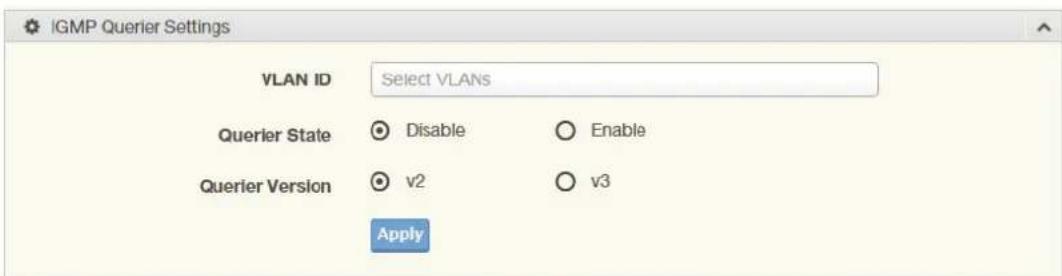
Figure 4.33 L2 Switching > Multicast > IGMP Snooping > IGMP Querier
The following table describes the items in the previous figure.
Item Description
| VLAN ID Select the VLAN ID to define the local IGMP querier. | |
| Querier State | Select Disable or Enable to configure the VLAN ID (IGMP Querier). |
| Querier Version Select the querier version (V2 or V3) designated to the selected VLAN ID. | |
| Apply | Click Apply to save the values and update the screen. |
The ensuing table for IGMP Querier Status settings are informational only and display the following: VLAN ID, Querier State, Querier Status, Querier Version and Querier IP.
IGMP Static Groups
To access this page, click L2 Switching > Multicast > IGMP Snooping > IGMP Static Groups.

Figure 4.34 L2 Switching > Multicast > IGMP Snooping > IGMP Static Groups
The following table describes the items in the previous figure.
Item Description
VLAN ID Select the VLAN ID to define IGMP static group.
Group IP Address Enter the IP address assigned to the VLAN ID.
Member Ports Enter the port numbers to associate with the static group.
Add Click Add to add an IGMP group.
The ensuing table for IGMP Static Groups Status settings are informational only and display the following: VLAN ID, Group IP Address, Member Ports and Modify.
Multicast Groups
To access this page, click L2 Switching > Multicast > IGMP Snooping > Multicast Groups.
The ensuing table for Multicast Groups settings are informational only and display the following: VLAN ID, Group IP Address, Member Ports, Type and Life (Sec).
Router Ports
To access this page, click L2 Switching > Multicast > IGMP Snooping > Router Ports.
The ensuing table for Router Ports settings are informational only and display the following: VLAN ID, Port and Expiry Time (Sec).
4.5.8.3 MLD Snooping
The MLD Snooping page allows you to select the snooping status (enable or disable), the version (v1 or v2) and the enabling/disabling of the report suppression for the MLD querier, which sends out periodic general MLD queries and are forwarded through all ports in the VLAN.
MLD Settings
To access this page, click L2 Switching > Multicast > MLD Snooping > MLD Settings.

Figure 4.35 L2 Switching > Multicast > MLD Snooping > MLD Settings
The following table describes the items in the previous figure.
Item Description
| MLD Snooping State | Select Enable or Disable to setup the MLD Snooping State. |
| MLD Snooping Version | Select the querier version (V1 or V2) designated to the MLD Snooping Version. |
| MLD Snooping Report Suppression | Select Enable or Disable to designate the status of the report suppression. |
| Apply | Click Apply to save the values and update the screen. |
The ensuing table for MLD Snooping Information settings are informational only and display the following: MLD Snooping State, MLD Snooping Version and MLD Snooping V2 Report Suppression.
The ensuing table for MLD Snooping Table settings are informational only and display the following: Entry No., VLAN ID, MLD Snooping Operation State, Router Ports Auto Learn, Query Robustness, Query Interval (sec.), Query Max Response Interval (sec.), Last Member Query count, Last Member Query Interval (sec), Immediate Leave and Edit (click to modify the settings).
MLD Querier
The MLD Querier page allows you to select and enable/disable the MLD querier and define the version (IGMPv1 or IGMPv2) when enabled.
To access this page, click L2 Switching > Multicast > MLD Snooping > MLD Querier.
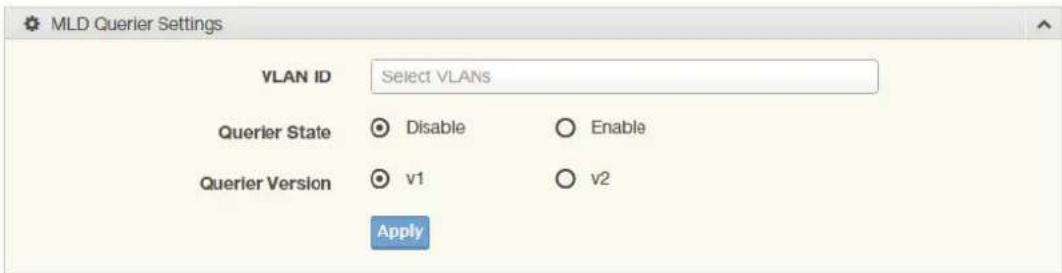
Figure 4.36 L2 Switching > Multicast > MLD Snooping > MLD Querier
The following table describes the items in the previous figure.
Item Description
| VLAN ID Enter the VLAN ID to configure. | |
| Querier State | Select Enable or Disable status on the selected VLAN.■ Enable: Enable IGMP Querier Election.■ Disable: Disable IGMP Querier Election. |
| Querier Version Select the querier version (IGMPV1 or IGMPV2) designated to the MLD Querier function. | |
| Apply | Click Apply to save the values and update the screen. |
The ensuing table for MLD Querier Status settings are informational only and display the following: VLAN ID, Querier State, Querier Status, Querier Version and Querier IP.
MLD Static Group
The MLD Static Group page allows you to configure specified ports as static member ports.
To access this page, click L2 Switching > Multicast > MLD Snooping > MLD Static Group.

Figure 4.37 L2 Switching > Multicast > MLD Snooping > MLD Static Group
The following table describes the items in the previous figure.
Item Description
VLAN ID Enter the VLAN ID to define the local MLD Static Group.
Group IP Address Enter the IP address associated with the static group.
Member Ports Enter the ports designated with the static group.
Add Click Add to add a MLD static group.
The ensuing table for MLD Static Groups Status settings are informational only and display the following: VLAN ID, Group IP Address, Member Ports and Modify.
Multicast Groups
To access this page, click L2 Switching > Multicast > MLD Snooping > Multicast Groups.
The ensuing table for Multicast Groups settings are informational only and display the following: ID, Group IP Address, Member Ports, Type and Life (Sec).
Router Ports
To access this page, click L2 Switching > Multicast > MLD Snooping > Router Ports.
The ensuing table for Router Ports settings are informational only and display the following: VLAN ID, Port and Expiry Time (Sec).
4.5.9 Jumbo Frame
Jumbo frames are frames larger than the standard Ethernet frame size of 1518 bytes. The Jumbo Frame function allows the configuration of Ethernet frame size.
To access this page, click L2 Switching > Jumbo Frame.
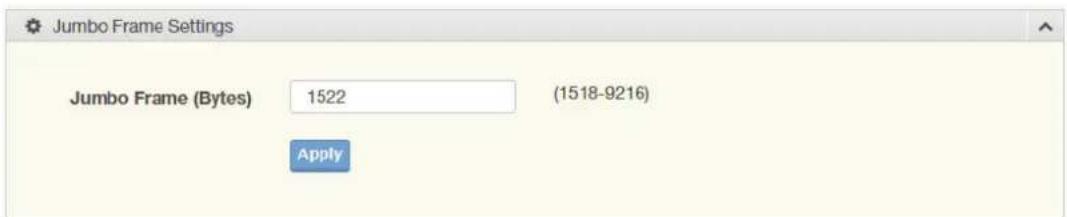
Figure 4.38 L2 Switching > Jumbo Frame
The following table describes the items in the previous figure.
Item Description
| Jumbo Frame (Bytes) | Enter the variable in bytes (1518 to 9216) to define the jumbo frame size. |
| Apply | Click Apply to save the values and update the screen. |
The ensuing table for Jumbo Frame Config settings are informational only and display the following: Jumbo Frame (Bytes).
4.5.10 Spanning Tree
The Spanning Tree Protocol (STP) is a network protocol to ensure loop-free topology for any bridged Ethernet local area network.
4.5.10.1 STP Global Settings
The STP Global Settings page allows you to set the STP status, select the configuration for a BPDU packet, choose the path overhead, force version and set the configuration revision range.
To access this page, click L2 Switching > Spanning Tree > STP Global Settings.

Figure 4.39 L2 Switching > Spanning Tree > STP Global Settings
The following table describes the items in the previous figure.
Item Description
| Enabled Click the radio-button to enable or disable the STP status. | |
| BPDU Forward | Selectfloodingor filteringto designate the type of BPDU packet. |
| PathCost Method Select short or long to define the method of used for path cost calculations. | |
| Force Version Click the drop-down menu to select the operating mode for STP.■STP-Compatible: 802.1D STP operation.■RSTP-Operation: 802.1w operation.■MSTP-Operation: 802.1s operation. | |
| Apply | ClickApplyto save the values and update the screen. |
The ensuing table for STP Information settings are informational only and display the following: STP, BPDU Forward, PathCost Method and Force Version.
4.5.10.2 STP Port Settings
The STP Port Settings page allows you to configure the ports for the setting, port's contribution, configure edge port, and set the status of the BPDU filter.
To access this page, click L2 Switching > Spanning Tree > STP Port Settings.
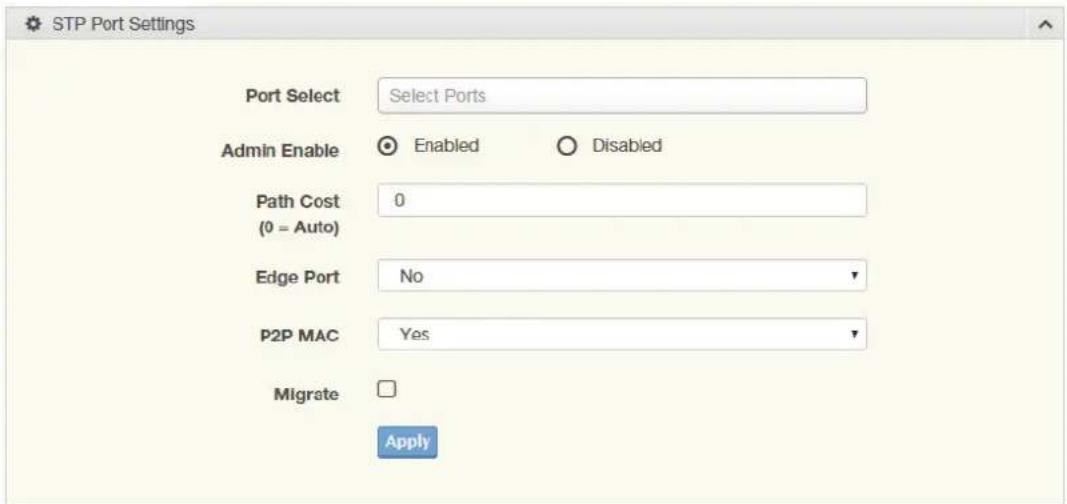
Figure 4.40 L2 Switching > Spanning Tree > STP Port Settings
The following table describes the items in the previous figure.
Item Description
| Port Select Select the port list to specify the ports that apply to this setting. | |
| Admin Enable | SelectEnabledorDisabledto setup the admin profile for the STP port. |
| Path Cost (0 = Auto) | Set the port's cost contribution. For a root port, the root path cost for the bridge. (0 means Auto). |
| Edge Port | Click the drop-down menu to set the edge port configuration.No: Force to false state (as link to a bridge).Yes: Force to true state (as link to a host). |
| P2P MAC | Click the drop-down menu to set the Point-to-Point port configuration.No: Force to false state.Yes: Force to true state. |
| Migrate Click the check box to enable the migrate function.Forces the port to use the new MST/RST BPDUs, requiring the switch to test on the LAN segment. for the presence of legacy devices, which are not able to understand the new BPDU formats. | |
Apply Click Apply to save the values and update the screen.
The ensuing table for STP Port Status settings are informational only and display the following: Port, Admin Enable, Path Cost, Edge Port and P2P MAC.
4.5.10.3 STP Bridge Settings
The STP Bridge Settings page allows you to configure the priority, forward delay, maximum age, Tx hold count, and the hello time for the bridge.
To access this page, click L2 Switching > Spanning Tree > STP Bridge Settings.

Figure 4.41 L2 Switching > Spanning Tree > STP Bridge Settings
The following table describes the items in the previous figure.
| Item Description | |
| Priority Click the drop-down menu to select the STP bridge priority. | |
| Forward Delay Enter the variable (4 to 30) to set the forward delay for STP bridge settings. | |
| Max Age Enter the variable (6 to 40) to set the Max age for STP bridge settings. | |
| Tx Hold Count Enter the variable (1 to 10) to designate the TX hold count for STP bridge settings. | |
| Hello Time Enter the variable (1 to 10) to designate the Hello Time for STP bridge settings. | |
| Apply | Click Apply to save the values and update the screen. |
The ensuing table for STP Bridge Information settings are informational only and display the following: Priority, Forward Delay, Max Age, Tx Hold Count and Hello Time.
The ensuing table for STP Bridge Status settings are informational only and display the following: Bridge Identifier, Designated Root Bridge, Root Path Cost, Designated Bridge, Root Port and Last Topology Change.
4.5.10.4 STP Port Advanced Settings
The STP Port Advanced Settings page allows you to select the port list to apply this setting.
To access this page, click L2 Switching > Spanning Tree > STP Port Advanced Settings.

Figure 4.42 L2 Switching > Spanning Tree > STP Port Advanced Settings
The following table describes the items in the previous figure.
Item Description
Port Select Select the port to designate the STP settings.
Priority Click the drop-down menu to designate a priority.
Apply Click Apply to save the values and update the screen.
The ensuing table for STP Port Status settings are informational only and display the following: Port, Identifier (Priority / Port Id), Path Cost Conf/Oper, Designated Root Bridge, Root Path Cost, Designated Bridge, Edge Port Conf/Oper, P2P MAC Conf/Oper, Port Role and Port State.
4.5.10.5 MST Config Identification
The MST Config Identification page allows you to configure the identification setting name and the identification range.
To access this page, click L2 Switching > Spanning Tree > MST Config Identification.

Figure 4.43 L2 Switching > Spanning Tree > MST Config Identification
The following table describes the items in the previous figure.
Item Description
Configuration Name Enter the identifier used to identify the configuration currently being used. It may be up to 32 characters.
Revision Level Enter the identifier for the Revision Configuration, range: 0 to 65535 (default: 0).
Apply Click Apply to save the values and update the screen.
The ensuing table for MST Configuration Identification Information settings are informational only and display the following: Configuration Name and Revision Level.
4.5.10.6 MST Instance ID Settings
The MST Instance ID Settings page allows you to edit the MSTI ID and VID List settings.
To access this page, click L2 Switching > Spanning Tree > MST Instance ID Settings.
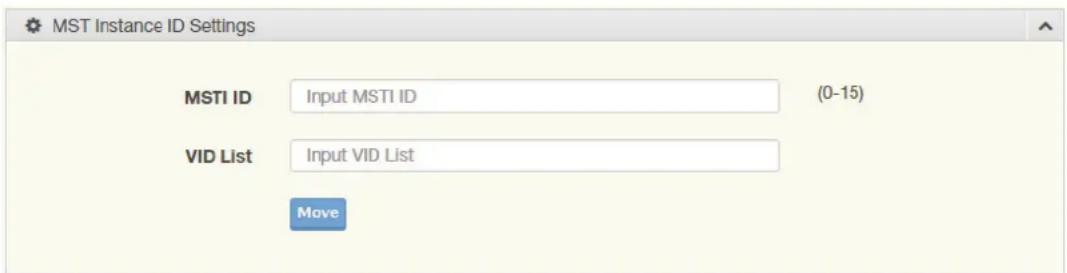
Figure 4.44 L2 Switching > Spanning Tree > MST Instance ID Settings
The following table describes the items in the previous figure.
Item Description
MSTI ID Enter the MST instance ID (0-15).
VID List Enter the pre-configured VID list.
Move Click Move to save the values and update the screen.
The ensuing table for MST Instance ID Information settings are informational only and display the following: MSTI ID and VID List.
4.5.10.7 MST Instance Priority Settings
The MST Instance Priority Settings allows you to specify the MST instance and the bridge priority in that instance.
To access this page, click L2 Switching > Spanning Tree > MST Instance Priority Settings.
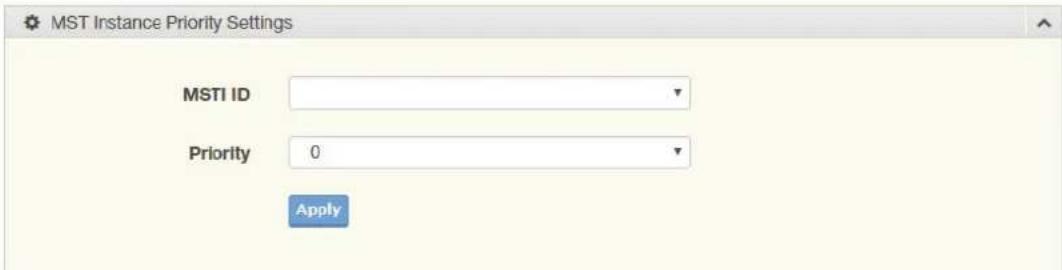
Figure 4.45 L2 Switching > Spanning Tree > MST Instance Priority Settings
The following table describes the items in the previous figure.
Item Description
MSTI ID Click the drop-down menu to specify the MST instance.
Priority Click the drop-down menu set the bridge priority in the specified MST instance
Apply Click Apply to save the values and update the screen.
The ensuing table for MST Instance Priority Information settings are informational only and display the following: MSTI ID, Priority and Action.
4.5.10.8 MST Instance Info
To access this page, click L2 Switching > Spanning Tree > MST Instance Info.
The ensuing table for STP Bridge Status settings are informational only and display the following: Bridge Identifier, Designated Root Bridge, Root Path Cost, Designated Bridge, Root Port and TCNLast Topology Change.
The ensuing table for STP Port Status settings are informational only and display the following: Port, Identifier (Priority / Port Id), Path Cost Conf/Oper, Designated Root Bridge, Root Path Cost, Designated Bridge, Edge Port Conf/Oper, P2P MAC Conf/Oper, Port Role and Port State.
4.5.10.9 STP Statistics
To access this page, click L2 Switching > Spanning Tree > STP Statistics.
The ensuing table for STP Statistics settings are informational only and display the following: Port, Configuration BPDUs Received, TCN BPDUs Received, Configuration BPDUs Transmitted and TCN BPDUs Transmitted.
4.5.11 X-Ring Elite
The X-Ring Elite function provides an improvement over Spanning Tree and Rapid Spanning Tree and a rapid auto recovery in the event that the network suffers a corrupt or broken link and prevents network loops.
4.5.11.1 X-Ring Elite Settings
The X-Ring Elite Settings allows you to enable or disable the state of the X-Ring settings.
To access this page, click L2 Switching > X-Ring Elite > X-Ring Elite Settings.

Figure 4.46 L2 Switching > X-Ring Elite > X-Ring Elite Settings
The following table describes the items in the previous figure.
Item Description
| State | Select Enabled or Disabled to setup the X-Ring Elite mode. |
| Apply Click Apply to save the values and update the screen. | |
The ensuing table for Information settings are informational only and display the following: X-Ring Elite State.
4.5.11.2 X-Ring Elite Groups
The X-Ring Elite Groups page allows you to select the function and role for each device and the connected ports.
To access this page, click L2 Switching > X-Ring Elite > X-Ring Elite Groups.

Figure 4.47 L2 Switching > X-Ring Elite > X-Ring Elite Groups
The following table describes the items in the previous figure.
Item Description
| Ring ID Enter a number to specifies a ranging from 1 to 255 to identify a given X-Ring Elite group. |
| Role Click the drop-down menu to select the ring role. |
| Port 1 Click the drop-down menu to define the port designation. |
| Port 2 Click the drop-down menu to define the port designation. |
| Add Click Add to save the values and update the screen. |
The ensuing table for Information settings are informational only and display the following: Ring ID, Role, Port 1, Port 2 and Delete (click to delete the desired Ring ID).
4.5.12 X-Ring Pro
The X-Ring Pro function provides an improvement over Spanning Tree and Rapid Spanning Tree and a rapid auto recovery in the event that the network suffers a corrupt or broken link and prevents network loops.
4.5.12.1 X-Ring Pro Settings
The X-Ring Pro Settings page allows you to configure the status (enabled or disabled) of the function.
To access this page, click L2 Switching > X-Ring Pro > X-Ring Pro Settings.

Figure 4.48 L2 Switching > X-Ring Pro > X-Ring Pro Settings
The following table describes the items in the previous figure.
| Item Description | |
| State | Select Enabled or Disabled to setup the X-Ring Pro mode. |
| Apply | Click Apply to save the values and update the screen. |
The ensuing table for Information settings are informational only and display the following: X-Ring Pro State.
4.5.12.2 X-Ring Pro Groups
The X-Ring Pro Groups page allows you to select the function and role for each ring ID and its connected ports.
To access this page, click L2 Switching > X-Ring Pro > X-Ring Pro Groups.

Figure 4.49 L2 Switching > X-Ring Pro > X-Ring Pro Groups > X-Ring Pro Groups Settings
The following table describes the items in the previous figure.
| Item Description |
| Ring ID Enter a number to specifies a ranging from 1 to 255 to identify a given X-Ring Pro group. |
| Port 1 Click the drop-down menu to define the port designation. |
| Port 2 Click the drop-down menu to define the port designation. |
| Add Click Add to save the values and update the screen. |

Figure 4.50 L2 Switching > X-Ring Pro > X-Ring Pro Groups > Couple Setting
The following table describes the items in the previous figure.
Item Description
Couple Ring ID Enter a number to specifies a ranging from 1 to 255 to identify a given X-Ring group.
Port Enter the port to assign to define the couple setting.
Master Ring ID Click the drop-down menu to designate the master ring.
Add Click Add to save the values and update the screen.
The ensuing table for Information settings are informational only and display the following: Ring ID, Mode, Operation State, Port 1, Forwarding State, Port 2, Forwarding State and Delete (click to delete the desired Ring ID).
4.5.13 Loopback Detection
The Loopback Detection function is used to detect looped links. By sending detection frames and then checking to see if the frames returned to any port on the device, the function is used to detect loops.
4.5.13.1 Global Settings
The Global Settings page allows you to configure the state (enabled or disabled) of the function, select the interval at which frames are transmitted and the delay before recovery.
To access this page, click L2 Switching > Loopback Detection > Global Settings.
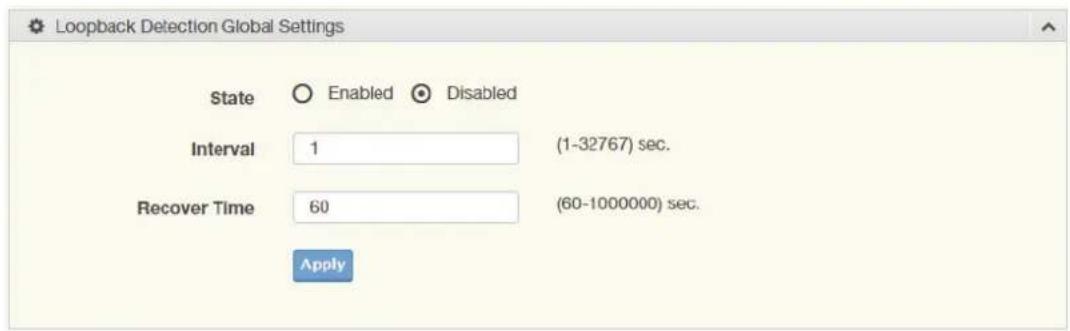
Figure 4.51 L2 Switching > Loopback Detection > Global Settings
The following table describes the items in the previous figure.
Item Description
State Select Enabled or Disabled to setup the loopback mode.
Interval Enter the variable in seconds (1 to 32767) to set the interval at which frames are transmitted.
Recover Time Enter the variable in seconds (60 to 1000000) to define the delay before recovery.
Apply Click Apply to save the values and update the screen.
The ensuing table for Loopback Detection Global Information settings are informational only and display the following: State, Interval and Recover Time.
4.5.13.2 Port Settings
The Port Settings page allows you to select ports that are detected by the loopback detection function and configure their status (enabled or disabled).
To access this page, click L2 Switching > Loopback Detection > Port Settings.

Figure 4.52 L2 Switching > Loopback Detection > Port Settings
The following table describes the items in the previous figure.
| Item Description | |
| Port Select | Enter the port to define the local loopback detection setting. |
| Enabled | Select Enabled or Disabled to setup the Loopback Detection function. |
| Apply | Click Apply to save the values and update the screen. |
The ensuing table for Loopback Detection Port Information settings are informational only and display the following: Port, Enable State and Loop Status.
4.6 L3 Switching
4.6.1 SNAT (Source NAT)
Source NAT (SNAT) is the most common form of NAT. SNAT changes the source address of the packets passing through the switch. SNAT is typically used when an internal (private) host needs to initiate a session to an external (public) host.
4.6.1.1 Global Settings
To access this page, click L3 Switching > SNAT > Global Settings.

Figure 4.53 L3 Switching > SNAT > Global Settings
The following table describes the items in the previous figure.
| Item Description | |
| Interface Click the drop-down menu to select the interface. | |
| Auto Mode | Select Enabled or Disabled to setup the auto mode. |
| Apply | Click Apply to save the values and update the screen. |
The ensuing table for Global Information settings are informational only and display the following: Information Name and Information Value.
4.6.1.2 Entry Settings
To access this page, click L3 Switching > SNAT > Entry Settings.
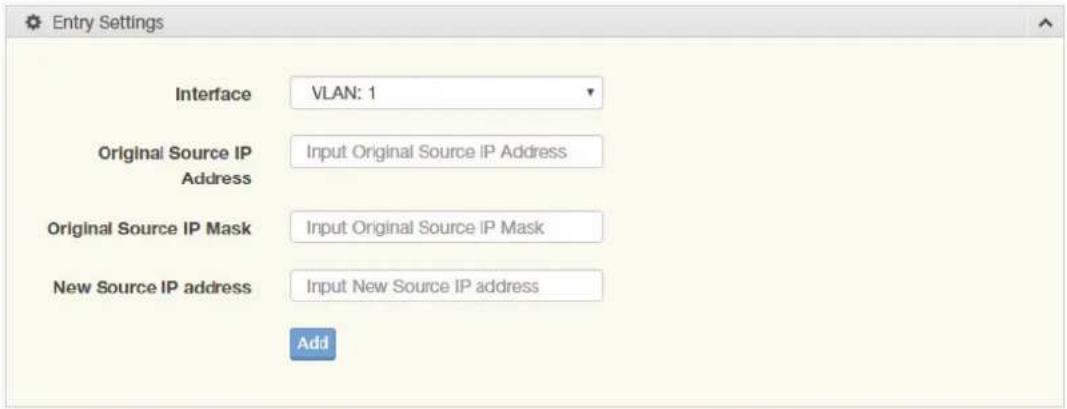
Figure 4.54 L3 Switching > SNAT > Entry Settings
The following table describes the items in the previous figure.
| Item Description | |
| Interface | Click the drop-down menu to select the interface. |
| Original Source IP Address | Define the original source IP address. |
| Original Source IP Mask | Define the original source IP mask. |
| New Source IP address | Define the new source IP address. |
| Add Click Add to save the values and update the screen. | |
The ensuing table for Entry Information settings are informational only and display the following: Original Source IP Address, Original Source IP Mask, New Source IP address and Delete (click to delete the desired interface).
4.6.2 DNAT (Destination NAT)
Destination NAT (DNAT) changes the destination address of packets passing through the switch. DNAT is typically used when an external (public) host needs to initiate a session with an internal (private) host.
To access this page, click L3 Switching > DNAT.
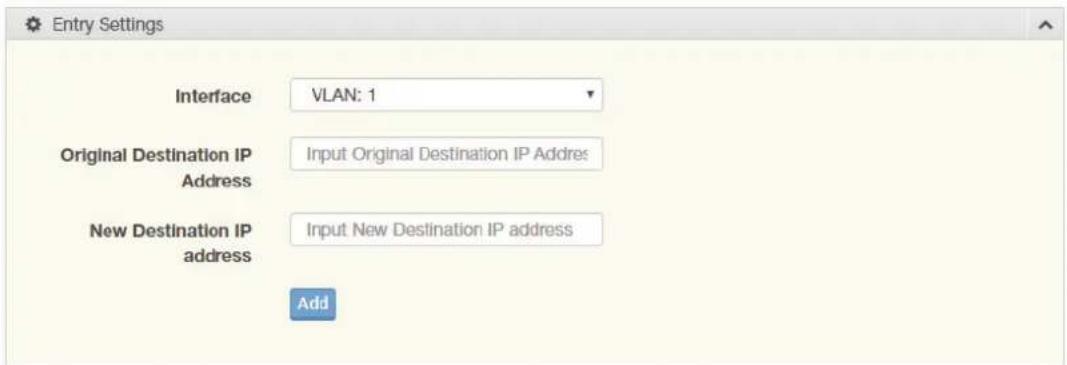
Figure 4.55 L3 Switching > DNAT
The following table describes the items in the previous figure.
Item Description
Interface Click the drop-down menu to select the interface.
Original Destination Define the original destination IP address. IP Address
New Destination IP address Define the new destination IP address.
Apply Click Add to save the values and update the screen.
The ensuing table for Entry Information settings are informational only and display the following: Original Destination IP Address, New Destination IP address and Delete (click to delete the desired interface).
4.6.3 Routing
To access this page, click L3 Switching > Routing.

Figure 4.56 L3 Switching > Routing
The following table describes the items in the previous figure.
Item Description
Interface Click the drop-down menu to select the interface.
Destination IP Address Define the destination IP address.
Destination IP Mask Define the destination IP mask.
Gateway Define the gateway IP address.
Add Click Add to save the values and update the screen.
The ensuing table for Routing Information settings are informational only and display the following: Destination IP Address, Destination IP Mask, Gateway IP address and Delete (click to delete the desired interface).
4.7 MAC Address Table
The MAC Address Table provides access to the Static MAC Settings, MAC Aging Time, and Dynamic Forwarding.
4.7.1 Static MAC
The Static MAC page allows you to configure the address for forwarding of packets, the VLAN ID of the listed MAC address and the designated Port.
To access this page, click MAC Address Table > Static MAC.

Figure 4.57 MAC Address Table > Static MAC
The following table describes the items in the previous figure.
Item Description
MAC Address Enter the MAC address to which packets are statically forwarded.
VLAN Click the drop-down menu to select the VLAN ID number of the VLAN for which the MAC address is residing.
Port Click the drop-down menu to select the port number.
Apply Click Apply to save the values and update the screen.
The ensuing table for Static MAC Status settings are informational only and display the following: No., MAC Address, VLAN, Port and Delete (click to delete the desired MAC address).
4.7.2 MAC Aging Time
The MAC Aging Time page allows you to set the MAC address of the aging time to study.
To access this page, click MAC Address Table > MAC Aging Time.

Figure 4.58 MAC Address Table > MAC Aging Time
The following table describes the items in the previous figure.
Item Description
Aging Time Enter the variable (10 to 630) to define the time required for aging.
Apply Click Apply to save the values and update the screen.
The ensuing table for Dynamic Address Status settings are informational only and display the following: Aging time.
4.7.3 Dynamic Forwarding Table
The Dynamic Forwarding function allows you to configure an address tables, which contain the following:
■ The port each hardware address is associated with
■ The VLAN to show or clear dynamic MAC entries
■ The MAC address selection
To access this page, click MAC Address Table > Dynamic Forwarding Table.

Figure 4.59 MAC Address Table > Dynamic Forwarding Table
The following table describes the items in the previous figure.
| Item Description | |
| Port Click the drop-down menu to select the port number to show or clear dynamic MAC entries. If a port, VLAN or MAC address is not selected the whole dynamic MAC table is displayed or cleared. | |
| VLAN Click the drop-down menu to select the VLAN to show or clear dynamic MAC entries. | |
| MAC Address Enter the MAC address to show or clear dynamic MAC entries. If a port, VLAN or MAC address is not selected the whole dynamic MAC table is displayed or cleared. | |
| View Click View to display the MAC address information. | |
| Clear | Click Clear to clear the MAC Address Information table. |
The ensuing table for MAC Address Information settings are informational only and display the following: MAC Address, VLAN, Type, Port and Add to Static MAC (click to add the MAC address to static MAC address list).
4.8 Security
The Security function allows for the configuration of Storm Control, Port Security, Protected Ports, DoS Prevention, Applications, 802.1x, and IP Security.
4.8.1 Storm Control
The Storm Control page allows you to setup the units and Preamble/IFG to manage the occurrence of packet flooding on the LAN and consequent traffic to prevent the degrading of network performance.
4.8.1.1 Global Settings
To access this page, click Security > Storm Control > Global Settings.

Figure 4.60 Security > Storm Control > Global Settings
The following table describes the items in the previous figure.
| Item Description | |
| Unit | Select pps or bps control units for the Storm Control function. |
| Preamble & IFG | Select Excluded or Included to setup the Storm Control Global settings.■ Excluded: exclude preamble & IFG (20 bytes) when count ingress storm control rate.■ Included: include preamble & IFG (20 bytes) when count ingress storm control rate. |
Apply Click Apply to save the values and update the screen.
The ensuing table for Storm Control Global Information settings are informational only and display the following: Unit and Preamble & IFG.
4.8.1.2 Port Settings
The Port Settings page allows you to configure the port and the type of storm control association along with the value of the storm rate for the selected port.
To access this page, click Security > Storm Control > Port Settings.
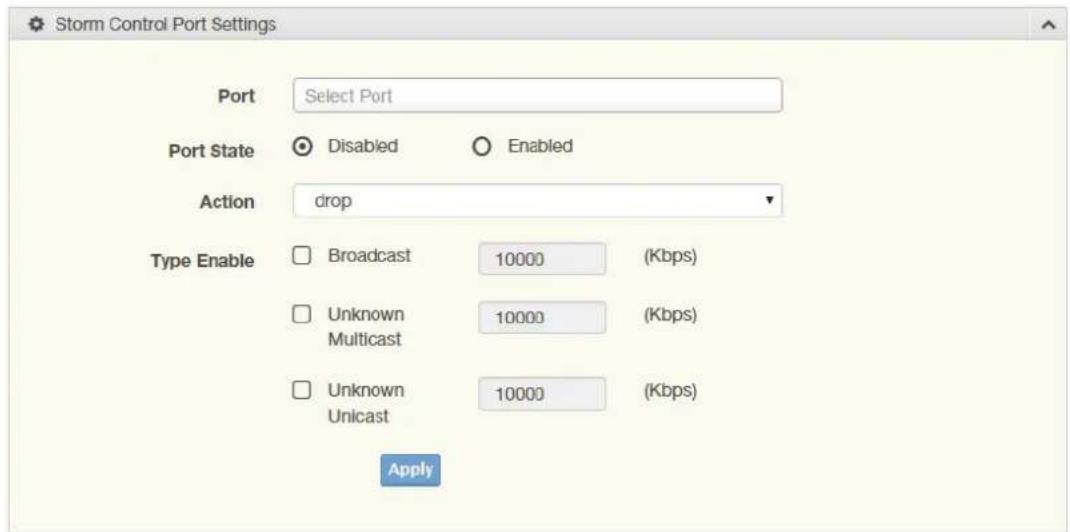
Figure 4.61 Security > Storm Control > Port Settings
The following table describes the items in the previous figure.
| Item Description | |
| Port Enter the port number to designate the local port for the Storm Control function. | |
| Port State | Select Disabled or Enabled to define the port state |
| Action | Click the drop-down menu to select the type of action to designate for the selected port during a Storm Control incident. The options are Drop and Shutdown. |
| Type Enable Click the radio button to enable Broadcast, Unknown Multicast, or Unknown Unicast.■ Broadcast: Select the variable in Kbps to define the broadcast bandwidth.■ Unknown Multicast: Select the variable in Kbps to define the multicast setting.■ Broadcast: Select the variable in Kbps to define the unknown unicast setting. | |
| Apply Click Apply to save the values and update the screen. | |
The ensuing table for Storm Control Port Information settings are informational only and display the following: Port, Port State, Broadcast (Kbps), Unknown Multicast (Kbps), Unknown Unicast (Kbps) and Action.
4.8.2 Port Security
The Port Security page allows you to configure port isolation behavior.
To access this page, click Security > Port Security.

Figure 4.62 Security > Port Security
The following table describes the items in the previous figure.
| Item Description | |
| Port Select Enter a single or multiple port numbers to configure. | |
| Enabled | Select Enabled or Disabled to define the selected Port. |
| FDB Learn Limit (0-64) | Enter the variable (0 to 64) to set the learn limit for the FDB setting. |
| Violation MAC Notification | Select Enabled or Disabled to define the selected Port. |
| Apply | Click Apply to save the values and update the screen. |
The ensuing table for Port Security Information settings are informational only and display the following: Port, Enabled, FDB Learn Limit and Violation MAC Notification.
4.8.3 Protected Ports
The Protected Port page allows you to configure a single or multiple ports as a protected or unprotected type.
To access this page, click Security > Protected Ports.
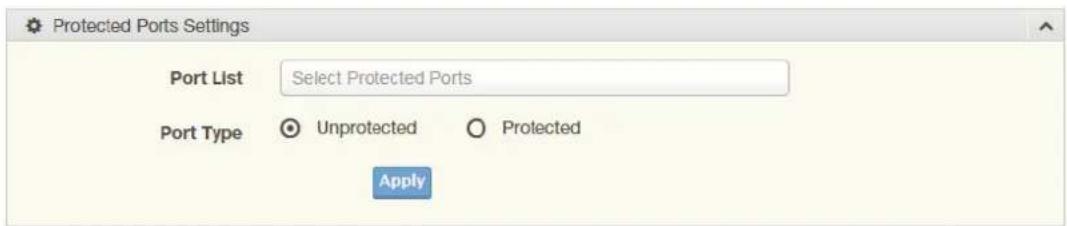
Figure 4.63 Security > Protected Ports
The following table describes the items in the previous figure.
| Item Description | |
| Port List Enter the port number to designate for the Protected Port setting. | |
| Port Type | Select Unprotected or Protected to define the port type. |
| Apply | Click Apply to save the values and update the screen. |
The ensuing table for Protected Ports Status settings are informational only and display the following: Protected Ports and Unprotected Ports.
4.8.4 DoS Prevention
The DoS Prevention page allows you to setup (enabled or disabled) the denial of service.
4.8.4.1 DoS Global Settings
The DoS Global Settings page allows you to configure (enabled or disabled) the setting for each function.
To access this page, click Security > DoS Prevention > DoS Global Settings.
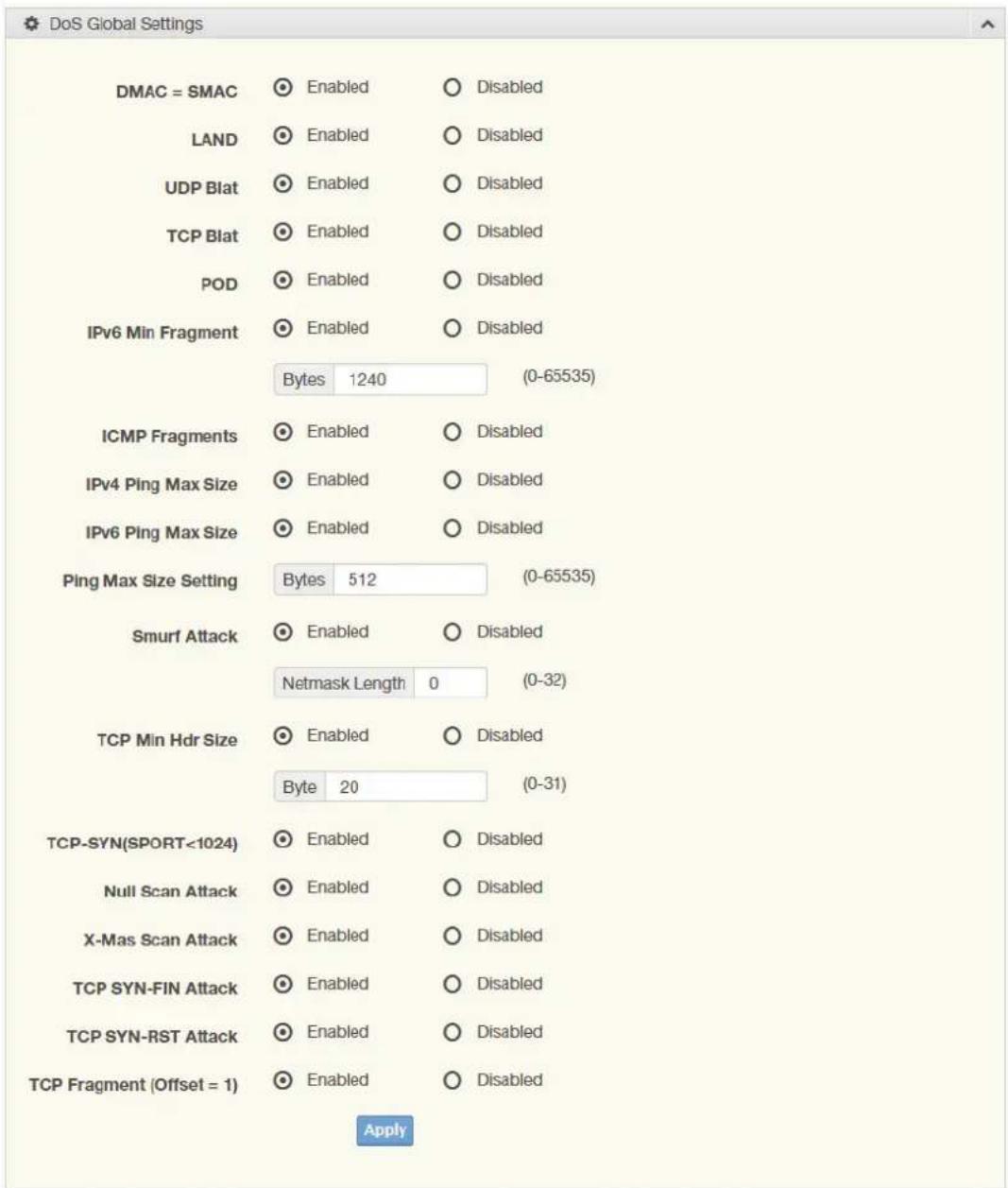
Figure 4.64 Security > DoS Prevention > DoS Global Settings
The following table describes the items in the previous figure.
| Item Description | |
| DMAC = SMAC | Click Enabled or Disabled to define DMAC-SMAC for the DoS Global settings. |
| LAND | Click Enabled or Disabled to define LAND for the DoS Global settings. |
| UDP Blat | Click Enabled or Disabled to define UDP Blat for the DoS Global settings. |
| TCP Blat | Click Enabled or Disabled to define TCP Blat for the DoS Global settings. |
| POD | Click Enabled or Disabled to define POD for the DoS Global settings. |
| IPv6 Min Fragment | Click Enabled or Disabled to define minimum fragment size for the IPv6 protocol.Enter the variable in bytes (0 to 65535) to set the minimum fragment size when the function is enabled. |
| ICMP Fragments | Click Enabled or Disabled to define the ICMP Fragments function. |
| IPv4 Ping Max Size | Click Enabled or Disabled to set the maximum ping size for the IPv4 protocol. |
| IPv6 Ping Max Size | Click Enabled or Disabled to set a maximum ping size for the IPv6 protocol. |
| Ping Max Size Setting | Enter the variable in bytes (0 to 65535) to set the maximum ping size. |
| Smurf Attack | Click Enabled or Disabled to set the Smurf Attack function. |
| TCP Min Hdr Size | Click Enabled or Disabled to set the minimum header size.Enter the variable in bytes (0 to 31) to set the minimum header size. |
| TCP-SYN (SPORT < 1024) | Click Enabled or Disabled to set the TCP synchronization function (sport < 1021). |
| Null Scan Attack | Click Enabled or Disabled to set the Null Scan Attack function. |
| X-Mas Scan Attack | Click Enabled or Disabled to set the X-Mas Scan function. |
| TCP SYN-FIN Attack | Click Enabled or Disabled to set the TCP synchronization termination attack function. |
| TCP SYN-RST Attack | Click Enabled or Disabled to set the TCP synchronization reset attack function. |
| TCP Fragment (Offset = 1) | Click Enabled or Disabled to set the TCP fragment function (offset =1). |
| Apply | Click Apply to save the values and update the screen. |
The ensuing table for DoS Global Information settings are informational only and display the following: DMAC = SMAC, Land Attack, UDP Blat, TCP Blat, POD (Ping of Death), IPv6 Min Fragment Size, ICMP Fragment Packets, IPv4 Ping Max Packet Size, IPv6 Ping Max Packet Size, Smurf Attack, TCP Min Header Length, TCP Syn (SPORT < 1024), Null Scan Attack, X-Mas Scan Attack, TCP SYN-FIN Attack, TCP SYN-RST Attack and TCP Fragment (Offset = 1).
4.8.4.2 DoS Port Settings
The DoS Port Settings page allow you to configure DoS security (enabled or disabled) for the selected port.
To access this page, click Security > DoS Prevention > DoS Port Settings.
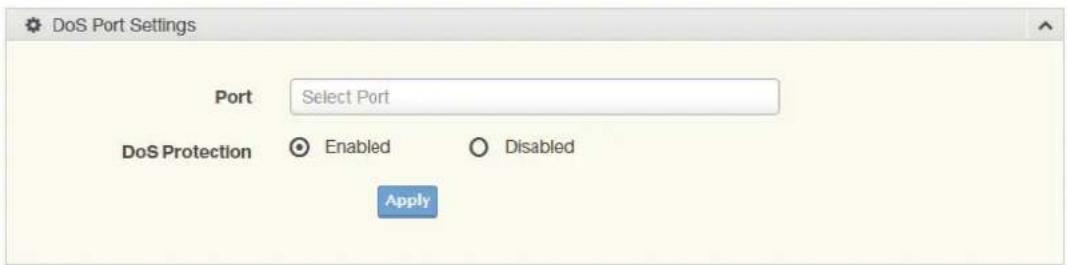
Figure 4.65 Security > DoS Prevention > DoS Port Settings
The following table describes the items in the previous figure.
Item Description
Port Select the port to configure for the DoS prevention function.
DoS Protection Click Enabled or Disabled to set the DoS Port security function state.
Apply Click Apply to save the values and update the screen.
The ensuing table for DoS Port Status settings are informational only and display the following: Port and DoS Protection.
4.8.5 Applications
The Applications function allows you to configure various types of AAA lists.
4.8.5.1 TELNET
The TELNET page allows you to combine all kinds of AAA lists with the Telnet line. To access this page, click Security > Applications > TELNET.

Figure 4.66 Security > Applications > TELNET
The following table describes the items in the previous figure.
Item Description
| Telnet Service | Click Enabled or Disabled to set remote access through the Telnet Service function. |
| Apply Click Apply to save the values and update the screen. | |
| Disconnect | Click Disconnect to disable the current Telnet service. |
The ensuing table for Telnet Information settings are informational only and display the following: Telnet Service and Current Telnet Sessions Count.
4.8.5.2 SSH
Secure Shell (SSH) is a protocol providing secure (encrypted) management connection to a remote device.
To access this page, click Security > Applications > SSH.

Figure 4.67 Security > Applications > SSH
The following table describes the items in the previous figure.
| Item Description | |
| SSH Service | Click Enabled or Disabled to set up Ethernet encapsulation (remote access) through the Secure Shell (SSH) function. |
| Apply | Click Apply to save the values and update the screen. |
The ensuing table for SSH Information settings are informational only and display the following: SSH.
4.8.5.3 HTTP
The HTTP page allows you to combine all kinds of AAA lists to the HTTP line. Attempts to access the switch's Web UI from HTTP are first authenticated.
To access this page, click Security > Applications > HTTP.

Figure 4.68 Security > Applications > HTTP
The following table describes the items in the previous figure.
| Item Description | |
| HTTP Service | Click Enabled or Disabled to set up Ethernet encapsulation (remote access) through HTTP function. |
| Session Timeout Enter the variable in minutes (0 to 86400) to define the timeout period for the HTTP session. | |
| Apply | Click Apply to save the values and update the screen. |
The ensuing table for HTTP Information settings are informational only and display the following: HTTP Service and Session Timeout.
4.8.5.4 HTTPS
The HTTPS page allows you to combine all kinds of AAA lists on the HTTPS line. Attempts to access the switch's Web UI from HTTPS are first authenticated.
To access this page, click Security > Applications > HTTPS.
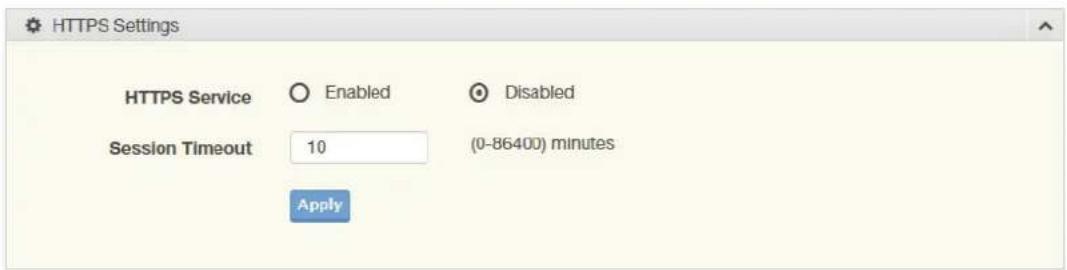
Figure 4.69 Security > Applications > HTTPS
The following table describes the items in the previous figure.
| Item Description | |
| HTTPS Service | Click Enabled or Disabled to set up Ethernet encapsulation over HTTPS. |
| Session Timeout Enter the variable in minutes (0 to 86400) to define the timeout period for the HTTP session. | |
| Apply Click Apply to save the values and update the screen. | |
The ensuing table for HTTPS Information settings are informational only and display the following: HTTPS Service and Session Timeout.
4.8.6 802.1x
The 802.1x function provides port-based authentication to prevent unauthorized devices (clients) from gaining access to the network.
4.8.6.1 802.1x Settings
The 802.1x Settings page allows you to set the state (enabled or disabled) for the selected IP server address, port, accounting port and associated password, including a reauthentication period.
To access this page, click Security > 802.1x > 802.1x Settings.

Figure 4.70 Security > 802.1x > 802.1x Settings
The following table describes the items in the previous figure.
| Item Description | |
| State | Click Enabled or Disabled to set up 802.1x Setting function. |
| Server IP Enter the IP address of the local server providing authentication function. | |
| Server Port Enter the port number (1 to 65535) assigned to the listed Server IP. | |
| Accounting Port Enter the port number (1 to 65535) assigned to the listed server IP configured to provide authorization and authentication for network access. | |
| Security Key Enter the variable to define the network security key used in authentication. | |
| Reauth Period Enter the variable in seconds to define the period of time between authentication attempts. | |
| Apply | Click Apply to save the values and update the screen. |
The ensuing table for 802.1x Information settings are informational only and display the following: 802.1x State, Server IP, Server Port, Accounting Port, Security Key and Reauth Period.
4.8.6.2 802.1x Port Configuration
The 802.1x Port Configuration page allows you to identify the authorization state for a port by using a MAC or Port authentication base.
To access this page, click Security > 802.1x > 802.1x Port Configuration.

Figure 4.71 Security > 802.1x > 802.1x Port Configuration
The following table describes the items in the previous figure.
| Item Description | |
| Authentication based | Click Port or Mac to designate the type of configuration for the 802.1x Port setting. |
| Port Select | Enter the port number associated with the configuration setting. |
| State | Click Authorize or Disabled to define the listed port's state mode. |
| Apply | Click Apply to save the values and update the screen. |
The ensuing table for 802.1x Port Authorization settings are informational only and display the following: Port and Port State.
4.8.7 IP Security
This section provides you a means to configure the IP Security settings.
4.8.7.1 Global Settings
The Global Settings page allows you to set the IP Security status (enabled or disabled).
To access this page, click Security > IP Security > Global Settings.

Figure 4.72 Security > IP Security > Global Settings
The following table describes the items in the previous figure.
| Item Description | |
| Status | Click Enabled or Disabled to define the global setting for the IP security function. |
| Apply Click Apply to save the values and update the screen. | |
The ensuing table for IP Security Status settings are informational only and display the following: IP Security.
4.8.7.2 Entry Settings
Once the Global Setting is enabled, use the Entry Settings to define an IP Security entry.
To access this page, click Security > IP Security > Entry Settings.

Figure 4.73 Security > IP Security > Entry Settings
The following table describes the items in the previous figure.
| Item Description | |
| Interface | Click the drop-down menu to select the interface. |
| VLAN ID | |
| IP Address Enter the source IP address to apply the IP Security function. | |
| IP Mask Enter the IP address for use in masking the previous IP Address. | |
| Services Enter the type of services to associate with the entry setting. | |
| Apply Click Apply to save the values and update the screen. | |
The ensuing table for IP Security Information settings are informational only and display the following: VLAN ID, IP Address, IP Mask, Services and Action.
4.9 QoS
The QoS function allows you to configure settings for the switch QoS interface and how the switch connects to a remote server to get services.
4.9.1 General
Traditionally, networks operate on a best-effort delivery basis, all traffic has equal priority and an equal chance of being delivered in a timely manner. When there is congestion, all traffic has an equal chance of being dropped.
The QoS feature can be configured for congestion-management and congestion-avoidance to specifically manage the priority of the traffic delivery. Implementing QoS in the network makes performance predictable and bandwidth utilization much more effective.
The QoS implementation is based on the prioritization values in Layer 2 frames.
4.9.1.1 QoS Properties
The QoS Properties allows you to set the QoS mode.
To access this page, click QoS > General > QoS Properties.

Figure 4.74 QoS > General > QoS Properties
The following table describes the items in the previous figure.
| Item Description | |
| QoS Mode | Select Disabled or Basic to setup the QoS function. |
| Apply | Click Apply to save the values and update the screen. |
The ensuing table for QoS Global Information settings are informational only and display the following: QoS Mode.
4.9.1.2 QoS Settings
Once the QoS function is enabled, you can configure the available settings.
To access this page, click QoS > General > QoS Settings.
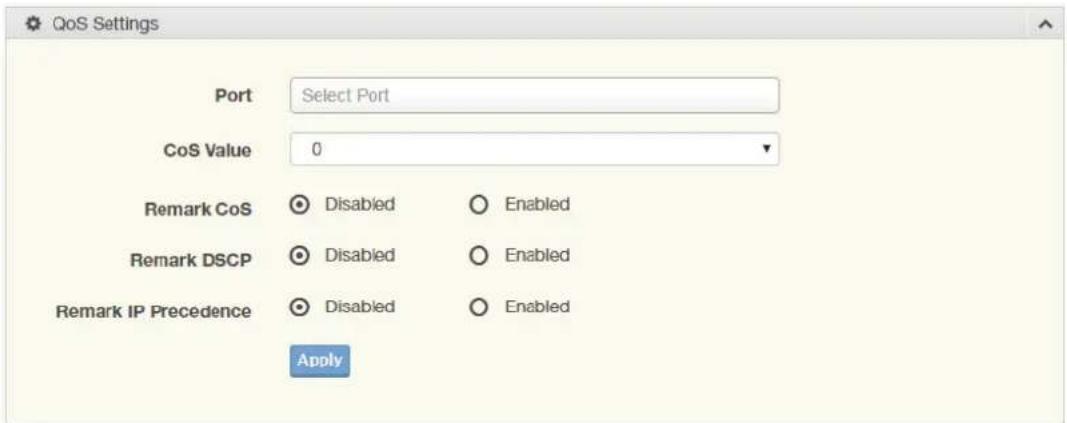
Figure 4.75 QoS > General > QoS Settings
The following table describes the items in the previous figure.
Item Description
| Port Enter the port number to associate with the QoS setting. | |
| CoS Value Click the drop-down menu to designate the Class of Service (CoS) value (0 to 7) for the Port entry. | |
| Remark CoS | Click Disabled or Enabled to setup the Remark CoS function. When enabled the LAN (preassigned priority values) is marked at Layer 2 boundary to CoS values. |
| Remark DSCP | Click Disabled or Enabled to setup the DSCP remark option for the QoS function. |
| Remark IP Precedence | Click Disabled or Enabled to setup the Remark IP Precedence for the QoS function. |
| Apply Click Apply to save the values and update the screen. | |
The ensuing table for QoS Status settings are informational only and display the following: Port, CoS value, Remark CoS, Remark DSCP and Remark IP Precedence.
4.9.1.3 Queue Scheduling
The switch support eight CoS queues for each egress port. For each of the eight queues, two types of scheduling can be configured: Strict Priority and Weighted Round Robin (WRR).
Strict Priority scheduling is based on the priority of queues. Packets in a high-priority queue are always sent first and packets in a low-priority queue are only sent after all the high priority queues are empty.
Weighted RoundRobin (WRR) scheduling is based on the user priority specification to indicate the importance (weight) of the queue relative to the other CoS queues. WRR scheduling prevents low-priority queues from being completely ignored during periods of high priority traffic. The WRR scheduler sends some packets from each queue in turn.
To access this page, click QoS > General > QoS Scheduling.

Figure 4.76 QoS > General > QoS Scheduling
The following table describes the items in the previous figure.
| Item Description | |
| Queue Queue entry for egress port. | |
| Strict Select Strict to assign the scheduling designation to the selected queue. | |
| WRR Select WRR to assign the scheduling designation to the selected queue. | |
| Weight Enter a queue priority (weight) relative to the defined entries (WRR only). | |
| % of WRR Bandwidth Displays the allotted bandwidth for the queue entry in percentage values. | |
| Apply Click Apply to save the values and update the screen. |
The ensuing table for Queue Information settings are informational only and display the following: Strict Priority Queue Number.
4.9.1.4 CoS Mapping
The CoS Mapping allows you to apply CoS mapping.
To access this page, click QoS > General > CoS Mapping.

Figure 4.77 QoS > General > CoS Mapping
The following table describes the items in the previous figure.
| Item Description | |
| CoS to Queue Mapping | |
| Class of Service Displays the CoS for the queue entry. | |
| Queue | Click the drop-down menu to select the queue priority for selected CoS |
| Queue to CoS Mapping | |
| Queue Displays the queue entry for CoS mapping. | |
| Class of Service Click the drop-down menu to select the CoS type | |
| Apply Click Apply to save the values and update the screen. | |
The ensuing table for CoS Mapping Information settings are informational only and display the following: CoS and Mapping to Queue.
The ensuing table for Queue Mapping Information settings are informational only and display the following: Queue and Mapping to CoS.
The DSCP to Queue mapping function maps queue values in incoming packets to a DSCP value that QoS uses internally to represent the priority of the traffic. The following table shows the DSCP to Queue map.
If these values are not appropriate for your network, you need to modify them.
To access this page, click QoS > General > DSCP Mapping.

Figure 4.78 QoS > General > DSCP Mapping
The following table describes the items in the previous figure.
| Item Description | |
| DSCP to Queue Mapping | |
| DSCP Enter the DSCP entry to define the precedence values. | |
| Queue Click the drop-down menu to select the queue designation for the DSCP value. | |
| Queue to DSCP Mapping | |
| Queue Displays the queue value for the DSCP map. | |
| DSCP Enter the DSCP entry to define the precedence values. | |
| Apply Click Apply to save the values and update the screen. |
The ensuing table for DSCP Mapping Information settings are informational only and display the following: DSCP and Mapping to Queue.
The ensuing table for Queue Mapping Information settings are informational only and display the following: Queue and Mapping to DSCP.
The IP Precedence Mapping allows you to set IP Precedence mapping.
To access this page, click QoS > General > IP Precedence Mapping.

Figure 4.79 QoS > General > IP Precedence Mapping
The following table describes the items in the previous figure.
| Item Description | |
| IP Precedence to Queue Mapping | |
| IP Precedence Displays the IP precedence value for the queue map. | |
| Queue | Click the drop-down menu to map a queue value to the selected IP precedence. |
| Queue to IP Precedence Mapping | |
| Queue Displays the queue entry for mapping IP precedence values. | |
| IP Precedence Click the drop-down menu to map an IP precedence value to the selected queue. | |
| Apply Click Apply to save the values and update the screen. | |
The ensuing table for IP Precedence Mapping Information settings are informational only and display the following: IP Precedence and Mapping to Queue.
The ensuing table for Queue Mapping Information settings are informational only and display the following: Queue and Mapping to IP Precedence.
4.9.2 QoS Basic Mode
Quality of Service (QoS) allows to give preferential treatment to certain types of traffic at the expense of others. Without QoS, the switch offers best-effort service to each packet, regardless of the packet contents or size sending the packets without any assurance of reliability, delay bounds, or throughput.
QoS mode supports two modes: 802.1p and DSCP.
4.9.2.1 Global Settings
The Global Settings page allows you to configure the trust mode to a port selection.
To access this page, click QoS > QoS Basic Mode > Global Settings.
The function is only available when QoS Properties is set to Basic.

Figure 4.80 QoS > QoS Basic Mode > Global Settings
The following table describes the items in the previous figure.
Item Description
Trust Mode Click the drop-down menu to select the trust state of the QoS basic mode.
Apply Click Apply to save the values and update the screen.
The ensuing table for QoS Information settings are informational only and display the following: Trust Mode.
4.9.2.2 Port Settings
The Port Settings page allows you to define a trust state (enabled or disabled) to a listed port.
To access this page, click QoS > QoS Basic Mode > Port Settings.

Figure 4.81 QoS > QoS Basic Mode > Port Settings
The following table describes the items in the previous figure.
Item Description
Port Enter the port number for the QoS basic mode setting.
Trust State Select Enabled or Disabled to set the port's trust state status.
Apply Click Apply to save the values and update the screen.
The ensuing table for QoS Port Status settings are informational only and display the following: Port and Trust State.
4.9.3 Rate Limit
Rate Limits features control on a per port basis. Bandwidth control is supported for the following: Ingress Bandwidth Control, Egress Bandwidth Control and Egress Queue.
4.9.3.1 Ingress Bandwidth Control
The Ingress Bandwidth Control page allows you to configure the bandwidth control for a listed port.
To access this page, click QoS > Rate Limit > Ingress Bandwidth Control.

Figure 4.82 QoS > Rate Limit > Ingress Bandwidth Control
The following table describes the items in the previous figure.
Item Description
| Port Enter the port number for the rate limit setup. | |
| State | Select Disabled or Enabled to set the port's state status. |
| Rate (Kbps) Enter the value in Kbps (16 to 1000000) to set as the bandwidth rate for the selected port. | |
| Apply Click Apply to save the values and update the screen. | |
The ensuing table for Ingress Bandwidth Control Status settings are informational only and display the following: Port and Ingress Rate Limit (Kbps).
4.9.3.2 Egress Bandwidth Control
The Egress Bandwidth Control page allows you to set the egress bandwidth control for a listed port.
To access this page, click QoS > Rate Limit > Egress Bandwidth Control.

Figure 4.83 QoS > Rate Limit > Egress Bandwidth Control
The following table describes the items in the previous figure.
Item Description
| Port Enter the port number to set the Egress Bandwidth Control. |
| Item Description | |
| State | Select Disabled or Enabled to set the Egress Bandwidth Control state. |
| Rate (Kbps) | Enter the value in Kbps (16 to 1000000) to set the Egress Bandwidth rate. |
| Apply | Click Apply to save the values and update the screen. |
The ensuing table for Egress Bandwidth Control Status settings are informational only and display the following: Port and Egress Rate Limit (Kbps).
4.9.3.3 Egress Queue
The Egress Queue page allows you to set the egress bandwidth parameters. To access this page, click QoS > Rate Limit > Egress Queue.
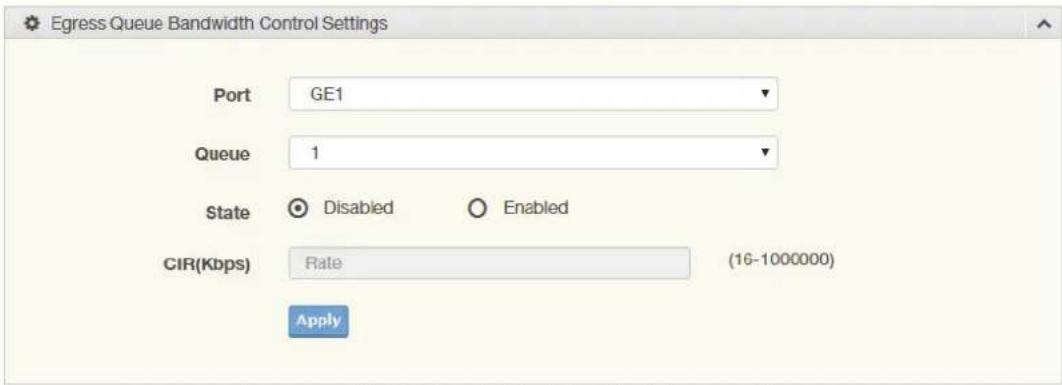
Figure 4.84 QoS > Rate Limit > Egress Queue
The following table describes the items in the previous figure.
| Item Description | |
| Port Click the drop-down menu to select the port to define the Egress queue. | |
| Queue Click the drop-down menu to set the queue order for the Egress setting. | |
| State | Click Disabled or Enabled to set the Egress queue state. |
| CIR (Kbps) | Enter the value in Kbps (16 to 1000000) to set the CIR rate for the Egress queue. |
| Apply | Click Apply to save the values and update the screen. |
The ensuing table for FE1 Egress Per Queue Status settings are informational only and display the following: Queue Id and Egress Rate Limit (Kbps).
4.10 Management
4.10.1 LLDP
LLDP is a one-way protocol without request/response sequences. Information is advertised by stations implementing the transmit function, and is received and processed by stations implementing the receive function.
4.10.1.1 LLDP System Settings
The LLDP System Settings allows you to configure the status (enabled or disabled) for the protocol, set the interval for frame transmission, set the hold time multiplier and the re-initialization delay.
To access this page, click Management > LLDP > LLDP System Settings.

Figure 4.85 Management > LLDP > LLDP System Settings
The following table describes the items in the previous figure.
| Item Description | |
| Enabled | Click Enabled or Disabled to set the Global Settings state. |
| LLDP PDU Disable Action | Click to select the LLDP PDU handling action when LLDP is globally disabled. Options include: Filtered, Bridged, or Flooded. |
| Transmission Interval | Select the interval at which frames are transmitted. The default is 30 seconds, and the valid range is 5 to 32768 seconds. |
| Holdtime Multiplier Select the multiplier on the transmit interval to assign to TTL. | |
| Reinitialization Delay Select the delay length before re-initialization. | |
| Transmit Delay Select the delay after an LLDP frame is sent. | |
| Apply Click Apply to save the values and update the screen. | |
The ensuing table for LLDP Global Config settings are informational only and display the following: LLDP Enabled, LLDP PDU Disable Action, Transmission Interval, Holdtime Multiplier, Reinitialization Delay and Transmit Delay.
4.10.1.2 LLDP Port Settings
The LLDP Port Settings page allows you to configure the state (enabled or disabled) of the selected port.
To access this page, click Management > LLDP > LLDP Port Settings.

Figure 4.86 Management > LLDP > LLDP Port Settings > LLDP Port Configuration
The following table describes the items in the previous figure.
Item Description
Port Select Enter the port number associated with the LLDP setting.
State Click the drop-down menu to select the LLDP port state.
Apply Click Apply to save the values and update the screen.

Figure 4.87 Management > LLDP > LLDP Port Settings > Optional TLVs Selection
The following table describes the items in the previous figure.
Item Description
Port Select Enter the port number associated with the TLV (optional) selection.
Optional TLV Select Click the drop-down menu to select the LLDP optional TLVs to be carried (multiple selections are allowed).
■ System Name: To include system name TLV in LLDP frames.
■ Port Description: To include port description TLV in LLDP frames.
System Description: To include system description TLV in LLDP frames.
System Capability: To include system capability TLV in LLDP frames.
802.3 MAC-PHY:
802.3 Link Aggregation:
802.3 Maximum Frame Size:
■ Management Address:
802.1 PVID:
Apply Click Apply to save the values and update the screen.
The ensuing table for LLDP Port Status settings are informational only and display the following: Port, State and Selected Optional TLVs.
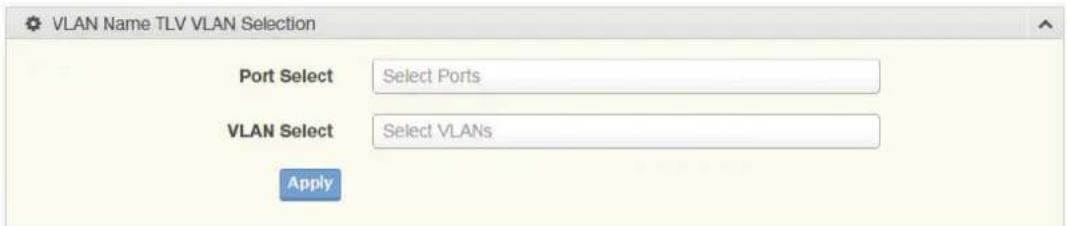
Figure 4.88 Management > LLDP > LLDP Port Settings > VLAN Name TLV VLAN Selection
The following table describes the items in the previous figure.
Item Description
Port Select Enter the port number to associated with the TLV selection.
VLAN Select Select the VLAN Name ID to be carried out (multiple selection is allowed).
Apply Click Apply to save the values and update the screen.
The ensuing table for LLDP Port VLAN TLV Status settings are informational only and display the following: Port and Selected VLAN.
4.10.1.3 LLDP Local Device Info
The LLDP Local Device Info page allows you to view information regarding network devices, providing that the switch has already obtained LLDP information on the devices.
To access this page, click Management > LLDP > LLDP Local Device Info.
The ensuing table for Local Device Summary settings are informational only and display the following: Chassis ID Subtype, Chassis ID, System Name, System Description, Capabilities Supported, Capabilities Enabled and Port ID Subtype.
The ensuing table for Port Status settings are informational only and display the following: Port, Selected VLAN and Detail (click the radio box and click Detail to displays the details).
4.10.1.4 LLDP Remote Device Info
The LLDP Remote Device Info page allows you to view information about remote devices, LLDP information must be available on the switch.
To access this page, click Management > LLDP > LLDP Remote Device Info.

Figure 4.89 Management > LLDP > LLDP Remote Device Info
The following table describes the items in the previous figure.
Item Description
Detail Click to display the device details.
Delete Click to delete the selected devices.
Refresh Click to refresh the remote device information list.
4.10.1.5 LLDP Overloading
To access this page, click Management > LLDP > LLDP Overloading.
The ensuing table for LLDP Overloading settings are informational only and display the following: Port, Total (Bytes), Left to Send (Bytes), Status and Status (Mandatory TLVs, 802.3 TLVs, Optional TLVs and 802.1 TLVs).
4.10.2 SNMP
Simple Network Management Protocol (SNMP) is a protocol to facilitate the monitoring and exchange of management information between network devices. Through SNMP, the health of the network or status of a particular device can be determined.
4.10.2.1 SNMP Settings
The SNMP Settings page allows you to set the SNMP daemon state (enabled or disabled).
To access this page, click Management > SNMP > SNMP Settings.

Figure 4.90 Management > SNMP > SNMP Settings
The following table describes the items in the previous figure.
| Item Description | |
| State | Click Enabled or Disabled to define the SNMP daemon. |
| Apply | Click Apply to save the values and update the screen. |
The ensuing table for SNMP Information settings are informational only and display the following: SNMP.
4.10.2.2 SNMP Community
The SNMP Community page provides configuration options for the community.
SNMP v1 and SNMP v2c use the group name (Community Name) certification. It's role is similar to the password function. If SNMP v1 and SNMP v2c are used, you can go directly from the configuration settings to this page to configure the SNMP community.
To access this page, click Management > SNMP > SNMP Community.

Figure 4.91 Management > SNMP > SNMP Community
The following table describes the items in the previous figure.
Item Description
Community Name Enter a community name (up to 20 characters).
Access Right Click the radio box to specify the access level (read only or read write)
Apply Click Apply to save the values and update the screen.
The ensuing table for Community Status settings are informational only and display the following: No., Community Name, Access Right and Delete (click to delete the desired community name).
4.10.2.3 SNMP User Settings
The SNMP User Settings page allows you to create SNMP groups. The users have the same level of security and access control permissions as defined by the group settings.
To access this page, click Management > SNMP > SNMP User Settings.
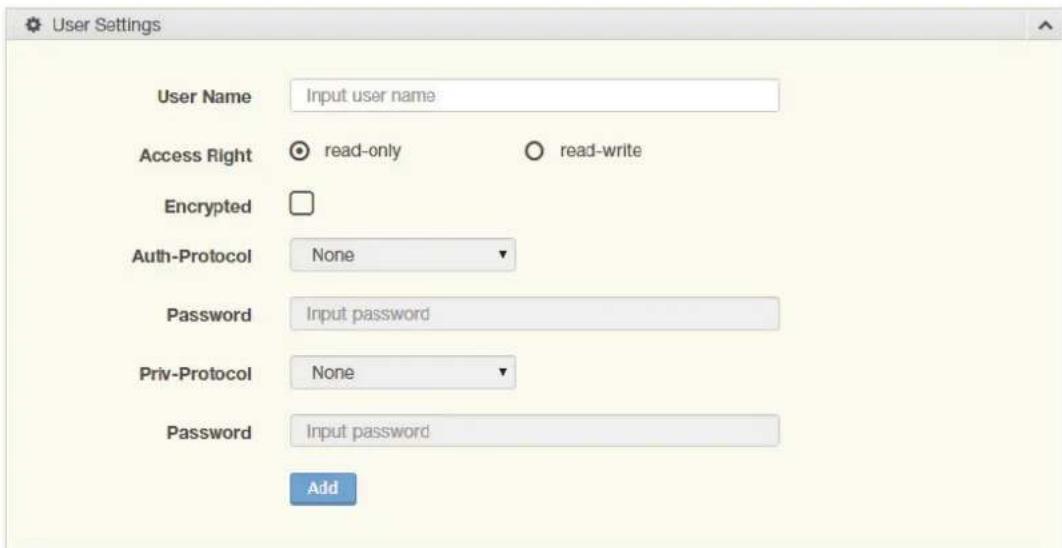
Figure 4.92 Management > SNMP > SNMP User Settings
The following table describes the items in the previous figure.
Item Description
User Name Enter a user name (up to 32 characters) to create an SNMP profile.
| Access Right | Click read-only or read-write to define the access right for the profile. |
| Encrypted | Click the option to set the encrypted option for the user setting. |
| Auth-Protocol | Click the drop-down menu to select the authentication level: MD5 or SHA. The field requires a user password.MD5: specify HMAC-MD5-96 authentication levelSHA: specify HMAC-SHA authentication protocol |
| Password Enter the characters to define the password associated with the authentication protocol. | |
| Priv-Protocol | Click the drop-down menu to select an authorization protocol: none or DES.The field requires a user password.None: no authorization protocol in useDES: specify 56-bit encryption in use |
| Password Enter the characters to define the password associated with the authorization protocol. | |
| Add | Click Add to save the values and update the screen. |
The ensuing table for User Status settings are informational only and display the following: User Name, Access Right, Auth-Protocol, Priv-Protocol and Delete (click to delete the desired user name).
4.10.2.4 SNMP Trap
The SNMP Trap page allows you to set the IP address of the node and the SNMP credentials corresponding to the version that is included in the trap message.
To access this page, click Management > SNMP > SNMP Trap.
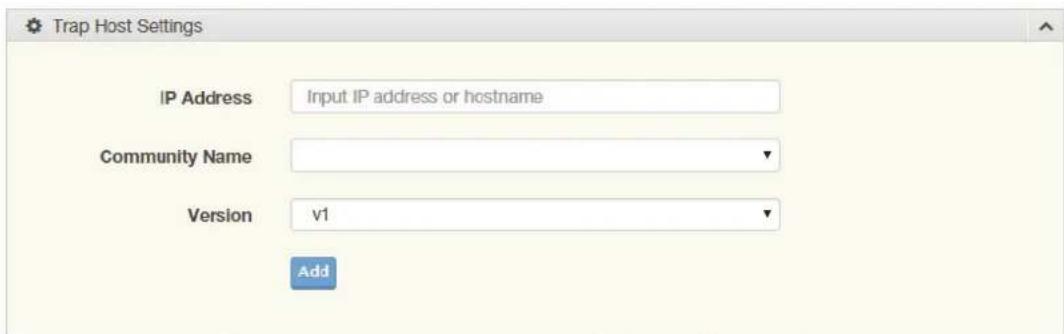
Figure 4.93 Management > SNMP > SNMP Trap
The following table describes the items in the previous figure.
| Item Description |
| IP Address Enter the IP address to designate the SNMP trap host. |
| Community Name Click the drop-down menu to select a defined community name. |
| Version Click the drop-down menu to designate the SNMP version credentials (v1 or v2c). |
| Add Click Add to save the values and update the screen. |
The ensuing table for Trap Host Status settings are informational only and display the following: No., IP Address, Community Name, Version and Delete (click to delete the desired IP address).
4.10.3 TCP Modbus Settings
The TCP Modbus function allows for client-server communication between a switch module (server) and a device in the networking running MODBUS client software (client).
4.10.3.1 TCP Modbus Settings
The TCP Modbus Settings page allows you to configure the modbus function.
To access this page, click Management > TCP Modbus Settings > TCP Modbus Settings.

Figure 4.94 Management > TCP Modbus Settings > TCP Modbus Settings
The following table describes the items in the previous figure.
| Item Description | |
| State | Click Disabled or Enabled to set the TCP Modbus state. |
| Time out Enter the value (1 to 86400) to define the timeout period between transport time. | |
| Apply Click Apply to save the values and update the screen. | |
The ensuing table for TCP Modbus Status settings are informational only and display the following: TCP Modbus status and TCP Modbus time out.
4.10.4 DHCP Server
The Dynamic Host Configuration Protocol (DHCP) is a network protocol enabling a server to automatically assign an IP address to a computer from a defined range of numbers configured for a given network.
4.10.4.1 Status Settings
The Status Settings page allows you to configure the DHCP server mode (enabled or disabled).
To access this page, click Management > DHCP Server > Status Settings.

Figure 4.95 Management > DHCP Server > Status Settings
The following table describes the items in the previous figure.
| Item Description | |
| DHCP Server | Select Enable or Disable to designate the DHCP server function type.When a new DHCP server mode is selected, the switch requires a system restart for the new mode to take effect. |
| Apply Click Apply to save the values and update the screen. | |
| Restart | Click Restart to have the switch perform a system restart function. In the event that the IP settings are changed, the DHCP server must be restarted for the IP settings to take effect. |
The ensuing table for Status Information settings are informational only and display the following: DHCP Server Service.
4.10.4.2 Global Settings
The Global Settings page allows you to configure the global settings for the DHCP function.
To access this page, click Management > DHCP Server > Global Settings.
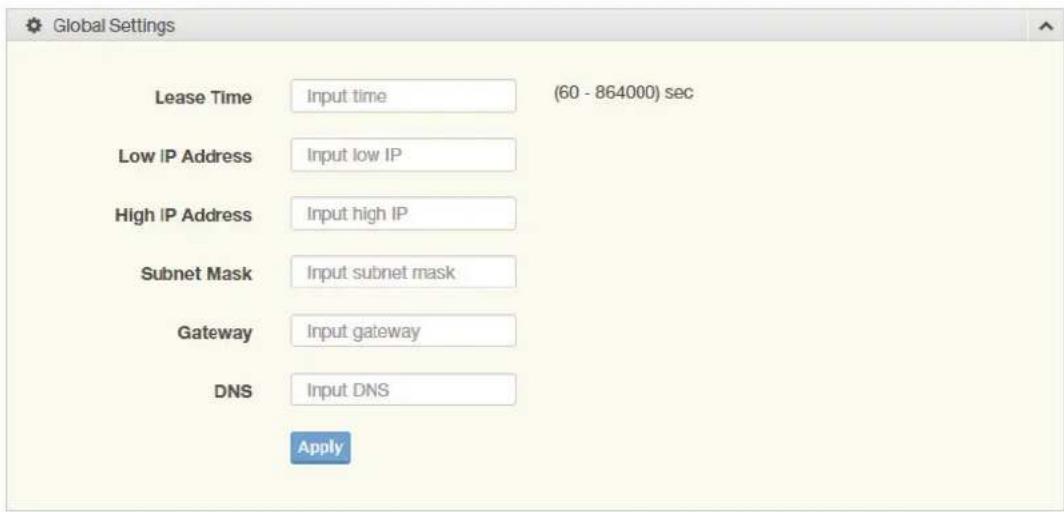
Figure 4.96 Management > DHCP Server > Global Settings
The following table describes the items in the previous figure.
Item Description
| Lease Time Type in the value designating the lease time (60 - 864000) in seconds for each setting lease. | |
| Low IP Address Type in the value designating the lowest range in the IP address pool. | |
| High IP Address Type in the value designating the highest range in the IP address pool. | |
| Subnet Mask Type in the value designating the subnet mask for the IP address pool. | |
| Gateway Type in the value designating the gateway for the IP address pool. | |
| DNS Type in the value designating the DNS for the IP address pool. | |
| Apply | Click Apply to save the values and update the screen. |
The ensuing table for Global Information settings are informational only and display the following: Lease Time, Low IP Address, High IP Address, Subnet Mask, Gateway, DNS and Clear (click to clear IP pool).
4.10.4.3 Port Settings
The Port Settings page allows you to configure selected ports for the DHCP function. To access this page, click Management > DHCP Server > Port Settings.
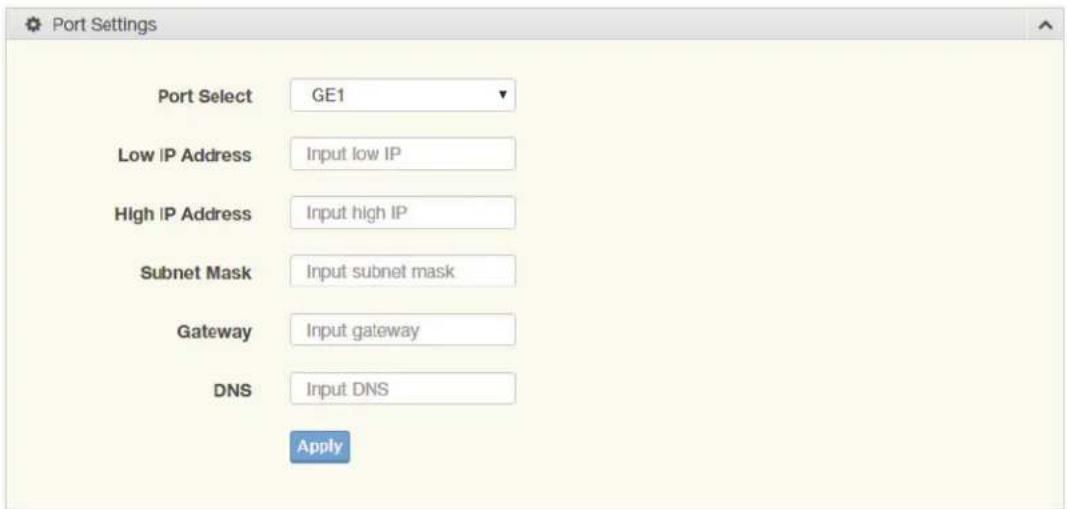
Figure 4.97 Management > DHCP Server > Port Settings
The following table describes the items in the previous figure.
| Item Description | |
| Port Select | Click the drop-down menu to select a pre-defined port to configure.The suboptions are designated for the selected port. |
| Low IP Address Type in the value designating the lowest range in the IP address pool. | |
| High IP Address Type in the value designating the highest range in the IP address pool. | |
| Subnet Mask Type in the value designating the subnet mask for the IP address pool. | |
| Gateway Type in the value designating the gateway for the IP address pool. | |
| DNS Type in the value designating the DNS for the IP address pool. | |
| Apply Click Apply to save the values and update the screen. | |
The ensuing table for Port Information settings are informational only and display the following: Port, Low IP Address, High IP Address, Subnet Mask, Gateway, DNS, Edit (click to modify the settings) and Clear (click to clear the settings).
4.10.4.4 VLAN Settings
To access this page, click Management > DHCP Server > VLAN Settings.

Figure 4.98 Management > DHCP Server > VLAN Settings
The following table describes the items in the previous figure.
| Item Description | |
| Entry Click the drop-down menu to select an entry for the VLAN setting. | |
| VLAN ID Type in the value designating the VLAN ID. | |
| Low IP Address Type in the value designating the lowest range in the IP address pool. | |
| High IP Address Type in the value designating the highest range in the IP address pool. | |
| Subnet Mask Type in the value designating the subnet mask for the IP address pool. | |
| Gateway Type in the value designating the gateway for the IP address pool. | |
| DNS Type in the value designating the DNS for the IP address pool. | |
| Apply Click Apply to save the values and update the screen. |
The ensuing table for Entry Information settings are informational only and display the following: Entry (click the drop-down menu to select an entry), Entry ID, VLAN ID, Low IP Address, High IP Address, Subnet Mask, Gateway, DNS, Edit (click to modify the settings) and Clear (click to clear the settings).
4.10.4.5 Option 82 Settings
The Option 82 Settings, also known as the DHCP relay agent information option, provide information about the network location of a DHCP client. In turn, the DHCP server uses the information to implement IP addresses or other parameters for the client.
To access this page, click Management > DHCP Server > Option 82 Settings.

Figure 4.99 Management > DHCP Server > Option 82 Settings
The following table describes the items in the previous figure.
Item Description
| Entry Click the drop-down menu to select an entry for the Option 82 setting. | |
| Circuit ID Format Click the drop-down menu to select the format of the circuit ID: string or hex. | |
| Circuit ID Content Enter the circuit ID string on the switch on which the request was received. | |
| Remote ID Format Click the drop-down menu to select the format of the remote ID: string or hex. | |
| Remote ID Content Enter the remote ID string of the host. | |
| Low IP Address Type in the value designating the lowest range in the IP address pool. | |
| High IP Address Type in the value designating the highest range in the IP address pool. | |
| Subnet Mask Type in the value designating the subnet mask for the IP address pool. | |
| Gateway Type in the value designating the gateway for the IP address pool. | |
| DNS Type in the value designating the DNS for the IP address pool. | |
| Apply Click Apply to save the values and update the screen. |
The ensuing table for Entry Information settings are informational only and display the following: Entry (click the drop-down menu to select an entry), Entry ID, Circuit ID Format, Circuit ID Content, Remote ID Format, Remote ID Content, Low IP Address,
High IP Address, Subnet Mask, Gateway, DNS, Edit (click to modify the settings) and Clear (click to clear the settings).
4.10.4.6 Lease Entry
To access this page, click Management > DHCP Server > Lease Entry.
The ensuing table for Lease entry Table settings are informational only and display the following: IP Address, Client Mac, Start Time, End Time and Type.
4.10.5 SMTP Client
Simple Mail Transfer Protocol (SMTP) is a protocol to send e-mail messages between servers. SMTP is used to send messages from a mail client to a mail server. SMTP by default uses TCP port 25.
4.10.5.1 Global Settings
The Global Settings page allows you to set the active profile for the SMTP client.
To access this page, click Management > SMTP Client > Global Settings.
Figure 4.100 Management > SMTP Client > Global Settings
The following table describes the items in the previous figure.
Item Description
| Active Profile Click the drop-down menu to select the profile status (None, 1 or 2). | |
| Apply | Click Apply to save the values and update the screen. |
The ensuing table for SMTP Information settings are informational only and display the following: Active Profile Id.
4.10.5.2 Profile Settings
The Profile Settings page allows you to select the server IP, the server port, and sender mail for the listed profile.
To access this page, click Management > SMTP Client > Profile Settings.

Figure 4.101 Management > SMTP Client > Profile Settings > Profile Settings
The following table describes the items in the previous figure.
Item Description
| Profile ID | Click the drop-down menu to select the identification type for the profile (1 or 2). |
| Server IP Enter the IP address to designate the server host. | |
| Server Port Enter the port number to designate the port associated with the server IP address. | |
| Sender Mail Enter the email address of the sender client. | |
| Apply Click Apply to save the values and update the screen. | |
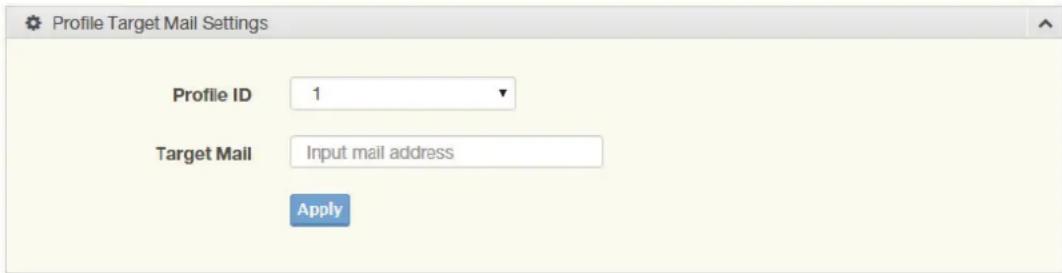
Figure 4.102 Management > SMTP Client > Profile Settings > Profile Target Mail Settings
The following table describes the items in the previous figure.
Item Description
| Profile ID | Click the drop-down menu to select the identification type for the profile (1 or 2). |
| Target Mail Enter the email address of the target client. | |
| Apply Click Apply to save the values and update the screen. | |
The ensuing table for Profile Information settings are informational only and display the following: Profile ID (click the drop-down menu to select a profile ID), Server IP, Server Port and Sender Mail Address.
The Sending Message page allows you to setup the log message for use with the SMTP client.
To access this page, click Management > SMTP Client > Sending Message.
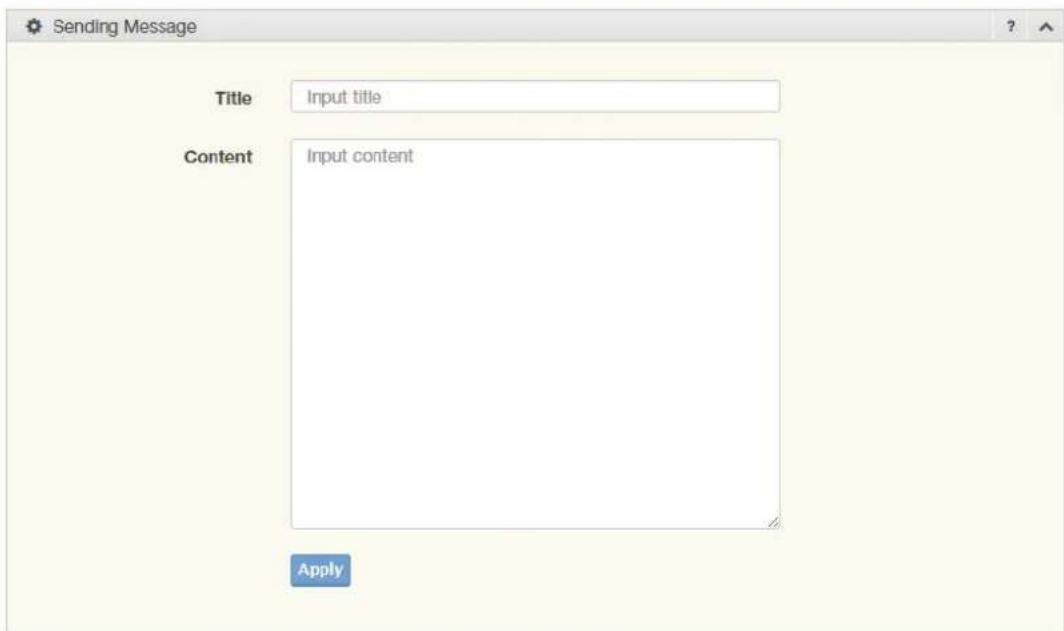
Figure 4.103 Management > SMTP Client > Sending Message
The following table describes the items in the previous figure.
| Item Description | |
| Title Assign the title of the email. The maximum length is 20 characters(alphanumeric, symbols (. (dot), _ (underline), - (dash line) and space). | |
| Content Assign the content of the email. The maximum length is 64 characters(alphanumeric, symbols (. (dot), _ (underline), - (dash line) and space). | |
| Apply | Click Apply to save the values and update the screen. |
4.10.6 RMON
Remote monitoring (RMON) uses a client-server model to monitor/manage remote devices on a network.
4.10.6.1 RMON Statistics
The RMON Statistics page allows you to view information regarding packet sizes and information for physical layer errors. The information displayed is according to the RMON standard.
To access this page, click Management > RMON > RMON Statistics.
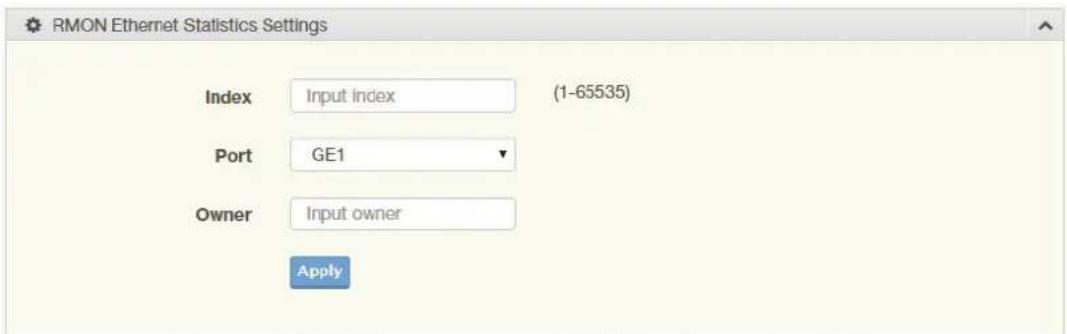
Figure 4.104 Management > RMON > Rmon Statistics
The following table describes the items in the previous figure.
Item Description
Index Enter an entry selection (1 to 65535) to display its statistical information.
Port Enter the respective port number for the selected entry.
Owner Enter the name of the owner of the RMON group.
Apply Click Apply to save the values and update the screen.
The ensuing table for Statistics Information settings are informational only and display the following: Index, Port, Drop Events, Octets, Packets, Broadcast, Multicast, Owner and Delete (click to delete the desired index).
4.10.6.2 RMON History
The RMON History page allows you to configure the display of history entries.
To access this page, click Management > RMON > RMON History.

Figure 4.105 Management > RMON > RMON History
The following table describes the items in the previous figure.
| Item Description | |
| Index Enter the index entry (1 to 65535) to select the number of new history table entries. | |
| Port Select the specific port switch. | |
| Buckets Requested Enter the specific (1-50) number of samples to store. | |
| Interval Enter value in seconds (1 to 3600) to designate a specific interval time for the collection of samples. | |
| Owner Enter the name of the owner of the RMON history group. | |
| Apply Click Apply to save the values and update the screen. |
The ensuing table for History Information settings are informational only and display the following: Index, Port, Buckets Requested, Interval, Owner and Delete (click to delete the desired index).
4.10.6.3 RMON Alarm
The RMON Alarm page allows you to configure RMON statistics group and alarm groups.
To access this page, click Management > RMON > RMON Alarm.

Figure 4.106 Management > RMON > Rmon Alarm
The following table describes the items in the previous figure.
Item Description
| Index Enter the index entry (1 to 65535) to define a specific Alarm Collection history entry. | |
| Interval Enter a value (1 to 2147483647) to define the interval value for the Alarm Collection history. | |
| Variable Enter the alarm variables to define the monitoring triggers. | |
| Sample Type Enter the variable sample type. | |
| Rising Threshold Enter the rising alarm threshold trigger. | |
| Falling Threshold Enter the falling alarm threshold trigger. | |
| Rising Event Index Enter the rising event index (1-65535) to define the alarm group. | |
| Falling Event Index Enter the falling event index (1-65535) to define the alarm group. | |
| Owner | Enter the name of the owner of the RMON alarm group. |
| Apply | Click Apply to save the values and update the screen. |
The ensuing table for Alarm Information settings are informational only and display the following: Index, Interval, Variable, Sample Type, Rising Threshold, Falling Threshold, Rising Event Index, Falling Event Index, Owner and Delete (click to delete the desired index).
4.10.6.4 RMON Event
The RMON Event page is used to configure RMON event groups. To access this page, click Management > RMON > RMON Event.

Figure 4.107 Management > RMON > RMON Event
The following table describes the items in the previous figure.
| Item Description | |
| Index Enter the index entry (1 to 65535) to define a specific RMON event. | |
| Description Enter a value (1 to 2147483647) to define the interval value for the Alarm Collection history. | |
| Type Click the drop-down menu to define the event type: None, Log, SNMP Trap, Log and Trap. | |
| Community Enter the community string to be passed for the specified event. | |
| Owner Enter the name of the owner of the RMON event. | |
| Apply Click Apply to save the values and update the screen. |
The ensuing table for Event Information settings are informational only and display the following: Index, Description, Type, Community, Owner and Delete (click to delete the desired index).
4.11 Diagnostics
Through the Diagnostics function configuration of settings for the switch diagnostics is available.
4.11.1 Cable Diagnostics
The Cable Diagnostics page allows you to select the port for applying a copper test. To access this page, click Diagnostics > Cable Diagnostics.

Figure 4.108 Diagnostics > Cable Diagnostics
The following table describes the items in the previous figure.
Item Description
Port Click the drop-down menu to select a pre-defined port for diagnostic testing. Giga ports are displayed with a channel A to D designation.
Copper Test Click Copper Test to display the test result for the selected port.
The ensuing table for Test Result settings are informational only and display the following: Port, Channel A, Cable Length A, Channel B, Cable Length B, Channel C, Cable Length C, Channel D and Cable Length D.
4.11.2 Ping Test
The Ping Test page allows you to configure the test log page.
To access this page, click Diagnostics > Ping Test.

Figure 4.109 Diagnostics > Ping Test
The following table describes the items in the previous figure.
Item Description
IP Address Enter the IP address or host name of the station to ping. The initial value is blank. The IP Address or host name you enter is not retained across a power cycle. Host names are composed of series of labels concatenated with periods. Each label must be between 1 and 63 characters long, maximum of 64 characters.
Count Enter the number of echo requests to send. The default value is 4. The value ranges from 1 to 5. The count entered is not retained across a power cycle.
Interval (in sec) Enter the interval between ping packets in seconds. The default value is 1. The value ranges from 1 to 5. The interval entered is not retained across a power cycle.
Item Description
Size (in bytes) Enter the size of ping packet. The default value is 56. The value ranges from 8 to 5120. The size entered is not retained across a power cycle.
Ping Results Display the reply format of ping.
PING 172.17.8.254 (172.17.8.254): 56 data bytes
--- 172.17.8.254 ping statistics ---
4 packets transmitted, 0 packets received, 100% packet loss Or
PING 172.17.8.93 (172.17.8.93): 56 data bytes
64 bytes from 172.17.8.93: icmp_seq=0 ttl=128 time=0.0 ms
64 bytes from 172.17.8.93: icmp_seq=1 ttl=128 time=0.0 ms
64 bytes from 172.17.8.93: icmp_seq=2 ttl=128 time=0.0 ms
64 bytes from 172.17.8.93: icmp_seq=3 ttl=128 time=0.0 ms
--- 172.17.8.93 ping statistics ---
4 packets transmitted, 4 packets received, 0% packet loss
round-trip min/avg/max = 0.0/0.0/0.0 ms
Apply Click Apply to display ping result for the IP address.
4.11.3 IPv6 Ping Test
The IPv6 Ping Test page allows you to configure the Ping Test for IPv6.
To access this page, click Diagnostics > IPv6 Ping Test.
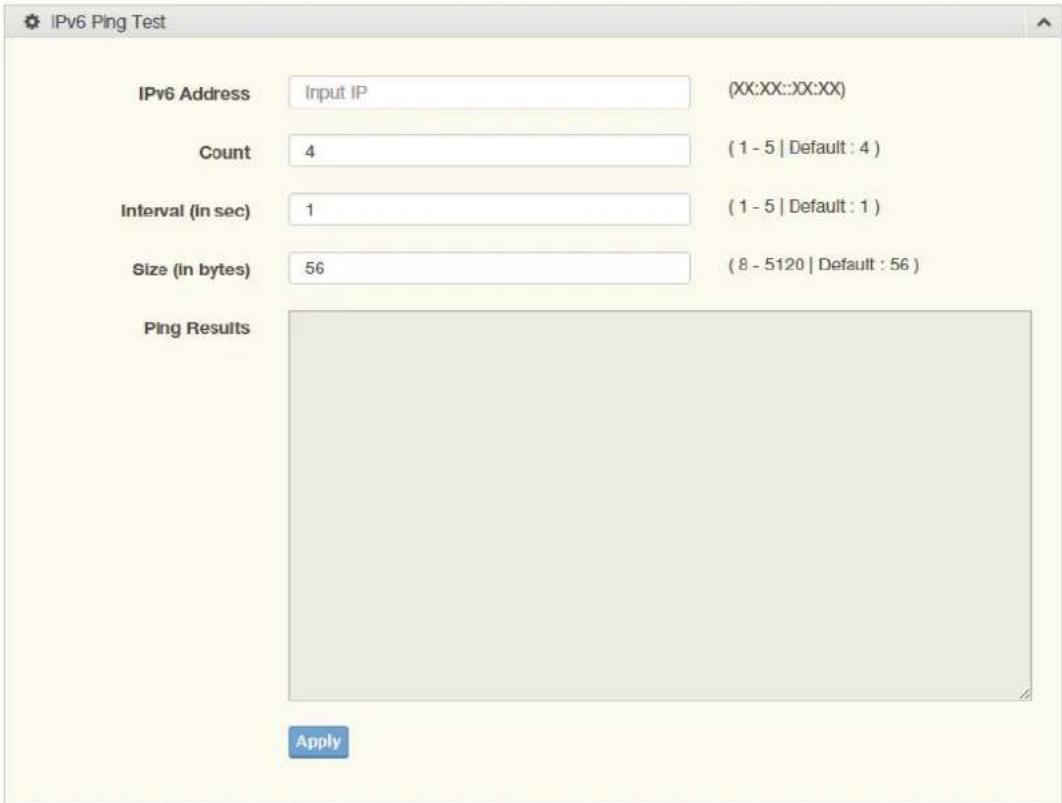
Figure 4.110 Diagnostics > IPv6 Ping Test
The following table describes the items in the previous figure.
| Item Description |
| IPv6 Address Enter the IP address or host name of the station you want the switch to ping. The initial value is blank. The IP Address or host name you enter is not retained across a power cycle. Host names are composed of series of labels concatenated with dots. Each label must be between 1 and 63 characters long, and the entire hostname has a maximum of 64 characters. |
| Count Enter the number of echo requests you want to send. The default value is 4. The value ranges from 1 to 5. The count you enter is not retained across a power cycle. |
| Interval (in sec) Enter the interval between ping packets in seconds. The default value is 1. The value ranges from 1 to 5. The interval you enter is not retained across a power cycle. |
| Size (in bytes) Enter the size of ping packet. The default value is 56. The value ranges from 8 to 5120. The size you enter is not retained across a power cycle. |
| Ping Results Display the reply format of ping.PING 2222:777 (2222:777): 56 data bytes--- 2222:777 ping statistics ---4 packets transmitted, 0 packets received, 100% packet lossOrPING 2222:717 (2222:717): 56 data bytes64 bytes from 2222:717: icmp6_seq=0 ttl=128 time=10.0 ms64 bytes from 2222:717: icmp6_seq=1 ttl=128 time=0.0 ms64 bytes from 2222:717: icmp6_seq=2 ttl=128 time=0.0 ms64 bytes from 2222:717: icmp6_seq=3 ttl=128 time=0.0 ms--- 2222:717 ping statistics ---4 packets transmitted, 4 packets received, 0% packet lossround-trip min/avg/max = 0.0/2.5/10.0 ms |
Apply Click Apply to display ping result for the IP address.
4.11.4 System Log
4.11.4.1 Logging Service
The Logging Service page allows you to setup the logging services feature for the system log.
To access this page, click Diagnostics > System Log > Logging Service.

Figure 4.111 Diagnostics > System Log > Logging Service
The following table describes the items in the previous figure.
Item Description
Logging Service Click Enabled or Disabled to set the Logging Service status.
Apply Click Apply to save the values and update the screen.
The ensuing table for Logging Information settings are informational only and display the following: Logging Service.
4.11.4.2 Local Logging
The Local Logging page allows you to designate a local target when the severity criteria is reached.
To access this page, click Diagnostics > System Log > Local Logging.

Figure 4.112 Diagnostics > System Log > Local Logging
The following table describes the items in the previous figure.
Item Description
Target Enter the local logging target.
| Severity Click the drop-down menu to select the severity level for local log messages. The level options are: emerg: Indicates system is unusable. It is the highest level of severity alert: Indicates action must be taken immediately crit: Indicates critical conditions error: Indicates error conditions warning: Indicates warning conditions notice: Indicates normal but significant conditions info: Indicates informational messages debug: Indicates debug-level messages | |
| Apply | Click Apply to save the values and update the screen. |
The ensuing table for Local Logging Settings Status settings are informational only and display the following: Status, Target, Severity and Delete (click to delete the desired target).
4.11.4.3 System Log Server
The System Log Server page allows you to configure the log server.
To access this page, click Diagnostics > System Log > System Log Server.

Figure 4.113 Diagnostics > System Log > System Log Server
The following table describes the items in the previous figure.
Item Description
Server Address Enter the IP address of the log server.
Server Port Enter the Udp port number of the log server.
Severity Click the drop-down menu to select the severity level for local log messages. The default is emerg.
The level options are:
■ emerg: Indicates system is unusable. It is the highest level of severity
■ alert: Indicates action must be taken immediately
■ crit: Indicates critical conditions
■ error: Indicates error conditions
■ warning: Indicates warning conditions
■ notice: Indicates normal but significant conditions
■ info: Indicates informational messages
- debug: Indicates debug-level messages
Facility Click the drop-down menu to select facility to which the message refers.
Apply Click Apply to save the values and update the screen.
The ensuing table for Remote Logging Setting Status settings are informational only and display the following: Status, Server Info, Severity, Facility and Delete (click to delete the desired server address).
4.11.5 DDM
The DDM page allows you to setup the diagnostic alarm status. To access this page, click Diagnostics > DDM.
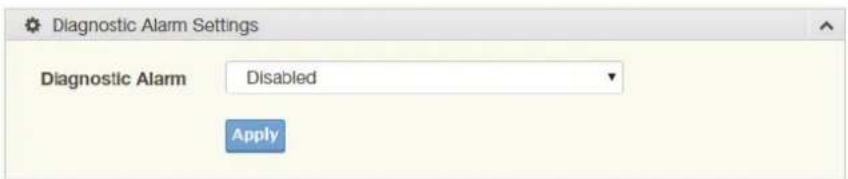
Figure 4.114 Diagnostics > DDM
The following table describes the items in the previous figure.
Item Description
Diagnostic Alarm Click the drop-down menu to designate the announcement method: Disabled, SysLog, E-mail, or SNMP.
Apply Click Apply to save the values and update the screen.
The ensuing table for Diagnostic Alarm Information settings are informational only and display the following: Diagnostic Alarm.
| GE0 | High Alarm | High Warning | Low Alarm | Low Warning |
| Temperature | 95.000℃ Enabled Disabled | 90.000℃ Enabled Disabled | -50.000℃ Enabled Disabled | -45.000℃ Enabled Disabled |
| Voltage | 3.500 V Enabled Disabled | 3.450 V Enabled Disabled | 3.100 V Enabled Disabled | 3.150 V Enabled Disabled |
| TX Basis | 100.000 mA Enabled Disabled | 90.000 mA Enabled Disabled | 6.000 mA Enabled Disabled | 7.000 mA Enabled Disabled |
| TX Power | -1.000 dbm Enabled Disabled | -5.000 dbm Enabled Disabled | -35.000 dbm Enabled Disabled | -30.000 dbm Enabled Disabled |
| RX Power | -1.000 dbm Enabled Disabled | -5.000 dbm Enabled Disabled | -35.000 dbm Enabled Disabled | -30.000 dbm Enabled Disabled |
| Apply | ||||
Figure 4.115 Diagnostics > DDM
The following table describes the items in the previous figure.
Item Description
| High Alarm | Click Enabled or Disabled to set the alarm state. |
| High Warning | Click Enabled or Disabled to set the alarm state. |
| Low Alarm | Click Enabled or Disabled to set the alarm state. |
| Low Warning | Click Enabled or Disabled to set the alarm state. |
| Apply | Click Apply to save the values and update the screen. |
The ensuing table for Vendor Info settings are informational only and display the following: Refresh (click to reload the vendor information), Port, Connector, Speed, VendorName, VendorOui, VendorPn, VendorRev, VendorSn and DateCode.
4.11.6 LED Indication
To access this page, click Diagnostics > LED Indication.

Figure 4.116 Diagnostics > LED Indication
The following table describes the items in the previous figure.
| Item Description | |
| LED Click the drop-down menu to select LED indicator. | |
| State | Select Enable or Disable to enable LED alarm. |
| Event Click to select the event of LED alarm. | |
| Apply Click Apply to save the values and update the screen. | |
The ensuing table for LED Information lists the following settings (informational only): LED and State.
The ensuing table for Event Information lists the following settings (informational only): LED, Event, State, and Delete.
4.12 Tools
4.12.1 Backup Manager
The Backup Manager page allows you to configure a remote TFTP sever or host file system in order to backup the firmware image or configuration file.
To access this page, click Tools > Backup Manager.
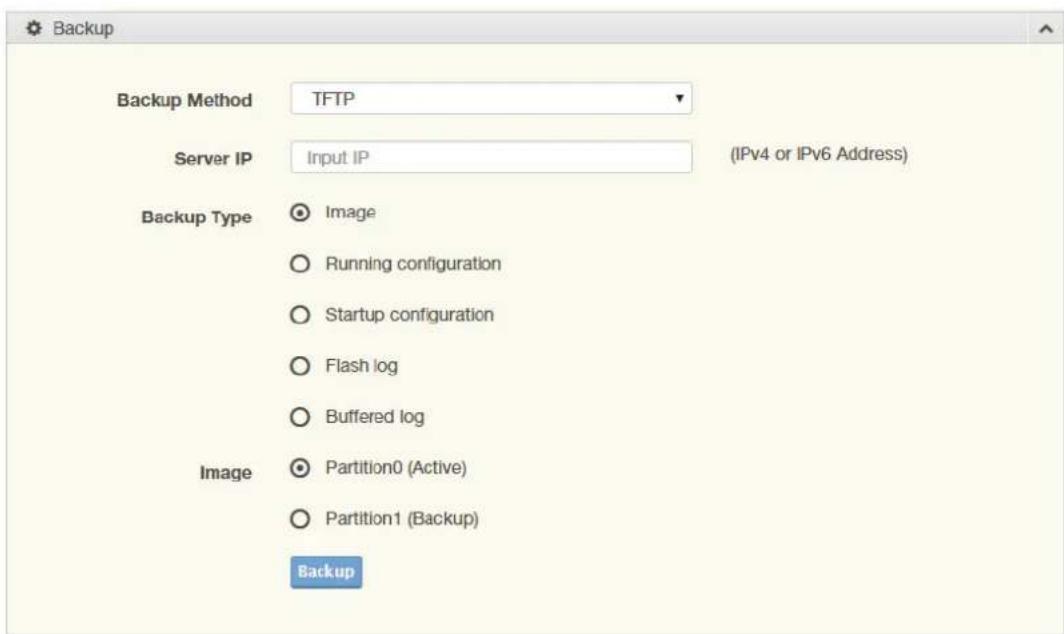
Figure 4.117 Tools > Backup Manager
The following table describes the items in the previous figure.
| Item Description |
| Backup Method Click the drop-down menu to select the backup method: TFTP or HTTP. |
| Server IP Enter the IP address of the backup server. |
| Backup Type Click a type to define the backup method: image: running configuration, startup configuration, flash log, or buffered log. |
| Image Click the format for the image type: 9612G_1_00_13.bix (Active) or vmlinux.bix (backup). |
| Backup Click Backup to backup the settings. |
4.12.2 Upgrade Manager
The Upgrade Manager page allows you to configure a remote TFTP sever or host file system in order to upload firmware upgrade images or configuration files.
To access this page, click Tools > Upgrade Manager.
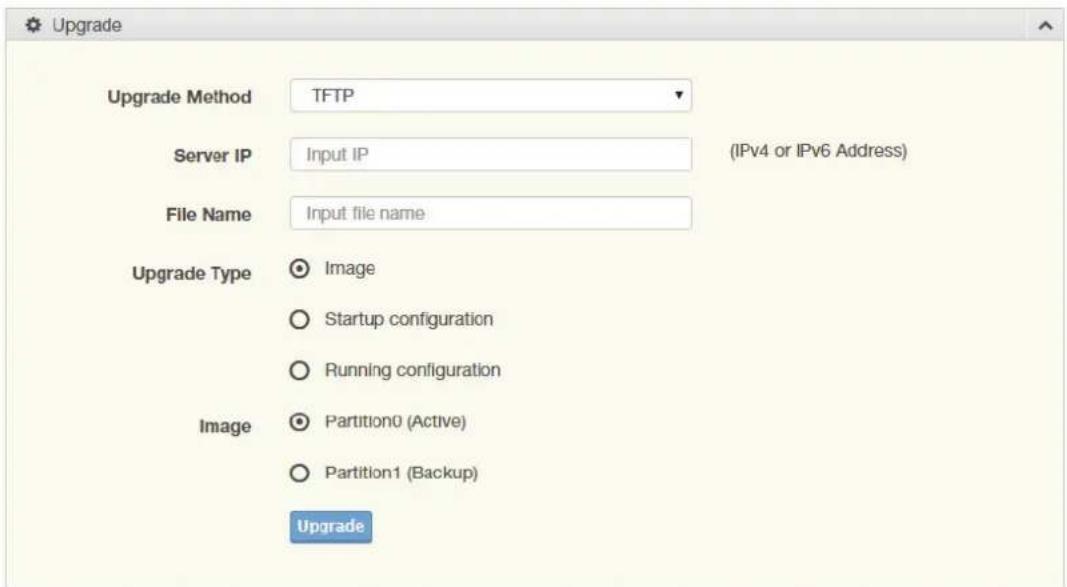
Figure 4.118 Tools > Upgrade Manager
The following table describes the items in the previous figure.
| Item Description | |
| Upgrade Method Click the drop-down menu to select the upgrade method: TFTP or HTTP. | |
| Server IP Enter the IP address of the upgrade server. | |
| File Name Enter the file name of the new firmware version. | |
| Upgrade Type | Click a type to define the upgrade method: image, startup configuration, or running configuration. |
| Image | Click the format for the image type: 9612G_1_00_13.bix (Active) or vmlinux.bix (backup). |
| Upgrade | Click Upgrade to upgrade to the current version. |
4.12.3 Dual Image
The Dual Image page allows you to setup an active and backup partitions for firmware image redundancy.
To access this page, click Tools > Dual Image.
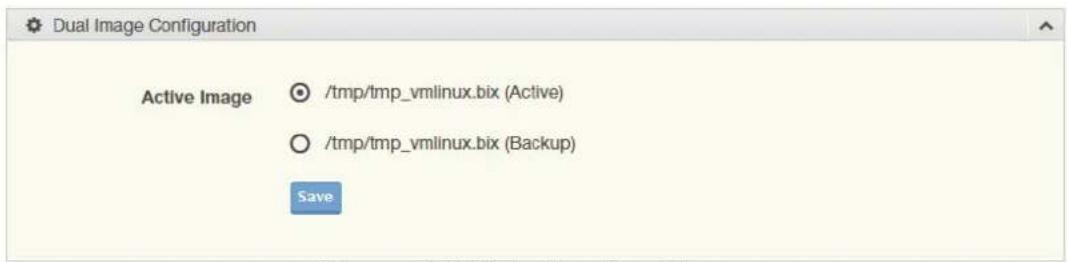
Figure 4.119 Tools > Dual Image
The following table describes the items in the previous figure.
| Item Description | |
| Active Image | Click the format for the image type: Partition0 (Active) or Partition1 (backup). |
| Save Click Save to save and keep the new settings. | |
The ensuing table for Image Information 0/1 settings are informational only and display the following: Flash Partition, Image Name, Image Size and Created Time.
4.12.4 Save Configuration
To access this page, click Tools > Save Configuration.
Click Save Configuration to FLASH to have configuration changes you have made to be saved across a system reboot. All changes submitted since the previous save or system reboot will be retained by the switch.
4.12.5 User Account
The User Account page allows you to setup a user and the related parameters. To access this page, click Tools > User Account.

Figure 4.120 Tools > User Account
The following table describes the items in the previous figure.
| Item Description | |
| User Name Enter the name of the new user entry. | |
| Password Type | Click the drop-down menu to define the type of password: Clear Text, Encrypted or No Password. |
Item Description
Password Enter the character set for the define password type.
Retype Password Retype the password entry to confirm the profile password.
Privilege Type Click the drop-down menu to designate privilege authority for the user entry: Admin or User.
Apply Click Apply to create a new user account.
The ensuing table for Local Users settings are informational only and display the following: User Name, Password Type, Privilege Type and Delete (click to delete the desired user account).
4.12.6 Reset System
To access this page, click Tools > Reset System.
Click Reset to have all configuration parameters reset to their factory default values. Click except for to select the configuration are excepted. All changes that have been made will be lost, even if you have issued a save.
Reset settings take effect after a system reboot.
4.12.7 Reboot Device
To access this page, click Tools > Reboot Device.
Click Reboot to reboot the switch. Any configuration changes you have made since the last time you issued a save will be lost.
Chapter 5
Troubleshooting
5.1 Troubleshooting
- Verify that the device is using the right power cord/adapter (DC 48V); please do not use a power adapter with DC output higher than 48V, or the device may be damaged.
Select the proper UTP/STP cable to construct the user network. Use unshielded twisted-pair (UTP) or shield twisted-pair (STP) cable for RJ-45 connections that depend on the connector type the switch equipped: 100R Category 3, 4 or 5 cable for 10Mbps connections, 100R Category 5 cable for 100Mbps connections, or 100R Category 5e/above cable for 1000Mbps connections. Also be sure that the length of any twisted-pair connection does not exceed 100 meters (328 feet).
R = replacement letter for Ohm symbol.
Diagnosing LED Indicators: To assist in identifying problems, the switch can be easily monitored through panel indicators, which describe common problems the user may encounter, so the user can be guided towards possible solutions.
If the power indicator does not light on when the power cord is plugged in, you may have a problem with power cord. Check for loose power connections, power losses, or surges, at the power outlet. If you still cannot resolve the problem, contact a local dealer for assistance.
If the LED indicators are normal and the connected cables are correct but packets still cannot be transmitted, please check the user system's Ethernet device configuration or status.
ADVANTECH
Enabling an Intelligent Planet
www.advantech.com
Please verify specifications before quoting. This guide is intended for reference purposes only.
All product specifications are subject to change without notice.
No part of this publication may be reproduced in any form or by any means, electronic, photocopying, recording or otherwise, without prior written permission of the publisher.
All brand and product names are trademarks or registered trademarks of their respective companies.
© Advantech Co., Ltd. 2007

- EKI-9612G
- Copyright
- Acknowledgements
- Product Warranty (5 years)
- Declaration of Conformity
- CE
- FCC Class A
- Technical Support and Assistance
- Warnings, Cautions and Notes
- Document Feedback
- Packing List
- Safety Instructions
- Safety Precaution - Static Electricity
- Contents
- Chapter 1 Product Overview ...... 1
- Chapter 2 Switch Installation .... 7
- Chapter 3 Configuration Utility ...... 22
- Chapter 4 Managing Switch...... 28
- System 37
- L2 Switching.... 40
- L3 Switching.... 65
- MAC Address Table.... 67
- Security 69
- QoS....79
- Management 88
- Diagnostics.... 105
- Tools 113
- Chapter 5 Troubleshooting.... 117
- List of Figures
- Chapter 1
- Specifications
- Hardware Views
- Front View
- System LED Panel
- Rear View
- Top View
- No. Item Description
- Chapter 2
- Installation Guidelines
- Connecting Hardware
- Verifying Switch Operation
- Installing the Switch
- DIN Rail Mounting
- Installing the DIN-Rail Mounting Kit
- Removing the DIN-Rail Mounting Kit
- Wall-Mounting
- Note!
- Installing and Removing SFP Modules
- Installing SFP Modules
- Removing SFP Modules
- Connecting the Switch to Ethernet Ports
- RJ45 Ethernet Cable Wiring
- Connecting the Switch to Console Port
- Power Supply Installation
- Overview
- Considerations
- Grounding the Device
- Wiring a Relay Contact
- Wiring the Power Inputs
- Reset Button
- Chapter 3
- Configuration Utility
- First Time Setup
- Overview
- Introduction
- Administrative Interface Access
- Using the Graphical (Web) Interface
- Configuring the Switch for Network Access
- Configuring the Ethernet Ports
- Command Line Interface Configuration
- Introduction to Command-Line Interface (CLI)
- Accessing the CLI
- Web Browser Configuration
- Preparing for Web Configuration
- System Login
- Chapter 4
- Log In
- Recommended Practices
- Changing Default Password
- Click Apply to change the current account settings.
- Monitoring
- Device Information
- Logging Message
- Item Description
- Port Monitoring
- Port Statistics
- Port Utilization
- Link Aggregation
- LLDP Statistics
- IGMP Statistics
- IGMP Statistics
- System
- IP Settings
- IPv6 Settings
- System Time
- Network Port
- L2 Switching
- Port Configuration
- Port Mirror
- Link Aggregation
- Load Balance
- LAG Port Settings
- LACP Priority Settings
- LACP Port Settings
- 802.1Q VLAN
- VLAN Management
- PVID Settings
- Port to VLAN
- VLAN Interface Management
- Q-in-Q
- Global Settings
- Port Settings
- GARP
- GARP Settings
- GVRP Settings
- 802.3az EEE
- Multicast
- Multicast Filtering
- IGMP Snooping
- IGMP Settings
- IGMP Querier
- IGMP Static Groups
- Multicast Groups
- Router Ports
- MLD Snooping
- MLD Settings
- MLD Querier
- MLD Static Group
- Jumbo Frame
- Spanning Tree
- STP Global Settings
- STP Port Settings
- STP Bridge Settings
- STP Port Advanced Settings
- MST Config Identification
- MST Instance ID Settings
- MST Instance Priority Settings
- MST Instance Info
- STP Statistics
- X-Ring Elite
- X-Ring Elite Settings
- X-Ring Elite Groups
- X-Ring Pro
- X-Ring Pro Settings
- X-Ring Pro Groups
- Loopback Detection
- Global Settings
- Port Settings
- L3 Switching
- SNAT (Source NAT)
- Global Settings
- Entry Settings
- DNAT (Destination NAT)
- Routing
- MAC Address Table
- Static MAC
- MAC Aging Time
- Dynamic Forwarding Table
- Security
- Storm Control
- Global Settings
- Port Settings
- Port Security
- Protected Ports
- DoS Prevention
- DoS Global Settings
- DoS Port Settings
- Applications
- TELNET
- SSH
- HTTP
- HTTPS
- 802.1x
- 802.1x Settings
- 802.1x Port Configuration
- IP Security
- Global Settings
- Entry Settings
- QoS
- General
- QoS Properties
- QoS Settings
- Queue Scheduling
- CoS Mapping
- QoS Basic Mode
- Global Settings
- Port Settings
- Rate Limit
- Ingress Bandwidth Control
- Egress Bandwidth Control
- Egress Queue
- Management
- LLDP
- LLDP System Settings
- LLDP Port Settings
- LLDP Local Device Info
- LLDP Remote Device Info
- LLDP Overloading
- SNMP
- SNMP Settings
- SNMP Community
- SNMP User Settings
- SNMP Trap
- TCP Modbus Settings
- TCP Modbus Settings
- DHCP Server
- Status Settings
- Global Settings
- Port Settings
- VLAN Settings
- Option 82 Settings
- Lease Entry
- SMTP Client
- Global Settings
- Profile Settings
- RMON
- RMON Statistics
- RMON History
- RMON Alarm
- RMON Event
- Diagnostics
- Cable Diagnostics
- Ping Test
- IPv6 Ping Test
- System Log
- Logging Service
- Local Logging
- System Log Server
- DDM
- LED Indication
- Tools
- Backup Manager
- Upgrade Manager
- Dual Image
- Save Configuration
- User Account
- Reset System
- Reboot Device
- Chapter 5
- Troubleshooting
- ADVANTECH
Brand : Advantech
Model : EKI-9612G-4FI-AE
Category : Switch