
CAM-NI1 - Rear Camera PAC - Free user manual and instructions
Find the device manual for free CAM-NI1 PAC in PDF.


| Product Type | Rear View Camera |
| Brand | PAC |
| Model | CAM-NI1 |
| Dimensions (approx.) | 50 x 30 x 25 mm |
| Weight | 50 g |
| Power Supply | 12V DC (vehicle power) |
| Video Output | Composite video (RCA) / CVBS |
| Resolution | 720 x 576 (PAL) / 720 x 480 (NTSC) |
| Viewing Angle | 120° (diagonal) |
| Night Vision | Infrared LEDs for low-light visibility |
| Waterproof Rating | IP67 (dust-tight and waterproof) |
| Operating Temperature | -20°C to 70°C |
| Mounting Type | Surface mount (bracket included) |
| Wiring | 6m cable with power and video connectors |
| Main Functions | Rear view display, parking guide lines (optional), automatic activation with reverse gear |
| Maintenance | Clean lens with soft, dry cloth. Check cable connections periodically. |
| Safety Precautions | Install securely to avoid detachment. Ensure proper voltage. |
| Spare Parts / Repairability | Lens and cable not user-serviceable. Contact PAC for replacements. |
| General Information | For use with compatible monitors. User manual available for free download. |
Frequently Asked Questions - CAM-NI1 PAC
User questions about CAM-NI1 PAC
0 question about this device. Answer the ones you know or ask your own.
Ask a new question about this device
Download the instructions for your Rear Camera in PDF format for free! Find your manual CAM-NI1 - PAC and take your electronic device back in hand. On this page are published all the documents necessary for the use of your device. CAM-NI1 by PAC.
USER MANUAL CAM-NI1 PAC
Introduction & Features
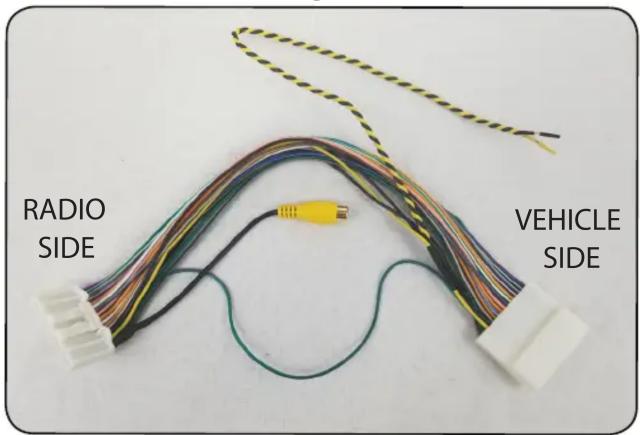
The CAM-NI1 is a reverse camera T-harness that gives the ability to add a reverse camera input for compatible Nissan radios. Simple plug and play installation.
Installation:
Adding a reverse camera to an OEM radio:
- Disassemble dash and remove the radio.
- Disconnect the 32 pin connector from the back of the factory radio (if equipped) and install the T-harness.
- Connect the RCA from the aftermarket camera to the female RCA located in the T-harness
- The OEM radio, when connected to this harness, may provide a +6v power output on the Yellow wire if needed. Most aftermarket cameras require +12v for power, if your camera requires +12v then you will need to find a reliable source of +12 volt ACC power. If not being used please insulate the Yellow wire.
- To function properly the camera must have power before the vehicle is placed into reverse, so using the reverse lamp as a power source is not recommended for proper functionality.
- It may be necessary to provide a reverse trigger to the radio. Normally a reverse trigger is provided by the vehicle manufacturer, as long as the camera has power when the vehicle is placed into reverse, the radio should automatically switch to the reverse camera. In the event that the radio does not automatically switch to the reverse camera a +12v reverse signal will need to be added to Pin 30 of the 32 pin connector. To do this, cut the Green / Purple wire in pin 30 in half and apply the +12v reverse signal to the radio side of the cut wire. See Fig 1 and Fig 2.
Fig. 1

natural_image
Close-up of a white plastic container with colorful cylindrical objects, one highlighted by a red arrow (no text or symbols visible)Fig. 2
Brand : PAC
Model : CAM-NI1
Category : Rear Camera