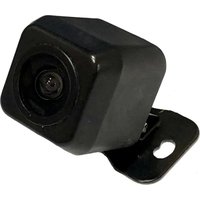
CFF-02 - Security Camera CRUX - Free user manual and instructions
Find the device manual for free CFF-02 CRUX in PDF.


| Brand | CRUX |
| Model | CFF-02 |
| Product Type | Security Camera (Vehicle Backup/Front Camera) |
| Dimensions | Approx. 2.5 x 2.5 x 1.5 inches (63 x 63 x 38 mm) |
| Weight | Approx. 2.5 oz (70 g) |
| Power Supply | 12V DC, 500 mA (from reverse light or headunit) |
| Power Trigger | Red wire A (reverse light) or Red wire B (headunit), do not connect both |
| Ground | Black wire to vehicle body metal |
| Parking Guide Lines | ON/OFF via WHITE loop wire (default ON) |
| Image Flip | Horizontal flip for front camera use via GREEN loop wire (default OFF) |
| Mounting | Butterfly mount for various locations |
| Compatibility | Works with aftermarket radios with backup camera input |
| Included Parts | Camera, Extension coax cable, Regulator, Wiring harness |
| Installation | Requires connection to reverse light or headunit for power |
| Viewing Angle | Not specified, typical wide angle (approx. 120°) |
| Resolution | Not specified, typical for backup cameras (480p or 720p) |
| Video Output | Composite video over coax (RCA) |
| Maintenance | Clean lens with soft, dry cloth; avoid water ingress |
| Safety | Disconnect power before installation; avoid short circuits |
| Repairability | Not user-serviceable; replace entire unit if damaged |
| Certifications | Not specified |
| Warranty | Not specified |
Frequently Asked Questions - CFF-02 CRUX
User questions about CFF-02 CRUX
0 question about this device. Answer the ones you know or ask your own.
Ask a new question about this device
Download the instructions for your Security Camera in PDF format for free! Find your manual CFF-02 - CRUX and take your electronic device back in hand. On this page are published all the documents necessary for the use of your device. CFF-02 by CRUX.
USER MANUAL CFF-02 CRUX
- Parking guide lines with on/off function.
- For front or rear view use.
- Butterfly mount for a variety of mounting locations.
PARTS INCLUDED:

natural_image
Close-up of a black rectangular electronic device with a circular lens and mounting bracket (no visible text or symbols)
natural_image
Coiled black cable with red and yellow connectors, no visible text or symbolsCFF-02 CAMERA EXTENSION CABLE
INSTALLATION DIAGRAM:

flowchart
graph LR
    A["Reverse Camera Interface Backup Camera Input"] --> B["OR"]
    B --> C["To Aftermarket Radio Backup Camera Input"]
    C --> D["Extension Coax Cable"]
    D --> E["Regulator"]
    E --> F["Make sure the arrows line up and push in the connectors well."]
    F --> G["GREEN Wire Flip Image (see below)"]
    G --> H["WHITE Wire Parking Guideline (see below)"]
    H --> I["Camera"]
    I --> J["Red Wire (B)*"]
    J --> K["RED Wire (A)*"]
    K --> L["Black Wire (Ground)"]
*NOTE: The camera needs a +12V trigger. Power the camera at the headunit using RED Wire B or from the reverse light wire using RED Wire A. DO NOT connect both wires to +12V at the same time. Insulate the red wire that is not being used. Tap the Black wire to an existing ground lead, or ground Black wire securely to vehicle body metal.
| Loop Wire Color | Function | Joined | Cut |
| White | Parking Lines | ON (default) | OFF |
| Green | Flip Image horizontally to use as a front camera | OFF (default) | ON |
NOTE: Reset the camera by disconnecting the power wire after cutting or joining the loop wires for the option to take effect.
Brand : CRUX
Model : CFF-02
Category : Security Camera