
VCA-SAE902 - Cleaning Station SAMSUNG - Free user manual and instructions
Find the device manual for free VCA-SAE902 SAMSUNG in PDF.


| Product Type | Clean Station |
| Brand | Samsung |
| Model | VCA-SAE902 |
| Dimensions (W x D x H) | 180 mm x 185 mm x 600 mm |
| Weight | 5.6 kg |
| Power Supply | 230-240 V, 50 Hz or 220-230 V, 50 Hz or 230 V, 60 Hz |
| Dust Bag Capacity | 2 bags (1 included) |
| Accessories | Dustbin, Power cord, User manual |
| Compatibility | Samsung Jet wireless vacuum only |
| Status Indicator | Blue (operation), Red (dust bag full) |
| Safety Features | Overheating prevention, automatic stop when dust bag full |
| Filter Types | Premotor Filter (washable), Ultra fine Dust Filter (replace yearly) |
| Dust Bag Replacement Indicator | Red LED |
| Maintenance | Replace dust bag when red; clean premotor filter with water; shake ultra fine filter |
| Usage | Insert dustbin, press Push button, automatic dust ejection |
| Installation Requirements | Place on stable floor, 10 cm from wall, avoid uneven surfaces |
| Power Cord Length | Not specified (estimate 1.5 m) |
| Replacement Dust Bag Model | VCA-ADB90 |
| Country of Origin | Not specified |
Frequently Asked Questions - VCA-SAE902 SAMSUNG
User questions about VCA-SAE902 SAMSUNG
0 question about this device. Answer the ones you know or ask your own.
Ask a new question about this device
Download the instructions for your Cleaning Station in PDF format for free! Find your manual VCA-SAE902 - SAMSUNG and take your electronic device back in hand. On this page are published all the documents necessary for the use of your device. VCA-SAE902 by SAMSUNG.
USER MANUAL VCA-SAE902 SAMSUNG
- Before operating this unit, please read the instructions carefully.
- For indoor use only
Contents
PREPARATION
Safety Information 3
INSTALLATION
Installing the clean station 7
Installation guide 7
OPERATION
Using the clean station 8
Product specifications

MAINTENANCE
Maintaining the clean station 10
Dust bag 10
Dustbin
11
Premotor Filter 11
Ultra fine Dust Filter 11
| Model | VCA-SAE90AVCA-SAE90B | VCA-SAE901, VCA-SAE902VCA-SAE903, VCA-SAE904 |
| Power | 230-240 V, 50 Hz or 220-230 V, 50 Hz or 230 V, 60 Hz | |
| Weight | 5.6 kg | |
| Size | W 180 mm x D 185 mm x H 600 mm | |
| Dust bag | 3 units | 2 units |
NOTE
- The wave pattern on the exterior of the product is a natural appearance due to the use of pearl plastic materials and its pearl distribution.
Accessories
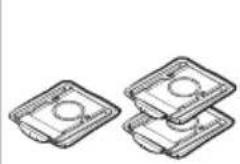
* VCA-SAE90A, VCA-SAE90B
natural_image
Two identical rectangular plastic containers with circular cutouts, arranged side by side (no text or symbols visible)Dust bag: 3 units (Inside the product: 1 unit)
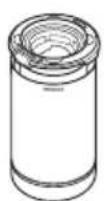
Dustbin
* VCA-SAE901, VCA-SAE902 VCA-SAE903, VCA-SAE904

Dust bag: 2 units (Inside the product: 1 unit)

Dustbin
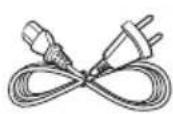
Power cord

User manual

NOTE
- If you want to purchase an additional dust bag, check the model name (VCA-ADB90) and Samsung logo (SAMSUNG) first, then contact your nearest Samsung Electronics retailer or Samsung service center.
English2.
Safety Information
The following contents are written for users' safety and prevention of property damage. Before using the product, please read this manual thoroughly and use the product correctly.
*For safety reasons, people with physical, sensory difficulties, or mental disorder, lack of experience and knowledge should not use this product without the supervision of their guardians.
Caution/Warning symbols used
WARNING
Indicates that a danger of death or serious injury exists.
CAUTION
Indicates that a risk of personal injury or material damage exists.
Other symbols used
NOTE
Indicates that the following text contains additional important information.
Failure to meet these requirements could cause damage to the internal parts of the vacuum and void your warranty.
General
- This appliance is not intended for use by persons (including children) with reduced physical, sensory or mental capabilities, or lack of experience and knowledge, unless they have been given supervision or instruction concerning use of the appliance by a person responsible for their safety. Children should not clean or perform maintenance on the vacuum without adult supervision.
Installation
CAUTION
- The clean station should be placed and used on a stable floor.
- If the product falls over, an injury or product and floor damage may occur.
- Do not place or use the product on an uneven floor, a carpet, a living room table, or a desk etc.
-
If the product falls over, an injury or product and floor damage may occur.
-
Do not place the product at a wall behind which pipes (gas or water etc.) or electrical cables are installed.
- Do not install the product near water, in an area with excessive moisture, or near window, etc.
- Do not install the product in a place where people frequently pass by, near an entrance, or a narrow passage.
- If people trip over the product, an injury or product damage may occur.
Power related
WARNING
- Do not bend the power cord with excessive force or put heavy objects on the power cord.
- Otherwise, electric shock or fire may occur.
- If there is dust, water, etc. on a contact point of the power plug pins, wipe them carefully.
- Otherwise, abnormal operation or electric shock may occur.
- Do not pull the power cord and do not touch the power plug with wet hands.
- Otherwise, electric shock or fire may occur.
- Do not use a power source with the incorrect voltage. Do not use a multi-plug outlet or power strip for the product. Do not leave the power cord lying on the floor. Attach the cord close to a wall.
- Otherwise, electric shock or fire may occur.
- Do not use a damaged power plug, power cord, or loose power outlet.
- Otherwise, electric shock or fire may occur.
- If the power cord is damaged, have a Samsung authorized service center's qualified repairman replace the power cord with a new power cord.
- Otherwise, electric shock or fire may occur.
- Except for an authorized repairman, do not disassemble or modify the clean station.
- When using the product in a veranda, make sure the power cord and the power plug do not touch water.
Operation
WARNING
- Static electricity may occur depending on the humidity, temperature, or floor material, etc. of your operating environment. If it happens repeatedly, contact a Samsung service center.
- Do not cause a short circuit by touching the power terminal with chop sticks, metal screw drivers, etc.
- Otherwise, product malfunction or electric shock may occur.
• Make sure that any liquid such as water or juice does not touch inside or outside the product.
- Otherwise, electric shock or fire may occur.
- The clean station is manufactured for Samsung Jet wireless vacuum cleaner only, so do not use the clean station for other purposes.
- Do not use the product near heating appliances such as heaters, or in areas containing combustible sprays, or flammable materials.
- Otherwise, fire or product deformation may occur.
- If there is a gas leak, or a combustible spray is used such as a dust remover, do not touch the power outlet and open the window for ventilation.
- Otherwise, an explosion or fire may occur.
- If the product makes a strange sound or emits a smell or smoke, turn off the product immediately, and then contact a Samsung service center.
- Otherwise, electric shock or fire may occur.
CAUTION
- Do not allow children or a pet to ride on or play with the product.
- If the product falls over, an injury or product and floor damage may occur.
- When moving the product, you should grip it with both hands.
NOTE
- When the dust bag of the clean station is filled with dust, the product may stop temporarily due to the overheating prevention device of the motor. Replace the dust bag and operate the product again. - As a new product, it may have a slight odor for the first 3 months after purchase.
Maintenance
WARNING
- When cleaning the exterior of the product, unplug the product first and then wipe it with a dry towel. Do not spray water directly onto the product or wipe it with volatile materials such as benzene, thinner, or alcohol.
- Otherwise, product damage such as plastic breakage, deformation, discoloration, printing deterioration, etc. may occur.
CAUTION
- Do not push the clean station in case it falls over.
- Personal injury, floor and product damage may occur.
- When the clean station emits bad odor, replace the dust bag or clean the filters.
- When you pull the power cord out of the groove at the bottom of the clean station, do not pull it hard. Turn the cord gently on its side so that it can come out without interruption.
- Otherwise, the power cord may get damaged and could cause an electric shock or fire.
Installation guide

As the outlet is at the rear of the product, do not put the product close against a wall, allow 10 cm space between the wall and the product, and place the product on a stable floor.
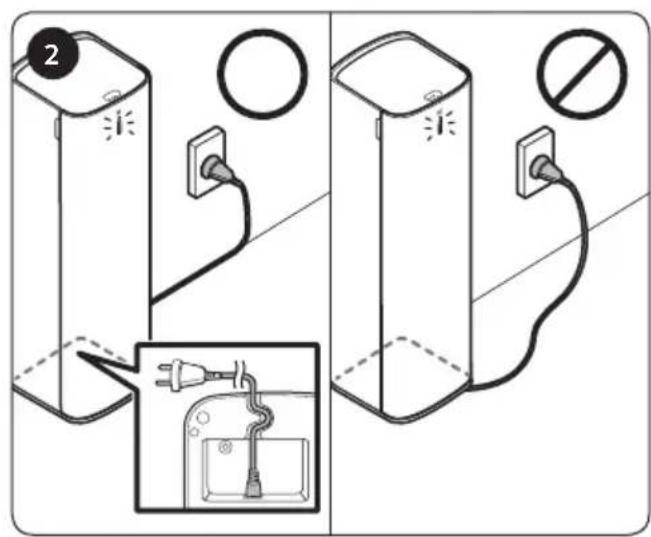
Put the power cord into the groove at the bottom of the clean station, arrange the cord neatly along the wall and plug the product in.
- When the cord is placed on the floor carelessly, the power cord may be damaged or a person can trip over the cord.
- When the clean station is plugged in, the product status indicator turns to 'blue' and then goes off.
* Please refer to the QR code for detailed information on the use of product and cleaning methods.
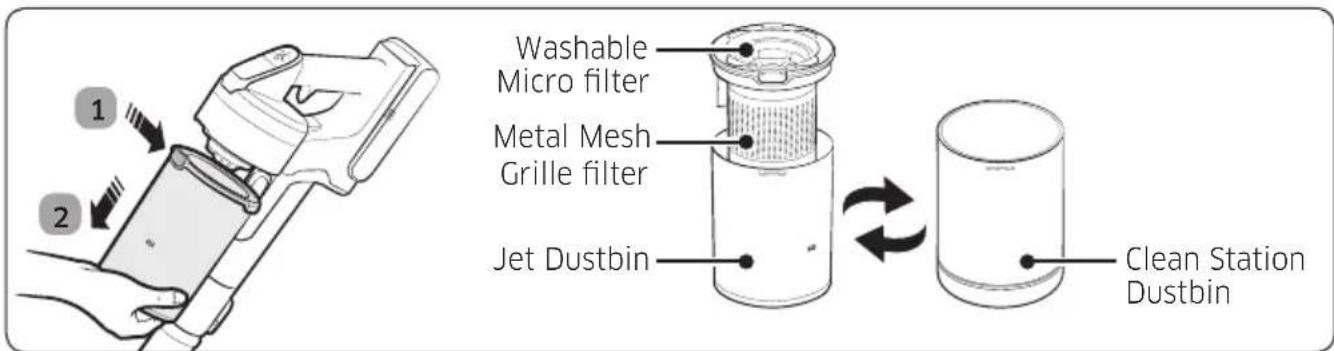
* VCA-SAE901, VCA-SAE902, VCA-SAE903, VCA-SAE904 includes only the transparent Dustbin. * Need to detach the Metal Mesh Grille filter and Washable Micro filter from the Jet Dustbin and then attach them to the Clean Station Dustbin.
The clean station is compatible with the provided dustbin only.
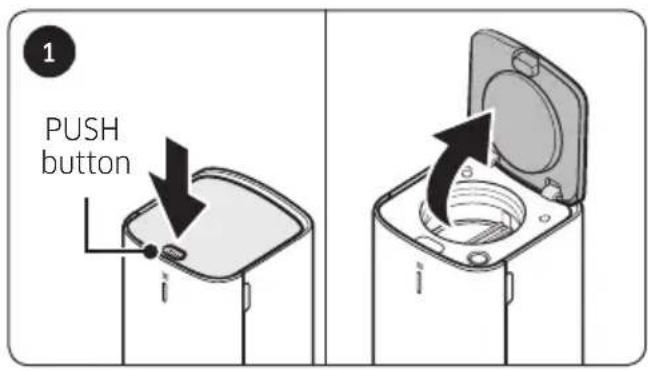
Press the [PUSH] button on the upper cover of the clean station.

Insert the dustbin into the clean station. Dust is ejected automatically.
- When the clean station is in operation, the product status indicator turns to 'blue'.
- Press the [Start/Stop] button to stop operation.

natural_image
Diagram of a device with an open lid and internal components, showing a black arrow indicating rotation or movement (no text or symbols present)When the clean station's operation stops completely, pull the dustbin out and close the clean station by pressing the upper cover firmly.

natural_image
Illustration of a hand pressing down on a cylindrical device with granular material, showing a magnified view of the interior (no text or symbols present)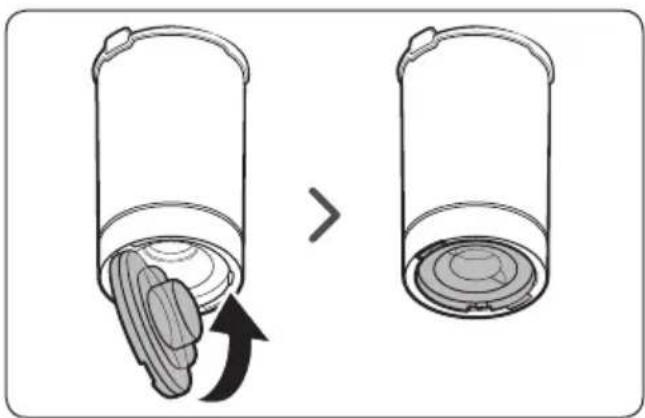
natural_image
Diagram showing a cylindrical container with a lid and an arrow indicating a change or transformation (no text or symbols present)NOTE
- When dust still remains inside the dustbin even after using the clean station, press the [Start/Stop] button to operate the clean station. - Press the button again to stop operation.
- If the dustbin is filled with dust and will not eject it properly, use a hand to push down the top of the washable micro filter, and then operate the clean station. - When there are foreign object residues, remove them by referring to 'Maintaining the clean station' section of the manual.
CAUTION
- After using the clean station, you should close the dustbin by pressing the bottom cover firmly until you hear it 'click'.
Dust bag
Time to replace a dust bag
natural_image
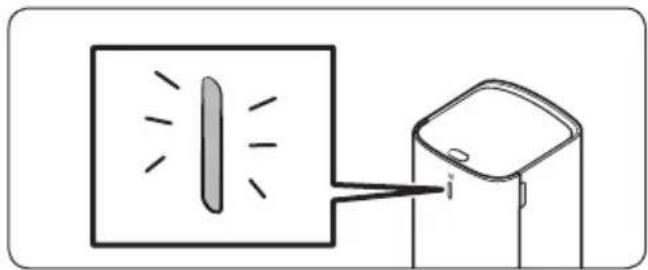
Simple line drawing of a device emitting light into a screen (no text or symbols)* When the product status indicator turns to 'red', you should replace the dust bag.
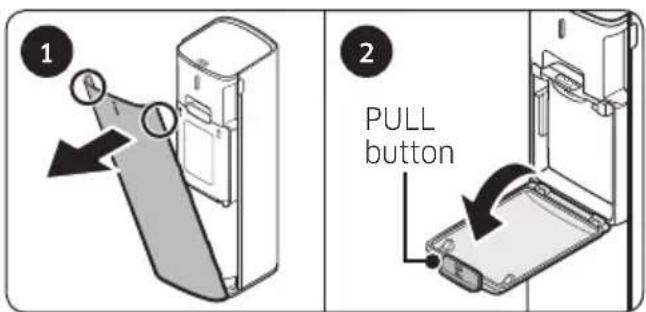
1 Grip both sides of the front cover and pull the cover towards you.
2 Open the cover by pulling the [PULL] button.

Press the 'PUSH' lever.

Pull the 'PULL' lever out in a diagonal direction and remove the dust bag.

Insert a new dust bag towards the back and push the 'PULL' lever upward firmly until you hear it 'click'.
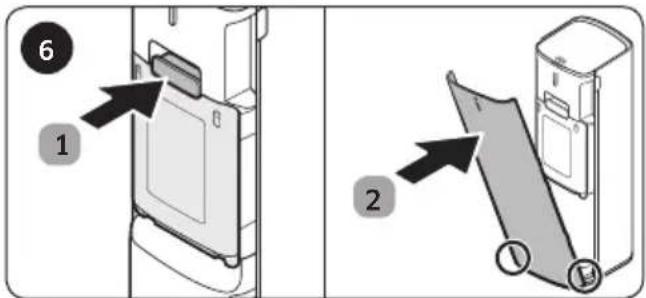
After replacing the dust bag, assemble the clean station in reverse order.
* Be cautious not to assemble incorrectly when inserting the dust bag.

NOTE
- If the dust bag emits a bad odor even though it is not filled with dust, replace the dust bag.
- When you operate the clean station after replacing the dust bag, the status indicator changes from red to blue.
natural_image
Illustration of kitchen cleaning and sanitation process with buckets, sprinklers, and containers under a sun (no text or symbols)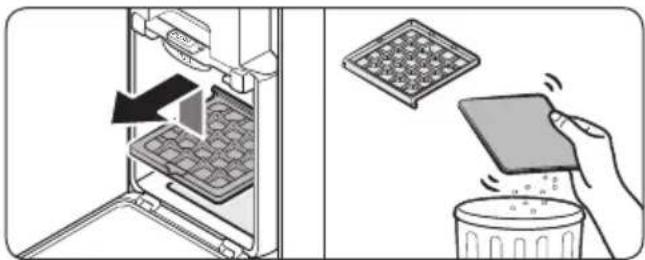
natural_image
Illustration showing a refrigerator interior with a tray and a hand holding a food item, next to a trash bin (no text or symbols)
Dustbin
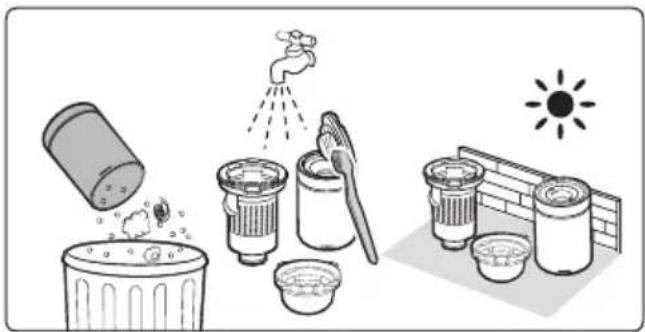
After emptying the dustbin, clean it with water and dry completely before use.
Premotor Filter
- Lift up the Premotor Filter inside the product and pull it out. Then, detach the nonwoven fabric from the filter.
- Remove the dust on the nonwoven fabric by shaking it and reassemble the Premotor Filter.
Ultra fine Dust Filter
- Do not clean the Ultra fine Dust Filter with water. Shake the filter.
- To maintain the best performance of the Ultra fine Dust Filter, replace the filter once a year.
If you have any questions or comments relating to Samsung products, please contact the SAMSUNG customer care center.
| Country / Location Customer Care Center Web Site | ||
| AUSTRALIA | 1300 362 603 (Other)1300 425 299 (HHP) | www.samsung.com/au/support |
| HONG KONG 3698 | 4698 | www.samsung.com/hk/support(Chinese)www.samsung.com/hk_en/support(English) |
| MALAYSIA | 1800-22-8899 (HHP)1800-88-9999 (OTH)+603-7713 7420 (Overseas contact) | www.samsung.com/my/support |
| SINGAPORE | 1800 7267864 / 1800-SAMSUNG(Other)1800 4252997 / 1800-GALAXYS(HHP) | www.samsung.com/sg/support |
| SOUTH AFRICA 0860 | SAMSUNG (726 7864) www.samsung.com/za/support | |
| PHILIPPINES | 1-800-10-726-7864 [PLDT Toll Free]1-800-8-726-7864 [Globe Landline and Mobile]02-8-422-2111 [Standard Landline] | www.samsung.com/ph/support |
| INDIA | 1800 40 SAMSUNG (1800 40 7267864) (Toll-Free)1800 5 SAMSUNG (1800 5 726864)(Toll-Free) | www.samsung.com/in/support |
This product is RoHS compliant
Brand : SAMSUNG
Model : VCA-SAE902
Category : Cleaning Station