DAV-6420 - Capteur de mesure environnementale DAVIS - Free user manual and instructions
Find the device manual for free DAV-6420 DAVIS in PDF.


| Product Type | Uncategorized Electronic Device |
| Brand | DAVIS |
| Model | DAV-6420 |
| Dimensions (Approx.) | 15 x 10 x 5 cm |
| Weight (Approx.) | 300 g |
| Power Supply | 5V DC, 1A (USB-C) |
| Battery Capacity | 2000 mAh (Rechargeable Lithium-ion) |
| Main Functions | Standard operation as per manual instructions |
| Maintenance | Clean with a soft, dry cloth; avoid liquids |
| Safety Precautions | Do not expose to water, heat, or drop; keep away from children |
| Spare Parts & Repairability | Contact DAVIS support for parts and service |
| General Information | Refer to the user manual for detailed instructions |
Frequently Asked Questions - DAV-6420 DAVIS
User questions about DAV-6420 DAVIS
0 question about this device. Answer the ones you know or ask your own.
Ask a new question about this device
Download the instructions for your Capteur de mesure environnementale in PDF format for free! Find your manual DAV-6420 - DAVIS and take your electronic device back in hand. On this page are published all the documents necessary for the use of your device. DAV-6420 by DAVIS.
USER MANUAL DAV-6420 DAVIS
Vantage Pro2 TM Accessories
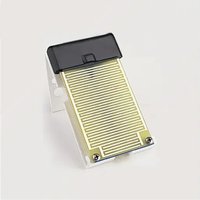
The Leaf Wetness Sensor detects the presence of surface moisture. The sensor is an artificial-leaf electrical-resistance type. It consists of a sensing grid, low-voltage bi-polar excitation circuit, and conductivity-sensing circuit. The Vantage Pro2 console measures the conductivity across the grid and displays the result as a moisture level, scaled from 0 to 15. The user may select the threshold level at and above which moisture-hour totals are accumulated.
The sensing grid is a gold-plated etched circuit on an epoxy-glass substrate; the excitation and sense circuits are encapsulated in black epoxy. The included mounting bracket holds the sensor at a 45° angle to simulate a typical leaf position and to permit runoff of excess moisture; it may be mounted on a vertical post, pipe, or stake, or on the Sensor Mounting Arm.
General
Sensor Type . . . . . . . . . . . . . . . . . . . . . . . . . . . . . . . . . . . . . . . . . . . . . . . . . . . . . . . . . . . Artificial leaf electrical resistance
Excitation Bipolar (3V nominal) built-in
Time Constant.... 2 seconds
Attached Cable Length 40' (12 m),
Maximum Recommended Cable Extension ..... 200' (61 m) using 4-conductor 26 AWG cable
Note: Increasing the cable length above the recommended maximum cable length causes measurement error in the form of lower leaf wetness readings.
Cable Type 4-conductor, 26 AWG
Connector .... Modular connector (RJ-11)
Material
Substrate. Glass-reinforced, ceramic-filled laminate
Grid 1 oz. copper, nickel, and 50 μ inch gold plate
Mounting Bracket .... White powder-coated aluminum
Dimensions (length x width x height)
Leaf Wetness Sensor.... 4.00" x 2.25" x 2.25" (102 mm x 58 mm x 58 mm)
Sensor Area 4.4 in 2 (28 cm 2 )
Weight 13 oz. (.4 kg)
Sensor Output
Resolution 1
Range 0 to 15
Dry/Wet Threshold .... User-selectable
Accuracy ±0.5
Update Interval 46 to 54 seconds
Input/Output
Supply Voltage and Current 100 μA (typical) @ 3 VDC
Output. 2.5 to 3 VDC
Connections
Yellow 3 VDC
Red ...... Ground
Green Output
Package Dimensions
| Product # | Package Dimensions (Length x Width x Height) | Package Weight | UPC Codes |
| 6420 | 5.75" x 4.25" x 3.25"(146 mm x 108 mm x 83 mm) | 1.0 lbs. (.5 kg) | 011698 00238 2 |
Brand : DAVIS
Model : DAV-6420
Category : Capteur de mesure environnementale