
KAGIMLAI3AA - Tripod Kogan - Free user manual and instructions
Find the device manual for free KAGIMLAI3AA Kogan in PDF.


| Product Type | Tripod |
| Brand | Kogan |
| Model | KAGIMLAI3AA |
| Maximum Height | 160 cm (63 in) |
| Minimum Height | 40 cm (15.7 in) |
| Folded Length | 45 cm (17.7 in) |
| Weight | 1.6 kg (3.5 lbs) |
| Load Capacity | 4 kg (8.8 lbs) |
| Material | Aluminum alloy |
| Head Type | 3-Way Pan/Tilt Head |
| Leg Sections | 3 |
| Leg Locks | Flip locks |
| Center Column | Yes, 2-section |
| Bubble Level | Yes, 1 on center column |
| Quick Release Plate | Included |
| Compatibility | DSLR, camcorders, spotting scopes |
| Accessories Included | Carrying bag, strap, hex wrench |
| Color | Black |
| Spare Parts Availability | Contact Kogan support |
Frequently Asked Questions - KAGIMLAI3AA Kogan
User questions about KAGIMLAI3AA Kogan
0 question about this device. Answer the ones you know or ask your own.
Ask a new question about this device
Download the instructions for your Tripod in PDF format for free! Find your manual KAGIMLAI3AA - Kogan and take your electronic device back in hand. On this page are published all the documents necessary for the use of your device. KAGIMLAI3AA by Kogan.
USER MANUAL KAGIMLAI3AA Kogan
natural_image
Line drawing of a self-handled device with a smartphone mounted on top and a handheld device extending upward (no text or symbols)3-AXIS PORTABLE PHONE GIMBAL
WITH AI TRACKING AND DIMMABLE LIGHT
KAGIMLAI3AA
SAFETY & WARNINGS
- Ensure the motor is not blocked and free from obstruction when the gimbal is powered on.
- Do not expose the gimbal to water or corrosive liquids, such as sea water.
- Do not disassemble the gimbal (except for the provided detachable accessories).
- Rest the motor after continuous use for an extended time to prevent the surface temperature getting too high.
- Do not drop or use excessive force against the gimbal, as doing so may damage it.
- Keep the gimbal away from children and pets.
- Keep the gimbal away from sources of heat (furnaces, heaters, etc.).
- Do not leave the gimbal in the car during hot weather.
- Store the gimbal in a dry environment.
- Do not overcharge or discharge the battery, as doing so will damage the battery.
- Do not use the gimbal in extreme temperatures.
COMPONENTS
- Gimbal
- AI tracker
- Tripod
- Charging cord
- Strip
- User guide
OVERVIEW

| FPV The gimbal will follow the movement of the handle. | |
| LF Secure the phone in one orientation. | |
| Charging port | Charge the gimbal. |
| Mode button | Press to switch between modes (FPV, LF, AF, HF).Double press to direct the phone back to the centre. |
| Power level indicator | Four lights illuminated: 100%.Three lights illuminated and the fourth light flashing: 76%-99%.Three lights illuminated: 50%-75%.Two lights illuminated: 26%-49%.One light illuminated: 0%-25% |
| Bluetooth Indicator | Slow flashing: Bluetooth is not connected.Fast flashing: Bluetooth is connecting.Solid: Bluetooth is connected. |
| AF The phone will follow the movement of the handle left/right and up/down. | |
| HF The phone will follow the movement of the handle left/right only. | |
| Zoom Push the slider up/down to zoom in and out.Note: This function only works when using the Gimbal Pro app. | |
| Power Button | Single press:Switch between horizontal and vertical mode.Restart the gimbal.Press and hold for one second: Power the gimbal on/off.Double press: Switch between photo/video modes.Note: This function only works when using the Gimbal Pro app.Triple press: Switch between front/rear camera.Note: This function only works when using the Gimbal Pro app. |

| Shutter Button | Single press:Single shot.Start/stop the video recording (if Bluetooth is connected).Double press: Suspend/recover the recording.Note: This function only works when using the Gimbal Pro app.Triple press: Capture pictures during recording.Note: This function only works when using the Gimbal Pro app. |
| Joystick | Push the joystick to move the gimbal left/right/up/down. |
INSTALLATION
Tripod
Connect the tripod to the base of the gimbal.

natural_image
Technical line drawing of a robotic arm with a blue circular base and three legs (no text or symbols)Attaching your smartphone
- Remove your phone case.
- Rotate your phone so the screen is horizontal, and the phone camera is on the left.
- Gently open the smart phone holder and place your smartphone inside. Ensure the smartphone holder is in the middle of the smartphone.

natural_image
Diagram showing two robotic arm configurations with directional arrows indicating movement (no text or symbols)CONNECT TO GIMBAL PRO APP
Download the Gimbal Pro App
This gimbal supports basic stable shooting without the app. To access more functions (such as zoom, panoramic, tracking and time lapse), you will need download the Gimbal Pro App.
Scan the QR Code below and download the ‘Gimbal Pro2’ app on the Google Play Store or the ‘Gimbal Pro’ app on the App Store. Alternatively, search for ‘Gimbal Pro2’ on the Google Play Store or ‘Gimbal Pro’ on the App Store.

Note:
The Gimbal Pro app require iOS 12.0 and later or Android 8.0 and later.
Pairing
- Power on the gimbal. The Bluetooth indicator should be flashing slowly. If it is not, press the shutter button and the power button at the same time to reset the gimbal.
- Open the Bluetooth settings on your smartphone and select the device name "GP7-xx" to connect. The Bluetooth indicator will begin flashing rapidly while connecting and turn solid when connected.
Unpairing:
Press the shutter button and the power button at the same time to unpair the gimbal from your device.
OPERATION
Charging
This gimbal supports fast charging. It is recommended to use a 5V/2A adapter to charge the gimbal.

natural_image
Diagram showing a device with a circular component and a connector (no text or symbols present)
Charging

Charging completed
Note:
The gimbal can be operated while charging.
Power On/Off
• To power on the gimbal, press the power button for one second.
- To power off the gimbal, press the power button for one second until the indicator lights are off.

natural_image
Diagram showing a handheld device with a blue laser line and a blue button labeled 'Power' pointing at it, alongside a hand cursor icon (no text or symbols on the device itself)Notes:
- If the smartphone is removed from the smartphone case while the gimbal is powered on, the gimbal will remain powered on.
- When the gimbal is powered off, it will return to the folding position.
Orientation
Work orientation:
Work orientation is the default orientation and works in both landscape and portrait.
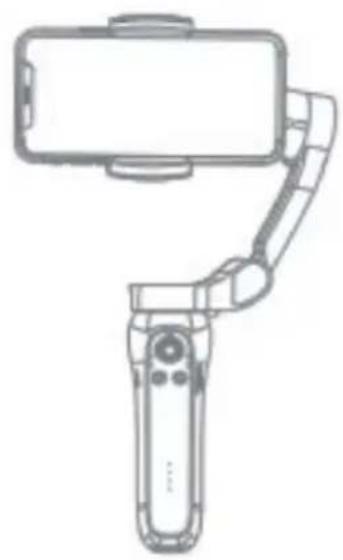
natural_image
Line drawing of a handheld device with a smartphone mounted on top, connected to a right-handled handle (no text or symbols)Landscape

natural_image
Line drawing of a smartphone mounted on a stand with a handheld device (no text or symbols)Portrait
Underslung orientation:
Hold the gimbal upside down to capture images from a low angle.
Side grip orientation:
Rotate the gimbal to the right or left by 90^ to go from upright to side grip mode, works with both landscape and portrait modes.

natural_image
Line drawing of a robotic arm holding a smartphone (no text or symbols)Underslung
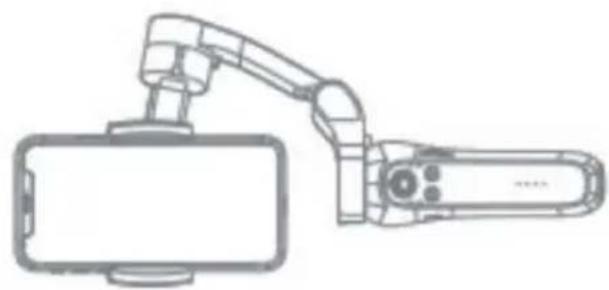
natural_image
Technical line drawing of a robotic arm holding a rectangular device (no text or symbols)Side grip
Modes
All Follow (AF): The roll axis is locked, pan (left/right) and tilt (up/down) will follow the movement of the handle.

Half Follow (HF) (default): The tilt and roll axes are locked. The pan axis rotates (left/right) with the handle.

Lock Full (LF): The pan, tilt and roll axes are all locked. The camera remains still and cannot follow the movement of the handle.
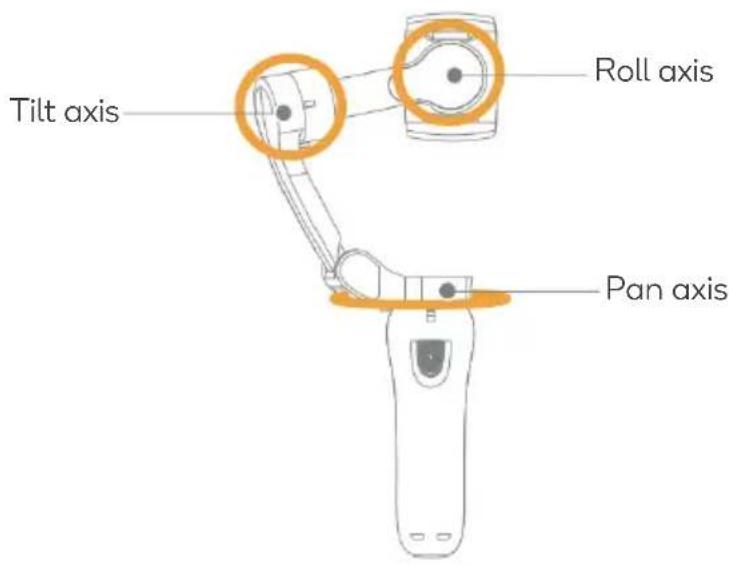
First person view (FPV): The pan, tilt and roll axes follow the movement of the handle.

AI tracker

| Gesture recognition indicator | Off: Gesture recognition is off.Solid: Gesture recognition is on.Flashes 3 times: Gesture recognition is triggered.Flashing: Gimbal is connecting to the AI tracker. |
| Face tracking indicator | Off: Face tracking is off.Slow flashing: Face tracking is on, and facial recognition is off.Solid: Face tracking and gesture recognition are on (default). |
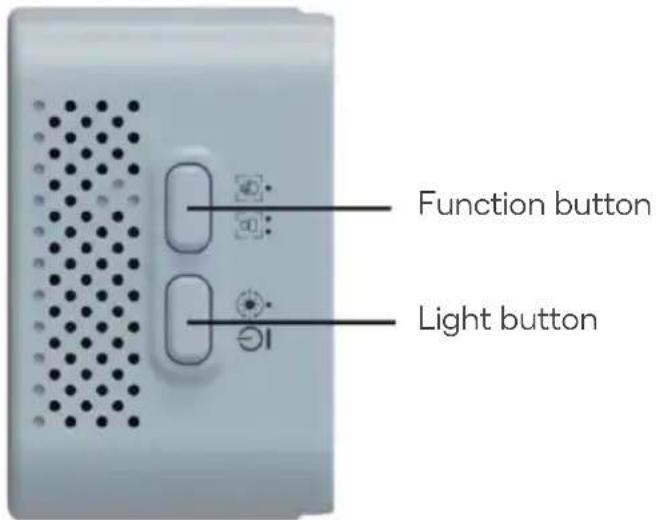
| Function button | Single press: turn gesture recognition on/off.Double press: turn face tracking on/off. |
| Light button | Press and hold: turn the light on/off.Single press: switch the light mode and light strength (9 levels):Mixed light: soft, mid, strong.Warm light: soft, mid, strong.White light: soft, mid, strong. |
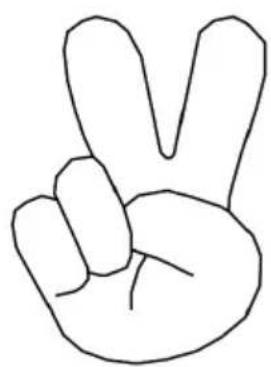
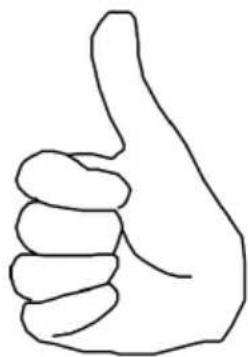
Gestures:
natural_image
Simple line drawing of a hand making a peace sign (V-shape) with no text or symbolsTurn the face tracking on.

natural_image
Simple line drawing of a human hand with five fingers (no text or symbols)Turn face tracking off.

natural_image
Simple line drawing of a hand making a thumbs-down gesture (no text or symbols)Turn the light on/off.
natural_image
Simple line drawing of a hand giving a thumbs-up gesture (no text or symbols)Adjust the brightness of the light.
SPECIFICATIONS
| Tile angle 160° | |
| Roll angle 325° | |
| Pan angle 340° | |
| Net weight 372.5g | |
| Payload 280g | |
| Working temperature 0°C-40°C | |
| Controllable tile angle | +50°/-40° |
| Controllable roll angle | +180°/-150° |
| Controllable pan angle | +250°/-90° |
| Working voltage | 3.4-4.2V (Standard 3.7V) |
| Compatible smartphone range | Diagonal: ≤180mmWidth: 55-90mmThickness: ≤9.5mm |
| Working currency | 150-3000mA (standard 1500mA) |
| Gimbal dimension | Unfolded: 260 x 130 x 88mmFolded: 152 x 110 x 46.6mrn |
| Charging time | 80mins (use 5V/2A adapter) |
| Working time | 4.5-5H |
| Face tracking Yes | |
| App Yes | |
| Input voltage 5V | |
| Input currency | 2A |
NOTES
The Ground Truth image displays a single, solid horizontal line. According to Rule 2 (UNDERSCORE & LINE RULES), this is a stylistic or background line, not a placeholder underscore. Therefore, the OCR result must ignore it and output nothing or only meaningful text. The provided OCR content is "____", which consists of four underscores. This is an incorrect interpretation of the line as a fill-in-the-blank placeholder, violating the rule that stylistic lines must be ignored. The OCR has hallucinated underscores where none should exist based on the GT's visual context. Hence, the OCR result is inconsistent with the Ground Truth.
[Non-Text]
[Non-Text]
[EMPTY]
[Non-Text]
[Non-Text]
The Ground Truth image displays a single, continuous horizontal line, which is a stylistic or background element (like a ruled paper line). According to Rule 2, such lines must be ignored by the OCR result. The OCR content provided is "", which consists of no characters. Since the OCR output correctly ignores the background/stylistic line and produces no actual text, it complies with the “Stylistic/Background Lines (Ignore)” rule. Therefore, the OCR result is consistent with the Ground Truth.
[Non-Text]
[Non-Text]
[EMPTY]
[Non-Text]
[Non-Text]
The Ground Truth image displays a single, continuous horizontal line, which is a stylistic or background element (like a ruled paper line). According to Rule 2, such lines must be ignored by the OCR result. The provided OCR content is "____", which consists of underscores. Underscores are not equivalent to a solid line and are not permitted under the “Stylistic/Background Lines (Ignore)” rule. Outputting underscores for a stylistic line is incorrect because it misinterprets the line as a fill-in-the-blank placeholder. Since the OCR output incorrectly rendered a stylistic line as underscores (which should be ignored), this violates the rule. Therefore, the OCR result is inconsistent with the Ground Truth.
[Non-Text]
[Non-Text]
[NO TEXT]
[Non-Text]
[Non-Text]
The Ground Truth image displays a single, continuous horizontal line, which is a stylistic or background element (like a ruled paper line). According to Rule 2, such lines must be ignored by the OCR result. The provided OCR content is "____", which consists of underscores. Underscores are not equivalent to a solid line and are not permitted under the “Stylistic/Background Lines (Ignore)” rule. Outputting underscores for a stylistic line is incorrect because it misinterprets the line as a fill-in-the-blank placeholder. Therefore, the OCR result is inconsistent with the Ground Truth.
[Non-Text]
[Non-Text]
The Ground Truth image displays a single, continuous horizontal line, which is a stylistic or background element (like a ruled paper line). According to Rule 2, such lines must be ignored by the OCR result. The provided OCR content is "____", which consists of underscores. Underscores are not equivalent to a solid line and are not permitted under the “Stylistic/Background Lines (Ignore)” rule. Outputting underscores for a stylistic line is incorrect because it misinterprets the line as a fill-in-the-blank placeholder. Therefore, the OCR result is inconsistent with the Ground Truth.
[Non-Text]
[Non-Text]
The Ground Truth image displays a single, continuous horizontal line, which is a stylistic or background element (like a ruled paper line). According to Rule 2, such lines must be ignored by the OCR result. The provided OCR content is "____", which consists of underscores. Underscores are not equivalent to a solid line and are not permitted under the “Stylistic/Background Lines (Ignore)” rule. Outputting underscores for a stylistic line is incorrect because it misinterprets the line as a fill-in-the-blank placeholder. Therefore, the OCR result is inconsistent with the Ground Truth.
[Non-Text]
[Non-Text]
The Ground Truth image displays a single, continuous horizontal line, which is a stylistic or background element (like a ruled paper line). According to Rule 2, such lines must be ignored by the OCR result. The provided OCR content is "____", which consists of underscores. Underscores are not equivalent to a solid line and are not permitted under the “Stylistic/Background Lines (Ignore)” rule. Outputting underscores for a stylistic line is incorrect because it misinterprets the line as a fill-in-the-blank placeholder. Therefore, the OCR result is inconsistent with the Ground Truth.
[Non-Text]
[Non-Text]
The Ground Truth image displays a single, solid horizontal line. According to Rule 2 (UNDERSCORE & LINE RULES), this is a stylistic or background line, not a placeholder underscore. Therefore, the OCR result must ignore it and output nothing or only meaningful text. The provided OCR content is "____", which consists of four underscores. This is an incorrect interpretation of the line as a placeholder, violating the rule that stylistic lines must be ignored. The OCR has hallucinated placeholder underscores where none should exist in the GT. This adheres to the strict requirement to ignore such lines.
[Non-Text]
[Non-Text]
The Ground Truth image displays a single, solid horizontal line, which is a stylistic or background element (like a ruled paper line or separator), not a placeholder for text. According to Rule 2, such stylistic/background lines must be ignored by the OCR result. The OCR content provided is "", which consists of no characters. This correctly represents the absence of any textual content in the GT and correctly matches the visual line as a stylistic element. Therefore, the OCR output should not contain any underscores or line representations. Outputting underscores for a stylistic line violates the rule and constitutes an error.
[Non-Text]
[Non-Text]
[Non-Text]
The Ground Truth image displays a single, solid horizontal line. According to Rule 2 (UNDERSCORE & LINE RULES), this is a stylistic or background line, not a placeholder underscore. Therefore, the OCR result must ignore it and output nothing or only meaningful text. The provided OCR content is "____", which consists of four underscores. This is an incorrect interpretation of the line as a placeholder, violating the rule that stylistic lines must be ignored. The OCR has hallucinated underscores where none should exist based on the GT's visual context. Hence, the OCR result is inconsistent with the Ground Truth.
[Non-Text]
[Non-Text]
The Ground Truth image displays a single, continuous horizontal line, which is a stylistic or background element (like a ruled paper line). According to Rule 2, such lines must be ignored by the OCR result. The provided OCR content is "____", which consists of underscores. Underscores are not equivalent to a solid line and are not permitted under the “Stylistic/Background Lines (Ignore)” rule. Outputting underscores for a stylistic line is incorrect because it misinterprets the line as a fill-in-the-blank placeholder. Therefore, the OCR result is inconsistent with the Ground Truth.
[Non-Text]
[Non-Text]
The Ground Truth image displays a single, solid horizontal line, which is a stylistic or background element (like a ruled paper line). According to Rule 2, such lines must be ignored by the OCR result. The provided OCR content is "____", which consists of underscores. Underscores are not equivalent to a solid line and are not permitted under the “Stylistic/Background Lines (Ignore)” rule. Outputting underscores for a stylistic line is incorrect because it misinterprets the line as a fill-in-the-blank placeholder. Since the OCR output incorrectly rendered a stylistic line as underscores (which should be ignored), this violates the rule. Therefore, the OCR result is inconsistent with the Ground Truth.
[Non-Text]
(No text)
The Ground Truth image displays a single, solid horizontal line. According to Rule 2 (UNDERSCORE & LINE RULES), this is a stylistic or background line, not a placeholder underscore. Therefore, the OCR result must ignore it and output nothing or only meaningful text. The provided OCR content is "____", which consists of four underscores. This is an incorrect interpretation of the line as a fill-in-the-blank placeholder, violating the rule that stylistic lines must be ignored. The OCR has hallucinated underscores where none should exist based on the GT's visual context. Hence, the OCR result is inconsistent with the Ground Truth.
[Non-Text]
[Non-Text]
The Ground Truth image displays a single, continuous horizontal line, which is a stylistic or background element (like a ruled paper line). According to Rule 2, such lines must be ignored by the OCR result. The provided OCR content is "____", which consists of underscores. Underscores are not equivalent to a solid line and are not permitted under the “Stylistic/Background Lines (Ignore)” rule. Outputting underscores for a stylistic line is incorrect because it misinterprets the line as a fill-in-the-blank placeholder. Therefore, the OCR result is inconsistent with the Ground Truth.
[Non-Text]
[Non-Text]
The Ground Truth image displays a single, continuous horizontal line, which is a stylistic or background element (like a ruled paper line). According to Rule 2, such lines must be ignored by the OCR result. The OCR content provided is "", which consists of no characters. Since the OCR output correctly ignores the background/stylistic line and produces no actual text, it complies with the “Stylistic/Background Lines (Ignore)” rule. Therefore, the OCR result is consistent with the Ground Truth.
[Non-Text]
[Non-Text]
[EMPTY]
[Non-Text]
[Non-Text]
The Ground Truth image displays a single, continuous horizontal line, which is a stylistic or background element (like a ruled paper line). According to Rule 2, such lines must be ignored by the OCR result. The provided OCR content is "____", which consists of underscores. Underscores are not equivalent to a solid line and are not permitted under the “Stylistic/Background Lines (Ignore)” rule. Outputting underscores for a stylistic line is incorrect because it misinterprets the line as a fill-in-the-blank placeholder. Therefore, the OCR result is inconsistent with the Ground Truth.
[Non-Text]
[Non-Text]
[NO TEXT]
[Non-Text]
[Non-Text]
The Ground Truth image displays a single, continuous horizontal line, which is a stylistic or background element (like a ruled paper line). According to Rule 2, such lines must be ignored by the OCR result. The provided OCR content is "____", which consists of underscores. Underscores are not equivalent to a solid line and are not permitted under the “Stylistic/Background Lines (Ignore)” rule. Outputting underscores for a stylistic line is incorrect because it misinterprets the line as a fill-in-the-blank placeholder. Therefore, the OCR result is inconsistent with the Ground Truth.
[Non-Text]
[Non-Text]
The Ground Truth image displays a single, continuous horizontal line, which is a stylistic or background element (like a ruled paper line). According to Rule 2, such lines must be ignored by the OCR result. The provided OCR content is "____", which consists of underscores. Underscores are not equivalent to a solid line and are not permitted under the “Stylistic/Background Lines (Ignore)” rule. Outputting underscores for a stylistic line is incorrect because it misinterprets the line as a fill-in-the-blank placeholder. Since the OCR output incorrectly rendered a stylistic line as underscores (which should be ignored), this violates the rule. Therefore, the OCR result is inconsistent with the Ground Truth.
[Non-Text]
[Non-Text]
The Ground Truth image displays a single, continuous horizontal line, which is a stylistic or background element (like a ruled paper line). According to Rule 2, such lines must be ignored by the OCR result. The OCR content provided is "", which consists of no characters. Since the OCR output correctly ignores the background/stylistic line and produces no actual text, it complies with the “Stylistic/Background Lines (Ignore)” rule. Therefore, the OCR result is consistent with the Ground Truth.
[Non-Text]
[Non-Text]
The Ground Truth image displays a single, continuous horizontal line, which is a stylistic or background element (like a ruled paper line). According to Rule 2, such lines must be ignored by the OCR result. The provided OCR content is "____", which consists of underscores. Underscores are not equivalent to a solid line and are not permitted under the “Stylistic/Background Lines (Ignore)” rule. Outputting underscores for a stylistic line is incorrect because it misinterprets the line as a fill-in-the-blank placeholder. Therefore, the OCR result is inconsistent with the Ground Truth.
[Non-Text]
[Non-Text]
The Ground Truth image displays a single, solid horizontal line. According to Rule 2 (UNDERSCORE & LINE RULES), this is a stylistic or background line, not a placeholder underscore. Therefore, the OCR result must ignore it and output nothing or only meaningful text. The provided OCR content is "____", which consists of four underscores. This is an incorrect interpretation of the line as a placeholder, violating the rule that stylistic lines must be ignored. The OCR has hallucinated placeholder underscores where none should exist in the GT. This is a formatting error: the OCR should have output nothing for this line. Therefore, the OCR result is inconsistent with the Ground Truth.
[Non-Text]
[Non-Text]
The Ground Truth image displays a single, solid horizontal line, which is a stylistic or background element (like a ruled paper line or separator), not a placeholder for text. According to Rule 2, such stylistic/background lines must be ignored by the OCR result. The OCR content provided is "", which consists of no characters. This correctly represents the absence of any textual content in the GT and correctly matches the visual line as a stylistic element. Therefore, the OCR output should not contain any underscores or line representations. Outputting underscores for a stylistic line violates the rule and constitutes an error.
[Non-Text]
[Non-Text]
[Non-Text]
The Ground Truth image displays a single, solid horizontal line. According to Rule 2 (UNDERSCORE & LINE RULES), this is a stylistic or background line, not a placeholder underscore. Therefore, the OCR result must ignore it and output nothing or only meaningful text. The provided OCR content is "____", which consists of four underscores. This is an incorrect interpretation of the line as a placeholder, violating the rule that stylistic lines must be ignored. The OCR has hallucinated underscores where none should exist based on the GT's visual context. Hence, the OCR result is inconsistent with the Ground Truth.
[Non-Text]
[Non-Text]
The Ground Truth image displays a single, continuous horizontal line, which is a stylistic or background element (like a ruled paper line). According to Rule 2, such lines must be ignored by the OCR result. The provided OCR content is "____", which consists of underscores. Underscores are not equivalent to a solid line and are not permitted under the “Stylistic/Background Lines (Ignore)” rule. Outputting underscores for a stylistic line is incorrect because it misinterprets the line as a fill-in-the-blank placeholder. Therefore, the OCR result is inconsistent with the Ground Truth.
[Non-Text]
[Non-Text]
The Ground Truth image displays a single, solid horizontal line, which is a stylistic or background element (like a rule line on paper). According to Rule 2, such lines must be ignored by the OCR result. The OCR content provided is "", which consists of no characters. Since the OCR output correctly ignores the stylistic line, it complies with Rule 2. Therefore, the OCR result is consistent with the Ground Truth.
[Non-Text]
(No text)
Need more information?
We hope that this user guide has given you the assistance needed for a simple set-up.
For the most up-to-date guide for your product, as well as any additional assistance you may require, head online to help.kogan.com
kogan.com
- 3-AXIS PORTABLE PHONE GIMBAL
- SAFETY & WARNINGS
- COMPONENTS
- OVERVIEW
- INSTALLATION
- Tripod
- Attaching your smartphone
- CONNECT TO GIMBAL PRO APP
- Download the Gimbal Pro App
- Note:
- Pairing
- Unpairing:
- OPERATION
- Charging
- Power On/Off
- Notes:
- Orientation
- Work orientation:
- Underslung orientation:
- Side grip orientation:
- Modes
- AI tracker
- Gestures:
- SPECIFICATIONS
- NOTES
- Need more information?
Brand : Kogan
Model : KAGIMLAI3AA
Category : Tripod