
AS3A102 - TV Accessories Chief - Free user manual and instructions
Find the device manual for free AS3A102 Chief in PDF.


| Product Type | Flat Panel Mount |
| Brand | Chief |
| Model | AS3A102 |
| Weight Capacity | 125 lbs (56.7 kg) |
| VESA Compatibility | 100x100 to 600x400 mm |
| Material | Steel |
| Color | Black |
| Mounting Profile | Low profile (1.5 in / 38 mm) |
| Tilt Adjustment | +/- 5° |
| Level Adjustment | +/- 3° |
| Screen Size | 32" to 65" |
| Dimensions (WxHxD) | 28.5 x 20.5 x 1.5 in (724 x 521 x 38 mm) |
| Weight | 8.6 lbs (3.9 kg) |
| Included Hardware | Lag bolts, concrete anchors, spacers, screws |
| Warranty | 5 years |
| Installation | Wall mount, single stud |
| Breakaway Feature | Yes (for easy dismount) |
| Roll Adjustment | +/- 2° |
| Certifications | UL Listed |
Frequently Asked Questions - AS3A102 Chief
User questions about AS3A102 Chief
0 question about this device. Answer the ones you know or ask your own.
Ask a new question about this device
Download the instructions for your TV Accessories in PDF format for free! Find your manual AS3A102 - Chief and take your electronic device back in hand. On this page are published all the documents necessary for the use of your device. AS3A102 by Chief.
USER MANUAL AS3A102 Chief
INSTALLATION INSTRUCTIONS

natural_image
Technical line drawing of a server rack with internal components and mounting brackets (no text or symbols)Flex Kit Adapter Bracket
DISCLAIMER
Legrand | AV and its affiliated corporations and subsidiaries (collectively “Legrand | AV”), intend to make this manual accurate and complete. However, Legrand | AV makes no claim that the information contained herein covers all details, conditions or variations, nor does it provide for every possible contingency in connection with the installation or use of this product. The information contained in this document is subject to change without notice or obligation of any kind. Legrand | AV makes no representation of warranty, expressed or implied, regarding the information contained herein. Legrand | AV assumes no responsibility for accuracy, completeness or sufficiency of the information contained in this document.
Chief® is a registered trademark of Legrand AV Inc.

IMPORTANT SAFETY INSTRUCTIONS

WARNING: A WARNING alerts you to the possibility of serious injury or death if you do not follow the instructions.

CAUTION: A CAUTION alerts you to the possibility of damage or destruction of equipment if you do not follow the corresponding instructions.

WARNING: Failure to read, thoroughly understand, and follow all instructions can result in serious personal injury, damage to equipment, or voiding of factory warranty! It is the installer's responsibility to make sure all components are properly assembled and installed using the instructions provided.

WARNING: Exceeding the weight capacity can result in serious personal injury or damage to equipment! It is the installer's responsibility to make sure the combined weight of all components attached to the AS3A102 accessory does exceed 8 lbs (36 kg).

WARNING: Use this mounting system only for its intended use as described in these instructions. Do not use attachments not recommended by the manufacturer.

WARNING: Never operate this mounting system if it is damaged. Return the mounting system to a service center for examination and repair.

WARNING: Do not use this product outdoors.
--SAVE THESE INSTRUCTIONS--
DIMENSIONS
![1.56 [39.7] 63 [15.9] 81 [20.6]](/content/2026/05/1044521/images/7a039b03c72d995a8a861af7c07098be0a4e96c00a4d80cd8e77fac6c9ce2965.jpg)
![5.18 [131.6] 2.75 [69.9] 1.59 [40.4] .88 [22.2] 5.00 [127.6]](/content/2026/05/1044521/images/5d294700a0d5851aeadc8cc3ed9ba632525809658f6fc675ea70b40f64a27aed.jpg)

natural_image
Technical line drawing of a mechanical clamp or bracket assembly (no text or symbols)![1.56 [39.7] 1.39 [35.2] .50 [12.7] 1.88 [47.6]](/content/2026/05/1044521/images/ac550e6aafb143b4c76af58ad741b9adde75d262552b3d2524cb2f4bab0ddabc.jpg)
DIMENSIONS: [MILLIMETERS] INCHES
DIMENSIONS (CONTINUED)
![38 [9.5] 1.27 [32.3] 83 [21.2]](/content/2026/05/1044521/images/ce2a256f4c5f74ec067c5d4d64c0dd15b50b3308359674a76ba62161a99e0801.jpg)
PARTS FOR INSTALLATION (NO TOOLS REQUIRED)
![A (1) [Flex hook bracket]](/content/2026/05/1044521/images/5dd5faee79a92b5a7367cc05ccf033abf6ebd2594bea6ab4897f160456a89dbc.jpg)
ASSEMBLY AND INSTALLATION
- Remove two thumb nuts from flex hook bracket (A). (See Figure 1)
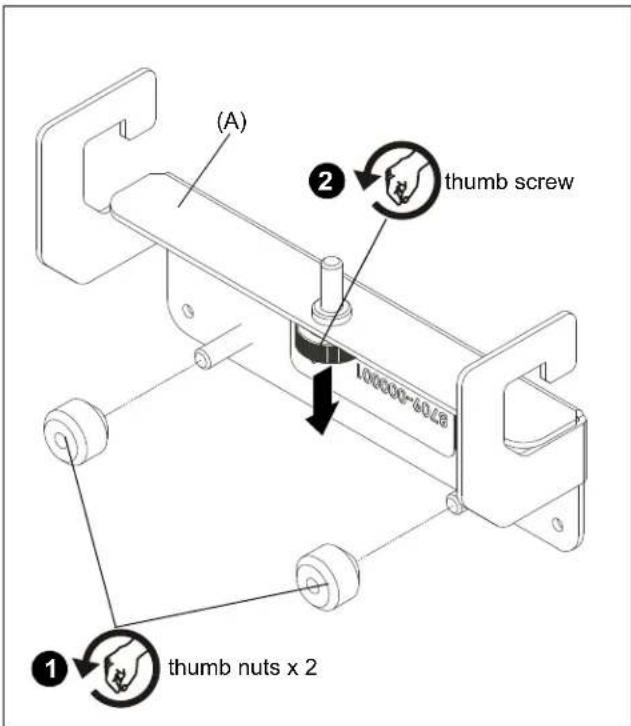
Figure 1
- Loosen thumb screw until it is almost completely lowered. (See Figure 2)
- Use removed thumb nuts to attach flex kit (sold separately) to flex kit bracket (A). (See Figure 2)
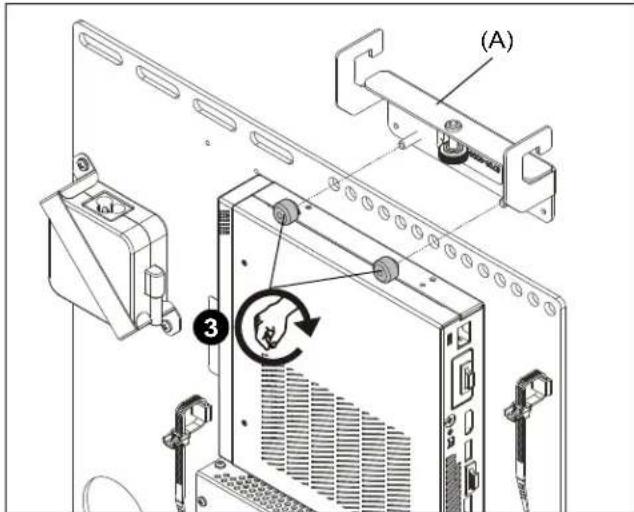
Figure 2

WARNING: Exceeding the weight capacity can result in serious personal injury or damage to equipment! It is the installer's responsibility to make sure the combined weight of all components attached to the AS3A102 accessory does exceed 8 lbs (36 kg).
-
Hang flex hook bracket onto top rail of AS3LD mounting system. (See Figure 3)
-
Tighten thumb screw until bracket is securely installed onto rail. (See Figure 3)
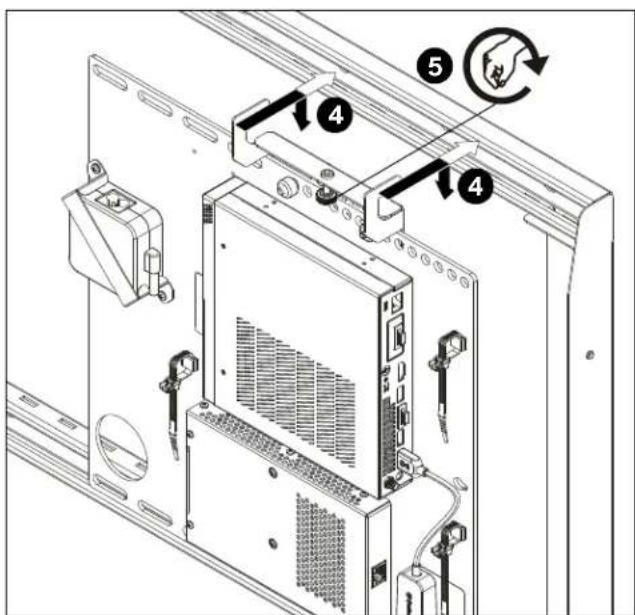
Figure 3
CHIEF®
A brand of legrand®
8800-003398 Rev00
©2023 Legrand | AV
www.legrandav.com
10/2023
USA/International A 6436 City West Parkway, Eden Prairie, MN 55344
P 800.582.6480 / 952.225.6000
F 877.894.6918 / 952.894.6918
Europe A Franklinstraat 14, 6003 DK Weert, Netherlands
P +31 (0) 495 580 852
F +31 (0) 495 580 845
Asia Pacific A Office No. 918 on 9/F, Shatin Galleria
18-24 Shan Mei Street
Fotan, Shatin, Hong Kong
P 852 2145 4099
F 852 2145 4477
Brand : Chief
Model : AS3A102
Category : TV Accessories