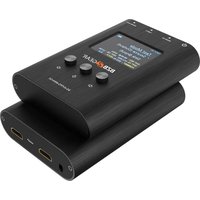
BG-AVTPG-MINI-G2 - Générateur de signal HDMI BZBGear - Free user manual and instructions
Find the device manual for free BG-AVTPG-MINI-G2 BZBGear in PDF.


| Product Type | Mini Test Pattern Generator |
| Brand | BZBGear |
| Model | BG-AVTPG-MINI-G2 |
| Video Output | HDMI (Type A female) |
| Output Resolution | Up to 3840x2160 @ 60 Hz |
| Pattern Selection | Push-button cycle through patterns |
| Patterns Available | Color bars, SMPTE, grid, crosshatch, white/black, ramp, and more |
| Power Supply | 5V DC via USB Micro-B |
| Dimensions (L x W x H) | 80 x 50 x 20 mm |
| Weight | 50 g |
| Enclosure Material | ABS plastic |
| LED Indicators | Power (green) and Signal (blue) |
| Operating Temperature | 0°C to 40°C |
| Storage Temperature | -20°C to 60°C |
| Package Contents | Device, USB cable, user manual |
| Compliance | FCC, CE, RoHS |
Frequently Asked Questions - BG-AVTPG-MINI-G2 BZBGear
User questions about BG-AVTPG-MINI-G2 BZBGear
0 question about this device. Answer the ones you know or ask your own.
Ask a new question about this device
Download the instructions for your Générateur de signal HDMI in PDF format for free! Find your manual BG-AVTPG-MINI-G2 - BZBGear and take your electronic device back in hand. On this page are published all the documents necessary for the use of your device. BG-AVTPG-MINI-G2 by BZBGear.
USER MANUAL BG-AVTPG-MINI-G2 BZBGear
Operation Controls and Functions 6
Connection Diagram 7
Menu Operation 8
Operation Approach 11
Tech Support 13
Warranty 14
Mission Statement 15
Copyright 16
Statement
Please read these instructions carefully before connecting, operating, or configuring this product. Please save this manual for future reference.
SafetyPrecaution
- To prevent damaging this product, avoid heavy pressure, strong vibration, or immersion during transportation, storage, and installation.
- The housing of this product is made of organic materials. Do not expose to any liquid, gas, or solids which may corrode the shell.
- Do not expose the product to rain or moisture.
- To prevent the risk of electric shock, do not open the case. Installation and maintenance should only be carried out by qualified technicians.
- Do not use the product beyond the specified temperature, humidity, or power supply specifications.
- This product does not contain parts that can be maintained or repaired by users. Damage caused by dismantling the product without authorization from BZBGEAR is not covered under the warranty policy.
- Installation and use of this product must strictly comply with local electrical safety standards.
Introduction
The BG-AVTPG-MINI-G2 is a handheld, pocket-sized, and rechargeable battery-supported device that can generate popular HDMI signals and detect important HDMI features. With the help of the BG-AVTPG-MINI-G2, installers can easily set up and test HDMI equipment in seconds.
In "Source" mode, the BG-AVTPG-MINI-G2 provides reliable video patterns up to HDMI 2.1 8K60 4:2:0 10bit, 8K30 4:4:4 & 4K2K 120Hz or 4K HDR, including HDMI 2.1, 2.0 & 1.4 resolutions such as 4K60, 1080P, and 720P. With adjustable color depth, installers and integrators can instantly test the connected display's capability and decide if the display under test is the right choice.
In "Sink" mode, the BG-AVTPG-MINI-G2 can be used as a reliable HDMI signal detector to obtain fundamental information such as resolution, frame rate, and HDCP version. This important information can help installers and integrators deal with tedious HDMI compatibility issues with ease.
Features
- Video resolution* outputs up to 8K60 10bit 4:2:0, 8K30 4:4:4, & 4K2K 120Hz
• HDR 4K2K@60 4:2:0 10bit/12bit
• Built-in 4 video patterns** - Both HDMI input and output support up to HDMI 2.1
- Fundamental HDMI feature analysis up to 8K4K@60 4:2:0 10bit HDMI 2.1 input
• HDCP 1.4 & 2.3 compliant - Wide frequency range: 25MHz\~1188MHz
- Input Video bandwidth: 48G
• Output Video bandwidth: 48G - Hand-held pocket size
- Rechargeable battery powered for portability
• Operation time with a full charge up to 1 hour - Designed with a rechargeable battery, the charging time is about 2 hours (via a DC 5V 2A USB wall charger)***
*4K2K60 DVI mode not supported
**Patterns may appear differently for each resolution.
***This device takes approximately 1 hour to charge when powered off ( via a DV 5V 2A wall charger) Charging time will be longer if the device is active.
PackingList
• 1x BG-AVTPG-MINI-G2
• 1x USB 2.0 A to C cable
- 1x User Manual
Specifications
| ModelName | BG-AVTPG-MINI-G2 | |
| TechnicalSpecifications | ||
| Usage | HDMI 2.1 Signal Generator and Analyzer | |
| Video bandwidth | Input up to FRL 6 (48G)Output up to FRL 6 (48G) | |
| HDMI compliance | HDMI 2.1 and below | |
| HDCP compliance | HDCP 2.3 and below | |
| Video Support | Up to 8K60 4:2:0 10bit, 8K30 4:4:4, & 4K2K 120Hz | |
| Video Format Support | HDMI | |
| Control | Push Button or Software | |
| ESD protection | Human body model — ±15kV [air-gap discharge] & ±8kV [contact discharge] | |
| Input | 1x HDMI | |
| Output | 1x HDMI | |
| USB Support | Firmware update / Recharge | |
| HDMI connector | Type A [19-pin female] | |
| USB Connector | USB-C | |
| Mechanical | ||
| Housing | Metal Enclosure | |
| Dimensions[L x W x H] | Model | 5.1" x 3.5" x 0.6" [130 x 89 x 14mm] |
| Package | 7.8" x 5.4" x 2.9" [198 x 137 x 74mm] | |
| Carton | 1'4"x 1'3" x 11.8" [420 x 400 x 300mm] | |
| Weight | Model | 10.4oz |
| Package | 16 oz | |
| Power Supply | USB-C / Battery | |
| Power Consumption | 9~11 Watts | |
| Operation Temperature | 0~40°C [32~104°F] | |
| Storage Temperature | -20~60°C [-4~140°F] | |
| Relative Humidity | 20~90% RH [no condensation] | |
OperationControlsandFunctions
FrontandTopPanels
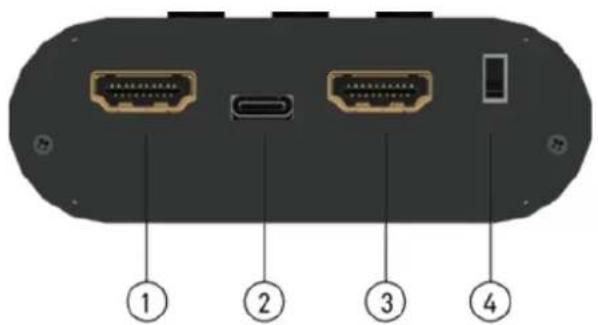

- OUTPUT:HDMI output
- USB-C: Firmware update / Recharge
- INPUT:HDMI input
- PowerSwitch:Power ON/OFF Switch
- LCDDisplay: the measured data is shown here
- Button(left):Back button
- Button(down):Select button
- Button(right): Enter button
ConnectionDiagram
MenuOperation
MethodA:PushButton
| Menu | Item | Description |
| Source (Output) | Resolution | Select the video resolution and bandwidth |
| Color Space | Select color space (RGB, YCC444, YCC422, YCC420) | |
| Color Depth | Select color depth (8 bits, 10 bits, 12 bits) | |
| HDCP | Enable/Disable HDCP function (1.4/2.3) | |
| Pattern | Provide four test patterns for user to use (Gray Gradient, Color Bars 1, Flat Fields, Color Bars 2) | |
| Audio | Adjust the sound level of HDMI output (0dB, -6dB, -12dB, -18dB, -24dB, Mute) | |
| EDID | · [Source Data(to Input Source)] Show the current device EDID information· [Sink Data(From Monitor)] Show the connected monitor EDID information· [Source Option(to Input Source)]· Default: Use default EDID· Sink: Learn connected monitor EDID· User Define: Use user defined EDID | |
| Sink (Input) | Screen Info | The screen will show connected source signal information like resolution, format, HDCP, etc.. |
| Through | [ON] The A/V signal will pass-through from the HDI input to the HDMI output[OFF] The HDMI output will send the device signal pattern. |
MethodB:SoftwareControlthroughUSB-Cport
1. SystemRequirement
(1) OS Information: Windows XP/7/8.1/10/11
(2) Baud rates: 115200
(3) Software size: 1 MB
(4) Minimum RAM requirement: 256 MB
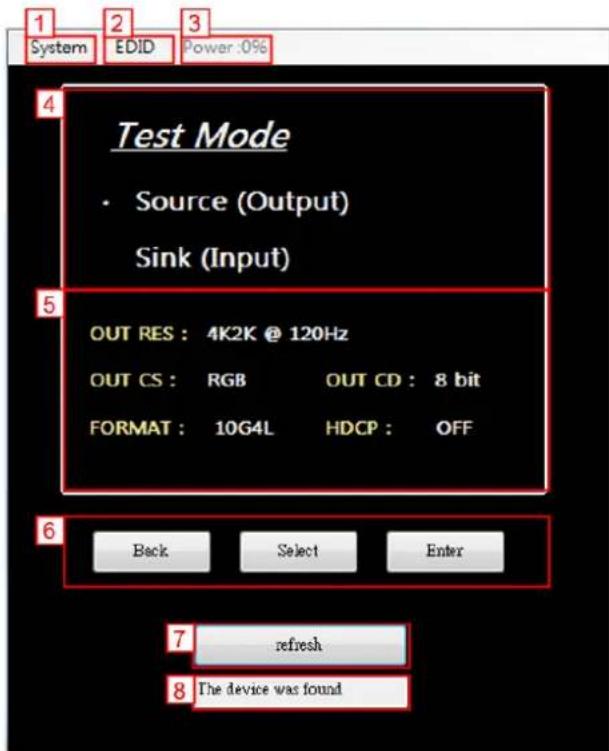
1. System
- Firmware Upgrade:
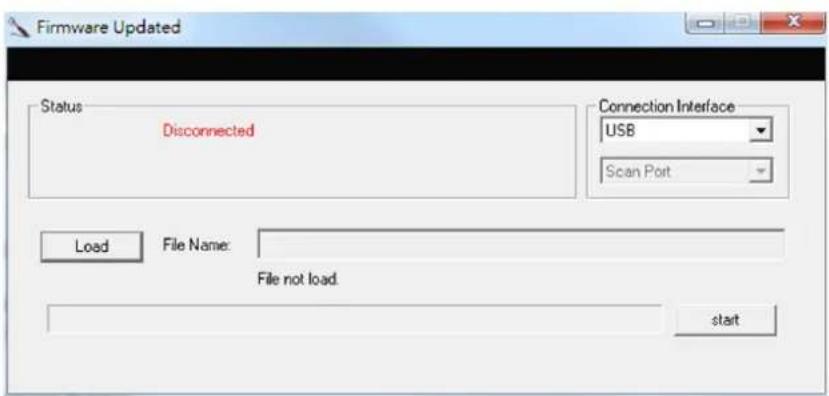
- Select "USB" as the Connection Interface
- Click the "Load" button to select the file which you want to upload
- Click the "start" button
- Power cycle the device and the firmware will start to update.
- Firmware Version
2.EDID
- Download Sink EDID
- Download the EDID of connected monitor to the computer
- Upload User EDID
○ Upload an EDID file from a computer to the device
3.BatteryPowerInformation
- The current battery power information
4. TestMode
- Source (Output) mode
- Sink (Input) mode
5. Thesignalinformationoftheoutput
- Shows the device's output signal information like resolution, format, HDCP, etc..
6.Back/Select/Enterbutton
- Use the buttons to select a mode, category, & items.
7. Connect/RefreshButton
8.ConnectionStatus
OperationApproach
SourceMode
When BG-AVTPG-MINI-G2 is treated as a source, it can generate different test patterns and send them to a connected display.

- As HDMI Generator
How to use Source Mode:
- Make sure the connection between the BG-AVTPG-MINI-G2 HDMI output port and the display is connected properly.
- Use the buttons or software to select the MODE category and enter SOURCE mode.
- Set the output signal format and video testing pattern.
SinkMode
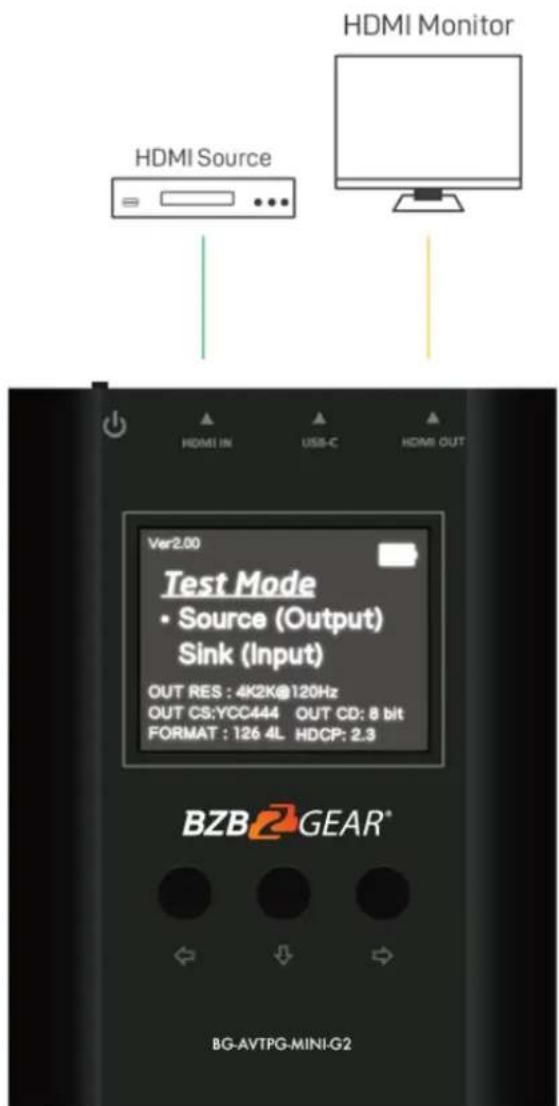
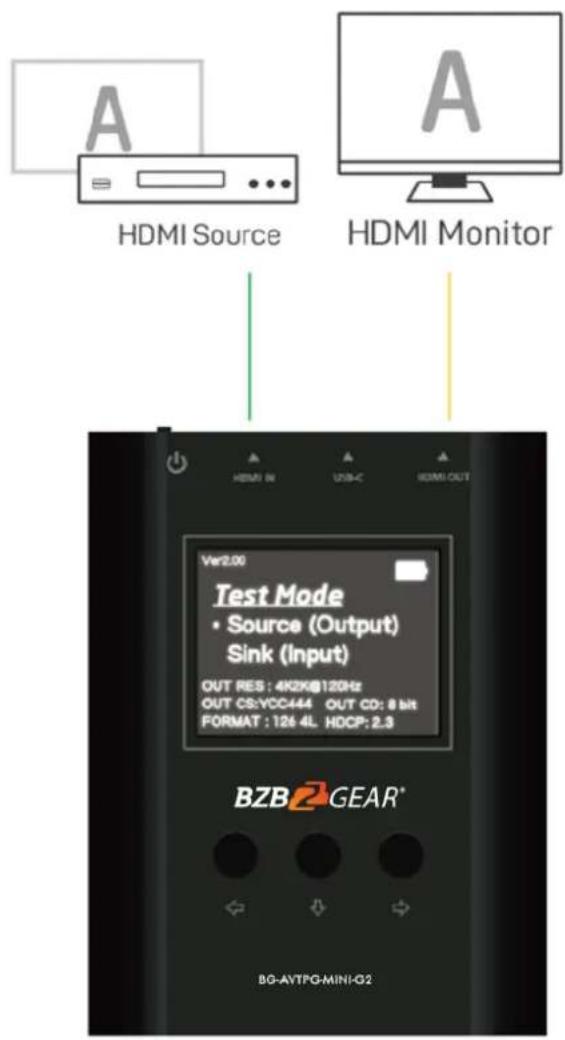
When BG-AVTPG-MINI-G2 is in sink mode, it can read the HDMI source's information and in addition, the input HDMI can be passed through to an HDMI capable display if needed (as shown below).
• As HDMI Receiver/Analyzer
How to use Sink Mode:
- Connect the BG-AVTPG-MINI-G2 between HDMI source and HDMI display.
- Use the buttons or software to select the MODE category and enter SINK mode.
- The source information will be presented on the LCD. The process of acquiring HDMI information will take about 3\~5 seconds.
TechSupport
Have technical questions? We may have answered them already!
Please visit BZBGEAR's support page (bzbgear.com/support) for helpful information and tips regarding our products. Here you will find our Knowledge Base (bzbgear.com/knowledge-base) with detailed tutorials, quick start guides, and step-by-step troubleshooting instructions. Or explore our YouTube channel, BZB TV (youtube.com/c/BZBTVchannel), for help setting up, configuring, and other helpful how-to videos about our gear.
Need more in-depth support? Connect with one of our technical specialists directly:
Phone
1.888.499.9906
support@bzbgear.com
LiveChat
bzbgear.com
Warranty
BZBGEAR Pro AV products and cameras come with a three-year warranty. An extended two-year warranty is available for our cameras upon registration for a total of five years.
For complete warranty information, please visit bzbgear.com/warranty.
For questions, please call 1.888.499.9906 or email support@bzbgear.com.
MissionStatement
BZBGEAR is a breakthrough manufacturer of high-quality, innovative audiovisual equipment ranging from AVoIP, professional broadcasting, conferencing, home theater, to live streaming solutions. We pride ourselves on unparalleled customer support and services. Our team offers system design consultation, and highly reviewed technical support for all the products in our catalog. BZBGEAR delivers quality products designed with users in mind.
Copyright
All the contents in this manual and its copyright are owned by BZBGEAR. No one is allowed to imitate, copy, or translate this manual without BZBGEAR's permission. This manual contains no guarantee, standpoint expression or other implies in any form. Product specification and information in this manual is for reference only and subject to change without notice.
Allrightsreserved. No reproducing is allowed without acknowledgement.
- Statement
- SafetyPrecaution
- Introduction
- Features
- PackingList
- OperationControlsandFunctions
- FrontandTopPanels
- ConnectionDiagram
- MenuOperation
- MethodB:SoftwareControlthroughUSB-Cport
- SystemRequirement
- System
- 2.EDID
- 3.BatteryPowerInformation
- TestMode
- Thesignalinformationoftheoutput
- 6.Back/Select/Enterbutton
- Connect/RefreshButton
- 8.ConnectionStatus
- OperationApproach
- SourceMode
- - As HDMI Generator
- SinkMode
- • As HDMI Receiver/Analyzer
- TechSupport
- Warranty
- MissionStatement
- Copyright
Brand : BZBGear
Model : BG-AVTPG-MINI-G2
Category : Générateur de signal HDMI