
PS002E - Battery Neewer - Free user manual and instructions
Find the device manual for free PS002E Neewer in PDF.


| Brand | Neewer |
| Model | PS002E |
| Product Type | Rechargeable Battery |
| Battery Chemistry | Lithium-ion (Li-ion) |
| Voltage | 7.4 V |
| Capacity | 1200 mAh |
| Dimensions (approx.) | 50 x 35 x 20 mm |
| Weight (approx.) | 80 g |
| Charging Input | DC 5V / 1A |
| Charging Time | Approximately 2-3 hours |
| Cycle Life | 500+ charge cycles |
| Operating Temperature | 0°C to 45°C (charging), -10°C to 60°C (discharging) |
| Storage Temperature | -20°C to 25°C |
| Overcharge Protection | Yes |
| Overdischarge Protection | Yes |
| Short Circuit Protection | Yes |
| LED Indicator | Shows charging status |
| Compatibility | Neewer devices and compatible chargers |
| Certifications | CE, RoHS |
| Maintenance | Clean with a dry cloth; avoid moisture |
| Storage | Store in a cool, dry place; charge to about 50% for long-term storage |
| Disposal | Recycle according to local regulations; do not dispose in household waste |
Frequently Asked Questions - PS002E Neewer
User questions about PS002E Neewer
0 question about this device. Answer the ones you know or ask your own.
Ask a new question about this device
Download the instructions for your Battery in PDF format for free! Find your manual PS002E - Neewer and take your electronic device back in hand. On this page are published all the documents necessary for the use of your device. PS002E by Neewer.
USER MANUAL PS002E Neewer
natural_image
Technical line drawing of a mechanical device with internal components and mounting feet (no text or symbols)YC-VP1 Power Supply Adapter Instruction Manual
Copyright
© 2022 Shenzhen Neewer Technology Co., Ltd. All Rights Reserved. This document is the sole property of Shenzhen Neewer Technology Co., Ltd and shall not be, reproduced, transmitted, transcribed, stored in a retrieval system or translated in any form, by any means, without prior written permission from Shenzhen Neewer Technology Co., Ltd. Shenzhen Neewer Technology Co., Ltd reserves the right to change content in this instruction manual at any time and without prior notice.
Version Control
| Date | Version number | Description | Issued by |
| 09/28/2022 | 1.0 | YC-VP1 Power Supply Adapter Manual | NEEWER® |
About this product
Thanks for purchasing from N€EWER®
Please read this manual carefully before operating and save it for future reference.
● This product is a portable power supply adapter.
- It has multi outputs including Type-C, D-TAP, 5.5*2.5 DC, 5.5*2.1 DC and USB-A.
● Multi-voltage outputs of 14.4V, 12V, 8V, 5V can power for various devices.
● Battery can be charged through Type-C port which supports FC/FCP/PD2.0/PD3.0 input&output QC protocol.
- It features low self-discharge, good performance in low temperature, high DC conversion rate, over-current and short-circuit protection.
Product Illustration
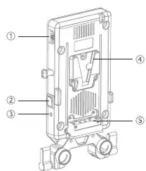
① D-Tap Output
② Power Supply Switch
③ Power Supply LED
④ V-Mount Plate
⑤ BP Input Interface
⑥ Type-C Input/Output LED
01
Product Illustration

Installation
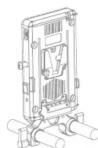
① Standing 15mm Rod Bracket installed at the bottom of the adapter plate
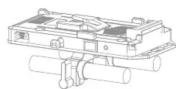
② Lying down 15mm Rod Bracket installed at back of the adapter plate
Operation Instruction
Charging Operation:
Hang a 14.4/14.8V V Mount Battery on the V-mount adapter, connect the charger to the Type-C port of the V-mount adapter, the LED will turn red, charging stars. The LED will turn green when the battery is fully charged.
PS: LED red and green flash alternately for abnormal operation.
Power Supply Operation:
① Hang a 14.4/14.8V V Mount Battery on the V-mount adapter, the Type-C port will have an output, and the output voltage can be automatically adjusted according to the connected device. The LED indicator is red when Type-C is outputing.
② Hang a 14.4/14.8V V Mount Battery on the V-mount adapter, the Type-C port will have an output. Turn on the power supply switch, the LED turns blue, and the D-Tap, DC, USB can output at this time. Turn off the switch, the LED will be off and there will be no output from the D-Tap, DC and USB.
03
Technical Specifications
| Battery Working Voltage | 12~17V | |
| Type-C Input | 9V~3A;9V~3A;12V~3A;15V~3A;20V~3.25A (65W Max.)Can charge for V Mount Battery | |
| Output | D-TAP Port | 12~17V(Battery Voltage) |
| DC 5.5*2.5 Port | 12V(2.0A(Max). | |
| DC 5.5*2.1 Port | 8V(2.0A(Max). | |
| USB Port | 5V(2.1A(Max). | |
| Type-C Port | 9V~3A;9V~3A;12V~3A;15V~3A;20V~3.25A (65W Max.) | |
| Dimensions | 107*178*26.5mm(4.2*7*1.1") | |
| Weight | About 323g(11.5oz) | |
| Packing Contents | V-Mount Adaptor Plate x 1 Dummy Battery Cable x 17.2V DC5.5*2.1 Right Angle to DC5.5*2.1 Straight Cable x 112V DC5.5*2.5 Right Angle to DC5.5*2.1 Right Angle Cable x 15V USDA-4 to 5.5*2.1 Cable x 1 | |
| CautionsPlease strictly follow the manual instructions when use this product, and ensure that the output voltage of each interface match the corresponding equipment.The company shall not be liable for any equipment damage caused by personal improper operation. | ||
If you have any questions about product, we are glad to help.

US +1 732-623-9777 UK +44 (0) 3330113494

Send us an email vip@neewer.com

www.neewer.com
UK REP
Lingfeng Electronic (UK) Ltd
International House, 10 Churchill Way, Cardiff, CF10 2HE, United Kingdom
EC REP
NW Formations GmbH(for authorities only)
Hoferstrasse 9B, 71636 Ludwigsburg, Germany
Shenzhen Neewer Technology Co., Ltd.
Room 1903, Block A, Lu Shan Building No. 3023
Chunfeng Rd Luo Hu District, Shenzhen
Guangdong 518001, China
备注:
Brand : Neewer
Model : PS002E
Category : Battery