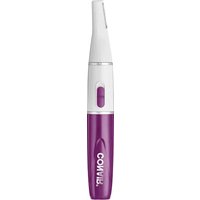
LLT2 - Electric mower Conair - Free user manual and instructions
Find the device manual for free LLT2 Conair in PDF.


| Product Type | Personal Grooming Trimmer |
| Brand | Conair |
| Model | LLT2 |
| Power Source | Lithium Battery (rechargeable) |
| Intended Use | Nose, ear, and eyebrow hair trimming |
| Blade Material | Stainless steel (assumed) |
| Water Resistance | Not waterproof; keep away from water |
| Dimensions | Approximately 5.5 x 1.5 inches (estimated) |
| Weight | Approximately 2.5 oz (estimated) |
| Warranty | Limited 2-year warranty |
| Maintenance | Clean blades after each use; replace battery as needed |
| Safety Warning | For household use only; do not use near water |
| Additional Features | Precision trimming head, ergonomic handle |
Frequently Asked Questions - LLT2 Conair
User questions about LLT2 Conair
0 question about this device. Answer the ones you know or ask your own.
Ask a new question about this device
Download the instructions for your Electric mower in PDF format for free! Find your manual LLT2 - Conair and take your electronic device back in hand. On this page are published all the documents necessary for the use of your device. LLT2 by Conair.
USER MANUAL LLT2 Conair
IMPORTANT SAFETY INSTRUCTIONS
When using an electrical appliance, basic precautions should always be taken, including
precisions should always be taken, including the following:
READ ALL INSTRUCTIONS
BEFORE USING
FOR HOUSEHOLD USE ONLY KEEP AWAY FROM WATER
KEEP AWAY FROM WATER
To reduce the risk of electrical shock: 1. Do not reach for an appliance that has
-
Do not reach for an appliance that has fallen into water.
-
Do not use while bathing or in the shower
-
Do not place or store appliance where it can fall or be pulled into a tub or sink. Do not place
in or drop into water or other liquids.
WARNING – To reduce the risk of be
fire, electrical shock, or injury to persons:
- This appliance should not be used by, on, or near children or by individuals with certain
or near decision or by individualized with serial disabilities.
- Use this appliance only for its intended use a described in this manual. Do not use attach
described in this manual. Do not use attachments not recommended by the manufacturer.
- Never operate this appliance if it is not
working properly, if it has been dropped, damaged, or dropped into water. Return the
appliance to a service center for examination and repair.
- Never operate the appliance with the air
openings blocked or while on a soft surface,
such as a bed or couch, where the air openings
may be blocked. Keep the air openings free of lint, hair and the like.
-
Never drop or insert any object into any opening
-
Do not use outdoors or operate where aerosol
(spray) products are being used or where oxygen is being administered
- Do not place appliance on any surface while
it is operating.
- Do not use this appliance with a damaged or broken comb or with teeth pricing from the
of broken comb or with leaf missing from the blades, as injury may occur.
- Avoid skin contact with moving blades.
SAVE THESE
SAVE THESE INSTRUCTIONS
INSTRUCTIONS
OPERATING
OPERATING INSTRUCTIONS
INSTRUCTIONS
PERSONAL GROOMING KIT
PERSONAL GROOMING KIT
- To insert battery, remove compartment cover at the Fig. 1
back of the unit by pull-
ing straight down (Fig. 1).
Insert one AAA lithium ion battery, negative and up
used battery promptly. This will increase the life of
your thriller. 7. After inserting the battery, range the
-
After installing the battery, replace the battery compartment cover
-
Now your unit is ready to be used
*Do not use in the shower. To clean, simply rinse
brimmer blade under faucet.
- To use your trimmer, push On/Off switch
upward to the "On" position.
- After you finish using your trimmer, push down
on the On/Off switch to turn the trimmer off.
- Always purchase the correct size and grade of
battery most suitable for the intended use.
- Clean the battery contacts and also those of the
device prior to battery installation.
d. Ensure the battery is installed correctly with record to polarity (i-, and, -).
e.gard to playfully (+ and -).
- Remove usually iron equipment, which is not to be used for an extended period of time
(10) Never short-circuit batteries. Store unused
batteries in their original packaging away from any
metal objects as that could cause a short-circuit.
- Never dispose of batteries in fire, except under
conditions of controlled incineration. Failure to
Observe this precaution may result in an explosion. Never attempt to replace primary batteries as
this may cause leakage, fire, or explosion
(1) Only 100% of the total, (2) 30% of the total
TO OPERATE TRIMMER
er comes with a large trimming can be used for trimming all body
can be used for trimming an body yetmoes
yes with two
t combs
ou achieve
it when want to
to remove the
arger attachment comb leaves hair longer
tely 7 min (see Fig. 1).
er attachment comb leaves hair proximately 4mm /ree Fig. 7)
proximately 4mm (see Fig. 1). attachment combs, be runa the unit
of position and slide the comb over the
made. Make sure that the teeth of the
facing in the same direction as the
wade, and that the top of the comb is the top of the trimmer.
t to completely remove hair, use the
without any attachment combs.
the trimmer, slide the On switch
- trimming blades. When you are
printing, slide the on switch away
e trimmer, slide one of the attach-
os over the trimming blade for added
•
SWITCH TRIMMER HEADS
making sure the "I" mark is aligned with the "I"
mark, then turn clockwise until the "1" marks are aligned and lock into position (see Fig. 4).
□ □ □
| 0 | | 52 |
| A | | B | |
| ∽ | | p. |
| 1 | 1 |
| | |
图3-1
TRIM YOUR BODY HAIR
THM YOUR BODY RAIL nd defi ne, move the trigger rapidly so
at any hair you do not intend to trim.
YOUR NOOF AND FAR HAID
YOUR NOSE AND EAR HAIR
lose and ear trimmer head to the pole. Turn unit on . Gently insert trims
to nostril. Gently move trimmer in
the nostril to remove unwanted hair.
ting the trimmer more than 12 to
- Confly inard limmes head as mum
- gently insert trimmer head no more to outer ear canal. Gently move trim-
I the outer ear to remove unwanted
ing beyond the outer ear. Guide the
ound the outer surface of ear to trim bairs. Never insert trimmer more
to ear canal.
TRIMMING TIPS
mmer at a slight right in the direction of
in the direction of orsing in the disartic
to apply excess pres
y damage the blade,
to the skin during tri
fi mly with one har
process to ensure the
ACING THE BAT
ACING THE BAT
lary, remove the low place battery and ps
Dispose of battery p
at incinerate.
llance is off and holo
the thinner fully an
Lithium Ion battery
g sure that the better
direction (+ / - poles)
"shimmer will go unable to move the battery.
the shower or sub
THE WORLD OF SALE
[Non-Text]
[Non-Text]
[Non-Text]
TAKING CARE
F YOUR TRIMMER
ARE
a tigrayor hindac as a precision p
e winter blades are precision in special use, they should always be
th care. Each time you finish using
ke a cleaning brush and brush ar
air that has collected in the blade inletus undewertes only, the fire
clades under water only, dry thro be trimper in its storage shond us
- Extensor into storage status of
the long life of the appliance, us
er only for the purpose intended
cturer
N YOUR TRIMMER
trimmer is off.
we the trimmer head fo
re "1" mark slights lwr
X, when hit the headquarters
us the head under water
proper functioning

Conair will repair or replace (at our option) your unit free of charge for 24 months from the date of pur-
chase if the appliance is defective in workmanship
or materials.
To-bailan service under the warranty, return the defective product to the service center listed below, together
with your purchase receipt and \$3.00 for postage and
handling. California residents need only provide proof of
purchase and should call 1-600-3-conven for shipping instructions. In the absence of a purchase receipt, the
warranty period shall be 24 months from the date
of manufacture.
ANY IMPLIED WARRANTIES, OBLIGATIONS, OR LIABILITIES, INCLUDING BUT NOT LIMITED TO
THE IMPLIED WARRANTY OF MERCHANTABILITY
AND FITNESS FOR A PARTICULAR PURPOSE, SHALL BE LIMITED IN PURATION TO THE
SHALL BE LIMITED IN DURATION TO THE 24-MONTH DURATION OF THIS WRITTEN, LIMITED
WARRANTY. Some states do not allow limitations on
how long an implied warranty lasts, so the above limitations may not apply to you.
IN NO EVENT SHALL CONAIR BE LIABLE FOR
ANY SPECIAL, INCIDENTAL, OR CONSEQUENTIAL
DAMAGES FOR BREACH OF THIS OR ANY OTHER WARRANTY EXPRESS OR IMPLIED WHATTOVER
WALDART, EXPRESS OR IMPLIED, WHO'S OUTFLEX Some states do not allow the exclusion or limitation
of special, incidental, or consequential damages,
so the above limitation may not apply to you.
This warranty gives you specific legal rights, and you may also have other rights, which vary from state
to state.
Please register this product at: www.canait.com/registration
Service Center
Canair Corporation
Service Department 7475 N. Glen Harbor Blvd.
Blendale, AZ 85367
©2014 Consair Corporation
14P0007981


MEDIDAS DE
SEGURIDAD
IMPORTANTES
www.xsdai.com/logs@user
©2014 Conair Corporation
Service Department 7675 North Gate Univ
1475 North dist Harbor Blvd. Glendale, AZ 85307
[Non-Text]
14P0007181
4.2718
LITO

Brand : Conair
Model : LLT2
Category : Electric mower