
MMS2550B - Loudspeaker PHILIPS - Free user manual and instructions
Find the device manual for free MMS2550B PHILIPS in PDF.


| Product Type | Speaker |
| Brand | Philips |
| Model | MMS2550B |
| Color | Black |
| Dimensions (W x H x D) | 200 x 150 x 100 mm |
| Weight | 1.0 kg |
| Power Source | USB or AC adapter (5V/1A) |
| Audio Input | 3.5mm AUX |
| Bluetooth | Yes, v4.2 |
| Speaker Driver | 2 x 2.5 inches |
| Output Power | 10W RMS |
| Frequency Response | 80 Hz - 20 kHz |
| Controls | Volume up/down, power, Bluetooth pairing |
| Compatibility | Smartphones, tablets, PCs, laptops |
| Box Contents | Speaker, USB charging cable, AUX cable, manual |
| Usage | Home entertainment, casual music listening |
| Cleaning | Wipe with dry cloth; do not use liquids |
| Safety | Do not expose to water or extreme temperatures |
| Repairability | No user-serviceable parts; contact support |
| Warranty | 1 year limited warranty |
Frequently Asked Questions - MMS2550B PHILIPS
User questions about MMS2550B PHILIPS
0 question about this device. Answer the ones you know or ask your own.
Ask a new question about this device
Download the instructions for your Loudspeaker in PDF format for free! Find your manual MMS2550B - PHILIPS and take your electronic device back in hand. On this page are published all the documents necessary for the use of your device. MMS2550B by PHILIPS.
USER MANUAL MMS2550B PHILIPS
Please read carefully the safety mark on the back side
This mark is intended to alert the user from the new updated discovery value under the
the non-ratated dangerous voltage within the product that may be of sufficient magnitude to
constitute a risk of electric shock to persons.
This mark is intended to alert the user for
■ Important operating and servicing instruction.
Warnings • Avoid sustained periods on high-volume use, and
do not turn the volume to maximum level while using high output signal, such as Mobile (Chrome or DVD).
ing/roscopot e-mail, such as Modem Phone or DVD, etc., as this will cause distortion and may damage the
- Please switch off the system from the wall socket.
when not in use. - Do not open the case or back target to avoid
- Do not open the cover or back panel of white electrical shock or any other accidents. No user-
■ Only for indoor use.
- Plug the system to the AC outlet with the right voltage ramped on the back panel of the Subwoofer.
- The MAINS plug is used as the disconnect device, the
disconnect device shall remain readily operate
Accessories
(No text)
Rate 3.5mm stereo reliable to 20%CA Remote control User manual
Connections
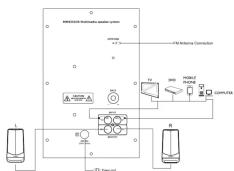
flowchart
graph TD
    A["INTEGRATED INTEGRATED Module System"] --> B["Power Source"]
    A --> C["AC/DC Power Supply"]
    A --> D["AC/DC Power Input"]
    A --> E["AC/DC Power Output"]
    A --> F["AC/DC Power Control"]
    A --> G["AC/DC Power Output"]
    A --> H["AC/DC Power Input"]
    A --> I["AC/DC Power Output"]
    A --> J["AC/DC Power Control"]
    A --> K["AC/DC Power Output"]
    A --> L["AC/DC Power Input"]
    A --> M["AC/DC Power Output"]
    A --> N["AC/DC Power Control"]
    A --> O["AC/DC Power Output"]
    A --> P["AC/DC Power Input"]
    A --> Q["AC/DC Power Output"]
    A --> R["AC/DC Power Control"]
    A --> S["AC/DC Power Output"]
    A --> T["AC/DC Power Input"]
    A --> U["AC/DC Power Output"]
    A --> V["AC/DC Power Control"]
    A --> W["AC/DC Power Output"]
    A --> X["AC/DC Power Input"]
    A --> Y["AC/DC Power Output"]
    A --> Z["AC/DC Power Control"]
Front-panel Operation

- To select Prev.Track in USD/SD/BT mode.
To select previous tuned station in FM
mode To backward the current song in
USA/SD/ATI Hobe 2. m. - /SCAN/Play/Rospin/USB/WD/INT mode
- ★★ ) SCAN PLAY, Pable, In 3.50, So/ on #ose press this button to play & pause the
system.In FM mode press this button
to scan available stations
- To select Next Track in USD/SD/WT mode.
To select next tailed station in FM mode To improve the current rate in USD/USD/RT
To forward the current long in data, 30-year mode
-
- :To increase system volume
S. op/o To select between AUX/FM/USB/SD/BT
/Power Button (Long Press)
- — :To decrease system Volume
-
■■ To prevent LRF flash shion
-
51: To connect SOI axis drive
* AVAILABLE IF CONNECTED
Remote controls
(No text)
(1) —— (2) —— (3) —— (4)
■ ■ ■
(3)
(A) (5)
图 1 2 3 (内) 四
[10] (11)
(72)
| □ |
□
P#201
[Non-Text]
3.17:46 4.07:4
2 MUTE 9 PLAY/PNGUSE
3.D-W 12.PREVIOUS 4.EQ 11.NEXT
5.100= 12.VOL-
6.INPUT 13.TUNE: 3.RPT 14.TUNE:
LAVAR ARVE IS CONNECTED
AVAILABLE IF CONNECTED
- U — Torr's hands-by-the speaker.
-
MUTI — Port 70 FE, in miles
-
MUTE 17/01/15:04 "the" is made in black/wake mode, display mode, when at: MUTE mode.
-
D>9 ...... Numeric keys, will've the help of these keys you select: song or back in USB, and to IBM are used to write from a song. For 2018, no
-
EDo: To set equalsing mode BOOK for BOOK, MZZ fly, MZZ R08 fly, R08 PASS fly
NORMAL, CLAS for CLASSIC, CDN for COUNTRY (works only 1H/USB/SD mode)
-
100=---- To select and play the music back present after the 100 tracks.
-
INPORT — ADB for ADB in, SFA BACUATOR, GATOR USA, GATOR SP, BYS KIF PM.
-
PMS — To not enter into PSF547 mode, when operating via LPS6/STS mode
-
VOL+----Volume up.
-
■ — Short press to play or to pause songs. For manual storage user can
press frequency(eg:100-4) and press 📁 station number will flat at ,press 📁 or 📁 to choose the serial .perea 📁 again to store the station.
- M — Play previous song in USB" SO" & BT mode or go to previous Preset station
in PM mode
-
■ —Play next song in 2018, SD & BT mode or go to next Point station in FM mode
-
VOL: ...... Volume slow
-
TUNE..... Press TUNE - each time to search channel step-by-step/each
(1) (2) (3) (4) (5) (6) (7) (8) (9) (10) (11) (12) (13) (14) (15) (16) (17) (18) (19) (20) and play the channel automatically.
M. TUNE> ---- Press“TUNE=” each time to search channel step by step(each
Step 0.1 MHz/Press TUNE + long time to search next channel,
and play the channel automatically
Playing the speakers and subwoofer

System positioning
The subwoofer is recommended to be put.
on the floor to get a better acoustic effect.
For best possible surround sound, all the
speakers (except subwoofer) should be placed at the same distance from the
listening position.
Place the front left and right speakers at
equal distances from the TV and at an angle of approximately 45 degrees (Horizontal)
of approximately 43 degrees (horizontal) from the listening position.
Unbef. Ulist
- To avoid magnetic interference, do not position
the speakers, too close to your TV.

natural_image
Blank white image with no visible content, text, or symbolsTroubleshooting
(No text)
Under no circumstances should you try to repair the system yourself, as this will invalidate the warranty
Do not open the system as there is a risk of electric shock. If a fault occurs, first check the points listed below before lightning fire stop the fire next. If you are confident in merely the problem by following limits.
below before taking the system for replan. If you are able to remote the mentioned in below table, Consult your dealer or PHILIPS APSC for help
(No text)
Problem
-
No power. Check if the AC power cord is properly inserted into the AC mains socket.
-
No sound or distorted sound. Adjust the volume / select the correct source to choose the equipment that you want to hear through the system.
2. The
function properly. the batteries with new ones./Paint the remote control directly towards the IR sensor (located on front panel of the subwoofer)/Check that the batteries
are loaded correctly / switch off the system for 30 seconds and then restart.
4. Low
The LED LED funda shot format is not compatible with the custom. Data is
5. The c drive
- Slow operation of the USB / SD Big memory size USB / SD flash drive will take time to read and play. /Teles and USB / ETO drive and read & rotate controls
flash flash
- I'M not properly tuned. Match with local frequency
8. ITM su
The Ground Truth image displays a single, solid horizontal line. According to Rule 2 (UNDERSCORE & LINE RULES), this is a stylistic or background line, not a placeholder underscore. Therefore, the OCR result must ignore it and output nothing or only meaningful text. The provided OCR content is "____", which consists of four underscores. This is an incorrect interpretation of the line as a placeholder, violating the rule that stylistic lines must be ignored. The OCR has hallucinated underscores where none should exist based on the GT's visual context. Hence, the OCR result is inconsistent with the Ground Truth.
In case these measures do not work contact the nearest PHLIPs service center or call at customer care numbers
Warranty
This Philips 2.1 Multimedia Speaker is warranted against any defect due to defective materials or workmanship for 12
months from the date of purchase, should a defect develop during the period of warranty. Gibson Innovations India Private Limited undertake to repair the aquaratus FREE OF CHARGE at any of the Philips
Authorised Service-Centres.
The warranty is not valid in
- Proof of purchase is not accompanied with this warranty card.
-
The warranty card is not completed immediately after purchase
-
The apparatus is not used.
-
Defects are caused by imp
-
Any repairs are done by persons other than Phillips Authorised service centre
-
The serial number is sanpared even.
- Defects due to causes beyond control like lightning, abnormal voltage, acts of God or while in
transit to the purchaser's residence.
All consumables and parts susceptible to normal wear and tear are not covered under warranty.
Model. No. Product Si No.
Inv. No. Date of Purchase
Customer's name and address: ____
本报告期末股东普通股股东持股变动明细表
Dealer Signature & Stamp
Question? Always there to help you
Contact1 Visit us at: www.india.phlipsci.com Contact1 at : 1860-180-178
The Ground Truth image displays a single, solid horizontal line. According to Rule 2 (UNDERSCORE & LINE RULES), if the GT contains lines used for stylistic emphasis or as background elements (like ruled paper), the OCR result must ignore them. The provided OCR content is "____", which consists of four underscores. This is incorrect because underscores are not equivalent to a solid line and are not permitted under the “Stylistic/Background Lines (Ignore)” rule. Outputting underscores for a stylistic line violates the rule and constitutes an error. Therefore, the OCR result is inconsistent with the Ground Truth.
Gibson Innovations India Private Limited 4th Floor, Black-1 Vatika Business Pte. Sector #9, Sotna Road
Gurgaon-122018, Haryana, I
Product specifications\*
表决结果:同意
Total system power 2000 RMS Satellite speaker power 10V, 2 Speakers
Zakovna spokator power 6WLC KFC Drive size 3 inches Extravoflex power 10A-5A5 Intra-delta 9.00%
Jahreside Power NW Kft. Impedance & Grid Evolution =45.4% Emissions: 1981-2001
September 14,30 SMD =22 pp. Frequent range: 11942 - 20402 Product Disperse (2007) W x H x D: 26 n 350 n T7
Austin input socket PCA Nar Weizer 0.32 gm
Austin mobile Solet, PCA LIMS (USB) mass
Power consumption 30 W Class support 40 W (total Class storage law)
Capacity Up to 6458
Sutewoofer speaker 1 May Playability MP3 format file
Drive Size 4 inches
Impedance 4 Ohm
Frequency range 20Hz - 115Hz
Dimension (mm) W x H x D 156 x 253 x 271 *Specification subject to change without prior notice
Weight 2.49 kg Measured under specific conditions.
The Ground Truth image displays a single, solid horizontal line, which is a stylistic or background element (like a ruled paper line or separator), not a placeholder for text. According to Rule 2, such stylistic/background lines must be ignored by the OCR result. The OCR content provided is "", which consists of no characters. This correctly represents the absence of any textual content in the GT and correctly ignores it as a hallucination. Therefore, the OCR output should have been empty or contained no text. Hence, the OCR result is consistent with the Ground Truth.
The Maza Trademans and Philips Bruchimizern are registered trademarks of kontinklijke Philips NV used under license.
This product has been manufactured by and sold under the responsibility of Obson Innovation Pella
Private Ltd. and Diluson Innovations India private Ltd. is the assessor in relation to this product.
(No text)

Brand : PHILIPS
Model : MMS2550B
Category : Loudspeaker