PRMDC40 - Détecteur de faux billets Pyle - Free user manual and instructions
Find the device manual for free PRMDC40 Pyle in PDF.


| Product Type | Counterfeit Bill Detector |
| Brand | Pyle |
| Model | PRMDC40 |
| Power Supply | AC 110-220V, 50/60Hz |
| Detection Technologies | UV (Ultraviolet), MG (Magnetic), IR (Infrared), IM (Image) |
| Display | LED display for denomination and status |
| Counting Capacity | Up to 9999 |
| Bill Exit Direction | Front or rear (configurable) |
| Calibration | Automatic calibration on startup |
| Currency Update | Field-updatable for new currency |
| Verification Indicators | Green light (pass), Red light (fail) |
| Failure Indicators | LED status indicators for UV, MG, IR, IM |
| Dimensions (Approx.) | 10 x 8 x 5 inches |
| Weight (Approx.) | 3 lbs |
| Clear Function | Press and hold Function button to clear totals |
| Startup Sequence | Plug in, switch ON, automatic calibration (8.8.8.8 display, 2 beeps) |
| Bill Feeding | Manual feed, left-aligned, top of head to right |
| Default Currency | EUR (Euro) |
| Operating Environment | Standard office/shop conditions |
| Maintenance | Clean bill path regularly, avoid dust |
| Safety | AC adapter, keep away from moisture |
Frequently Asked Questions - PRMDC40 Pyle
User questions about PRMDC40 Pyle
0 question about this device. Answer the ones you know or ask your own.
Ask a new question about this device
Download the instructions for your Détecteur de faux billets in PDF format for free! Find your manual PRMDC40 - Pyle and take your electronic device back in hand. On this page are published all the documents necessary for the use of your device. PRMDC40 by Pyle.
USER MANUAL PRMDC40 Pyle
The Function Button allows you to customize your machine
- Press and hold the Function Button once and you will see (CLR) in the LED display. This will clear all calculation and bring the display back to (0).
- If you continue holding the Function Button, within 5 seconds you will have the choice the direction the banknote will exit. Exiting though the rear (UUUU) will be displayed in the LED. Exiting thought the front (nnnn) will be displayed in the LED.
- The unit will beep 2 times and the direction of bill exit will blink one in the LED that go dark. The bill direction is now set as the new default
- To change direction repeat the above steps to show the desired direction.
Counting Function
The bill detector has a built-in counting function.
- The unit will automatically detect the bill denomination and add it to the previous amount. The new total will then appear in the LED.
- The machine will count, add and display totals up to (9999)
Clearing The Totals
Clearing the totals from the machine is very simple.
- Press and hold the Function Button once and you will see (CLr) in the LED display. This will clear all calculation and bring the display back to (0).
Updating For New Currency
The machine has the ability to be updated with the introduction of new currency.
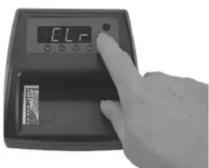
Press and Hold Function Button to Clear

Bill Rear Exit

Bill Front Exit

Displays maximum of 9999

Press and Hold Function Button to Clear
PYLE®
PyleUSA.com
MULTI-CURRENCY DETECTOR
User Manual

natural_image
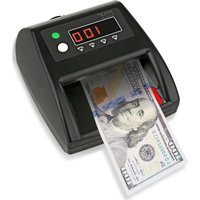
Black handheld digital currency counter with US dollar bills being scanned (no visible text or symbols on the counter or bills)PRMDC40
Counterfeit Bill Detector
Introduction

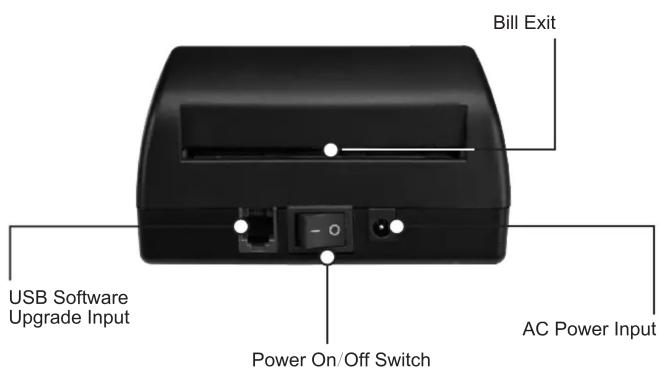
Counterfeit Bill Detector
Operating Instructions:
Starting up
Plug the power cord into the AC power input and plug the AC adapter into any standard AC 110 volt or 220 volt outlet. Switch the machine onto the ON position
The machine will then go though a calibration setup • The unit will display (8.8.8.8.).
- The unit will then sound two (2) beeps and a GREEN/RED light will show in the Verification Window.
- The machine will then verify the default currency. (EUR) Euro will show in the LED display.
- (UUUU) or (nnnnn) will then be displayed. This indicates the direction the bill will exit after it is scanned. (See Function Button)
• The motor will then cycle twice. - Once a (0) is displayed in the LED, the unit is now ready use.
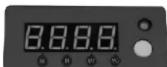
Calibration Display

Currency Verification

Ready to Use
Getting Started
Once the (0) is displayed in the LED, the machine is ready to use.
- Place a bill along the left edge of the entrance with the top of the head on the bill to the right.
• Gently push the bill into the entrance throat. - The machine will pull the bill into the unit. It will scan the bill for (IM) correct direction of bill being fed (IR) Infrared characteristics, (UV) Ultraviolet characteristics and (MG) Magnetic strip detection.
- The machine will discharge the bill either through the front of rear of the unit.
- If the bill passes inspection, the light in the Verification Window will light (GREEN).
• The unit will sound a beep. - The denomination of the bill will be displayed by the LED.
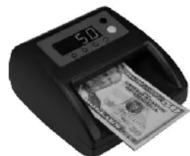
Passes with GREEN Light and Bill Denomination Displayed
If The Banknote Fails Inspection
- If the bill fails inspection, the light in the Verification Window will light (RED).
- The Unit will sound with (3) beeps.
- The LED will display the same amount before the last bill was inserted.
- Failure Lights will display for feature or features which did not pass.(Status Indicator)

Failed with RED Light
Failure LED Indicators Light
Brand : Pyle
Model : PRMDC40
Category : Détecteur de faux billets