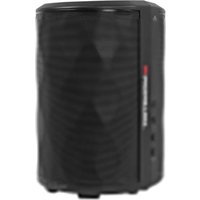
BTW249 - Speaker MONSTER - Free user manual and instructions
Find the device manual for free BTW249 MONSTER in PDF.


| Product Type | Wireless Indoor/Outdoor Speakers |
| Model | Monster BTW249 |
| Amplifier Output | 10W per channel (20W total), < 1% THD |
| Speaker Driver | 3.0" full-range |
| Bluetooth Version | Bluetooth 5.0 (estimated) |
| Bluetooth Range | Up to 30 meters (line of sight) |
| Wireless Multi-Speaker | EZ-Play technology; connect up to 8 speakers |
| Audio Inputs | Bluetooth, 3.5mm AUX |
| Controls | Power switch, Volume +/- , BT button, EZ-Play button |
| Battery Type | Rechargeable lithium-ion, 3.7V |
| Power Supply | AC 100-240V, 50/60Hz |
| Net Weight (each speaker) | 0.7 kg |
| Wall Mountable | Yes, with included brackets |
| LED Indicators | Power, Bluetooth pairing, EZ-Play status |
| Included Accessories | AC power cord, user manual, quick start guide, wall mount brackets, screws |
| Safety Certifications | FCC, CE (estimated) |
Frequently Asked Questions - BTW249 MONSTER
User questions about BTW249 MONSTER
0 question about this device. Answer the ones you know or ask your own.
Ask a new question about this device
Download the instructions for your Speaker in PDF format for free! Find your manual BTW249 - MONSTER and take your electronic device back in hand. On this page are published all the documents necessary for the use of your device. BTW249 by MONSTER.
USER MANUAL BTW249 MONSTER
Wireless Indoor/Outdoor Speakers with EZ-Play Technology
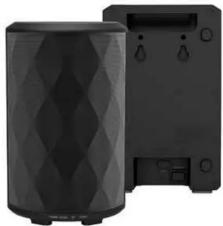
natural_image
Two black cylindrical devices with diamond patterns, one on top and one on side (no visible text or symbols)
TABLE OF CONTENTS
IMPORTANT SAFETY INSTRUCTIONS 3
UNPACKING 4
GETTING STARTED 5
BLUETOOTH CONNECTION (Bluetooth Devices) 5
E-Z PLAY CONNECTION 6
CONNECT TO MULTIPLE SETS OF BTW249 SPEAKERS 6
CONNECTION USING AUX INPUT 7
LED STATUS INDICATORS 7
AUDIO CONFIRMATION 7
WALL MOUNTING 7
TROUBLESHOOTING 8
SPECIFICATIONS 8
LIMITED WARRANTY 9
WARNING
To reduce the risk of fire or electric shock, do not expose this apparatus to rain or moisture.
CAUTION Use of controls or adjustments or performance of procedures other than those specified may result in hazardous
radiation exposure.
CAUTION: These servicing instructions are for use by qualified service personnel only. To reduce the risk,
of electric shock do not perform any servicing other than that contained in the operating instructions unless you are qualified to do so.
CAUTION
Danger of explosion if battery is incorrectly replaced. Replace only with the same or equivalent type.
PCC Warning Statement Changes as modifications set previously approved by the party responsible for compliance would valid using
Changes or modifications not expressly approved by the party responsible for compliance could void your authority to operate the equipment.
This equipment has been tested and found to comply with the limits for a Class B digital device, pursuant to Part 15 of the 500 Drivs
15 of the FCC Rules. These limits are designed to provide reasonable protection against harmful interference in a residential installation
This equipment generates, uses, and can radiate radio frequency energy and, if not installed and used in accordance with the instructions, may serve harmful interference to radio communications.
with the instructions, may cause harmful interference to radio communications. However, there is no guarantee that interference will not occur in a particular installation. If this equipment does
cause harmful interference to radio or television reception, which can be determined by turning the equipment off
and on, the user is encouraged to try to correct the interference by one or more of the following measures: - Reorient or relocate the receiving antenna.
- Increase the separation between the equipment and receiver.
- Connect the equipment into an outlet on a circuit different form that to which the receiver is connected.
- Consult the dealer or an experienced radio/TV technician for help.
FCC Radiation Exposure Statement: This equipment requires with FCC radiation exposure limits set forth for an uncontrolled environment. In order to
This equipment complies with FCC radiation exposure limits set forth for an uncontrolled environment. In order to avoid the possibility of exceeding the FCC radio frequency exposure limits. Human proximity to the antenna shall
not be less than 20cm (8 inches) during normal operation.
UNPACKING
Check that you have all of the following items.
If any item is missing, please contact the customer service hotline for assistance. The hotline number is printed on the cover page of this user manual.
The name number is printed on the cover page of this user manual.
- BTW249 speakers (KZ) - AC Power Cable (x7)
- Audio Cable
- User Manual (with Warranty Statement)
- Quick Bluert Guide - Instructions for installing Speakers
- Template for Wall Mount
- Metal Screw (x4)
- Plastic Sleeve (x4) - Anchor (x4)
Name (A)
PART DESCRIPTIONS
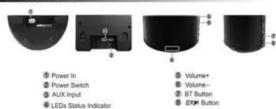
4
IMPORTANT SAFETY INSTRUCTIONS
TO PREVENT FIRE OR SHOCK HAZARD, DO NOT USE THIS PLUG WITH AN EXTENSION GORD
TO PREVENT FIRE OR SHOCK HAZARD, DO NOT USE THIS PLOG WITH AN EXTENSION CORD, RECEPTACLE OR OTHER OUTLET UNLESS THE BLADE SCAN BE FULLY INSERTED TO PREVE
RECEPTACLE OR OTHER OUTLET UNLESS THE BLADE SCAN BE POLELY INSERTED TO PREVENT BLADE EXPOSURE. TO PREVENT FIRE OR SHOCK HAZARD. DO NOT EXPOSE THIS
APPLIANCE TO RAIN OR MOIST.


The lightning flash with arrow-head
symbol, within an equilateral triangle is WARNING TO REDUCE THE RISK OF equilateral triangle is intended to
intended to alert the user to the presence ELECTRIC SHOCK DO NOT REMOVE COVER alert the user to the presence of
of uninsulated 'dangerous voltage' within (OR BACK), NO USER SERVICEABLE PARTS important operating and maintenance
the product's enclosure that may be of INSIDE REFER SERVICING TO QUALIFIED (servicing) instructions in the literature
sufficient magnitude to constitute a risk of SERVICE PERSONNEL. accompanying the appliance
BEONE, BLOCK 10 PERSONS.
READ INSTRUCTIONS - All the safety and operating instructions, should be read before the product is operated
-
RETAIN INSTRUCTIONS -The safety and operating instructions should be retained for future reference.
-
HEED WARNINGS - All warnings on the product and in the operating instructions should be adhered to:
1 FOLLOW INSTRUCTIONS - All operating and use instructions should be followed.
-
CLEANING - Unplug this product from the wall outlet before cleaning. Do not use liquid cleaners or aerosol cleaner clean only with a dry cloth
-
ATTACHMENTS - Do not use attachments not recommended by the product manufacturer as they may cause
- My treatment is - do not use albumin no recommendations by its product manufacturer. All they may taste hazards.
- ACCESSORIES - Do not place this product on an unstable cart, stand, tripod, bracket, or table. The product may
all, causing serious injury to a child or adult, and serious damage to the product. Use only with a cart, stand, tripod,
wacket, or table recommended by the manufacturer, or sold with the product. Any mounting of the product should
follow the manufacturer instructions, and should use a mounting accessory recommended by the manufacturer. A product and cart combination should be moved or quick store excessive force
and uneven surfaces may cause the product and car combination to overturn.
- VENTILATION- Slots and openings in the cabinet are provided for ventilation and to ensure
reliable operation of the product and to protect it from overheating, and these openings must not be
locked or covered. The openings should never be blocked by placing the product on a bed, sofa, rug
or other similar surface. This product should not be placed in a built-in installation, such as a bookcase or rack, unless
(1) POWER SOURCES - This product should be operated only from the type of power source indicated on the
- POWER BUSINESS - The graduate institute is operated only from the type of power sales to installed on the marking label. If you are not sure of the type of power supply to your home, consult your product dealer or local power
company. For products intended to operate from battery power, or other sources, refer to the operating instructions.
- GROUNDING OR POLARIZATION - This product may be equipped with a polarized alternating-current line
plug(a plug having one blade wider than the other). This plug will fit into the power outlet only one way. This is a safety
feature. If you are unable to insert the plug fully into the outlet, try reversing the plug. If the plug should still fail to fit, contact your electrician to replace your obsolete outlet. Do not defeat the safety purpose of the polarized plug.
- POWER-CORD PROTECTION - Power-supply cords should be routed so that they are not likely to be walked
on or pinched by items placed upon or against them, paying particular attention to cords at plugs, convenience
acceptacles, and the point of exit from the product.
- NON-USE PERIODS - The power cord of the product should be unplugged from the outlet when left unused for
Long periods of time. 2. Do not use this perspective per year water.
- Do not install near any heat sources such as radiators, heat resistors, sloves or other apparatus.
(1) We do not heat near × high electric shock as required; Heat negative; stored in low-temperature (including amplifiers) that produce heat.
- Refer all servicing to qualified service personnel. Servicing is required when the apparatus has been damaged in
any way, such as power - supply cord or plug is damaged, liquid has been spilled or objects have fallen into the
apparatus, the apparatus has been exposed to rain or moisture, does not operate normally, or has been dropped.
- Mains plug is used as disconnect device and it should remain readily operable during intended use. In order to disconnect the apparatus from the mains completely, the mains plan should be disconnected from the mains socket
outlet completely.
- Battery shall not be exposed to excessive heat such as sunshine, fire or the like.
m = 311
GETTING STARTED
Power Connection
Connect the supplied AC cable to the speakers
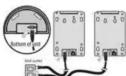


Power On/Off Switch
- Power on the mechanical Power Switch
- The Power Green LED will turn On. you will hear Voice confirmation "Power on".
- The unit will enter into Bluetooth
mode, the BT Blue LED will fast
- If the 3.5mm Stereo Audio cable is plugged in during this Power On mode, it will automatically enter into Aux mode.
- If the unit is left no action for more than 10 minutes, the unit will enter to standby mode automatically. All LEDs burn Off
- Press 'BT' or 'EZ-Play' button to wake up the unit
- Note: The unit will not go into Standby in Aux mode.
Charging Ba

000
- By connecting AC power, batteries will be charged and Red LED will turn on
- Red LED indicator will turn off when unit is fully charged. - If Red LED indicator is flashing, Spin offers that battery levels are low and good otherwise
- Prime LED Indicator is missing, this means that battery levels are low and medium. - Charge batteries about 10 hours before you start using the units for the first time
BLUETOOTH CONNECTION /Bluetooth Fir
BEETSOOTH CONNECTION (Bluetooth Devices and Spinuses)
Bluetooth connection (pairing) between your Bluetooth device and the Speakers can be completed by using NFC or manually. Your Bluetooth device must be NEC enabled to complete passenger automatically by using NEC.
of Michigan: Your Outlook service must be IPO enabled to complete pairing automatically by using IPO.
Bluetooth pairing by using NFC
- Turn on Bluetooth function on you Bluetooth device. - Plain your Bluetooth device on the website "NFC"
- Place your Bioblock device on the skinscreen "HFC" on the top surface of an - Parinol will be completed automatically and Bluetooth Blue LED indicator on
- Using all the complete authority, and intention to see the status of
- Once paired, you can play audio from your Bluetooth device and audio can be heard from this unit.
Be heard from this unit.
Note: If pairing won't be complete automatically, please use the manual pinning since your Bluetooth device may
the manual pairing since your broadband device may not be NFC enabled.
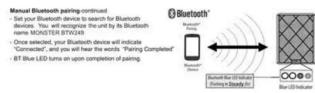
Manual Bluetooth pairing - Place one Speaker and up
- Place one open bath and your bedroom device so they are no more than 3 feet apart.
- Press and hold "BT" button on Speaker for 2 seconds to enter
into Bluetooth pairing mode. BT Blue LED will flash rapidly. Main menu Bluetooth functions of one Bluetooth device is 0%! BT Button
- Make sure Bluetooth function or your Bluetooth device is ON. eContinued in next session for 2 seconds
5 Blue LED Indicator [Flashing Rapidly]


OOO
EZ-Play WIRELESS CONNECTION (Between Sp
- Press and hold the EARN. Auditors on the First visit for 2 seconds
- Press and hold the 12.10P-1 button on the first unit for 2 seconds to send connection request to E7.01N - unit
to send connection request to "E2+D-1" unit
- EZTUP! Amber LED on Rx unit will flash.
- Press and hold the button on the second for 2 seconds to
scan connection request from Rx unit.
- EZFLPY Amber LED on Tx unit will flash during scanning.
- 870kV. Amber LED on both units will turn steadily on upon
(1) 1. Number 22 of super limits and non-study on open removalence of operation
completion of connection.
Once complete, the same audio will play on both speakers.
(1) 本说明仅供参考。
Wireless Speaker Auto Connection
Once the above wireless connection is completed, the Tx unit and
the Rx unit will be connected automatically whenever they are
turned on together.
2.2.1.3.2017
The Ground Truth image displays a single, solid horizontal line. According to Rule 2 (UNDERSCORE & LINE RULES), this is a stylistic or background line, not a placeholder underscore. Therefore, the OCR result must ignore it. The provided OCR content is "____", which consists of four underscores. This is an incorrect interpretation of the line as a placeholder, violating the rule that stylistic lines must be ignored. The OCR has hallucinated underscores where none should exist based on the GT's visual context. Hence, the OCR result is inconsistent with the Ground Truth.
CONNECT TO MULTIPLE SETS OF BTW249 SPI
- You can wirelessly connect multiple subscribers (up to 8 units) by up
- You can interfere contact multiple speakers (up to 6 units) by p
- Tx units of the extra BTW249 sets need to be converted to Reca
connected to the Tx unit of 1st BTW249 set.
[Non-Text]
To be Rx conversion
1x to Rx conversion
- Press 📄 button for 5 seconds converting Tx unit to Rx unit.
(二) 本次股东大会的召集和召开程序
- In this case, BT function is turn off, and BT Blue LED will turn off.
- Tx unit is now converted to the Receiver unit and will function like
Rx unit.
- Aux in will not function after above-conversion
Note 1: Will not be able to see conversion.
[Non-Text]
(1) 本说明仅供参考。
To connect 3rd\~7th additional speaker units
- Repeat the same steps described in "USB Wireless Connect"
- Repeat the same steps described in S19: Wireless comm
[Non-Text]
•
6
(No text)
[EMPTY]
(No text)
TROUBLESHOOTING
TROUBLESHOOTING
General No prior to
- Check the AC power cord is securely inserted in the unit and th
- Check the Power On/Off switch is turn to On position.
- If battery is flat. Plug in the AC power cord to charge and operate Keys no response
- Turn the Power On/Off switch to Off, and then On again to reset
- Unplug the AC power cord and plug is back again.
- Make sure the Aux connected device volume is turn to reasons
- Make sure the Bluetooth connected device output the audio tha
- Make sure the Bluetooth connected device volume is turn to re
Bluetooth Operations Audio quality in poor
- Bluetooth reception is poor. Move the Bluetooth device nearer to
Cannot pair to Bluetooth device Make sum both Bluetooth device and To unit in net connected
- Make sure both Bluetooth device and Tx unit is not connected to - Make sure the Bluetooth On/Off switch located below Tx unit is
- Make sure the Blue LED on the Tx unit is fast flashing (Pairing
- Turn Power switch to Off, and then On again. Press and hold b
EZ-Play Wireless Link Operations
- EZ-Play-wireless reception is poor. Move the Receiver unit (Rx)
Cannot connect the Receiver unit (Rx) to Tx
- Move the Rx unit near to the Tx during connection request. - Turn Power switch to Off, and then On again. Press and hold #
- From Power switch to Off, and then On again. Press and hold at connection request:
SPECIFICATIONS
SPECIFICATIONS
Amplifier
RMS-output power : 10W per oh, 10% THD
Total RMS power (Tx & Rx) : 40W Frequency response : 20 Hz - 30 kHz
Frequency response: 20 Hz + 20 kHz
Aux Inou: Stereo 3.5mm Jack
Mode switch : Auto
Speaker
Type : Full range, 3.0", 4Ω, water resist
Bluetooth
Bluetooth specification : Var. 3.0 *EDR
Support profiles : A2/DP Working range : 10M (line of sight)
ESTPLY
Wireless type : BTM Bi-Directional
Maximum connected unit : 8 Stereo units
Working range : 30M (line of sight)
Built in Battery Battery type : Living 11.1V
Battery type: 2-45°C, 11.14 Battery life: 5 hours
General
Power Supply: AC 100V-240V/50-60Hz
Power supply : 10W / 25W / 35W / 50W Power consumption : 30W
Standby power consumption : 1W Dimension (WxHxD) : 6.5" x 10.2" x 3.8", 169mm x 26
Mass (Net Weight): 8.2lbs..3.7 kg
(1) 本说明仅供参考。
[Non-Text]
[Non-Text]
[Non-Text]
[Non-Text]
8
。
The Ground Truth image displays a single, solid horizontal line. According to Rule 2 (UNDERSCORE & LINE RULES), if the GT contains lines used for stylistic emphasis or as background elements (like ruled paper), the OCR result must ignore them. The OCR content provided is "____", which represents four underscores. This is incorrect because underscores are not equivalent to a solid line and are not permitted under the “Stylistic/Background Lines (Ignore)” rule. The OCR has hallucinated text (underscores) where none should exist, violating the rule to ignore stylistic lines. Therefore, the OCR result is inconsistent with the Ground Truth.
The Ground Truth image displays a single, solid horizontal line. According to Rule 2 (UNDERSCORE & LINE RULES), this is a stylistic or background line, not a placeholder underscore. Therefore, the OCR result must ignore it and output nothing or only meaningful text. The provided OCR content is "____", which consists of four underscores. This is an incorrect interpretation of the line as a placeholder, violating the rule that stylistic lines must be ignored. The OCR has hallucinated underscores where none should exist based on the GT's visual context. Hence, the OCR result is inconsistent with the Ground Truth.
[Non-Text]
[Non-Text]
[Non-Text]
[Non-Text]
[Non-Text]
[Non-Text]
[Non-Text]
[Non-Text]
[Non-Text]
[Non-Text]
[Non-Text]
[Non-Text]
[Non-Text]
[Non-Text]
[Non-Text]
[Non-Text]
[Non-Text]
[Non-Text]
[Non-Text]
[Non-Text]
[Non-Text]
[Non-Text]
[Non-Text]
[Non-Text]
[Non-Text]
[Non-Text]
[Non-Text]
[Non-Text]
[Non-Text]
[Non-Text]
[Non-Text]
[Non-Text]
[Non-Text]
[Non-Text]
[Non-Text]
[Non-Text]
[Non-Text]
[Non-Text]
[Non-Text]
[Non-Text]
[Non-Text]
[Non-Text]
[Non-Text]
[Non-Text]
[Non-Text]
[Non-Text]
[Non-Text]
[Non-Text]
[Non-Text]
[Non-Text]
[Non-Text]
[Non-Text]


Brand : MONSTER
Model : BTW249
Category : Speaker