
rQPOD - Boat YSI - Free user manual and instructions
Find the device manual for free rQPOD YSI in PDF.


| Product Type | Boat |
| Brand | YSI |
| Model | rQPOD |
| Category | Boat |
| Hull Material | Fiberglass (estimated) |
| Length | Approx. 4.5 m (estimated) |
| Beam | Approx. 1.8 m (estimated) |
| Weight | Approx. 400 kg (estimated) |
| Engine Type | Outboard (estimated) |
| Fuel Type | Gasoline (estimated) |
| Maximum Power | 50 HP (estimated) |
| Capacity | Up to 4 persons (estimated) |
| Manual Format | |
| Number of Pages | 24 |
| Language | English |
| User Rating | 6.5/10 |
| Download | Free |
| AI Question Support | Available |
Frequently Asked Questions - rQPOD YSI
User questions about rQPOD YSI
0 question about this device. Answer the ones you know or ask your own.
Ask a new question about this device
Download the instructions for your Boat in PDF format for free! Find your manual rQPOD - YSI and take your electronic device back in hand. On this page are published all the documents necessary for the use of your device. rQPOD by YSI.
USER MANUAL rQPOD YSI
natural_image
Exterior view of a modern electric scooter with visible branding and wheels (no text or symbols)rQPOD
MODULAR REMOTE SURVEY BOAT
The information contained in this manual is subject to change without notice.
Effort has been made to make the information in this manual complete, accurate, and current.
The manufacturer shall not be held responsible for errors or omissions in this manual.
Consult YSI.com for the most up-to-date version of this manual.
Thank you for purchasing a YSI rQPOD Surface Vehicle. This manual covers operation and functionality of the rQPOD.
rQPOD features include:
- Lightweight design for single-person transport in a convenient backpack
- Easy on-site setup that's ready to run in 15 minutes or less
- Marine-grade components for operation in tough environments
• Ultimate flexibility in sensor payload
Safety Information
Please read this entire manual before unpacking, setting up or operating this equipment. Pay attention to all precautionary statements. Failure to do so could result in serious injury to the operator or damage to the equipment. Do not use or install this equipment in any manner other than that specified in this manual.
The manufacturer is not responsible for any damages due to misapplication or misuse of this product including, without limitation, direct, incidental and consequential damages, and disclaims such damages to the full extent permitted under applicable law. The user is solely responsible to identify critical application risks and install appropriate mechanisms to protect processes during a possible equipment malfunction.
Product Components
Carefully unpack the instrument and accessories and inspect for damage. If any parts or materials are damaged, contact YSI at 937-767-7241 or any authorized YSI distributor.

THIS IS AN INTERACTIVE DOCUMENT
When viewing this document as an Adobe® PDF hovering your cursor over certain phrases will bring up the finger-point icon. Clicking elements of the Table of Contents, website URLs, or references to certain sections will take you automatically to those locations.
Contents
- rQPOD Packages .... 5
- Components 6
- Setup 6
3.1 - First Time Setup .... 6
3.2 - General Assembly ..... 7
- Transmitter Alarms & Tips ..... 12
4.1 - Steering and Turning.... 12
4.2 - Fast and Slow Speed Settings ..... 12
4.3 - Signal Strength.... 12
4.4 - Telemetry and Servo Information ..... 13
- Propeller Servicing.... 14
- Troubleshooting 14
- Spare Parts and Accessories ..... 15
- Autonomous Vehicle Services ..... 16
- DJI Phantom 3 Battery Information ..... 18
- Warranty Statement.... 22

rQPOD in Action

natural_image
Black-and-white photo of a person in waders standing on a riverbank with a small boat and power lines in the background (no visible text or symbols)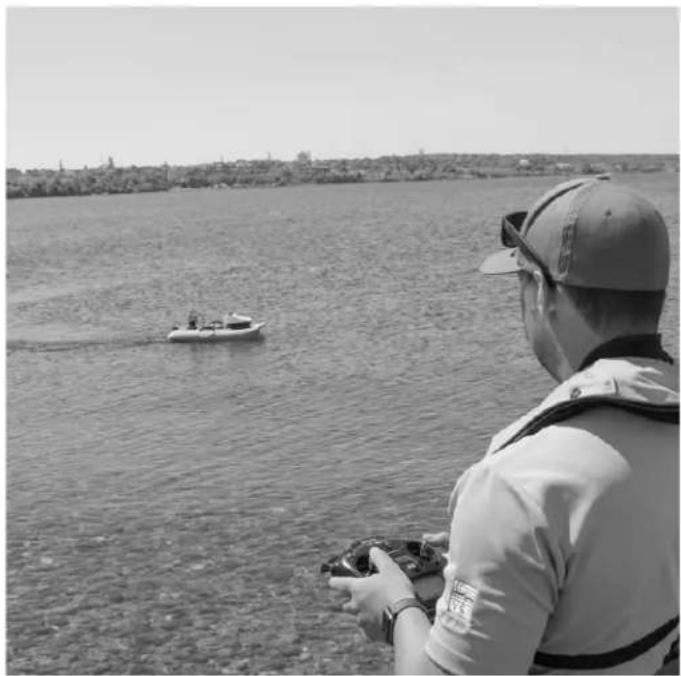
natural_image
Person in life vest and cap observing a small boat on a river, with no visible text or symbols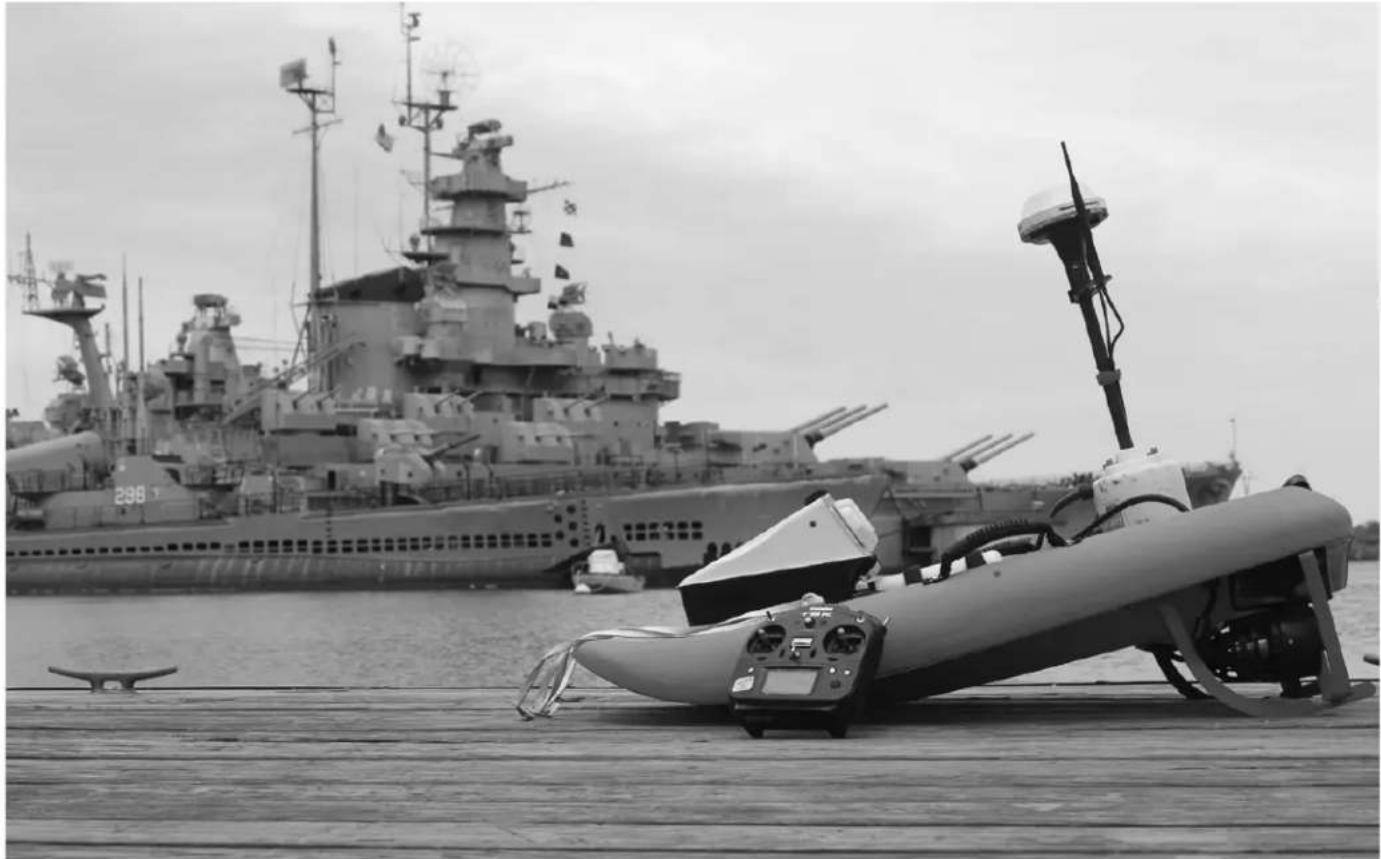
natural_image
Black-and-white photo of a naval warship docked at a pier with its gun on the dock, no visible text or symbols.1. rQPOD Packages
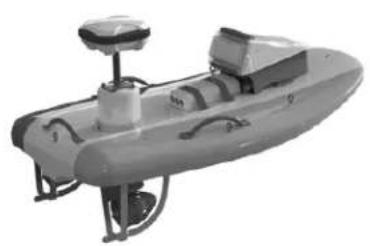
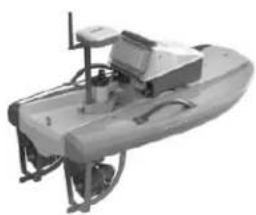
The Torrent Boards below have been optimized for the rQPOD module and Xylem's industry-leading sensors from YSI and SonTek. Choose the larger DUO to get multiple sensors, the standard TB to use one sensor, or the specialized TBX to carry the world's smallest ADCP, SonTek's RS5.

natural_image
Exterior view of a gray industrial vessel with control panel and mechanical components (no visible text or symbols)DUO
Length 1.39 m (4.56 ft)
Width 0.78 m (2.56 ft)
Weight 6.80 kg (15 lb)
The RiverScanner
- Duo Board
- SonTek M9
- On-board PC
• High Resolution Side Scan Sonar
• GNSS GPS
The EXO Surveyor
- Duo Board
- Sontek M9
• EXO Whale Mount - YSI EXO Sonde
- On-board PC with radio link
- GNSS GPS
natural_image
Exterior view of a gray offshore platform with control panel and support structure (no visible text or symbols)TB
Length 1.14 m (3.74 ft)
Width 0.72 m (2.36 ft)
Weight 5.90 kg (13 lb)
The RiverSurveyor M9
- Standard TB Board
- SonTek M9
- GNSS GPS
The EXO
- Standard TB Board
- EXO Whale Mount
- YSI EXO Sonde
• On-board PC with radio link
• GNSS GPS
natural_image
Exterior view of a small boat or vessel with visible structural components and no text or symbolsTBX
Length 0.86 m (2.82 ft)
Width 0.54 m (1.77 ft)
Weight 4.54 kg (10 lb)
The RiverSurveyor RS5
- TBX Board
- SonTek RS5
• No GNSS GPS (Discharge only)
2. Components
- Skid Guard Vertical Port (red)/ Starboard (green)
- Skid Guard Horizontal Port (red)/ Starboard (green)
- Main Pod Body
• RADIOMASTER TX16S transmitter - Spare props - 2 counterclockwise
- Mk 2 Thrusters assembly with FCS mounts
• TORX driver and screws - FCS key
- Magnetic Pen
• 2 Batteries - Phantom LIPO 3
- Charger
- Transmitter cover
- LiPo safe charging bag
- Spare 20 A fuses
- O-ring grease
- rQPOD mounting plate
- 2 x 18650 batteries
3. Setup
3.1 – First Time Setup
Torrent Board Preparation
-
Stick Prop Guard warning safety labels on the board.
-
Insert 6 TORX self-tapping screws into holes supplied in the miscellaneous box.

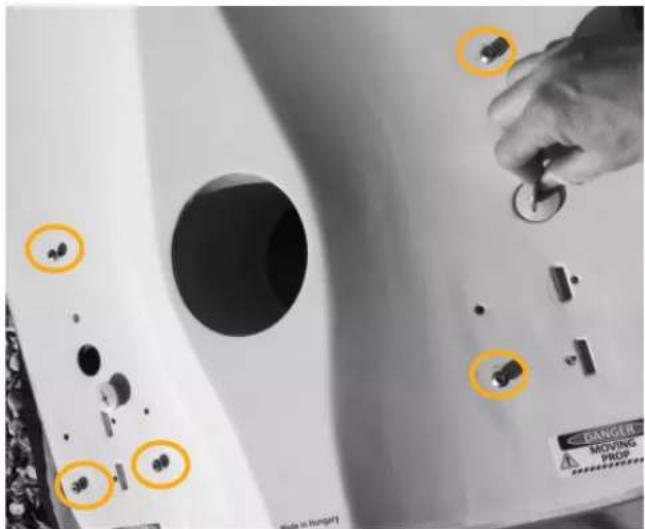
- Fix 2 TORX M9 bolts into the top side of the board.
natural_image
Close-up of a white sports equipment with a tool inserted, showing a circular orange mark on the base (no visible text or symbols)3.2 – General Assembly
- Remove plugs from torrent board V7 on top and bottom of the board using a coin or similar size object.

natural_image
Close-up of a mechanical component with a circular highlight on a surface, no visible text or symbolsTOP BOTTOM

- Insert thruster assembly into FCS fin slots as shown below. The thrusters are interchangeable and work on either side of the board.

natural_image
Exterior view of a white electronic device with attached cables and a yellow circle highlighting a component (no visible text or symbols)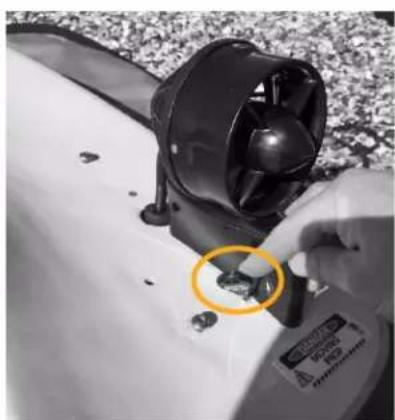
natural_image
Close-up of a hand using a small electric fan to clean or store green contents on a white surface (no visible text or symbols)

NOTE: Only use the FCS key to secure the thruster assembly to the board and do not overtighten.
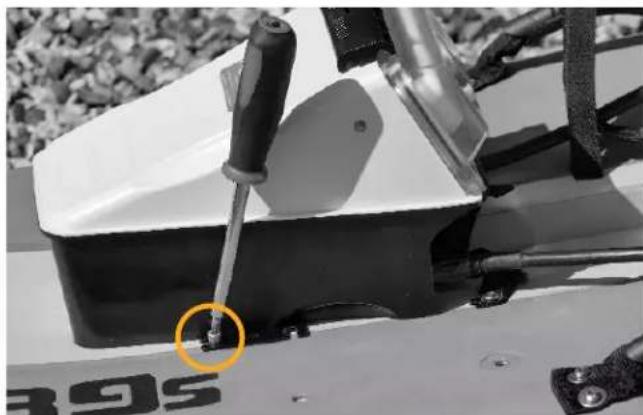
- Fit the skid guards making sure they are paired, matching the color of the skid guard to the color of the dot on the board as each side is slightly different. Use the TORX driver to tighten the top bolt but be careful not to overtighten. Next place the skid guard on the correct side of the board matching the color of the skid guard to the colored dot on the underside of the board. Slide the mounts over the TORX screws in the bottom of the board. Tighten the TORX screws approximately 12 turn to secure. Once complete, turn the board over.

natural_image
Two types of metal tools: a blue tool with curved blades and a red tool with a cross-shaped handle (no text or symbols visible)
natural_image
Close-up of a white industrial machine with a green bracket and screwdriver, no visible text or symbols
NOTE: If the TORX screws are not fitted then they will need to be fitted first.
NOTE: When viewed in the normal operating position when the unit is floating on the water the red skid guard should be on the left (PORT) and the green skid guard should be on the right (STARBOARD) side of the board when viewed from behind. Pass the cables through the holes of the board and ensure the coned plugs fit firmly, this stops air from being sucked down through the board.

natural_image
Line drawing of a vehicle's front and side views, showing a vehicle body with buttons and a small car component (no text or symbols)- Connect the cables from the thrusters to the rQPOD. Do not overtighten the locking sleeves. Periodically grease the connectors with the supplied grease in the accessories case, especially if plugs are hard to insert.


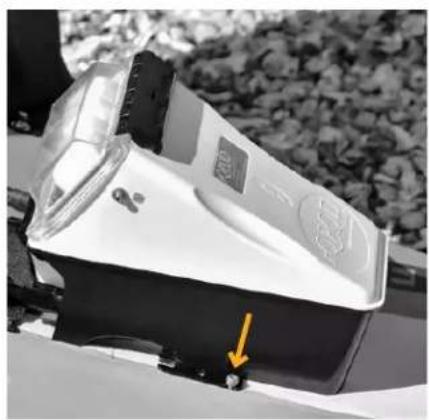
- Place the rQPOD on the board using the mounting plate, it should slide in from one side then rotate down. Tighten the TORX screws to hold in place but do not overtighten.
natural_image
Close-up of a white electronic device with a yellow arrow pointing to a small black button, set against a blurred background of foliage (no text or symbols visible)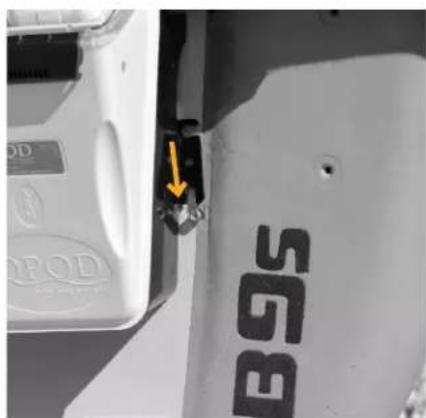
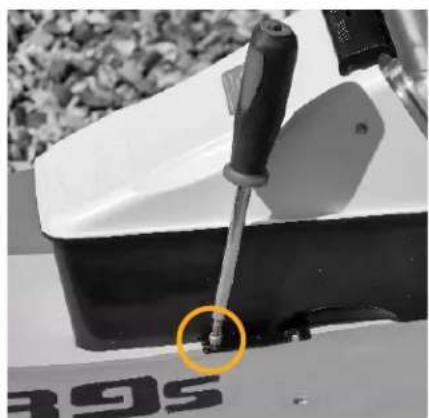
natural_image
Close-up of a white sports equipment with a tool and a yellow circle highlighting a small feature, no visible text or symbols.- Turn the remote control transmitter and make sure that switch F is in the lower position and the throttle stick is in the center neutral position.

natural_image
Close-up of a power supply robot with dual motors and control panel (no visible text or symbols)
natural_image
Person wearing a Phoenix-themed vest, viewed from inside cockpit against cloudy sky (no text or symbols visible)
NOTE: Make sure switch F is in the lower position for low speed otherwise a warning will be displayed.
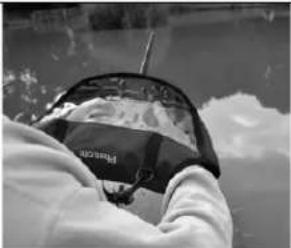
CAUTION: If it is raining or damp use the provided transmitter glove - the transmitter is not waterproof and may fail if it gets wet.
- In a dry environment, undo the black handles and remove the clear battery cover. This has been designed to be a tight fit to stop water ingress. Insert the two batteries and push home, they click in place. Turn the batteries on - one short press to check the battery level and then a long press to activate them. Check the clear battery cover for dirt and clean if necessary and re-grease. Replace the battery cover making sure the arrow on the cover is pointing towards the sky, it is keyed and can only go on one way. Lock the handles in place and visually check all seals through the clear battery cover. Clean if necessary.

natural_image
Close-up of hands installing a digital device on a surface, with visible wiring and a label (no readable text or symbols)
natural_image
Close-up of a hand placing a white electrical component on a device, with no visible text or symbols.
natural_image
Close-up of a hand adjusting a white electronic device with two buttons, mounted on a surface (no visible text or symbols)
natural_image
Hand operating a vintage electrical meter device with a paper label, set against a gravel background (no readable text or symbols)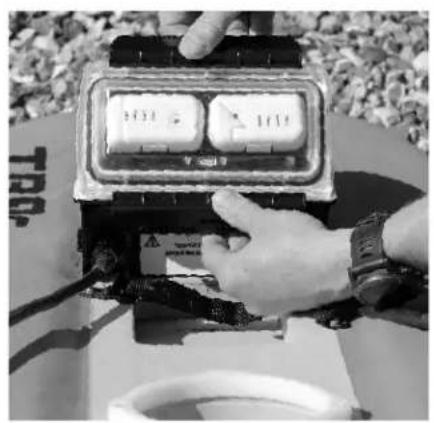
natural_image
Hand operating a wall-mounted electrical meter with two dials, outdoors on a table (no visible text or symbols)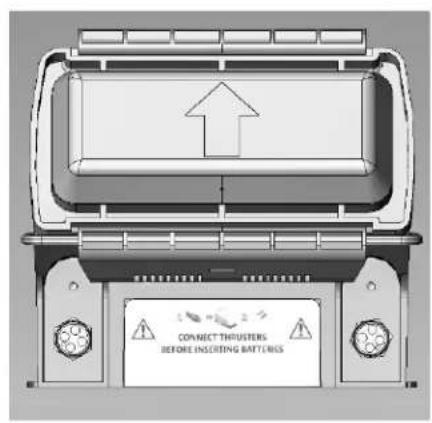

NOTE: Only use batteries that have similar charge levels.
NOTE: Both batteries need to be installed.
NOTE: Check the O-Ring seals and re-grease if necessary.
NOTE: When activated, battery will chime and LED lights will turn green.
- Using the pen magnet swipe over the ARM logo on the rQPOD. The navigation lights will come on and the thrusters will make a sound. Quickly check that the thrusters are working using the transmitter. Disarm the rQPOD using the magnet.

natural_image
Close-up of a hand adjusting a white equipment component with a yellow circle highlighting a red dot, next to an inset showing a hand holding a red dot (no text or symbols visible)Navigation light

NOTE: Do not operate the thrusters in the air for longer than 10 seconds as they are water lubricated.
- Place the board in the water carefully and keep hold of it. Use the magnet and swipe over the ARM position, the navigation lights on the side of the rQPOD should illuminate and the thrusters should make a sound. Whilst holding on to the side of the Torrent board do a quick check of the thrusters using the transmitter before deploying.

natural_image
Black-and-white photo of a T89s inflatable boat on gravel ground, no visible text or symbols on the boat body
natural_image
Black-and-white photo of a person carrying a container on a wooden platform, standing near a water channel with vegetation (no visible text or symbols)
NOTE: The batteries for the rQPOD have a power-save mode to prevent them from discharging when not in use. If the thrusters are not turning for 15 minutes, the batteries will enter a power-saving mode and shut down. They will manually need to be turned back on.
NOTE: The batteries will need to be charged on a regular basis each month, even if they are not being used.
4. Transmitter Alarms & Tips

natural_image
Front view of a TX16S radio receiver with dual dials and control buttons (no readable text or symbols)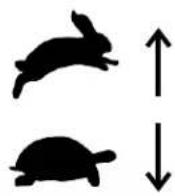

natural_image
Close-up of a TX16S radio receiver with dual dials and control buttons (no readable text or symbols)SPEEDSTEERING & TURNING
4.1 – Steering and Turning
Use the left joystick to navigate the vehicle forward and backward. Use the right joystick to rotate the vehicle left and right.
4.2 – Fast and Slow Speed Settings
Use the lower left-hand switch to control vehicle speed. Push it forward to go faster and pull it back to go slower. A warning will come up on the screen if the transmitter is turned on and Switch F is in the high rate position.
4.3 – Signal Strength
The range of the transmitter will vary according to the line of sight and how elevated the user is in relation to the rQPOD. If both are approximately 1 m (3.28 ft) above ground level the range is approximately 304.8 m (1000 ft) but this can be increased if the user is elevated. A signal strength indicator is shown below. An audible warning will be given when the connection is getting weak.


NOTE: If the rQPOD goes out of range it will not stop, but carry on going depending on the last command received.
4.4 – Telemetry and Servo Information
The telemetry information from the rQPOD is shown the the Radiomaster TX16s display as described below.
VFAS - This is the voltage from the rQPOD batteries and will vary depending on the amount of throttle that is being applied. A voltage at 17.4V indicates fully charged batteries and 14.4V indicates it to be nearly empty when no throttle is applied. When the propellers are turning, especially at a high speed, there will be a drop in the voltage. An audible "Battery Critical" alarm will go off if the voltage drops below 14.7V and the current is less than 2 A.

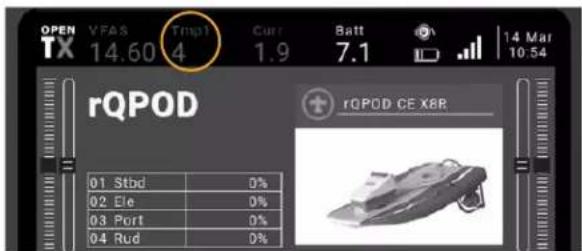
Tmp1 - This is the internal temperature of the rQPOD housing. Audible alarms are set to go off at temperatures below 5°C (41°F) and above 40°C (104°F). If the temperature alarms are activated, do not continue the operation. Limits are set based on the warnings for the Lipo batteries.

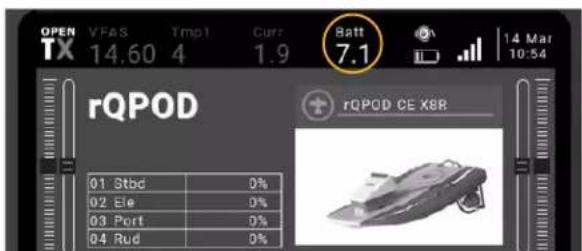
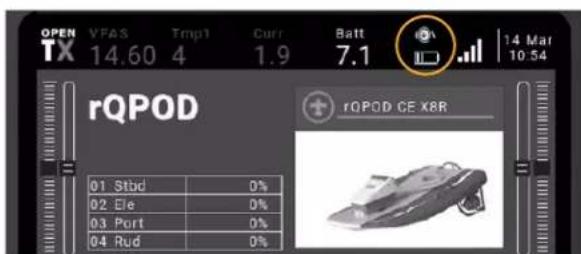
Batt - This shows the voltage of the handheld transmitter. The battery icon shows transmitter battery capacity and will give an audible and visual warning when it is getting low.
5. Propeller Servicing
Tools Needed:
- 2 mm Allen key
-
Small Phillips or Cross head screwdriver
-
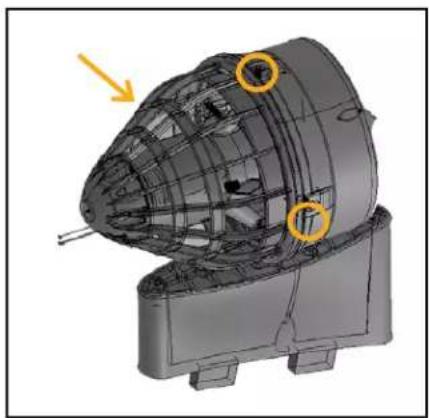
Disconnect thruster from the rQPOD to ensure no power is being supplied. Remove the 3 screws that hold the main body of the thruster to the Kurt nozzle cowling. Gently pull the assembly apart.
natural_image
3D mechanical component diagram showing internal structure with highlighted regions (no text or symbols)- Remove the 2 Allen screws using a 2 mm hex driver and remove the impeller. Ensure that there is no debris in the back part of the assembly and also under the stator. Replace the impeller with a new one if needed, ensuring that the new one has the same rotation. Replace all screws. Do not overtighten.

natural_image
Close-up of hands assembling a mechanical component with wires (no visible text or symbols)
natural_image
Close-up of hands assembling a mechanical component (no visible text or symbols)6. Troubleshooting
This section provides an approach to establishing the cause of common malfunctions. If the problem cannot be resolved, please contact YSI Technical Support.
The rQPOD isn't turning on.
Solution: Check batteries, magnetic arm switch, and fuses. Fuses are located inside the battery chamber and can be removed using a long screwdriver. Replace with 20 A fuse if the fuse is blown. If it blows again, contact YSI. Fuse locations are indicated in orange on the diagram below.

natural_image
Illustration of a connected electrical meter device with labeled ports and warning labels (no readable text or symbols beyond safety warnings)The rQPOD does not steer straight.
Solution: First check that there is no debris in thrusters, especially in the rear cone of the thruster. This will require the removal of the assembly. If that is all clear, check that the trim switches are all set to zero on the transmitter. If it still doesn't steer straight and no wind or currents are affecting the Torrent board, then the sub trim can be adjusted on the transmitter.

NOTE: A copy of the Transmitter manual is included within the shipment.
NOTE: It is best to adjust the sub trim out of the water just after it has been submerged to ensure the bearings are lubricated. Do not run the thrusters excessively in the air.
7. Spare Parts and Accessories
 |  | 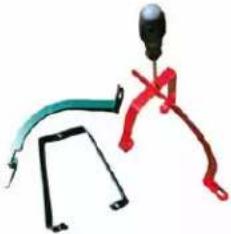 |
| 910214 - MK 2 Complete Thruster Assembly | 911232 - MK 2 Prop 911231 - Skid Guard | |
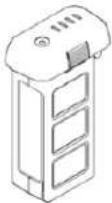 |  |  |
| 911219 - Batteries 911228 - Battery Charger 911226 - Battery Cover | ||
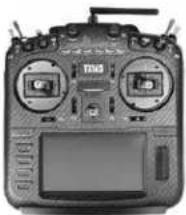 |  |   |
| 910208 - Transmitter 911230 - Waterproof Glove 910233 - Side Scan Sonar | ||
 |    HYPACK HYPACK | |
| 911204 - Water Quality Mount for EXO2 and EXO3 | SonTek & YSI Instrumentation, HYPACK Software | |
8. Autonomous Vehicle Services

natural_image
Two people in inflatable boats on a body of water, one with a sensor and the other with a helmet, viewed from above (no visible text or symbols)Your Vehicle to Better Data!
A Vehicle Platform with all of its sensors is a big commitment, and we want to ensure that you get all the benefits that this great technology has to offer. Please contact YSI if any of the following services need to be booked with your order.

Factory training when you purchase a vehicle.

Refresher training or training for new users.

Maintenance contracts for all of your sensors.

Full service packages where our experts run the technology for you—without a purchase!
Contact YSI's Integrated Systems & Services Team

937-767-7241

info@ysi.com
YSI.com/ServicesYSI.com/Let-YSI-Drive
THIS PAGE INTENTIONALLY LEFT BLANK.
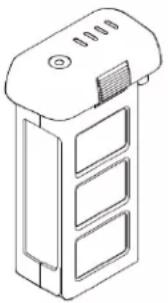
9. DJI Phantom 3 Battery Information APPENDIX 1
NOTE: The precautions and battery information below have been taken from the DJI Phantom 3 Intelligent Battery Safety Instructions version 1.0.2015.8
All instructions and other collateral documents are subject to change at the sole discretion of SZ DJI TECHNOLOGY CO. LTD. For up-to-date product information, visit https://www.dji.com/ and click on the product page.
natural_image
Isometric line drawing of a multi-tiered electronic device with ventilation slots and a top handle (no text or symbols)Glossary
The following terms are used throughout the product literature to indicate various levels of potential harm when operating this product.
NOTICE: Procedures, which if not properly followed, create a possibility of physical property damage AND a little or no possibility of injury.
CAUTION: Procedures, which if not properly followed, create the possibility of physical property damage AND a possibility of serious injury.

WARNING: Procedures, which if not properly followed, create the probability of property damage, collateral damage, and serious injury OR create a high probability of superficial injury.

WARNING: Read the entire Phantom 3 user manual to become familiar with the features of this product before operating. Failure to operate the product correctly can result in damage to the product or personal property and cause serious injury.
This is a sophisticated product. It must be operated with caution and common sense and requires some basic mechanic ability. Failure to operate this product in a safe and responsible manner could result in injury or damage to the product or other property. This product is not intended for use by children without direct adult supervision. Do not use with incompatible components or alter this product in any way outside of the documents provided by SZ DJI TECHNOLOGY CO. LTD. These safety guidelines contain instructions for safety, operation and maintenance. It is essential to read and follow all of the instructions and warnings in the Phantom 3 user manual, prior to assembly, setup or use, in order to operate the product correctly and avoid damage or serious injury.
Intelligent Battery Safety Guidelines

WARNING: To avoid fire, serious injury and property damage, observe the following safety guidelines when using, charging or storing your batteries.
Battery Use
- Do NOT allow the batteries to come into contact with any kind of liquid. Do NOT leave batteries out in the rain or near a source of moisture. Do NOT drop the battery into water. If the inside of the battery comes into contact with water, chemical decomposition may occur, potentially resulting in the battery catching on fire, and may even lead to an explosion.
- Never use non-DJI batteries.
- Never use or charge swollen, leaky, or damaged batteries. If your batteries are abnormal, contact DJI or a DJI authorized dealer for further assistance.
- Never install or remove the battery from the rQPOD when it is turned on. Do NOT insert or remove batteries if the plastic cover has been torn or compromised in any way.
- The battery should be used in temperatures from -10ircC to 40ircC . Use of the battery in environments above 50ircC can lead to a fire or explosion. Use of battery below -10ircC can lead to permanent damage.
- Do NOT use the battery in strong electrostatic or electromagnetic environments. Otherwise, the battery control board may malfunction and cause a serious accident during flight.
- Never disassemble or pierce the battery in any way or the battery may leak, catch fire, or explode.
- Electrolytes in the battery are highly corrosive. If any electrolytes make contact with your skin or eyes, immediately wash the affected area with fresh running water for at least 15 minutes, and then see a doctor immediately
- Do NOT use the battery if it was involved in a crash or heavy impact.
- If the battery falls into water with the rQPOD during a mission, take it out immediately and put it in a safe and open area. Maintain a safe distance from the battery until it is completely dry. Never use the battery again, and dispose of the battery properly as described in the Battery Disposal section below. Do NOT heat batteries. Put out any battery fire using sand or a dry powder fire extinguisher.
- Do NOT put batteries in a microwave oven or in a pressurized container.
- Do NOT place loose battery cells on any conductive surface, such as a metal table.
- Do NOT put the loose cells in a pocket, bag or drawer where they may short-circuit against other items or where the battery terminals could be pressed against each other.
- Do NOT drop or strike batteries. Do NOT place heavy objects on the batteries or charger. Avoid dropping batteries
- Clean battery terminals with a clean, dry cloth.
- Make sure the batteries are fully charged before each mission.
Battery Charging
- Do NOT attach the batteries to wall outlets or car charger sockets directly and always use a DJI approved adapter. DJI takes no responsibility if the battery is charged using non-DJI charger.
- Never leave the battery unattended during charging. Do NOT charge the battery near flammable materials or on flammable surfaces such as carpet or wood.
- Do NOT charge battery immediately after mission, because the battery temperature may be too high. Do NOT charge the battery until it cools down to near room temperature. Charging the battery outside of the temperature range of 0irc C - 40irc C may lead to leakage, overheating, or battery damage.
- Disconnect the charger when not in use. Examine the charger regularly for damage to the cord, plug, enclosure, or other parts. Do NOT clean the charger with denatured alcohol or other flammable solvents. Never use a damaged charger.
- The Intelligent Battery is designed to stop charging when it is full. However, it is good practice to monitor the charging progress and disconnect the batteries when fully charged.
Battery Storage
- Keep batteries out of the reach of children and pets.
- Do NOT leave the battery near heat sources such as a furnace or heater. Do NOT leave the batteries inside a vehicle on hot days. The ideal storage temperature is 22irc C - 28irc C.
- Keep the battery dry. Never drop the battery into water.
- Do NOT drop, strike or impale, or manually short-circuit the battery.
- Keep the battery away from metal objects such as glasses, watches, jewelry and hairpins.
- Never transport a damaged battery or a battery with power level higher than 50%.
- Discharge the battery to 40% - 65% if it will NOT be used for 10 days or more. This can greatly extend the battery life.
- The battery automatically discharges below 65% when it is idle for more than 10 days to prevent is from swelling. It takes approximately 3 days to discharge the battery to 65%. It is normal that you may feel moderate heat emitting from the battery during the discharge process. Set the discharging thresholds in the DJI GO app.
- The battery will enter hibernation mode if depleted and stored for a long period. When in hibernation mode, if you try to power on the battery, the battery power LED will show a solid red light and the battery level LEDs will all be off. You cannot manually turn off the battery power LED in this state. Leave the battery unattended for 5 minutes and then the light will turn off. Recharge the battery to bring it out of hibernation.
- Remove batteries from the aircraft when stored for an extended period.
Battery Disposal
- Dispose of the battery in specific recycling boxes only after a complete discharge. Do NOT place the battery in regular trash containers. Strictly follow your local regulations regarding the disposal and recycling of batteries.
- If the power on/off button on the Intelligent Battery is disabled and the battery cannot be fully discharged, please contact a professional battery disposal/recycling agent for further assistance.
Battery Maintenance
- Never use the battery when the temperature is too high or too low.
- Never store the battery in environments with a temperature higher than 60irc C.
- Never over-discharge, as this may lead to battery cell damage.
- Battery life may be reduced if not used for a long time.
Travel Notice
- Before carrying the Intelligent Battery on an airline flight, it must be fully discharged. This can be done by using your rQPOD until the battery is depleted. Only discharge the battery in a fireproof location.
- Store Intelligent batteries in a ventilated location.
10. Warranty Statement APPENDIX 2
The rQPOD is covered under a 12 month limited manufacturer's warranty on defects and workmanship. This warranty extends to all parts and labor for any malfunction due to workmanship or errors in the manufacturing process. The warranty does not cover shortcomings that are due to the design, nor does it cover any form of incidental damage as a result of misuse.
YSI will repair and/or replace, at its sole option, any product established to be defective, with a product of like type. CLAIMS FOR LABOR COSTS AND/OR OTHER CHARGES RESULTING FROM THE USE OF YSI GOODS AND/OR PRODUCTS ARE NOT COVERED BY THIS LIMITED WARRANTY.
YSI DISCLAIMS ALL EXPRESS WARRANTIES OTHER THAN THOSE CONTAINED ABOVE AND ALL IMPLIED WARRANTIES, INCLUDING BUT NOT LIMITED TO WARRANTIES OF MERCHANTABILITY AND/OR FITNESS FOR A PARTICULAR PURPOSE. It is understood and agreed that YSI DISCLAIMS AND WILL NOT BE LIABLE, UNDER ANY CIRCUMSTANCE, IN CONTRACT, TORT OR WARRANTY, FOR ANY SPECIAL, INDIRECTLY, INCIDENTAL OR CONSEQUENTIAL DAMAGES OF ANY KIND, INCLUDING BUT NOT LIMITED TO LOST PROFITS, BUSINESS INTERRUPTION LOSSES, LOSS OF GOODWILL, OR LOSS OF BUSINESS OR CUSTOMER RELATIONSHIPS. Some states do not allow the exclusion of implied warranties or the limitation or exclusion of liability for incidental or consequential damages, so the above exclusion may not apply to the buyer.
If your system is not functioning properly, first try to identify the source of the problem. If additional support is required, we encourage you to contact us immediately. We will work to resolve the problem as quickly as possible.
In the event a system needs to be shipped back to the factory, YSI is to be contacted to provide a Service Request (SR) number. We reserve the right to refuse receipt of shipments without SR numbers. We require that the systems be shipped back in the original shipping container using original packing material and all delivery cost to YSI is covered by the customer (including all taxes and duties). If the system is returned without appropriate packaging the customer will be required to cover the cost of a new packaging crate and material.
NOTE - The DJI Phantom 3 batteries, Futaba TX6 transmitter and DJI charger are carefully selected third party supplier branded components which do not come under the YSI warranty but instead are covered by the suppliers own warranty, the details of which can be obtained by contacting YSI.
YSI
1700/1725 Brannum Lane
Yellow Springs, Ohio 45387-1107 USA
info@ysi.com
+1 937-688-4255
+1 877-726-0975 (US)
+1 937-767-9353 Fax
Xylem |'zīləm|
1) The tissue in plants that brings water upward from the roots; 2) a leading global water technology company.
We're a global team unified in a common purpose: creating advanced technology solutions to the world's water challenges. Developing new technologies that will improve the way water is used, conserved, and re-used in the future is central to our work. Our products and services move, treat, analyze, monitor and return water to the environment, in public utility, industrial, residential and commercial building services settings. Xylem also provides a leading portfolio of smart metering, network technologies and advanced analytics solutions for water, electric and gas utilities. In more than 150 countries, we have strong, long-standing relationships with customers who know us for our powerful combination of leading product brands and applications expertise with a strong focus on developing comprehensive, sustainable solutions.
For more information on how Xylem can help you, go to www.xylem.com

natural_image
Abstract circular icon with a leaf and curved arrow, no text or symbols presentWho's Minding the Planet?®
xylem
Environmental Solutions
YSI, a Xylem brand
1725 Brannum Lane
Yellow Springs, OH 45387
+1.937.767.7241
info@ysi.com
YSI.com
© 2022 Xylem, Inc. XA00070 0622


YSI.com/rQPOD
- rQPOD
- Safety Information
- Product Components
- THIS IS AN INTERACTIVE DOCUMENT
- Contents
- rQPOD in Action
- rQPOD Packages
- DUO
- The RiverScanner
- The EXO Surveyor
- TB
- The RiverSurveyor M9
- The EXO
- TBX
- The RiverSurveyor RS5
- Components
- Setup
- – First Time Setup
- Torrent Board Preparation
- – General Assembly
- Transmitter Alarms & Tips
- – Steering and Turning
- – Fast and Slow Speed Settings
- – Signal Strength
- – Telemetry and Servo Information
- Propeller Servicing
- Troubleshooting
- The rQPOD isn't turning on.
- The rQPOD does not steer straight.
- Spare Parts and Accessories
- Autonomous Vehicle Services
- Your Vehicle to Better Data!
- DJI Phantom 3 Battery Information APPENDIX 1
- Glossary
- Intelligent Battery Safety Guidelines
- Battery Use
- Battery Charging
- Battery Storage
- Battery Disposal
- Battery Maintenance
- Travel Notice
- Warranty Statement APPENDIX 2
- Xylem |'zīləm|
- Who's Minding the Planet?®
Brand : YSI
Model : rQPOD
Category : Boat