
RCD-813 R - CD Player Orava - Free user manual and instructions
Find the device manual for free RCD-813 R Orava in PDF.


| Product Type | CD Player |
| Brand | Orava |
| Model | RCD-813 R |
| Color | Black/Silver (typical) |
| Dimensions (W x H x D) | Approx. 430 x 100 x 310 mm |
| Weight | Approx. 4.0 kg |
| Power Supply | AC 220-240 V, 50 Hz |
| Power Consumption | 15 W (typical) |
| Playback Media | CD, CD-R, CD-RW |
| Audio Output | RCA stereo (L/R) |
| Headphone Jack | 3.5 mm stereo |
| Remote Control | Included (typical) |
| Display | LED/LCD for track and time |
| Playback Functions | Program, Repeat, Random, Skip, Pause, Stop |
| Frequency Response | 20 Hz - 20 kHz |
| Signal-to-Noise Ratio | > 85 dB (typical) |
| Total Harmonic Distortion | < 0.1% (typical) |
| Maintenance | Clean with dry soft cloth; avoid solvents |
| Safety Precautions | Do not expose to moisture; unplug during storms |
| Spare Parts Availability | Contact Orava support for parts |
| Warranty | Standard 2 years (subject to region) |
Frequently Asked Questions - RCD-813 R Orava
User questions about RCD-813 R Orava
0 question about this device. Answer the ones you know or ask your own.
Ask a new question about this device
Download the instructions for your CD Player in PDF format for free! Find your manual RCD-813 R - Orava and take your electronic device back in hand. On this page are published all the documents necessary for the use of your device. RCD-813 R by Orava.
USER MANUAL RCD-813 R Orava
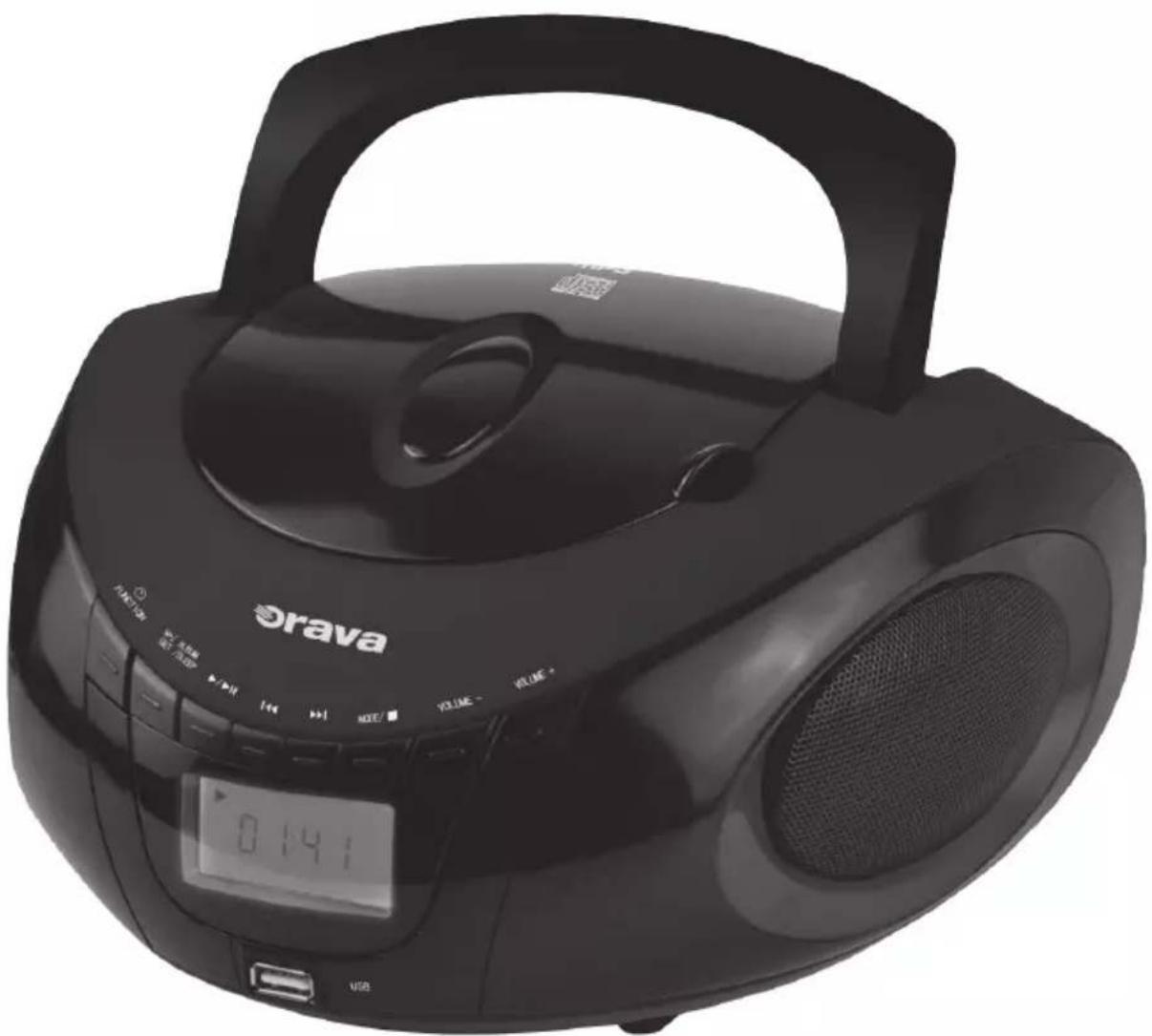
CD/MP3/USB player with FM receiver and Bluetooth interface
Instruction manual
EN
CE
The intended use of the device
The device is intended solely for playing audio from external sources, playing audio from a mobile phone or other digital device or source (wirelessly via Bluetooth® or via a wired connection) to the extent specified by the technical and operating parameters, and functions, safety and user instructions and external influences of the operating environment, and the reception and reproduction of radio broadcasting to the extent specified by the technical and operational parameters and functions, safety and user instructions and external influences of the operating environment.
Orava electrical appliances are manufactured according to the state of the art and recognized safety-technical rules. However, it may be incorrect and improper use or use contrary to designation will cause the risk of injury or endanger the life of the user or third person, damage to the device and other material values.

1. GENERAL SAFETY INSTRUCTIONS AND WARNINGS
Read all instructions before using the device!
- This document contains important safety instructions and warnings for safe, correct and economical operation of the electrical equipment. Its compliance helps the user avoid risks, increase reliability and product life.
- In this document, the generic term product is used in text parts such as: electrical equipment - any device used for the production, conversion, transmission, distribution or use of electricity.
-
From the point of view of the purpose of using electricity, the concept of electrical equipment in the strict sense of the word will include the following categories:
-
household electric appliances,
- information and communication equipment,
- consumer electronics,
- lighting equipment,
- electrical and electronic tools,
- toys and equipment for sporting and recreational
1.1 General safety instructions
- Before commissioning the unit, we recommend that you carefully read the operating instructions and operate the equipment in accordance with the instructions!
-
The safety instructions and warnings in this manual do not cover all the possible conditions and situations that may arise when using the device. The user must understand that a factor that can not be incorporated into any of the products is responsibility and caution. These factors must therefore be ensured by users/users who use and operate this device.
-
Failure to follow the safety instructions and warnings is forbidden by the manufacturer for any damage to health or property!
- Make sure that the appliance is complete and shows no signs of damage before using the appliance for the first time. If the product is defective or if it has any visible damage, do not use the product.
- Keep the operating instructions as close to the device as possible throughout its service life. Always keep the operating instructions together with the appliance for future use and use by new users.
- Use the appliance only for the purpose for which it is intended and in the manner specified by the manufacturer.
- The appliance is intended for home and similar indoor use, with no special focus.
- It is not a professional device for commercial use.
- Do not change the technical parameters and features of the device by unauthorized modification or modification of any part of the device.
- The manufacturer is not responsible for damages caused during transportation, misuse, damage or destruction of the equipment due to adverse weather conditions.
1.2 Safety of the operating environment
- Do not use the device in an industrial environment or outside environment.
• Always keep the operating environment clean and well lit. - Do not place the device on an unstable surface. Overriding or dropping the device may result in personal injury or damage to the device.
- Do not expose the unit to direct sunlight or excessive heat sources.
- Do not use an electric appliance in areas with flammable liquids, gases or dust. The appliance may be the source of scaling, which can result in the ignition of dust or vapors.
Features of the operating environment
- Ambient temperature: +5 ÷ +40 °C
- Humidity: 5 ÷ 85%
- Altitude: ≤ 2 000 m
- Occurrence of water: intermittent condensation of water or occurrence of water vapor
- Occurrence of foreign bodies: amount and type of dust are not significant Protection class: IP20
- Other characteristics of the operating environment (mechanical stress - shocks and vibrations, occurrence of plant, animals, weather effects) are negligible in terms of effect on the correct and safe use of electrical equipment.
1.3 Electrical safety
- Before connecting the appliance to the power supply for the first time, make sure that the voltage on the appliance label corresponds to that of the household electrical outlet.
- The electrical appliance is designed for mains supply 230 V \~.
The electrical safety of the appliance is guaranteed only if it is properly connected to the electricity grid.
- Only use a power cord with a plug (mains lead) that came with the device and compatible with a wall outlet. Using another cable may result in fire or electric shock.
- Always connect an electrical appliance to an easily accessible power outlet. In the event of an operating fault, the appliance must be switched off as soon as possible and disconnected from mains supply.
- Do not pull the power cord / power cord by pulling on the cord / cord. Disconnect the power cord by pulling the plug behind the power cord / power cord plug.
- If you use an extension cord, check that the total rated (ampere) power of all devices connected to the extension cord does not exceed the maximum current rating of the extension cable.
- If you need to use an extension cord or power supply block, make sure that the extension cord or power pack is plugged into a power outlet, and not to another extension cord or power supply. Extension power cord or power supply block must be designed for grounded plugs and plugged into a grounded outlet.
- The power plug of the appliance must be compatible with the mains socket. Never use any adapters or modify the socket in any other way. Do not use inappropriate or damaged sockets.
- To avoid electrical shock, plug the power cables into properly grounded electrical outlets. If the device is equipped with a 3-pin power supply cord, do not use adapters that do not have a grounding element or remove the grounding element from the plug or adapter.
- Do not bend, crush or otherwise expose the power cord / power cord of the appliance to mechanical stress or external heat sources. Damage to the power cord may result in electric shock.
- If the power cord is damaged, disconnect the appliance from the mains and do not use it again. If the power cord / power cord is damaged, it must be replaced by the manufacturer, its service department, or a qualified person to avoid the risk of electric shock.
- Regularly check and maintain the electrical appliance as well as the power cable. Disconnect the power plug regularly and clean it if necessary. Pollution by dust or other substances may cause disruption of the insulating state and consequently fire.
- Do not expose the appliance to water or moisture. The ingress of water into the appliance increases the risk of electric shock. If the power cord is wet or the appliance gets water, disconnect it immediately from the mains. If the appliance is plugged into a mains socket and if possible, turn off the power supply before attempting to disconnect the power supply. If you are pulling wet wires from a live power source, be very careful.
- If the electrical equipment is installed (connecting) the protective covers are dismantled, the electrical parts must not be accessible to the user when the installation is finished.
1.4 Safety of persons
- This appliance is intended for use by persons without an electrotechnical qualification (layperson) according to the instructions specified by the manufacturer.
- Device operation includes activities such as switching on and off, user manipulation and setting of operating parameters, visual or auditory inspection of the equipment, and user cleaning and maintenance.
- This appliance can be used by children 8 years of age and older and persons with reduced physical, sensory or mental abilities or lack of experience and knowledge only when under the supervision or guidance of the responsible person have been instructed to use the appliance in a safe way and understand the potential hazards.
- Cleaning and user maintenance can be carried out by children 8 years of age and older only under the supervision of the responsible person.
• Children may not play with the appliance.
- Always keep the appliance out of reach of children during use and operation. Be sure to download the appliance even for a freely accessible power cord.
- Always be careful when operating the electric appliance. Do not use an electric appliance if you are overly tired, under the influence of medication or narcotic drugs that reduce attention and focus. Inattention during operation may result in serious injury.
1.5 Cleaning, maintenance and repairs
- Observe the normal user cleaning and maintenance of the appliance in the recommended way. Do not use solvents or harsh cleaners for cleaning. Pollution and visible stains from finger contact, respectively. The hands can be cleaned using detergent detergents specially designed to clean household appliances.
- If you do not use the appliance, clean it or disconnect the appliance from the power supply when the appliance is faulty.
- Electrical appliances that are cleaned after use and are not intended to be completely or partly immersed in water or other liquid, protect against the effects of dripping and / or splashing water and before immersion.
- Electric household appliances, like all other technical devices, are subject to the surrounding environment and natural wear. Since the legal framework of regular maintenance is not laid down for lay-in electrical household appliances, the manufacturer recommends that the user have the appliance checked and cleaned at least once a year by a specialist workshop.
- By doing so, it is possible to achieve safety, operational reliability and increased service life.
-
Do not disassemble the electric appliance! The appliance works with a dangerous voltage. For this reason, always switch off the appliance and disconnect it from the mains supply during user maintenance. In the event of a fault, please have the repair serviced by an authorized service center.
• Before calling a service: -
Turn the appliance off and on to make sure the fault reappears.
-
If the malfunction of the appliance still persists after these operations, call the nearest specialist service center.
- Never repair the electric appliance yourself!
- Unauthorized, unqualified and improper use of an electric appliance may result in electric shock or other serious injury.
- Only carry out the warranty or post-warranty repair of an electrical appliance to an authorized qualified person (*).
2. Special Safety Instructions.
Read carefully!
Electrical equipment is designed and manufactured in such a way as to allow for safe operation and use by persons without a professional qualification. Despite all the measures taken by the manufacturer to ensure safe use, handling and use, it carries with it certain residual risks and associated potential hazards. To warn of possible hazards, the following symbols and their meanings have been used on the device and in the accompanying documentation:

This symbol alerts users that the device is operating a dangerous electrical voltage. Do not remove protective covers on the device.
Failure to observe the safety instructions during use and operation of the device may result in:
Danger of electric shock!
Danger of serious injury or life threatening!

This symbol alerts users to the following: Risk of serious injury or life threatening when not following the safety instructions when using and operating the unit!
Danger of damage to equipment or other damage to property!

This symbol means that the product is made with a double insulation between hazardous live parts (parts with dangerous voltage from the mains) and parts that are accessible in normal use.
Transportation
- Only use a trolley or mobile table designed or recommended by the manufacturer to transport the appliance. Use caution when using a transport carriage to avoid overturning the device.
• Always transfer the device after disconnecting all cable connections. - Grab the device by gripping the side covers.
There is a risk of serious injury or life threatening!
There is a risk of damage to the device!
Unpacking/Packaging
- Unpack the equipment and accessories before putting it into operation and dispose of all parts of packaging material, labels and labels and place them in a safe place or keep them out of the reach of children and inappropriate persons.
- Clean the machine before commissioning as described in the „Commissioning“ or. “Cleaning” section.
- Never clean the appliance, remote control, and power cord with a plug in a way that the cleaning liquid could get into the device.
- Clean these parts with a slightly moistened cloth and wipe dry or let it dry.
- Only clean the appliance when the appliance is switched off and disconnected from the mains.
There is a risk of electric shock!
There is a risk of electrical short circuit!
Check/Commissioning
• We recommend performing both initial and subsequent regular machine inspections.
- Never use the appliance if it is incomplete, damaged, or any part of it has been damaged during use.
- Do not use non-original and incomplete parts of the device and its accessories.
- Use only recommended parts and accessories to install the device.
There is a risk of serious injury!
There is a risk of damage to the equipment or other property damage!
- If the equipment has been transported and stored at low temperatures (eg in winter) or excessive humidity, first allow it to „acclimatize“ at room temperature for about 1 to 2 hours to remove any moisture in the electrical / electronic parts, which occurs when the ambient temperature changes.
- Do not switch the device on or off by plugging in or pulling out the power cord from the AC socket.
- Always connect the appliance to mains power supply before use, then switch on the main power switch.
- When you have finished using the appliance, turn off the main switch and then pull the mains cord out of the mains socket.
- Do not use the device if the main power switch does not work on the device.
- The device is under dangerous voltage when the power supply is connected.
There is a risk of electric shock!
Location/Installation
- Only place the device on:
- Straight, firm and stable pads
- for tables and tables, for furniture parts suitable for the location of audio/video equipment.
- Always make sure that the place where you want to place the device has enough space, mechanical strength and load capacity.
- Do not install the device in a room (eg enclosed library cabinets, built-in cabinets and cabinets, etc.), where there is insufficient room for space and ventilation.
- Leave plenty of free space around the device to ensure the desired air circulation. It is recommended to keep min. 10 cm from all sides.
- Do not cover the appliance in part. Do not place any objects and / or decorative and other fabrics on the appliance, do not put and do not allow foreign bodies to enter the ventilation holes and holes in the housing covers.
- Do not cover the openings of the airflow covers. Air ventilation ensures reliable and safe operation of the device.
There is a risk of electric shock!
There is a danger of fire!
Warning!
- Do not expose the audio and remote controls to:
- direct sunlight, heat generating equipment,
- vibration and mechanical stress,
- excessive dust,
- water and excess moisture,
- insect,
- an aggressive external environment.
- Do not set the audio device (and the remote control):
- to places where medical devices are used. Their function may be impaired;
- for unstable carts, stands or desks;
- on an uneven, unstable and dirty surface;
- the sealing edge of tables, tables or parts of furniture;
-
in the vicinity of containers with water or other liquids.
-
Do not place containers of water or other liquids on shelves that are located above the machine.
- Do not place any objects, especially naked flame objects, equipment, or shelves that are located above the device.
Warning!
- Place the device in a place where children cannot reach freely.
- Prevent children from handling the device. The device may overwhelm children and cause serious injury.
- Mechanical damage (cracking of the plastic covers) of the device can cause serious injury.
There is a risk of serious injury!
There is a risk of damage to equipment or other property damage!
- Do not place or use the appliance near water-containing containers. If the appliance falls into the water, do not remove it! First, pull the power cord plug out of the mains socket and then select the appliance from the water. In such cases, take the device for inspection to a specialist service to check that it is safe and working properly.
There is a risk of electric shock!
There is a risk of electrical short circuit!
- Do not expose the device and its accessories to strong vibrations and / or shocks. Prevent anything from dropping or hitting objects.
There is a risk of serious injury!
There is a risk of damage to equipment or other property damage!
- Do not use in potentially explosive atmospheres in the presence of a combustible liquids dumping materials and vapors, mist or dust in the ambient conditions, wherein the exhaust gas after ignition easily spread by air.
- Do not use the device near sources of excessive heat and open flame.
There is a risk of explosion and / or fire!
Operation/Supervision
- Keep the appliance under control during use and operation!
- Ensure that all electrical wiring is securely and correctly connected connection. If the power cord is not firmly connected to the device, be careful not to disconnect it from the device when the plug is plugged into the mains outlet. The free end of the power cord is under a dangerous voltage. Do not insert any conductive objects into the end cap.
- Do not touch the equipment, power cord, antenna system. It could hit you with electric current from atmospheric discharge. Do not disconnect the power cord from the power supply during a storm or if you do not use it for a long time.
- Disconnect the appliance from AC power while leaving children or unqualified persons near the device unattended.
There is a risk of serious injury!
There is a risk of electric shock! There is a danger of fire!
- Do not connect the power cord and signal cables to common bundles. Do not pull the cables together. The power cord must remain accessible for safe disconnection of the
appliance from the electrical network.
- Do not subject the power cord and signal cables to mechanical stress and damage.
- Do not let the power cord and signal cables hang freely and do not allow them to be freely accessible and reachable to children.
There is a risk of serious injury!
There is a risk of electric shock!
- The device contains parts of the covers (ventilation grilles) that can be used in the usual way activities to heat up. Do not touch these parts of the device.
- Never leave your device freely accessible and do not leave it freely accessible network cord. Children could download the device for a network cord.
There is a risk of serious injury!
- The device is equipped with headphones to reproduce audio signals. Do not use earphones set to extreme sound pressure levels.
Risk of serious damage or hearing loss!
Caution!
- If you do not use the device for a long time, unplug the power cord from the power outlet. Deposition of dust and humidity may cause electrical insulation to be impaired.
There is a risk of electric shock!
There is a risk of fire!
- Do not store the appliance with a wrapped cord around your body. Unfold the cord in the way it was folded in the original packaging by the manufacturer.
- Never overload the machine beyond the limits specified by the technical parameters!
- If you notice any unusual occurrences (sounds, smell, smoke, etc.) while using the device, disconnect it
immediately and unplug it from the mains. Have the appliance checked by a specialist workshop.
Power Supplies/Batteries
- Safety instructions for the power supply of the remote control - to the batteries.
- Always store batteries out of reach of children. In case of battery swallowing, immediately seek medical advice.
- Wipe the battery with a dry cloth before inserting it into the remote control. This will ensure a better electrical contact.
- Only use the specified battery type by the manufacturer. Do not use new batteries together with old ones. This may damage the remote control.
- Insert the batteries to match the „+“ and „-“ symbols on the batteries and on the inside of the remote control cover.
- Do not handle the batteries with metal tools (eg tweezers, etc.). Conductive contact between the two poles of the battery may cause a short circuit.
- If you do not use the remote for a long time, it is recommended to remove the battery from the device. This protects your device from damage from leaking batteries.
- Carefully store the used batteries so that children can not swallow them.
- Dispose of batteries in accordance with applicable regulations and provisions for disposal of electronic devices.
Warning!
- In case of improper handling, the batteries may explode.
- Do not charge, disassemble, or dump the batteries.
- If affected, seek medical advice.
Never underestimate the potential hazards and take extra caution !!!
DANGER
The device is classified as a CLASS 1 LASER product. The CLASS 1 LASER PRODUCT classification mark is placed on the device.
Bluetooth® technology
- Bluetooth® is a wireless short-range radio signal transmission technology that enables wireless data communication and synchronization between a digital device, mobile phone, and main kit.
- ORAVA is not responsible for any incidental, consequential or consequential damages or other damages or disclosure of data and / or information that may occur during wireless transmission.
Frequency band
- This technology uses the 2.4 GHz non-licensed microwave radio frequency band.
Certifications
- This device adheres to frequency constraints and has been certified to comply with statutory regulations concerning frequency bands. Therefore, there is no need for wireless access.
The interventions below are illegal:
- separation from the main device
- removing labels with parameters
Determination of use
- This system is intended for normal general purpose use.
- Microwaves from Bluetooth devices may adversely affect the functions of electronic medical devices.
- Do not use this system near equipment or in a high-frequency interference sensitive environment, for example:
- places with the presence of combustible gas.
- spaces near automatic door systems, alarm systems such as:
- airports.
- hospitals
- laboratories
- gas stations, etc.,
as interference to broadcasting can cause an accident.
Limitations in use
- Wireless transmission and / or use with all Bluetooth® devices can not be guaranteed.
- All devices must comply with standards set by Bluetooth SIG, Inc.
- Depending on the parameters and settings of the devices, the connection may not be performed or some operations may be different.
- This system supports Bluetooth® security features. However, in some operating environments or under certain settings this may not be sufficient. Be careful when transmitting wireless data to this system.
Range of use
- Use a wireless device at a distance of up to 10 m.
- Different types and characteristics of the environment, obstacles or interference can reduce the range of transmission (eg metal barriers, walls, people, ...).
Interference with other devices
- If this device is located too close to other Bluetooth® devices or devices that use the 2.4 GHz frequency band, they may not work properly and noise and / or sound interruptions caused by radio waves interference may occur.
- This system may not work properly if radio waves broadcast by a nearby radio station or similar device are too strong.
Other
- If you feel inconvenience when using Bluetooth®, stop using the Bluetooth device immediately.
- If any problem persists, contact your nearest ORAVA dealer.
Licenses
- The Bluetooth® word mark and logo are owned by Bluetooth SIG, Inc. and any use thereof by ORAVA retail 1, a.s. is subject to a license.
- Other trademarks and trade names are the property of their respective owners.
Producer:
ORAVA retail 1, a.s.
Seberíniho 2
821 03 Bratislava
Slovenská republika
Importer:
ORAVA retail 1, a.s.
Seberíniho 2
821 03 Bratislava
Slovenská republika
ORAVA distribution CZ, s.r.o.
Ostravská 494
739 25 Sviadnov
Česká republika
INSTRUCTIONS AND INFORMATION REGARDING THE DISPOSAL OF USED PACKAGING
Dispose of used packaging material at a municipal waste disposal site.
DISPOSAL OF USED ELECTRICAL AND ELECTRONIC EQUIPMENT


This symbol on the products or in the accompanying documents means that used electrical and electronic products should not be mixed with general household waste. For proper disposal, recovery and recycling, please return these products to designated collection points. Alternatively, in some countries of the European Union or other European countries, you may return your products to your local retailer when purchasing an equivalent new product. By ensuring this product is disposed of correctly, you will help prevent potential negative consequences for the environment natural resources and help prevent potential negative effects on environment and human health, which could be the consequences of improper disposal waste. Contact your local authority or nearest office for more details collection point. Improper disposal of this type of waste may result in penalties in accordance with national regulations.
For business entities in the countries of the European Union
If you wish to discard electrical and electronic equipment, please request the necessary information from your seller or supplier.
Disposal in other countries outside the European Union
This symbol is valid in the European Union. If you wish to discard this product, please request obtain the necessary information on the correct method of disposal from the local authorities or from the your supplier.

This product complies with all the essential requirements of the EU directives that apply to it.
DECLARATION OF CONFORMITY
Short text Declaration of Conformity:
ORAVA retail 1, a.s. hereby declares that the RCD-813R complies with the essential requirements and other relevant conditions of Directive 2014/53/EU of the European Parliament and of the Council. The full text of the Declaration of Conformity is available at: www.orava.eu
Power supply
Power supply from the mains
1 Plug one end of the power cord into the AC-IN connector on the device and plug the other end into a power socket.
2 Use the ⏻/FUNCTION switch to turn on the device and select the desired sound source.
Warning!
Only an authorized person in an authorized service center may replace the power cord. The device is under constant voltage as long as the power cord is in the power socket, even if the device itself is turned off.
Powered by batteries
The device can also be powered by batteries.
1 Open the battery compartment cover on the back of the device.
2 Insert six 1.5 V size C batteries (not supplied) into the device according to the correct polarity + and -.
3 Close the battery compartment cover.
Notes
- Do not put any other objects in the battery compartment.
- Do not use new batteries together with old ones.
- If you are not going to use the device for a long time, remove the batteries to prevent possible leakage of the battery contents and subsequent corrosion.
- Observe the correct + and - polarity. If the batteries are stored with the wrong polarity, there is a risk of damage to the batteries and the device itself.

Control elements
Elements on the device
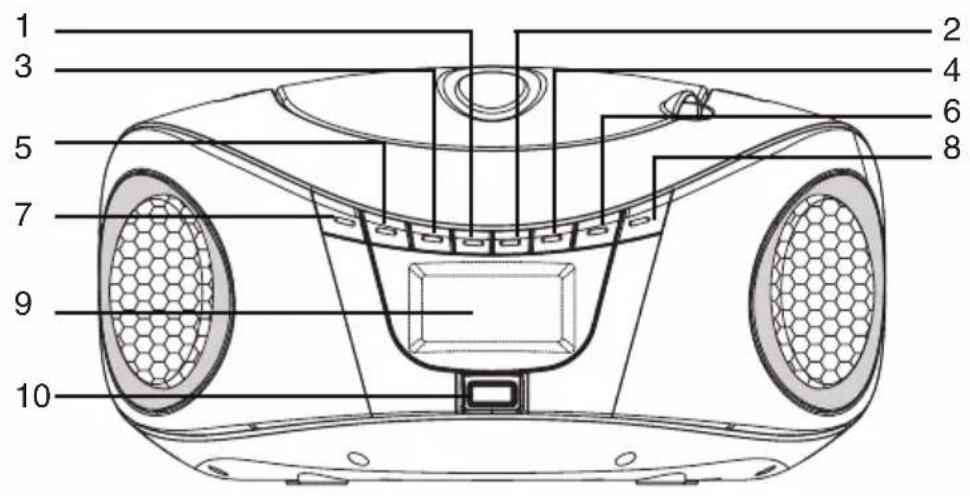

1 Button ◀◀ (Switching tracks backwards/Fast forward)
2 Button ▶▶▶ (Switch tracks forward/Fast forward)
3 ▶/▶ISCAN (Auto Tuning/Play/Pause) button
4 MODE button (Select playback mode/Store stations)
5 ■/SLEEP
(Stop playback/Clock setting/Sleep timer setting/Folder switching)
6 VOLUME button - (Volume reduction)
7 Switch ⏻/FUNCTION (CD/USB/FM/AUX/BT) (Switching the sound source on/off)
8 VOLUME + button (Volume up)
9 LCD display
10 USB connector
11 Telescopic FM antenna
12 Connector for power cord (AC IN)
13 AUX IN connector (Connection of external audio devices)
General operations
Display
The display shows track numbers, playback status, tuned station, etc.
Sound settings
1 Turn on the device by pressing and holding the ⏻/FUNCTION switch.
2 Press the ⏻/FUNCTION switch to select the desired sound source.
3 Press the VOLUME + and - buttons to adjust the volume. The volume is shown on the display.
4 Turn off the device by pressing and holding the ⏻/FUNCTION switch.
Connecting external audio devices (not supplied)
Connect the audio output of the connected external audio device to the AUX IN connector on the back of this device using a suitable audio cable with a 3.5 mm mini audio connector.
Turn on the device by pressing and holding the ⏻/FUNCTION switch and pressing the ⏻/FUNCTION switch to select the desired sound source After connection, the sound from the connected audio device can be reproduced from the speakers of this device. Adjust the volume on the connected device as well.
Another long press and hold of the ⏻/FUNCTION switch turns off the device.
Radio control
Basic operations
1 Turn on the device by pressing and holding the ⏻/FUNCTION switch and switch the audio source to FM radio (FM) with the ⏻/FUNCTION switch.
2 Extend the TELESCOPIC ANTENNA to its maximum length and adjust its angle and direction for the best possible reception.
3 Press the ▶/▶II button briefly to start automatic tuning and save all available FM stations in the device's memory.
4 After storing the stations in the memory, you can select the desired station by briefly pressing the MODE button.
5 If you want to tune in a station manually, tune in the desired station by pressing and holding the button ◀◀◀ (tuning down)/▶▶▶I (tuning up).
The frequency will start to change and when the nearest station is tuned in, the tuning will stop. By briefly pressing the ◀◀◀ or ▶▶▶ buttons, you fine-tune the station.
6 Press the VOLUME + and - buttons to adjust the volume. The volume is shown on the display.
7 Turn off the device by pressing and holding the ⏻/FUNCTION switch.
Listening to the radio
Select FM mode and select the desired stored station.
Improving reception
Adjust the position and direction of the telescopic FM antenna.
Note
After turning the device off and on again, after turning on the tuner, the last listened station will be tuned.
CD player
Disc information
Discs suitable for playback
This device can play Audio CD discs with a diameter of 8 or 12 cm, marked with the Compact Disc DIGITAL AUDIO logo, and CD-R discs recorded in Audio CD or MP3 format.
Warning
Depending on the condition of the CD-R/CD-RW disc and the recording on the disc, the disc may not play even if it meets all the conditions for playback.
Handling disks
- Always hold the disc by its edges and, in order to avoid contamination, do not touch the surface without marking.
- If you are not using the discs, store them in their packaging or in a magazine.
- Do not expose discs to high temperatures. Do not leave them on the dashboard or under the rear window of a parked vehicle.
- Do not stick stickers or adhesive tapes on the surface of the disc, do not use discs with a sticky surface. A sticky surface can cause the disc to stop spinning and cause the device to malfunction or destroy the disc.
- Do not use discs with labels or stickers attached. The following malfunctions may occur when using such discs:
- Impossibility to eject the disc (due to sticking of the disc and jamming of the ejector mechanism).
- Incorrect loading of audio data (i.e. playback may not be possible, or the sound may skip) due to deformation of the sticker due to heat, or warping of the disc.
- Discs with odd shapes (heart-shaped, square or star-shaped discs) cannot be played on this unit. If you try to play such a disc, you may damage the device. Do not use such discs.
- Before playback, clean the disc with a commercially available cleaning cloth. Clean it from the center to the edges in the direction of the arrows. Do not use solvents such as petrol, thinner, commercially available cleaners, or antistatic sprays on analog records.
Warning
Opening the disc compartment while playing a CD can damage the disc and the device itself.
Before opening the disc compartment, always stop playback with the ■/SLEEP button and wait until the disc has stopped spinning.
Disc playback
1 Turn on the device by pressing and holding the ⏻/FUNCTION switch and switch the sound source to CD (CD player) with the ⏻/FUNCTION switch.
2 Open the CD compartment cover by lifting it with your finger on the handle on the right side.
3 Insert an audio CD into the CD slot. Insert the disc with the label facing up.
4 Close the CD compartment cover by pushing the cover.
5 CD playback starts automatically from the first track.
6 Press the VOLUME + and - buttons to adjust the volume. The volume is shown on the display.
7 Press and hold the ⏻/FUNCTION switch to turn off the device.
Basic operations
Playback
Press ▶/▶II/SCAN to start CD playback from the first track.
Suspension
During playback, press the ▶/▶II/SCAN button. Playback will pause. Press the ▶/▶II/
SCAN button again during pause. Playback will resume.
Stopping
Press ■/SLEEP to stop CD playback.
Move backward:
Advance to the beginning of the current (one press) or previous songs (repeated press) and their automatic playback.
Move forward: ▶▶▶
Advance to the next song(s) (one press or repeated press) and its/their automatic playback.
Fast reverse feed: ◀◀
Fast forward in the current song backwards (you have to keep the button pressed). After releasing the button, playback continues.
Fast forward: ▶▶▶
Fast forward in the current song (you have to keep the button pressed). After releasing the button, playback continues.
Zostavenie programu
This function will make it possible to assemble a program from many songs.
Up to 20 songs from CD discs can be included in the program and 99 songs from MP3 discs and USB memory drives.
Tracks can only be added to the program while stopped.
So if you are playing a disc, you have to stop playback with the ■/SLEEP button.
1 Press and hold the MODE button in playback stop mode to enter programming mode. "P01" appears and flashes and the display shows PROG.
The two digits are the positions where the number of program items is displayed.
2 Press ./> to add the desired track to the program.
3 Press the MODE button briefly to confirm the selected track to be included under item "P01".
“P02” will be displayed.
4 Repeat steps 2 and 3 to add other songs to the program.
You can enter up to 20 tracks from a CD. If you want to enter the 21st song, the “P01” display will be restored and the newly entered song will overwrite the previously entered song at the “P01” position.
For mp3 discs and USB drives, it is possible to enter up to 99 songs.
5 After selecting the desired tracks, confirm the list by pressing the MODE button.
6 Press B/u to start playing the program.
7 To cancel the compiled program, press x/SLEEP twice, open the CD compartment cover, or switch to another sound source.
Repeat Play (REP)
All songs on the disc or individual songs can be played repeatedly.
1 Press MODE once during playback.
One track repeat indicator will light up on the display and the currently playing track will be continuously played repeatedly.
2 Each time you press MODE, the playback mode is cycled as follows:
REP (repeat one track) - REP ALL (repeat all tracks)
REP ALBUM (album repeat) - RAND (play in random order) - OFF
3 Press MODE to select the desired repeat mode.
4 To resume standard playback, press MODE until the display shows no playback mode.
Note
Repeat and shuffle mode do not work in program mode.
Repeat playback of MP3 songs (REP ALBUM)
All MP3 songs in a given folder can be played repeatedly. If an MP3 disc is inserted or a USB drive is connected, pressing MODE switches the playback modes as follows: REP (repeat 1 item) - REP ALL (repeat all items) - REP ALBUM (album repeat) - RAND (play in random order) - OFF (off)
Play in random order (RAND)
All songs can be played in random order.
Press MODE until the display shows RAND and random playback starts.
The items on the disc/USB will be played in random order.
Note
Repeat and shuffle mode do not work in program mode.
Playback of MP3/WMA files
The player enables playback of MP3/WMA format in audio quality comparable to a CD disc. You can play up to 600 minutes of music or 150 songs on one disc. You can play MP3 files just like tracks on a CD.
1 Turn on the device by pressing and holding the ⏻/FUNCTION switch and switch the sound source to CD (CD player) with the ⏻/FUNCTION switch.
2 The CD display will appear on the display.
3 Insert the MP3 disc into the carrier (label side up).
4 Close the disc compartment. The CD player automatically loads the disc and stops after loading.
5 MP3 files will start playing automatically.
6 Press the volume + and - buttons to adjust the volume. The volume is shown on the display.
7 Press ▶/▶II to pause playback. Press the button again to resume playback.
9 To stop playback, press the ■/SLEEP button.
10 Press and hold the ◀◀/▶▶I button to fast forward/reverse.
11 Press the ◀◀/▶▶ button to switch to the previous/next track.
12 Press and hold the ⏻/FUNCTION switch to turn off the device.
Repeat playback
1 Press MODE during playback to activate the desired repeat mode.
2 Press MODE to switch the repeat mode as follows:
REP - Repeat playback of the current track
REP ALL - Repeat playback of the entire disc
REP ALBUM - Repeat playback of the current folder (album)
RAND - Play songs in random order
No indicator - Standard playback
Note
Repeat and shuffle mode do not work in program mode.
Playback of MP3/WMA files
The player enables playback of MP3/WMA format in comparable audio quality with CD disc. You can play files from a USB device formatted in FAT or FAT32 and NTFS. You can play MP3 files using the buttons on the device.
1 Connect a USB device to the USB connector.
2 Turn on the device by pressing and holding the ⏻/FUNCTION switch, and switch the audio source to USB with the ⏻/FUNCTION switch.
3 The contents of the USB drive are loaded. Loading may take longer than 1 minute, depending on the capacity of the connected unit.
4 Playback will start automatically, or press B/u to start playback from the USB device from the first track.
5 Press the VOLUME + and - buttons to adjust the volume. The volume is shown on the display.
6 Press and hold the ⏻/FUNCTION switch to turn off the device.
Basic operations
Playback
If playback does not start automatically by pressing▶/▶II, start playback from the USB device from the first track.
Suspension
Press the ▶/▶II button during playback. Playback will pause.
Press the ▶/▶II button again during pause. Playback will resume.
Stopping
Press ■/SLEEP to stop playback.
Move backward:
Advance to the beginning of the current (one press) or previous songs (repeated press) and their automatic playback.
Move forward: ▶▶▶
Advance to the next song(s) (one press or repeated press) and its/their automatic playback.
Fast reverse feed: ◀◀◀
Fast forward in the current song backwards (you have to keep the button pressed). After releasing the button, playback continues.
Fast forward: ▶▶▶
Fast forward in the current song (you have to keep the button pressed). After releasing the button, playback continues.
Other functions
Other playback options in different modes (program playback, repeat playback, random playback, etc.) are the same as disc playback. Do the same.
Playing music via Bluetooth interface from a Bluetooth device
1 Turn on the Bluetooth interface on your Bluetooth device (phone, tablet, etc.). For details, see the user manual of the device in question.
2 Turn on the device by pressing and holding the ⏻/FUNCTION switch, and switch the audio source to BT with the ⏻/FUNCTION switch.
The device will turn on to Bluetooth mode and will be ready for pairing (the Bluetooth indicator will flash).
3 Search for available Bluetooth devices on your Bluetooth device (phone, tablet, etc.).
For details, see the user manual of the device in question.
When RCD813 appears on your Bluetooth device's display, select it and wait for your Bluetooth device's display to confirm pairing with RCD813. On this device, the blue LED indicator will stop flashing and start to glow continuously. The devices are paired.
4 After pairing, you can start playback on your Bluetooth device and adjust the appropriate volume on it.
For details on playback control, see the user manual of the device in question. The sound from the paired device will be played by this device.
Playback operations
Playback
Press ▶/▶II to start playback.
Suspension
Press the ▶/▶II button during playback. Playback will pause. Press the▶/▶II button again during pause. Playback will resume.
Move backward:
During playback, press the button ◀◀◀ you switch to the beginning of the current or previous tracks.
Move forward: ▶▶▶
During playback, press the ▶▶I button to switch to the next track/s.
For playback control to work, the connected device must support the Bluetooth AVRCP profile.
5 Press the VOLUME + and - buttons briefly during playback to adjust the volume.
6 After playback is finished, turn off the Bluetooth source on this device, stop playback on your Bluetooth device, and turn off the Bluetooth interface on it.
7 Press and hold the ⏻/FUNCTION switch to turn off the device.
Note
After pairing the devices, it is no longer necessary to perform pairing again. The devices will connect automatically again after turning on the Bluetooth audio source on this device and turning on the Bluetooth interface on your Bluetooth device.
Warning!
When playing via the Bluetooth interface, the sound may drop out.
These outages are caused by interference, greater distance, obstacles, etc. It is not a device malfunction.
Switch off timer
The device has a shutdown timer that allows you to set a time after which the device will automatically turn off.
Set the shutdown timer time as follows.
1 Turn on the device by pressing and holding the ⏻/FUNCTION switch to any mode and play music.
2 In FM, AUX, BT, CD and USB mode, press and hold the ■/SLEEP button for about 3 seconds.
"SLEEP 90" will appear on the display. It means that with this setting, the device will automatically switch off to standby mode after 90 minutes.
3 By briefly pressing the ■/SLEEP button, set the desired time until automatic shutdown to 90, 80, 70, 60, 50, 40, 30, 20 or 10 minutes.
4 To cancel the sleep timer function, press and hold the ■/SLEEP button to activate the timer setting mode and then press it briefly to select the "SLEEP OFF" setting.
Automatic shut down
The device has an automatic shutdown function for energy saving purposes.
In CD/USB/BT mode, if the device is in stop mode, playback pause mode, or without a disc inserted for more than 10 minutes without performing any operation, it will automatically turn off.
Press the ⏻/FUNCTION button to turn the device back on after automatic shutdown.
Further information
Wireless BLUETOOTH technology
BLUETOOTH wireless technology is a short-range technology that enables wireless data communication between digital devices such as PC and digital camera. Wireless BLUETOOTH technology works within a range of approx. 10 m.
The connection between two devices is mutual, but some devices can be connected to several devices at once.
No cable is required for connection, nor is it necessary to place the devices opposite each other as with infrared technology. For example, you can use the devices even if they are in your backpack or pocket.
The BLUETOOTH standard is an international standard supported and used by many companies around the world.
Maximum communication range
The maximum communication range can be shorter in the following conditions.
There are obstacles such as people, metal or a wall between this system and the BLUETOOTH device.
A LAN device is used near this system. A microwave oven is used near this system.
A device generating electromagnetic radiation is used near this system.
Interference from other devices
BLUETOOTH and wireless LAN (IEEE802.11b/g) devices use the same frequency, so if you use this system near a wireless LAN device, microwave interference may occur, which may cause communication speed degradation, noise, or faulty connection. In this case, do the following.
Use this system at least 10 m away from a wireless LAN device.
If you use this system at a distance of less than 10 m from a wireless LAN device, turn off the wireless LAN device.
Interference with other devices
Microwaves emitted by a BLUETOOTH device may affect the operation of electronic medical devices. Turn off the system and the BLUETOOTH device at the following locations, as there may be a risk of danger.
Near flammable gases, in hospitals, trains, airplanes or gas stations.
Near automatic doors or fire alarms.
Notes
- In order to use the BLUETOOTH function, the connected BLUETOOTH device must have the same profile as this system.
- Even if the profiles are the same, the devices may work differently depending on their specifications.
-
Due to the characteristics of the BLUETOOTH wireless technology, the sound reproduced by this system is slightly delayed compared to the sound from the playback BLUETOOTH device when talking on the phone or listening to music.
-
This system supports security standards that comply with BLUETOOTH standards to ensure a secure connection when using BLUETOOTH wireless technology. However, depending on the settings, the security may not be enough. Be careful when communicating using wireless BLUETOOTH technology.
- We are not responsible for information leakage during BLUETOOTH communication.
- In order to ensure compliance with BLUETOOTH standards specified by the Bluetooth SIG standard and authentication, a device with BLUETOOTH functionality is required. Even if the connected device complies with the specified BLUETOOTH standards, some devices may not be able to be connected or may not work properly depending on the functions or technical specifications of the device.
- Depending on the BLUETOOTH device connected to this system, the communication environment, or the operating environment, noise or sound dropouts may occur.
Maintenance
Cleaning the surface of the device
Use a soft cloth slightly moistened with a mild cleaning solution to clean the surface, panel and controls. Do not use rough cloths, cleaning powders, or solvents such as thinner, petrol, or alcohol.
Cleaning the laser lens
Use a commercially available blower used to clean camera lenses to clean the laser lens. Check with the seller.
Technical specifications
CD player
Disc format: CD/DA - CD-R - CD-RW (MP3/WMA)
Channels: 2 audio channels
Signal-to-noise ratio: More than 50 dB
Distortion: Below the measurable limit
Sampling frequency: 44.1 kHz
Quantization: 16 bit - linear/channel
Sensing device: Semiconductor laser
Wavelength: 790 nm
Laser emission: Continuous
Frequency range: 20 - 20,000 Hz
Data flow: 8 - 384 Kb/s
Formats: ISO 9660, Joliet, Romeo
Radio
Tuning range: FM: 87.5 - 108 MHz
Antenna: Telescopic extendable antenna
Generally
Output audio power: 2 x 2.2 W
Connectors - input: AC IN
USB
3.5 mm AUX IN mini-connector
Power consumption: 18 W when powered from the mains
Power supply: AC: 230 V, 50 Hz
DC: 9V (6 x 1.5V size C batteries (not included)
Operating temperature: +5 to +35 °C
Supplied accessories: Operating instructions (1)
Power cord (1)
Subject to change!
- CD/MP3/USB PLAYER WITH FM RECEIVER AND BLUETOOTH INTERFACE
- THE INTENDED USE OF THE DEVICE
- GENERAL SAFETY INSTRUCTIONS AND WARNINGS
- 1.1 GENERAL SAFETY INSTRUCTIONS
- 1.2 SAFETY OF THE OPERATING ENVIRONMENT
- 1.3 ELECTRICAL SAFETY
- 1.4 SAFETY OF PERSONS
- 1.5 CLEANING, MAINTENANCE AND REPAIRS
- SPECIAL SAFETY INSTRUCTIONS
- READ CAREFULLY
- TRANSPORTATION
- UNPACKING/PACKAGING
- CHECK/COMMISSIONING
- LOCATION/INSTALLATION
- WARNING
- OPERATION/SUPERVISION
- CAUTION
- POWER SUPPLIES/BATTERIES
- DANGER
- BLUETOOTH® TECHNOLOGY
- FREQUENCY BAND
- CERTIFICATIONS
- DETERMINATION OF USE
- LIMITATIONS IN USE
- RANGE OF USE
- INTERFERENCE WITH OTHER DEVICES
- OTHER
- LICENSES
- PRODUCER
- IMPORTER
- INSTRUCTIONS AND INFORMATION REGARDING THE DISPOSAL OF USED PACKAGING
- DISPOSAL OF USED ELECTRICAL AND ELECTRONIC EQUIPMENT
- FOR BUSINESS ENTITIES IN THE COUNTRIES OF THE EUROPEAN UNION
- DISPOSAL IN OTHER COUNTRIES OUTSIDE THE EUROPEAN UNION
- DECLARATION OF CONFORMITY
- POWER SUPPLY
- POWER SUPPLY FROM THE MAINS
- POWERED BY BATTERIES
- NOTES
- CONTROL ELEMENTS
- GENERAL OPERATIONS
- DISPLAY
- SOUND SETTINGS
- CONNECTING EXTERNAL AUDIO DEVICES (NOT SUPPLIED)
- RADIO CONTROL
- BASIC OPERATIONS
- LISTENING TO THE RADIO
- IMPROVING RECEPTION
- NOTE
- CD PLAYER
- DISC INFORMATION
- HANDLING DISKS
- DISC PLAYBACK
- PLAYBACK
- SUSPENSION
- MOVE BACKWARD
- MOVE FORWARD
- FAST REVERSE FEED: ◀◀
- FAST FORWARD
- ZOSTAVENIE PROGRAMU
- REPEAT PLAY (REP)
- REPEAT PLAYBACK OF MP3 SONGS (REP ALBUM)
- PLAY IN RANDOM ORDER (RAND)
- PLAYBACK OF MP3/WMA FILES
- REPEAT PLAYBACK
- STOPPING
- FAST REVERSE FEED: ◀◀◀
- OTHER FUNCTIONS
- PLAYING MUSIC VIA BLUETOOTH INTERFACE FROM A BLUETOOTH DEVICE
- PLAYBACK OPERATIONS
- SWITCH OFF TIMER
- AUTOMATIC SHUT DOWN
- FURTHER INFORMATION
- WIRELESS BLUETOOTH TECHNOLOGY
- MAXIMUM COMMUNICATION RANGE
- INTERFERENCE FROM OTHER DEVICES
- MAINTENANCE
- CLEANING THE SURFACE OF THE DEVICE
- CLEANING THE LASER LENS
- TECHNICAL SPECIFICATIONS
- RADIO
- GENERALLY
Brand : Orava
Model : RCD-813 R
Category : CD Player