
VMBDALI-20 - Dimmer Velbus - Free user manual and instructions
Find the device manual for free VMBDALI-20 Velbus in PDF.


Pick your language and provide your email: we'll send you a specifically translated version.
| Product Type | DALI Dimmer |
| Brand | Velbus |
| Model | VMBDALI-20 |
| Category | Dimmer |
| Dimensions (HxWxD) | 90 x 36 x 58 mm |
| Weight | 0.15 kg |
| Power Supply | 230 V AC, 50/60 Hz |
| Output Type | DALI-2 broadcast |
| Maximum Load | 20 DALI devices |
| Protocol | DALI (IEC 62386) |
| Control Interface | Velbus bus (RS485) |
| Mounting | DIN rail (1 module) |
| Operating Temperature | 0°C to 45°C |
| Protection Class | IP20 |
| Function | Dimming of DALI lights via Velbus |
| Cleaning Instructions | Wipe with dry cloth; do not use liquids |
| Safety Cautions | Install by qualified electrician; disconnect power before servicing |
| Spare Parts Availability | Contact Velbus distributor |
| Repairability | Professional repair only; no user-serviceable parts |
| General Information | Compatible with Velbus home automation systems |
Frequently Asked Questions - VMBDALI-20 Velbus
What is the VMBDALI-20 used for?
The VMBDALI-20 is a DALI dimmer used to control DALI-compatible lights via a Velbus home automation system.
How many DALI devices can it control?
It can control up to 20 DALI devices (e.g., LED drivers, ballasts) on a single DALI bus.
What power supply does it require?
It requires 230 V AC, 50/60 Hz for its own operation. The DALI bus power is separate (typically 16 V DC).
Is it compatible with DALI-2?
Yes, the VMBDALI-20 supports DALI-2 (IEC 62386) for enhanced compatibility with modern devices.
Can I use it with non-Velbus systems?
It is designed for the Velbus ecosystem and requires a Velbus bus connection (RS485) to function.
How do I install the VMBDALI-20?
Mount on a DIN rail, connect power (230 V), Velbus bus, and DALI bus. Refer to the manual for wiring details.
What is the maximum cable length for DALI?
The maximum DALI cable length is 300 meters (depending on wire gauge) to ensure reliable communication.
Does it support scenes or groups?
Yes, via the Velbus system, you can configure scenes and groups for DALI lights.
How do I reset the device?
Press and hold the reset button (if present) for 5 seconds, or cycle power via the mains supply.
Where can I find the full manual?
The full user manual is available for free download on notice-facile.com in the product page.
User questions about VMBDALI-20 Velbus
0 question about this device. Answer the ones you know or ask your own.
Ask a new question about this device
No questions yet. Be the first to ask one.
Download the instructions for your Dimmer in PDF format for free! Find your manual VMBDALI-20 - Velbus and take your electronic device back in hand. On this page are published all the documents necessary for the use of your device. VMBDALI-20 by Velbus.
USER MANUAL VMBDALI-20 Velbus
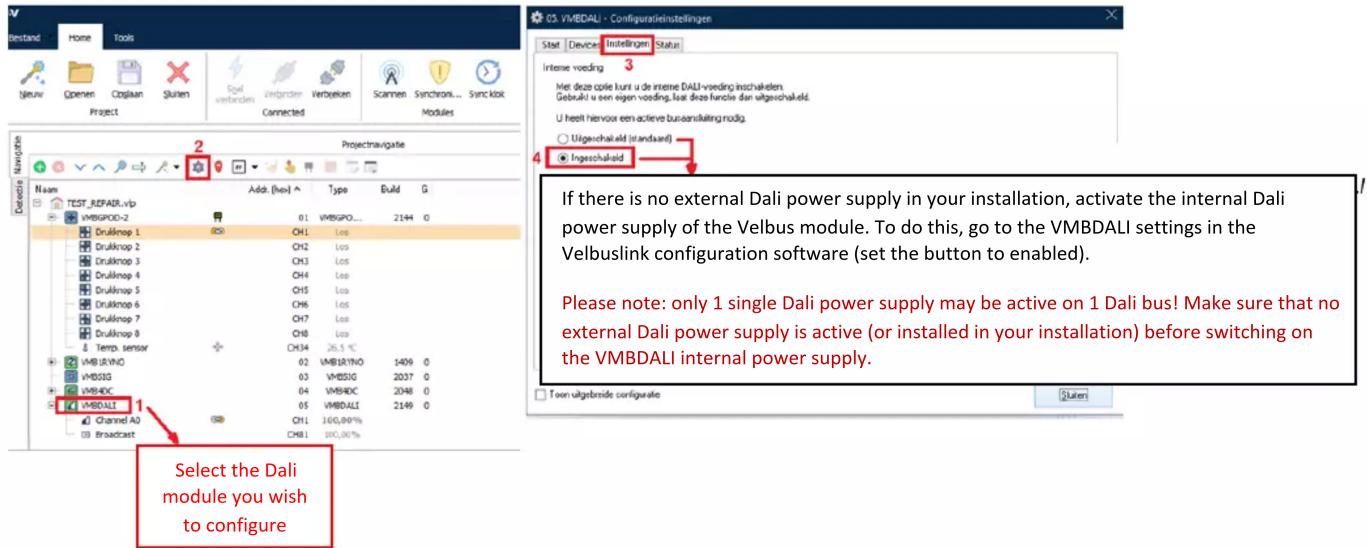
VMBDALI – QuickStart Guide

- After addressing & configuring, you can create actions in VelbusLink between VMBDALI channels and other Velbus Channels (push buttons).

![VelbusLink 10.8.3 - C:\Users\Repair\OneDrive\TEST_REPAIR.vip* Bestand Home Tools Gleenv Opreen Oglaan Gluten Ziel verbunden Verzeln Verzeln Scumen Syndrom Syndrok Project Connected Modules Go to Signa Problem... Project navigatingie Name Add: [no] Type Build G TEST_REPAIR.vip VMBSPOD-2 Drukknop 1 Drukknop 2 Drukknop 3 Drukknop 4 Drukknop 5 Drukknop 6 Drukknop 7 Drukknop 8 Temp. sensor VMBSRINO VMBSIG VMBHDIC VMEDALI Channel A0 Broadcast CH1 Les CH2 Les CH3 Les CH4 Les CH5 Les CH6 Les CH7 Les CH8 Les CH9 Les CH14 36,5 °C 02 VMBSRINO 1469 0 03 VMBSIG 2037 0 04 VMBHDIC 2048 0 05 VMEDALI 2149 0 CH1 100,00% CH8 100,00% Weilon Actions Logging Deuwn Worsen Remplaten Legmaken Gegroep... Toon modulzenamen Als oorzaak Oozsaak Acte Gevolg 01. Drukknop 1 (CH1) 01. Drukknop 1 (CH1) 202. Dimens aan/ut bij kort druklen OS. Channel A0 (CH1) The link has been configured. Synchronize (17) and write to send the programming to the modules.](/content/2026/05/1043431/images/1d68c44d2787d9cf66290f009c8ec872585c75d5c2dc89da08cefb1d4dfe614f.jpg)


Table of contents
Click a title to access it
Manual assistant
Powered by Anthropic
Waiting for your message
Product information
Brand : Velbus
Model : VMBDALI-20
Category : Dimmer