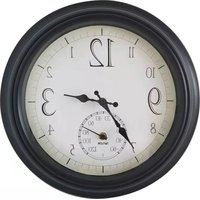
6740 - Clock Taylor - Free user manual and instructions
Find the device manual for free 6740 Taylor in PDF.


| Product Type | Analog/Digital Clock |
| Brand | Taylor |
| Model | 6740 |
| Dimensions | Approximately 20 cm x 20 cm x 5 cm |
| Weight | Approximately 0.5 kg |
| Power Source | 1 AA battery (not included) |
| Display Type | Analog dial with hour and minute hands |
| Functions | Time display, alarm, snooze, date display |
| Alarm Sound | Beep or buzzer, adjustable volume |
| Backlight | Yes, for night viewing |
| Mounting | Tabletop stand or wall-mountable (hardware not included) |
| Material | Plastic case with glass lens |
| Color | Black or white (varies by model) |
| Maintenance | Wipe with a soft dry cloth; avoid liquids |
| Safety | Keep away from water and extreme temperatures |
| Spare Parts | Battery compartment cover available; contact manufacturer |
| Repairability | Battery replacement only; internal repair not user-serviceable |
| Warranty | 1 year limited warranty |
Frequently Asked Questions - 6740 Taylor
User questions about 6740 Taylor
0 question about this device. Answer the ones you know or ask your own.
Ask a new question about this device
Download the instructions for your Clock in PDF format for free! Find your manual 6740 - Taylor and take your electronic device back in hand. On this page are published all the documents necessary for the use of your device. 6740 by Taylor.
USER MANUAL 6740 Taylor
MOUNTING INSTRUCTIONS:
- Select a location on a wall that is out of direct sunlight
- Depending on surface material, you may need to pre-drill a hole to install mounting screw. Installation should be made using a 1 1/2" #8 screw (not included). Drive a screw into surface leaving approximately 1/2" protruding.
- Line up hanger over protruding screw head and slide down until the unit is firmly in place.
CLOCK DIAL SET-UP INSTRUCTIONS:
- Start clock by installing 1 AA battery (not included).
- To time set, turn the small knob above the battery compartment to set the clock hands to the correct time.
EXPOSURE:

Mount securely and protected from the wind to prevent against any damage from being knocked off the mounting screw and falling to the ground. Ultraviolet light from sunlight can prematurely weather the product.
COMPLETE ONE YEAR LIMITED WARRANTY
©2019 Taylor Precision Products
Oak Brook, IL 60523
www.taylorusa.com
6740_91575T_4.23.19


natural_image
Empty white rectangle with a thin black border (no text or symbols)Made in China
CLOCK & THEWMOMETER
Brand : Taylor
Model : 6740
Category : Clock