KBIO1411 - Air Conditioning KwiKool - Free user manual and instructions
Find the device manual for free KBIO1411 KwiKool in PDF.


| Product Type | Portable Air Conditioner (Air Cooled) |
| Model | KBIO1411 |
| Cooling Capacity | 13,800 BTU/hr (1 Ton) |
| Air Purification | HEPA Filter (99.9% @ >0.12 microns), UVC Light (17W, 253.7 nm) |
| Dimensions (W x L x H) | 16.325 x 29.0 x 37.75 inches |
| Weight | 189 lbs (net), 239 lbs (shipping) |
| Power Supply | 115 V / Single Phase / 15 Amp circuit |
| Current Consumption | 11.2 Amps |
| Power Consumption | 1.16 kW |
| Compressor Type | Hermetic Rotary |
| Refrigerant | Non-CFC R410A |
| Air Flow (Evaporator) | 460 CFM (single speed) |
| Fan Mode | Auto or Manual (cooling or fan only) |
| Thermostat | Digital Microprocessor, set point 72°F recommended |
| Safety Switches | High Pressure (manual reset), Low Pressure (auto reset), Compressor Overload, Freeze Protection (hot gas bypass) |
| Condensate Management | Internal pump with 20" head pressure, external 5-gallon tank option |
| Pre-Filter Maintenance | Washable blue pre-filter; clean with compressed air or water; dry completely before reinstall |
| HEPA Filter Replacement | Disposable, replace twice annually; size 21 x 13.5 x 4 inches |
| UV Bulb Replacement | Part # KK-UVB1; 85W max; unplug before replacing |
| Operating Temperature Range (Cool Mode) | 65°F to 105°F (ambient) |
| Alarm Codes | CP (condensate pump), HP (high pressure), LP (low pressure), FL (filter change), CF (condensate full), etc. |
| Warranty Info | Cutting power plug voids warranty; call 1-800-KWIKOOL for support |
Frequently Asked Questions - KBIO1411 KwiKool
User questions about KBIO1411 KwiKool
0 question about this device. Answer the ones you know or ask your own.
Ask a new question about this device
Download the instructions for your Air Conditioning in PDF format for free! Find your manual KBIO1411 - KwiKool and take your electronic device back in hand. On this page are published all the documents necessary for the use of your device. KBIO1411 by KwiKool.
USER MANUAL KBIO1411 KwiKool
Engineered Safe for use in
Health Care Environments
BIOKool™
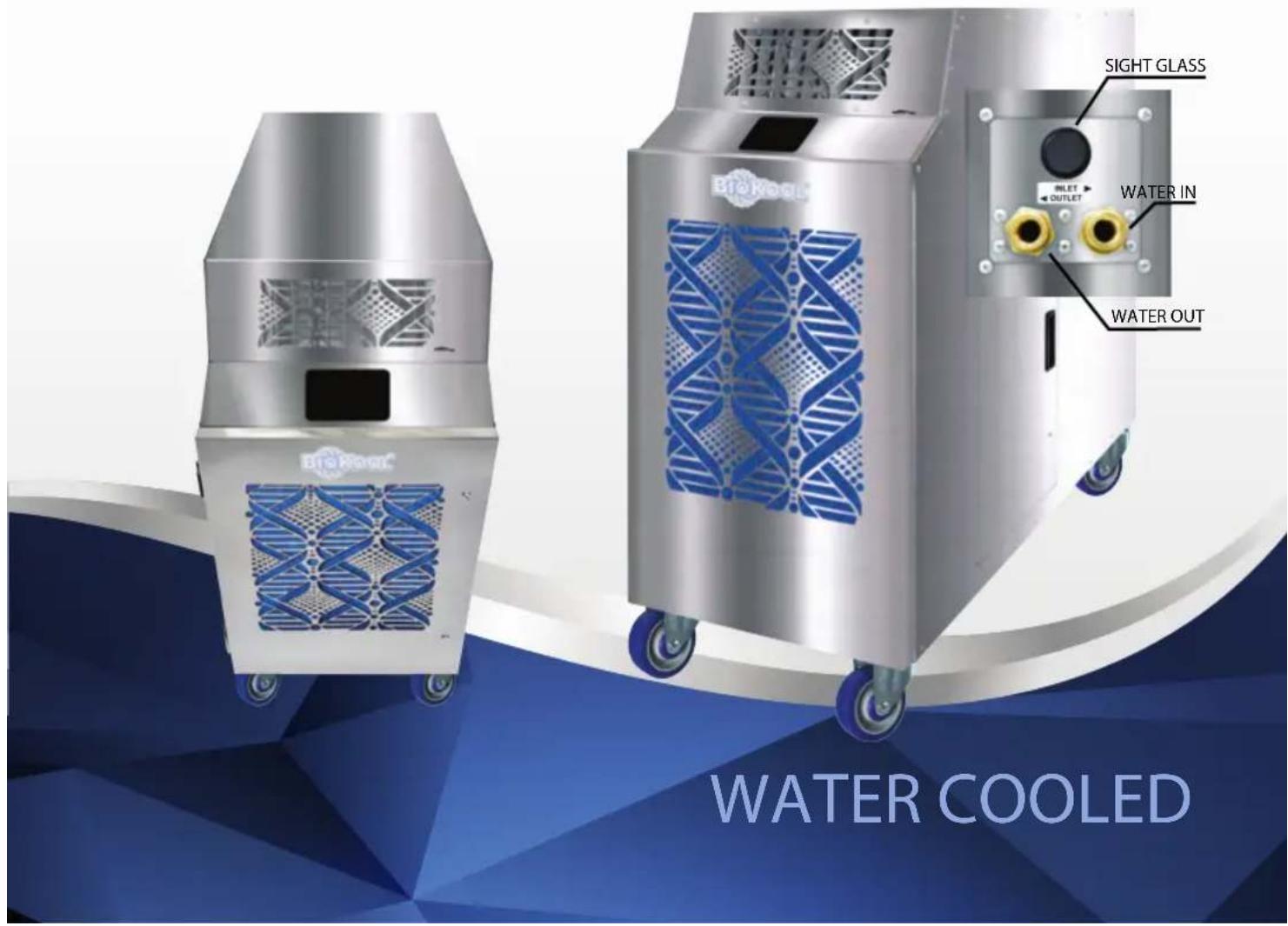
WATER OR AIR COOLED
Hygienic Portable Air Conditioner
UV LIGHT | HEPA FILTER
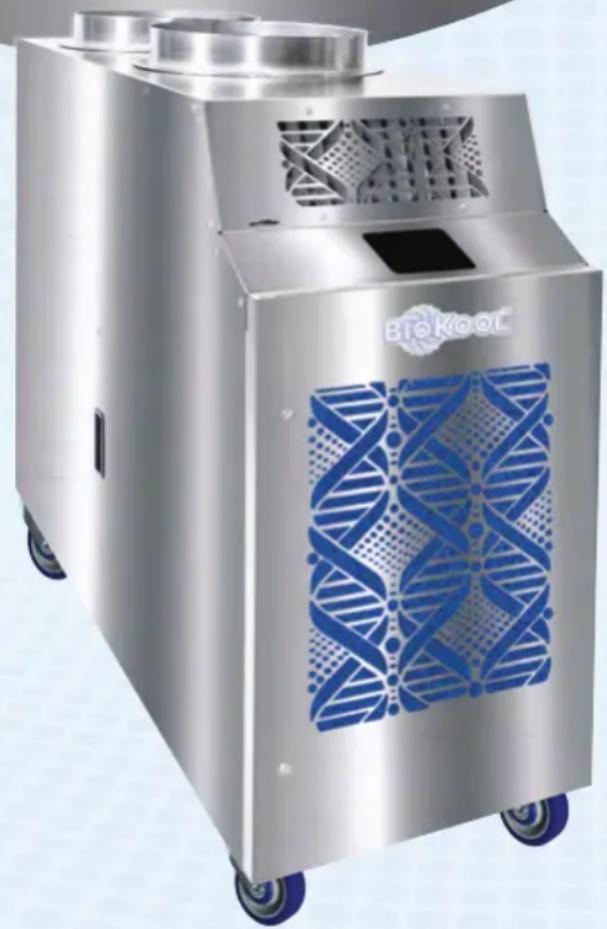
natural_image
Exterior view of a stainless steel BTKool industrial vacuum cleaner with blue patterned cover (no text or symbols visible)
natural_image
Exterior view of a stainless steel industrial air purifier unit with blue decorative panels (no visible text or symbols)WBIO1411
WATER COOLED
natural_image
Exterior view of a stainless steel industrial vacuum cleaner with blue mesh panel (no visible text or symbols)BIO1411
AIR COOLED
KBIX1411
Air Cooled Ionizer
• Stainless Steel Commercial Strength
• Hepa Filtration + Ultraviolet Irradiation
• 13,800 BTUH (1-Ton) 115V 15 Amp Standard
KwiKool®
FAMILY OF PRODUCTS
BIOKool™ Bioair™ Bioair+™ BioairMAX™
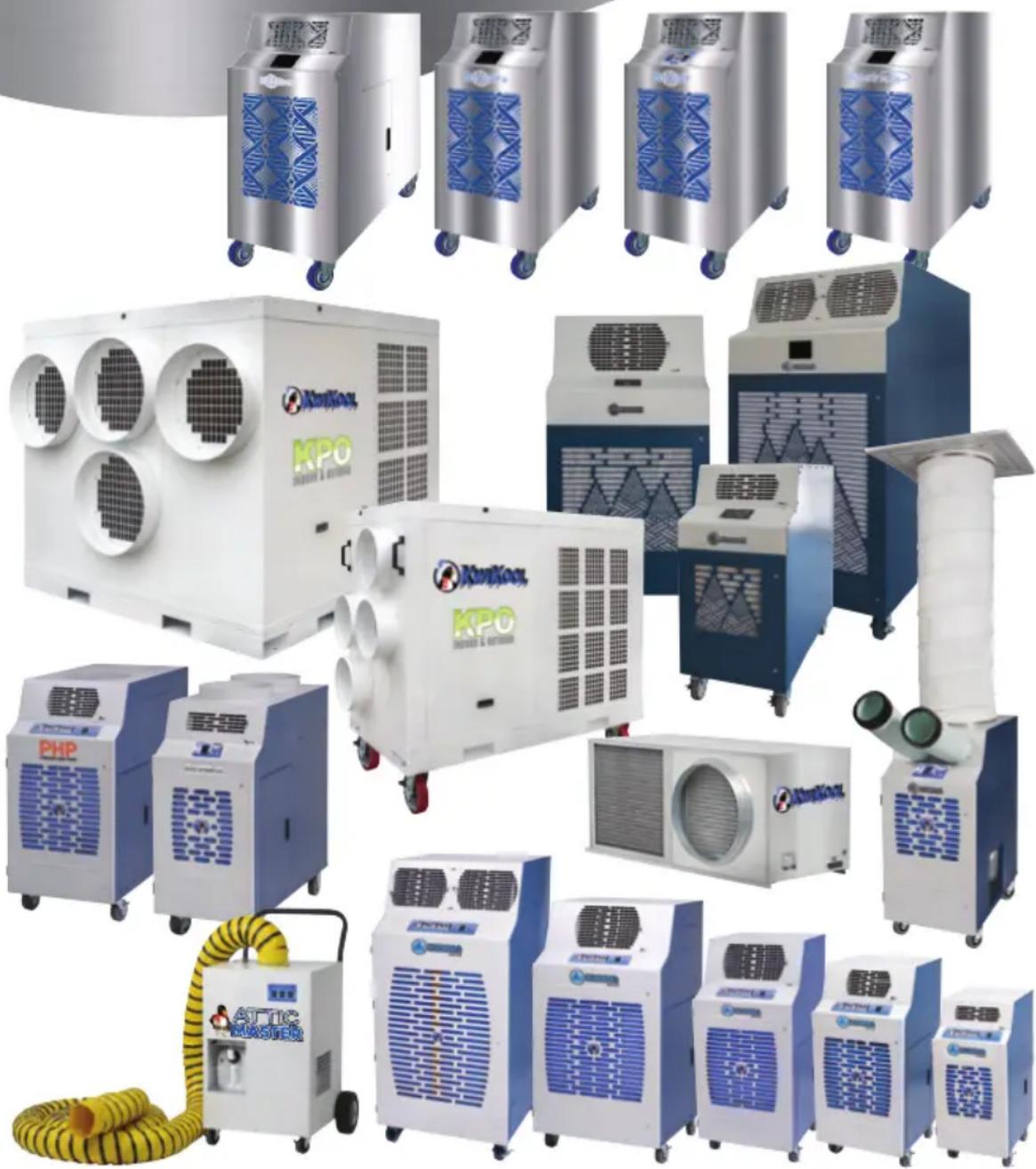
natural_image
Collection of industrial air conditioning units including KPO, KPO Master, and others, displayed without any visible text or symbols.
ICEBERG
KPO
INDOOR & OUTDOOR
PHP
PORTABLE HEAT PUMP

KPACII
OPERATIONAL SAFEGUARDS
BEFORE YOU INSTALL PLEASE READ THE FOLLOWING
A) Keep your system away from flammable materials and open flame.
B) To avoid electrical shock, keep your KwiKool system away from water and liquid. DO NOT touch your system with wet hands.
C) Is your KwiKool unit stable? It only takes a minute to drop a level onto the floor. Make sure it is level and stable before you power up. The ideal surface for operation is free of any possibility of vibration, and strong enough to support the weight of your particular model.
D) DO NOT operate or install your KwiKool unit in a potentially explosive, combustible, or corrosive gaseous atmosphere.
E) DO NOT move the system while it is operating. Before moving, first turn the system OFF and unplug it from the power source. Lastly, unlock the casters.
DO NOT tilt or overturn, this will likely damage the compressor.
F)
DO NOT place objects on top of your unit, under any circumstances.
G)
DO NOT insert your hand or any object into the cold air supply chutes.
H)
DO NOT operate your KwiKool system with its service doors open.
l)
If your KwiKool system makes abnormal noises or vibrations, call a
J) KwiKool customer service team member to assist you.

KiwKool®
Manufacturing Excellence.
1-800-KWIKOOL (594-5665)
sales@kwikool.com
TAKE CONTROL OF AIR
BioKool's exclusive four point air therapy process cools, cleans, disinfects and retards mold and microbe growth.
IRRIDIATED

According to the CDC, hospital acquired infections are the fourth leading cause of death. The CDC recommends four lines of defense against infection which are pressure, filtration, purification, and dilution. Kwikool® Biokool™ targets these requirements, empowering health care facilities to meet their two primary goals, improving patient outcomes and also profitability.
Positioning of Biokool
Do not place your KwiKool® unit in direct sunlight, The unit should be positioned so that the output of the unit can be focused as close to the heat generating equipment as possible with the front grill fully exposed. Do not block the front of the unit, since this will cause a restriction in the airflow and can cause low performance and/or evaporator coil freezing.
Biokool™ is the only portable air conditioner specially designed to perform air therapy for regulation in sensitive health care facilities. Biokool™ is engineered with the highest filtration in the world, known as HEPA. The ever impressive HEPA filter offers 99.9% efficiency with particulates larger than .3 microns. Together with HEPA a laboratory quality Ultraviolet light source penetrates both incoming warm and outgoing cool, isolated air streams with intense ultraviolet light.
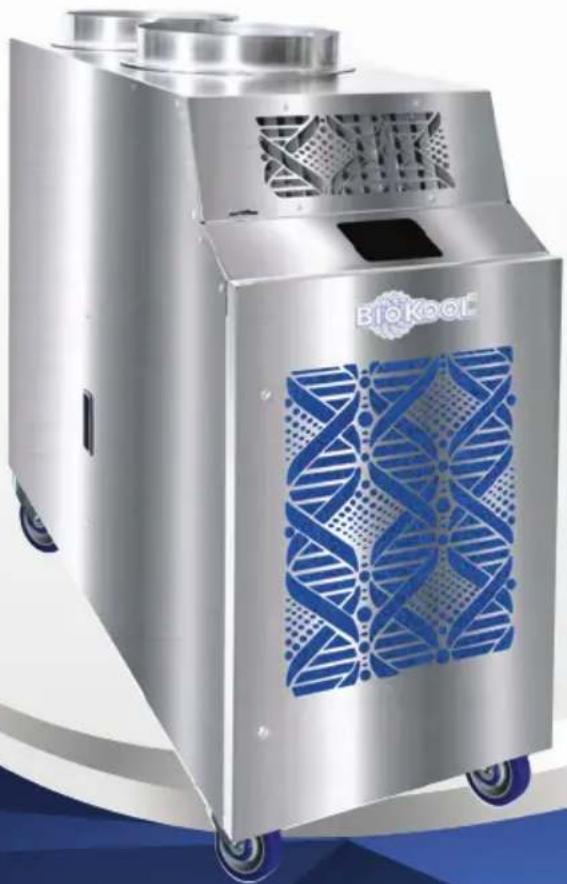
KBIO1411
13,800 BTUH (1-Ton) 115V 15 Amp Standard
304 Stainless Cabinet 99.9% HEPA Filtration Ultraviolet Irradiation
natural_image
Exterior view of a modern industrial vacuum cleaner with blue DNA-patterned cover (no text or symbols visible)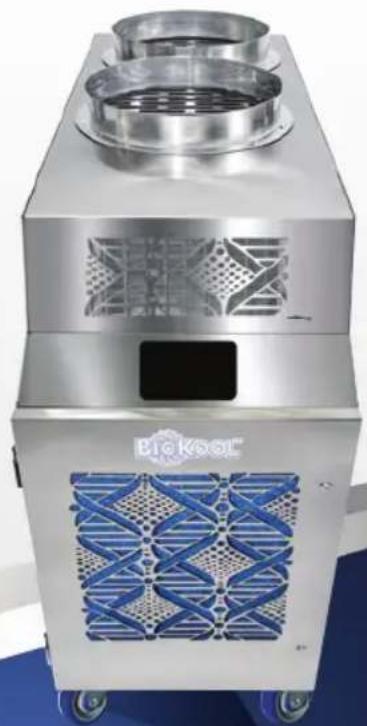
natural_image
Exterior view of a modern stainless steel industrial air purifier unit (no visible text or symbols)AIR COOLED
Biokool's unique air therapy system cools, cleans, disinfects and retards mold & microbe growth while preventing cross contamination.
Biokool™ effectively cools while unmasking dormant microorganisms including viruses, bacteria, and mold spores. Biokool's interior evaporator chamber is lined with a microbe-resistant insulation fabric, to further reduce the potential for cross-contamination.
KwiKool® Biokool™ is the new benchmark for supplemental, hygienic, air conditioning that can live up to the exceptional and uncompromising standards required inside of medical and hospital environments.
KWBIO1411
Non Porous Insulation Isolated Air Streams
13,800 BTUH (1-Ton) 115V 15 Amp Standard
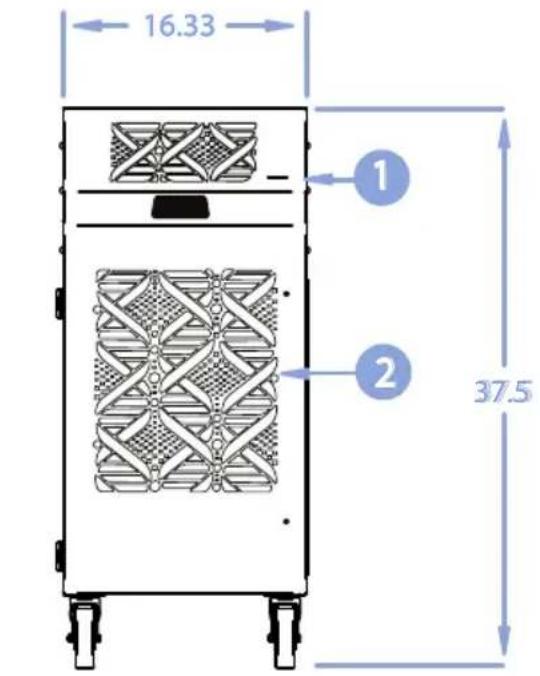
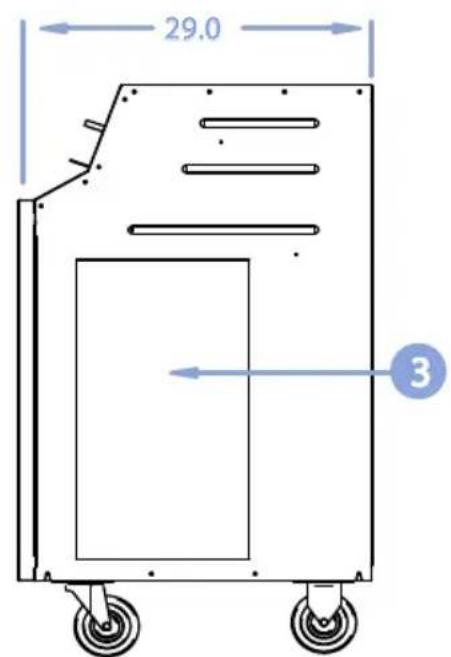
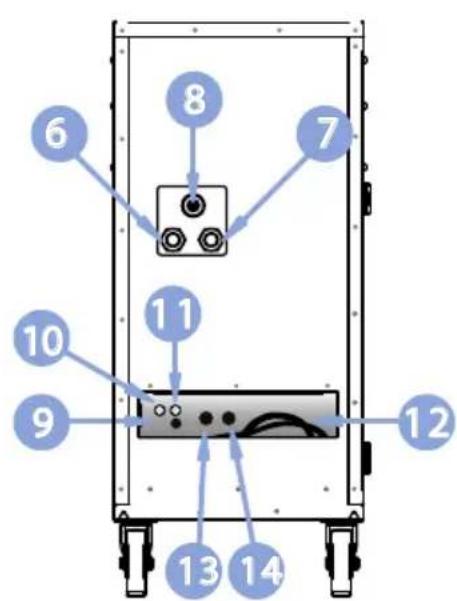
1) Vent Control
2) Cold Air Return
3) Access Panel
4) KoolPad Digital Control
5) Cold Air Supply
6) Condenser Water Inlet
7) Condenser Water Outlet
8) Sight Glass (Remove Cover)
9) Condensate Alarm Jack
10) Condensate Nipple
11) H.P. Reset Switch
12) Condensate Alarm Jack
13) H.P. Service Port
14) L.P. Service Port

ETL LISTED CONFORMS TO ANSI/UL1995 CERTIFIED TO CAN/CSA 22.2 NO 235
KWKIKOOL.COM
| COOLING CAPACITY | |
| BTU/hr @95 F at 60%RH | 13,800 / 1-Ton |
| AIR PURIFICATION | |
| HEPA Filter | 99.999% @ > .12 Microns |
| UVC Light Wave Length | UVC 17 Watts / Max 85 Watts |
| COMPRESSOR DATA | |
| Compressor Type | Hermetic Rotary |
| Operating Temperatures | 65-105F 50% RH |
| Non-CFC Refrigerant | 410A |
| FAN DATA EVAPORATOR | |
| Fan Type (Centrifugal) | Direct Drive |
| Air Flow (CFM) | 460 / Single Speed |
| Supply Air Data | Adjustable Vent |
| Supply Air Chute Data (Optional) | 2 - 5" dia x 16" length |
| CONDENSER WATER FLOW | |
| Flow Regulation Valve .5" NPT | Automatic |
| Inlet Water 85F-95F Exit GPM | 3 |
| Inlet Water 75F-95F Exit GPM | 1.5 |
| Inlet Water 65F-95F Exit GPM | 1 |
| Inlet Water 55F-95F Exit GPM | .75 |
| ELECTRICAL DATA | |
| Power Supply (Volts) | 115 V / Single Phase |
| Current Consumption (Amps) | 11.2 |
| Power Consumption (kW) | 1.16 |
| Maximum Circuit Breaker (Amps) | 20 |
| Recommended Breaker Size | 15 |
| Minimum Circuit Ampacity (Amps) | 16.875 |
| Min/Max Voltage | 105 - 125 |
| Power Cord Gauge / Length in Feet | 14 AWG / 6' |
| Plug Configuration | NEMA 5 - 15 |
| DIMENSIONAL DATA | |
| Width x Length x Height (inches) | 16.325" x 29.0" x 37.75" |
| Weight (lbs) | 189 |
| Shipping Weight (lbs) | 239 |
| SAFETY DEVICE DATA | |
| Compressor Overload | External |
| Fan Motor Overload | Automatic Internal |
| Evaporator Freeze-up | Hot Gas Bypass |
| High Pressure Switch | Manual |
| Low Pressure Switch | Auto |
| Compressor Short Cycle | Yes |
| Automatic Restart | Yes |
| Thermostat Type | Digital Microprocessor |
| Condensate Pump Overflow | Yes |
| Condensate Tank Overflow Yes | |
| Condensate Pump W/20" Head Pressure Yes | |
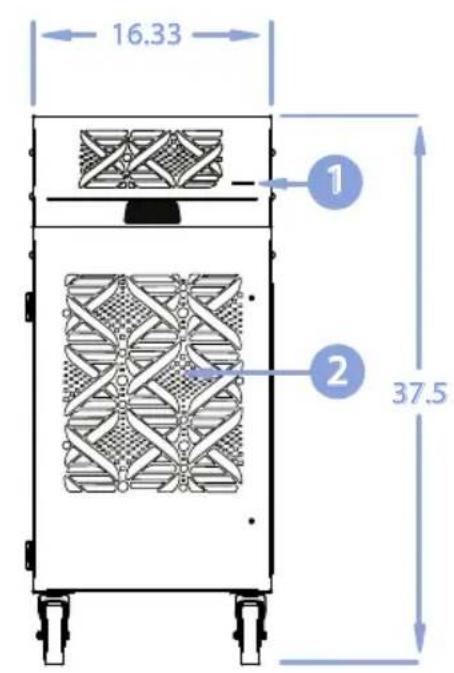
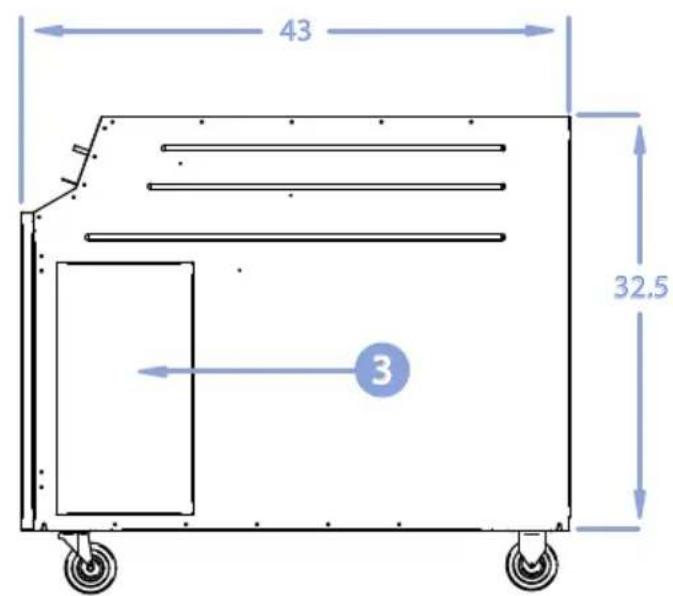
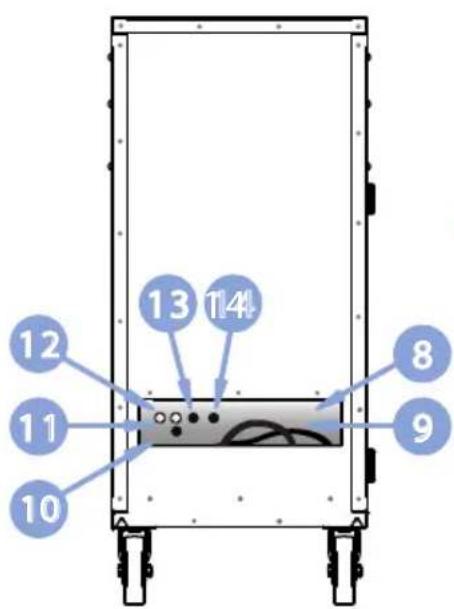
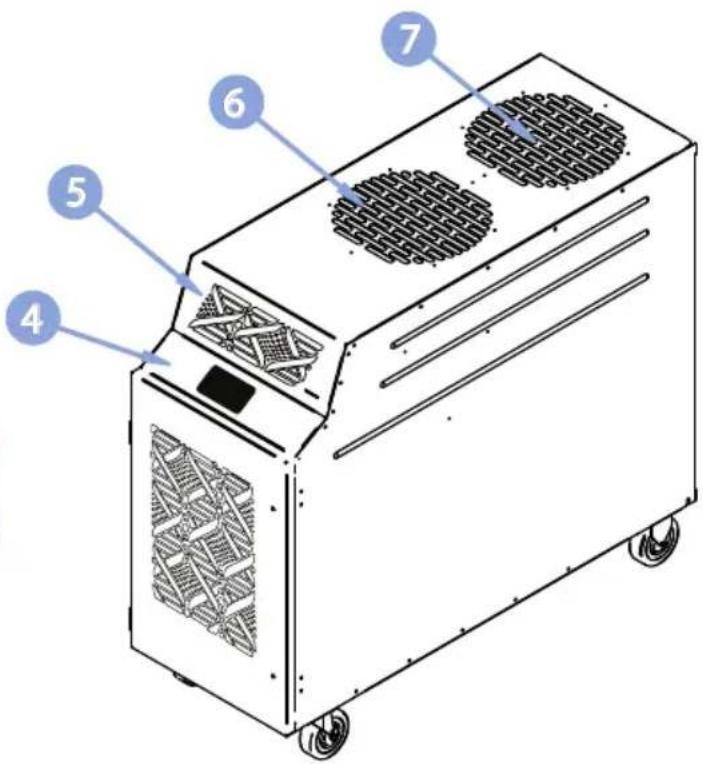
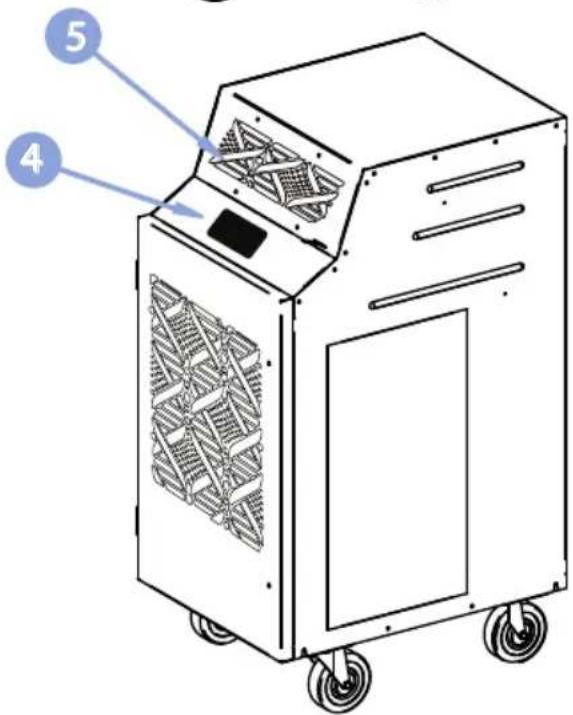
1) Vent Control
2) Cold Air Return
3) Access Door
4) KoolPad Digital Control
5) Cold Air Supply
6) Condenser Air Inlet
7) Condenser Air Outlet
8) Storage Pocket
9) Power Cord
10) Condensate Alarm Jack
11) Condensate Nipple
12) H.P. Reset Switch
13) Low Pressure Service Port
14) High Pressure Service Port

ETL LISTED CONFORMS TO ANSI/UL1995 CERTIFIED TO CAN/CSA 22.2 NO 235
KWIKOOL.COM
COOLING CAPACITY
| BTU/hr @95 F at 60%RH | 13,800 / 1-Ton |
AIR PURIFICATION
| HEPA Filter | 99.9% @ > .12 Microns |
| UVC Light Wave Length UVC 17 Watts / Max 85 Watts | |
| KBIX - Ionization | Needle Point |
COMPRESSOR DATA
| Compressor Type | Hermetic Rotary |
| Operating Temperatures | 65-105F 50% RH |
| Non-CFC Refrigerant | 410A |
FAN DATA EVAPORATOR
| Fan Type (Centrifugal) | Direct Drive |
| Air Flow (CFM) | 460 / Single Speed |
| Supply Air Data | Adjustable Vent |
| Supply Air Chute Data (Optional) | 2 - 5” dia x 16” length |
FAN DATA CONDENSER
| I/O Integral Condenser - In/Out | Balanced Air Flow |
| Fan Type (Centrifugal) | Direct Drive |
| Air Flow (CFM) | 700 |
| Condenser Duct Data (Optional) | 2 - 12” dia x 8” length |
| Condenser Maximum Duct Length | 25’ |
ELECTRICAL DATA
| Power Supply (Volts) | 115 V / Single Phase |
| Current Consumption (Amps) | 14.7 |
| Power Consumption (kW) | 1.55 |
| Maximum Circuit Breaker (Amps) | 20 |
| Recommended Breaker Size | 15 |
| Minimum Circuit Ampacity (Amps) | 18.575 |
| Min/Max Voltage | 105 - 125 |
| Power Cord Gauge / Length in Feet | 14 AWG / 6' |
| Plug Configuration | NEMA 5 - 15 |
DIMENSIONAL DATA
| Width x Length x Height (inches) | 16.325" x 43.25" x 37.75" |
| Weight (lbs) | 230 |
| Shipping Weight (lbs) | 265 |
| Ceiling Kit CK-12 Weight (lbs) | 17 |
| Shipping Weight with Ceiling Kit (lbs) | 282 |
SAFETY DEVICE DATA
| Compressor Overload | External |
| Fan Motor Overload | Automatic Internal |
| Evaporator Freeze-up | Hot Gas Bypass & Fan Cycling |
| High Pressure Switch | Manual |
| Low Pressure Switch | Auto |
| Compressor Short Cycle | Yes |
| Automatic Restart | Yes |
| Condensate Pump Safety Cut-off | Yes |
| Condensate Tank Overflow | Yes |
| Thermostat Type Digital Microprocessor | |
ASSEMBLY
natural_image
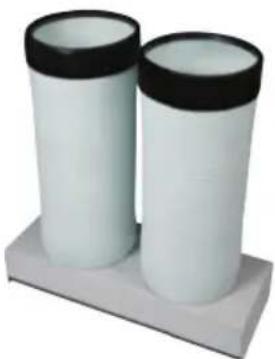
Two white cylindrical objects with black lids placed on a gray base (no text or symbols visible)Air Chutes
Your unit may come equipped with air chutes, or you may have purchased them as an optional accessory. Install supply air flanges to the front of your KwiKool unit above the control panel. Step by step instructions are included with the air chute kit.
Condensate Tank
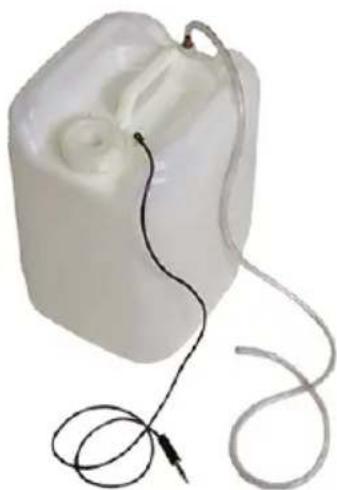
KwiKool® BioKool™ systems come standard with an external 5-gallon condensate tank. The tank is equipped with a float switch that shuts your KwiKool down and alerts operators with an alarm and display, when the condensate tank is full. It will read CF Condensate Full, on the screen. This prevents accidental water overflow on the floor. The alarm will clear automatically upon emptying the 5 gallon tank and reconnecting it. If connecting to a permanent drain, DO NOT connect or use the equipped tank.
To use the external condensate tank, remove the factory installed condensate float switch bypass plug on your KwiKool unit and install the male connector jack supplied on the condensate tank. Next connect the factory supplied 14 " ID condensate tubing to the 14 " OD barbed condensate water outlet on the back of your KwiKool and connect the discharge end of the tube to the 14 " barbed connector on the condensate tank. The condensate float jack must be inserted into the female condensate jack to operate your BioKool ^™ . CF displays if the jack is not connected or the bypass plug is not inserted properly.
natural_image
White plastic medical device with coiled cable and connector, no visible text or symbolsFive gallon condensate tank automatic cutoff float assembly
Condensate Water Outlet
The Condensate Water Outlet is located in the back of the unit in the cord compartment. Look for the 1/4" OD barbed fitting. Push to connect the clear tube to the fitting.

natural_image
Two types of connectors: a transparent blue hose and a metallic threaded connector (no text or symbols visible)The condensate float switch jack either connects to the condensate tank; or is bypassed by the factory installed male bypass switch, plug. You will find it next to the condensate water outlet.
OPTIONAL CEILING KIT
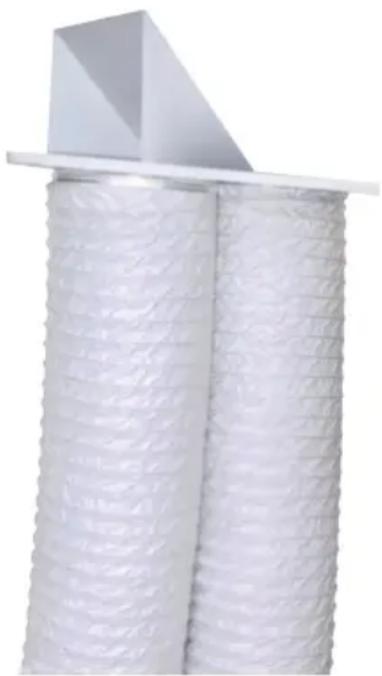
The ceiling kit is comprised of flanges with foam tape, fasteners, two (2) eight foot lengths of flexible duct, duct clamps, and one 24 x 24 in. replacement ceiling tile.

Align the holes of the flange to the holes located on the top of the unit. Attach to the top of the KwiKool BioKool™ system using the specially factory supplied fasteners.

Attach each duct to the flanges on the replacement ceiling panel(s); secure the duct to each flange using the supplied clamps.

Install the replacement ceiling panel(s) in the ceiling grid with the duct attached, connect the open end of the duct to the flanges on your KwiKool and secure with supplied clamps. Your KwiKool must have fresh make up air going to the condenser to operate at peak performance. Ensure the ducted space can absorb the heat load. It must be open enough to keep hot air from returning.

KwiKool ^® two duct ceiling kit (CK-12) is designed especially for KBIO models. BioKool ^™ is regularly used for primary, supplemental or standby cooling. In order to ensure you are able to utilize 100% of the units rated capacity and without creating a negative pressure in your conditioned space, use KwiKool's custom ceiling kit. KwiKool's exclusive IO integral condenser system isolates both the condenser discharge air and the condenser make up air from the conditioned space.
natural_image
Close-up of white cylindrical insulation with a triangular top and flat base (no text or symbols visible)Ceiling Kit Discharge Outlet
(condenser exhaust) & Discharge Make Up (fresh air inlet)
A Well Ventilated Space
Normally, the make up air and discharge air is directed above a drop ceiling. However, the ceiling kit is not limited to ceiling use and may be placed or fastened to any vertical surface or wall. The important thing is space must be well ventilated and large enough for the heat load to be absorbed. Condenser discharge air is prevented from entering the make up air inlet by way of a factory installed deflector on your Ceiling Kit. The deflector should discharge from the rear duct. If the condenser discharge and return space is unventilated, or unable to handle the exiting heat load, KBIO's high pressure safety switch will
t r i p .
If this occurs, you will get an "HP" on the control panel. Resolve this by finding appropriate ventilation then reset the high pressure switch per the instructions in the troubleshooting guide. For areas with a closed ceiling or no ceiling use the double flange ceiling kit method, or extended duct method.
MAKING CONNECTIONS
Water Connection for KWBIO1411
KwiKool® BioKool™ KWBIO1411 is equipped with two brass female 12 " (NPT) pipe thread connections located on the lower left corner of the back panel. Each fitting is labeled for water in or out. Use the proper sized wrench to connect either hard piping or the optional high-pressure line set, available in various lengths from the factory, be sure and use a backup wrench on the mounting bolt of the fitting to prevent the copper tube inside the cabinet from twisting when making your connections. Apply Teflon tape or pipe sealant to the thread for a good seal. Water pressure should be limited to 150 PSI maximum and should be between 40^ and 85^ F. If the water supply is interrupted or the incoming water temperature is too high, the unit will shut down and go into an audio alarm and display HP on the control. The high pressure switch is tripped and must be reset by pressing the HP reset button located in the return air compartment, be sure the water supply has been re-established to avoid future tripping. For long term use of water-cooled models a circulating water supply, such as a chilled water plant or cooling tower system is recommended. Tap water is not an acceptable water source, due to the high water consumption.
POWER CONNECTION
Verify that the source power, phase and breaker size is compatible with your KwiKool® serial plate information and that the electrical circuit is dedicated only for the use of the unit. If you aren't sure about your power, contact a licensed electrician. KwiKool® systems are factory equipped with 8 feet of power cable sized to meet the power requirement of your system. Extension power cable is allowed but cannot exceed 25 feet and must be rated to operate your unit. Units that come supplied with a factory installed plug require the exact receptacle to match the plug and exact circuit size and power. Cutting the power plug on your unit will void its warranty.
FILTER MAINTENANCE

natural_image
Solid blue textured background with no visible text, symbols, or distinct featuresCleaning The Pre Filter
Unplug System
Remove any and all power sources from the unit.
Access And Remove The Filter
Loosen the two screws on the filter access door until the door opens. Access the blue filter from the front panel. Pull it out from behind the door flanges.
Option One
In an open, well ventilated area blow out your blue pre-filter with compressed air away from you or others. Ensure to blow in the opposite direction of air flow. When facing the side you are blowing from, the cutouts for the door bracket should be on the left side. Blow until there is no more particulate coming from the filter.
Option Two
Using a hose or a sink, direct a flow of water through the filter from the outlet side to the inlet side. Wash and squeeze the filter until the water is clear.
Note
Before reinstalling the filter, ensure that the pre-filter is completely dry. Typically a safe waiting time is three hours. This time will vary depending on conditions, so double check that your pre-filter is dry before installation. In order to minimize downtime; it is advised that you have two filters that can be switched out in order to continue using your portable cooling system.
Replace | Install The Filter
The replacement pre-filter must be inserted the same direction as the original pre-filter. Tuck the filter as deep as possible into the door flanges, or cutouts for the door brackets. When looking at the inside of the front panel, the two squares go on the left side so that the fastening screws go through the rectangular cutouts.
Latch The Panel Door Closed
Push front panel closed and tighten the screws until they are firmly secured.
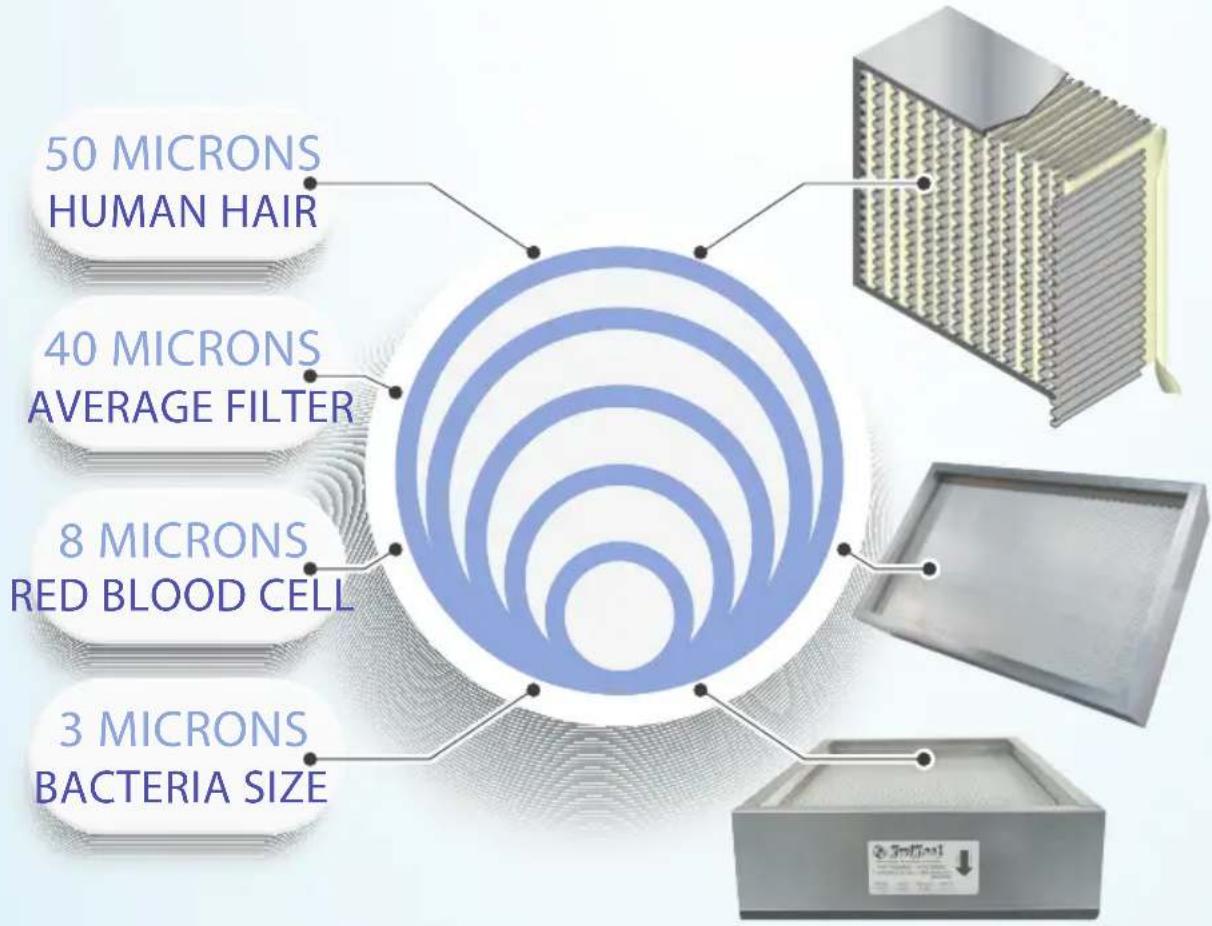
BIOKOOL IS HEPA PURITY
Common standards require that a HEPA air filter must remove 99.9% of particles greater than or equal to 0.3 m diameter.

99.9%
FILTRATION

KWIKOOL.COM
HEPA INSTALLATION STEPS
flowchart
graph TD
    A["1"] --> B["2"]
    B --> C["3"]
    C --> D["4"]
    D --> E["5"]
UNPLUG SYSTEM
IMPORTANT: Remove any and all power sources from the unit. Unplug the unit.
ACCESS FILTERS
Gently loosen the two screws on the filter access panel door until the door opens.
REMOVE PRE-FILTER
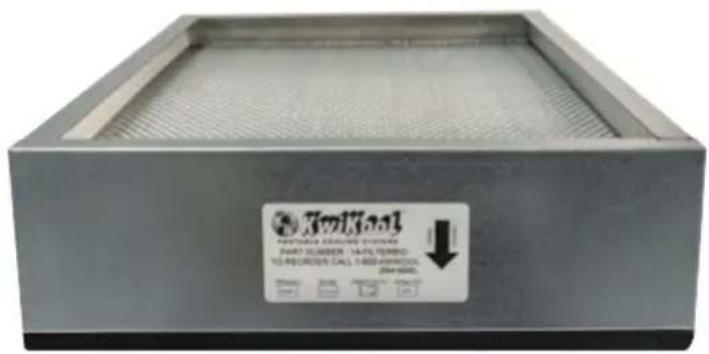
Using the lip on the filter, pull the HEPA filter straight out.
INSTALL NEW FILTER
Air flow direction is marked on the filter. Ensure it is facing the correct direction before securing it in the housing. The black rubber faces towards the interior of the unit.
INSTALL PRE-FILTER
Push the front panel closed and tighten the screws until they are firmly secured.
HEPA MAINTENANCE
natural_image
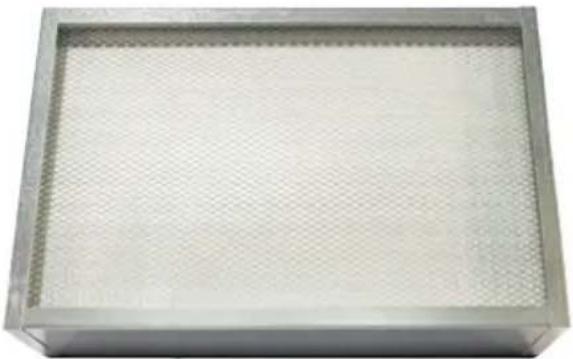
Metallic rectangular container with a honeycomb pattern on the front face (no text or symbols visible)Kwikool's KBIO BioKool™ system is a highly effective way to reduce microorganisms such as virus, bacteria, and mold spores. Filters also prevent dust and debris from circulating in the conditioned space. This portable system will come standard from the factory with both the pre-filter and HEPA filter installed on the evaporator inlet. KBIO's filters are disposable and therefore must be periodically inspected and replaced based on the air quality of your conditioned space.
Encased in steel, HEPA filters measure 21 X 13.5 X 4 inches, and are lined with fibrous, filter material. Expect to replace each HEPA filter twice annually. The blue pre-filter is washable. If washed frequently, it will preserve the HEPA filter longer. Failure to maintain will restrict air flow, and lower the air quality, and overall performance of your system.
UV LIGHT
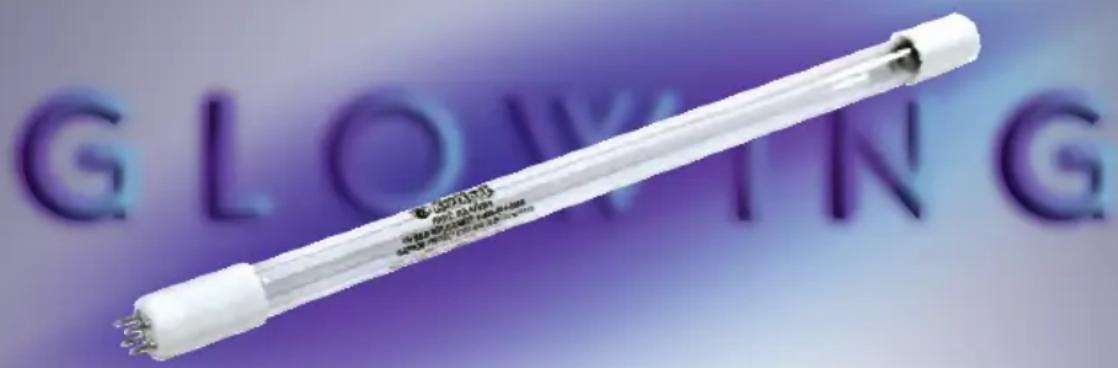
The UV spectrum has potential to either kill or inactivate microorganisms, preventing them from replicating. Biokool™ utilizes UVC energy at 253.7 nanometres to inactivate microorganisms, also known as Germicidal Irradiation or UVGI. UVC exposure inactivates microbial organisms such as bacteria and viruses by altering the structure and the molecular bonds of their DNS after UVC exposure, the organism dies off leaving no offspring, and the remaining population of the microorganism diminishes rapidly soon after. Biokool's™ Ultraviolet germicidal lamp provides a much more powerful and concentrated effect of ultraviolet energy than can be found naturally. Germicidal UV provides a highly effective method of destroying microorganisms.

PART NUMBER
KK-UVB1
800-KWIKOOL
(1-800-594-5665)
TO ORDER
ULTRAVIOLET BULB REPLACE-
BEFORE YOU INSTALL PLEASE READ THE FOLLOWING
Max Voltage: 210 Volts | Max Wattage: 85 Watts
flowchart
graph TD
    A["1"] --> B["2"]
    B --> C["3"]
UNPLUG SYSTEM
IMPORTANT: Remove any and all power sources from the unit. Unplug the unit.
OPEN ACCESS DOOR
Use a flat screwdriver and turn the latches 180 degrees. Then pull the handle.
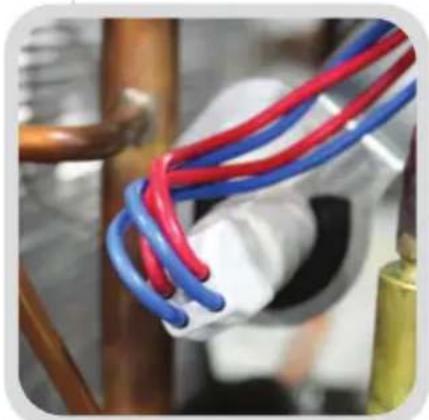
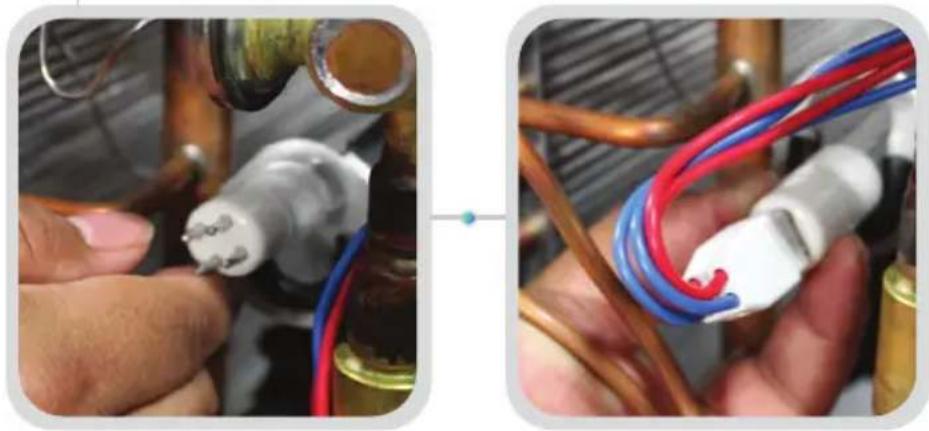
UNPLUG BULB
With one hand holding the plug and the other holding the white end cap of the bulb in place, pull the two apart.
natural_image
Close-up of red and blue electrical wires bundled in a pipe, no visible text or symbols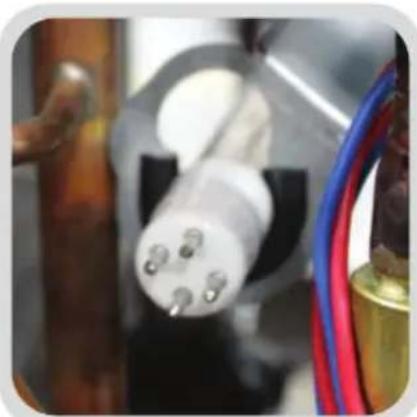
natural_image
Close-up of a white electrical plug connector with three pins, attached to a black base and red/green cables (no visible text or symbols)
natural_image
Simple line drawing of a light bulb inside a hexagonal frame (no text or symbols)Short-wave ultraviolet light damages DNA and sterilizes surfaces with which it comes into contact. Excessive exposure to UV radiation can result in acute and chronic harmful effects on the eye's dioptric system and retina.
natural_image
Abstract circular graphic with concentric rings and a numbered point '4' (no text or symbols beyond the number)REMOVE BULB
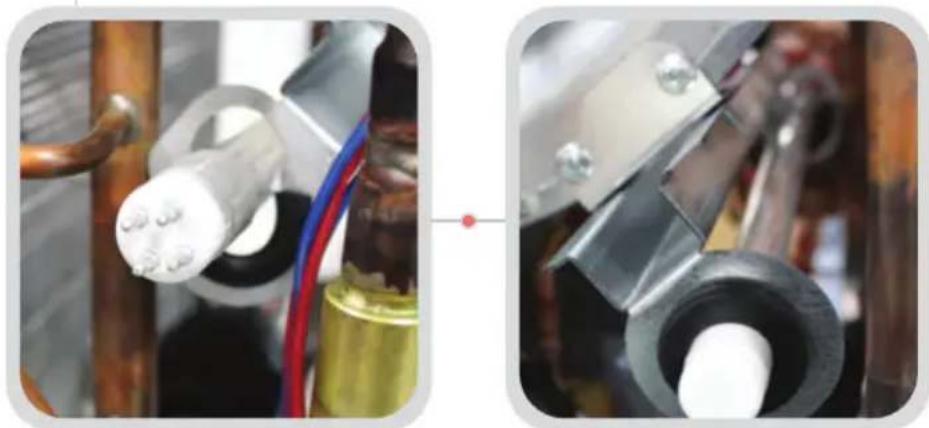
Reach inside the unit and push the bulb up before pulling it out of it's secure rubber holder. Properly dispose of the old bulb.
natural_image
Close-up of two mechanical components with wires and connectors, no visible text or symbolsFRONT BACK
natural_image
Circular graphic with a number 5 at the center, surrounded by concentric rings and small dots (no text or symbols)PLUG IN NEW BULB
Push the front panel closed and tighten the screws until they are firmly secured.
natural_image
Close-up of hands connecting a red and blue electrical cable to a white terminal block (no text or symbols visible)
natural_image
Abstract graphic with a central number 6 and a small circular element, no text or symbols present.CLOSE ACCESS DOOR
Make sure there aren't any wires hanging out, and close the access door, repeating the steps to secure it with the installed door latches.
AIR THERAPY
BIOKOOL'S FOUR POINT PROCESS
COOL
Internal UVC light further reduces microorganisms by irradiating the evaporator coil, airstream and the internal surfaces of the evaporator chamber.
RETARD
Biokool's steel walls and non porous evaporator insulation prohibit spores and microbes from attaching, keeping internal surfaces pure.
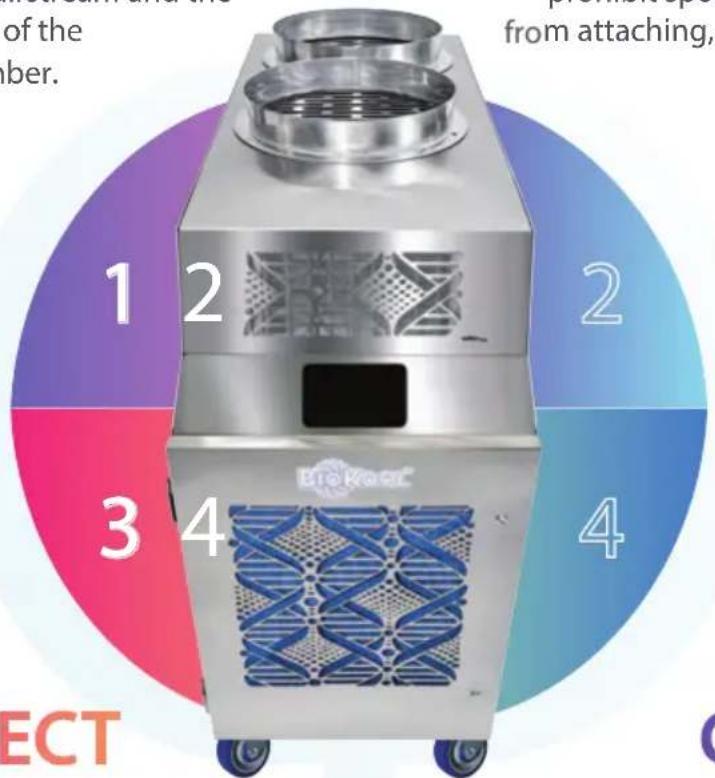
DISINFECT
BioKool™ produces cool air without cross contamination. It features the only I/O Integral condenser system isolating the condenser section from conditioned space.
CLEAN
BioKool™ is engineered with HEPA technology and utilizes ultra-violet light inside the air chamber. Germicidal UV is a highly effective method of destroying microorganisms.
APPLICATION REQUIRE-
Air Temperature Requirements In Cool Mode
Environmental requirements of your KwiKool® unit at the installation site are 0°F to 110°F for the condenser make up air located on each side of the unit. If the unit is operating in an environment above 110°F the high pressure switch may trip, causing the compressor to stop, or you may also notice diminished performance.
The High Pressure Switch is a manual reset type and located in the front service compartment on KPO5 and KPO12. The reset is located in the return air compartment on the KPO25 and the system is equipped with 2 reset switches.
Reset is accomplished by pressing the button on the switch located on the compressor discharge line. If the switch has tripped, you will feel a distinct click upon reset. Standard KwiKool KPO models are not designed to operate at temperatures below 60°F on the cooling side. Temperatures below 60°F will cause evaporator coil freezing.
Capacity & Temperature Settings
Sizing of our units is based on matching capacity to a specific heat load while maintaining a 72°F temperature. In order to reach temperatures below 72°F the unit must have extra capacity. Therefore, we recommend that you do not set the temperature set point below 72°F unless you have excess cooling capacity beyond your heat load, since this may cause the unit's evaporator coil to freeze up.
KOOLPAD OPERATION
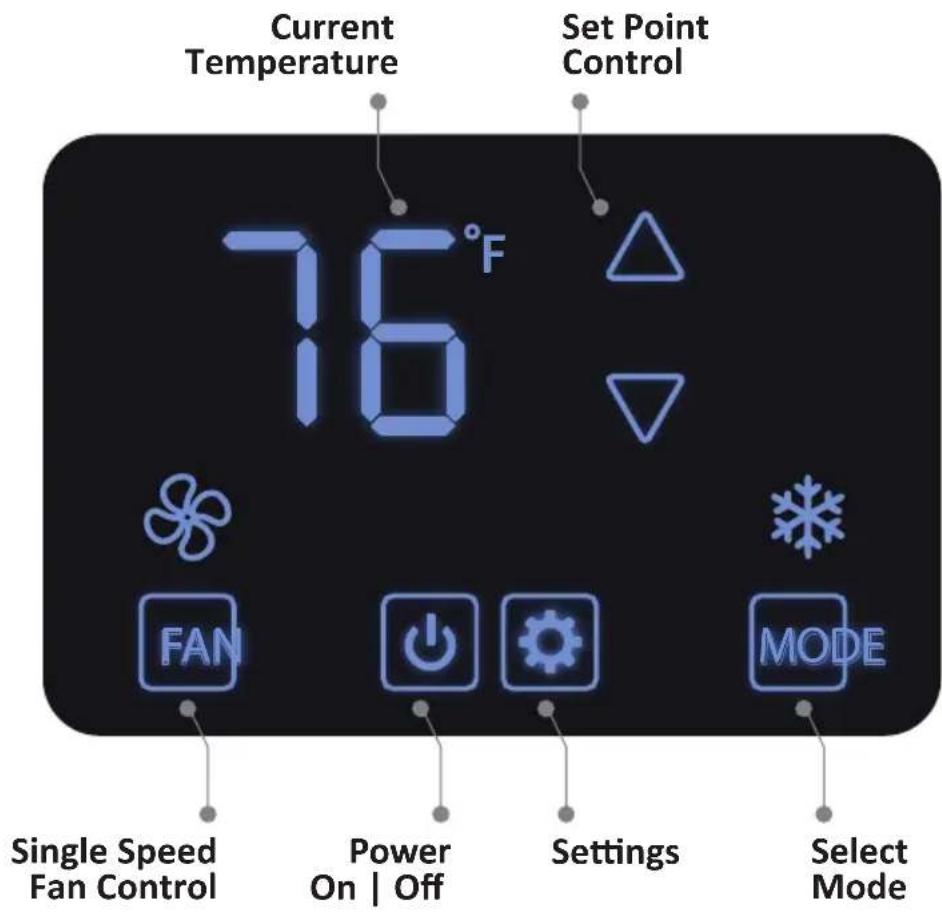
When you initially power up the system and select ON, you will discover the digital control of your Kwikool® system is factory set to COOL. The manual fan will be engaged and the set point is 72°F.
The digital display will show the current room temperature and will automatically start cooling if the set point is under room temperature.
To operate the control press the ON/OFF icon. A short press on this button turns the system on or off and the systems operates in the last parameter that was entered in operating Mode.

natural_image
Simple line drawing of a light bulb inside a hexagonal frame (no text or symbols)The control memory holds the last parameters entered. This includes ON and OFF if power is lost and then restored.
OPERATION CONTROL

A light tap on the ARROW icons raise and lower the set point temperature in the current operational mode.
A light tap on the MODE icon will enable you to adjust the operating mode COOL and FAN .


A light tap on the FAN icon will adjust between AUTO and MANUAL.
Fan Mode
FAN MODE operates the supply air fan and UV Lights. You will know that the system is operating in this mode when the fan icon is steady,
Auto Fan
AUTO FAN initiates after a short press on the FAN icon. It will activate either AUTO or MANUAL FAN. In AUTO FAN, the display will read AUTO FAN, and the supply air will operate only while the compressor is on.
Manual Fan
In MANUAL FAN mode, the supply air fan is on, and the fan icon will not display. The supply air will operate at all times when the system is on.
OPERATION CONTROL
Cool Mode
Press ON 🏠 COOL 🌱 blinks when the time delay is complete. The hot air exhaust fan will ramp up as refrigerant pressure builds. It is normal for this fan to have a delayed start. Also, it’s normal for the fan to stop and start during the operating process, especially in low temperatures.

natural_image
Icon of a magnifying glass inside a hexagonal frame with green and purple gradient (no text or symbols)The hot air exhaust fan (condenser discharge) operates exclusively in Cool mode and not in Fan mode.
Cycling Off
When the system reaches the desired, programmed set point in COOL mode it will automatically begin cycling off or you may choose to turn it off. The system time delay will activate before cooling again.
When cycling off by making the set point, the evaporator fan will remain activated if FAN is selected. When the temperature rises above the set point, cooling will begin automatically.
Turning the system OFF manually will turn the evaporator fan off also, impeding the BioKool™ from restarting automatically. In FAN mode the supply air fan and UV lights shut down when OFF is selected.
USER PARAMETERS
Enter this mode by short pressing the
icon.
SETTING USER SETTINGS
Start by going to SETTINGS. Use FAN and MODE to scroll.
Use the UP and DOWN arrows to change values.
SETTING FOR YOUR TECHNICAL STAFF
Hold MODE until it beeps and flashes a lock icon, then hold FAN until it beeps. Release FAN then touch it again, it will beep and then display P04.
To scroll use FAN and MODE. Select ON/OFF to exit, or after one minute the display defaults to the operating screen. Use the UP and DOWN arrows to change values.
BUILT IN SAFEGUARDS
Time Delay
Protects your KwiKool® while in COOL mode from potential damage by delaying the compressor from starting before the pressures in the mechanical system equalize. Always activates when your KwiKool cycles off, is turned off, power is lost and then restored.
High-Pressure switch and Alarm
Protects your KwiKool ^® from potential damage to the mechanical system by shutting down and alerting operators of a condition such as stopped or slowed air flow over the condenser coil; make up air temperature above operating range or mechanical failure. Your KwiKool ^® will sound an audio alarm only and display HP on the control. To resume operation, the system requires a manual reset after corrective action is taken, the reset switch is located in the power cord pocket. Push in to reset, if activated you will hear a click. If this alarm is engaged the system will not operate in cool fan mode.
Low Pressure switch and Alarm
Protects your KwiKool ^® from potential damage to the mechanical system by shutting down and alerting operators of the condition. This safety activates when pressures below 20 PSI are detected in the mechanical system of your KwiKool ^® . Your KwiKool ^® will sound an audible alarm and displays LP on the control. Call 1-800-KWIKOOL if this alarm is present on start up. Automatic reset upon correction of low pressure condition. If this alarm is engaged the system will not operate in cool, fan or heat mode.

natural_image
Abstract geometric design with blue and silver gradient background, no text or symbols presentBUILT IN SAFEGUARDS
Automatic Restart
In the event of a power loss your KwiKool ^® resumes operation when the power is restored if in the ON position. All operational functions are preserved in the memory of the control.
Condensate Pump & High Level Alarm
BioKool™ systems are factory equipped with an internal high lift condensate pump. KwiKool condensate pumps are able to pump the condensation collected in the reservoir of the pump to a drain or other area approved for the discharge water by attaching 14 " I.D. tubing to the 14 " O.D. barbed condensate outlet. KwiKool condensate pumps are equipped with a pump safety cut-off that prevents accidental water overflow by shutting your KwiKool down and alerting operators with an audible alarm and displays CP on the control.
Call 1-800-KWIKOOL if this alarm is present on start up. The most common reason for this alarm to activate during operation is restricted water flow thru the discharge tubing or excessive discharge line connected to the system. Automatic reset upon correction of the condensate flow. If this alarm is engaged the system will not operate in cool or fan mode.
ALARM CODES
A1 Customer Installed input Optional
CP Condensate Fault Pump Standard
LP Low Freon Level Detected Standard
HP High Pressure Detected Standard
FL Run Time for Filter Has Elapsed Standard
FS Freezing Detected Optional
UL Run Time for UV Light Elapsed Standard
P04 - Lock Fan Button Select 0 or 1 0 - Unlock, 1 - Lock
P05 - Lock Mode Button Select 0 or 1 0 - Unlock, 1 - Lock
P06 - Lock On/Off Button Select 0 or 1 0 - Unlock, 1 - Lock
P07 - Lock Plus/Minus Button Select 0 or 1 0 - Unlock, 1 - Lock
USER PARAMETERS
| P30 | Beeper Enable | Select 0 or 1 | 0 - Disable1 - Enable |
| P40 | Filter Counter | Hours 10 - 999 | Read Only |
| P41 | Filter Counter Reset | Select 1 to Reset | Defaults To 0 |
| P42 | Filter Alarm Delay | Days, Select 0-180 | 0 - Disable |
| P100 | Enable Dimming | Select 0 or 1 | 0 - Disable1 - Enable |
| P101 | Dimming Time | Min, Select 0 - 10 | Defaults To 5 |
| P102 | Dimming Brightness | (%) 1, 5, 10 - 90 | Defaults To 10 |
| P105 | Active State Brightness | (%) 50 - 100 | Defaults To 100 |
| P106 | UV Light TimeSettings / Hours / 100 | 0 - 999 Represents0 - 999 Hours | 0 - disable |
| P107 | UV Light Actual TimeHours / 100 | Range 0 - 999 | Read Only |
| P108 | UV Light Reset | Range 1, 0 | 1 - Reset |
TROUBLESHOOTING GUIDE
FAULT CAUSE SOLUTION
| Unit displays CF, Audio alarm fails to clear on start up or while operating | External Condensate Tank is full. Condensate bypass jack or condensate float switch jack is not installed or not positioned correctly. Water level switch is engaged. | If applicable, empty the external tank. Make sure thank is upright and level. Unplug bypass / tank plug to assure stable connections. System is set to automatically reset when the fault condition is corrected. |
| Unit Displays CP and Audio alarm is sounding during start up or while operating | Microprocessor board has detected high water level in the condensate pump. | Inspect the condensate pump for over flow, then check the condensate line for clogs or crimping. Resets automatically upon fault correction, or call 1-800-KWIKOOL if the problem persist. |
| Unit Displays HP, Audio alarm is sounding during start up or while operating | Microprocessor board has detected high pressure. The High Pressure switch is likely tripped. | High pressure is normally caused by reduced condenser air flow. Look for duct restrictions. Check for condenser air system ventilation. Look at the condenser motors and/or blowers for proper operation. Reset manually (located next to the power cable). |
| Display shows 32 and unit will not turn on cooling | The temperature sensor is not connected to the microprocessor. There is a temperature Sensor malfunction. | Call 1-800-KWIKOOL for instructions. |
| Supply air flow is limited, and / or water is dripping from the front of the system | Supply or return air is blocked or restricted, and or the evaporator coil is freezing. | Verify the supply and return air are not blocked. Turn the system off in order to thaw the check the air filter for blockage. Replace filter if needed. |
FAULT CAUSE SOLUTION
| Condensate is not pumping Water is below pumping level, external line restricted, line installed with too high of lift. | Reservoir fills, and then pumps. Check for line crimping or restrictions and proper line run height. | |
| Evaporator coil is freezing Low or restricted air flow. Undersized capacity, unit constantly on, unable to achieve set point. Low return air temperature out of factory specifications. Evaporator door open, mechanical system malfunction. | Direct supply return air to area of highest heat load, check for blocked air flow from the supply air, replace air filters, adjust set point to allow the unit to cycle, add another KwiKool® system or larger capacity model, close evaporator compartment door, inspect supply air blower for worn condition or breaking, Install service gauges to view pressures. | |
| Control Box Chatter of Hum During Operation | Incoming source power is poor or low voltage component is faulty. | Check for proper voltage selection, call 1-800-KWIKOOL. |
| 99 Flashes on display Ambient room temperature over 99 degrees F. | Unit is working properly. When the temperature in the room lowers, the 99 code will stop flashing. | |
| 60 Flashes on display Ambient room temperature under 60° F. | Limits of unit have been reached. Operating temperatures 65° - 105°F. | |
| Power is supplied but control is blank | Low voltage circuit is not engaged | Inspect the power breaker and verify that there is power getting through to the connector. Call 1-800-KWIKOOL |
FAULT CAUSE SOLUTION
| Unit Displays LP, Audio alarm is sounding during start up or while operating. | Microprocessor board has detected low pressure. This alarm might cycle on and off. | Check air filter and replace if dirty. Make sure nothing is blocking the filter inlet. Check for icing on coil. Resets automatically when fault condition is corrected. |
| Audio alarm fails to clear on start up or while operating, unit displays FP. | If the system has a factory installed freeze sensor, then the microprocessor has detected freezing on the evaporator coil. | Check for freezing on the evaporator coil and turn the system off to thaw.Call 1-800-KWIKOOLif your system lacks a freeze sensor. |
| System is ON and display is showing ON but unit is not supplying conditioned air.F or C is flashing. | System is in time out.One of three things.Either control is above room temp; adjusted out of operating parameters, or not in the correct operational MODE. | Wait 2 minutes, review System Operations guide. |
| System is ON and flashing F or C. The microprocessor resets the time delay when the compressor attempts to start. | Microprocessor board detects voltage drop below operating parameters. | Confirm the integrity of your power source, by inspecting size and length of the power extension cable. Be sure to have a dedicated circuit. |
| System trips breaker on start up | Incoming power is incorrect, breaker is undersized or faulty, and or power cable is too long and or undersized. | Verify the circuit and power cable is within the systems specifications, consult with your electrician or Call 1-800-KWIKOOL. |
| System Cools, however, the Condenser Discharge Air Exhaust Fan is Revving, and/or the Condenser Discharge Fan is Intermittent. | This is the normal operating condition and especially when operating in low temperatures. | No action is required. |
BIOKool
PATENT PENDING

PORTABLE COOLING SYSTEMS


KWIKOOL Manufactures
Excellent Commercial
Portable Cooling Equipment
IN THE U.S.A.

KwiKool®
Manufacturing Excellence.
1-800-KWIKOOL (594-5665)
sales@kwikool.com
- BIOKool™
- Hygienic Portable Air Conditioner
- KwiKool®
- FAMILY OF PRODUCTS
- BIOKool™ Bioair™ Bioair+™ BioairMAX™
- OPERATIONAL SAFEGUARDS
- BEFORE YOU INSTALL PLEASE READ THE FOLLOWING
- TAKE CONTROL OF AIR
- Positioning of Biokool
- KBIO1411
- Biokool's unique air therapy system cools, cleans, disinfects and retards mold & microbe growth while preventing cross contamination.
- KWBIO1411
- Non Porous Insulation Isolated Air Streams
- 13,800 BTUH (1-Ton) 115V 15 Amp Standard
- ASSEMBLY
- Air Chutes
- Condensate Tank
- Condensate Water Outlet
- OPTIONAL CEILING KIT
- A Well Ventilated Space
- MAKING CONNECTIONS
- Water Connection for KWBIO1411
- POWER CONNECTION
- FILTER MAINTENANCE
- Cleaning The Pre Filter
- Option One
- Option Two
- Note
- Replace | Install The Filter
- Latch The Panel Door Closed
- BIOKOOL IS HEPA PURITY
- HEPA INSTALLATION STEPS
- UNPLUG SYSTEM
- ACCESS FILTERS
- REMOVE PRE-FILTER
- INSTALL NEW FILTER
- INSTALL PRE-FILTER
- HEPA MAINTENANCE
- UV LIGHT
- ULTRAVIOLET BULB REPLACE-
- OPEN ACCESS DOOR
- UNPLUG BULB
- REMOVE BULB
- PLUG IN NEW BULB
- CLOSE ACCESS DOOR
- AIR THERAPY
- BIOKOOL'S FOUR POINT PROCESS
- COOL
- RETARD
- DISINFECT
- CLEAN
- APPLICATION REQUIRE-
- Air Temperature Requirements In Cool Mode
- Capacity & Temperature Settings
- KOOLPAD OPERATION
- OPERATION CONTROL
- Fan Mode
- Auto Fan
- Manual Fan
- Cool Mode
- Cycling Off
- USER PARAMETERS
- SETTING USER SETTINGS
- SETTING FOR YOUR TECHNICAL STAFF
- BUILT IN SAFEGUARDS
- Time Delay
- High-Pressure switch and Alarm
- Low Pressure switch and Alarm
- Automatic Restart
- Condensate Pump & High Level Alarm
- ALARM CODES
- TROUBLESHOOTING GUIDE
- BIOKool
Brand : KwiKool
Model : KBIO1411
Category : Air Conditioning