
X3-17-THUNDER8 - Loudspeaker MTX Audio - Free user manual and instructions
Find the device manual for free X3-17-THUNDER8 MTX Audio in PDF.


| Product Type | Car Audio Subwoofer |
| Brand | MTX Audio |
| Model | X3-17-THUNDER8 |
| Category | Speaker |
| Speaker Size | 8 inches |
| Impedance | 4 ohms |
| RMS Power Handling | 200 Watts |
| Peak Power Handling | 400 Watts |
| Sensitivity | 92 dB @ 1W/1m |
| Frequency Response | 30 Hz - 200 Hz |
| Mounting Depth | 3.5 inches |
| Recommended Enclosure | Sealed or Ported |
| Cone Material | Polypropylene |
| Voice Coil | 1.5-inch Dual Voice Coil |
| Magnet Type | Ferrite |
| Terminals | Spring-loaded |
| Recommended Amplifier Power | 100-300 Watts RMS |
| Overall Dimensions (W x H x D) | 8.5 x 8.5 x 4.5 inches |
| Weight | 5.5 lbs |
| Color | Black |
Frequently Asked Questions - X3-17-THUNDER8 MTX Audio
User questions about X3-17-THUNDER8 MTX Audio
0 question about this device. Answer the ones you know or ask your own.
Ask a new question about this device
Download the instructions for your Loudspeaker in PDF format for free! Find your manual X3-17-THUNDER8 - MTX Audio and take your electronic device back in hand. On this page are published all the documents necessary for the use of your device. X3-17-THUNDER8 by MTX Audio.
USER MANUAL X3-17-THUNDER8 MTX Audio
natural_image
Collection of various electronic devices and components including a large camera, speaker units, and cable assemblies (no visible text or symbols)Thank You! Thank You!
Congratulations and thank you for purchasing the MTX Audio X3-17-THUNDER8 audio system designed for the Can-Am™ Maverick X3. Our audio system will deliver ground pounding audio making you the party vehicle in any ride!
With a few basic hand tools in your trusty toolbox, you can have this installed in no time. So, what are you waiting for? It's time to get the rumble in your ride and go hit the trails! Oh, and congratulations on your purchase, thanks for your support and most importantly, enjoy the ultimate audio experience with MTX!
IN THE BOX

AWMC3
Bluetooth Media
Controller
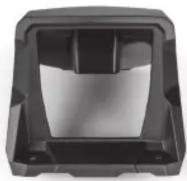
X3-17-DK
AWMC3 Dash Kit
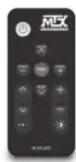
MUDLEDC
RGB Remote Control

MUD100.4
4-Channel Amplifier

MUD600-1
Mono Block Amplifier
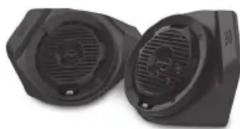
X3-17-FS-L
Front Speaker Kit
(Lower)
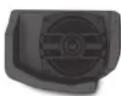
X3-17-FS-U
Front Speaker Kit (Upper)

natural_image
Two black industrial fan or motor unit units with ventilation grilles and mounting brackets (no visible text or symbols)MUD65PL
Rear Cage Speaker Pods

X3-17-SW-D
Subwoofer Kit (Driver Side)

X3-17-SW-P
Subwoofer Kit (Passenger Side)
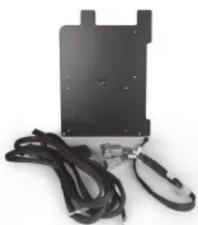
natural_image
Black electronic device with attached cables and a connector (no visible text or symbols)X3-17-CORE
Amplifier Bracket Kit and Wire Harness

natural_image
Coiled black cable with connectors, no visible text or symbolsPS-REARHAR-1
Rear Speaker Harness

EBC-01
External Bass Control
Knob

natural_image
Close-up of a black cable with exposed wires (no text or symbols)1-10823
AWMC3 Amplifier
Harness

natural_image
Coiled black cable with connectors and wires, no visible text or symbols1-10825
AWMC3 Speaker Harness
RECOMMENDED TOOLS
• T40 Torx with driver or drill
- Small flat blade or pin removal tool
- 19mm socket with extension and driver or drill
• 15mm socket with driver or drill
• 13mm socket with driver or drill
- 10mm socket with driver or drill
- 13mm wrench
- 10mm wrench
- 3mm Allen wrench
- RGB option - heat gun, butane torch, or lighter
- Extra zip ties
INSTALL VIDEO
Please visit http://mitk.co/NLI or scan the QR code to view our installation video.

VEHICLE LAYOUT

natural_image
Top-down technical sketch of a vehicle chassis with visible motors, speakers, and camera (no text or symbols)WE'RE HERE TO HELP
We're here to help with any installation or technical support. Visit mtx.com to chat, call 1-800-225-5689 to speak with an MTX Technical Support representative, or visit youtube.com/user/MTXAudioUSA to view product videos.
DON'T FORGET TO REGISTER YOUR PRODUCT
Don't forget to register your new MTX Audio product. Visit mtx.com/productregistration or scan the QR code to the right.
Model # ____
Serial #
Dealer's Name
Date of Purchase

MAKE SURE TO READ THIS
Installation of the X3-17-THUNDER8 audio system requires a lot of vehicle disassembly. It is very important to return all hardware from which it came to insure the safety and longevity of the vehicle and audio system.
IMPORTANT NOTICE
Whenever working on the vehicle, it is recommended to disconnect the battery prior to starting work. Failure to do so may lead to a risk of electric shock or equipment damage. When connecting power and ground wires ensure that the red power wire is fused at the point where it is connected to the vehicle's battery. Failure to do so can result in damage to the vehicle if a short circuit develops between the vehicle connection point and the product.
MX®
AUDIO
THANKS AGAIN!
Once you're done putting your new MTX Audio X3-17-THUNDER8 audio system to the test, and making all your friends jealous, be sure to find us online and let us know what you think. Leave a product review on the website, and connect with us over social media.
Let's Get Social
mtx.com

Like, Follow, & Subscribe
Brand : MTX Audio
Model : X3-17-THUNDER8
Category : Loudspeaker