SoundBase 670 - Hi-Fi System Zvox - Free user manual and instructions
Find the device manual for free SoundBase 670 Zvox in PDF.


| Product Type | Hi-Fi System / Soundbar |
| Model | SoundBase 670 |
| Brand | Zvox |
| Dimensions (Width x Depth x Height) | Approx. 35 in (890 mm) x 10 in (254 mm) x 3.5 in (89 mm) (estimated) |
| Weight | Approx. 15 lb (6.8 kg) (estimated) |
| Power Supply | AC 120V, 60Hz (unswitched outlet recommended) |
| Power Consumption | <0.5 W in standby |
| Audio Inputs | 2 optical digital, 1 coaxial digital, 2 analog RCA, 1 front minijack, Bluetooth |
| Audio Outputs | Subwoofer output (RCA), stereo signal output (RCA) |
| Remote Control | Infrared with learning function for TV remote (Volume, Mute, Power) |
| Surround Settings | Three levels: So 1 (low virtual surround, strong vocals), Sd 2 (moderate), 5d 3 (strong, good for movies) |
| Accuvoice | One-button boost for voice clarity |
| Output Leveling | Reduces volume swings between quiet and loud content |
| Bass Adjustment | Range -1 to 4 |
| Treble Adjustment | Range -4 to 4 |
| Volume Range | 01 to 30 |
| Auto Standby | After 30 minutes of silence, enters standby |
| Bluetooth | Built-in, for wireless audio streaming |
| Maximum TV Weight on Top | 120 lb (55 kg) |
| Maximum TV Base Size | Width: 35 in (890 mm), Depth: 10 in (254 mm) (estimated) |
| Included Accessories | Remote control, AC power cord, optical digital cable, analog signal cable, instruction sheets |
| Cleaning | Wipe with dry cloth only |
| Safety Certifications | Class II apparatus, double insulation, grounded plug |
| Country of Origin | China (implied by manual info) |
Frequently Asked Questions - SoundBase 670 Zvox
User questions about SoundBase 670 Zvox
0 question about this device. Answer the ones you know or ask your own.
Ask a new question about this device
Download the instructions for your Hi-Fi System in PDF format for free! Find your manual SoundBase 670 - Zvox and take your electronic device back in hand. On this page are published all the documents necessary for the use of your device. SoundBase 670 by Zvox.
USER MANUAL SoundBase 670 Zvox
4a. Infrared Remote Control Features of the SoundBase
Learning:
You can "teach" the SoundBase to respond to your current TV remote control for the following functions: Volume, Mute (on/off) and Power (on/off). See the separate sheet for instructions. After this "learning" process, you will not need the SoundBase remote control for adjusting Volume, Mute and Power. Teaching the SoundBase to respond to your preferred remote does not affect the included SoundBase remote. The SoundBase remote will still provide its full range of adjustments.
Input Selection:
Pressing the INPUT button allows you to select a different input. Inputs are selected in the following order:
Input 1—digital (optical jack)
Input 2—digital (optical jack)
Input 3—digital (conxial jack)
Input 1—analog (RCA jacks)

Input 5—analog (RCA jacks) Input 6—analog (front minijack) Bluetooth device

Remote Control Capabilities
Mute

Bass set at -2

Treble set at 1

Volume
The VOLUME buttons on the SoundBase remote control operate in the normal manner.
Power (STANDBY)
The Power button on the SoundBase remote control toggles the SoundBase between STANDBY and On. Note: A SoundBase will automatically enter STANDBY if the selected input is silent for longer than approximately 30 minutes. A SoundBase in STANDBY will automatically turn back on if it senses a volume adjustment or power command from the "learned" remote control or the SoundBase remote control.
Mute
The MUTE button on the SoundBase remote control operates in the normal manner. When MUTE is active, the display will show a blinking -00- for 20 seconds.
Bass and Treble
The Bass control has a range of -1 to 4.
The Treble control has a range of -4 to 4.
Note: The bass output of a SoundBase system is affected by its position within a room. You may find it sounds best with slightly more or less bass than the neutral setting.
Surround Settings
There are three SURROUND levels:
- Surround One ("So 1") has low virtual surround effect and strong vocals. Use this setting if vocal clarity is important to you.
- Surround Two ("Sd 2") has moderate virtual surround effect and moderate vocals. Most people prefer this setting for most program material.
- Surround Three ("5d 3") has strong virtual surround effect and moderate vocals. Many people prefer this setting when watching movies.

Output Leveling
Press this button to prevent large changes in volume. When engaged, it boosts quiet dialog and lowers the output of loud commercial breaks. It also reduces volume swings between cable or satellite channels. This feature can be used along with any of the three Surround settings.
Accuvoice
Press this button to increase the clarity of most voices.
Pressing Accuvoice overrides the current Surround setting. A second press returns the SoundBase to the last-used Surround setting.


4b. SoundBase Front Panel and Rear Panel
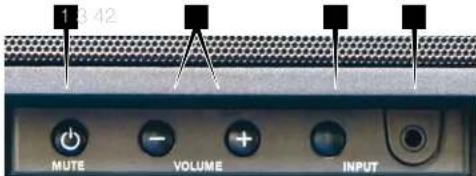
SoundBase Front Panel Controls and Input
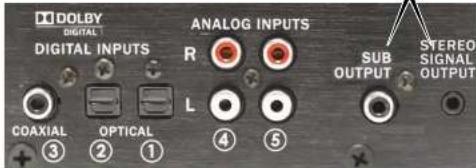
SoundBase Back Panel Inputs and Outputs
MUTE/Power button. If the system is on, a press of this button toggles MUTE on and off. Also while the system is on, if you press and hold the MUTE button for longer than four seconds, the system will enter STANDBY.
2 VOLUME -/+ The volume range indication is 01 to 30.
3 INPUT. Selects between the seven input choices on a SoundBase. See 4a Input in first column.
4 AUDIO CONNECTING JACK. Connect a smartphone or other audio device to this jack using a cable with a stereo miniplug at each end. Select input 6 on the SoundBase (in6A appears on the display).
5 SUB OUTPUT AND STEREO SIGNAL OUTPUT. If your powered subwoofer has both Left and Right inputs, the SUB OUTPUT of the SoundBase should be connected to both inputs via a "Y" adapter. The STEREO SIGNAL OUTPUT supplies an audio signal for use with another another audio system or wireless headphones. The signal level from both outputs varies along with the volume setting on the SoundBase.
5. Digital Audio Troubleshooting
TV sets with no audio output:
You should check the program sources connected to the TV for an audio output (cable box, disc player, game box). Many cable boxes and DVD/Blu-ray players have both analog and digital audio outputs. If you connect directly to a set top box and a DVD/Bluray player, you need to switch inputs on the TV and the SoundBase.
Bluray disc audio:
If you don't get sound from a Bluray disc, the digital audio on that disc may be encoded using a proprietary format. In this case, use the Bluray disc menu or the Bluray player menu to select Dolby Digital or PCM digital output.
Internet streaming HD video audio:
If your TV features a internet connection and displays HD streaming content, it may be necessary to select Dolby Digital or PCM digital audio in the TV or from the streaming provider's sound options.
STILL NEED ASSISTANCE? If your home TV system does not conform to the descriptions in this guide, don't hesitate to send an inquiry to info@zvoxaudio.com or call ZVOX Audio at (866) 367-8869. Please provide your TV brand and model number. A ZVOX Audio representative should be available (Eastern Time Zone) Monday through Friday 9:30 AM to 7:30 PM and noon to 4:00 PM on Saturday.
C3147A08A05112
3740c and SearlRas in Wightwood Trademore and Asia where it is transversal of 260K Austin, LLC. 38 Chiswolo is a registered trademark owned by Bluetooth 50G, Inc. used under license by: 260K Audio LLC.

Setup & Operation Don't Worry It's Pretty Easy.

STEP 1
Place the system on furniture.
STEP 2
Connect one signal cable.
STEP 3
Connect the power cable.
STEP 4
Use the SoundBase remote to select the correct input and volume.
Home Theater
Made Simple!
What's in the box
SoundBase system • Remote control • Instruction sheets AC power cord • Optical digital and Analog signal cables
ZVOX
(866) 367-9869 | info@zvoxaudio.com

READ THIS FIRST
Important Safety Instructions For ZVOX System


The exc amson point within an equineal storage is amended to alert the user to the presence of important operating and maintenance (basic reg) manufacture in the literature accompanying the application.

This lighting down with announced symbol, within an equivalent triangle, is relevant to the use to the presence of urine, when 'dangerous voltage' within the practice: it closes that may be of sufficient magnesium in solution a risk of electrical stents or pansars.
Important Safety Instructions
- Read these instructions
- Keep these instructions.
- Head all warnings.
- Follow all instructions.
- Do not use this apparatus near water.
- Clean only with dry cloth
- Do not block any ventilation openings, install in
scourance with the manufacturer & manufacturers - Do not install near any heat sources such as radiators, heat registers, stoves, or other apparatus (including amplifiers) that produce heat.
- Do not detail the safety purpose of the polarized or grounding-type plug. A polarized plug has two blades with one wider than the other. A grounding type plug has two blocks and a third grounding plug. The wide blade or the third plug are provided for your safety. If the proposed plug does not fit into your outlet, consult an electrician for replacement of the obsolete outlet.
- Protect the power cord from being walked on or pinched particularly at plugs, convenience receptacles, and the paint where they exit from the apparatus.
- Only use attachments/accessories specified by

-
Use only with the cart, stand, hood, bracket, or table specified by the manufacturer, or sold with the apparatus. When a cart is used, use caution when moving the curb/uppercase combination to avoid injury from top-over.
-
Unplug this apparatus during lightning storms or after unpriced for long periods of time.
- Haler all servicing to qualified service personnel. Servicing is required when the apparatus has been damaged in any way, such as power-supply cord or plug is damaged, liquid has been spliced or objects have fallen into the apparatus, the apparatus has been exposed to rain or moisture, does not operate normally, or has been dropped.
Special Safety Warnings Regarding Placement of ZVOX System and Other Equipment

Stable Placement. Do not place the ZVCK system on an unstable cart, stand, bracket or table. The ZVCK system may fall causing serious injury in a child or small and severe damage to the product. Do not use the
ZVOX system of any pipeline outside.
Placement of a TV on the ZVOX system. A television that weighs less than the other limits and that has a base that is smaller than both dimensions limits (planned before) can be placed on top of a ZVOX system - BUT ONLY WHEN THE FOLLOWING SAFETY PRECAUTIONS ARE STRICTLY OBSERVED. PLACING A TV ON TOP OF A ZVOX SYSTEM WITHOUT FOLLOWING ALL THE PRECAUTIONS IS DANGEROUS AND SHOULD NOT BE DONE.
- The TV must be anchored to the rear wall using anchor bolts and supporting cables according to the recommended guidelines provided by the TV manufacturer, Household accidents and other information issues are likely to be on a ZVOX Audio provider to guarantee that any object placed on top of a ZVOX Audio product is safe and stable. It is the sole responsibility of the ZVOX owner to check that any
object placed on the ZVOK system is stable at the time of installation and at frequent intervals afterward. SoundBox 870 and 770: The TV must weigh 140 pounds (64 kg) or less.
The base of the TV must measure less than: Width Depth
41.5 in (1105 mm) 17 in (440 mm)
- SoundBase 670: The TV must weigh 120 pounds (55 km) or less.
The base of the TV must measure less than:
Width Depo
35 Nm SE1 mm 10 cm 1/40 mm
- SoundBase 570: The TV must weigh 110 pounds (53 km or less).
The base of the TV must measure less than:
With Dapen
- Install the ZVOX system on a solid and flat surface. Do sure to prevent the ZVOX system from changing position after installation.
Simple Setup – Just Four Steps
Place the SoundBase.
Connect the SoundBase to your TV and/or audio devices.
Learn the features and controls of the ZVOX system.
"Teach" the SoundBase to respond to your preferred remote controls commands (Volume/Mute/Power).
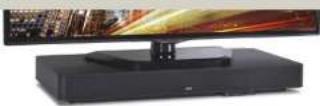
1. Speaker placement
You can place the SoundBase on any flat, stable surface near your TV. If the TV base is small enough, you can place the SoundBase system on a piece of furniture and then place the TV on top of the SoundBase.
Alternate Warnings—This product is equipped with a three-wire grounding-type plug, a plug having a third grounding pin. This plug will only fill in a grounding-type power outlet. This is a safety feature. If you are unable to insert the plug into the outlet, contact your electrician to replace your obsolete outlet. Do not deal the safety purpose of the grounding-type plug.
15. Ventilation Slots and openings in the cabinet are provided for ventilation and to ensure variable operation of the product and to protect it from overheating, and these openings must not be blocked or covered. The openings should never be blocked by placing the product on a bed, sofa, rug, or other similar surface. This product should not be pressed into fault removal such as a bookcase or rack unless proper ventilation is preceded or the manufacturer's instructions have been adhered to.
17. The MANS plug or an appliance coupler is used as the disconnect nodes, the disconnect device shall remain readily operable.
15. CLASS II apparatus with double insulation, and no protective earth provided.
19. CAUTION: Danger of explosion if the female control delivery is incorrectly replaced. Replace only with the same or equivalent type.
20. WARNING: The remote control battery (battery or batteries or battery pack) shall not be exposed to excessive heat such as sunshine, fire or the light.
21. No asked flame sources, such as lighted candles, should be placed on the apparatus.
- Consider the surface that will support the SoundBase. It is the SoundBase owner's responsibility to insure that a furniture finish is unaffected by supporting the combined weight of a SoundBase and possibly a TV. Place an appropriate barrier between the surface and the feet of the SoundBase if you are in doubt. The four support pads on the bottom of a SoundBase are a soft, inert synthetic material that does not react with typical furniture finishes. But some furniture finishes can be deformed or altered by having any heavy object resting on them for a long period of time. ZVOX Audio, Inc., cannot be responsible for any use of the service of any supporting surface finish that may occur after a SoundBase is placed upon the surface.
- A safe installation is the SoundBase owner's responsibility.
- Use an unswitched AC outlet to provide power to a SoundBase. If Auto Standby is turned on, a SoundBase will always enter its Standby state after 30 minutes of inactivity. A SoundBase uses less than 0.5 watt in Standby. Use of a switched AC outlet to cut off AC power to a SoundBase system may erase user preferences and delays subsequent turn-on
- A TV heavier than 140 lbs (64 kg) should not be placed directly on top of a SoundBase 870 and 770.
- A TV heavier than 120 lbs (55 kg) should not be placed directly on top of a SoundBase 670.
- A TV heavier than 110 lbs (50 kg) should not be placed directly on top of a SoundBase 570.
- A flat panel TV has a high center of gravity. Please confirm the furnishing supporting your TV and the SoundBase is stable and secure. The surface supporting the SoundBase/TV combination should not move in any direction.
- All TV manufacturers recommend that a flat panel TV be anchored to a secure vertical surface with a tether. This prevents a household accident from causing a TV to tell off its supporting surface. ZVOX Audio recommends you heed this recommendation and all other installation recommendations made by the TV manufacturer.
2. Connecting your TV to the SoundBase
Almost all HDTVs have an audio output, which you can connect to your SoundBase. You should not disconnect or change any video program source connected to your TV.
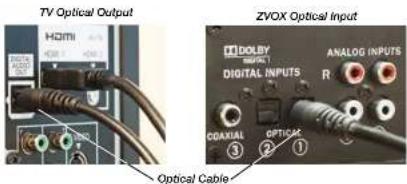
Optical Digital Output
Almost all HDTVs use an optical digital audio output, which you connect to the Soundbase's optical AI using an optical cable.
Coaxial Digital Output
A few TVs, set top boxes and DVD/Blu-ray players have a coaxial digital audio output. You can connect this output to the coaxial digital audio input on the SoundBase using a cable with an RCA phone plug at each end.
Program Sources with an Analog Audio Output
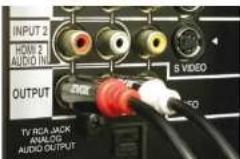
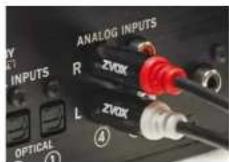
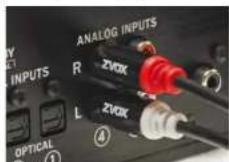
If your TV set does not have a digital audio output, you could connect the TV set's analog audio output to an analog audio input on the SoundBase system.
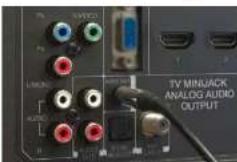
An analog audio input on the SoundBase is also useful for connecting portable devices with an audio output. For instance, the headphone output of a smartphone or music player could be connected to the SoundBase front panel minijack. This requires a cable with a stereo miniplug at both ends. The minijack headphone output from a TV could be connected to one of the rear panel inputs. This requires a cable with a stereo miniplug at one end (to fit the TV headphone jack) and Red/White RCA plugs at the other end (to connect to the ZVOX back panel).
You can connect an RCA jack analog audio output to Analog Input 4.
OR
You can connect a minijack analog audio output to Analog Input 4.
3. Connect the AC cord
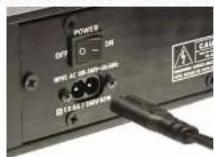
After making the signal connection, connect the AC power cord to the back of the speaker. Then connect the AC power cord to an AC power receptacle. Turn on the speaker using the power switch on the back panel next to the AC cord.
AC cord connection to SoundBase back panel.
If your home TV system does not conform to the descriptions in this guide, don't hesitate to send an inquiry to info@zvoxaudio.com or call ZVOX Audio at (866) 367-9869. Please provide your TV brand and model number. A ZVOX Audio representative should be available (Eastern Time Zone) Monday through Friday 9:30 AM to 7:30 PM and noon to 4:00 PM on Saturday.
- 4a. Infrared Remote Control Features of the SoundBase
- Learning:
- Input Selection:
- Remote Control Capabilities
- Volume
- Power (STANDBY)
- Mute
- Bass and Treble
- Surround Settings
- Output Leveling
- Accuvoice
- Digital Audio Troubleshooting
- Bluray disc audio:
- Internet streaming HD video audio:
- Setup & Operation Don't Worry It's Pretty Easy.
- STEP 1
- STEP 2
- STEP 3
- STEP 4
- Home Theater
- Made Simple!
- What's in the box
- ZVOX
- READ THIS FIRST
- Important Safety Instructions For ZVOX System
- Important Safety Instructions
- Special Safety Warnings Regarding Placement of ZVOX System and Other Equipment
- Simple Setup – Just Four Steps
- Speaker placement
- Connecting your TV to the SoundBase
- Optical Digital Output
- Coaxial Digital Output
- Program Sources with an Analog Audio Output
- Connect the AC cord
Brand : Zvox
Model : SoundBase 670
Category : Hi-Fi System