White Shark Racer-Two - Office chair

Racer-Two - Office chair White Shark - Free user manual and instructions

Find the device manual for free Racer-Two White Shark in PDF.

📄 1 pages English EN Download 💬 AI Question 10 questions ⚙️ Specs
Notice White Shark Racer-Two - page 1
Pick your language and provide your email: we'll send you a specifically translated version.
Product Type Office / Gaming Chair
Brand White Shark
Model Racer-Two
Seat Height Adjustment Range 45 cm - 53 cm
Backrest Height 80 cm
Seat Width 50 cm
Seat Depth 48 cm
Overall Height (with backrest) 125 cm - 133 cm
Weight Capacity 120 kg
Net Weight 20 kg
Material PU Leather, Foam Padding, Nylon Base
Armrest Type 2D Adjustable (Height & Rotation)
Tilt Mechanism Multi-lock with Tension Adjustment
Gas Lift Class Class 3
Caster Wheels Nylon, 60mm
Recommended Floor Type Hardwood, Carpet
Color Options Black/Red, Black/Blue
Care Instructions Wipe clean with damp cloth, avoid harsh chemicals
Safety Standards BIFMA / ANSI certified
Spare Parts Available Yes, through manufacturer
Warranty 2 years

Frequently Asked Questions - Racer-Two White Shark

How do I adjust the seat height of the White Shark Racer-Two?
Locate the lever under the seat. Pull up to raise or push down to lower while sitting on the chair. The gas lift provides smooth height adjustments between 45 cm and 53 cm.
What is the maximum weight capacity?
The Racer-Two supports up to 120 kg. Exceeding this limit may compromise safety and chair longevity.
How do I clean the chair?
Wipe the PU leather surface with a soft damp cloth. Avoid abrasive cleaners or solvents. For stubborn stains, use a mild soap solution.
Are the armrests adjustable?
Yes, the armrests have 2D adjustment: you can change the height by pressing the button underneath, and rotate them inward/outward for better comfort.
Does the chair come fully assembled?
No, the Racer-Two requires assembly. The box includes a manual and necessary tools. Estimated assembly time is 20-30 minutes.
Can I use the chair on carpet?
Yes, the nylon caster wheels are designed for both hardwood and carpet floors. However, on thick carpet, the chair may roll less freely.
How do I adjust the tilt mechanism?
Turn the knob under the seat to adjust tilt tension. Use the lever to lock the backrest in an upright position or allow rocking.
What is the warranty period?
The chair comes with a 2-year limited warranty covering manufacturing defects. Contact White Shark support for claims.
Are replacement parts available?
Yes, you can order spare parts such as casters, gas lift, and armrests from the White Shark official website or authorized dealers.
How do I adjust the backrest recline?
Pull the lever on the right side of the seat to recline or lock the backrest. The chair offers multiple recline positions for optimal comfort.

User questions about Racer-Two White Shark

0 question about this device. Answer the ones you know or ask your own.

Ask a new question about this device

The email remains private: it is only used to notify you if someone responds to your question.

No questions yet. Be the first to ask one.

Download the instructions for your Office chair in PDF format for free! Find your manual Racer-Two - White Shark and take your electronic device back in hand. On this page are published all the documents necessary for the use of your device. Racer-Two by White Shark.

USER MANUAL Racer-Two White Shark

GC-90041 RACER-TWO
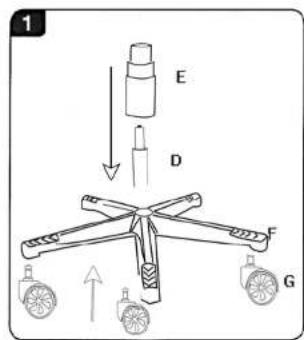
A x1 D x1 E x1 F x1 B x1 G x5 H x8 M8X20 mm C x1 I x4 M8X25 mm J x2 M x2 K x2 M5X 8 mm L x1

1 E D F G

2 L H Front C B

3 L H Front

Cleaning: → If there are stains on the surfaces of the chair, apply some polish on a soft towel and rub the stains until they dissolves. Note: Do not apply the polish directly on the chair.
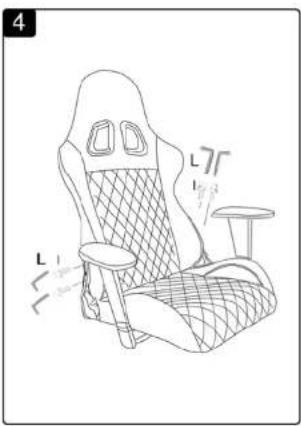
4 L1 L2 L3

5 L K J L K

Line drawing of an office chair with a hatched backrest and five wheels, no text or symbols present

Manual assistant
Powered by Anthropic
Waiting for your message
Product information

Brand : White Shark

Model : Racer-Two

Category : Office chair