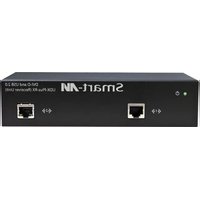
UDX-PRX - Switch Smart-AVI - Free user manual and instructions
Find the device manual for free UDX-PRX Smart-AVI in PDF.


| Product Type | HDMI Matrix Switch |
| Model | UDX-PRX |
| Brand | Smart-AVI |
| Channels | 4 Inputs x 2 Outputs |
| Video Resolution | Up to 4K@60Hz (3840x2160) |
| HDMI Version | HDMI 2.0 with HDCP 2.2 |
| Audio Support | Pass-through, up to 7.1 channels |
| Control Interface | IR remote, RS-232, Front panel buttons |
| EDID Management | Internal EDID emulation, learning mode |
| Dimensions (W x H x D) | 17.0 x 1.75 x 6.0 inches (1U rackmount) |
| Weight | 5.0 lbs (2.3 kg) |
| Power Supply | 12V DC, 2A (included adapter) |
| Power Consumption | 10W (max) |
| Operating Temperature | 32°F to 104°F (0°C to 40°C) |
| Maintenance | Wipe with a dry, soft cloth. Do not use liquids. |
| Safety | Use only the provided power adapter. Do not expose to moisture. |
| Spare Parts Availability | Contact Smart-AVI support for replacement parts. |
| Repairability | No user-serviceable parts inside. Refer to qualified service personnel. |
| Regulatory Compliance | FCC, CE, RoHS |
Frequently Asked Questions - UDX-PRX Smart-AVI
User questions about UDX-PRX Smart-AVI
0 question about this device. Answer the ones you know or ask your own.
Ask a new question about this device
Download the instructions for your Switch in PDF format for free! Find your manual UDX-PRX - Smart-AVI and take your electronic device back in hand. On this page are published all the documents necessary for the use of your device. UDX-PRX by Smart-AVI.
USER MANUAL UDX-PRX Smart-AVI
| PART NO. QTY DESCRIPTION | ||
| UDX-PS 1 DVI-D+USB 2.0 C | AT6 STP Extender. Includes: [UDX-PTX, UDX-PRX, 2x PS5VD4A] | |
| Power Supply 1 PS5VDC4A | ||
| User Manual 1 | ||
Technical Specifications
| VIDEO | |
| Format DVI-D Single Line | |
| Maximum Pixel Clock 165 MHz | |
| Input Interface (TX) (1) | DVI-D 29-pin female |
| Output Interface (RX) (1) | DVI-D 29-pin female |
| Resolution Up to 1920±1200 @60Hz | |
| DDC | 5 volts p-p(TTL) |
| Input Equalization | Automatic |
| Input Cable Length | Up to 20 ft. |
| Output Cable Length Up to 20 ft. | |
| USB | |
| Signal Type | USB 2.0 480 Mbit/s (60 MB/s) |
| Input Interface (TX) | (1) USB Type B (Female) |
| Output Interface (RX) | (4) USB Type A (Female) |
| OTHER | |
| Power | External 100-240 VAC/SVDC4A @20W |
| Dimensions | 7.25 in W x 1.75 in H x 3.375 in D (3 in RX) |
| Weight | 3 lb |
| Operating Temp. | 0-55 °C (32-131°F) |
| Storage Temp. | -20-85 °C (-4-185 °F) |
| Humidity | Up to 95% |
© Copyright 2012 Smart-AVI, All Rights Reserved
NOTICE
The information contained in this document is subject to change without notice. Smart-AVI makes no warranty of any kind with regard to this material, including but not limited to, implied warranties of merchantability and fitness for any particular purpose.
Smart-AVI will not be liable for errors contained herein or for incidental or consequential damages in connection with the furnishing, performance or use of this material.
No part of this document may be photocopied, reproduced or translated into another language without prior written consent from Smart-AVI.
For more information, visit www.smartavi.com.

UDX-Plus-TX Front

UDX-Plus-TX Rear

UDX-Plus-RX Front
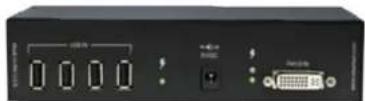
UDX-Plus-RX Rear

SmartAVI, Inc. / Twitter: smartavi
11651 Vanowen St. North Hollywood, CA 91605
Tel:(818)503-6200 Fax:(818)503-6208
http://www.SmartAVI.com
Smart-AVI SMART AUDIO VIDEO INNOVATION
Installation Manual
UDX-Plus
DVI-D and USB 2.0 Extender over Twisted Pair with Super Reclocking
natural_image
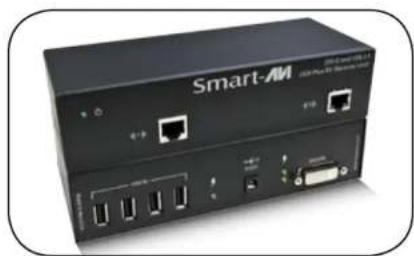
Front view of a Smart-AM network device with ports and connectors (no visible text or symbols on the device body)DVI-D and USB 2.0 Extender up to 250 feet over Twisted Pair Cable
www.smartavi.com
Introduction
The UDX-Plus is the perfect solution for extending dual DVI-D displays and USB 2.0 devices to a remote location. It extends DVI-D and USB 2.0 signals to a remote location up to 250 feet away. The UDX-Plus features pixel accurate signal reclocking which regenerates the input signal into a perfectly sharp and clear output signal. It is fully plug and play with dynamic DDC learning.
Features
• DDC from internal table for Mac/PC
• Dedicated switch to learn any DDC
• Supports High Resolution 1920x1200 60Hz WUXGA
• Supports Mac, PC, and Linux DVI
• Uses universal DVI Single Link connectors
• Zero pixel loss with TMDS signal correction
• Supports all USB 2.0 and 1.0 Devices Transparently
(Disk Drives, Flash Drives, Printers, Cameras, Scanners, etc.)
• Supports 4-port USB 2.0 in remote location
• Full reclocking for the receiver regenerates digital signal producing top signal quality
• Extends up to 250ft (275ft with high quality CAT6 STP)
Applications
• Medical Applications
• Industrial Work Areas
• Home Theater Integration
• Digital Signage Deployment
• Information Kiosks/Displays
• Film/Recording Studios

flowchart
graph LR
    A["COMPUTER"] -->|UDX-Plus-TX up to 250 ft over STP| B["UDX-Plus-RX"]
    B --> C["DVI-D MONITORS"]
    C --> D["USB 2.0 FLASH DRIVE"]
    D --> E["USB 2.0 KEYBOARD USB 2.0 MOUSE"]
Connecting the UDX-Plus
- Power off all devices.
- Connect a DVI-D source (computer) to the DVI-D port of the UDX-Plus-TX labeled DVI-D IN.
- Connect a USB source to the USB port of the the UDX-Plus-TX labeled USB IN.
- Connect the UDX-Plus-TX to the the UDX-Plus-RX with two STP (Sheilded Twisted Pair) cables using the ports labeled 1 from TX to 1 RX, and 2 TX to 2 RX.
-
Connect the DVI display to the port on the rear of the UDX-Plus-RX labeled DVI-D IN.
-
Connect up to 4 USB 2.0 devices to the ports on the UDX-Plus-RX labeled USB IN.
-
Connect the power supply to the ports labeled on the UDX-Plus-TX and UDX-Plus-RX.
-
Power on the computer, display and USB 2.0 devices.
Learning the EDID of a Display
- Power off all devices.
- Power on the UDX-Plus Transmitter and the display to be learned.
- Connect a DVI-D display to the DVI-D port of the UDX-Plus-TX labeled DVI-D IN.
- Press the LEARN button
- The light will blink quickly if the learning was successful. If the learning is unsuccessful the light will not illuminate.
The following is the wiring standard for terminating UTP/STP cable using RJ-45-STP connector:

Pair 1 Pins 1 & 2
Pair 2 Pins 3 & 6
Pair 3 Pins 4 & 5
Pair 4 Pins 7 & 8

Connectors: RJ-45-STP
Capacitance: 14 pf/ft (46.2 pf/m)
Conductor Gauge: 24 AWG
Impedance: 100 +/- 15 ohms
Brand : Smart-AVI
Model : UDX-PRX
Category : Switch