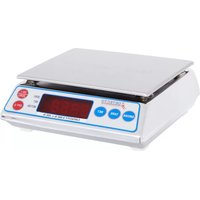
AP-10 - Kitchen scale Cardinal Detecto - Free user manual and instructions
Find the device manual for free AP-10 Cardinal Detecto in PDF.


| Product Type | Digital Kitchen Scale |
| Brand | Cardinal Detecto |
| Model | AP-10 |
| Capacity | 5000 g / 11 lb |
| Resolution | 1 g / 0.05 oz |
| Display | LCD, 4-digit |
| Units | g, lb:oz, oz, fl.oz (water/milk) |
| Power Source | 2 × AAA batteries (included) |
| Auto-Off | Yes, after 2 minutes of inactivity |
| Tare Function | Yes |
| Platform Material | Stainless steel |
| Dimensions (approx.) | 20 × 15 × 1.5 cm |
| Weight (approx.) | 200 g |
| Overload Indicator | Yes |
| Low Battery Indicator | Yes |
| Cleaning | Wipe with damp cloth; do not immerse |
| Safety | Do not exceed capacity; keep away from water |
| Spare Parts / Repairability | Batteries user-replaceable; otherwise contact support |
Frequently Asked Questions - AP-10 Cardinal Detecto
User questions about AP-10 Cardinal Detecto
0 question about this device. Answer the ones you know or ask your own.
Ask a new question about this device
Download the instructions for your Kitchen scale in PDF format for free! Find your manual AP-10 - Cardinal Detecto and take your electronic device back in hand. On this page are published all the documents necessary for the use of your device. AP-10 by Cardinal Detecto.
USER MANUAL AP-10 Cardinal Detecto
The AP-6 All Purpose Scale is a compact solid scale, designed to fill a variety of weighing needs. Please read this manual before attempting to put scale into use and keep it handy for future reference.
FCC COMPLIANCE STATEMENT
Notice: This equipment generates, uses and can radiate radio frequency energy and if not installed and used in accordance with the instruction manual, may cause interference to radio communications. It has been tested and found to comply with the limits for a Class A computing device pursuant to Subpart J of Part 15 of FCC rules, which are designed to provide reasonable protection against such interference when operated in a commercial environment. Operation of this equipment in a residential area may cause interference in which case the user will be responsible to take whatever measures necessary to correct the interference.
TRADEMARKS
All rights reserved. Reproduction or use, without expressed written permission, of editorial or pictorial content, in any manner, is prohibited. No patent liability is assumed with respect to the use of the information contained herein. While every precaution has been taken in the preparation of this manual, the Seller assumes no responsibility for errors or omissions. Neither is any liability assumed for damages resulting from use of the information contained herein. All instructions and diagrams have been checked for accuracy and ease of application; however, success and safety in working with tools depend to a great extent upon the individual accuracy, skill and caution. For this reason the Seller is not able to guarantee the result of any procedure contained herein. Nor can they assume responsibility for any damage to property or injury to persons occasioned from the procedures. Persons engaging the procedures do so entirely at their own risk.
Serial Number
Date of Purchase
Purchased From
RETAIN THIS INFORMATION FOR FUTURE USE
SPECIFICATIONS
Construction: 304 Stainless Steel
Display: 4 digit, 1/2" red LED digital display
Dimensions: 7 1/2" W x 7" D x 2 3/4" H
Weight: 3.5 lb
Zero: Established on power up routine
and maintained automatically by auto-zero circuitry.
Power: 115 VAC, 50/60 Hz or 220 VAC
50/60 Hz: AC adapter with 6" power cord
Operating
Temperature: 14°F to 104°F (-10c to 40°C)
Humidity: 75 % without condensation
Accuracy: Class III
Capacity: AP-4K ... 4 kilo - 3999g x 1g
AP-6 ..... 6 lb - 99.95 oz x .05 oz
AP-8 ..... 8 lb - 7.998 lb x .002 lb
AP-10 ... 10 lb - 9.995 lb x .005 lb
AP-20 ... 20 lb - 19.99 lb x .01 lb
INSTALLATION
Keep carton and packing material for return shipment or relocation if it should become necessary. Inspect the scale for signs of damage due to shipping such as loose screws or exterior dents or scratches. It is the responsibility of the purchaser to file all claims for any damages or loss in transit incurred.
Please read this entire manual before operating the scale and pay special attention to the precautions provided on the last page and to the DO: and DO NOT: instructions affixed to the underside of your scale's tray.
Set the scale on a stable, vibration-free surface, away from direct sunlight and any rapidly moving air source. Then place the scale's tray, lip side down, onto its platform.
PRECAUTIONS
Before using this instrument, read this manual and pay special attention to all "WARNING" symbols:

IMPORTANT

TRICAL WARNING
POWER CONNECTION

natural_image
Simple line drawing of a device with a power outlet connected to a wall-mounted unit (no text or symbols)To apply power to your AP Series scale, connect the power cable's scale connector (round) into the scale and then connect the power cable's electrical connector (square) into a 115V 50/60 Hz outlet. Your scale is now ready for operation.
OPERATION

When applying power, make certain the scale platform is empty. Press and hold the ON/ZERO key until one of the annunciators (ZERO, NET or MOTION) turn on. When one of the annunciators turn on, release the ON/ZERO key. After a second or so the display should indicate a zero weight with the ZERO annunciator turned on. Weighing may now begin. If the display does not indicate zero, press the ON/ZERO key again to zero the weight display.
GROSS WEIGHT
The normal display mode for the AP scale is the gross weight mode where the display shows the total weight on the scale platform. NOTE! In the gross weight mode, the NET annunciator is turned off. If you are in the net display mode and wish to return to the gross weight display mode, simply press the GROSS key.
TARE WEIGHT ENTRY
The AP scale has an automatic tare feature that allows you to enter tare weights up to the three least significant digits of the scale capacity. This tare weight feature is often used to subtract the empty container weight or other unwanted fixed weight values from the weight reading.
The following table lists the maximum tare weight allowed for each model of the AP scale.
Model Capacity Maximum Tare Weight
AP-4K 4000 gm x 1 gm 999 gm
AP-6 99.95 oz x .05 oz 9.95 oz
AP-8 8 lb x .002 lb .998 lb
AP-10 9.995 lb x.005 lb .995 lb
AP-20 20.01 lb x .01 lb 9.99 lb
TARE WEIGHT ENTRY, cont.
Pressing the TARE key will cause the currently displayed gross weight to be stored as the new tare weight and cause the scale to enter the net weight display mode. The net weight display mode is indicated by turning on the net annunciator. Example: on an AP-20, if the displayed gross weight is 2 lb and you press the TARE key, the 2 lb would be entered as the new tare weight. The scale would then enter the net weight mode and subtract the 2 lb tare value from the gross weight, displaying a net weight of 0.00 lb. If you added another 2 lb to the platform, the display would indicate 2 lb of net weight. Pressing the GROSS key would return the scale to the gross weight mode and display 4 lb.
NOTE: Remember the scale will only weigh to its maximum capacity. Any combination of NET plus TARE weights over the scale capacity will result in an overload condition and display n_f . For example, using the AP-20 from above, with a tare weight of 2 lb, adding 19 lb to the platform will cause an overload condition. This is because the 2 lb tare weight plus the 19 lb load weight equals 21 lb gross weight, which exceeds the capacity of the scale.
NET WEIGHT
To display a net weight without entering a new tare value, simply press the NET key. The NET annunciator will be turned on and the display will show the net weight (gross weight less the stored tare weight). If there is no currently stored valid tare weight, the AP scale will ignore this key.
SETUP REVIEW
The Setup Review mode allows you to review the operational parameters, but does not allow you to change them. To enter the setup review mode, with the instrument off, press and hold the GROSS key, then press and release the ON/ZERO key. Release the GROSS key. The display will then show: instance. Follow the steps listed.

Scale Interval
With the display showing :nL=, press the NET key. The scale interval will be displayed. The interval is smallest change in value that can be displayed by the scale. Press the NET key to advance to the next step.
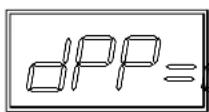
Decimal Point Position
With the display showing U^PP = , press the NET key. The decimal point position (the number of digits to the right of the decimal point) will be displayed. Press the NET key to advance to the next step.

Scale Capacity
With the display showing , press the NET key. The capacity of the scale will be displayed. Press the NET key to advance to the next step.
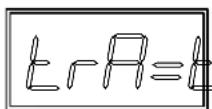
Zero Tracking Range
The scale display will now show L-r. Press the NET key to show the value assigned to the Automatic Zero Tracking range. This value (0.5) is the scale divisions that will be automatically zeroed off. For example, if the scale divisions are 0.5 and the zero tracking is set to 3, the scale will automatically zero weights of 1.5 or less. Press the NET key to advance to the next step.

Tracking Range Limit
The display will now show _i = 1 , Press the NET key to show the current setting (no) of the tracking range limit. This limit, is a 4% limit placed on the Automatic Zero Tracking feature. NOTE: At the time this was printed, the 4% limit is not a US requirement. Press the NET key to advance to the next step.
SETUP REVIEW, Cont.

Power Up Zero
With the display showing PUU=, press the NET key to show current setting (yes) of the power up zero feature. Press the NET key to advance to the next step.
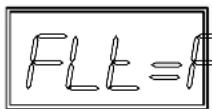
Digital Filter Level Selection
The display will now show H.E. Press the NET key to show current setting, (0 = minimal filtering) for the selection of the digital filtering level. Press the NET key to advance to the next step.
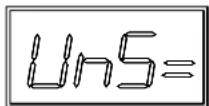
Motion (UNSTABLE) RANGE
With the display showing I_In5 , press the NET key to show current setting, (1 division) for the motion (unstable) range. Changes in weight exceeding this value will turn the stable indicator off. Press the NET key to advance to the next step.

Sample Rate
The display will now show _r . Press the NET key to show current setting (4 samples per second) for the sample rate. Press the NET key to advance to the next step.
ERROR and STATUS DISPLAYS
Display Meaning
Inst Inst Motion is present when the AP is attempting to
perform one of the following operations:
Power Up
Entry of a Tare value
Zero Weight Display
The weight on the scale platform exceeds the zero range on Power On.
LoRoLoRoThe scale deadlock is less than the zero range on Power On.
-0C-
Attempting to display a weight greater than the scale capacity.
-DF-
Attempting to display a negative number greater than -999 or a count greater than 9,999
CHLCHLIndicates that the scale has not been calibrated or
has been interrupted during the calibration process.
ErrErr Indicates a disallowed keyboard entry:
Attempt to enter a tare value of zero or less
Attempt to enter a tare value of greater than 999
Attempt to zero when the gross weight is outside the scale zero range.
EEProm failure
ErrorNo load cell signal or load cell signal polarity reversed.
PRECAUTIONS
The heart of your AP Series is its precision load cell located in the center of the scale base. It will provide years of accurate operation if protected against overload of scale capacity, dropping items onto the scale, or other occasions of extreme shock. Affixed to the underside of your scale's tray is a list of DO's and DO NOT's. Please refer to them frequently and follow them completely to insure long dependable performance from your AP Series Scale.

The membrane keyboard is not to be operated with pointed objects (pencils, pens, fingernails, etc.). Damage to keyboard resulting from this practice will NOT be covered under warranty.
• DO NOT submerge scale in water, pour or spray water directly on instrument.
• DO NOT use acetone, thinner or other volatile solvents for cleaning.
- DO NOT expose equipment to temperature extremes.
• DO NOT place equipment in front of heating/cooling vents.
• DO clean the scale with a damp soft cloth and mild non-abrasive detergent.
- DO remove power before cleaning with a damp cloth.
• DO provide clean AC power and adequate protection against lightning damage.
- DO keep the surroundings clear to provide clean and adequate air circulation.
BEFORE YOU CALL FOR SERVICE
The AP Series Scale has been designed to provide you with years of trouble-free operation. In spite of this, troubles sometimes happen. Before calling for service assistance you should make some initial checks to verify that a problem does exist. The following describes several types of symptoms along with suggested remedies.
Problem Possible Solutions
Display does not turn on Is DC power supply cable plugged into the scale?
Is AC power adapter plugged into wall receptacle? Check wall receptacle for proper AC power. Try another electrical appliance in the same receptacle, does it work? Check the circuit breaker. Has there been a power failure of any kind?
Incorrect weight displayed Insure that the scale platform isn't touching an adjacent object. Have proper operation procedures been followed?
Scale will not display weight Refer to Error and Status Displays section and
make certain that the UnLd or Lda messages are not on. If so, and scale is not loaded, contact a qualified scale technician.
If you have any problems, DO NOT TRY TO REPAIR THIS SCALE YOURSELF! Unplug the power cord and contact a qualified scale technician.


- FCC COMPLIANCE STATEMENT
- TRADEMARKS
- SPECIFICATIONS
- INSTALLATION
- PRECAUTIONS
- POWER CONNECTION
- OPERATION
- GROSS WEIGHT
- TARE WEIGHT ENTRY
- TARE WEIGHT ENTRY, cont.
- NET WEIGHT
- SETUP REVIEW
- Scale Interval
- Decimal Point Position
- Scale Capacity
- Zero Tracking Range
- Tracking Range Limit
- SETUP REVIEW, Cont.
- Power Up Zero
- Digital Filter Level Selection
- Motion (UNSTABLE) RANGE
- Sample Rate
- ERROR and STATUS DISPLAYS
- Display Meaning
- BEFORE YOU CALL FOR SERVICE
- Problem Possible Solutions
Brand : Cardinal Detecto
Model : AP-10
Category : Kitchen scale