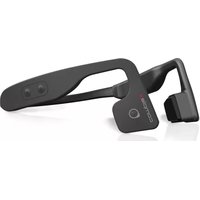
PSWBT550 - Headphones Pyle - Free user manual and instructions
Find the device manual for free PSWBT550 Pyle in PDF.


| Product Type | Over-Ear Wireless Headphones |
| Model | PSWBT550 |
| Brand | Pyle |
| Color | Black |
| Connectivity | Bluetooth 5.0 |
| Wireless Range | Up to 30 feet (10 meters) |
| Battery Life | Up to 15 hours |
| Charging Time | Approx. 2 hours |
| Driver Size | 40mm |
| Impedance | 32 Ohms |
| Frequency Response | 20Hz - 20kHz |
| Sensitivity | 105 dB |
| Weight | Approx. 0.5 lbs (225 g) |
| Dimensions (Closed) | 7.0 x 6.5 x 3.0 inches |
| Microphone | Built-in, for hands-free calls |
| Controls | On-ear buttons for volume, track, and power |
| Foldable Design | Yes, for portability |
| Ear Cushion Material | Memory foam with leatherette |
| Headband Material | Adjustable, padded |
| Included Accessories | USB charging cable, audio cable, user manual |
| Warranty | 1 year limited |
Frequently Asked Questions - PSWBT550 Pyle
User questions about PSWBT550 Pyle
0 question about this device. Answer the ones you know or ask your own.
Ask a new question about this device
Download the instructions for your Headphones in PDF format for free! Find your manual PSWBT550 - Pyle and take your electronic device back in hand. On this page are published all the documents necessary for the use of your device. PSWBT550 by Pyle.
USER MANUAL PSWBT550 Pyle
natural_image
Close-up of a black and gray headband with two side clips (no text or symbols visible)PSWBT550
Bone Conduction Headphone
USER MANUAL
OVERVIEW


- Microphone
- Multifunction Button
- VOL+
- VOL-
- Magnetic Charging Port
- LED Indication
HOW TO WEAR

- As shown in above picture, put the headphone between your ears and head. Make sure the speaker sit on your cheek bones. Then you can adjust and find the best position for you.
HOW TO PAIR TO YOUR DEVICE
-
Long press the Multifunction button for 9s until the LED flashes in Red&Blue.
-
Enter the Bluetooth menu of your device, search for the [PyleUSA] and click to connect.
- When the Blue LED flashes every 5s, it means the connection has been established successfully. If the passkey input is required, input "0000".
Notice:
- The device will automatically reconnect to the last connected device every time it turns on. If you want to connect to other devices, just turn off the Bluetooth of the last device or repeat Step 1 above.
- If the reconnect process failed, just choose the headphone in the Bluetooth device to click.
- When the device has been failed to reconnect for 10min, the device will turn off automatically.
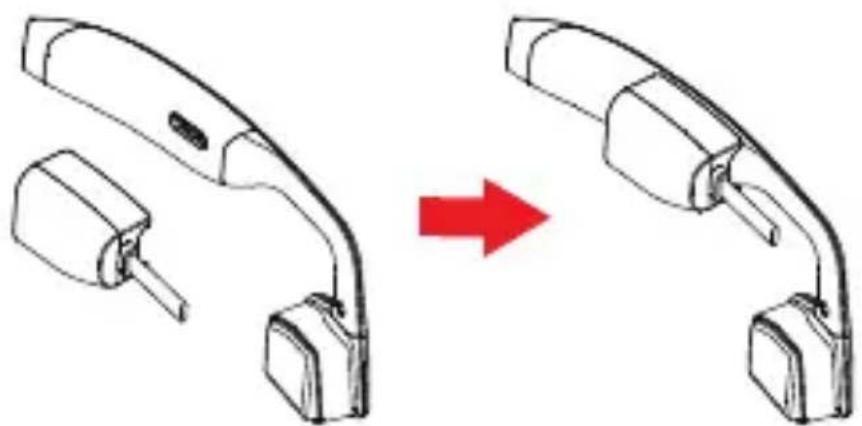
HOW TO CHARGE
natural_image
Diagram showing a device being processed from a left-side component, with a red arrow indicating the process (no text or symbols present)- When LED indicator shows blinking red light with the voice prompt "Low Battery", it mean you should charge your device.
-
For charging, please connect the device to a reliable power source with the USB cable included in the package.
-
The standard charging time is about 2 hours. During charging, the Red LED indicator is solid. When the charging is finished, the Blue LED will turn solid.
Notice:
- To protect your device during charging, please make sure the input voltage of the USB cable should not exceed 5V.
- Remember to clean the charging port with a cloth before you charge. Keep your charging port dry and clean.
BASIC OPERATION
| MUSIC FUNCTION | |
| FUNCTION OPERATION | |
| Power on/off | Long press the multifunction button for 6s |
| Play/Pause | Press the Multifunction button |
| PRE./NEX. | Long press the VOL+/VOL- for 2s |
| Volume Control | Press the VOL+/VOL- to adjust volume |
| HANDS - FREE FUNCTION | |
| FUNCTION | OPERATION |
| Answer/End a call | Press the Multifunction button |
| Reject a call | Long press the Multifunction button for 2s |
| Volume Control | Press the VOL+/VOL- to adjust volume |
Notice:
- The volume will be automatically saved when powering off.
TROUBLE SHOOTING
| PROBLEM POSSIBLE CAUSE SOLUTION | ||
| Can't turn on | Low battery | Please charge the device |
| Can't reconnect | Out of range | Take the device within 10m and click to connect on the phone |
| No sound during music | 1. Bluetooth connection failed2. Not in Bluetooth music mode | 1. Reconnect the device2. Switch to Bluetooth mode |
| No sound during a call | 1. Connection failed2. Not in Bluetooth call mode | 1. Reconnect the device2. Change the phone call mode on the phone |
SPECIFICATION
Bluetooth Version: 4.1
Bluetooth Profile: A2DP/AVRCP/HSP/HFP
Bluetooth Range: 10m/3.3ft.
USB Type: Magnetic USB port
Music Time : 6H
Standby Time: 240H
Charge Time: 2H
STORAGE AND MAINTENANCE
1. Storage:
Store your product in cool and dry place.
2. Maintenance:
a. The recommended working temperature range is 32-113°F over hot/cold/humid environment may badly reduce the product battery life and harm the overall performance.
b. Avoid using the product during a lighting storm.
c. Please charge your unit first before using the device after a long time storage.
d. Clean the product with a piece of dry cloth.
e. If remaining water/sweat is found on the charging port, simply dry it with a soft cloth.
f. Keep the product away from sharp edges/points.

VISIT US ONLINE:
Have a question?
Need service or repair?
Want to leave a comment?
PyleUSA.com/ContactUs

Brand : Pyle
Model : PSWBT550
Category : Headphones