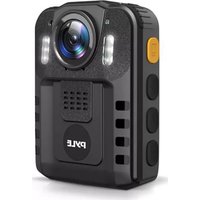
PPBCM6 - Camera Pyle - Free user manual and instructions
Find the device manual for free PPBCM6 Pyle in PDF.


| Product Type | Digital Camera |
| Brand | Pyle |
| Model | PPBCM6 |
| Dimensions | 5.5 x 2.5 x 1.2 inches (140 x 63 x 30 mm) |
| Weight | 0.33 lbs (150 g) |
| Power Source | Rechargeable Li-ion battery |
| Image Resolution | Up to 16 MP |
| Video Resolution | 1080p Full HD |
| Storage | MicroSD card up to 32GB (not included) |
| Connectivity | USB 2.0 |
| Display | 2.0-inch LCD screen |
| Lens | Fixed focus |
| Shooting Modes | Auto, Night, Sports |
| Flash | Built-in LED |
| Battery Life | Approx. 2 hours continuous recording |
| Charging | Via USB cable (included) |
| Warranty | 1 year limited |
| Package Contents | Camera, USB cable, user manual |
| Maintenance | Clean lens with soft dry cloth |
| Safety | Do not expose to water or extreme temperatures |
| Reparability | Battery and memory card user-replaceable |
Frequently Asked Questions - PPBCM6 Pyle
User questions about PPBCM6 Pyle
0 question about this device. Answer the ones you know or ask your own.
Ask a new question about this device
Download the instructions for your Camera in PDF format for free! Find your manual PPBCM6 - Pyle and take your electronic device back in hand. On this page are published all the documents necessary for the use of your device. PPBCM6 by Pyle.
USER MANUAL PPBCM6 Pyle
natural_image
Black PYLE digital camera with orange buttons and control panel (no visible text or symbols on body)

Personal HD Wireless Body Worn Camera with Audio/Video Recording, Night Vision, Waterproof, Removable 16GB Memory (1296p)
USER MANUAL
PPBCM6 BODY CAMERA DIAGRAM


POWER ON/OFF
POWER ON
- Press "Power" button, the LED Status Indicator will light up green with power on sound and LCD screen will display the PYLE logo.
- The camera system will enter into recording standby mode and the LED Status Indicator will remain lit green.
- The LCD will display the currently recording interface and your body camera is ready to use.
Note: If you have set the screen saver setting to be 1min/3min/5min, if there is no interaction with the camera, the camera LCD screen will turn off.
POWER OFF
- Press and hold the "Power" button for at least two seconds.
- The current file will be saved to the internal storage and the device will power down.
VIDEO RECORDING
- Press the "Video" button until the LED Status Indicator lights up red and flash. The camera will beep audibly.
- The camera will enter into Video Recording Mode and begin to record. It will save a file every 3min/5min/10min/20min. The recording time can be set in video setting menu list.
Note: If you have set the Auto night vision in the system setting list to be Manual. When the lighting is insufficient, press the Up/IR button can enable Night Mode and the IR LEDs. If you have set the Auto night vision to be Auto. When the lighting is insufficient, the camera will automatically enable Night Mode and the IR LEDs. It will automatically return to the normal recording mode when light conditions improve.
Stop Video Recording
- Press the "Video" button until the LED Status Indicator Lights up green.
- The camera will enter Recording Standby Mode.
AUDIO RECORDING
- Press the "Audio" button until the LED Status Indicator flashes green.
- The camera will beep, the LCD screen will show the Audio Recording Mode Screen to indicate it has begun recording audio only.
Stop Recording Audio
- Press the "Audio" button until the LED Status Indicator shows solid green.
- The camera will enter Recording Standby Mode.
TAKING A PHOTO
- When the camera is in Recording Standby Mode or during Video Recording Mode, press the "Photo" button to take a photo.
- The LED Status Indicator will flash green once if take a photo in Recording Standby Mode. There is photo capturing sound when taking a photo.
FILES PLAYBACK
- Press and hold the "Audio/Playback" button until the camera enters into Playback Mode.
- To play the currently recording file, press the "OK" button again.
- To play another file, use the "UP" or "Down" button to cycle through the files. Press the "OK" button when you have found the file to play it.
EXIT PLAYBACK MODE
- To exit the Playback Mode, long press the "Audio/Playback" button.
- The camera will return to the Recording Standby Mode.
CHARGING BATTERY WITH USB CABLE
- Connect a USB cable with a compatible connector to a computer/wall charger.
- Connect the USB cable to the USB port on the body camera.
BATTERY STATUS ICONS

Low Power
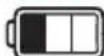
Not Fully Charged

Fully Charged
When charging battery while camera is power off, the LED Status Indicator will light up red. When the battery is fully charged, the red LED Status Indicator will turn off.
CONNECT TO PC
Connect to PC via mini USB cable, on camera LCD, it will display "Connected Computer". You will find the camera disk on PC.
PARAMETER SETTING
- Short press Menu button, first menu is Video parameters setting list. Press and hold Menu button to enter into second menu which is System parameters setting list.
2. Video parameters setting list as below:
- Resolution: 2304*1296 20P, 1920x1080 30P, 1440x1080 30P, 1280x720 30P, 800x480 30P, 640x480 30P
• Video Quality: Fine, Normal, Economy. (Bitrate is different for different options) - Loop Recording: Off, On
• Recording Time: 3 minutes, 5 minutes, 10 minutes, 20 minutes
• Video Delay: Off, On
- Motion Detection: Off, On
• Photo Size: 36M, 21M, 16M, 12M, 10M, 8M, 5M, 2M
• Continuous Shoot: Off, 2 sheets, 3 sheets, 5 sheets, 10 sheets
3. System parameters setting list as below:
• Volume: Off, Low, Medium, High
• Screen Saver: Off, 1 Minute, 3 Minutes, 5 Minutes
• Auto Power Off: Off, 3 Minutes, 5 Minutes, 10 Minutes
• Auto night vision: Manual, Auto
• Frequency: 50Hz, 60Hz
- Date/Time: YYYY/MM/DD, HH/MM/SS. Press UP/Down button to select correct date and time, press OK button to confirm each figure, after date and time fixed, press Menu button to get back to System parameters setting list.
• Language: English, Traditional Chinese, Simplify Chinese, Japanese, Korean, Russian
- ID setting: 6 figures ID number. Press UP/Down button to select correct each figure and confirm by pressing OK button, after ID number is fixed, press Menu button to get back to System parameters setting list.
- Format: Cancel, OK
- Default Setting: Cancel, OK
- Version: version number
Other features:
- Torch light: short press "Up/Torch" button to turn on/off torch light. Torch light is for using in dark situation to add more light.
- Laser pointer: short press "Power" button to turn on/off laser pointer. Laser pointer can show the direction where lens is recording.
TROUBLE SHOOTING AND HANDLING
1. Camera cannot boot.
- Please charge camera battery for more than 2 hours first then try to turn on camera again.
2. Camera cannot respond.
- Please press reset button for 2 seconds then restart camera.
3. Device failed to connect to computer.
- Please change to another USB port on computer to connect the camera or change another USB cable.
Note: If above solutions cannot solve the problems, please contact customer service staff to return for factory repair.
Features:
• Police Security Video Camera
• Personal Wearable Body Camera Style
• 3-in-1: Camera + Camcorder + Voice Recorder
• Lightweight, Compact & Portable
• Waterproof & Weather-Resistant
• Built-in Rechargeable Battery
• Built-in Microphone & Speaker
• 2.0" Digital LCD Display
- Playback Captured Media Files (Audio +Video)
• Full HD 1296p Video Resolution
- Snap up to 36MP Hi-Res Images
• 16 GB Removable Memory
- Button-Activated Night Vision
• Hassle-Free File Saving & Sharing
- Connect to Computer via Included USB Cable
- Simple Touch-Button Controls
• Date & Time Setting Display
• Auto Exposure & Picture Adjustment
• Rugged & Durable Housing Construction
- Laser Pointer Function to Show Lens Direction
Video Recording:
• Simple One-Button Video Recording
• Captures Over 8+ Hours of Video
- Motion Detector Function
- Loop Recording Ability: 3 / 5 / 10 / 20 Minutes
• Recording Resolutions: 1296p / 1080p / 720p / 480p
• 2304x1296 @20fps, 1920x1080 @30fps, 1280x720 @30fps, 800x480 @30fps, 640x480 @30fps
• Video File Format: MOV
Picture Snapping:
- Simple One-Button Image Snap Ability
• Capture Over 10,000+ Images
• Photo Resolution: 2 / 5 / 8 / 10 / 12 / 16 / 21 / 36 MP
• Image File Format: JPG
Audio/Voice Recording:
• Simple One-Button Voice Record Ability
• Record Over 10+ Hours of Audio
• Audio File Format: WAV
What's in the Box:
- Body Camera
• (2) Mounting Clips - USB Charge Cable
• Wall Power Adapter
Technical Specs:
- Ensure Compatibility, Memory Must be Formatted to FAT32
• Supports Up to 128GB External Memory MAX - Input Interface Type: USB Min, 2.0
• Night Vision: Manual/Auto IR Switch. 33' ft.
• Marine Grade Waterproof Rating: IP-56 - Shockproof: Up to 2-3 Meters Free-Fall Safe
- Motion Detection: On/Off
• LCD Display Resolution: 320 x 240 Output, 4:3
• Extra Wide 130° Degree Angle Lens - Imaging Sensor: 1/3" Full-Color CMOS
• Electronic Shutter: 1/2 - 1/2000s
• Construction Material: Engineered ABS - Operating System: Windows XP/Windows 7/Windows 8/Windows 10
- Battery Life: Up to 8 Hours (Recording 1080p)
- Micro SD Card: Standard 16GB: Up to 8hours (720p), Up to 5hours (1080p)
Optional: 32GB/64GB stores 2/4 times hrs. Video
• Rechargeable Battery: 3.7V Li-iOn, 2650mAh
• Total Camera Size (L x W x H): 3.2" x 2.3" x 1.0" -inches

WARNING:
This product can expose you to a chemical or group of chemicals, which may include "Lead (Pb)" which is known in the state of California to cause cancer, birth defects, or other reproductive harm. For more info, go to https://www.p65warnings.ca.gov/.
PYLE
PyleUSA.com

natural_image
Illustration of a laptop with a red checkmark on the screen (no text or symbols)VISIT US ONLINE:
Have a question?
Need service or repair?
Want to leave a comment?
PyleUSA.com/ContactUs
PYLE
Questions? Issues?
We are here to help!
Phone: (1) 718-535-1800
Email: support@pyleusa.com
- POWER ON/OFF
- POWER ON
- POWER OFF
- VIDEO RECORDING
- Stop Video Recording
- AUDIO RECORDING
- Stop Recording Audio
- TAKING A PHOTO
- FILES PLAYBACK
- EXIT PLAYBACK MODE
- CHARGING BATTERY WITH USB CABLE
- BATTERY STATUS ICONS
- CONNECT TO PC
- PARAMETER SETTING
- Video parameters setting list as below:
- System parameters setting list as below:
- Other features:
- TROUBLE SHOOTING AND HANDLING
- Camera cannot boot.
- Camera cannot respond.
- Device failed to connect to computer.
- Features:
- Video Recording:
- Picture Snapping:
- Audio/Voice Recording:
- What's in the Box:
- Technical Specs:
- PYLE
- PyleUSA.com
Brand : Pyle
Model : PPBCM6
Category : Camera