
SLDEHU50 - Household Fan SereneLife - Free user manual and instructions
Find the device manual for free SLDEHU50 SereneLife in PDF.


| Product Type | Dehumidifier |
| Brand | SereneLife |
| Model | SLDEHU50 |
| Dimensions (W x H x D) | 13.3 x 20.1 x 9.7 inches |
| Weight | Approximately 35 lbs (estimated) |
| Power Supply | 115V / 60Hz |
| Rated Current | 6A |
| Power Consumption | 420 Watts |
| Moisture Removal (at 80°F, 60% RH) | 50 pints/day (28 L/day) old DOE; 35 pints/day (20 L/day) new DOE |
| Room Capacity | Up to 3000 sq. ft. |
| Effective Dehumidifying Area | Up to 1000 sq. ft. (50 pints) |
| Water Tank Capacity | 1 gallon (4L) |
| Humidity Setting Range | 30% - 80% RH |
| Operating Temperature Range | 41°F - 90°F (5°C - 32°C) |
| Fan Speeds | 2 (High / Low) |
| Timer | 1-24 hours auto ON/OFF |
| Filters | Washable PP filter + Replaceable HEPA filter |
| Drainage Options | Removable water tank or continuous drain hose (9mm inner diameter, included) |
| Auto Shutoff | Yes, when water tank full |
| Child Lock | Yes |
| Defrost Function | Automatic |
| Control Panel | Digital display with touch buttons |
| Noise Level | Approximately 48-52 dB (estimated) |
| Certifications | ETL listed (assumed) |
Frequently Asked Questions - SLDEHU50 SereneLife
User questions about SLDEHU50 SereneLife
0 question about this device. Answer the ones you know or ask your own.
Ask a new question about this device
Download the instructions for your Household Fan in PDF format for free! Find your manual SLDEHU50 - SereneLife and take your electronic device back in hand. On this page are published all the documents necessary for the use of your device. SLDEHU50 by SereneLife.
USER MANUAL SLDEHU50 SereneLife
natural_image
White industrial water heater with digital display and 'Life' branding (no visible text or symbols on body)*☆♣♦★*√♦♠♠*☆♣♦★*X
◇□○□✿✿✿✿◆○✿✿✿✿
Electric Dehumidifiers for Quiet & Efficient Intelligent Humidity Control on Small/Medium Rooms
User Manual
TABLE OF CONTENTS
Safety Warning 3
Frequent Enquiries 4
Installation 5
HEPA Filter Installation 5
Components 7
Control Panel 8
Operation Methods 9
Drainage 10
Maintenance 12
Troubleshooting 13
Features and Technical Specs 14
SAFETY WARNING
For your safety, please read the following contents carefully before using this dehumidifier.
Requirements:
• Install this humidifier in smooth place to reduce vibration and noise. Keep a distance of at least 50cm between appliances and surroundings.
- Do not place this dehumidifier in water or other liquids.
- In order to prevent accidents, please do not use this dehumidifier if wires or other connections are damaged.
- Users of this appliance must be at least 8 years old. Those who are weak, those with poor sensory ability, or those with low mental quality must supervise their use with an understanding of the correct use and harm.
Children are prohibited from playing. Children need to clean and maintain the appliance under supervision.
- When stop, reset or clean this dehumidifier, please cut off the power.
- Please use at the specified voltage.
- This dehumidifier can only be used indoor, please do not use for other purposes.
- Please do not place heavy objects on this dehumidifier.
- Please empty water tank to prevent overflow and spill before restarting this dehumidifier.
- Please do not incline in case that the spilled water damages this dehumidifier.
- Please do not place waste rods and hard objects into the dehumidifier in case that error and damage occur.
- If the supply cord is damaged, it must be replaced by the manufacturer, its service agent or similarly qualified persons in order to avoid a hazard.
- In the event of an abnormality (such as a burning smell), turn off the machine and unplug the power cord.
- The appliance should be installed in accordance with the corresponding national wiring regulations and ensure reliable grounding.
Prohibition:
- Please do not place this dehumidifier close to heating devices (flame or heaters, etc.).
- Please do not turn on or turn off this dehumidifier by plugging in or pulling out the plug.
- Do not use insecticide spray or other flammable substances in the vicinity of this dehumidifier.
- Do not scratch appearance of this dehumidifier with sharp matters.
- Do not splash oil or water into this dehumidifier.
- Do not clean this dehumidifier with water, please wipe it with subhumid soft cloth.
- Do not wipe this dehumidifier with chemical solvents such as benzene, gasoline and alcohol, etc. If this dehumidifier is indeed dirty, please wipe with neutral detergent.
- Please do not incline this dehumidifier over 45^ or place this dehumidifier upside down.
FREQUENT ENQUIRIES
Q: Why does the dehumidifier seem to collect less water in winter?
- In winter, because the temperature is lower than in summer, the effect of the dehumidifier is greatly reduced. Although only a little water collects in the tank, this is not a malfunction.
Q: Why doesn't the dehumidifier operate? Why does the unit stop operating suddenly?
- This dehumidifier may be full of water or water tank is not installed properly, drain the water in water tank, or re-install water tank in correct way.
- At the moment the dehumidifier may be in “dehumidification mode”, the ambient temperature is lower or higher (dehumidification cannot be performed when the ambient temperature is <5^ or >32^ / <41^ or >89.6^ ).
The ambient temperature for operation of the dehumidifier is 5-32°C or 41°F-89.6°F, and the relative humidity is 30%-80%. The optimal temperature for use is 16-32°C or 60.8-89.6°F;
Q: Why is hot air blown out from air supply outlet?
- This dehumidifier extracts the air in the room, and the dehumidification unit cools the air, the temperature decreases below the condensation point, the air condenses into water drops, which falls into water tank finally, and the dehumidified air is heated by the temperature returning unit. This can reduce energy consumption and also accelerate dehumidification, therefore, hot air is blown out, and this not a fault.
INSTALLATION
- Drain the water tank before use.
- Refrain from opening doors/windows during operation.
- When the dehumidifier is installed, a certain space must be reserved around this dehumidifier, the minimum distance above is 50cm, and the minimum distance in front/rear and left/right is 20cm as required, as shown in figure below.
• Theres loud noise during operation:
Place the unit on top of a mat. This reduces vibration and noise. It also prevents leaving depressions on carpets.

1. HEPA FILTER INSTALLATION
The HEPA filter screen is installed in the filter frame to purify the air.
- Remove the rear filter frame.
• Install the equipped HEPA filter into the filter frame.
• Install the filter frame back into the machine.

2. Hidden 88 display
The hidden status is synchronized with the top digital display.

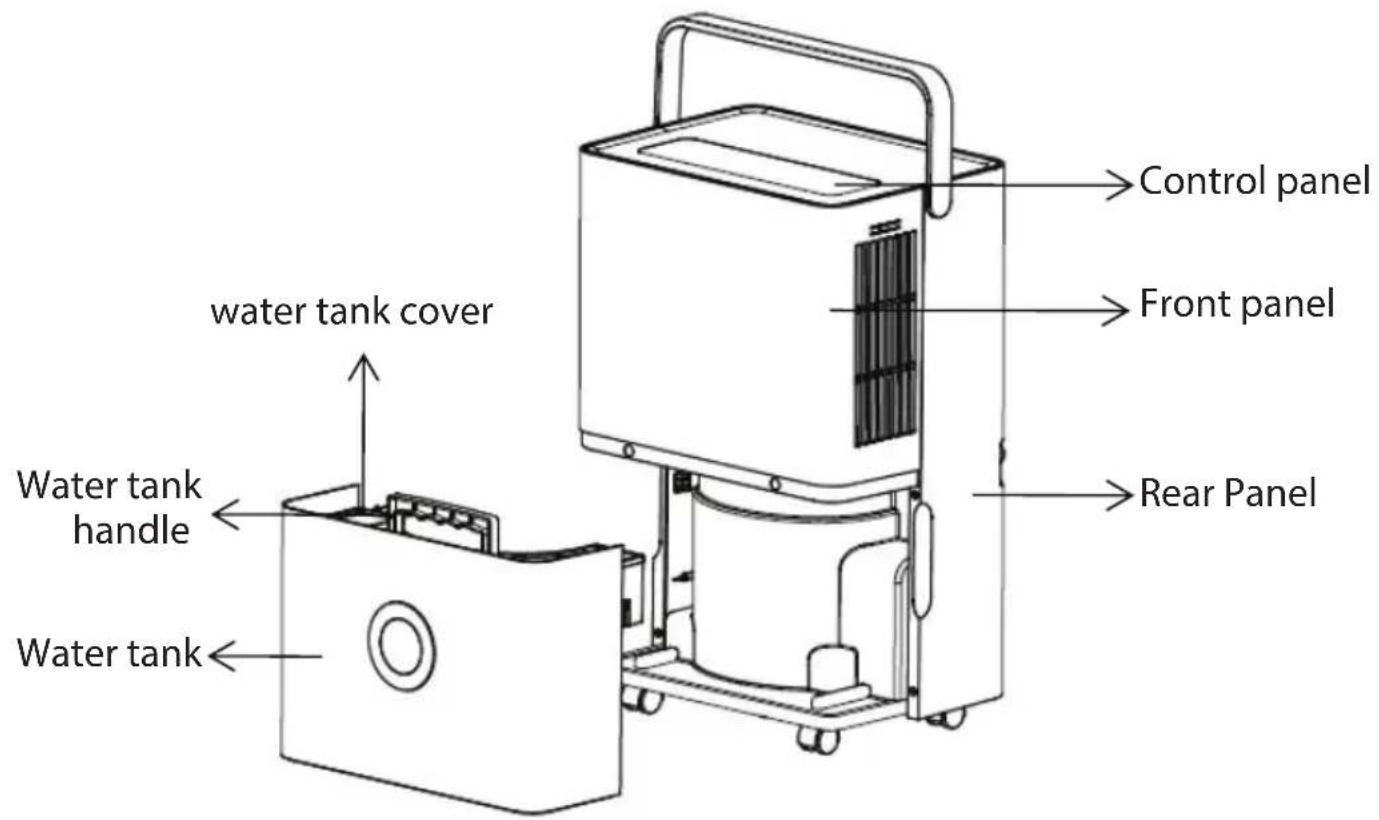
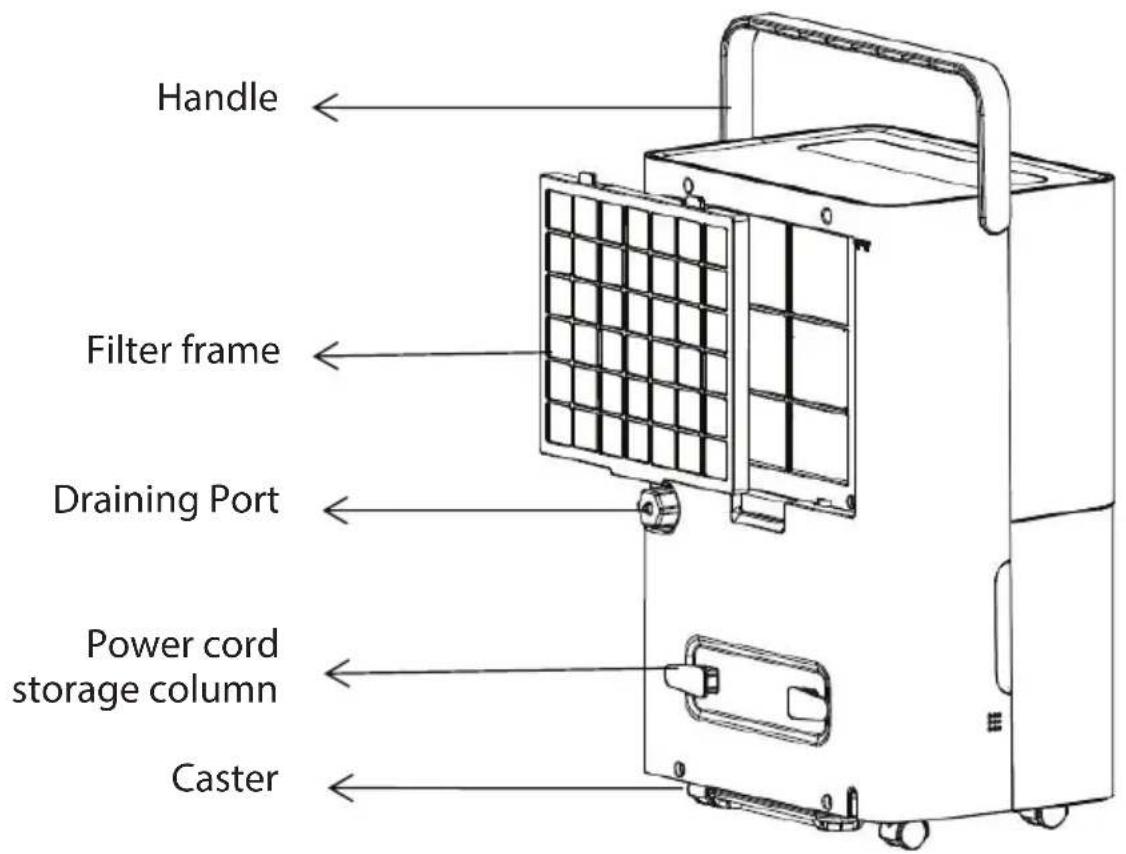
COMPONENTS
Front
Back
CONTROL PANEL

-
Timer: 24h timer setup, press this key to set ON/OFF time of the dehumidifier, the setting range is 1-24h, every press adjusts one hour. If you want to cancel timer setup, press twice continuously after confirmation of setting time.
-
Inside Drying Key: Press this key to start drying procedure in the dehumidifier, this can prevent mold inside the dehumidifier due to damp. The whole drying procedure needs approximate 1h. Press this key again to cancel the drying function in the dehumidifier, and to recover to running state before starting drying.
-
Fan Speed: Under AUTO or CONTINUOUS mode, adjust the fan speed, HIGH and LOW can be circularly selected.
-
LCD Display: In AUTO, CONTINUOUS AND DRYING modes, etc., this indicator displays room humidity. When it is set in AUTO mode, this indicator shows the set humidity; and displays the set time in timer state, % represents percentage of humidity.
-
Humidity Setting: Once this key is pressed, the humidity is displayed circularly in the range of 30%-35%-40%-45%-50%-55%-60%-65%-70%-75%-80%, and the humidity setting is only valid in AUTO mode.
-
Mode: During startup or timer startup press this key to select AUTO, CONTINUOUS and DRYING modes, etc., and the indicator lamp corresponding to the selected mode is on. Press and hold (3 seconds) the Mode button to activate the child lock. Repeat the process to turn the child lock off.
-
On/off key: Press this key to turn on or turn off the dehumidifier.
OPERATING METHODS
Description of Functions
SETTING TIMER OFF
When the dehumidifier is running, press the [Timer key] to adjust time from 1h to 24h, press the key once to increase the setting time by 1h, after the setting time exceeds 24h, the figure returns to 1 to start cycle. The Timer key can also be pressed all the time, the time increases and changes circularly, when the set time expires, the dehumidifier turns off automatically. After the setting is completed, if the Timer key does not act at all within 5s, the set time is confirmed. In timer off state the key lamp on the [Timer key] is normally on.
SETTING TIMER ON
When the dehumidifier is in standby state, the method for adjustment of setting time by the [Timer key] is the same as timer OFF. After the setting is completed, if the Timer key does not act at all within 5s, the set time is confirmed. In timer ON state the key lamp on the [Timer key] is normally on, and the set time is displayed on control panel.
AUTO MODE
Select AUTO dehumidification, if the room humidity is high than the set humidity or is between +5% or -5% of the set humidity, the compressor will starts and the fan will run at the set speed. If the room humidity is lower than the set humidity by -5%, then the compressor will stop but the fan will run at the set speed.
The default set humidity value is 50%.
CONTINUOUS MODE
Select CONTINUOUS dehumidification, no matter how the relative humidity in the room is, the compressor starts, the fan runs at high speed in default, and the air speed can be regulated via the air speed key.
INSIDE DRYING MODE
Press the [Inside drying key] to start drying in the dehumidifier, and the whole drying procedure needs approximate 1h:
- The dehumidifier starts at HIGH fan speed and releases air continuously for 30min;
- The dehumidifier turns to run at LOW fan speed and lasts for 20min;
How to stop:
-
Press the key again to cancel drying in dehumidifier, and recover to the running state before start of drying.
-
Press the [Power key] to stop drying in dehumidifier and recover to the standby state.
CHILD LOCK FUNCTION
Press and hold the mode key 3S to enable or disable the child lock function. (All keys on the operation panel are disabled after the child lock function is activated)
DRAINAGE
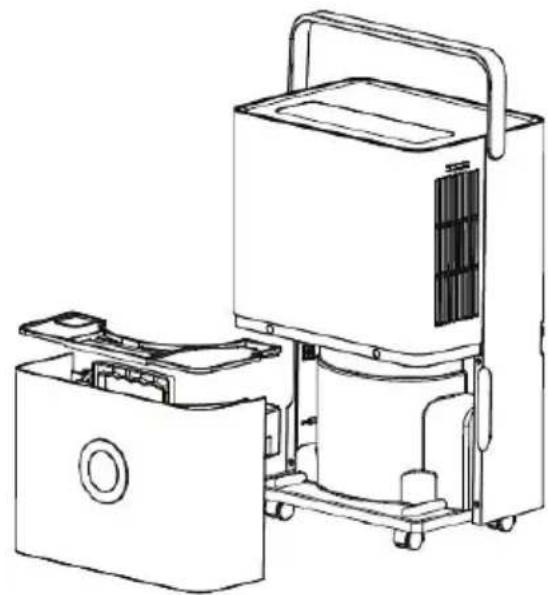
- Use of water tank: When the water tank is full of water, the full water icon on LCD flashes (the compressor, fan and negative ion will stop running), the BUZZER sounds for 10 times to remind the user till water is drained.
- Place both hands respectively at the side of the back cover side of the depression, gently remove the water tank, turn the water tank handle upright, remove the water tank cover, and pour the water out.
natural_image
Line drawing of a portable air conditioner unit with internal components and housing (no text or symbols)- Close the tank cover, and rotating water tank handle down, then put the water tank gently and put it back in the right place to restart dehumidifier.

natural_image
Line drawing of a portable air purifier with internal components and housing (no text or symbols)Attention: When the water tank is full of water, please empty it. Before putting the water tank into the dehumidifier, please confirm whether the floater rotates flexibly or not, and then push it in position with both hands.
-
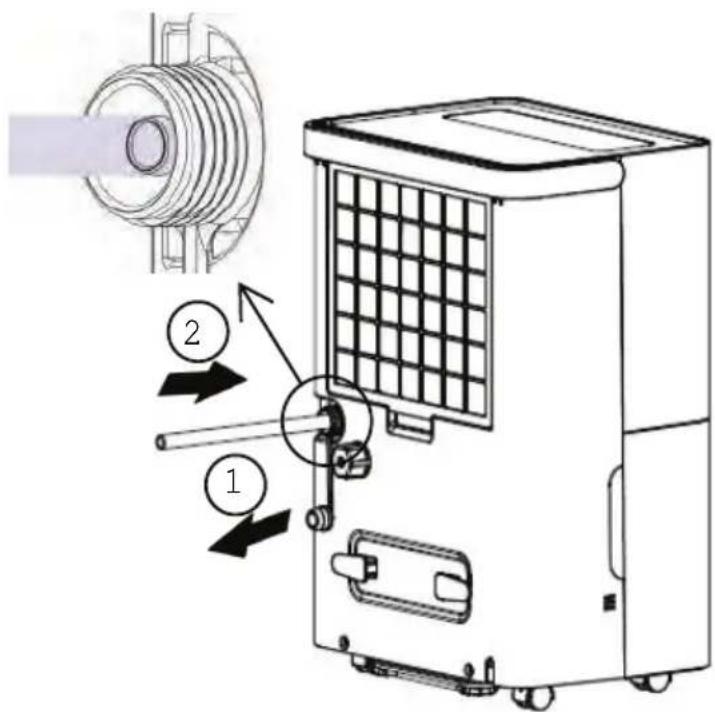
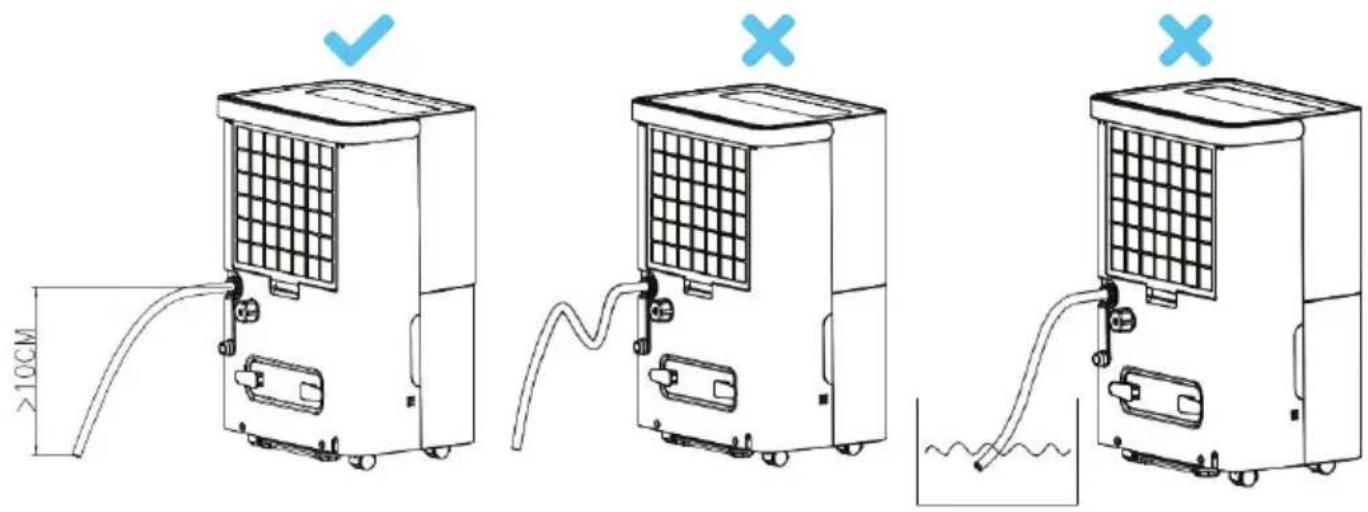
Continuous Drainage: if you do not want to drain water in the water tank frequently, you can connect a drainage pipe (with inner diameter 9mm) at the back of the dehumidifier to drain water.
-
Locate the drain outlet at the back, unscrew the drain cover, and pull out the water plug.
- Connect the 9.0mm drainage pipe to the drain outlet.
Attention:
The external water pipe must not be too long (the recommended length is less than 0.6 meters). The height of the end of the water pipe must be more than 10cm lower than the height of the water outlet. The water pipe must be kept smooth, otherwise the water may not be drained normally.
MAINTENANCE
Precautions:
- Please disconnect power supply before maintenance or repair to prevent electric shock.
- If the dehumidifier will not be used for a long time, please disconnect power supply.
- Please do not clean the dehumidifier body with chemical solvents such as alcohol, gasoline and benzene, etc.
- Please clean the water tank and its cover with a soft cloth dipped in cold or warm water regularly to prevent mould inside the dehumidifier.

natural_image
Line drawing of a rectangular electronic component with a circular button and mounting bracket (no text or symbols)- Wipe the surface of the dehumidifier slightly with wet cloth, and do not use detergent or abrasive in case the plastic surface is damaged.

natural_image
Technical line drawing of a portable air purifier with internal components and housing (no text or symbols)- Clean the filter and the frame at lease once per two weeks simply with cold or warm water, do not use chemical solvents or hot water.

natural_image
Empty rectangular grid with uniform square cells, no text or symbols presentTROUBLESHOOTING
If the following problems occur to the dehumidifier, the following solutions can be adopted.
| Symptoms | Possible reasons Solutions | |
| The unit does not turn ON | Power cord is unplugged | Plug the power cord properly into the power socket. |
| The water tank is full.Water tank is not placed properly. | Drain water from the water tank, and then install the water tank again. | |
| The ambient temperature is lower than 5°C or higher than 32°C | Normal phenomenon | |
| The dehumidifi-cation function is not effective | Is the room temperature or humidity too low? | In dry season the dehumidifi-cation ability will reduce. |
| Are the air outlet & inlet blocked? | Clean up the objects blocking the air outlet and inlet. | |
| Air is not blown out | Is the air filter net blocked? | Clean the air filter net according to the above method. |
| Noise is abnormal during operation | Is the dehumidifier placed improperly so that it is inclined or unstable? | Place the dehumidifier in a smooth place. |
| Is the air filter net blocked? | Clean the air filter net according to the above method. | |
| There is “tittering” sound | The flowing sound of refrigerant, which is a normal phenomenon. | |
| Water leaks | Connection of drainage pipe becomes loose | Fasten drainage pipe. |
| Drainage system is blocked | Remove obstacles and straighten out water pipe. | |
| Frosting occurs | The ambient temperature is low, and it is in the state waiting for defrost. | It is a normal phenomenon, and the dehumidifier has the automatic defrosting function. |
Display Code Error
FL The water tank is full
E1 The coil sensor detects anomaly
E2 The room temperature sensor detects anomaly
P1 The unit is in the defrosting state, normal
CL The unit is in internal drying state, normal
LC Child lock funtcion starts
FEATURES:
• Efficient Moisture Removal
• Intelligent Humidity Control
- Unique Modern Design
• Automatic Continuous Operation
- User-friendly Operation
- With High-Efficiency Compressor and Fan
• 1-24 Hours Auto ON/OFF Timer
• Auto Shutoff when Water Tank Full
• Continuous Drain Hose Included
• 3-Prong Plug, Adjustable Fan Speed
- Recessed Handles, Adjustable Humidity
• Auto Error Detection
• 3 Min. Compressor Delay, 2 Fan Speed
- Washable PP Filter + Replaceable HEPA filter
WHAT'S IN THE BOX:
- Compact Dehumidifier
- HEPA Filter
- Draining Pipe
natural_image
White industrial cleaning device with digital display and circular button (no visible text or symbols)
natural_image
White industrial air conditioner unit with solar panel and cable (no visible text or symbols)TECHNICAL SPECS:
| SLDEHU30 SLDEHU50 | ||
| Rated Current | 3.1A 6A | |
| Room Capacity | Up to 1500 sq.ft. Up to 3000 sq.ft. | |
| Effective Dehumidifying for Rooms | up to 30 Pints and 700 Sq. ft. | up to 50 Pints and 1000 Sq. ft. |
| High-Powered Power Output | 260 Watt 420 Watt | |
| Moisture Removal | • 30 pints/day (17L/day)• new DOE 24 pints/day (14 L/day) | • 50 pints/day (28L/day)• new DOE 35 pints/day (20 L/day) |
• Power Supply: 115V/60Hz
• Humidity Setting Range: 30%-80%
• Operation Temperature: 41-90°F
• Water Tank Capacity: 135Oz
• Water Reservoir Capacity: 1 gal. (4L)
- Product Dimension: 13.3" x 20.1" x 9.7"-inches

WARNING:
This product can expose you to a chemical or group of chemicals, which may include "Acrylonitrile" which is known in the state of California to cause cancer, birth defects, or other reproductive harm. For more info, go to https://www.p65warnings.ca.gov/.
SereneLife
Questions? Issues?
We are here to help!
Phone: (1) 718-535-1800
Email: support@pyleusa.com
- TABLE OF CONTENTS
- SAFETY WARNING
- For your safety, please read the following contents carefully before using this dehumidifier.
- Requirements:
- Prohibition:
- FREQUENT ENQUIRIES
- Q: Why does the dehumidifier seem to collect less water in winter?
- Q: Why doesn't the dehumidifier operate? Why does the unit stop operating suddenly?
- Q: Why is hot air blown out from air supply outlet?
- INSTALLATION
- HEPA FILTER INSTALLATION
- Hidden 88 display
- COMPONENTS
- Front
- Back
- CONTROL PANEL
- OPERATING METHODS
- Description of Functions
- SETTING TIMER OFF
- SETTING TIMER ON
- AUTO MODE
- CONTINUOUS MODE
- INSIDE DRYING MODE
- Press the [Inside drying key] to start drying in the dehumidifier, and the whole drying procedure needs approximate 1h:
- How to stop:
- CHILD LOCK FUNCTION
- DRAINAGE
- Attention:
- MAINTENANCE
- Precautions:
- TROUBLESHOOTING
- Display Code Error
- FEATURES:
- WHAT'S IN THE BOX:
- SereneLife
Brand : SereneLife
Model : SLDEHU50
Category : Household Fan