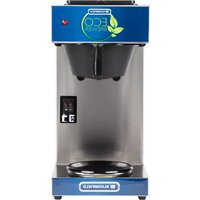
Eco Brewer 4543 - Coffee maker Bloomfield - Free user manual and instructions
Find the device manual for free Eco Brewer 4543 Bloomfield in PDF.


| Product Type | Coffee Maker |
| Brand | Bloomfield |
| Model | Eco Brewer 4543 |
| Dimensions (WxDxH) | 10.5 x 9.0 x 14.5 inches |
| Weight | 8.5 lbs |
| Power Supply | 120 V, 60 Hz, 900 W |
| Brew Capacity | 12 cups (60 oz) |
| Material | Stainless steel & BPA-free plastic |
| Functions | Brew, Keep Warm, Auto Shut-Off (2 hours) |
| Cleaning | Removable brew basket, decalcification recommended every 3 months |
| Safety Features | Auto shut-off, boil-dry protection, cool-touch handle |
| Spare Parts | Replacement carafe (model 4543-CAR), filter basket (4543-FB) |
| Repairability | User-replaceable parts; professional service recommended for internal issues |
| Warranty | 1 year limited warranty |
Frequently Asked Questions - Eco Brewer 4543 Bloomfield
User questions about Eco Brewer 4543 Bloomfield
0 question about this device. Answer the ones you know or ask your own.
Ask a new question about this device
Download the instructions for your Coffee maker in PDF format for free! Find your manual Eco Brewer 4543 - Bloomfield and take your electronic device back in hand. On this page are published all the documents necessary for the use of your device. Eco Brewer 4543 by Bloomfield.
USER MANUAL Eco Brewer 4543 Bloomfield
Servicing Instructions

natural_image
Exterior view of a modern coffee maker with a red and black glass pitcher, labeled 'ECO BREWER' (no additional signage or text visible on the device itself)Model 4774-A Airport Brewer
with optional
7760-ALM Airport
Model 4543-D2 Brewer
with optional
8900-Series Glass Decanters

natural_image
Exterior view of a modern eco-brewer coffee maker with visible branding and control panel (no text or symbols on the device itself)WARRANTY STATEMENT
All electrical equipment manufactured by BLOOMFIELD is warranted against defects in materials and workmanship for a period of one year from the date of original installation (1 year labor, two years parts) and is for the benefit of the original purchaser, except that:
A. airports carry a 30 day parts warranty only.
B. dispensers; i.e., tea and coffee carry a 90 days parts warranty only, excludes decanters.
C. decanters are not covered by this warranty
D. ECO brewers carry a 90 day parts and labor warranty.
THE FOREGOING OBLIGATION IS EXPRESSLY GIVEN IN LIEU OF ANY OTHER WARRANTIES, EXPRESSED OR IMPLIED, INCLUDING ANY IMPLIED WARRANTY OF MERCHANTABILITY OR FITNESS FOR A PARTICULAR PURPOSE, WHICH ARE HEREBY EXCLUDED.
BLOOMFIELD, LLC SHALL NOT BE LIABLE FOR INDIRECT, INCIDENTAL OR CONSEQUENTIAL DAMAGES OR LOSSES FROM ANY CAUSE WHATSOEVER.
This warranty is void if it is determined that upon inspection by an Authorized Service Agency that the equipment has been modified, misused, misapplied, improperly installed, or damaged in transit or by fire, flood or act of God.
It also does not apply if the serial nameplate has been removed or unauthorized service personnel perform service. The prices charged by Bloomfield for its products are based upon the limitations in this warranty. Seller's obligation under this warranty is limited to the repair of defects without charge by a Bloomfield Authorized Service Agency or one of its sub-agencies. This service will be provided on customer's premises for non-portable models. Portable models (a device with a cord and plug or a dispenser) must be taken or shipped to the closest Authorized Service Agency, transportation charges prepaid, for services.
In addition to restrictions contained in this warranty, specific limitations are shown on the back cover. Bloomfield Authorized Service Agencies are located in principal cities.
This warranty is valid in the United States, Canada and void elsewhere. Please consult your classified telephone directory, your foodservice equipment dealer or for information and other details concerning warranty write to:
Service Parts Department; Bloomfield
10 Sunnen Dr. | St. Louis, MO 63143
Phone: (314) 678-6336 | Fax: (314) 781-5445
parts@wellsbloomfield.com / www.wellsbloomfield.com
BLOOMFIELD SERVICE POLICY AND PROCEDURE GUIDE ADDITIONAL WARRANTY EXCLUSIONS
- Resetting the safety thermostats, circuit breakers, overload protectors, or fuse replacements.
- All problems due to operation at voltage other than specified on equipment nameplates – conversion to correct voltage must be the customer's responsibility.
- All problems due to electrical connections not made in accordance with electrical code requirement and wiring diagrams supplied with the equipment.
- Replacement of items subject to normal wear, to include such items as knobs and light bulbs. Normal maintenance functions including adjustments of thermostats, microswitches, and replacement of fuses and indicating lights are not covered under warranty.
- All problems due to inadequate water supply, such as fluctuating, high or low water pressure, etc.
- All problems due to mineral/calcium deposits, or contamination from chlorides/chlorines. De-liming is considered a preventative maintenance function and not covered by warranty.
- Full use and care and manuals may or may not be sent with each unit, only a condensed version. Please visit our web site to download the full version if needed.
- Travel mileage is limited to fifty (50) miles from an Authorized Service Agency or one of its sub-service agencies.
- All labor shall be performed during normal working hours. Overtime premium will be charged to customer.
- All genuine Bloomfield replacement parts are warranted for ninety (90) days from date of purchase on non-warranty equipment. Any use of non-genuine Bloomfield parts completely voids any warranty.
- Installation, labor, and job checkouts are not considered warranty.
- Charges incurred by delays, waiting time or operating restrictions that hinder the service technician's ability to perform service are not covered by warranty. This includes institutional and correctional facilities.
SHIPPING DAMAGE CLAIM PROCEDURE
NOTE: For your protection, please note that equipment in this shipment was carefully inspected and packaged by skilled personnel before leaving the factory. Upon acceptance of this shipment, the transportation company assumes full responsibility for its safe delivery.
IF SHIPMENT ARRIVES DAMAGED:
- VISIBLE LOSS OR DAMAGE: Be certain that any visible loss or damage is noted on the freight bill or express receipt, and that the note of loss or damage is signed by the delivery person.
- FILE CLAIM FOR DAMAGE IMMEDIATELY: Regardless of the extent of the damage.
- CONCEALED LOSS OR DAMAGE: if damage is unnoticed until the merchandise is unpacked, notify the transportation company or carrier immediately, and file "CONCEALED DAMAGE" claim with them. This must be done within fifteen (15) days from the date the delivery was made to you. Be sure to retain the container for inspection.
Wells Bloomfield cannot assume liability for damage or loss incurred in transit. We will, however, at your request, supply you with the necessary documents to support your claim.
TABLE OF CONTENTS
WARRANTY STATEMENT xi
SPECIFICATIONS 1
PRECAUTIONS & GENERAL INFORMATION 2
AGENCY APPROVAL INFORMATION 2
INSTALLATION INSTRUCTIONS 3
OPERATION 5
BREWING COFFEE 7
CLEANING INSTRUCTIONS 8
TROUBLESHOOTING SUGGESTIONS 9
SERVICING INSTRUCTIONS 10
Deliming Instructions 10
Thank You for purchasing this Wells Bloomfield appliance.
Proper installation, professional operation and consistent maintenance of this appliance will ensure that it gives you the very best performance and a long, economical service life.
This manual contains the information needed to properly install this appliance, and to use, care for and maintain or repair the appliance in a manner which will ensure its optimum performance.
SPECIFICATIONS
| MODEL | TYPE | WARMERS | VOLTS 1ø | Hz | AMPS | WATTS | POWER CORD |
| 4543-D2 | Two Warmer Low Profile Brewer | 2 | 120V | 60 | 13.75 | 1650W | NEMA 5-15P |
| 4774-A | Airpot Brewer | N/A | 120V | 60 | 12.083 | 1450W | NEMA 5-15P |
PRECAUTIONS AND GENERAL INFORMATION

WARNING: ELECTRIC SHOCK HAZARD
All servicing requiring access to non-insulated components must be performed by qualified service personnel. Do not open any access panels which require the use of tools. Failure to heed this warning can result in electrical shock.

WARNING: INJURY HAZARD
All installation procedures must be performed by qualified personnel with full knowledge of all applicable electrical and plumbing codes. Failure could result in property damage and personal injury.

WARNING: ELECTRIC SHOCK HAZARD
Brewer must be properly grounded to prevent possible shock hazard.
Electrical shock will cause death or serious Injury.

WARNING: BURN HAZARD
This appliance dispenses very hot liquid. Serious bodily injury from scalding can occur from contact with dispensed liquids.
This appliance is intended for commercial use only.
This appliance is intended for use to brew beverage products for human consumption. No other use is recommended or authorized by the manufacturer or its agents.
This appliance is intended for use in commercial establishments, where all operators are familiar with the appliance use, limitations and associated hazards. Operating instructions and warnings must be read and understood by all operators and users.
The following trouble shooting, component views and parts lists are included for general reference, and are intended for use by qualified service personnel.
This manual should be considered a permanent part of this appliance. The manual must remain with the appliance if it is sold or moved to another location.

CAUTION: BURN HAZARD
Exposed surfaces of the appliance, brew chamber and decanter may be HOT to the touch, and can cause serious burns.
AGENCY APPROVAL INFORMATION


INSTALLATION INSTRUCTIONS
READ THIS CAREFULLY BEFORE STARTING THE INSTALLATION
IMPORTANT:
To enable the installer to make a quality installation and to minimize installation time, the following suggestions and tests should be done before the actual unit installation is started:
LEVELING THE UNIT
Place unit on a firm level surface.
A spirit level should be placed on the top of the unit, at the edge, to be sure it is level.
ELECTRICIAN'S INSTALLATION INSTRUCTIONS
All models are equipped with a cord and plug. They require a 115 - 125 volt 15 amp circuit (50/60 Hz, 2 wire plus ground, with NEMA 5-15R).

CAUTION: EQUIPMENT DAMAGE
DO NOT plug in or energize this appliance until all Installation Instructions are read and followed. Plug into the voltage that is on the nameplate, damage to the Brewer will occur if these instructions are not followed.
IMPORTANT: The ground prong of the plug is part of a system designed to protect you from electrical shock in the event of internal damage. Never cut off the ground prong nor twist a blade to fit an existing receptacle. Contact a licensed electrician to install the proper circuit and receptacle.

CAUTION: UNSTABLE EQUIPMENT HAZARD
It is very important for safety and for proper operation that the brewer is level and stable when standing in its final operating position. Provided non-skid legs must be installed at each corner of the unit. Failure to do so will result in movement of the brewer which can cause personal Injury and/or damage to brewer.
NOTE: This equipment must be installed to comply with applicable federal, state and local plumbing codes and ordinances.

WARNING: SHOCK HAZARD
Brewer must be properly grounded to prevent possible shock hazard. Electrical shock will cause death or serious injury.
START UP
IMPORTANT:
Never pour more than 9 cups (2.2 liter) of water into the water reservoir.
Never pour hot water, coffee, or anything other than cold water into the water reservoir.

natural_image
Technical line drawing of a mechanical device with a handle and base mount (no text or symbols)

natural_image
Illustration of a hand stirring a steaming hot pot (no text or symbols)A. INITIAL START-UP BEFORE BREWING COFFEE
For initial start-up, or if the brewer has not been used for an extended period of time:
Please check that your EMPTY brew chamber is assembled correctly, with the spring wedged firmly at the bottom of the basket.
DO NOT ADD COFFEE.
- Place the machine on a firm level surface with plenty of space above it to place a decanter.
- Plug machine into a power source that matches that on the dataplate.
- Place an empty decanter / airport under the brew chamber.
- Fill a container with 9 cups of tap water. Lift the pour-over cover and pour the entire contents into the opening, which will fill the basin, wait for 2 minutes for water to force the air out of the machine.
- Turn the switch "ON", the "In USE" Indicator will light up.
- Some HOT WATER will start to flow into the decanter.
- When the unit has emptied the reservoir, the "In USE" indicator will turn off, ending the brew cycle.
- You should repeat the above process twice to clean the internal parts of the machine, before brewing coffee for the first time.
NOTE: During above procedure it is normal to hear some brewing and pumping sounds of water and see some water vapor coming out of the machine.
BREWING COFFEE
A. PREPARATION
Place one (1) genuine Bloomfield paper filter in the brew chamber. Add a pre-measured amount of fresh coffee grounds. Gently shake the brew chamber to level the bed of grounds. Slide the brew chamber into place under the brew head.

Fig. 7 Brew Chamber
Be sure the unit's power switch is on.
Place the appropriate EMPTY decanter / airport in place under the brew chamber.
Fill a container with 9 cups of tap water. Lift the pour-over cover and pour the entire contents into the opening, which will fill the basin.
Water from the basin will turn on the internal float switch, which will light the indicator light. Water will enter the boiler, once the water boils, the hot water will be forced into the brew head where it will spray over the bed of grounds. Freshly brewed coffee will begin to fill the container under the brew chamber. When there is no more water in the basin the indicator light will turn off.
CAUTION: wait for the flow and all drippings to stop before removing the container and serving coffee.
Discard the contents of the brew chamber. Rinse the brew chamber in a sink.
IMPORTANT: In situations when the unit stops working during normal operation, but regains power when it cools
down, then its likely has a lime build-up and needs deliming.
IMPORTANT: An extreme build-up could cause the high limit to trip, preventing it from going into the brew cycle. Press down on the high-limit to reset it to begin next cycle. Deliming procedure may need to be performed.

natural_image
Line drawing of a hand operating a mechanical device with wires and components (no text or symbols)
CAUTION: BURN HAZARD
Exposed surfaces of the brewer, brew chamber and decanter may be HOT to the touch, and can cause serious burns.

CAUTION: BURN HAZARD
To avoid splashing or overflowing hot liquids, ALWAYS place an empty decanter under the brew chamber before starting the brew cycle. Failure to comply can cause serious burns.

CAUTION: BURN HAZARD
After a brew cycle, brew chamber contents are HOT. Remove the brew chamber and dispose of used grounds with care. Failure to comply can cause serious burns.

CAUTION: BURN HAZARD
Brewing and serving temperatures of coffee are extremely hot. Hot coffee will cause serious skin burns.
CLEANING INSTRUCTIONS

CAUTION: SHOCK HAZARD
Do not submerge or immerse brewer in water.
IMPORTANT:
DO NOT use steel wool, sharp objects, or caustic, abrasive or chlorinated cleansers to clean the brewer.
IMPORTANT:

Fig. 8 Cleaning
We recommend that the deliming procedures be performed every 6 months or after 200 cycles whichever comes first. Frequency of deliming will depend on the local water characteristics.
PROCEDURE: Clean Coffee Brewer
PRECAUTIONS: Disconnect brewer from electric power. Allow brewer to cool.
FREQUENCY: Daily
TOOLS: Mild Detergent, Clean Soft Cloth or Sponge Bristle Brush.
- Disconnect brewer from electric power.
Allow brewer to cool before cleaning. - Remove and empty decanters.
- Remove and empty brew chamber.
- Remove the spray disk from the brew head (See figure 8):
Remove the screw holding the spray disk and gasket in place.. - Wipe inside of brew head and area around the brew head with a soft clean cloth or sponge moistened with clean water.
- Wash the spray disk in a sink using warm water and a mild detergent. A bristle brush may be used to clear clogged spray holes. Rinse the spray disk with clean water and allow to air dry.
- Wash the brew chamber in a sink using warm water and a mild detergent. A bristle brush may be used to clean the inside. Rinse with clean water and allow to air dry. For stainless steel brew chambers, be sure the wire rack is properly reinstalled.
- Wipe the exterior of the brewer with a soft clean cloth or sponge moistened with clean water.
- Reinstall the gasket & spray disk and secure with the retaining screw.
- Reinstall the brew chamber.
- Decanters may be washed in a dishwasher or sink.
Procedure is complete
DELIMING INSTRUCTIONS
PROCEDURE: Delime the Water Tank
PRECAUTIONS: Disconnect Power and allow brewer to cool.
FREQUENCY: As Required
TOOLS: Deliming Solution Protective Gloves, Goggles & Apron
In areas around the water boiler, hard water will cause a mineral to build-up as the unit is used. To keep the machine in best condition and to prevent a build-up that would result in a poor performance, We recommend that the deliming procedures be performed every 6 months or after 200 cycles whichever comes first. Frequency of deliming will depend on the local water characteristics.
- Mix 2 quarts of deliming solution according to the manufacturers directions.
- Place a paper filter into the brew chamber and put chamber into position in the unit.
- Place an empty container under the brew chamber.
- Pour the deliming solution into the pour-over located on top of the unit.
- Turn the power switch on to begin the brew cycle.
- Some of the HOT solution will begin dispensing into the decanter / airport, when that happens, turn the unit "OFF". Wait 30 minutes or as directed by the deliming manufacturer.
- Continue running cold water thru brew cycles until the smell of deliming solution is no longer present.
- Brewer is ready to use.

CAUTION: CHEMICAL BURN HAZARD
Deliming chemicals are caustic. Wear appropriate protective gloves and goggles during this procedure.
Never siphon deliming chemicals or solutions by mouth.
This operation should only be performed by qualified and experienced personnel.
IMPORTANT: DO NOT spill, splash or pour water or deliming solution into or over any internal component other than the inside of the water tank.
NOTE: Normally, silicone hoses do not need to be delimited. Should deliming hoses become necessary, Bloomfield recommends replacing the hoses.
TROUBLESHOOTING SUGGESTIONS
| SYMPTOM POSSIBLE CAUSE SUGGESTED REMEDY | ||
| Water won't heat | Brewer unplugged or circuit breaker tripped | Check power supply cord |
| Check / reset circuit breaker | ||
| Hi-Limit thermostat tripped | Allow to cool | |
| Reset hi-limit | ||
| Perform Deliming Procedures | ||
| Damaged internal component or wiring | Examine wiring & connectors, thermostat and heating element, Repair/replace as needed | |
| Pourover - no water or too little water added at startup | Be sure to add sufficient water | |
| Coffee level low (pour-over) | Not enough water poured in Increase water | amount |
| Too much coffee grounds Adjust amount of | grounds | |
| Brew chamber overflows | Too many filter papers or wrong filter paper | Use one (1) genuine Bloomfield filter per brew |
| Brew chamber dispense hole plugged Thoroughly clean brew chamber | ||
| Too much coffee or too fine a grind Adjust coffee amount and grind | ||
| Too much water poured in Do not use more than 9 cups of water | ||
| Sprays water from brew head | Spray gasket improperly installed Check/reinstall gasket on INSIDE of brew head | |
| Spray disk plugged Clean spray disk | ||
| Poor coffee quality | Keep brewer, and decanters clean. Install a taste and odor filter in water supply, and replace cartridges regularly. Use a quality coffee with a consistent roast. Use proper grind and amount of coffee per brew. | |
SPARE PARTS
| Spare Parts List Models | ||||
| Fig No. | Parts No. | Description. 4543 4774 | ||
| 1 2A- | Z17451 Foot X X | |||
| 5 2E- | Z17542 Relay X X | |||
| 11 2A- | Z17453 Inflow Pipe Silicone X X | |||
| 11 2A- | Z17472 Inflow Pipe Silicone - X | |||
| 14 2E- | Z17454 Main Heater | XX | ||
| 17 2A- | Z17455 Outflow Pipe Silicone | X - | ||
| 17 2A- | Z17477 Outflow Pipe Silicone | - X | ||
| 18 2E- | Z17456 Auto Thermostat 221°F (105°) | XX | ||
| 19 | 2E-Z17480 | Manual Thermostat 293°F (145°) | X | X |
| 12 2N- | 70091UL Heating of warming plate 120V 100W X - | |||
| 24 | 2D-70090 | Warming Plate | X | - |
| 28 | 2F-76666 | Plastic Lid Of Water Reservoir | X | X |
| 33 2E- | Z17464 Liquid Switch Single | XX | ||
| 36 2S- | Z17457 Indicator | XX | ||
| 42 2E- | Z17458 Power Switch Twin | X - | ||
| 42 2E- | Z17471 Power Switch Single | - X | ||
| 47 2D- | 70234 Plastic Basket | XX | ||
| 49 | 2M-Z17237 | Front Graphic Panel, Top | X | X |
| 50 | 2M-Z17459 | Bottom Graphic Panel | X | X |
| 12 | 2V-Z17461 | Boiler Tank Set | X | X |
| 41 2V- | Z17463 Sprinkler Plate | XX | ||
| 38 | 2C-Z17466 | Screw, Internal Threads | X | X |
| 51 2A- | Z17473 Drain Pipe, Silicone | - X | ||
| 51 2A- | Z17474 Drain Pipe, Silicone | X - | ||
| 52 | 2I-Z17478 | Stop Bumper | - X | |
| 53 | 2I-Z17479 | Hole Plug | - | X |
EXPLODED VIEW; 4543-D2
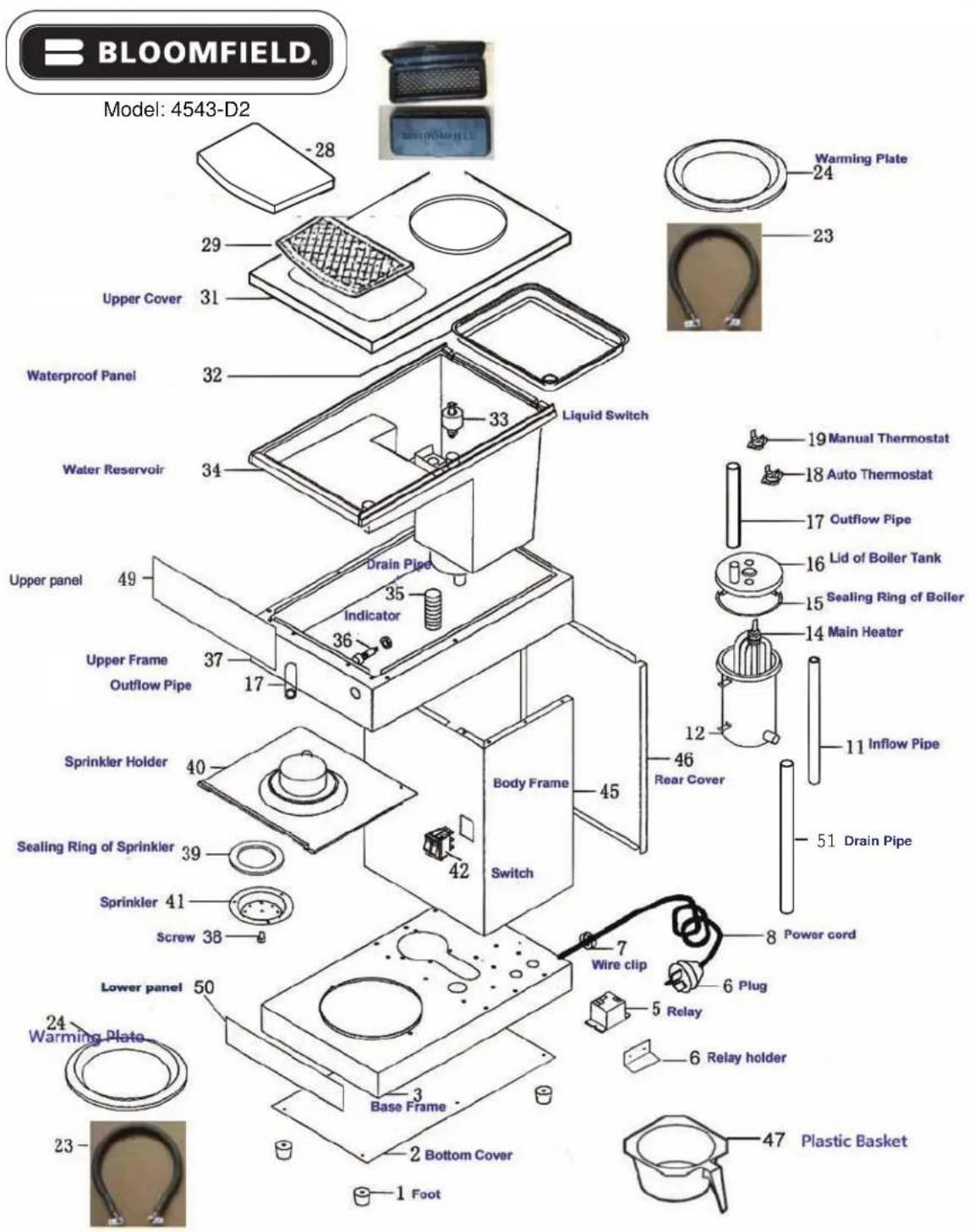
2M-Z16993-631 ECO Style Brewers
EXPLODED VIEW; 4774-A

NOTES
NOTES

Wells Bloomfield proudly supports CFESA Commercial Food Equipment Service Association
SERVICE TRAINING - QUALITY SERVICE

CUSTOMER SATISFACTION

BLOOMFIELD®
WELLS BLOOMFIELD, LLC
10 Sunnen Drive, St. Louis, MO 63143
telephone: 314-678-6336 fax: 314-781-2714
www.wellsbloomfield.com
- WARRANTY STATEMENT
- BLOOMFIELD SERVICE POLICY AND PROCEDURE GUIDE ADDITIONAL WARRANTY EXCLUSIONS
- SHIPPING DAMAGE CLAIM PROCEDURE
- IF SHIPMENT ARRIVES DAMAGED:
- TABLE OF CONTENTS
- PRECAUTIONS AND GENERAL INFORMATION
- WARNING: ELECTRIC SHOCK HAZARD
- WARNING: INJURY HAZARD
- WARNING: BURN HAZARD
- CAUTION: BURN HAZARD
- AGENCY APPROVAL INFORMATION
- INSTALLATION INSTRUCTIONS
- READ THIS CAREFULLY BEFORE STARTING THE INSTALLATION
- IMPORTANT:
- LEVELING THE UNIT
- ELECTRICIAN'S INSTALLATION INSTRUCTIONS
- CAUTION: EQUIPMENT DAMAGE
- CAUTION: UNSTABLE EQUIPMENT HAZARD
- WARNING: SHOCK HAZARD
- START UP
- INITIAL START-UP BEFORE BREWING COFFEE
- DO NOT ADD COFFEE.
- BREWING COFFEE
- PREPARATION
- CLEANING INSTRUCTIONS
- CAUTION: SHOCK HAZARD
- PROCEDURE: Clean Coffee Brewer
- DELIMING INSTRUCTIONS
- PROCEDURE: Delime the Water Tank
- CAUTION: CHEMICAL BURN HAZARD
- TROUBLESHOOTING SUGGESTIONS
- SPARE PARTS
- EXPLODED VIEW; 4543-D2
- EXPLODED VIEW; 4774-A
Brand : Bloomfield
Model : Eco Brewer 4543
Category : Coffee maker