
PE0210SA - Extension block ATEN - Free user manual and instructions
Find the device manual for free PE0210SA ATEN in PDF.


| Type | Power Distribution Unit (PDU) with Surge Protection |
| Brand | ATEN |
| Model | PE0210SA |
| Number of Outlets | 10 |
| Input Voltage | 100-120V AC |
| Input Current | 15A |
| Frequency | 60 Hz |
| Outlet Type | NEMA 5-15R |
| Plug Type | NEMA 5-15P |
| Surge Protection | Yes, with indicator light |
| Circuit Breaker | Yes, resettable |
| Form Factor | 1U rackmount |
| Rack Mount Ears | Included |
| Grounding | Yes, via grounding screw |
| Dimensions (W x H x D) | 19 x 1.75 x 6 inches (482 x 44 x 152 mm) |
| Weight | 2.5 lbs (1.1 kg) |
| Material | Metal chassis |
| Cooling | Passive (no fan) |
| Cleaning | Wipe with dry cloth; do not use liquids |
| Safety Features | Surge protection, circuit breaker, overload protection |
| Repairability | Not user-serviceable; return to dealer for repair |
| Spare Parts | Not available separately |
Frequently Asked Questions - PE0210SA ATEN
User questions about PE0210SA ATEN
0 question about this device. Answer the ones you know or ask your own.
Ask a new question about this device
Download the instructions for your Extension block in PDF format for free! Find your manual PE0210SA - ATEN and take your electronic device back in hand. On this page are published all the documents necessary for the use of your device. PE0210SA by ATEN.
USER MANUAL PE0210SA ATEN
© Copyright 2015 AIEH International Co., Ltd.
At 31 and the AILs ops are transaction of AILs commercial Co., Ltd. (the proposed all other transactions are the property of the respective owner.
The product is Roll-5 company.
[Unreadable]

PE01075PE01 105PE0207SPE0209SPE02 105 with surge protection Quick Start Guide
www.csc108.com
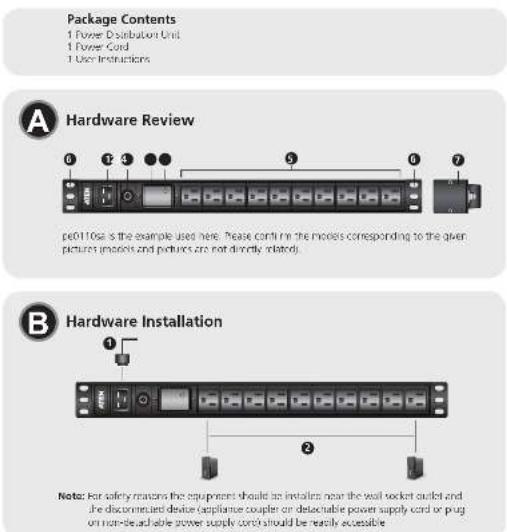
A Hardware Review
① Power inlet
② Circuit Breaker
3 Surge Protection
4 Surge Protection Indicator
⑤ Power Outlets
6 Rack Mount Ears
7 Grounding
B Hardware Installation
Refer to the installation diagram (the numbers in the diagram corresponded to the numbered steps), and do the following:
Connect the Basic PDU's power cord to an AC power source.
② For each device you want to connect, connect its power cable between the device's AC socket (where applicable) and any available outlet on the Basic FDU.
Note: We strongly advise that you do not plug the Basic FDU into a multi socket extension cord, since it may not receive enough amperage to operate correctly. Once you have finished
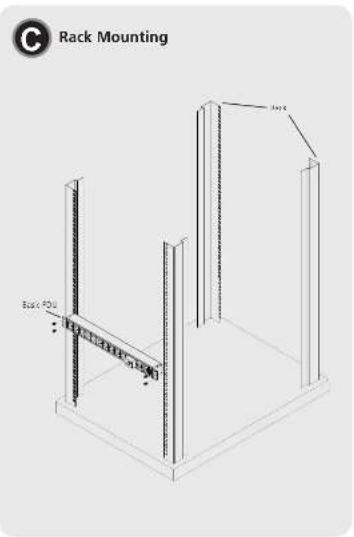
© Rack Mounting
The Basic PDU can be installed in a TU configuration on the side of a rack. to rack mount the device, stabilize the device on the rack and tighten screws onto the rack mount ears.
Surge Protection Indicator
The Surge Protection Indicator is as shown in the Hardware Review. It should normally be lit when the unit is powered.
If the indicator is not lit when the unit is powered, please power down the unit and any connected device serial. Return the unit to the dealer closest to your location for further assistance.
Brand : ATEN
Model : PE0210SA
Category : Extension block