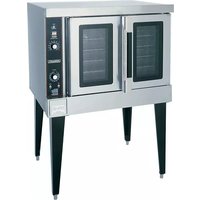
HEC501 - Oven Hobart - Free user manual and instructions
Find the device manual for free HEC501 Hobart in PDF.


| Product Type | Commercial Convection Oven |
| Brand | Hobart |
| Model | HEC501 |
| Dimensions (W x D x H) | 38 in x 36 in x 58 in |
| Weight | 425 lbs |
| Power Supply | 208-240 V, 3-phase, 60 Hz |
| Cooking Capacity | Full-size sheet pans, up to 5 racks |
| Temperature Range | 150°F to 500°F (65°C to 260°C) |
| Cooking Modes | Convection Bake, Roast, Broil, and Proofing |
| Control Type | Digital display with programmable timer |
| Safety Features | Door interlock switch, cool-touch handle, auto shutoff |
| Interior Light | Yes, halogen for visibility |
| Venting | Integrated exhaust system |
| Cleaning | Removable racks and crumb tray; non-stick interior coating |
| Construction | Stainless steel exterior and interior |
| Maintenance | Self-diagnostic system with error codes |
| Warranty | 1 year parts and labor |
| Certifications | ETL, NSF, ANSI |
Frequently Asked Questions - HEC501 Hobart
User questions about HEC501 Hobart
0 question about this device. Answer the ones you know or ask your own.
Ask a new question about this device
Download the instructions for your Oven in PDF format for free! Find your manual HEC501 - Hobart and take your electronic device back in hand. On this page are published all the documents necessary for the use of your device. HEC501 by Hobart.
USER MANUAL HEC501 Hobart
FORM 34492 Rev. A (Jan. 2002)
TABLE OF CONTENTS
GENERAL 3
INSTALLATION 4
Unpacking 4
Location 4
Installation Codes and Standards. 4
Installing Basic Oven 4
Assembling the Legs to the Single Oven 4
Leveling 4
Casters 4
Assembling the Stand to the Oven 5
Electrical Connections....5
Assembling Stacked Ovens 6
Electrical Connections (Stacked Ovens) 7
OPERATION 8
Controls — Models DEC5/HEC5/HEC5X 8
Before First Use (All Models) 9
Using Models HEC5/HEC5X 9
Controls — Models HEC5D/HEC5DX 10
Manually Setting the Temperature and Cook Time 11
To Program Menu Item and Rack Number Cook Times 11
Setting the Oven for Cook & Hold. 13
Cook & Hold Operation — Models HEC5D and HEC5DX 13
Proper Utensils 13
Operating Hints 13
Cooking Guidelines 14
Standard Cooking Time Chart 15
Power Outage 15
Cleaning 15
MAINTENANCE 16
Replacing Lamps 16
Service 16
Installation, Operation and Care of
DEC & HEC SERIES
ELECTRIC CONVECTION OVENS
SAVE THESE INSTRUCTIONS
GENERAL
The DEC & HEC Series Electric Convection Ovens feature a 500°F thermostat, timer, porcelain interior and a two-speed, 12 HP blower motor as standard equipment. Ovens equipped with standard voltages are 208 or 240 V, 60 Hz, single- or three-phase. Ovens equipped for 480 V, 60 Hz, single- or three-phase electrical specifications are optional.
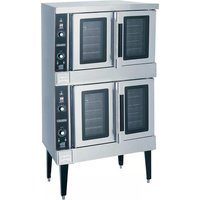
The DEC & HEC Series Oven is a single cavity oven furnished with five racks. On DEC ovens, independently opening doors are standard; simultaneously opening doors with chain mechanism underneath are optional. On HEC ovens, simultaneously opening doors with chain mechanism underneath are standard; independently opening doors are optional. Oven lights with on-off switch are standard on all models.
An open stand with lower storage rack is available as an option.
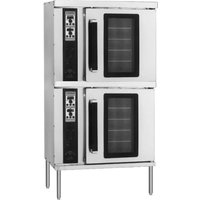
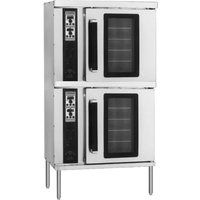
Stacked ovens are furnished with either Stacking Kit ELECLEG-STACK (8" LEGS) or Stacking Kit ELECCST-STACK (CASTERS) for mounting one oven on top of the other.
Additional racks are available as accessories.
Features of the models are shown below:
SNOITPO&SERUTAEF
| One Interior Pth | One Exterior Pth | Thermostat | Timer | Bst & Hold | H6 Term | tSck iK with gel* | tSck with Casters * | Legs with eEt | Legs with Casters | rt8 with Rack eEt | rt8 with Rack Casters | |
| DEC5 | 26^1/2"7ft | 41^1/2"5ft | Solid State | 1 Hr. Dial | NA | Opt. | Opt. | Opt. | Std. | Opt. | Opt. | Opt. |
| HEC5 | 26^1/2"7ft | 41^1/2"5ft | Solid State | 1 Hr. Dial | NA | Opt. | Opt. | Opt. | Std. | Opt. | Opt. | Opt. |
| D5CEH | 26^1/2"7ft | 41^1/2"5ft | poteC | 24 Hr. Digital | Std. | NA | Opt. | Opt. | Std. | Opt. | Opt. | Opt. |
| X5CEH | 30^1/2"7ft | 45^1/2"5ft | Solid State | 1 Hr. Dial | NA | Opt. | Opt. | Opt. | Std. | Opt. | Opt. | Opt. |
| XD5CEH | 30^1/2"7ft | 45^1/2"5ft | poteC | 24 Hr. Digital | Std. | NA | Opt. | Opt. | Std. | Opt. | Opt. | Opt. |
* With Two Stacked Ovens Only.
INSTALLATION
UNPACKING
Immediately after unpacking the oven, check for possible shipping damage. If the oven is found to be damaged, save the packaging material and contact the carrier within 15 days of delivery.
Prior to installation, verify that the electrical service agrees with the specifications on the oven data plate, located on the inside of the top front cover.
Do not use the doors or their handles to lift the oven.
LOCATION
The installation location must allow adequate clearances for servicing and proper operation. For solid state and digitally controlled models, there must be 18" (45 cm) of clearance on the right side of the oven from any open flame.
INSTALLATION CODES AND STANDARDS
In the United States, install the oven in accordance with: 1) State and local codes; 2) National Electrical Code, NFPA-70 (latest edition) and 3) NFPA Standard #96, Vapor Removal from Cooking Equipment (latest edition), available from National Fire Protection Association, Batterymarch Park, Quincy, MA 02269.
In Canada, install the oven in accordance with: 1) Local codes; 2) Canadian Electrical Code, CSA Standard C22.2 No. 1 (latest edition) and 3) Canadian Standard for Commercial Cooking Equipment CSA Standard C22.2 No.109 (latest edition).
INSTALLING BASIC OVEN
The basic oven must be installed on legs or mounted on a modular stand. Installations on concrete bases or other supports restricting air circulation underneath the oven is not advisable and may void the warranty. If using the modular stand, set the oven on the stand after unpacking.
ASSEMBLING THE LEGS TO THE SINGLE OVEN
The legs must be installed on the bottom of the oven. Gently position the oven on its left side, taking care not to cause scratches or damage.
Attach each of the four leg assemblies to the bottom of the oven with the 24 bolts and lockwashers (six bolts and lockwashers per leg). Carefully raise the oven to its normal position.
LEVELING
Adjust the legs to ensure that the oven racks are level in the final installed position.
CASTERS
If the oven is to be installed on casters, assemble the casters to the legs provided. Then attach the caster-leg units to the oven at each corner using the 24 bolts and lockwashers (six bolts and lockwashers per leg). Place the locking casters on the front legs and nonlocking casters on the rear legs.
ASSEMBLING THE STAND TO THE OVEN
Attach each of the four leg assemblies to the bottom of the oven with the 24 bolts and lockwashers (six per leg). Carefully raise the oven to the normal position.
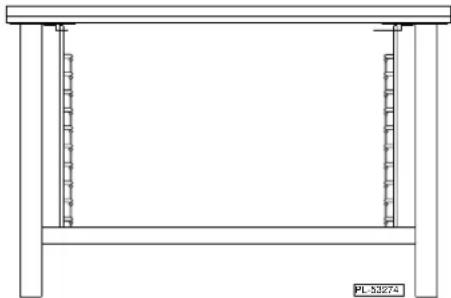
Attach the undershelf to the legs with eight bolts and lockwashers (two per leg).
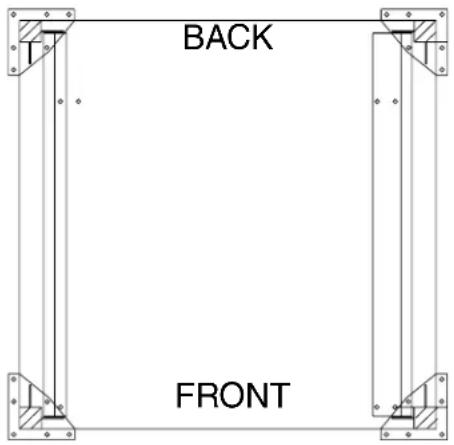
Install the rack guides into the shelf at the desired locations (for pan or flat rack), then attach the rack supports to the top end of the rack guides. Attach rack supports to the leg assembly by removing one middle bolt and reattaching the back through the end holes in the rack support (Fig. 2).
natural_image
Simple line drawing of a two-legged table with vertical supports and a base plate (no text or symbols)Fig. 2
ELECTRICAL CONNECTIONS
WARNING: ELECTRICAL AND GROUNDING CONNECTIONS MUST COMPLY WITH THE APPLICABLE PORTIONS OF THE NATIONAL ELECTRICAL CODE ANSI/NFPA70 (LATEST EDITION) AND/OR OTHER LOCAL ELECTRICAL CODES.
WARNING: DISCONNECT ELECTRICAL POWER SUPPLY AND PLACE A TAG AT THE DISCONNECT SWITCH TO INDICATE THAT YOU ARE WORKING ON THE CIRCUIT.
Remove the wiring compartment cover on the front of the oven. Remove the appropriate knockout on the bottom of the oven and attach the power supply conduit to the bottom of the oven.
Comply with the wiring diagram (located inside the right side panel) when making connections to the electrical supply lines.
Replace the wiring compartment cover and right side panel. Turn on the power supply.
ELECTRICAL DATA
| TOTAL KW KW | 208-240 V 480 V3-PHASE LOADING | 3-PHASE LOADING | NOMINAL AMPERES PER LINE WIRE | ||||||||||||||||
| 3-PHASE | 1-PHASE | ||||||||||||||||||
| PER PHASE KW P | PER PHASE | 208 V | 240 V | 480 V | 208 V | 240 V | 480 V | ||||||||||||
| L1-L2 | 2-L3 L | 1-L3 L | L1-L2 L2 | L3 L1 | L3 | L1 L | 2 L3 L | 1 L2 L | 3 L1 L2 | L3 | |||||||||
| Single Oven | 12.5 | 4 | 4 | 4.5 | 4 | 4 | 4.5 | 35 | 33 | 35 | 33 | 29 | 33 | 14.4 | 15.3 | 15.3 | 60 | 52 | 26 |
| Stacked Oven | 25 | 8 | 8 | 9 | 8 | 8 | 9 | 70 | 66 | 70 | 66 | 58 | 66 | 28.8 | 30.6 | 30.6 | 120 | 104 | 52 |
ASSEMBLING STACKED OVENS
Unpack the ovens and the stack kit. Position the oven to be used as the bottom oven on its left side for access to the oven bottom, taking care not to scratch or damage it.
Attach the four leg assemblies with the 24 bolts and lockwashers (six per leg).
Place the lower oven (with legs) on the floor and remove two 716 " (11 mm) diameter knockouts on each side of the top cover.
Install two locating studs to the bottom of the top oven per stacking kit instructions.
Move the oven with legs to the installed position. Place the upper oven on top of the lower oven using the locating studs.
Remove the optional rear panel, if provided, from the TOP oven. Install the Stacking Flue (Fig. 3) with the four screws provided. Replace the top oven rear panel, if provided.
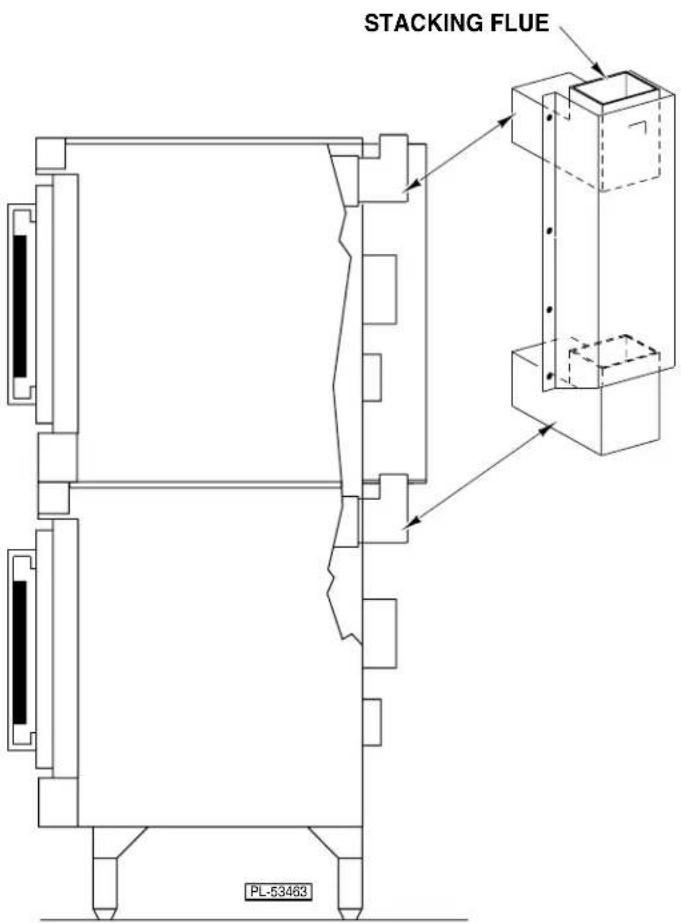
Fig. 3
ELECTRICAL CONNECTIONS (Stacked Ovens)
WARNING: ELECTRICAL AND GROUNDING CONNECTIONS MUST COMPLY WITH THE APPLICABLE PORTIONS OF THE NATIONAL ELECTRICAL CODE AND/OR OTHER LOCAL ELECTRICAL CODES.
WARNING: DISCONNECT ELECTRICAL POWER SUPPLY AND PLACE A TAG AT THE DISCONNECT SWITCH TO INDICATE THAT YOU ARE WORKING ON THE CIRCUIT.
Make sure that the electrical power supply agrees with the specifications on the oven data plate, the wiring diagram on the oven and Electrical Data, page 5.
- Wires to connect both ovens are provided with each oven. Carefully route these leads from the top oven through the bushing (supplied with the stacking kit) through the electrical access knockout holes common to both ovens.
- Connect wires X, Y and Z from the upper oven to the lower oven per the wiring diagram using wire nuts provided. Attach the power supply conduit to the bottom of the lower oven. Connect the power supply leads to the line side of the terminal block on the bottom oven.
- Finally, inspect and check all wiring and terminal connections for tightness or pinch points (cover on oven frame).
- Refer to reference drawing 426986 supplied with the stacking kit for electrical connection instructions.
- Refer to instructions supplied with the stacking kit for marking the combined electrical load information to the electrical data plate of the bottom oven.
OPERATION
WARNING: THE OVEN AND ITS PARTS ARE HOT. USE CARE WHEN OPERATING, CLEANING OR PERFORMING ANY MAINTENANCE.
CONTROLS — MODELS DEC5/HEC5/HEC5X
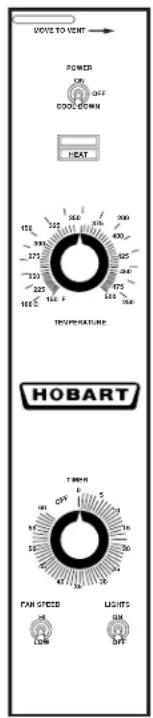
PL-53496
MOISTURE VENT DAMPER – Open the damper to exhaust excess moisture. Close the damper when cooking dry products. Select settings between OPEN and CLOSED for optimum performance.
POWER Switch - ON - Turns oven control circuits on.
- OFF - Turns oven control circuits off.
- COOL DOWN - Allows the fan motor to run with the doors ajar to speed oven cooling.
ON LIGHT (Amber) – Lit when POWER SWITCH is turned to ON.
HEAT LIGHT (White) – Comes on and goes off when the heating elements cycle on and off.
TEMPERATURE – Controls oven temperature.
TIMER – Use to set the cooking time. Alarm sounds continuously when time has elapsed to 0. Turn the timer OFF to silence the alarm. The timer does not turn the oven off. Keep timer set to OFF when the oven is not in use.
FAN SPEED – Adjust air velocity in the oven cavity.
HI - Normal operating speed.
LOW - Use this setting when cooking a delicate product like meringue, which could blow around in the oven.
LIGHTS - ON - Turns the interior lights on.
- OFF - Turns the interior lights off.
BEFORE FIRST USE (All Models)
Before using the oven for the first time, it must be burned off to release any odors that might result from heating the new surfaces in the chamber.
- Using a clean damp cloth, wipe the inside of the oven, including the racks.
- Close the oven doors, turn the Power Switch ON, turn the Thermostat to 300^ F ( 149^ C) and allow the oven to cycle for 6 to 8 hours before turning the Power Switch OFF.
USING MODELS HEC5/HEC5X
Preheating
- Turn POWER SWITCH to ON. Amber ON light will come on, indicating that power to oven is on.
- Set Thermostat as desired. Refer to COOKING GUIDELINES for suggested temperatures and times for various products.
- Prepare product and place in suitable pans. When white HEAT light goes off, oven has reached desired preheat temperature.
Cooking
- Open doors and load the product into the oven. Place pans in the center of the racks. Close doors.
- Set the Timer. After the preset time lapses, turn TIMER to OFF position to stop alarm.
- When product is done, open doors and carefully remove cooked product from the oven. Care should be taken when wiping up any spills, as oven is still hot.
End of Day
- Turn Thermostat to OFF.
- Turn POWER SWITCH to COOL DOWN. Leave doors open while the fan is on to cool the oven.
- When oven has cooled sufficiently, turn POWER SWITCH to OFF and clean the oven.
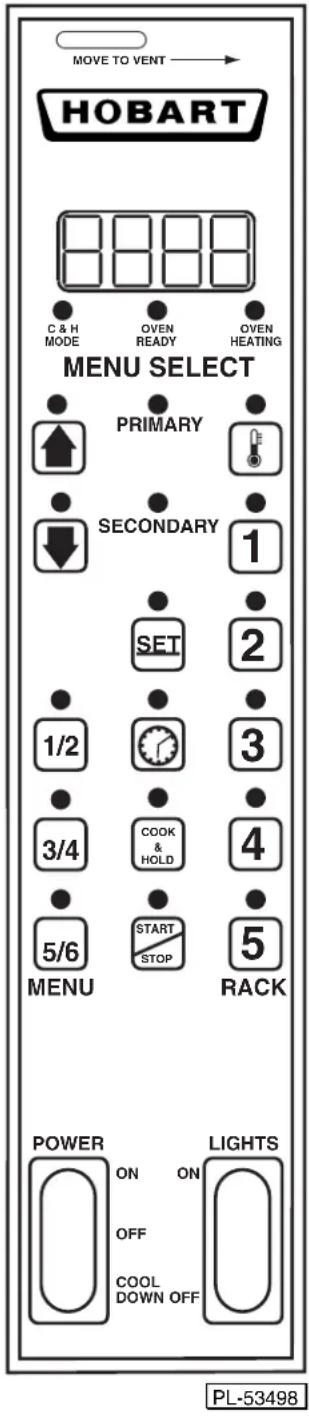
![Always displays [HR:Min] when setting the Time. Displays [HR:Min] if the countdown Time is more than 1 Hour. Displays [Min:Sec] if the countdown Time is less than 1 Hour. Displays Temperature in °F. C & H MODE Indicates the oven is in the Cook and Hold Mode. OVEN READY Indicates the oven is preheated and ready for cooking. OVEN HEATING Indicates the oven is preheating. PRIMARY Primary indicates Menu Items 1, 3 or 5. SECONDARY Secondary indicates Menu Items 2, 4 or 6. Up arrow increases and Down arrow decreases a displayed Time or Temperature value (if arrow keys are lit). TEMPERATURE: Use with SET to set the oven temperature. SET SET: Use with Time or Temperature. TIME: Use with SET to manually set the time. COOK & HOLD Selects Cook & Hold mode; also selects Low Fan Speed. START STOP Press once to start; press a second time to stop. 1/2 3/4 5/6 Press once for Primary Menu Items (1, 3 or 5). Press a second time for Secondary Menu Items (2, 4 or 6). 1 2 3 4 5 Rack Buttons select individual Menu/Rack Number Cook Times — once programmed.](/content/2026/05/1042222/images/5816f50062c68937398662135c93336abbe76123cd1cbbae0155e7c935500d0a.jpg)
MANUALLY SETTING THE TEMPERATURE AND COOK TIME
To Set the Temperature
- Press the SET button. Press the TEMPERATURE button; StPt displays to indicate Setpoint.
- Use the Up and Down arrow keys to increase or decrease the displayed Temperature value.
- Press the SET button again to save the Temperature setpoint in the computer.
To Set the Cook Time
- Press the SET button. Press the TIME button. Time displays to indicate TIME.
- Use the Up and Down arrow keys to increase or decrease the displayed Cook Time (HR:Min).
- Press the SET button again to save the Time setting in the computer.
To Start Cooking
- Press the START/STOP button.
- The manual Cook Time counts down to 00:00. Displays [HR:Min] above 1 hour; [Min:Sec] below.
- The buzzer will sound. To silence the buzzer, press the START/STOP button again.
- The control retains the manual settings for Temperature and Time.
TO PROGRAM MENU ITEM AND RACK NUMBER COOK TIMES
Factory Preset and Programmable Cook Times are shown in the table, below:
| MENUNOITOERS | MENU | TESERPYROTCAF | SEULAVELBAMMARGORP | |||||||
| METIUMEMITKOOC | NEMEM | METIUMEMITKOOC | 1KCAM | 2KCM | 3KCM | 4KCM | 5KCM | 6 | ||
| yramirP2/1 | 1 | n. | i | m | 0 | |||||
| yradno82/1 | 2 | n. | i | m | 5 | |||||
| yramirP4/3 | 3 | n. | i | m | 0 | |||||
| 3/4 Secondary | 4 | 25 min. | ||||||||
| 5/6 Primary | 5 | 30 min. | ||||||||
| 5/6 Secondary | 6 | 35 min. | ||||||||
The Primary indicator light with Menu 1/2 selects Menu Item 1 (Factory Preset Cook Time = 10 minutes). The Secondary indicator light with Menu 1/2 selects Menu Item 2 (Factory Preset Cook Time = 15 minutes). This is similar, for Menu Buttons 3/4 or 5/6. Any Menu Item Cook Time can be changed using the procedure below. Rack number Cook Times may be programmed if desired but are not required.
To Change the Time Setting for any Menu Item (1 - 6)
- To enter program mode, press and hold the Up and Down arrow buttons until PrOG displays.
- Select the Menu Item to be programmed (1 - 6). Time displays to indicate TIME. Use the Up and Down arrow buttons to increase or decrease the Menu Item's COOK TIME. Repeat this step for any other Menu Items.
- Press the START/STOP button; LOC displays. Press the START/STOP button a second time to save the Menu Item(s)' COOK TIME(s).
- Press the START/STOP button once to begin cooking (with the Menu Item's Cook Time). To exit, press the START/STOP button a second time.
To Program Individual Rack Number Cook Times for a Menu Item
- To enter program mode, press and hold the Up and Down arrow buttons until PrOG displays.
- Select the Menu Item to be programmed (1 - 6); Tine displays to indicate TIME.
- Then select the rack number (1 - 5) . [t 1] indicates rack 1; [t 2] indicates rack 2 and so on. Use the Up and Down arrows to increase or decrease the COOK TIME for any rack number.
- Press the START/STOP button; LOC displays. Press the START/STOP button a second time to save the Menu/Rack Number's COOK TIME(s).
- To exit program mode, press START/STOP twice.
Always Set the Temperature Before Setting the Time
- Press the SET button. Press the TEMPERATURE button; StPt displays. Use the Up and Down arrow keys to increase or decrease the temperature. To save, press the SET button again.
At startup, the display will initially show a GROWING BAR. When the oven temperature reaches the Set Point, the set temperature displays. The READY light is lit, the HEAT light goes out and the oven is ready for you to select the Cook Time, Menu Item Cook Time or Menu/Rack Number Cook Time.
Starting a Timed Cycle On All Racks
- Open the door; door will display.
- Place the desired product on any of the five racks.
- Close the door. The display should return to the set temperature or the GROWING BAR.
- Press the Menu Key once for Primary or twice for Secondary to select a Menu Item Cook Time.
- Press the START/STOP button. Pressing the START/STOP button after making a menu selection will time all racks for the selected menu time.
- The timer will count down the time remaining for the Menu Item Cook Time.
- When the time has counted down to 00:00, the buzzer will sound and all Rack Buttons will flash.
- To silence the buzzer, press the START/STOP button.
Starting a Timed Cycle Using Programmed Individual Menu/Rack Number Cook Time(s)
- After the set temperature is reached, open the door; door displays. Place product(s) in oven.
- Close the door. The display returns to the set Temperature or the GROWING BAR.
- Select the Menu Item (once for Primary or twice for Secondary) and the Rack Number to select the Menu/Rack Number Cook Time. If using simultaneous cook times, select the other Menu/Rack Number's.
- The timer selects the rack number with the shortest cook time and counts down to 00:00.
- The buzzer sounds and the rack number flashes. To silence the buzzer, press the flashing Rack Number.
- Open the door; door displays. Remove the finished product and close the door.
- The next shortest cook time displays, its rack number flashes and the time counts down to 00:00.
- The buzzer sounds. Press the flashing Rack Number. Open the door, door displays. Remove the product and close the door.
- Repeat steps 7 through 8 until all rack number's are done.
To Display the Actual Oven Temperature
- Press and hold the Temperature button for 3 seconds to display Actual Oven Temp until released.
To End a Cooking Cycle
At the end of a cooking cycle, the alarm will sound. To silence the alarm and end a Menu Item cooking cycle, press START/STOP. To silence the alarm and end a rack number cooking cycle, press the Rack Number.
To cancel a cooking cycle which might have been started in error, press and hold the Rack Number button to be terminated and press START/STOP at the same time.
Door and Timing
Opening the door while loading additional product will interrupt all timing functions until the door is closed and the timer resumes. For example, if a product time had diminished to 1 minute and the door was opened for 30 seconds and then closed, the timer would still show 1 minute.
SETTING THE OVEN FOR COOK & HOLD
- Press the COOK & HOLD button to select Cook & Hold.
- Set the first stage Temperature and the Cook Time as described in: MANUALLY SETTING THE TEMPERATURE AND COOK TIME. Press START/STOP to begin cooking.
- The HOLD Temperature is preset by the computer control at 150^ F ( 66^ C).
- The LOW FAN SPEED is present during Cook & Hold. Use Cook & Hold to select LOW FAN SPEED.
COOK & HOLD OPERATION — Models HEC5D and HEC5DX
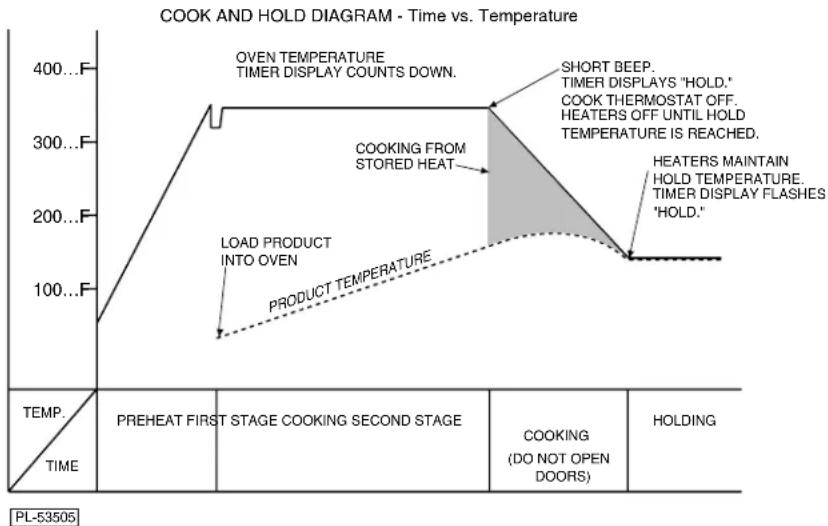
Cook & Hold roasts the product in two stages. During First Stage Cooking, the oven temperature is regulated by the Temperature setpoint and the Time setting. After the time counts down to 00:00, Second Stage Cooking begins. During Second Stage Cooking, the heating elements are off as the temperature in the oven declines to the Hold Temperature. The doors should remain closed during Second Stage Cooking.
When the Hold temperature is reached, the display flashes HOLD. Temperature in the oven will be maintained at the Hold temperature until the oven is turned off.
line
| Temperature | Time (°F) | | ----------- | --------- | | 0 | 0 | | 350 | 350 | | 150 | 150 |PROPER UTENSILS
The use of proper utensils can enhance oven operation. Medium and lightweight pans allow the product to warm faster. Roast meats in shallow pans deep enough to hold all juices yet allow free air circulation.
OPERATING HINTS
When using the convection oven for the first time with a particular food, check the degree of doneness periodically before the suggested time has elapsed. This will ensure the desired doneness is achieved.
Record your temperature and time settings for various products. The convection oven can provide consistent and repeatable results.
The convection oven is faster than conventional deck-type ovens; temperature settings are lower and cook times are shorter. Since recipes and foods are subject to many variations and tastes, the guidelines regarding Times and Temperatures in this manual are SUGGESTIONS ONLY. Experiment with your food products to determine the cooking temperatures and times that give you the best results.
NOTE: For a more even bake in models HEC5X and HEC5DX, place the pans horizontally in the center of the oven rack and decrease the suggested cooking temperature by 50^ F ( 10^ C).
COOKING GUIDELINES
The information in the Cooking Guidelines chart is suggested only. Cooking times for various products may be different depending on the brand, consistency and the chef's preferences for taste and presentation. The times below may require adjustments. Note the times and temperatures of your preferred results for future use. The preheating time for all of the following is 15 minutes. The computer control's Holding Temperature is preset at 150^ F ( 66^ C) and cannot be changed.
COOKING GUIDELINES (HOLDING FEATURE)
| Product | Amount Temp. Ibs. (kg) | Cooking Time Time °F (°C) | Cooking Min. Cook Temp. Hours | Hold Max. Hold Temp. Hours | Internal Internal °F (°C) | °F (°C) |
| Prime Rib | 20 (9.06) | 225 (107) | 5 | 4 | 140 (60) | |
| Rib Eye Boneless | 12 (5.43) | 225 (107) | 3 | 4 | 140 (60) | |
| Top Round | 20 (9.06) | 225 (107) | 5 | 4 | 140 (60) | |
| Steamship Round | 20 (9.06) | 225 (107) | 7 | 2 | 140 (60) | |
| Bottom Round | 20 (9.06) | 225 (107) | 5 | 8 | 140 (60) | |
| Boneless Strip Loin | 12 (5.43) | 225 (107) | 3 | 4 | 140 (60) | |
| Whole Tenderloin | 6 (2.71) | 225 (107) | 2 | 2 | 140 (60) | |
| Top Sirloin Butt | 14 (6.34) | 225 (107) | 3 | 4 | 140 (60) | |
| Beef Short Ribs | 10 (4.53) | 225 (107) | 4 | 4 | 165 (74) | |
| Cube Steaks | 10 (5.43) | 225 (107) | 3 | 3 | 180 (82) | |
| Beef Back Ribs | 30 (13.6) | 225 (107) | 5 | 4 | 175 (79) | |
| Beef Stew | 10 (5.43) | 225 (107) | 4 | 6 | 175 (79) | 150 (66) |
| Corned Beef | 12 (5.43) | 250 (121) | 4 | 4 | 165 (74) | 150 (66) |
| Fresh Ham | 12 (5.43) | 250 (121) | 6 | 4 | 165 (74) | |
| Cooked Cured Ham | 12 (5.43) | 250 (121) | 4 | 4 | 135 (57) | |
| Pork Back Ribs | 10 (4.53) | 250 (121) | 5 | 3 | 175 (79) | 150 (66) |
| Pork Spare Ribs | 30 (13.6) | 250 (121) | 5 | 4 | 175 (79) | 150 (66) |
| Fresh Sausages | 10 (4.53) | 225 (107) | 2 | 5 (Max) | 175 (79) | |
| Pre-Cooked Sausage | 10 (4.53) 250 (121) | 1 | ^3/_4 | 5^1/_2 (Max) | 160 (71) | |
| Roast Suckling Pig | 30 (13.6) | 250 (121) | 6 | 3 | 170 (77) | 155 (68) |
| Bacon | 350 (177) | 40 min. | N/A | |||
| Roasted Chicken | 10 (4.56) | 350 (177) | 45 min. | N/A | 165 (74) | |
| Chicken Pieces (per tray) | 10 (4.56) | 250 (121) | 2^1/_2 | ^1/_2 (Max) | 170 (77) | 150 (66) |
| Whole Chickens(per chicken) | 3.25 (1.47) | 250 (121) | 2^1/_2 | 4^1/_2 (Max) | 170 (77) | 150 (66) |
| Whole Turkeys | 20 (9.06) | 230 (110) | 6^1/_2 | 12 (Max) | 170 (77) | 160 (71) |
| Bone In Turkey Breast | 10 (4.53) | 250 (121) | 5 | 1 | 160 (71) | 150 (66) |
| Roast Duckling (per duck) | 4 (1.81) | 350 (177) | 1^1/_2 | 3 (Max) | 170 (77) | 150 (66) |
| Rack of Lamb | 15 racks per tray | 250 (121) | 3^1/_22 | ^1/_2 | 160 (71) | |
| Lamb Shanks, Braised | 250 (121) | 4 | 4 | 180 (82) | 150 (66) | |
| Fish Filets | 4-6 oz. (23g) | 225 (107) | 40 min. | 4 | 160 (71) | |
| Clear Soups | 1/1 Gastronome or 12x20x4" Steam Pan | 225 (107) | 3 | Overnight | 175 (79) | 150 (66) |
| Frozen Pizza | (2) 18" Pies | 350 (177) | 15 min. | 2 | 175 (79) | 160 (71) |
| Rice | 1 Qt. dry | 250 (121) | 2 | 18 | 160 (171) | N/A |
| Baked Potatoes | 90 CT. | 350 (177) | 1 | 1^1/_2 | 200 (93) | 170 (77) |
| Product Amount Temp. Time | |||
| Frozen Croissant Dough | 1.75 oz. | 350°F (177°C) | 25 Min |
| Cinnamon Croissant | 1.75 oz. | 350°F (177°C) | 35 Min. |
| Small Bread Loaves | 1 Tray | 350°F (177°C) | 30 Min. |
| Large Bread Loaves | 1.5 lbs. | 350°F (177°C) | 60 Min. |
| Sheet Cake | (1) 18x26" Tray | 300°F (149°C) | 25 Min. |
| Scone Mix | 1 Tray | 350°F (177°C) | 30 Min. |
| Muffin Mix | 1 Tray | 350°F (177°C) | 30 Min. |
| Kaiser Rolls | 1 Tray | 350°F (177°C) | 16 Min. |
| Italian Bread | 1 Tray | 350°F (177°C) | 40 Min. |
| Danish Rounds* | 1 Tray | 350°F (177°C) | 30 Min. |
| Cream Cake* | 1 Tray | 350°F (177°C) | 60 Min. |
| Cookies | 1 Tray | 325°F (163°C) | 16 Min. |
*The maximum internal cooking temperature should be 190°F (88°C).
POWER OUTAGE
In case of a power outage, the oven will automatically shut down. When power is restored to the lines, the oven will resume its normal operation. However, if the oven is to be left unattended during a power outage, push the POWER switch to the OFF position. When power is restored to the lines, push POWER switch to the ON position, wait for the oven to preheat, then resume normal cooking operations.
CLEANING
WARNING: DISCONNECT ELECTRICAL SUPPLY AND PLACE A TAG AT THE DISCONNECT SWITCH TO INDICATING THAT YOU ARE WORKING ON THE OVEN BEFORE CLEANING.
- Clean outside of the oven daily by wiping with a clean, damp cloth.
- Clean porcelain oven interior daily with soap or detergent and water. Rinse thoroughly and wipe dry with a soft, clean cloth.
Optional Stainless Steel Oven Interior
Soap or detergent and water usually handle routine cleaning. Rinse thoroughly and dry with a soft, clean cloth.
For burned-on foods and grease which resist simple soap and water cleaning, an abrasive cleanser (scouring powder) mixed into a paste may be used. Apply with stainless steel wool or sponge, always rubbing with the grain.
This treatment is equally effective for "heat tint" (slightly darkened areas caused by oxidation). Again, remember to rub in the direction of the polish lines. Rinse with clear water and dry with a soft cloth.
MAINTENANCE
WARNING: THE OVEN AND ITS PARTS ARE HOT. USE CARE WHEN OPERATING, CLEANING, OR PERFORMING ANY MAINTENANCE.
WARNING: DISCONNECT ELECTRICAL SUPPLY AND PLACE A TAG AT THE DISCONNECT SWITCH TO INDICATING THAT YOU ARE WORKING ON THE OVEN BEFORE PERFORMING ANY MAINTENANCE.
The fan motor comes with sealed bearings and requires no lubrication.
Annually check the vent, when cool, to be sure it is free of obstructions.
REPLACING LAMPS
- Allow oven to cool.
- Remove all racks by pulling forward, lifting up and out.
- Unscrew glass dome(s) from light body.
-
Replace the bulb(s).
-
Reassemble glass dome(s) and racks by reversing the disassembly procedure.
SERVICE
Contact your local Hobart-authorized service office for any repairs or adjustments needed on this equipment. Long-term service contracts are available on this and other Hobart products.
- TABLE OF CONTENTS
- GENERAL 3
- INSTALLATION 4
- OPERATION 8
- MAINTENANCE 16
- Installation, Operation and Care of
- DEC & HEC SERIES
- ELECTRIC CONVECTION OVENS
- SAVE THESE INSTRUCTIONS
- GENERAL
- INSTALLATION
- UNPACKING
- LOCATION
- INSTALLATION CODES AND STANDARDS
- INSTALLING BASIC OVEN
- ASSEMBLING THE LEGS TO THE SINGLE OVEN
- LEVELING
- CASTERS
- ASSEMBLING THE STAND TO THE OVEN
- ELECTRICAL CONNECTIONS
- ASSEMBLING STACKED OVENS
- ELECTRICAL CONNECTIONS (Stacked Ovens)
- OPERATION
- BEFORE FIRST USE (All Models)
- USING MODELS HEC5/HEC5X
- Preheating
- Cooking
- End of Day
- MANUALLY SETTING THE TEMPERATURE AND COOK TIME
- To Set the Temperature
- To Set the Cook Time
- To Start Cooking
- TO PROGRAM MENU ITEM AND RACK NUMBER COOK TIMES
- To Change the Time Setting for any Menu Item (1 - 6)
- To Program Individual Rack Number Cook Times for a Menu Item
- Always Set the Temperature Before Setting the Time
- Starting a Timed Cycle On All Racks
- Starting a Timed Cycle Using Programmed Individual Menu/Rack Number Cook Time(s)
- To Display the Actual Oven Temperature
- To End a Cooking Cycle
- Door and Timing
- SETTING THE OVEN FOR COOK & HOLD
- COOK & HOLD OPERATION — Models HEC5D and HEC5DX
- PROPER UTENSILS
- OPERATING HINTS
- COOKING GUIDELINES
- POWER OUTAGE
- CLEANING
- Optional Stainless Steel Oven Interior
- MAINTENANCE
- REPLACING LAMPS
- SERVICE
Brand : Hobart
Model : HEC501
Category : Oven