
HALO 60 - Loudspeaker WyreStorm - Free user manual and instructions
Find the device manual for free HALO 60 WyreStorm in PDF.


| Brand | WyreStorm |
| Model | HALO 60 |
| Product Type | Speakerphone with Bluetooth and USB-C connectivity |
| Dimensions | 36 mm (height) x 120 mm (diameter) |
| Weight | 0.29 kg (0.64 lb) |
| Power Supply | 5V DC, 1A via USB-C |
| Power Consumption | Max 5W |
| Battery Type | Rechargeable lithium-ion, 2500mAh |
| Battery Life | Up to 10 hours |
| Audio Input | 1x USB-C (USB 2.0), Bluetooth |
| Microphone | 360° 4x Omni-directional Mic Array with Echo Cancellation |
| Microphone Pickup Range | Up to 3 m (10 ft) |
| Microphone Frequency Range | 100 - 10,000 Hz |
| Speaker | 3 watts |
| Speaker Frequency Range | 10 - 20,000 Hz |
| Signal-to-Noise Ratio | 80 dB |
| Max Speaker Audio Pressure | 104 dB SPL |
| Controls | Capacitive touch buttons: power, Bluetooth, volume +/-, mute, call/end, battery indicator |
| Connectivity | Bluetooth (for HALO 60) |
| Compatible Software | Zoom, Microsoft Teams (and other conferencing apps) |
| Operating Temperature | 0°C to 45°C (32°F to 113°F) |
| Storage Temperature | -20°C to 70°C (-4°F to 158°F) |
| Certifications | CE, FCC, RoHS, RCM, EAC |
| Warranty | 2 years limited |
| Maintenance | Clean with soft dry cloth. Do not use liquids or abrasive cleaners. |
Frequently Asked Questions - HALO 60 WyreStorm
User questions about HALO 60 WyreStorm
0 question about this device. Answer the ones you know or ask your own.
Ask a new question about this device
Download the instructions for your Loudspeaker in PDF format for free! Find your manual HALO 60 - WyreStorm and take your electronic device back in hand. On this page are published all the documents necessary for the use of your device. HALO 60 by WyreStorm.
USER MANUAL HALO 60 WyreStorm
Setting up the Speakerphone
CONNECTING THE SPEAKERPHONE
-
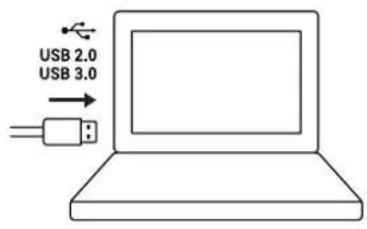
Connect the supplied USB Type-C cable into the port at the base of the speakerphone.
-
Connect the other end of the supplied cable into an available port on your PC or Laptop.
-
The speakerphone will automatically power on, which is indicated by the Power LED shown below.

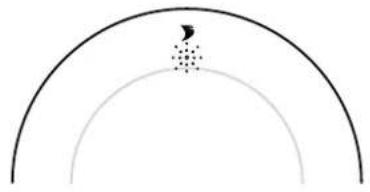
Note: If the Speakerphone is powered off and there is still a USB device connected, simply hold the Power button for 2 seconds and the device will power on.
Connecting via Bluetooth(ONLY APPLICABLE FOR HALO 60)

To begin, make sure that the Halo 60 is discoverable. To do this, turn Bluetooth on by tapping the Bluetooth button on the device. The LED will illuminate white, indicating Bluetooth is on. Next, press and hold the Bluetooth button until the LED flashes blue. Now the Halo 60 is discoverable.
CONNECTING TO A LAPTOP/PC
-
Navigate to your connectivity settings on your device and ensure Bluetooth is switched on.
-
Click on Add Bluetooth or other device. Then a new menu should appear. Click the Bluetooth option.
-
A list of all discoverable Bluetooth devices should now appear. Click on the Device named WyreStorm HALO 60 and after a few seconds, you will be connected.


CONNECTING TO A MOBILE DEVICE
-
Navigate to your connectivity settings on your mobile device and ensure Bluetooth is switched on.
-
All nearby Bluetooth devices should now show. Press WyreStorm HALO 60 and after a few seconds, you will be connected.


Call/End Buttons

Answer/End buttons are for use with the paired Bluetooth device only and not compatible with conferencing software.
Software Device Setup
Connecting To Zoom
To connect the WyreStorm HALO Speakerphone to your Zoom software, first navigate to your settings pane which can be found by clicking the gear icon in the top right hand corner, then click on the Audio tab. Here you can change the speaker and microphone by using the dropdown menus. Select WyreStorm HALO device under the applicable options.

Connecting To Microsoft Teams
To connect the WyreStorm HALO Speakerphone to your Microsoft Teams software, first navigate to your settings pane which can be found by clicking on your display image in the top right hand corner, then click on the devices tab. Here you can change the Audio device by using the dropdown menu. Select WyreStorm HALO device under the applicable options.
Settings
General
Accounts
Privacy
Notifications
Devices
App permissions
Captions and transcripts
Calls
Audio devices
WyreStorm HALO 60
Speaker
WyreStorm HALO 60
Microphone
WyreStorm HALO 60
Automatically adjust mic sensitivity
Make a test call

Specifications
| HALO 30 HALO 60 | ||
| Audio and Video | ||
| Inputs | 1x USB-C Input | |
| Supported Standards USB 2.0 | ||
| Speakerphone | ||
| Microphone | 360° 4x Omni-directional Mic Array with Echo Cancellation | |
| Microphone Pickup and Audio Range | 3m/10ft | |
| Microphone Frequency Range | 100~10kHz | 100~10kHz |
| Microphone Type | Digital MEMS | Digital MEMS |
| Speaker | 2 watts | 3 watts |
| Speaker Frequency Range | 10~20kHz | 10~20kHz |
| Signal-to-Noise Ratio | 80dB | 80dB |
| Max Speaker Audio Pressure | 102dB SPL | 104dB SPL |
| Control | Capacitive touch power on/off, volume +/- and microphone mute buttons | Capacitive touch power on/off, Bluetooth® on/off, battery level indicator, call/end, volume +/- and microphone mute buttons |
| Power | ||
| Power Supply | 5V DC 1A 5V DC 1A | |
| Power Consumption Max: 2.5 watts Max 5 watts | ||
| Battery Life NA Up to 10 hours | ||
| Battery Capacity NA 2500mAh | ||
| Environmental | ||
| Operating Temperature | 0 to +45°C (32 to +113 °F), 10% to 90%, non-condensing | |
| Storage Temperature -20 to +70°C (-4 to +158 °F), 10% to 90%, non-condensing | ||
| Max BTU 34 BTU/hr | ||
| Dimensions and Weight | ||
| Height | 36mm/1.42in | |
| Diameter 120mm/4.72in | ||
| Weight 0.22kg/0.49lb 0.29kg/0.64lb | ||
| Regulatory | ||
| Safety and Emission | CE | FCC | RoHS | RCM | EAC | |
Note: WyreStorm reserves the right to change product specification, appearance or dimensions of this product at any time without prior notice.
This equipment has been tested and found to comply with the limits for a Clave declare that this device is in compliance with the essential requirements and B digital device, pursuant to part 15 of the FCC Rules. These limits are designed rather relevant provisions of Directive 2014/53/EU.
to provide reasonable protection against harmful interference in a residential
installation. This equipment generates, uses and can radiate radio frequency enManufacturer: Shen Zhen Proitav Technology Co.,Ltd and, if not installed and used in accordance with the instructions, may cause Address: 301-401, Building 16, Hejing Industrial Park, No.87, Hexiu west harmful interference to radio communications. However, there is no guarantee Road,Heping Community, Fuhai street, Bacan District, Shenzhen, China interference will not occur in a particular installation. If this equipment does cause
harmful interference to radio or television reception, which can be determined. Accessory Manufacturer: ShenZhen Tianweixun Wireless Technology Co., Ltd by turning the equipment off and on, the user is encouraged to try to correct Adapter: Antenna
interference by one or more of the following measures:
Address of Manufacturer: 9/F, Building 1, Guole Science and Technology Park, No. 1 Lirong Road, Dalang Street, Longhua New District, Shenzhen
- Reorient or relocate the receiving antenna.
- Increase the separation between the equipment and receiver.
- Connect the equipment into an outlet on a circuit different from that to receiver is connected.
- Consult the dealer or an experienced radio/TV technician for help.
Accessory Manufacturer: Dongguan NB Power Electronic Limited Adapter: Power supply
Address of Manufacturer: No.365, South Dongkeng Road, Dongkeng Town, Dongguan City, 523443, P. R. China
The adapter shall be installed near the equipment and shall be easily accessible.
Changes or modifications not expressly approved by the party responsible for compliance could void the user's authority to operate the equipment.
The distance between user and products should be no less than 20cm.
Accessory Manufacturer: Shenzhen Ohonda Technology Co., LTD
Adapter: Terminal block
Address of Manufacturer: Room 609, Block D, Hongtaifu Building, Zone No.34, Bacan District, Shenzhen
Operating temperature: 0°C to 45°C
Wi-Fi Operation Frequency: 2412MHz\~2472MHz
Maximum Power: 16.74dBm(E.I.R.P.)
Warranty Information
WyreStorm Technologies ProAV Corporation warrants that its products to be free from defects in material and workmanship under normal use for a period of two (2) years from the date of purchase. Refer to the Product Warranty page on wyrestorm.com for more details on our limited product warranty.

Brand : WyreStorm
Model : HALO 60
Category : Loudspeaker