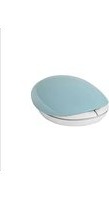
MEB-300 - Wireless Mouse LG - Free user manual and instructions
Find the device manual for free MEB-300 LG in PDF.


| Product Type | Countertop Microwave Oven |
| Model Number | MEB-300 |
| Brand | LG |
| Capacity | 1.5 cu. ft. |
| Power Output | 1100 Watts |
| Power Source | 120V, 60Hz, 12 Amps |
| Dimensions (W x D x H) | 21.5 x 17.3 x 12.8 inches |
| Weight | 35.3 lbs |
| Control Type | Digital touch with rotary dial |
| Display | LED display with clock and timer |
| Door Opening | Push-to-open, right hinged |
| Interior Material | Stainless steel with ceramic enamel |
| Cooking Functions | Microwave, grill, combination, defrost, reheat, auto cook |
| Auto Cook Programs | 20 pre-programmed recipes |
| Turntable | Glass turntable, 13.5 inches diameter |
| Interior Light | Yes, LED |
| Child Safety Lock | Yes, keypad lock |
| Cleaning Mode | Steam cleaning cycle |
| Eco Mode | Energy-saving standby |
| Warranty | 1 year limited, 10 years on magnetron |
Frequently Asked Questions - MEB-300 LG
User questions about MEB-300 LG
0 question about this device. Answer the ones you know or ask your own.
Ask a new question about this device
Download the instructions for your Wireless Mouse in PDF format for free! Find your manual MEB-300 - LG and take your electronic device back in hand. On this page are published all the documents necessary for the use of your device. MEB-300 by LG.
USER MANUAL MEB-300 LG
natural_image
Two diagrams showing a device with an upward and downward arrow, no text or symbols present.*本製品には電池が付属します。
All rights reserved.
© 2016 LG Electronics Inc.
Please read the Safety Precautions carefully before using this product.
After reading this manual, please keep it in an easily accessible location for future reference. Snelling mistakes or errors in this manual may be changed by LG Electronics without
Spelling mistakes of errors in this manual may be changed by ED Electronics without prior notification.
MEB-300 www.lg.com
Inserting Batteries

natural_image
Two diagrams showing a device with an upward and downward arrow, no text or symbols present.* A set of batteries is included with the product.
- Insert the batteries with the polarity oriented correctly.
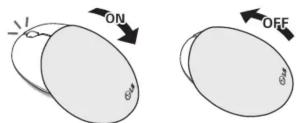
Turning the Power On/Off
123
Power Saving Mode
The mouse will automatically enter power saving mode if it is idle for a certain amount of time or its USB receiver is removed from the PC while being used in USB wireless mode. You can exit power saving mode by pressing the left or right mouse button.
Battery Status Indicator
If the status indicator above the scroll wheel continues
to blink, replace the batteries.


Using in Bluetooth® Mode
Pairing with a Mobile Device in Bluetooth Mode

* The mouse will enter the Pairing Mode and the blue status indicator above the scroll wheel will turn on.
* If the mouse is not connected to a mobile device after entering the Pairing Mode for a certain period of time, it will enter power saving mode.
Using in BluetoothMode

Using in USB Wireless Mode
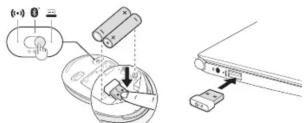
* The USB receiver can be stored inside the bottom panel of the mouse below the batteries.
Product Specifications
| Item Details | |
| Model MEB-300 | |
| Connection Method Bluetooth | Non-standard RF |
| Bluetooth Specification V 4.1 | |
| Operating Frequency 2.402 to 2 | 2,480 GHz |
| Communication Distance Up to | about 10 m |
| OS Compatibility | Bluetooths LL devices running AndroidTM 4.0 or laterMac OS X 10.7 or laterWindows® 7 or later |
| Dimensions | Open: 68 mm (W) X 106.4 mm (L) X 31.8 mm (H)Close: 68 mm (W) X 82.7 mm (L) X 31.6 mm (H) |
| Operating Temperature 0 °C - | 40 °C |
| Battery 2 X AAA Battery | |
Bluetooth® is a registered trademark of Bluetooth SIG, Inc. worldwide.

Bluetooth®
4567
Safety Precautions
WARNING
- Make sure to consult the manufacturer or retailer if your batteries are visibly swollen or corroded as they may be dangerous.
- Do not place near fire. (Do not place inside a microwave oven.)
• Make sure to not let any metallic objects such as necklaces, coins, keys or watches touch the battery ends.
• Do not point the light of the LED on the bottom of the optical mouse at your eyes
for the protection of your eyesight.
CAUTION
- Compatibility issues may arise with certain products when connecting to other products
LG Electronics does not guarantee compatibility with all peripheral devices.
- Use at temperatures between 0ircC and 40ircC .
Using or storing the product at temperatures too high or too low may result in product damage, malfunction or an explosion.
• Install in a stable location where the product will not fall.
In the event the product falls, the product may be damaged or cause physical injury.
- Be careful not to spill any water, coffee, juice or other liquids on the mouse as the product may be damaged or malfunction.
- Keep the product away from heating appliances (e.g. heaters).
- Keep the product away from heating appliances (1) - Otherwise, this may result in product deformation or fire
- Turn the product's power off when not in use for a long period of time to prevent
unnecessary battery consumption.
- Do not disassemble or modify the product.
The warranty will be voided even within the warranty period.
- Users that have received medical device transplants must consult a doctor before use - Make sure the product is not exposed to direct sunlight in locations such as inside
• Make sure the produce is not exposed to direct sunlight in locations such as inside a confined car.
The increase in temperature may result in product deformation or fire.
- Do not use this product for any application other than as a mouse.
- Keep out of reach of children
• The Nano receiver provided with the mouse will only function with the wireless mouse, it was included with
mouse it was included with. It will not function with models from other manufacturers or same models of different serial
numbers.
Additional Information
Radio Frequency Exposure
The USB/Bluetooth mouse MEB-300 is a radio transmitter and receiver. The device will
transmit and receive radio frequency (RF) electromagnetic fields (microwaves) within the
frequency range from 2.402 GHz to 2.480 GHz while functioning to communicate with
Bluetooth-equipped mobile devices. The OSy/Bluetooth mouse is designed to function in accordance with RE exposure guidelines and limits established by state agencies and
international health organizations when used with compatible LG Electronics mobile phones.
Contact for questions related to operation and faults
LG Mobile Customer Service Center
(Call service is only available in Japanese)

0120-011-167
※You can also use the center from cell phones and PHS.
LG Electronics will use personal information provided by customers to respond to
questions and to confirm the communication
LG Electronics may provide customers' personal information to group companies and
associated companies related to the product to the extent that they are used.
LG Electronics will appropriately manage customers' personal information and keep it
as long as the company deems necessary.
Contact hours (excluding Saturdays, Sundays, holidays and year end.) Monday through Friday: 9:00 – 18:00
Troubleshooting
Please check the operations manual. If the problem continues, turn off the power and
contact the LG Mobile Customer Service Center.
During the warranty period
The LG Service Center will replace the product based on separately documented warranty
conditions. The warranty period for this product is one year from purchase.
■ If the warranty period is exceeded
There will be no repair support for this product.
■Please provide the following information when requesting product replacement.
- Name, address, telephone number - Product name, model name, manufacturing number
Purchase date, name of store where purchased • Fault conditions (in as much detail as possible)
■Attaching proof of purchase
When applying for product replacement based on warranty conditions, provide proof of
purchase that contains purchase date, name of store where purchased, and product name
Warranty conditions
The following are not covered by warranty.
• No proof of purchase is presented.
• Proof of purchase does not include date of purchase, name of store where purchased
and product name. The text of the proof of purchase has been altered.
• External damage caused by use
- Improper repair or modification - Faults or damage resulting from fire, pollution, earthquake, lightning, wind, water or
other acts of God.
- Faults or damage caused by liquid entering the product, and corrosion caused by
condensation
• Damage caused by dropping
• Any other fault not caused by normal usage, as determined by LG Electronics
Brand : LG
Model : MEB-300
Category : Wireless Mouse