
P4GC - Uncategorized APC - Free user manual and instructions
Find the device manual for free P4GC APC in PDF.


| Product Type | Uninterruptible Power Supply (UPS) |
| Model | APC P4GC |
| Input Voltage | 120V, 60Hz |
| Output Voltage | 120V, 60Hz (simulated sine wave) |
| Power Capacity | 500 VA / 300 W |
| Number of Outlets | 4 x NEMA 5-15R (battery backup & surge protection) |
| Surge Protection | 1200 Joules |
| Battery Type | Sealed lead-acid, 12V / 7Ah |
| Typical Backup Time | 5 minutes at full load, 15 minutes at half load |
| Dimensions (H x W x D) | 15.2 x 10.2 x 33.8 cm (6.0 x 4.0 x 13.3 in) |
| Weight | 5.4 kg (11.9 lbs) |
| Main Functions | Automatic voltage regulation (AVR), battery backup, surge protection, cold start, and audible alarms |
| Maintenance | Replace battery every 3-5 years; keep vents clean; test monthly with self-test button |
| Safety | Do not plug into another surge protector; avoid overloading; do not expose to water or extreme heat |
| Spare Parts & Repairability | Replacement battery (RBC2) available; user-replaceable battery; no user-serviceable parts inside |
| General Information | Designed for home/office electronics; provides protection against power surges and outages; supports PowerChute software (optional) |
Frequently Asked Questions - P4GC APC
User questions about P4GC APC
0 question about this device. Answer the ones you know or ask your own.
Ask a new question about this device
Download the instructions for your Uncategorized in PDF format for free! Find your manual P4GC - APC and take your electronic device back in hand. On this page are published all the documents necessary for the use of your device. P4GC by APC.
USER MANUAL P4GC APC
User Guide - Essential SurgeArrest® Surge Protector with LCD Timer P4GC/P6GC
Complete and return the warranty card.

Read the safety instructions before installing the unit. Failure to follow these instructions may cause damage to equipment.
- The SurgeArrest is intended for indoor use only. The internal components are not sealed from the environment.
- Do not install the SurgeArrest where there is excessive heat or humidity.
- Do not use extension cords with the SurgeArrest.
- Plug the SurgeArrest into a three wire, grounded receptacle only. If the Building Wiring Fault LED illuminates indicating a wiring fault, discontinue use and have a qualified electrician check the building wiring for an overloaded neutral, reversed polarity, or a missing ground.
- Never install electrical wiring during a lightening storm.
Overview and Operation
This unit enables the user to specify the time that all outlets controlled by the timer (for outlets on the P4GC and 5 outlets on the P6GC), will turn on and off. Specific times of day and specific days of the week can be selected. See “LCD Timer” on page 2.
When unplugged from the wall outlet the unit will shut off in 20 seconds. Programmed settings will be held in memory for future use.
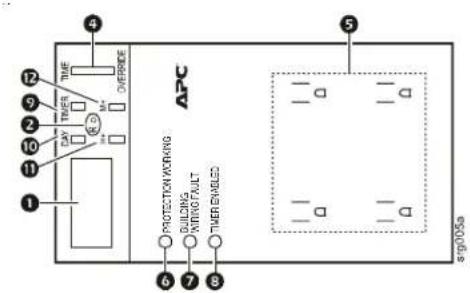
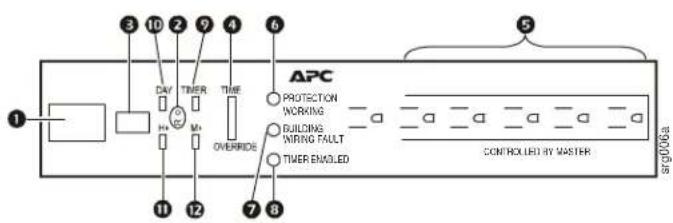
① LCD Timer Display-The LCD timer display shows the settings selected using the buttons described in this guide.
② R (reset)-Push this button to clear all settings and reset the unit to the factory default state.
③ ON/OFF switch P6GC models only-This switch provides on/off power control to all of the outlets. To disconnect power to the outlets on P4GC models, unplug the unit from the wall outlet. See "LCD Timer" on page 2.
4 TIME/OVERRIDE button-Use Time to set and display the current day and time. Use OVERRIDE as an on/off button for the current program. OVERRIDE acts as a circuit breaker in output overload conditions. See "LCD Timer" on page 2.
⑤ CONTROLLED by TIMER outlets-P6GC models, five outlets are controlled by the timer. P4GC models, all four outlets are controlled by the timer.
6 PROTECTION WORKING LED-This LED illuminates during normal operation of the CONTROLLED by MASTER outlets. The LED will extinguish if a sustained high-energy power surge as with a lightening strike, causes the circuit breaker to trip. Disconnect all equipment from the SurgeArrest before pushing the circuit breaker Reset button. If the LED does not illuminate after the circuit breaker is reset and the Auto/Manual switch is switched to Auto, contact APC using the contact information provided in this guide.
⑦ BUILDING WIRING FAULT LED-This LED illuminates when there is no ground circuit, or there is a reversed polarity in the building wiring. Discontinue use and have a qualified electrician check the wiring in the building
8 TIMER ENABLED-This LED illuminates when the LCD TIMER function is enabled. See "LCD Timer" on page 2.
P4GC P6GC
LCD Timer
The LCD timer enables the user to program the time that each of the outlets will turn on and off.
The numbered callouts in this section refer to the diagrams on page 1.
④ TIME/OVERRIDE button:
- TIME button-Press the TIME button to see the current time and day of the week. To change the time, press and hold the TIME button while pressing the H+ (hours) and M+ (minutes) buttons. Release the TIME button when the correct time appears on the display. To change the day, press and hold the TIME button while pressing the DAY button when the correct day appears on the display.
- OVERRIDE button-OVERRIDE mode has two functions.
- OVERRIDE acts as an on/off switch for the current program settings. The unit will automatically go to the next program settings.
- When an output overload condition occurs an internal circuit breaker will trip. The TIME/OVERRIDE switch will automatically go to OVERLOAD mode. Correct the overload condition, then toggle the switch to the TIME position.
⑨ TIMER mode allows the user to program the time that all four outlets (as a group), will turn on and off. There are settings for six potential programs.
Use the H+ (hours) and M+ (minutes) buttons to set the time for a program to turn on.
- Press the TIMER button once to display the On settings for program 1. Press the H+ and M+ buttons to set the time of day and the day of the week. Release the TIME button when the correct time appears on the display. Refer to number 10 below for Day button functionality.
- Press the TIMER button again to display the Off settings for program 1. Repeat the steps above to set the time of day and day of the week program.
- Press the TIMER button again to display the On settings for program 2.
- Press the TIMER button again to display the Off settings for program 2.
- Continue this sequence of steps to configure up to six on/off programs.
The DAY button allows the user to select the days of operation for Timer mode. The possible selections for day or combinations of days are listed below. Hold the button down to fast forward through the list.
• MO TU WE TH FR SA SU-The On/Off settings will repeat every day.
• M OThe On/Off settings will repeat every Monday.
• TU-The On/Off settings will repeat every Tuesday.
• WE-The On/Off settings will repeat every Wednesday.
• TH-The On/Off settings will repeat every Thursday.
• FR-The On/Off settings will repeat every Friday.
• SA-The On/Off settings will repeat every Saturday.
- SU-The On/Off settings will repeat every Sunday.
• MO TU WE TH FR-The On/Off settings will repeat every Monday through Friday.
• SA SU-The On/Off settings will repeat every Saturday and Sunday.
• MO TU WE TH FR SA-The On/Off settings will repeat every Monday through Saturday.
⑪ H+-sets the hours for operation. Hold the button down to fast forward through the number of hours.
⑫ M+-sets the minutes for operation. Hold the button down to fast forward through the number of minutes.
NOTE: To turn off the LCD display illumination, press and hold the DAY button for two seconds. The set functions will continue to operate when the display is not illuminated. Press any of the buttons to turn the LCD display illumination back on.
Equipment protection Policy
THIS POLICY IS NOT A WARRANTY. REFER TO THE APC LIMITED WARRANTY FOR INFORMATION CONCERNING THE WARRANTY FOR YOUR APC PRODUCT. THE LIMITATIONS AND CONDITIONS IN THIS POLICY DO NOT AFFECT THE TERMS OF THE WARRANTY.
(In the United States AND Canada only for 120 Volt Products)
If your electronic equipment is damaged by power line transients on an AC power line (120 volt) while directly and properly connected to a
standard APC 120 volt product covered by the Equipment Protection Policy ("connected equipment"), and if all of the remaining conditions specified below are met, APC will, at APC's sole option, during the period specified below, replace the APC product and either (a) pay for the repair of the equipment or (b) reimburse you for the fair market value, as determined by the then current price list of the Boston Computer Exchange (or equivalent), of the connected equipment, in an amount not to exceed the dollar limits stated below, if APC determines that the damage was caused by the failure of the APC product to protect against power line transients. (telephone line, or CATV transients. If applicable). Power line transients that APC products have been designed to protect against, as recognized by industry standards, include spikes and surges on AC power lines (not designed as protection against protection, and in cases in which such protection is available, telephone service equipment must include a properly installed and operating "primary protection" device at the service entrance (such devices are normally added during telephone installation) in order to be covered for telephone line transients. Protection of CATV (Cable Television) connected equipment from transients applies only to APC products which offer such protection, and in such cases, the CATV service must be properly grounded according to the codes set forth in the National Electric Code (NEC) in order to be covered for CATV transients. Protection from network line transients applies only to APC products which offer network line protection.
Equipment Protection Policy Dollar Limits
For customers who meet the qualifications and conditions set forth in this policy, APC will provide reimbursement (cost of repair or fair market value) up to the dollar limits stated as follows:
Product Dollar Limit
| Personal SurgeArrest Models | 2500 |
| Professional SurgeArrest Models | 10,000 |
| Network SurgeArrest Models | 25,000 |
| Essential SurgeArrest Models | 50,000 |
| Home/Office SurgeArrest Models | 150,000 |
| Performance SurgeArrest Models | 300,000 |
Eligibility for coverage under the Equipment Protection Policy
- You must register the product by returning to APC the warranty card provided with the product within 10 days of purchase. All information must be filled in, and you should retain a copy for your records. The warranty card must clearly identify the types of electronic equipment that will be plugged into the APC product for which protection under this policy is claimed. All connected equipment must be UL or CSA approved.
- The APC product must be plugged into properly wired and grounded outlets; no extension cords, adapters, other ground wires, or electrical connections may be used, with the sole exception of other standard APC 120 volt products. The Installation must not include power protection products made by any manufacturer other than APC. The Installation must comply with all applicable electrical and safety codes set forth pursuant to the National Electrical Code (NEC).
- Any claim under the Equipment Protection Policy must be made within 10 days of the date of alleged damage to the connected equipment.
- The Equipment Protection Policy covers only standard APC 120 volt products used in the 50 United States, Canada, and Bermuda.
What is not covered under the Product Policy:
-
Restoration of lost data and reinstallation of software are not covered.
-
This policy does not cover damage from a cause other than AC power line transients, except for damage due to telephone line, network or CATV transients, which is covered only if the APC product offers such protection.
In addition, the following are expressly excluded from coverage:
-
Damage caused by failure to provide a suitable installation environment for the product (including, but not limited to, lack of a good electrical ground).
-
Damage caused by the use of the APC product for purposes other than those for which it was designed.
-
Damage caused by accidents, or disasters such as fire, flood, or wind.
-
Damage caused by abuse, misuse, alteration, modification, or negligence.
-
This policy is null and void if, in APC's view, the APC product has been tampered with or altered in any way.
-
EXCEPT AS EXPRESSLY PROVIDED IN THIS POLICY, IN NO CASE SHALL APC BE LIABLE UNDER THE TERMS OF THIS POLICY FOR ANY DAMAGES WHATSOEVER, INCLUDING BUT NOT LIMITED TO, DIRECT, INDIRECT, SPECIAL, INCIDENTAL, CONSEQUENTIAL, OR MULTIPLE DAMAGES ARISING OUT OF THE USE OF THE APC PRODUCT OR DAMAGE TO THE CONNECTED EQUIPMENT, REGARDLESS OF THE LEGAL THEORY ON WHICH SUCH CLAIM IS BASED, EVEN IF ADVISED OF THE POSSIBILITY OF SUCH DAMAGE. SUCH DAMAGES INCLUDE, BUT ARE NOT LIMITED TO, LOSS OF PROFITS, LOSS OF SAVINGS OR REVENUE, LOSS OF USE OF THE APC PRODUCT OR THE CONNECTED EQUIPMENT OR ANY ASSOCIATED EQUIPMENT, LOSS OF SOFTWARE, COST OF CAPITAL, COST OF ANY SUBSTITUTE EQUIPMENT, FACILITIES OR SERVICES, LABOR, DOWNTIME, THE CLAIMS OF THIRD PARTIES. INCLUDING CUSTOMERS, AND INJURY TO PROPERTY.
Submitting an Equipment Protection Policy Claim:
-
If all of the conditions for coverage are satisfied, call the APC customer service department at (800) 800-4APC and obtain an EPP RMA (Equipment Protection Policy Returned Material Authorization) number. APC will forward to you an Equipment Protection Policy claim form, which must be completed and filed within 30 days.
-
Mail the completed claim forms to: American Power Conversion, Attention: Claims Department, 132 Fairgrounds Road, PO Box 278, West Kingston, RI 02892
- Mark the Equipment Protection Policy RMA number on the APC product you are returning.
- Pack the APC product in its original packaging (or request packing materials from APC if the packaging has been discarded). Mark the EPP RMA number clearly on the outside of box.
- Ship the product (one way shipping charges paid by you) to:
American Power Conversion, 1600 Division Road, Dock 25, West Warwick, RI 02893, Attn: EPP RMA#
-
APC will evaluate the product to determine its level of functionality, and will examine the product for evidence of damage from AC power line transients (telephone line, network and CATV transients, if applicable). (A) If APC's evaluation provides no evidence of damage from power line transients (telephone line, network or CATV transients, if applicable), APC will send to the customer (I) a report summarizing the tests performed and (ii) a rejection of claim notice. (B) If the APC product shows evidence of damage from power line transients (telephone line, network or CATV transients, if applicable), APC will request that all connected equipment for which an Equipment Protection Policy claim has been submitted, be sent for evaluation to either APC or an authorized service center. If it is determined that the connected equipment has been damaged from AC power line transients (telephone line, network or CATV transients, if applicable), APC will, at its discretion, either authorize you to have the equipment repaired or reimburse you for the fair market value of the damaged equipment, up to the dollar limits stated above. Please save the damaged connected equipment or all damaged parts.
-
If you are authorized by APC to have the connected equipment repaired, the repair must be performed at a service center that is authorized by the manufacturer of the connected equipment. APC reserves the right to contact the authorized service center directly to discuss repair costs and repair diagnosis, and damage to the connected equipment to determine if it was caused by AC power line transients (telephone line, network or CATV transients, if applicable) and the right to request that the service center forward the connected equipment or components of the connected equipment to APC for inspection.
-
APC will, after determining that the damage was caused by the failure of the APC product to protect against AC power line transients (telephone line, network or CATV transients, if applicable), issue payment to you, at its sole discretion, for either costs of repair or the fair market value of the connected equipment, up to the dollar limits stated above. APC reserves the right to require you to transfer title and deliver the connected equipment to APC if it chooses to reimburse you for the fair market value of the connected equipment.
-
Unless modified in writing signed by APC and you, the terms of this policy are understood to be the complete and exclusive agreement between the parties, superseding all prior agreements, oral and written, and all other communications between the parties relating to the subject matter of this agreement. No employee of APC or any other party is authorized to make any representations beyond those made in this agreement concerning the Equipment Protection Policy.
Limited warranty
American Power Conversion (APC) warrants its Surge Protectors to be free from defects in materials and workmanship under normal use and service for the lifetime of the original purchaser, excluding only the LCD Timer which is warranted to be free from defects in materials and workmanship under normal use and service for four (4) years from date of purchase. APC obligation under this warranty is limited to repairing or replacing, at its own sole option, any such defective products. Repair or replacement of a defective Product or part thereof does not extend the original warranty period.
Contact APC
Web site: www.apc.com
Telephone Contact: +1 800 555 2725
© 2009 APC by Schneider Electric. APC, the APC logo, and SurgeArrest are owned by Schneider Electric Industries S.A.S., American Power Conversion Corporation, or their affiliated companies. All other trademarks are property of their respective owners.
- User Guide - Essential SurgeArrest® Surge Protector with LCD Timer P4GC/P6GC
- Overview and Operation
- LCD Timer
- ④ TIME/OVERRIDE button:
- Equipment protection Policy
- (In the United States AND Canada only for 120 Volt Products)
- Equipment Protection Policy Dollar Limits
- Eligibility for coverage under the Equipment Protection Policy
- What is not covered under the Product Policy:
- Submitting an Equipment Protection Policy Claim:
- Limited warranty
- Contact APC
Brand : APC
Model : P4GC
Category : Uncategorized