DWC-P336CNMW - Wall mount Digital Watchdog - Free user manual and instructions
Find the device manual for free DWC-P336CNMW Digital Watchdog in PDF.


| Product Type | Wall Mount |
| Brand | Digital Watchdog |
| Model | DWC-P336CNMW |
| Compatible Cameras | Digital Watchdog DWC-P336 series (e.g., DWC-P336CN, DWC-P336T) |
| Material | Aluminum alloy with corrosion-resistant coating |
| Dimensions (W x H x D) | 4.5 x 4.5 x 3.2 inches (114 x 114 x 81 mm) |
| Weight | 0.85 lbs (385 g) |
| Load Capacity | Up to 5 lbs (2.27 kg) |
| Mounting Pattern | Standard 1/4-20 UNC threaded insert |
| Color | White |
| Operating Temperature | -40°F to 140°F (-40°C to 60°C) |
| Ingress Protection | IP66 rated (weatherproof) |
| Installation Type | Surface mount on wall or ceiling |
| Included Hardware | Mounting bracket, screws, anchors, and hex key |
| Adjustability | Pan: 360°, Tilt: 90°, Rotation: 360° |
| Warranty | Limited 3-year warranty |
Frequently Asked Questions - DWC-P336CNMW Digital Watchdog
User questions about DWC-P336CNMW Digital Watchdog
0 question about this device. Answer the ones you know or ask your own.
Ask a new question about this device
Download the instructions for your Wall mount in PDF format for free! Find your manual DWC-P336CNMW - Digital Watchdog and take your electronic device back in hand. On this page are published all the documents necessary for the use of your device. DWC-P336CNMW by Digital Watchdog.
USER MANUAL DWC-P336CNMW Digital Watchdog
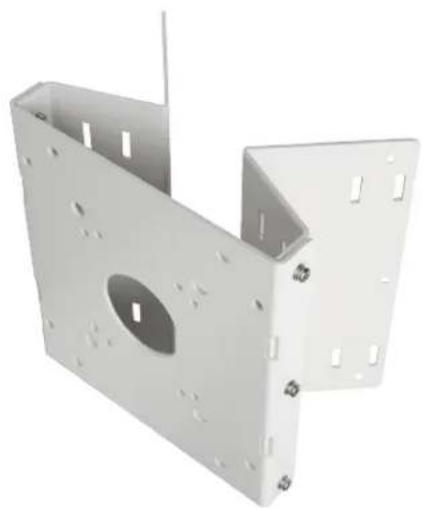
Corner and pole mount bracket for white IP PTZ cameras
DWC-P336CNMW
natural_image
3D rendering of a white metal bracket with mounting holes and a central circular cutout (no text or symbols)WHAT'S IN THE BOX
| 6x plastic anchors (6pi) | 4x nut (M8) |
| 6x tapping screws (6x50) 2x hose band (275mm) | |
| 4x machine screws, PH (M6x25) 1x quick setup guide | |
| 4x machine screws, PH (M8x35) |
NOTE: Download all your support materials and tools in one place
1. Go to: http://www.digital-watchdog.com/resources
2. Search your product by entering the part number in the 'Search by Product' search bar. Results for applicable part numbers will populate automatically based on the part number you enter.
3. Click 'Search'. All supported materials, including manuals and quick start guide (QSGs) will appear in the results.
Quick Start Guide
COMPOSITION
Mounting the accessory to a structure's pole
Feed the hose bands through the vertical stills located on the four corners of the mounting flaps as shown to the right. Wrap the hose bands around the pole like structure then use the driver to rotate the screw attached at the end of the hose bands clockwise. Rotating the screw shortens the bands, thereby fastening around the structure.
Stainless hose band D=10.24" (260mm)
Mounting the accessory to a structure's corner
Using the pole and mounting bracket as a template, mark the locations of the six screw holes where the mounting adaptor will go. Install the plastic anchors (D6) at the six pre-marked locations. Use the screws with washers to affix the mount adaptor to the corner of a building structure.
Tapping screw BH 6x50L stainless steel
Plastic anchor (D6)
Mounting a power box to the pole and corner mount bracket
Screw Machine (5EMS) PH M6x25L
Using the appropriate screws and nuts supplied, affix the power box base to the pole and corner mount at the four corners of the mounting surface.
Screw Machine (SEMS) PH M8x35L
Using the appropriate screws and nuts supplied, affix the wall mount to the pole and corner mount at the four corners of the mounting surface as shown below.
A - Installation using DWC-P336WM
B - Installation using DWC-P220WM
Nut MB
Machine screw (SEMS) PH M8x35L
Machine screw (5EMS) PH M6x25L
Brand : Digital Watchdog
Model : DWC-P336CNMW
Category : Wall mount