
FHT2311 - Uncategorized ZKTeco - Free user manual and instructions
Find the device manual for free FHT2311 ZKTeco in PDF.


| Product Type | Fingerprint Time Attendance Terminal |
| Brand | ZKTeco |
| Model | FHT2311 |
| Dimensions (W x H x D) | 180 mm x 130 mm x 45 mm |
| Weight | 0.5 kg |
| Power Supply | DC 12V, 1.5A |
| Display | 2.8-inch TFT color screen |
| Fingerprint Capacity | Up to 3,000 templates |
| Card Capacity | Up to 10,000 cards (optional) |
| Transaction Storage | Up to 100,000 logs |
| Identification Mode | Fingerprint, PIN, RFID card (optional) |
| Fingerprint Sensor | Optical or capacitive (varies by version) |
| Communication | TCP/IP, USB host, RS232/485 |
| Voice Guidance | Yes, multilingual |
| Access Control Interface | Electric lock, door sensor, exit button |
| Operating Temperature | 0°C to 45°C |
| Operating Humidity | 20% to 80% RH |
| Software Compatibility | ZKTeco ZKBioTime or third-party |
| Maintenance | Clean sensor with soft dry cloth; avoid liquids |
| Security Features | Anti-passback, tamper switch, alarm output |
Frequently Asked Questions - FHT2311 ZKTeco
User questions about FHT2311 ZKTeco
0 question about this device. Answer the ones you know or ask your own.
Ask a new question about this device
Download the instructions for your Uncategorized in PDF format for free! Find your manual FHT2311 - ZKTeco and take your electronic device back in hand. On this page are published all the documents necessary for the use of your device. FHT2311 by ZKTeco.
USER MANUAL FHT2311 ZKTeco
Full Height Turnstile User Manual
Applicable Models: FHT 2300 / 2400
Version: 1.2
Date: Mar. 2019
Contents
Chapter 1 Product Introduction ....1
1.1 Model number and access control....1
1.2 Structures and dimensions....1
1.3 Mechanical system of FHT2300&FHT2400 series....2
1.4 Electronic control system....2
1.5 The working principle of full height turnstiles....3
1.6 Product related parameters....3
Chapter 2 The Installation of the Device....4
2.1 Installation notes....4
2.2 Installation position of the full height turnstile....4
2.3 Installation and fixation of cables 4
Chapter 3 Product Maintenance....8
3.1 Mainframe-box maintenance ....8
3.2 Movement maintenance ....8
3.3 Power maintenance....8
Chapter 1 Product Introduction
1.1 Model number and access control
| AccessModel | No | C3-200 with two KR101E reader | InBio260 with two FR1200/ID reader |
| FHT2300 | √ | ||
| FHT2311 | √ | ||
| FHT2322 | √ | ||
| FHT2400 | √ | ||
| FHT2411 | √ | ||
| FHT2422 | √ |
1.2 Structures and dimensions
FHT2000 series has stainless steel casing, which provides corrosion resistance and durability.
FHT2300's appearance and dimensions are as shown in Figure 1-2A:
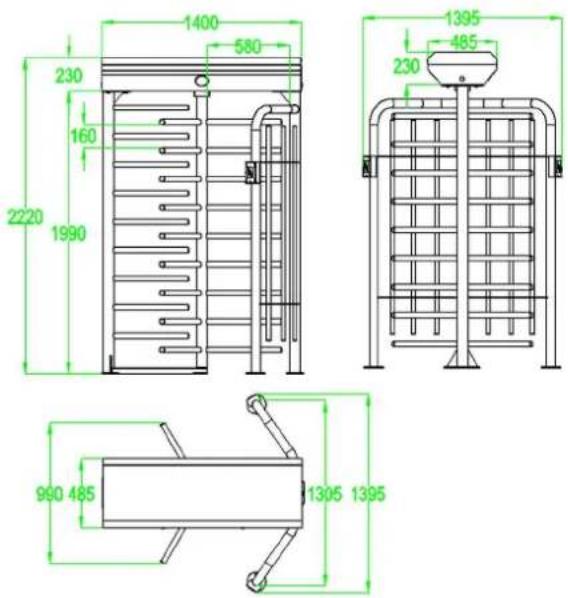
Figure 1-2A
FHT2400's appearance and dimensions are as shown in Figure 1-2B:
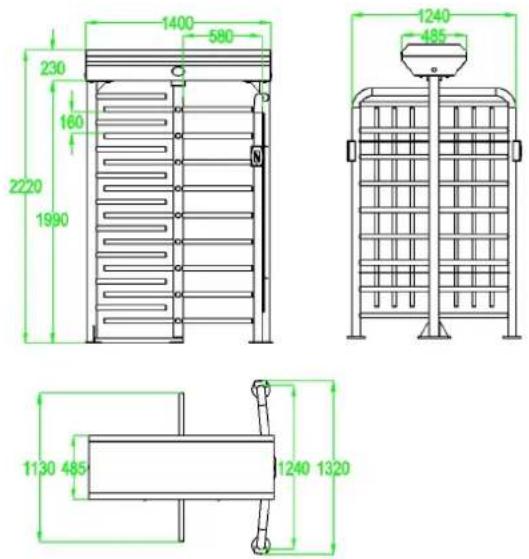
Figure 1-2B
1.3 Mechanical system of FHT2300&FHT2400 series
The mechanical system of the full height turnstiles includes a mainframe box and a frame.
The direction indicator, core, control panel, access controller and lock are installed in the mainframe box. The core component mainly consists of two solenoids, a spring and a transmission mechanism. The frame supports the entire mainframe box.
1.4 Electronic control system
The electronic control system of the full height turnstile is composed of reader, control panel, access controller, direction indicator, horn, and transformer.
Reader: The reader reads the data from the card and sends it to the controller.
Control panel: The control panel is the system's control center that receives signals from the controller. After the signals have been processed by the control panel, the control panel will deliver commands to the indicator.
Direction indicator: This indicator displays the current status of the sign at the channel, and directs the pedestrian to pass the channel.
1.5 The working principle of full height turnstiles
1.5.1 After the power is turned on, the system will perform self-check. If no fault is detected, the device will operate as usual. If a fault is detected, the system will display the related messages on the LCD screen. This can be useful for error checking and troubleshooting.
1.5.2 When the reader detects a valid signal, the buzzer will give pedestrians a voice prompts to remind pedestrians have been successful credit card. And then, the reader sends signals to the access controller to request permission to pass through the passage. After the access controller send the signals to the control panel, the control panel will send out a pass.
1.5.3 After receiving the signal from the access controller, the control panel sends signals to the direction indicator and solenoid. Then the direction arrow will turn green. Also the solenoid will lose that the pedestrian can push the rod to pass the passage.
1.6 Product related parameters
| Dimensions(mm) | FHT2000: L = 1400, W = 1310, H = 2200FHT2400: L = 1400, W = 1370, H = 2200 | ||
| Communication Interface | RS232 | Input voltage | AC 100 - 120V/200 - 240V,50 - 60Hz |
| Input control signal | Switching signal | Output voltage | DC 24V |
| Working environment | Indoor/Outdoor | Relative humidity | 25% - 75% |
| Temperature | -28°C~ 60°C | Pass speed | RFID: Maximum 30/minuteFingerprint:Maximum25/minuteFace: Maximum 15/minuteVein: Maximum 15/minute |
Chapter 2 The Installation of the Device
2.1 Installation notes
2.1.1 It is recommended that the full height turnstile should be installed on a cement platform with 50mm to 100mm in height.
2.1.2 It is recommended that the full height turnstile should not be used in corrosive environments.
2.1.3 Make sure the earth wire of the system is connected reliably reliably to prevent any personal injuries or other accidents.
2.1.4 After completion of the installation, check the connection condition of earth wire, connector assembly for connecting line and all moving parts with the device. Make sure the connection is firm in order to prevent failure caused by long time operation. If any screw or part is not tightened, please tighten.
2.2 Installation position of the full height turnstile
The installation position are subject to the size of the full height turnstile, as shown in Figure 2-2A.
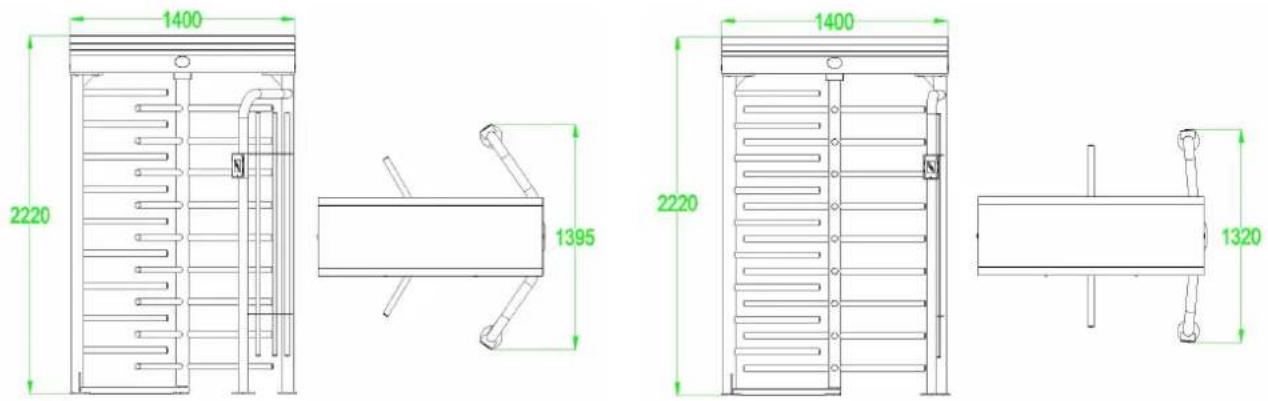
Figure2-2A
2.3 Installation and fixation of cables
The following diagram shows the interface of the concealed cable. The input voltage for
this full height turnstile is AC100-120V/200-240V. The PVC conduits are buried 100mm below the ground, with the height of the exposed part not not less than 100mm. To prevent water leakage to the conduit, the conduit mouth needs to be bent back.
FHT2300&FHT2400 series installation holes are as shown in Figure 2-3A and Figure 2-3B.
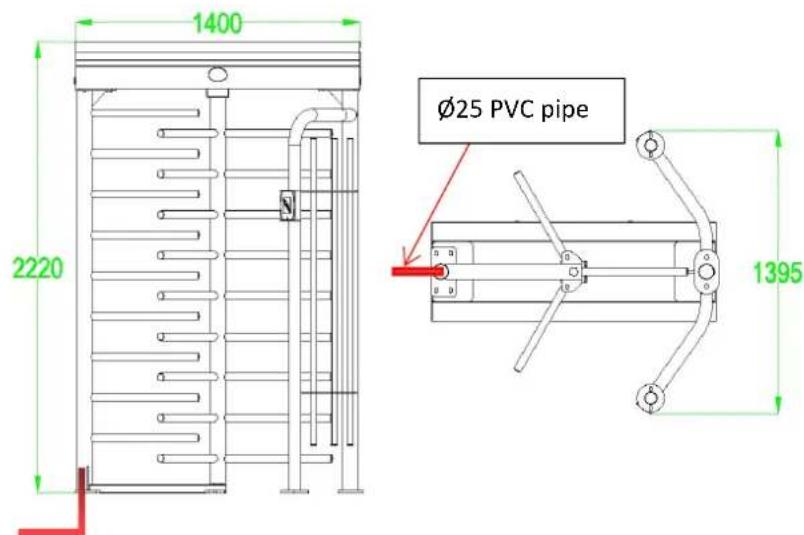
Figure2-3A
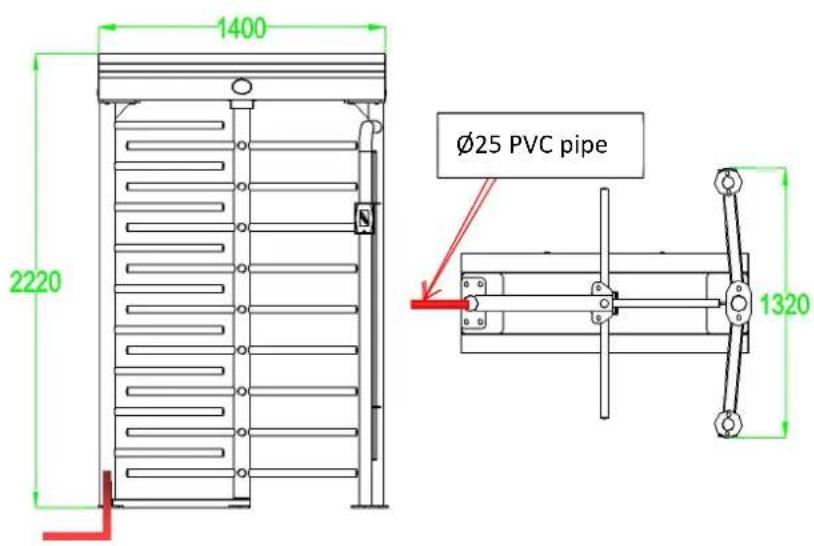
Figure2-3B
Put the installation diagram on the floor. Using percussion to drill holes for M12 screws on the corresponding position. Then install the screws to the corresponding positions. Next, place the frame on top of the screw and fix it. After that, the mainframe-box is fixed on the frame. Finally install the whole rotating part in the middle of the frame as shown in Figure 2-3C.
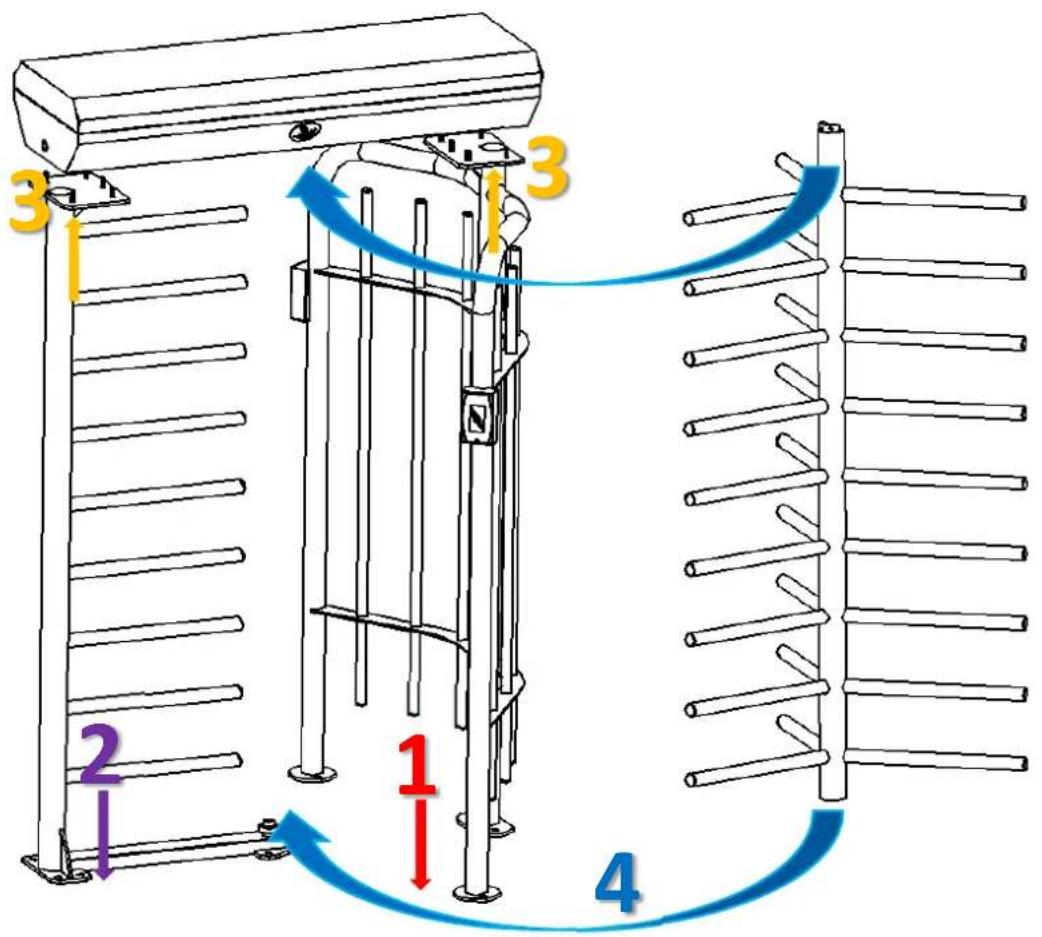
Figure2-3C
After fixing the device, open the mainframe-box to connect power wire and reader. Pull out the reader and power cord from both sides of the column and connect to the corresponding interface. Wiring diagram is as shown in Figure 2-3D
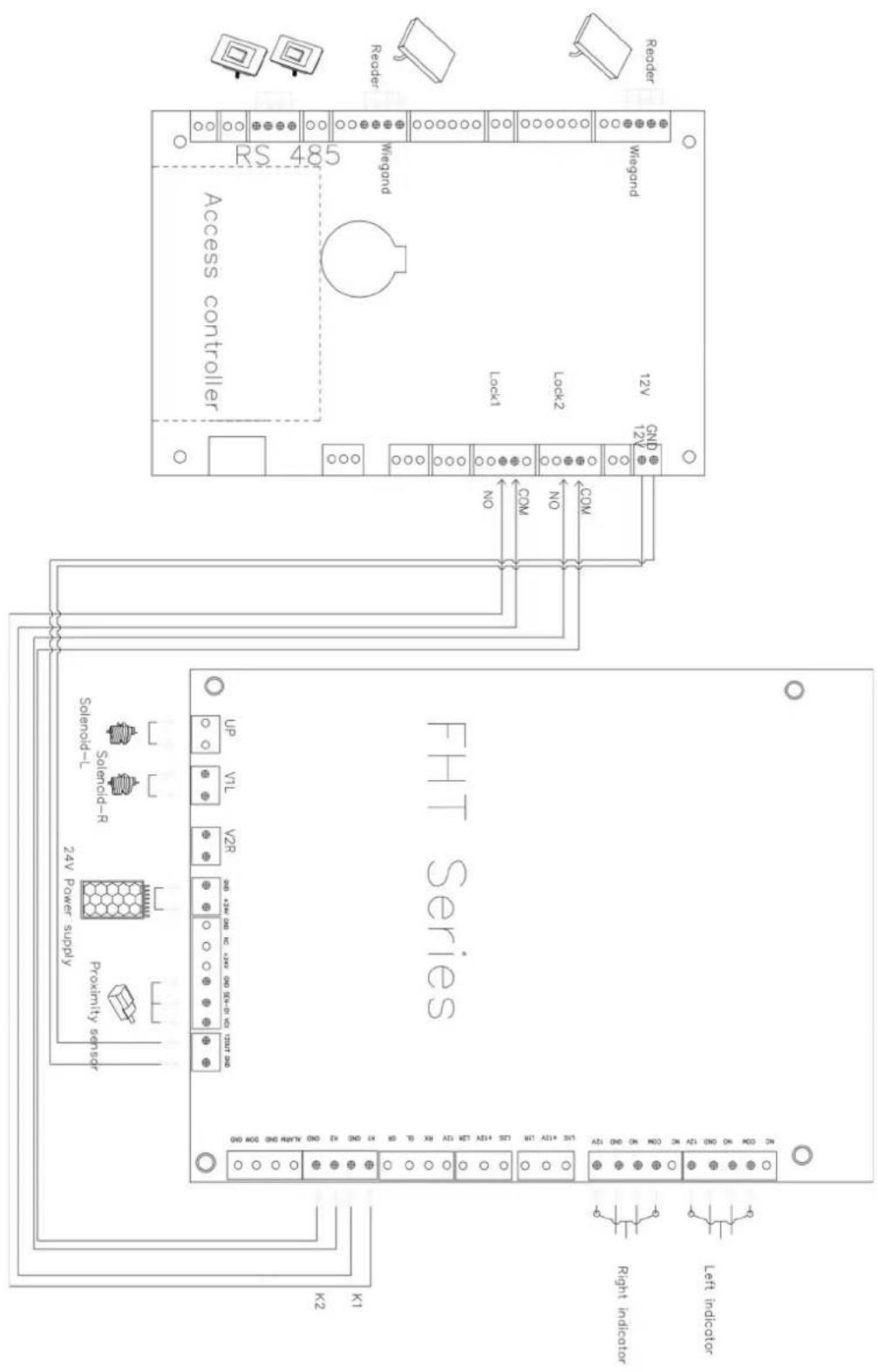
Figure 2-3D
Chapter 3 Product Maintenance
3.1 Mainframe-box maintenance
The mainframe-box is made of 304 stainless steels. So after a long period of operation, its surface may have some stains. It can use gauze to clean the mainframe-box. In order to protect the lines of surface, please wipe along the lines direction. It's best to polish and wax.
3.2 Movement maintenance
Cut off power supply before maintenance. Open the barriers and clean the dust on surface, add lubricating oil to the transmission mechanism. Check and tighten others connection parts.
3.3 Power maintenance
Cut off power supply before maintenance. Check whether the plug is loose, if loose, it needed to tightly it. Please do not replace the connection position at random. Check whether the external power supply is exposed and wrap it. Check whether there is any leakage, found to be timely processing. Check the technical parameters at the interface are regular and replace the old electronic components in time.
(Attention: Above full height turnstile maintenance must be maintained by professional personnel. Especially the movement and the electric control part, first cut off the power supply, ensure the operation safety.)
- Full Height Turnstile User Manual
- Contents
- Chapter 1 Product Introduction ....1
- Chapter 2 The Installation of the Device....4
- Chapter 3 Product Maintenance....8
- Chapter 1 Product Introduction
- Model number and access control
- Structures and dimensions
- Mechanical system of FHT2300&FHT2400 series
- Electronic control system
- The working principle of full height turnstiles
- Chapter 2 The Installation of the Device
- Installation notes
- Installation position of the full height turnstile
- Installation and fixation of cables
- Chapter 3 Product Maintenance
- Mainframe-box maintenance
- Movement maintenance
- Power maintenance
Brand : ZKTeco
Model : FHT2311
Category : Uncategorized