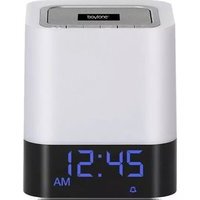
BT-84CB - Clock Boytone - Free user manual and instructions
Find the device manual for free BT-84CB Boytone in PDF.


| Product Type | Digital Alarm Clock |
| Brand | Boytone |
| Model | BT-84CB |
| Dimensions | Approximately 4.5 x 2.5 x 2.0 inches |
| Weight | About 0.5 lbs |
| Power Source | 2 AAA batteries (not included) or AC adapter (not included) |
| Display Type | LED digital display with adjustable brightness |
| Alarm Features | Single alarm with snooze function |
| Additional Functions | Time display, date display, temperature display |
| Backup Battery | Maintains time and alarm settings during power outage |
| Controls | Buttons for setting time, alarm, snooze, and brightness |
| Mounting | Desk stand or wall-mountable (hardware not included) |
| Material | Plastic casing with glass lens |
| Color | Black or white (varies by model) |
| Care Instructions | Clean with a soft, dry cloth. Avoid using liquids or abrasive cleaners. |
| Safety Warnings | Keep away from water and moisture. Do not disassemble. |
| Spare Parts / Repairability | Replacement batteries are widely available. No user-serviceable parts inside. |
| Warranty | Limited 1-year warranty against defects |
Frequently Asked Questions - BT-84CB Boytone
User questions about BT-84CB Boytone
0 question about this device. Answer the ones you know or ask your own.
Ask a new question about this device
Download the instructions for your Clock in PDF format for free! Find your manual BT-84CB - Boytone and take your electronic device back in hand. On this page are published all the documents necessary for the use of your device. BT-84CB by Boytone.
USER MANUAL BT-84CB Boytone

FM ALARM CLOCK RADIO
WITH BT SPEAKERS
Button Layout
| ∅/▶II | MODE | |←| | ▶| | Vol- | Vol+ |
- ⏻/▶II --- Press and hold ⏻/▶II to turn clock radio on or off. Press to play or pause music in SCH (USB or Micro SD card) mode. Press to answer or end a call in hands-free, mobile phone mode.
- MODE --- Press "Mode" to select mode. Press and Hold Mode to set time in clock when in clock mode, to set the alarm time in alarm mode and seek/search in radio mode.
- K -- Press K for previous MP3 music track or tune radio. Press and hold K to fast rewind through track in MP3 mode or next preset radio station in Radio Mode. Press K to switch between 12 hour/24 hour in clock or alarm mode
- ▶▶▶ --- Press t▶▶ for next MP3 music track or tune radio. Press and hold ◀◀ to fast forward through track in MP3 mode or next preset radio station in Radio Mode. Press ◀◀ to switch between 12 hour/24 hour in clock or alarm mode

- V- --- Press V- to decrease volume
- v+ --- Press V+ to increase volume
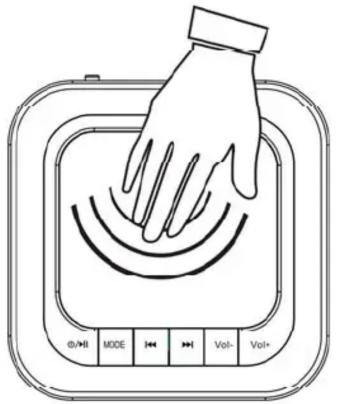
- Speaker mesh – Touch speaker mesh to adjust led light level from off, low light, medium light and brightest illumination. Touch one time when alarm rings to snooze. Touch twice when alarm rings to turn alarm off.
- Manual Power Switch --- Located on the back of the unit, click left and right to turn off and on, respectively.
Device power supply
- (DC 5V) power supply
- Build-in lithium battery
Rechargeable Lithium Battery
- Charging – Plug in a MICRO USB cable and the red LED indicator will light up indicating device is charging. Lithium Rechargeable Battery will fully charge in approximately 8-10 hours
- To prevent damage or battery leakage to the Lithium Rechargeable Battery, please fully charge Lithium Rechargeable Battery at least once a month.
Operation of Unit:
Power Switch key --- Click the back switch to turn on our clock radio. Upon being switched on, LED display will display "HI."
Constant on as Alarm Clock Radio --- Unit will stay on as long as the unit is charging with a MICRO USB cable plugged in. Unit display will automatically turn off (with 1 minute of inactivity) if unplugged.
Touch SPEAKER MESH to adjust LED light (no light / low brightness / middle brightness / high brightness)

MODE/FUNCTION SEQUENCE:
Time-> Date-> Alarm-> FM Radio ->Bluetooth-> Music Player(MP3)-> Line/AUX in-> Sleep-> Back to Time
The default mode is Time, when you power on the device.

Time Mode
The DEFAULT MODE is time mode. Time will display upon 1 minute of inactivity in any other mode.
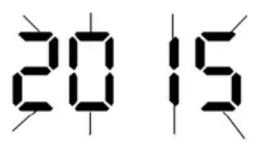
Press and hold the MODE BUTTON enter the setting time mode,
Press “◀◀” or “▶” to adjust the digits Year/Month/Date/Hour/Minute
Press "MODE" button again to confirm setting.

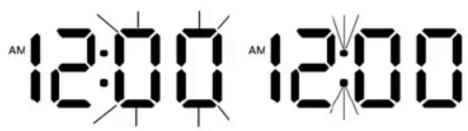
Alarm Mode
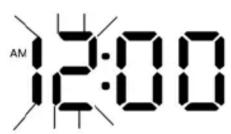
In Alarm mode, press and hold MODE BUTTON to enter the alarm setting mode.
Press“◀◀” or “▶” to adjust the hour and minutes for desired alarm time.

After confirming alarm time, Press“◀◀” or “▶◀” to select “ON” or “OFF” for the alarm. An alarm icon will appear in the bottom row.

Alarm Type
If Alarm is set to ON, Press“◀◀” or “▶” to select “rA/FM radio” or “bb/Birds chirping.”

The default alarm type are the birds chirping.
FM Radio Mode
Our unit comes with a built-in FM antenna.
Press"◀◀" key to tune station manually.
Press ▶ key to tune station manually.
Seek and Preset Stations
Press and hold "MODE" BUTTON key to search/seek and automatically store local FM stations.
Press “▶▶▶” key to display the FM Station frequency and the corresponding programmed station number (i.e. P01, P02, etc)

For optimal signal reception, adjust the position of the unit or Insert the 3.5mm Line in cable in AUX socket.
BT Connect Mode
Press MODE to select the Bluetooth mode.
In Bluetooth mode, LED Display will show "BLUE." The unit is ready to be searched and paired.
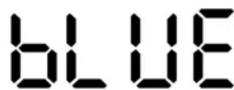
Upon transmitting your Bluetooth device (e.g. mobile, tablet, etc.), search for "BT83CR" or "BT84CB." You will hear a confirmation tone when successfully paired. (In the case where the device asks for a passcode, enter "0000")
When Playing Music on the Speaker
Press ◀◀ key to select previous track .Press ▶▶▶ key to select next track.
Press ▶■■·▼ key to play / pause Music.
Press V+ key to increase the volume. Press V- key to decrease the volume.
Your mobile phone or other device may also be used to control music playback.
-Handset and Hands-free MODE
Press 📋/▶ to answer or end your call.
When in Bluetooth mode, our Alarm Clock Radio Bluetooth device and Mobile phone will be paired automatically
MP3 Mode
Insert USB drive or MICRO SD card into corresponding slot on the back of the unit. If no drive or card is inserted, "NO d" will be displayed.

Press ◀◀ key to select previous track .Press ▶▶key to select next track.
Press ▶■·▼ key to play / pause Music

AUX(LINE-IN) Mode
Press MODE key to select Audio Input (Line / AUX) Mode.
LINE-IN 3.5mm cable is inserted in the AUX socket to connect external player device or to computer audio out.

Press V+ key to increase the volume.
Press V-key to decrease the volume
Sleep Mode (Automatic Sleep setting)
In Sleep Mode, Press ▶II·C to adjust the sleep time (OFF / 15 / 30 / 60 / 120 minutes), this setting works for all audio modes (FM Radio, SCH/USB/MICRO SD and AUX).

FAQ:
| No Power | Battery may not have sufficient charge. Charge at least 2 hours, unplug and switch on. |
| No Sound Check the level of volume to make sure it is not on zero volume. | |
| Device hanging up | Switch OFF the power then Switch ON the power again OR After charging, unplug and switch ON the power once again |
Specification
| DISPLAY | LED | |
| Built-in Rechargeable Lithium Battery | Play time :Max 6~8 Hours*According to the level of Volume | |
| LINE-IN Audio in (AUX) | Max. input | (L) 300mV + (R) 300mV |
| Output power | 5W | |
| MP3/WMA/APE/FLAC/WAV | MP3 Bit Rate 8K bps | -320K bps |
| Signal noise Ratio(SNR) | 85dB | |
| Signal Distortion <0.55% | ||
| Music Format MP3, | WMA,WAC,FLAC | |
| Operation Temperature | -5 to 40 Celsius Degree | |
* Product appearance, function and specification subject to change without prior notice.
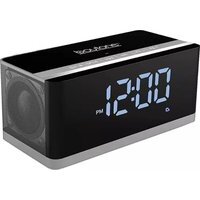


- Button Layout
- Device power supply
- Rechargeable Lithium Battery
- Operation of Unit:
- MODE/FUNCTION SEQUENCE:
- Time Mode
- Alarm Mode
- Alarm Type
- FM Radio Mode
- Seek and Preset Stations
- BT Connect Mode
- When Playing Music on the Speaker
- -Handset and Hands-free MODE
- MP3 Mode
- AUX(LINE-IN) Mode
- Sleep Mode (Automatic Sleep setting)
Brand : Boytone
Model : BT-84CB
Category : Clock