Luna LMD-AE-12HDI - Air conditioner Maxicool - Free user manual and instructions
Find the device manual for free Luna LMD-AE-12HDI Maxicool in PDF.


| Product Type | Split-type air conditioner (inverter) |
| Brand | Maxicool |
| Model | Luna LMD-AE-12HDI |
| Cooling Capacity | 12000 BTU/h |
| Heating Capacity | 12000 BTU/h |
| Power Supply | 220-240 V, 50 Hz |
| Refrigerant | R32 |
| Energy Efficiency | SEER up to 12.0 |
| Indoor Unit Dimensions (W x H x D) | 800 x 290 x 200 mm |
| Outdoor Unit Dimensions (W x H x D) | 700 x 550 x 250 mm |
| Indoor Unit Weight | Approx. 10 kg |
| Outdoor Unit Weight | Approx. 30 kg |
| Functions | Cool, Heat, Fan, Dehumidify, Auto Swing, Timer |
| Airflow | Up to 600 m³/h |
| Noise Level (Indoor) | 28-45 dB(A) |
| Noise Level (Outdoor) | 55 dB(A) |
| Maintenance | Clean air filter every 2 weeks |
| Safety Features | Auto restart, child lock, leakage detection |
| Spare Parts | Air filter, remote control, installation bracket |
| Warranty | 2 years |
Frequently Asked Questions - Luna LMD-AE-12HDI Maxicool
User questions about Luna LMD-AE-12HDI Maxicool
0 question about this device. Answer the ones you know or ask your own.
Ask a new question about this device
Download the instructions for your Air conditioner in PDF format for free! Find your manual Luna LMD-AE-12HDI - Maxicool and take your electronic device back in hand. On this page are published all the documents necessary for the use of your device. Luna LMD-AE-12HDI by Maxicool.
USER MANUAL Luna LMD-AE-12HDI Maxicool
The design and specifications are subject to change without prior notice for product improvement. Consult with the sales agency or manufacturer for details.
CR155-RG57A4(A6)
16117000A11163
Thank you very much for purchasing our air conditioner. Please read this owner's manual carefully before using your air conditioner.
CONTENTS
Remote controller Specifications.... 2
Operation buttons 3
Indicators on LCD 6
How to use the buttons 7
Auto operation.... 7
Cooling/Heating/Fan operation.... 7
Dehumidifying operation 8
Timer operation.... 9
Handling the remote controller 13
NOTE:
- Buttons design is based on typical model and might be slightly different from the actual one you purchased, the actual shape shall prevail.
- All the functions described are accomplished by the unit. If the unit has no this feature, there is no corresponding operation happened when press the relative button on the remote controller.
- When there are wide differences between "Remote controller Illustration" and "USER'S MANUAL" on function description, the description of "USER'S MANUAL" shall prevail.
Remote Controller Specifications
| Model | RG57A4/BGEF, RG57A6/BGEF |
| Rated Voltage | 3.0V(Dry batteries R03/LR03×2) |
| Signal Receiving Range | 8m |
| Environment | -5°C, 60°C |

RG57A4/BGEF

RG57A6/BGEF
Operation of buttons
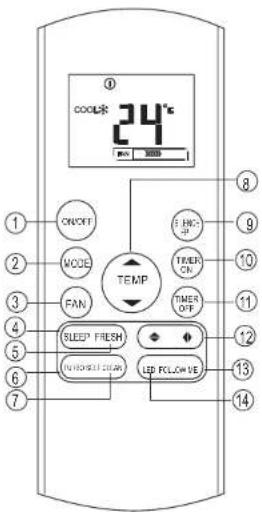
RG57A4BGEF
ON/OFF Button
This button turns the air conditioner ON and OFF.
MODE Button
Press this button to modify the air conditioner mode in a sequence of following:
AUTO COOL DRY HEAT FAN
NOTE: Please do not select HEAT mode if the machine you purchased is cooling only type. Heat mode is not supported by the cooling only appliance.
FAN Button
Used to select the fan speed in four steps:
→ AUTO→ LOW→ MED→ HIGH
NOTE: You can not switch the fan speed in AUTO or DRY mode.
SLEEP Button
- Active/Disable sleep function. It can maintain the most comfortable temperature and save energy. This function is available on COOL, HEAT or AUTO mode only.
- For the detail, see "sleep operation" in "USER'S MANUAL".
NOTE: While the unit is running under SLEEP mode, it would be cancelled if MODE, FAN SPEED or ON/OFF button is pressed.
FRESH Button(applicable to RG57A4/BGEF) Active/Disable FRESH function. When the FRESH function is initiated, the Ionizer/ Plasma Dust Collector(depending on models) is energized and will help to remove pollen and impurities from the air.
TURBO Button
Active/Disable Turbo function. Turbo function enables the unit to reach the preset temperature at cooling or heating operation in the shortest time(if the indoor unit does not support this function, there is no corresponding operation happened when pressing this button.)
7 SELF CLEAN Button(applicable to RG57A4/BGEF) Active/Disable Self Clean function

Operation of buttons

RG57A6/BGEF
⑧ UP Button( ▲ )
Push this button to increase the indoor temperature setting in 1°C increments to 30°C.
DOWN Button(▼)
Push this button to decrease the indoor temperature setting in 1°C increments to 17°C.
SILENCE/FP Button
• Active/Disable SILENCE function. If pushing more than 2 seconds, the 'FP' function will be activated, pushing more than 2 seconds again to disable.
- When the Silence function is activated, the compressor will operate at low frequency and the indoor unit will bring faint breeze, which will reduce the noise to the lowest level and creat a quiet and comfortable room for you. Due to low frequency operation of compressor, it may result in insufficient cooling and heating capacity.
- The 'FP' function can only be activated during the heating operation(only when the setting mode is HEAT). The unit will operate at a setting temperature of 8°C. The display window of indoor unit will display 'FP'. Press the buttons of ON/OFF, SLEEP, FP, MODE, FAN SPEED, UP or DOWN while operating will cancel the 'FP' function.
TIMER ON Button
Press this button to initiate the auto-on time sequence. Each press will increase the auto-timed setting in 30 minutes increments. When the setting time displays 10.0, each press will increase the auto-timed setting 60 minutes increments. To cancel the auto-timed program, simply adjust the auto-on time to 0.0.
① TIMER OFF Button
Press this button to initiate the auto-off time sequence. Each press will increase the auto-timed setting in 30 minutes increments. When the setting time displays 10.0, each press will increase the auto-timed setting 60 minutes increments. To cancel the auto-timed program, simply adjust the auto-off time to 0.0


RG57A6/BGE
Swing Button(applicable to RG57A4/BGEF) Used to stop or start vertical louver movement and set the desired left/right air flow direction. The vertical louver changes 6 degree in angle for each press. And the temperature display area of indoor unit displays t_H for one second. If keep pushing more than 2 seconds, the vertical louver swing feature is activated. And the display area of indoor unit displays t_III flashes four times, then the temperature setting reverts back. If the vertical louver swing feature is stopped, it displays t_LC and remains on for 3 seconds.
Swing Button(applicable to RC57A4/BGEF) Used to stop or start horizontal louver movement or set the desired up/down air flow direction. The louver changes 6 degree in angle for each press. If keep pushing more than 2 seconds, the louver will swing up and down automatically.
SWING Button(applicable to RG57A6/BGE) Used to stop or start horizontal louver auto swing feature.
DIRECT Button(applicable to RG57A6/BGE) Used to change the louver movement and set the desired up/down air flow direction. The louver changes 6° in angle for each press.
FOLLOW ME Button
Push this button to initiate the Follow Me feature, the remote display is actual temperature at its location. The remote control will send this signal to the air conditioner every 3 minutes interval until press the Follow Me button again. The air conditioner will cancel the Follow Me feature automatically if it does not receive the signal during any 7 minutes interval.
LED Button
Disable/Active indoor screen Display. When pushing the button, the indoor screen display is cleared, press it again to light the display.
5
Indicators on LCD
Information are displayed when the remote controller is powered up.

Mode display
AUTO COOL DRY
HEAT FAN
Displayed when data transmitted.
① Displayed when remote controller is ON.
Battery display(low battery detection)
ECO Not available for this unit
ON Displayed when TIMER ON time is set.
OFF Displayed when TIMER OFF time is set.
88 Show set temperature or room temperature, or time under TIMER setting.
Displayed in Sleep Mode operation.
Indicated that the air conditioner is operating in Follow me mode
Not available for this unit
Not available for this unit
Fan speed indication
| FAN | >> | Low speed |
| FAN | xxxxxx | Medium speed |
| FAN | xxxxxxxx | High speed |
| FAN | AUTO | Auto fan speed |
Note:
All indicators shown in the figure are for the purpose of clear presentation. But during the actual operation only the relative functional signs are shown on the display window.
6
How to use the buttons

Auto operation
Ensure the unit is plugged in and power is available. The OPERATION indicator on the display panel of the indoor unit starts flashing.
- Press the MODE button to select Auto.
- Press the UP/DOWN button to set the desired temperature. The temperature can be set within a range of 17 C\~30 C in 1 C increments.
- Press the ON/OFFbutton to start the air conditioner.
NOTE
- In the Auto mode, the air conditioner can logically choose the mode of Cooling, Fan, and Heating by sensing the difference between the actual ambient room temperature and the setting temperature on the prostate control
- In the Auto mode, you can not switch the fan speed.
- If the Auto mode is not comfortable for you, the desired mode can be selected manually.
Cooling /Heating/Fan operation
Ensure the unit is plugged in and power is available.
- Press the MODE button to select COOL, HEAT(cooling & heating models only) or FAN mode.
- Press the UP/DOWN buttons to set the desired temperature. The temperature can be set within a range of 17 C ^20 30 C in 1 C increments.
- Press the FAN button to select the fan speed in four steps- Auto, Low, Med, or High.
- Press the ON/OFF button to start the air conditioner.
NOTE
In the FAN mode, the setting temperature is not displayed in the remote controller and you are not able to control the room temperature either. In this case, only step 1, 3 and 4 may be performed.

How to use the buttons

Dehumidifying operation
Ensure the unit is plugged in and power is available. The OPERATION indicator on the display panel of the indoor unit starts flashing.
- Press the MODE button to select DRY mode.
- Press the UP/DOWN buttons to set the desired temperature. The temperature can be set within a range of 17^ -30°C in 1^ increments.
- Press the ON/OFF button to start the air conditioner.
NOTE
In the Dehumidifying mode, you can not switch the fan speed. It has already been automatically controlled.

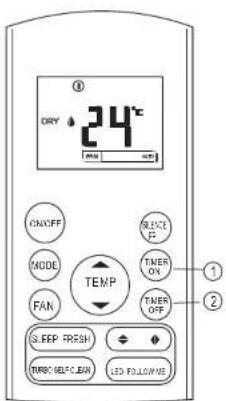
Timer operation
Press the TIMER ON button can set the auto-on time of the unit. Press the TIMER OFF button can set the auto-off time of the unit.
To set the Auto-on time.
- Press the TIMER ON button. The remote controller shows TIMER ON, the last Auto-on setting time and the signal "H" will be shown on the LCD display area. Now it is ready to reset the Auto-on time to START the operation.
- Push the TIMER ON button again to set desired Auto-on time. Each time you press the button, the time increases by half an hour between 0 and 10 hours and by one hour between 10 and 24 hours.
- After setting the TIMER ON, there will be a one second delay before the remote controller transmits the signal to the air conditioner. Then, after approximately another 2 seconds, the signal "h" will disappear and the set temperature will re-appear on the LCD display window.
To set the Auto-off time.
- Press the TIMER OFF button. The remote controller shows TIMER OFF, the last Auto-off setting time and the signal "H" will be shown on the LCD display area. Now it is ready to reset the Auto-off time to stop the operation.
- Push the TIMER OFF button again to set desired Auto-off time. Each time you press the button, the time increases by half an hour between 0 and 10 hours and by one hour between 10 and 24 hours.
- After setting the TIMER OFF, there will be a one second delay before the remote controller transmits the signal to the air conditioner. Then, after approximately another 2 seconds, the signal "H" will disappear and the set temperature will re-appear on the LCD display window.
CAUTION
- When you select the timer operation, the remote controller automatically transmits the timer signal to the indoor unit for the specified time. Therefore, keep the remote controller in a location where it can transmit the signal to the indoor unit properly.
- The effective operation time set by the remote controller for the timer function is limited to the following settings: 0.5, 1.0, 1.5, 2.0, 2.5, 3.0, 3.5, 4.0, 4.5, 5.0, 5.5, 6.0, 6.5, 7.0, 7.5, 8.0, 8.5, 9.0, 9.5, 10, 11, 12, 13, 14, 15, 16, 17, 18, 19, 20, 21, 22, 23 and 24.
Example of timer setting

TIMER ON
(Auto-on Operation)
The TIMER ON feature is useful when you want the unit to turn on automatically before you return home. The air conditioner will automatically start operating at the set time.
Example:
To start the air conditioner in 6 hours.
- Press the TIMER ON button, the last setting of starting operation time and the signal "H" will show on the display area.
- Press the TIMER ON button to display "6.0H" on the TIMER ON display of the remote controller.
- Wait for 3 seconds and the digital display area will show the temperature again. The "TIMER ON" indicator remains on and this function is activated.
TIMER OFF
(Auto-off Operation)
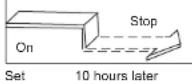
The TIMER OFF feature is useful when you want the unit to turn off automatically after you go to bed. The air conditioner will stop automatically at the set time.
Example:
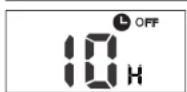
To stop the air conditioner in 10 hours.
- Press the TIMER OFF button, the last setting of stopping operation time and the signal "H" will show on the display area.
- Press the TIMER OFF button to display "10H" on the TIMER OFF display of the remote controller.
- Wait for 3 seconds and the digital display area will show the temperature again. The "TIMER OFF" indicator remains on and this function is activated.
COMBINED TIMER
(S both ON and OFF)etting timers simultaneously

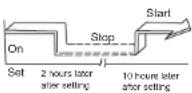
This feature is useful when you want to stop the air conditioner after you go to bed, and start it again in the morning when you wake up or when you return home.
Example:
To stop the air conditioner 2 hours after setting and start it again 10 hours after setting.
- Press the TIMER OFF button.
- Press the TIMER OFF button again to display 2.0H on the TIMER OFF display.
- Press the TIMER ON button.
- Press the TIMER ON button again to display 10H on the TIMER ON display.
- Wait for 3 seconds and the digital display area will show the temperature again. The "TIMER ON OFF" indicator remains on and this function is activated.


(Off → Start → Stop operation)
This feature is useful when you want to start the air conditioner before you wake up and stop it after you leave the house.
Example:
To start the air conditioner 2 hours after setting, and stop it 5 hours after setting.
- Press the TIMER ON button.
- Press the TIMER ON button again to display 2.0H on the TIMER ON display.
- Press the TIMER OFF button.
- Press the TIMER OFF button again to display 5.0H on the TIMER OFF display.
- Wait for 3 seconds and the digital display area will show the temperature again. The "TIMER ON & TIMER OFF" indicator remains on and this function is activated.
Handling the remote controller

Location of the remote controller.
- Use the remote controller within a distance of 8 meters from the appliance, pointing it towards the receiver. Reception is confirmed by a beep.
CAUTIONS
- The air conditioner will not operate if curtains, doors or other materials block the signals from the remote controller to the indoor unit.
- Prevent any liquid from falling into the remote controller. Do not expose the remote controller to direct sunlight or heat.
- If the infrared signal receiver on the indoor unit is exposed to direct sunlight, the air conditioner may not function properly. Use curtains to prevent the sunlight from falling on the receiver.
- If other electrical appliances react to the remote controller, either move these appliances or consult your local dealer.
- Do not drop the remote controller. Handle with care.
- Do not place heavy objects on the remote controller, or step on it.

natural_image
Illustration of a remote control device and its internal components (no text or symbols)Using the remote controller holder(optional)
- The remote controller can be attached to a wall or pillar by using a remote controller holder(not supplied, purchased separately).
- Before installing the remote controller, check that the air conditioner receives the signals properly.
• Install the remote controller with two screws. - For installing or removing the remote controller, move it up or down in the holder.

natural_image
Diagram of a device's internal components and parts, showing a battery, switch, and housing (no text or labels)Replacing batteries
The following cases signify exhausted batteries. Replace old batteries with new ones.
- Receiving beep is not emitted when a signal is transmitted.
• Indicator fades away.
The remote controller is powered by two dry batteries (R03/LR03X2) housed in the back rear part and protected by a cover.
(1) Remove the cover in the rear part of the remote controller.
(2) Remove the old batteries and insert the new batteries, placing the(+) and (-) ends correctly.
(3) Install the cover back on.
NOTE: When the batteries are removed, the remote controller erases all programming. After inserting new batteries, the remote controller must be reprogrammed.
CAUTIONS
- Do not mix old and new batteries or batteries of different types.
- Do not leave the batteries in the remote controller if they are not going to be used for 2 or 3 months.
- Do not dispose batteries as unsorted municipal waste. Collection of such waste separately for special treatment is necessary.
13
14
- CONTENTS
- NOTE:
- ON/OFF Button
- MODE Button
- FAN Button
- SLEEP Button
- TURBO Button
- ⑧ UP Button( ▲ )
- DOWN Button(▼)
- SILENCE/FP Button
- TIMER ON Button
- ① TIMER OFF Button
- FOLLOW ME Button
- LED Button
- Indicators on LCD
- Mode display
- Auto operation
- NOTE
- Cooling /Heating/Fan operation
- Dehumidifying operation
- Timer operation
- To set the Auto-on time.
- To set the Auto-off time.
- CAUTION
- Example of timer setting
- TIMER ON
- (Auto-on Operation)
- Example:
- TIMER OFF
- (Auto-off Operation)
- COMBINED TIMER
- Handling the remote controller
- Location of the remote controller.
- CAUTIONS
- Using the remote controller holder(optional)
- Replacing batteries
Brand : Maxicool
Model : Luna LMD-AE-12HDI
Category : Air conditioner