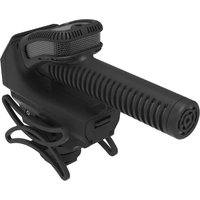
SMX-30 - Microphone Azden - Free user manual and instructions
Find the device manual for free SMX-30 Azden in PDF.


| Product Type | Stereo/Mono Switchable Video Microphone |
| Brand | Azden |
| Model | SMX-30 |
| Polar Pattern (Mono) | Super-Cardioid |
| Polar Pattern (Stereo) | 2x Cardioid (120° apart) |
| Frequency Response | 40 Hz - 20 kHz |
| Sensitivity | -36 dB (0 dB=1V/Pa @1kHz) |
| Dynamic Range | 118 dB |
| Signal-to-Noise Ratio | 82 dB (1kHz @1Pa) |
| Maximum Input Sound Pressure Level | 130 dB SPL (1kHz @1% T.H.D.) |
| Maximum Output Level | +6.2 dB |
| Output Impedance | 50 Ω |
| Power Source | 2x AA batteries |
| Battery Life | Approx. 24 hours |
| Output Connector | 3.5 mm stereo mini plug (TRS) |
| Power Switch Modes | Off, Battery, Auto |
| Gain Control | -10 dB, 0 dB, +20 dB |
| Low-Cut Filter | Selectable @ 120 Hz, 3 dB/octave |
| Dimensions (L x W x H) | 45 mm x 107 mm x 145 mm |
| Weight (without battery/windscreen) | Approx. 145 g |
| Mounting Options | Integrated shock mount with standard shoe and 1/4"-20 thread |
| Warranty | 10-year limited warranty (registration required within 90 days) |
| Safety | Avoid heat, moisture, water; remove batteries for extended storage |
| Included Accessories | Detachable foam windscreen |
Frequently Asked Questions - SMX-30 Azden
User questions about SMX-30 Azden
0 question about this device. Answer the ones you know or ask your own.
Ask a new question about this device
Download the instructions for your Microphone in PDF format for free! Find your manual SMX-30 - Azden and take your electronic device back in hand. On this page are published all the documents necessary for the use of your device. SMX-30 by Azden.
USER MANUAL SMX-30 Azden
DO NOT STORE OR OPERATE THIS PRODUCT NEAR A HEAT SOURCE OR IN AN ENVIRONMENT OF EXTREME TEMPERATURES. AVOID EXPOSURE TO RAIN OR ANY OTHER SOURCE OF MOISTURE. DO NOT SUBMERGE IN WATER. IF EXTERIOR IS EXPOSED TO WATER, WIPE DRY BEFORE USE.
REMOVE BATTERIES BEFORE STORING THIS MICROPHONE FOR AN EXTENDED PERIOD OF TIME. OLD ALKALINE BATTERIES HAVE THE POTENTIAL TO LEAK AND CAUSE DAMAGE TO THE INTERNAL COMPONENTS OF THE MICROPHONE. ADDITIONALLY, BATTERY ACID CAN BE HARMFUL IF CONTACT IS MADE WITH THE SKIN OR EYES; IF THIS HAPPENS, WASH WITH WATER IMMEDIATELY. USE CAUTION WHEN HANDLING DISCHARGED BATTERIES.
PLEASE TAKE THE TIME TO READ THIS MANUAL CAREFULLY AND KEEP IT FOR YOUR REFERENCE.
INTRODUCTION
The SMX-30 was engineered to be the ultimate DSLR camera microphone with outstanding audio quality, appealing design, ergonomic form factor, and all of the functional features one expects in a top-of-the-line, camera-mounted microphone.
With separate stereo and shotgun style microphone units, the SMX-30 is actually 2 microphones packaged into one, and can be switched between mono and stereo recording modes on the fly. In stereo mode, two cardioid mic elements angled apart by 120° are used to capture immersive and natural stereo sound. Mono mode uses the same professional quality, super-cardioid mic element as the SGM-250 to focus on sound in front of the camera.
Additionally, the SMX-30 comes with gain controls. A +20dB boost is available to send strong audio levels to your camera, thereby reducing the level of noise produced by low-quality camera audio preamps. A -10dB pad is there as well to protect against distortion when recording sound in high sound pressure level environments. And as with most of our microphones, we include a low-cut filter switch to reduce low-frequency noise usually produced by air conditioners, traffic, wind, etc.
A smart functioning “Auto” power mode and LED battery indicator light help to ensure you get the maximum battery life and are not caught unexpectedly with dead batteries. Last but not least, the SMX-30 has a uniquely integrated shock absorbing mount that will effectively isolate the microphone from camera motor and handling noise. It includes a standard size shoe that fits most cameras and a 1/4 ”-20 thread for boom-pole mounting.
We sincerely hope you enjoy using your new SMX-30 microphone for years to come. We at Azden stand behind our build quality. That's why the SMX-30 is covered by a 10 Year Limited Warranty. Please take the time to register your microphone for warranty at www.azden.com/register within 90 days of your purchase.
SMX-30 SPECIFICATIONS
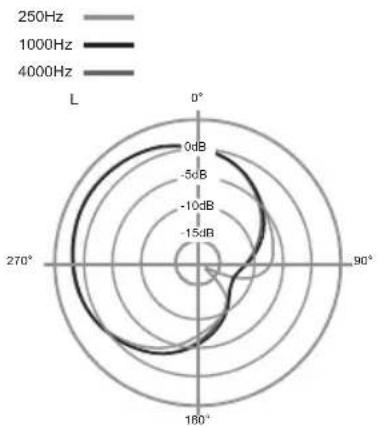
Polar Pattern: Mono: Super-Cardioid, Stereo:
2x
Cardioid
Frequency Response: 40Hz - 20kHz
Sensitivity: -36dB
@1kHz (0dB=1V/Pa)
Dynamic Range: 118dB
S/N Ratio: 82dB, 1kHz@1Pa
Max Input Level: 130dB SPL (1kHz@ 1% T.H.D.)
Max Output Level: +6.2dB
Output Impedance: 50Ω
Power Requirement: (2) AA Batteries
Output Connector: 3.5mm Stereo mini plug
Power Switch: Off, Battery, Auto
Gain Control: -10dB, 0dB, +20dB
LCF: Selectable @ 120Hz, 3dB/octave
Dimensions: 45mm x 107mm x 145mm (L x W x H)
Weight: Approx. 145g (without battery or windscreen)
Frequency Response: Mono / Stereo

Polar Patterns: Mono / Stereo


FEATURES
- Switchable stereo and mono recording modes
- Gain level adjustment: -10dB, 0dB, +20dB
- +20dB gain booster alleviates noise produced by low-quality camera preamps
- -10dB pad prevents distortion in loud environments
- Low-cut filter selectable at 120Hz, 3dB/octave.
• 24 hours of operation on (2) AA batteries with no degradation in audio quality - Low noise, high sensitivity, wide frequency response
• 10 year warranty with registration - Custom, detachable foam windscreen
- Integrated shock-absorbing shoe-mount with 1/4"-20 thread
- Battery indicator LED light
• 3.5mm stereo mini-plug output
SMX-30 MICROPHONE PARTS
① Shotgun microphone (mono)
② Stereo microphone
③ Battery Door
④ Shock-mount
⑤ Shoe-mount
⑥ 3.5mm TRS Phone Plug
⑦ Low-cut Filter Switch
⑧ Stereo/Mono Switch
⑨ Gain Adjustment Switch
⑩ Power Switch
⑪ LED Battery Indicator


SETUP AND USE
Installing Batteries
The SMX-30 takes power from 2 AA batteries. The battery door ③ is located on the front of the microphone, below the shotgun barrel. To open the battery door, pull down on the switch on the front face of the door. The door will swing downward and remain attached. Insert 2 AA batteries matching the polarity indicated inside the battery compartment. Once the batteries are installed, close the door. The door should click into place when closed properly. Do not force the door closed if there is resistance; check to make sure your batteries are installed with the correct polarity and try again.

Mounting And Connecting The SMX-30
The SMX-30's integrated shock mount comes with a standard size shoe at the bottom for camera mounting. In the center of the shoe is also a female 1/4" - 20 thread for mounting to boom poles, tripods and other accessories.
To mount the SMX-30 on a camera shoe, first loosen the thumb wheel at the bottom of the mount by turning it counter-clockwise. Then slide the microphone's shoe into your camera's shoe slot, with the microphone pointing the same direction as the camera's lens. Once secure, tighten the thumb wheel by turning it clockwise. The wheel should be snug but take care not to over tighten.

The audio output from the SMX-30 is delivered via a stereo mini-plug cable. Connect the 3.5mm TRS phone plug 6 of the SMX-30 to your camera's dedicated microphone input (See Fig. 5). In many cases this input is located on the side of your camera, usually on the left (when looking at the back of the camera) but this may be different depending on your model. Please refer to your camera's user manual if you are having trouble locating the microphone input.
In addition to cameras, the SMX-30 may be used with any audio device that accepts a microphone level signal via a stereo 3.5mm TRS phone plug connection. Once the SMX-30 is securely mounted and connected you can turn it on and begin recording.

SMX-30 Controls
All of the controls for the SMX-30 are located on the back of the microphone. For this section you may refer to Figure 2.
Power Switch ⑩
The SMX-30 has 3 power settings.
OFF: The microphone is powered off and will not drain the batteries.
BATT: The microphone is powered on and will continue to drain the batteries even when disconnected. AUTO: Senses the presence of "plug-in power" when connected to an audio input that provides it. In this mode the microphone will be automatically turned on when the camera is on and turned off when the camera is off. The microphone will also be off when disconnected, so leaving the switch in AUTO mode will not drain the batteries when not in use.
LED Battery Indicator ⑪
Once switched to AUTO or BATT mode, the LED Battery Indicator light illuminates RED continuously to indicate good battery life. If the LED is unlit, this indicates that the remaining battery life is low or batteries are dead. From the time the LED first goes out, about 1 hour of battery life will remain; It is recommended to change the batteries as soon as possible once this occurs.
FIG. 6

Stereo/Mono Switch ⑧
Use this switch to select stereo or mono recording modes. Stereo mode (ST) uses the SMX-30's two directional mic elements located at the top②. These mic elements are spaced apart at a 120° to best replicate the way the human ears hear in stereo for a natural sounding stereo image. Stereo mode is best suited for recording/filming any scene where dialogue is not important. Musical performances, action sports and nature scenes are all good applications for the stereo mode.
Mono mode uses the highly directional, super-cardioid shotgun microphone①. The barrel's acoustically tuned slots are what give this microphone its high directionality, making it very sensitive to sound directly in front while rejecting sound from the sides. The mono mode is well suited for any situation where capturing clear dialogue is important as it will help to focus on your speaking subject and reduce the ambient noise present in the environment. This microphone uses the same element as Azden's SGM-250 and SGM-250P professional shotgun microphones, so it has been designed to capture broadcast quality audio.
Gain Adjustment Switch⑨
The SMX-30 has 3 gain settings.
-10: Acts as a pad, reducing audio output level by 10dB. This setting is best to use when recording very loud sounds so to avoid overdriving your camera's audio input. The level reduction occurs before the microphone's gain stage so to protect against internal distortion as well.
0 : Disengages the gain adjustment and the output level is left unaffected.
+20 : Increases the audio output level by 20dB. This setting is best for recording very soft sounds or for optimizing signal-to-noise ratio with DSLR cameras.
Optimizing Audio Gain With A Camera
Compact cameras such as DSLRs, camcorders and mirrorless cameras are notoriously equipped with very low quality microphone preamps. Low quality preamps have an inherently high noise floor which becomes very noticeable in the soundtrack of a video recording if the external microphone does not provide enough gain. This noise manifests as low level "hiss" or "static" in the soundtrack of your video.
The SMX-30's +20dB gain boost setting can help to alleviate this noise issue: by providing a much hotter audio signal to your camera, you'll be able to turn down the gain of your camera's preamp and thereby reduce the level of noise it produces. Even if your camera does not have a gain adjustment setting, the boosted signal from the SMX-30 will still make noise less noticeable.
For best results, start by reducing your camera's gain adjustment setting to as low a level as possible. Set the SMX-30's gain adjustment to +20dB and observe the audio meters on your camera. Gradually increase the camera's gain setting (it shouldn't need much) until the audio level is optimal. Your audio meters should be peaking slightly below the maximum limit so to reduce the possibility of distortion.
Keep in mind that the SMX-30 will work best when your camera's Auto Gain Control function is turned off. It's always recommended that you record a test video with your settings to evaluate the quality of the audio before recording anything important.
Windscreen
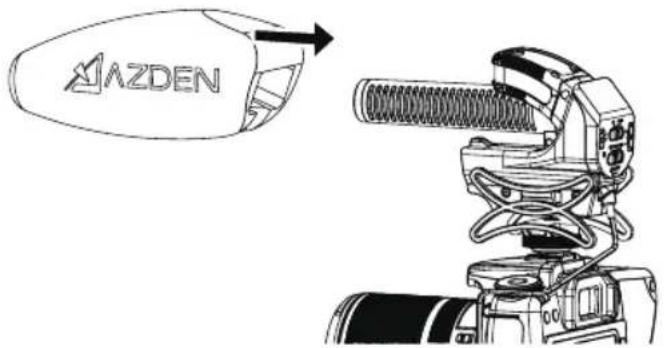
The SMX-30 comes with a custom-fitted foam windscreen that is removable. This windscreen is designed to protect against light wind conditions when recording outdoors. The windscreen will also provide adequate protection against plosive syllables when recording speech up close. The windscreen can be removed for indoor use if desired but it is recommended to keep it on the microphone during outdoor use.
FIG. 7

REGISTER FOR YOUR 10 YEAR WARRANTY

Congratulations on your purchase of the Azden SMX-30 Stereo/Mono Switchable Video Microphone. This product is eligible for coverage under Azden's Limited 10 Year Warranty. To obtain your 10 year warranty, please register your microphone online at www.azden.com/register within 90 days of purchase.*
*Azden's 10 year warranty is not available in all countries and not all Azden products are eligible. See www.azden.com for details.
Azden Ten Year Limited Warranty
Azden Corporation warrants, to the first purchaser, that the Azden brand product purchased is free from defects in material and workmanship. Azden's sole obligation under this warranty shall be to provide, without charge, repair or replacement (at Azden's sole discretion), within ten years from the date of purchase. A dated receipt is required to establish the date of purchase and online registration within 90 days of purchase is required to receive warranty service under this Ten Year Limited Warranty. The cost to ship a failed product to and from Azden or to its dealer shall not be covered by this warranty.
This warranty is the sole and exclusive express warranty given with respect to the product and all other warranties, expressed or implied, are hereby excluded. Neither Azden, nor the dealer who sells this product, is responsible for indirect, incidental or consequential damages.
This warranty does not extend to any defect, malfunction or failure caused by misuse, abuse, accident, act of God, faulty hookup, unauthorized modification, connecting this product to equipment for which it is not intended or defective associated equipment.
Customers in the Asia and Oceania markets contact: Azden Corp., 1-12-17 Kamirenjaku Mitaka-shi, Tokyo, 181-8533 Japan Tel: +81-1-422-55-5115 (Japan) • Fax: +81-422-55-0131 (Japan) www.azden.co.jp • email: sales@azden.co.jp
- INTRODUCTION
- SMX-30 SPECIFICATIONS
- FEATURES
- SMX-30 MICROPHONE PARTS
- SETUP AND USE
- INSTALLING BATTERIES
- SMX-30 CONTROLS
- POWER SWITCH ⑩
- LED BATTERY INDICATOR ⑪
- STEREO/MONO SWITCH ⑧
- GAIN ADJUSTMENT SWITCH⑨
- OPTIMIZING AUDIO GAIN WITH A CAMERA
- WINDSCREEN
- REGISTER FOR YOUR 10 YEAR WARRANTY
- AZDEN TEN YEAR LIMITED WARRANTY
Brand : Azden
Model : SMX-30
Category : Microphone