
TU3-ETG - Computer Cable TRENDNET - Free user manual and instructions
Find the device manual for free TU3-ETG TRENDNET in PDF.


| Product Type | USB 3.0 to Gigabit Ethernet Adapter |
| Brand | TRENDnet |
| Model | TU3-ETG |
| Dimensions | 7.1 x 2.6 x 1.7 cm |
| Weight | 30 g |
| Power Source | Bus-powered via USB |
| Interface | USB 3.0 (backward compatible with USB 2.0/1.1) |
| Network Standard | IEEE 802.3, 802.3u, 802.3ab |
| Data Transfer Rate | 10/100/1000 Mbps |
| Chipset | Realtek RTL8153 |
| Connector | 1 x RJ-45, 1 x USB Type-A |
| LED Indicators | Link/Activity (green) |
| Cable Length | 15 cm (integrated USB cable) |
| Supported Operating Systems | Windows, macOS, Linux |
| Compliance | FCC, CE, RoHS |
| Operating Temperature | 0°C to 50°C |
| Storage Temperature | -10°C to 70°C |
| Humidity | 5% to 90% non-condensing |
| Main Functions | Add Gigabit Ethernet port to USB-enabled devices |
| Maintenance & Cleaning | Wipe with a dry, soft cloth |
| Safety | No special safety precautions required |
| Spare Parts & Repairability | No user-serviceable parts; dispose of at end of life |
| General Information | Gigabit speeds via USB 3.0; plug-and-play installation |
Frequently Asked Questions - TU3-ETG TRENDNET
User questions about TU3-ETG TRENDNET
0 question about this device. Answer the ones you know or ask your own.
Ask a new question about this device
Download the instructions for your Computer Cable in PDF format for free! Find your manual TU3-ETG - TRENDNET and take your electronic device back in hand. On this page are published all the documents necessary for the use of your device. TU3-ETG by TRENDNET.
USER MANUAL TU3-ETG TRENDNET
natural_image
White USB network adapter with Ethernet port, no visible text or symbols on device bodyUSB 3.0 to Gigabit Ethernet Adapter
TU3-ETG
TRENDnet User's Guide TU3-ETG
Table of Contents
Table of Contents....2
Product Overview ....3
Features....3
Easy Setup.... 3
Operating Systems 3
LED Indicators 3
USB Powered....3
USB Compatibility 3
Gigabit Ethernet....3
USB 3.0....3
Energy Efficient....3
Package Contents.... 3
Interface 4
Application Diagram....4
Windows Installation....5
Windows 8....5
Windows 7....7
Windows Vista / XP 9
- Windows will prompt when TU3-ETG is ready to use......9
MAC Installation 10
MAC 10.6 - 10.10 Installation .... 10
MAC 10.6 - 10.10 Uninstallation....13
Linux Installation 14
Installation....14
Regulations....15
Federal Communication Commission Interference Statement 15
RoHS....15
Europe - EU Declaration of Conformity 16
EMC....16
Directives....16
Limited Warranty....17
TRENDnet User's Guide TU3-ETG
Product Overview

natural_image
White USB connector with network ports and a blue USB port (no visible text or symbols)TU3-ETG
Features
TRENDnet's compact USB 3.0 to Gigabit Ethernet Adapter, model TU3-ETG, quickly adds a Gigabit Ethernet port to a Windows or Mac computer. A SuperSpeed USB 3.0 port supports Full Duplex 2 Gbps transfer speeds. The TU3-ETG is compatible with older USB 2.0 and 1.1 ports.
Easy Setup
Quick intuitive setup
Operating Systems
Compatible with Windows, Mac, and Linux operating systems
LED Indicators
LED indicators confirm connectivity and transfer speeds
USB Powered
No bulky power brick—compact adapter powered by USB port
USB Compatibility
Compatible with older USB 2.0 and 1.1 ports
Gigabit Ethernet
Full Duplex 2 Gbps Ethernet speeds
USB 3.0
USB 3.0 port maintains Full Duplex 2 Gbps Ethernet speeds
Energy Efficient
Up to 70% energy saving GREENnet technology
Package Contents
TU3-ETG package includes:
• TU3-ETG USB 3.0 to Gigabit Ethernet Adapter
• Multi-Language Quick Installation Guide
• CD-ROM (Driver and User's Guide)
If any package content is missing or damaged, please contact the retail store, online retailer, or reseller/distributor from which the product was purchased.
TRENDnet User's Guide TU3-ETG
Interface
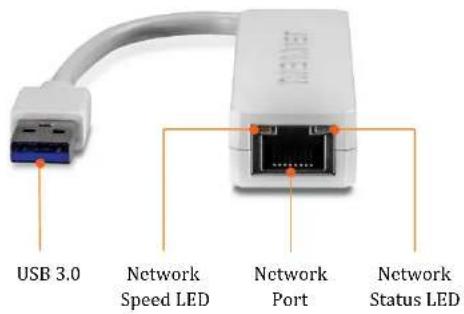
| USB 3.0 | Connecting to USB3.0 port of a computer |
| Network Port | Connect to Gigabit network with full 8 wires gigabit Ethernet cable. |
| Network | On: Gigabit network connection established |
| Speed LED (Amber) | Off: No gigabit network connection(10/100 Mbps network is the default) |
| Network | Blinking: Network traffic detected. |
| Status LED (Green) | Off: No network connection |
Application Diagram

Gigabit Ethernet Port -Connect one end of the network cable to Gigabit Ethernet Port and the other end to your Gigabit Router.
TRENDnet User's Guide TU3-ETG
Windows Installation
Windows 8
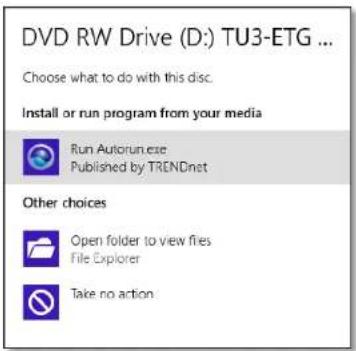
- Insert the Driver CD-ROM into your CD-ROM Drive. The prompt will show up on top right corner, tap it to start the autorun.

- Click Run Autorun.exe
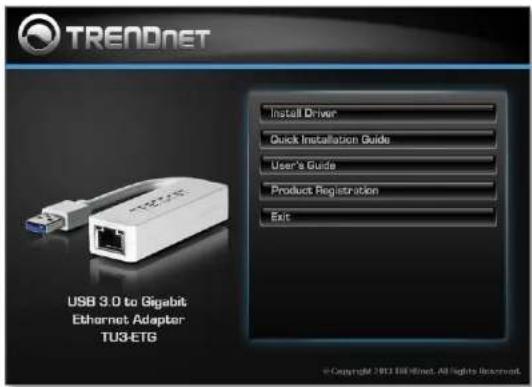
- Click Install Driver
- Click Yes to setup driver.

TRENDnet User's Guide TU3-ETG
5. Wait while driver is installing.

6. The driver is installed. Click Finish quick the setup.

TRENDnet User's Guide TU3-ETG
Windows 7
- Insert the Driver CD-ROM into your CD-ROM Drive.

- Click Install Driver
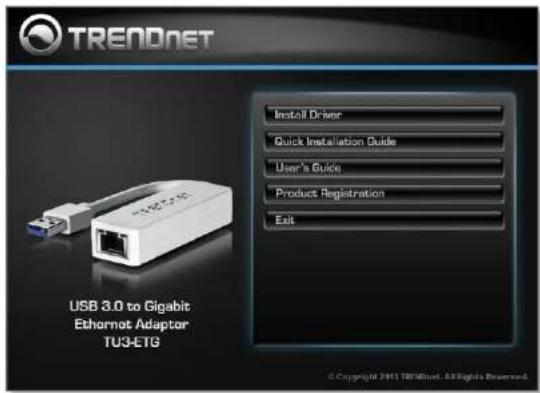
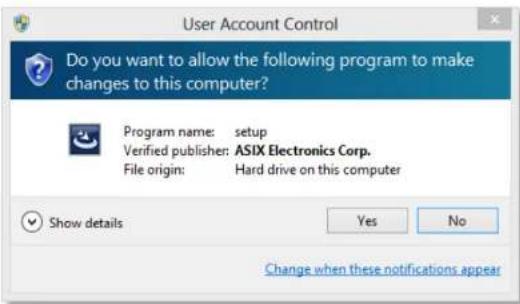
- Click Yes to setup driver
TRENDnet User's Guide TU3-ETG
4. Select the language you preferred

5. Wait while driver is installing
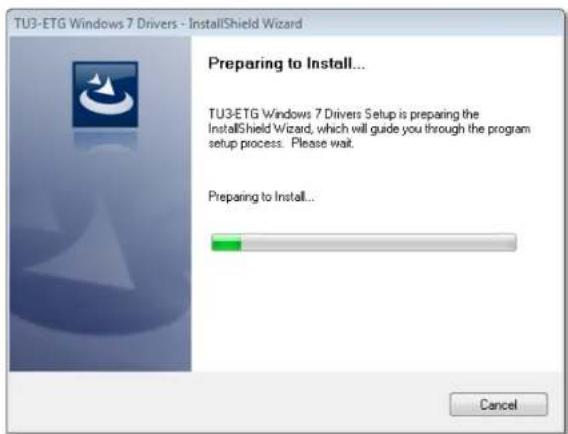
6. The driver is installed. Click Finish to end the driver installation.

TRENDnet User's Guide TU3-ETG
Windows Vista / XP
- Insert the Driver CD-ROM into your CD-ROM Drive.
- Click Install Driver

- Wait while driver is installing

- The driver is installed. Click Finish to end the driver installation.

- Windows will prompt when TU3-ETG is ready to use

TRENDnet User's Guide TU3-ETG
MAC Installation
MAC 10.6 - 10.10 Installation
- Insert the Driver CD-ROM into your CD-ROM Drive. Double-click the CD and navigate to the directory of \Driver\OSX. Double-click on TU3-ETG.dmg

- The installation virtual drive will show up on desktop. Double-click and open the drive.

- Double-clickTU3-ETG_v2.2.0.pkg to launch the installer

- Click Continue to install the driver.

- Select the destination and then click on Continue.

TRENDnet User's Guide TU3-ETG
- Authorize driver installation by entering your user name and password, then click Install Software

- Confirm the system restart message. Click Continue Installation

- Waiting while driver is installing
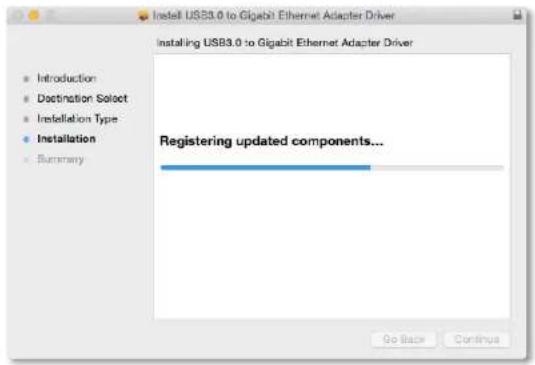
- Driver is successfully installed. Click Restart to restart your system.

TRENDnet User's Guide TU3-ETG
- Connect TU3-ETG to your MAC's USB port. Checking the installation by clicking Apple logo > System Preferences > Network. Click "+" to add a new network card.
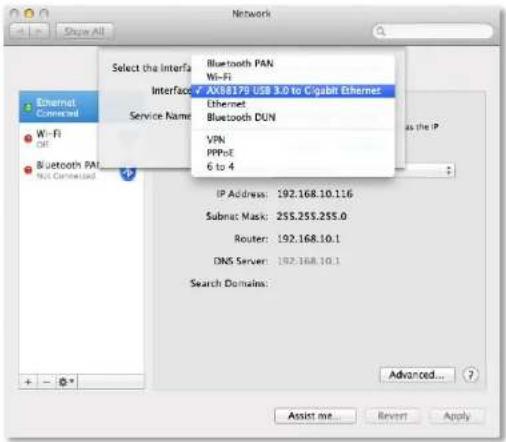
- Choose "AX88179 USB3.0 to Gigabit Ethernet" Interface and enter the Service Name for easy identification.
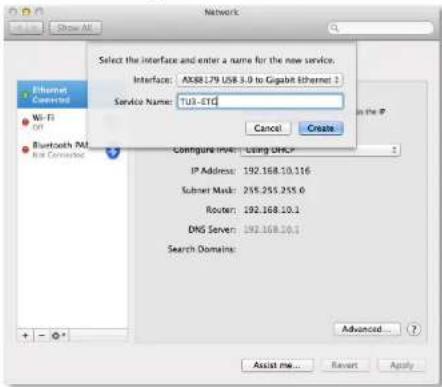
- Click Apply to apply the change. You'll see TU3-ETG network card is installed correctly.

TRENDnet User's Guide TU3-ETG
MAC 10.6 - 10.10 Uninstallation
The driver CD comes with an uninstall utility. Insert the Driver CD-ROM into your CD-ROM Drive. Double-click the CD and navigate to the directory of \Driver\OSX. You will find TU3-ETG_Uninstall_V140. Double click if you want to uninstall TU3-ETG driver.

TU3-ETG Uninstall\_v140
The uninstaller will bring Terminal app out and remover the driver. Enter your password and then close this window when the job is done.

TRENDnet User's Guide TU3-ETG
Linux Installation
Installation
TU3-ETG driver for Linux comes with source code. You have to build and install the driver on you particular Linux environment. To build the driver, open your terminal and find Linux driver source file in CD-ROM under \Driver\Linux directory
Files for make and install:
ax88179_178a.c AX88179_178A Linux driver main file axix.h AX88179_178A Linux driver header file Makefile AX88179_178A driver make file
Execute the following command to compile the driver:
user@host# sudo make
ax88179_178a.ko kernel driver will be created in same directory. Execute following command to install the driver into your Linux:
user@host# sudo make install
username@hostname :-/Desktop/Driver$ sudo make
[sudo] password forusername:
make -C /lib/modules/3.5.0-23-generic/build SUBDIRS=/home/vincent/Desktop/Driver
modules
make[1]: Entering directory '/usr/src/linux-headers-3.5.0-23-generic'
Building nodules, stage 2.
MODPOST 1 modules
make[1]: Leaving directory '/usr/src/linux-headers-3.5.0-23-generic'
username@hostname:-/Desktop/Driver$ sudo make install
su -c "cp -v ax88179_178a.ko /lib/modules/3.5.0-23-generic/kernel/drivers/net/us
b && /sbin/depnod -a"
'ax88179_178a.ko' -> '/lib/modules/3.5.0-23-generic/kernel/drivers/net/usb/ax88179_178a.ko'
* To see more options, please see README file in same folder
TRENDnet User's Guide TU3-ETG
Regulations
Federal Communication Commission Interference Statement
This equipment has been tested and found to comply with the limits for a Class B digital device, pursuant to Part 15 of the FCC Rules. These limits are designed to provide reasonable protection against harmful interference in a residential installation. This equipment generates uses and can radiate radio frequency energy and, if not installed and used in accordance with the instructions, may cause harmful interference to radio communications. However, there is no guarantee that interference will not occur in a particular installation. If this equipment does cause harmful interference to radio or television reception, which can be determined by turning the equipment off and on, the user is encouraged to try to correct the interference by one of the following measures:
- Reorient or relocate the receiving antenna.
- Increase the separation between the equipment and receiver.
- Connect the equipment into an outlet on a circuit different from that to which the receiver is connected.
- Consult the dealer or an experienced radio/TV technician for help.
FCC Caution: Any changes or modifications not expressly approved by the party responsible for compliance could void the user's authority to operate this equipment.
This device complies with Part 15 of the FCC Rules. Operation is subject to the following two conditions: (1) This device may not cause harmful interference, and (2) this device must accept any interference received, including interference that may cause undesired operation.

IMPORTANT NOTE:
FCC Radiation Exposure Statement:
This equipment complies with FCC radiation exposure limits set forth for an uncontrolled environment. This equipment should be installed and operated with minimum distance 20cm between the radiator & your body.
This transmitter must not be co-located or operating in conjunction with any other antenna or transmitter.
The availability of some specific channels and/or operational frequency bands are country dependent and are firmware programmed at the factory to match the intended destination. The firmware setting is not accessible by the end user.
RoHS
This product is RoHS compliant.


TRENDnet User's Guide TU3-ETG
Europe - EU Declaration of Conformity
TRENDnet hereby declare that the product is in compliance with the essential requirements and other relevant provisions under our sole responsibility.

EMC
EN 55022: 2010 Class B
EN 55024: 2010
This product is herewith confirmed to comply with the Directives.
Directives
EMC Directive 2004/108/EC
| Česky [Czech] | TRENDnet timto prohlašuje, že tento TU3-ETG je ve shodě se základními požadavky a dalšími příslušnými ustanovenimi směrnice 2004/108/ES. |
| Dansk [Danish] | Undertegnede TRENDnet erklærer herved, at følgende udstyr TU3-ETG overholder de væsentlige krav og øvrige relevante krav i direktiv 2004/108/EF. |
| Deutsch [German] | Hiermit erklärt TRENDnet, dass sich das Gerät TU3-ETG in Übereinstimmung mit den grundlegenden Anforderungen und den übrigen einschlägigen Bestimmungen der Richtlinie 2004/108/EG befindet. |
| Eesti [Estonian] | Käesolevaga kinnitab TRENDnet seadme TU3-ETG vastavust direktiivi 2004/108/ EÜ põhinõuetele ja nimetatud direktiivist tulenevatele teistele asjakohastele sätetele. |
| English | Hereby, TRENDnet, declares that this TU3-ETG is in compliance with the essential requirements and other relevant provisions of Directive 2004/108/CE. |
| Español [Spanish] | Por medio de la presente TRENDnet declara que el TU3-ETG cumple con los requisitos esenciales y cualesquiera otras disposiciones aplicables o exigibles de la Directiva 2004/108/CE. |
| Ελληνική[Greek] | ME THN ΠΑΡΟΥΣΑΤRENDnet ΔΗΛΩΝΕΙ OTI TU3-ETG ΣΥΜΜΟΡΦΩΝΕΤΑΙ ΠΡΟΣ ΤΙΣ ΟΥΣΙΩΔΕΙΣ ΑΠΑΙΤΗΣΕΙΣ ΚΑΙ ΤΙΣ ΛΟΙΠΕΣ ΣΧΕΤΙΚΕΣ ΔΙΑΤΑΣΕΙΣ ΤΗΣ ΟΔΗΓΙΑΣ 2004/108/EK και. |
| Français[French] | Par la présente TRENDnet déclare que l'appareil TU3-ETG est conforme aux exigences essentielles et aux autres dispositions pertinentes de la directive 2004/108/CE. |
| Italiano[Italian] | Con la presente TRENDnet dichiara che questo TU3-ETG è conforme ai requisiti essenziali ed alle altre disposizioni pertinenti stabilite dalla direttiva 2004/108/CE. |
| Latviski[Latvian] | AršoTRENDnetdeklarē, ka TU3-ETG atbilstDirektīvas 2004/108/EK būtiskajāmprasibām un citiemar to saistītajiemnoteikumiem. |
| Lietuviq[Lithuanian] | Šiuo TRENDnet deklaruojja, kad šis TU3-ETG atitinka esminius reikalavimus ir kitas 2004/108/EB Direktyvos nuostatas. |
| Nederlands[Dutch] | Hierbij verklaart TRENDnet dat het toestel TU3-ETG in overeenstemming is met de essentiële eisen en de andere relevante bepalingen van richtlijn 2004/108/EG. |
| Malti [Maltese] | Hawnhekk, TRENDnet, jiddikjara li dan TU3-ETG jikkonforma mal-ħtigijiet essenzjali u ma provvedimenti oħrajn relevanti li hemm fid-Dirrettiva 2004/108/KE. |
| Magyar[Hungarian] | Alulírott, TRENDnet nyilatkozom, hogy a TU3-ETG megfelel a vonatkozó alapveštő követelménycknek és az 2004/108/EK irányelv egyeb előírásainak. |
| Polski [Polish] | Niniejszym TRENDnet oświadcza, že TU3-ETG jest zgodny z zasadniczymi wymogami oraz pozostałymi stosownymi postanowieniami Dyrektywy 2004/108/WE. |
| Português[Portuguese] | TRENDnet declara que este TU3-ETG está conforme com os requisitos essenciais e outras disposições da Directiva 2004/108/CE. |
| Slovensko[Slovenian] | TRENDnet izjavlja, da je ta TU3-ETG v skladu z bistvenimi zahtevami in ostalimi relevantnimi določili direktive2004/108/ES. |
| Slovensky[Slovak] | TRENDnettýmtovyhlasuje, že TU3-ETG spĺňazákladnépožiadavky a všetkypríslušnéustanovenia Smernice 2004/108/ES. |
| Suomi [Finnish] | TRENDnet valkuuttaa täten että TU3-ETG tyyppinen laite on direktiivin2004/108/EY oleellisten vaatimusten ja sită koskevien direktiivin muiden ehtojen mukaïnen. |
| Svenska[Swedish] | Härmed intygar TRENDnet att denna TU3-ETG står I överensstämmelse med de väsentliga egenskapskrav och övriga relevanta bestämmelser som framgår av direktiv 2004/108/EG. |
TRENDnet User's Guide TU3-ETG
Limited Warranty
TRENDnet warrants its products against defects in material and workmanship, under normal use and service, for the following lengths of time from the date of purchase.
• TU3-ETG - 2 Years Warranty
If a product does not operate as warranted during the applicable warranty period, TRENDnet shall reserve the right, at its expense, to repair or replace the defective product or part and deliver an equivalent product or part to the customer. The repair/replacement unit's warranty continues from the original date of purchase. All products that are replaced become the property of TRENDnet. Replacement products may be new or reconditioned. TRENDnet does not issue refunds or credit. Please contact the point-of-purchase for their return policies.
TRENDnet shall not be responsible for any software, firmware, information, or memory data of customer contained in, stored on, or integrated with any products returned to TRENDnet pursuant to any warranty.
There are no user serviceable parts inside the product. Do not remove or attempt to service the product by any unauthorized service center. This warranty is voided if (i) the product has been modified or repaired by any unauthorized service center, (ii) the product was subject to accident, abuse, or improper use (iii) the product was subject to conditions more severe than those specified in the manual.
Warranty service may be obtained by contacting TRENDnet within the applicable warranty period and providing a copy of the dated proof of the purchase. Upon proper submission of required documentation a Return Material Authorization (RMA) number will be issued. An RMA number is required in order to initiate warranty service support for all TRENDnet products. Products that are sent to TRENDnet for RMA service must have the RMA number marked on the outside of return packages and sent to TRENDnet prepaid, insured and packaged appropriately for safe shipment. Customers shipping from outside of the USA and Canada are responsible for return shipping fees. Customers shipping from outside of the USA are responsible for custom charges, including but not limited to, duty, tax, and other fees.
WARRANTIES EXCLUSIVE: IF THE TRENDNET PRODUCT DOES NOT OPERATE AS WARRANTED ABOVE, THE CUSTOMER'S SOLE REMEDY SHALL BE, AT TRENDNET'S OPTION, REPAIR OR REPLACE. THE FOREGOING WARRANTIES AND REMEDIES ARE EXCLUSIVE AND ARE IN LIEU OF ALL OTHER WARRANTIES, EXPRESSED OR IMPLIED, EITHER IN FACT OR BY OPERATION OF LAW, STATUTORY OR OTHERWISE, INCLUDING WARRANTIES OF MERCHANTABILITY AND FITNESS FOR A PARTICULAR PURPOSE.
TRENDNET NEITHER ASSUMES NOR AUTHORIZES ANY OTHER PERSON TO ASSUME FOR IT ANY OTHER LIABILITY IN CONNECTION WITH THE SALE, INSTALLATION MAINTENANCE OR USE OF TRENDNET'S PRODUCTS.
TRENDNET SHALL NOT BE LIABLE UNDER THIS WARRANTY IF ITS TESTING AND EXAMINATION DISCLOSE THAT THE ALLEGED DEFECT IN THE PRODUCT DOES NOT EXIST OR WAS CAUSED BY CUSTOMER'S OR ANY THIRD PERSON'S MISUSE, NEGLECT, IMPROPER INSTALLATION OR TESTING, UNAUTHORIZED ATTEMPTS TO REPAIR OR MODIFY, OR ANY OTHER CAUSE BEYOND THE RANGE OF THE INTENDED USE, OR BY ACCIDENT, FIRE, LIGHTNING, OR OTHER HAZARD.
LIMITATION OF LIABILITY: TO THE FULL EXTENT ALLOWED BY LAW TRENDNET ALSO EXCLUDES FOR ITSELF AND ITS SUPPLIERS ANY LIABILITY, WHETHER BASED IN CONTRACT OR TORT (INCLUDING NEGLIGENCE), FOR INCIDENTAL, CONSEQUENTIAL, INDIRECT, SPECIAL, OR PUNITIVE DAMAGES OF ANY KIND, OR FOR LOSS OF REVENUE OR PROFITS, LOSS OF BUSINESS, LOSS OF INFORMATION OR DATE, OR OTHER FINANCIAL LOSS ARISING OUT OF OR IN CONNECTION WITH THE SALE, INSTALLATION, MAINTENANCE, USE, PERFORMANCE, FAILURE, OR INTERRUPTION OF THE POSSIBILITY OF SUCH DAMAGES, AND LIMITS ITS LIABILITY TO REPAIR, REPLACEMENT, OR REFUND OF THE PURCHASE PRICE PAID, AT TRENDNET'S OPTION. THIS DISCLAIMER OF LIABILITY FOR DAMAGES WILL NOT BE AFFECTED IF ANY REMEDY PROVIDED HEREIN SHALL FAIL OF ITS ESSENTIAL PURPOSE.
Governing Law: This Limited Warranty shall be governed by the laws of the state of California.
Some TRENDnet products include software code written by third party developers. These codes are subject to the GNU General Public License ("GPL") or GNU Lesser General Public License ("LGPL").
Go to http://www.trendnet.com/gpl or http://www.trendnet.com Download section and look for the desired TRENDnet product to access to the GPL Code or LGPL Code. These codes are distributed WITHOUT WARRANTY and are subject to the copyrights of the developers. TRENDnet does not provide technical support for these codes. Please go to http://www.gnu.org/licenses/gpl.txt or http://www.gnu.org/licenses/lgpl.txt for specific terms of each license.
December 23, 2014
TU3-ETG User's Guide V1.4
TRENDNET®
Product Warranty Registration
Please take a moment to register your product online. Go to TRENDnet's website at http://www.trendnet.com/register
TRENDnet
20675 Manhattan Place
Torrance, CA 90501. USA
Copyright ©2015. All Rights Reserved. TRENDnet.
- TRENDnet User's Guide TU3-ETG
- Table of Contents
- Product Overview
- Features
- Easy Setup
- Operating Systems
- LED Indicators
- USB Powered
- USB Compatibility
- Gigabit Ethernet
- USB 3.0
- Energy Efficient
- Package Contents
- Windows Installation
- Windows 8
- Wait while driver is installing.
- The driver is installed. Click Finish quick the setup.
- Windows 7
- Select the language you preferred
- Wait while driver is installing
- The driver is installed. Click Finish to end the driver installation.
- Windows Vista / XP
- MAC Installation
- MAC 10.6 - 10.10 Installation
- MAC 10.6 - 10.10 Uninstallation
- TU3-ETG Uninstall\_v140
- Linux Installation
- Installation
- Regulations
- Federal Communication Commission Interference Statement
- IMPORTANT NOTE:
- RoHS
- Europe - EU Declaration of Conformity
- EMC
- Directives
- Limited Warranty
- TRENDNET®
- Product Warranty Registration
Brand : TRENDNET
Model : TU3-ETG
Category : Computer Cable