GEN10 - Audio/video converter AJA - Free user manual and instructions
Find the device manual for free GEN10 AJA in PDF.


| Product Type | Audio/Video Converter (Mini-Converter) |
| Brand | AJA |
| Model | GEN10 |
| Dimensions | 76 x 51 x 20 mm (3.0 x 2.0 x 0.8 in) |
| Weight | 0.23 kg (0.5 lb) |
| Power Supply | 5V DC via USB or external power adapter (sold separately) |
| Power Consumption | ≤ 5W |
| Video Input Formats | SD-SDI (SMPTE 259M), HD-SDI (SMPTE 292M), 3G-SDI (SMPTE 424M) |
| Video Output Formats | Same as input, plus HDMI (up to 1080p60) |
| Audio Support | Embedded SDI audio, 2 channels up to 24-bit, 48kHz |
| Connectors | BNC input (SDI), BNC output (SDI), HDMI output (Type A) |
| Supported Standards | SMPTE 259M, 292M, 424M; ITU-R BT.656/601, BT.1120 |
| Color Space | RGB, YCbCr 4:2:2 |
| Latency | < 1 frame (typical) |
| Operating Temperature | 0°C to 40°C (32°F to 104°F) |
| Storage Temperature | -20°C to 60°C (-4°F to 140°F) |
| Humidity | 10% to 90% non-condensing |
| Mounting | Freestanding or VESA mount via optional bracket |
| Maintenance & Cleaning | Wipe with a dry, soft cloth. Do not use liquids or abrasives. |
| Safety Precautions | Do not expose to rain or moisture. Use only approved power sources. |
| Spare Parts & Repairability | No user-serviceable parts inside. Contact AJA support for repairs. |
| Certifications | CE, FCC Part 15 Class A |
Frequently Asked Questions - GEN10 AJA
User questions about GEN10 AJA
0 question about this device. Answer the ones you know or ask your own.
Ask a new question about this device
Download the instructions for your Audio/video converter in PDF format for free! Find your manual GEN10 - AJA and take your electronic device back in hand. On this page are published all the documents necessary for the use of your device. GEN10 by AJA.
USER MANUAL GEN10 AJA
AJA^® , KONA®, and XENA® are registered trademarks of AJA Video, Inc. Io HD™ and Io™ are trademarks of AJA Video, Inc. All other trademarks are the property of their respective holders.
Notice
Copyright © 2008 AJA Video, Inc. All rights reserved. All information in this manual is subject to change without notice. No part of the document may be reproduced or transmitted in any form, or by any means, electronic or mechanical, including photocopying or recording, without the express written permission of AJA Inc.
FCC Emission Information
This equipment has been tested and found to comply with the limits for a Class A digital device, pursuant to Part 15 of the FCC Rules. These limits are designed to provide reasonable protection against harmful interference when the equipment is operated in a commercial environment. This equipment generates, uses and can radiate radio frequency energy and, if not installed and used in accordance with the instruction manual, may cause harmful interference to radio communications. Operation of this equipment in a residential area is likely to cause harmful interference in which case the user will be required to correct the interference at his own expense. Changes or modifications not expressly approved by AJA Video can effect emission compliance and could void the user's authority to operate this equipment.
Contacting Support
To contact AJA Video for sales or support, use any of the following methods:
443 Crown Point Circle, Grass Valley, CA. 95945 USA
Telephone: +1.800.251.4224 or +1.530.274.2048
Fax: +1.530.274.9442
Web: http://www.aja.com
Support Email: support@aja.com
Sales Email: sales@aja.com
When calling for support, have all information on the product (serial number etc.) at hand prior to calling.
Limited Warranty
AJA Video warrants that this product will be free from defects in materials and workmanship for a period of five years from the date of purchase. If a product proves to be defective during this warranty period, AJA Video, at its option, will either repair the defective product without charge for parts and labor, or will provide a replacement in exchange for the defective product.
In order to obtain service under this warranty, you the Customer, must notify AJA Video of the defect before the expiration of the warranty period and make suitable arrangements for the performance of service. The Customer shall be responsible for packaging and shipping the defective product to a designated service center nominated by AJA Video, with shipping charges prepaid. AJA Video shall pay for the return of the product to the Customer if the shipment is to a location within the country in which the AJA Video service center is located. Customer shall be responsible for paying all shipping charges, insurance, duties, taxes, and any other charges for products returned to any other locations.
This warranty shall not apply to any defect, failure or damage caused by improper use or improper or inadequate maintenance and care. AJA Video shall not be obligated to furnish service under this warranty a) to repair damage resulting from attempts by personnel other than AJA Video representatives to install, repair or service the product, b) to repair damage resulting from improper use or connection to incompatible equipment, c) to repair any damage or malfunction caused by the use of non-AJA Video parts or supplies, or d) to service a product that has been modified or integrated with other products when the effect of such a modification or integration increases the time or difficulty of servicing the product.
THIS WARRANTY IS GIVEN BY AJA VIDEO IN LIEU OF ANY OTHER WARRANTIES, EXPRESS OR IMPLIED. AJA VIDEO AND ITS VENDORS DISCLAIM ANY IMPLIED WARRANTIES OF MERCHANTABILITY OR FITNESS FOR A PARTICULAR PURPOSE, AJA VIDEO'S RESPONSIBILITY TO REPAIR OR REPLACE DEFECTIVE PRODUCTS IS THE WHOLE AND EXCLUSIVE REMEDY PROVIDED TO THE CUSTOMER FOR ANY INDIRECT, SPECIAL, INCIDENTAL OR CONSEQUENTIAL DAMAGES IRRESPECTIVE OF WHETHER AJA VIDEO OR THE VENDOR HAS ADVANCE NOTICE OF THE POSSIBILITY OF SUCH DAMAGES.
Introduction
The GEN10 is a cost effective and flexible SD/HD/AES sync generator. The GEN10 features 7 outputs including 2 groups of independently controlled SD/HD sync outputs and 1 AES-11 output. The SD outputs can be switched between Color Black or Color Bars. HD tri-level sync can be switched between 19 different HD formats including all that are in use today. The AES-11 output can be switched between SILENCE and TONE. All outputs are in sync with each-other and are sourced from an accurate master time base.
Features
• HD Tri-level sync generation
• SD Color Black or Color Bars
- Two groups of independently switchable outputs allows simultaneous HD and SD sync generation
- AES-11 output switchable between silence and tone
- Multiple outputs can synchronize entire systems without requiring a Sync DA
- 5-18VDC Power
• External Dip Switch Configuration
Block Diagram

flowchart
graph TD
    A["Master Timebase"] --> B["SD Sync Generator"]
    A --> C["HD Sync Generator"]
    A --> D["AES Generator"]
    B --> E["SD SW1"]
    B --> F["SD SW2"]
    E --> G["Output 1"]
    E --> H["Output 2"]
    E --> I["Output 3"]
    E --> J["Output 4"]
    F --> K["Output 5"]
    F --> L["Output 6"]
    G --> M["Group 1 Selectable as a group for HD: Trilevel 720 or 1080 (multiple formats: see specifications)"]
    H --> N["Group 2 Selectable as a group for HD: Trilevel 720 or 1080 (multiple formats: see specifications)"]
    I --> O["Group 2 Selectable as a group for HD: Trilevel 720 or 1080 (multiple formats: see specifications)"]
    J --> P["Group 2 Selectable as a group for HD: Trilevel 720 or 1080 (multiple formats: see specifications)"]
    D --> Q["AES 11 Output"]
GEN10, Block Diagram
I/O Connections

GEN10, Side View
User Controls
The user interface for the GEN10 is an 8-switch DIP accessible through a cut-out in the bottom of the unit. Use the DIP switches to configure outputs and formats.
Note: The combination of switch settings determines the overall operation of the GEN10.
The exact purpose of each DIP switch and what it controls is described on the following pages.
DIP Switch Setting LEFT RIGHT
| 1 | SD | OUT 1-4 | HD |
| 2 | SD | OUT 5-6 | HD |
| 3 | BLK | SD OUT | BARS |
| 4 | 59.94 | FORMAT | 50 |
| 5 | 1080 | HD FMT | 720 |
| 6 | 0 | S1 | 1 |
| 7 | 0 | S2 | 1 |
| 8 | 0 | S3 | 1 |

USA Tel 530-274-2048 www.aja.com
Switch 1 (OUT 1-4)—Switches outputs 1-4 between SD and HD sync
| LEFT (SD) RIGHT (HD) | |
| Selects SD Sync Selects HD Sync | |
Switch 2 (OUT 5-6)—Switches outputs 5-6 between SD and HD sync
| LEFT (SD) RIGHT (HD) | |
| Selects SD Sync Selects HD Sync | |
Switch 3 (SD OUT)—Switches SD output between Color Black and Color Bars. Also switches AES output between BLK/Silence and BARS/TONE
| LEFT (BLACK) RIGHT (BARS) | |
| SD Output is Color BlackAES-11 output is silent | SD Output is 75% Color BarsAES-11 output with tone |
Switch 4 (FORMAT)—Switches outputs between 59.94/60Hz and 50Hz
| LEFT (59.94) RIGHT (50) | |
| Select NTSC related frame rates (for true 60/24Hz see chart that follows) | Select PAL related frame rates |
Switch 5 (HD FMT)—Switches HD between 720 and 1080 formats
| LEFT (1080) RIGHT (720) | |
| Select 1080 line formats Select 720 line formats | |
Switches 6 (S1), 7 (S2), and 8 (S3)—Used for selecting “less popular” HD Formats
For the most popular HD formats switches 6, 7, and 8 should be set to the default position (all three switches set to LEFT or "000", as listed in the chart that follows). Switches 6, 7, and 8 should only be changed to select other HD formats that are more rarely used. The following chart in Table 1 shows how to select those formats using switches 4 through 8 in combination.
Table 1. Selection Matrix For Switches 6, 7 and 8
The following table shows the combinations of DIP switch settings required to configure various formats. To use the table, first locate the video format you want in the colored columns and then set switches as shown in the corresponding left hand gray column.
Note: the switches numbers and labels are both shown on the chart, with the labels in parentheses (for example, switch 4 is labelled "FORMAT" and switch 8 is labelled "S3").
| SW 4 (FORMAT) | 59.94 | 50 | |||||
| SW 5 (HD FMT) | 1080 | 720 | 1080 | 720 | |||
| SW8 (S3) - SW7 (S2) -SW6 (S1): These three switches form a binary value shown in the left hand column below. A "0" = switch LEFT, a "1" = switch RIGHT. | |||||||
| SW8-SW7-SW6(S3) (S2) (S1) | |||||||
| 0 | 0 | 0 | 1080i59.94 | 720p59.94 | 1080i50 | 720p50 | |
| 0 | 0 | 1 | 1080psf23.98 | 720p23.98 | 1080i50 | 720p25 | |
| 0 | 1 | 0 | 1080p23.98 | 720p23.98 | 1080p25 | 720p25 | |
| 0 | 1 | 1 | 1080p29.97 | 720p29.97 | 1080p25 | 720p25 | |
| 1 | 0 | 0 | 1080i60 | 720p60 | 1080i50 | 720p50 | |
| 1 | 0 | 1 | 1080psf24 | 720p24 | 1080i50 | 720p25 | |
| 1 | 1 | 0 | 1080p24 | 720p24 | 1080p25 | 720p25 | |
| 1 | 1 | 1 | 1080p30 | 720p30 | 1080p25 | 720p25 | |
Note: for 1080psf29.97 use 1080i59.94
for 1080psf30 use 1080i60
for 1080psf25 use 1080i50
Internal Jumper
An internal jumper block with 3 jumpers determines the offset to Pedestal for NTSC. For most instances, the factory default (all jumpers in place) will be the proper setting.
- Jumper 1 installed (default): NTSC with Setup (54 mV pedestal offset)
- Jumper 1 removed: NTSC without Setup (no offset)
Note: Jumpers 2 and 3 are ignored—installed or not, they do not affect operation.
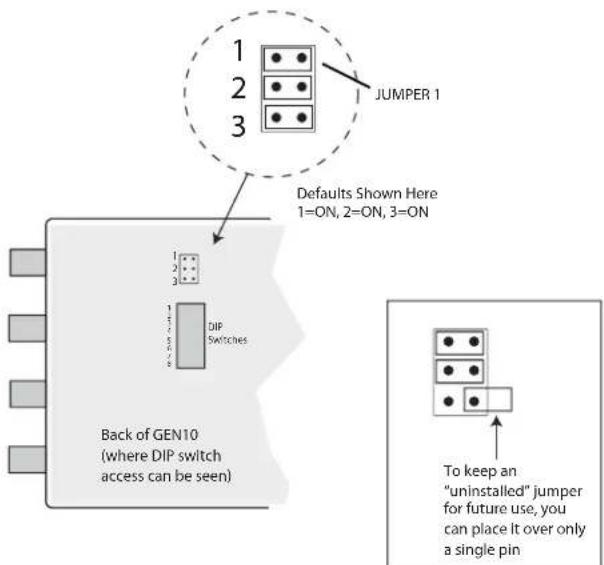
GEN10 Internal Jumper (remove back of case to access)
Specifications
| Item Specification | |
| HD Sync Tri-level | |
| SD Sync Color Black, 75% Color Bars | |
| AES-11 Output AES-11, 48KHz, Silent or 1KHz Tone (-20dBFS for NTSC, -18dBFS for PAL), 1 BNC | |
| Video Sync Outputs Assignable in two groups to either HD or SD:4 BNCs—Outputs 1 to 42 BNCs—Outputs 5 and 6 | |
| Accuracy 3 ppm | |
| Formats 525i, 625i | 720p23.98/24/25/29.97/30/50/59.94/601080i50/59.94/601080psF23.98/24/25/29.97/301080p23.98/24/25/29.97/30 |
| User Controls External Dipswitch | |
| Size 5.8" x 3.1" x 1 (147 x 79 x 25mm) | |
| Power 5-18VDC, 2 watts. Requires power supply. | |

Brand : AJA
Model : GEN10
Category : Audio/video converter