
CWA2000 - Motion detector CHAMBERLAIN - Free user manual and instructions
Find the device manual for free CWA2000 CHAMBERLAIN in PDF.


| Product Type | Motion Detector |
| Brand | Chamberlain |
| Model | CWA2000 |
| Detection Technology | Passive Infrared (PIR) |
| Detection Range | Up to 40 ft (12 m) |
| Detection Angle | 110 degrees |
| Power Supply | 12-24 V AC/DC |
| Current Consumption | 30 mA max |
| Output Relay | Form C, 1A @ 30V |
| Dimensions (H x W x D) | 4.5 x 2.8 x 2.2 in (114 x 71 x 56 mm) |
| Weight | 0.4 lb (180 g) |
| Mounting Type | Wall or ceiling mount |
| Operating Temperature | -20°F to 120°F (-30°C to 50°C) |
| Weather Resistance | IP54 (splash proof) |
| Adjustable Sensitivity | Yes |
| Time Delay Adjustment | 5 seconds to 30 minutes |
| Compatible Systems | Chamberlain garage door openers and access control |
| Includes | Mounting bracket, screws, user manual |
| Certifications | FCC, UL |
| Warranty | 2 years limited |
Frequently Asked Questions - CWA2000 CHAMBERLAIN
User questions about CWA2000 CHAMBERLAIN
0 question about this device. Answer the ones you know or ask your own.
Ask a new question about this device
Download the instructions for your Motion detector in PDF format for free! Find your manual CWA2000 - CHAMBERLAIN and take your electronic device back in hand. On this page are published all the documents necessary for the use of your device. CWA2000 by CHAMBERLAIN.
USER MANUAL CWA2000 CHAMBERLAIN
The Wireless Motion Detection System uses a Passive Infra-Red (PIR) Motion Sensor to detect movement of people and vehicles.
The Base Station is powered by the DC adapter and the 4 AA batteries supply power in case of a power outage.
NOTE: The Base Station is intended for indoor use only.

WARNING: This product can expose you to chemicals including lead, which are known to the State of California to cause cancer or birth defects or other reproductive harm. For more information go to www.P65Warnings.ca.gov
Carton Inventory

Operation and Features
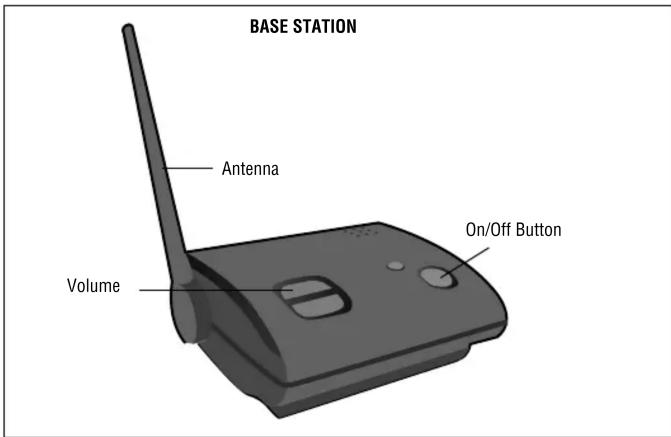
On/Off: To turn the Base Station on and off, hold down the power button until you hear the on/off tone.
Volume: The Base Station is equipped with adjustable volume controls. The lowest volume setting is the mute feature.
Batteries: If the Base Station batteries are low, the Base Station will beep every 30 minutes. The AA batteries in the Motion Sensor will last up to 2 years depending on use (Lithium batteries are recommended for colder environments). If the Motion Sensor batteries are low, the Base Station will beep every 30 minutes until the batteries are replaced. The Motion Sensor will continue to operate with a low battery, however the light will not illuminate. For peak performance, inspect batteries annually and replace as needed.
Programming Additional Motion Sensors: The Base Station can learn the code of up to 7 additional Motion Sensors, responding with unique buzzes. To program additional Motion Sensors see Step 4.
To order additional Motion Sensors call 1-800-528-9131.
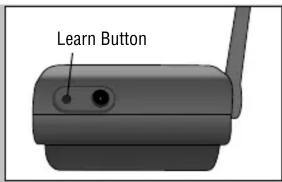
Clear Memory: Press and hold the Learn Button on the Base Station until 3 beeps are heard.
Assembly and Programming
1
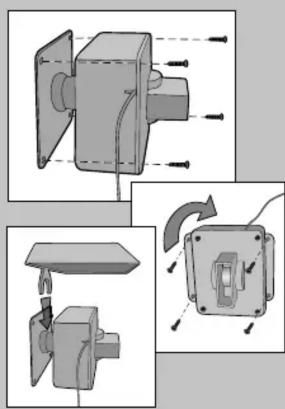
Attach Motion Sensor box to mounting plate with large silver screw. Tighten screw until Motion Sensor stays in place when repositioned.

natural_image
3D mechanical assembly diagram showing two components with mounting holes and a central hub (no text or symbols)2
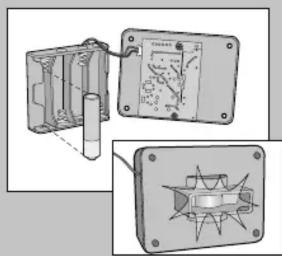
Install 4 AA Alkaline batteries. (Lithium batteries recommended for colder environments.) LED light will flash.
natural_image
Technical illustration of a mechanical assembly with cross-sectional views (no text or symbols)SWITCH SETTINGS
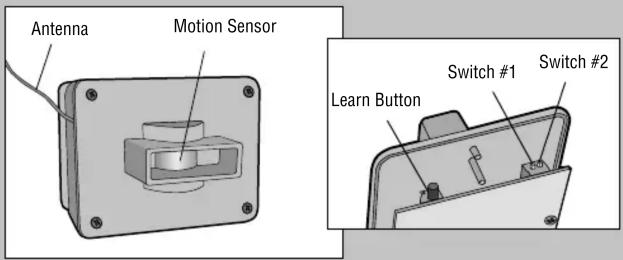
SWITCH #1:
| OFF 15 Feet (4.5 m) Detection Range |
| ON 30 Feet (9.1 m) Detection Range(Default) |
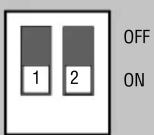
SWITCH #2:
| OFF | Low | Sensitivity | |
| ON | High | Sensitivity | |
(Default)
NOTE: To avoid detection of small animals move Switch #2 to OFF.
3
Plug in the Base Station. Adhere rubber pads to the bottom of the base.

4 AA batteries are optional in case of a power failure.

4
A Ensure Base Station and Motion Sensor are in close proximity to each other. Press and release Learn Button on Base Station. Buzzer will sound.
B Within 60 seconds, press the Learn Button on the inside of the Motion Sensor. LED light will illuminate and Base Station will buzz.
5
Insert battery pack facing away from circuit board and fasten cover with the smallest screws (provided).
NOTE: Ensure the batteries do not touch the circuit board and the antenna and battery wires are not pinched.
6
Test Motion Sensor by waving hand in front of sensor. LED light should flash and the Base Station will buzz X number of times indicating which sensor has been activated.


natural_image
Mechanical device with internal components and directional arrows, plus a circular symbol indicating no text or symbols (no readable text or labels)
natural_image
Illustration of hands interacting with a device labeled 'USB' (no text or symbols on the device itself)MOTION SENSOR INSTALLATION
7
Mount Motion Sensor horizontally on solid surface 3-5 feet (1-1.5 m) off the ground and within 1/2 mile (0.8 km) of Base Station (rotate sensor to access screw holes). Unit should be able to swivel as needed.
Attach sun/rain shield. NOTE: Keep Motion Sensor antenna away from metal objects. Do not mount Motion Sensor in direct sunlight, near moving tree branches, or in the path of a sprinkler system.
natural_image
Technical illustration of a mechanical assembly with exploded and assembled views (no text or symbols)Vehicle Alert Installation: For cars, the best mounting position is about 4 feet (1.2 m) high, between 10-20 feet (3-6 m) back, and angled to see the back of car after passing the sensor.

The Motion Sensor lights up, but the Base Station does not respond.
The Motion Sensor must be programmed to Base Station (See Step 4). Ensure Base Station is on and the volume is turned up.
Motion Sensor is detecting motion only part of the time.
Ensure the Motion Sensor is set to the High Sensitivity setting (See Step 2). To detect cars, it is best to mount Motion Sensor at height of car's motor and have it between 10-20 feet (3-6 m) from the road. Swivel sensor as needed.
The Wireless Motion Detection System is giving false alarms.
Check for moving tree branches or insects in sensor window. Motion Sensor can also be triggered by light shining directly in sensor window, such as reflected sunlight, or motion in front of a light source.
It is possible that condensation has built up on the sensor. Wipe condensation from Motion Sensor with cotton swab. Let it sit inside for a few hours, open to the air, without the batteries and it should correct itself.
Check Sensor Switches on Motion Sensor. See Switch Settings.
Base Station beeps every 30 minutes.
The batteries in the Base Station or the Motion Sensor(s) are low. Replace the 4 AA batteries. Check the Motion Sensor(s), if the LED illuminates on all of the Motion Sensors, change the batteries in the Base Station.
The Wireless Motion Detection System is not getting expected transmission range.
Keep both antennas vertical and keep Motion Sensor antenna away from trees and metal objects. Ensure Base Station is in clearest possible sight of the Motion Sensor. The less objects between the devices, the longer the range.
NOTE: The manufacturer is not responsible for any radio or TV interference caused by unauthorized modifications to this equipment. Changes or modifications not expressly approved by the manufacturer could void the user's authority to operate the equipment.
NOTICE: This device complies with Part 15 of the FCC rules and Industry Canada's license-exempt RSSs. Operation is subject to the following two conditions: (1) this device may not cause harmful interference, and (2) this device must accept any interference received, including interference that may cause undesired operation.
Any changes or modifications not expressly approved by the party responsible for compliance could void the user's authority to operate the equipment.
This device must be installed to ensure a minimum 20 cm (8 in.) distance is maintained between users/bystanders and device.
This device has been tested and found to comply with the limits for a Class B digital device, pursuant to part 15 of the FCC rules and Industry Canada ICES standard. These limits are designed to provide reasonable protection against harmful interference in a residential installation. This equipment generates, uses and can radiate radio frequency energy and, if not installed and used in accordance with the instructions, may cause harmful interference to radio communications. However, there is no guarantee that interference will not occur in a particular installation. If this equipment does cause harmful interference to radio or television reception, which can be determined by turning the equipment off and on, the user is encouraged to try to correct the interference by one or more of the following measures:
- Reorient or relocate the receiving antenna.
- Increase the separation between the equipment and receiver.
- Connect the equipment into an outlet on a circuit different from that to which the receiver is connected.
- Consult the dealer or an experienced radio/TV technician for help.
www.chamberlain.com
1-800-528-9131


- Assembly and Programming
- 1
- 2
- 3
- 4
- 5
- 6
- MOTION SENSOR INSTALLATION
- 7
- The Motion Sensor lights up, but the Base Station does not respond.
- Motion Sensor is detecting motion only part of the time.
- The Wireless Motion Detection System is giving false alarms.
- Base Station beeps every 30 minutes.
- The Wireless Motion Detection System is not getting expected transmission range.
Brand : CHAMBERLAIN
Model : CWA2000
Category : Motion detector