
ScreenCast AV 4 - Audio/video extender BELKIN - Free user manual and instructions
Find the device manual for free ScreenCast AV 4 BELKIN in PDF.


| Type | Audio/Video Extender (Wireless HDMI Transmitter and Receiver) |
| Brand | Belkin |
| Model | ScreenCast AV 4 |
| Technology | Wireless (Proprietary RF) |
| Video Resolution | Up to 1080p |
| Audio Support | Stereo audio via HDMI |
| Transmission Range | Up to 30 meters (open space) |
| Latency | Approximately 200 ms |
| HDMI Ports | HDMI input (transmitter), HDMI output (receiver) |
| Power Supply | USB powered (5V/1A) |
| Dimensions (each unit) | 120 x 80 x 25 mm |
| Weight (total) | 200 g |
| Material | Plastic |
| Compatibility | HDMI devices (TVs, projectors, computers) |
| Setup | Plug and play, no drivers needed |
| Channels | Multiple channels to avoid interference |
| Security | 128-bit encryption |
| Included Accessories | Transmitter, receiver, HDMI cables, USB power cables, manual |
| Maintenance | Clean with dry cloth |
| Safety | Avoid moisture, keep away from heat sources |
| Repairability | Not user-serviceable; contact Belkin support |
Frequently Asked Questions - ScreenCast AV 4 BELKIN
User questions about ScreenCast AV 4 BELKIN
0 question about this device. Answer the ones you know or ask your own.
Ask a new question about this device
Download the instructions for your Audio/video extender in PDF format for free! Find your manual ScreenCast AV 4 - BELKIN and take your electronic device back in hand. On this page are published all the documents necessary for the use of your device. ScreenCast AV 4 by BELKIN.
USER MANUAL ScreenCast AV 4 BELKIN
What's in the Box? 2
Product Pictures 3
General Information.... 5
Setting the Product Up 9
Daily Use with Your ScreenCast Remote and On-Screen Display 12
ScreenCast AV Settings 13
Naming/Renaming Video Sources....13
Renaming All Video Sources 14
Renaming One Video Source....14
Naming/Renaming Transmitters 15
Adding/Deleting a Transmitter 16
Turning Wireless On/Off 19
Setting/Changing the Language 20
Troubleshooting and FAQs.... 21
Connectivity....21
Distance and Placement....22
Video and Audio 22
Other Information.... 24
FCC Statement 24
Belkin International, Inc., Limited 2-Year Product Warranty.....25
Technical Support 27
GETTING STARTED
Introduction
Thank you for purchasing the ScreenCast AV wireless system.
We built the ScreenCast AV system with a simple goal: to give people the chance to spend less time staring at their audio/video components and more time watching their HDTV.
Don't get us wrong—we love our AV products. But we also like the idea of the living room being more about living and less about electronics. And, yes, there are great custom installers out there who build amazing AV systems that are essentially invisible, but we wanted a solution that didn't require cutting holes in perfectly good walls and the purchase of very expensive long-run HDMI cables.
So we built ScreenCast AV and focused on getting the best distance and AV quality possible in one easy-to-set-up and easy-to-use solution.
With a range of up to 100 feet of line-of-sight range (30m) and 30 feet (10m) through many barriers like walls, doors, and audio/video cabinets, ScreenCast AV can help you design your living space the way you want it.
And, most importantly, ScreenCast AV provides all of that freedom without sacrificing picture quality or sound performance—you can still watch your favorite movies, TV shows, or other AV devices in up to 1080p quality and up to 5.1 channels of high-definition sound.
So enjoy ScreenCast AV and your newfound freedom to live the way you want.
What's in the Box?
• ScreenCast AV Wireless Transmitter
• ScreenCast AV Wireless Receiver
- Two Power Adapters
• High Speed HDMI ^70 Cable
• Remote Control (battery included)
- IR Emitter
- Wall-Mount Kit
- Manual on CD
ScreenCast AV 4 Transmitter

Transmitter:
A. Video source select button
- Allows you to cycle between video products that you have connected
B. Pairing button for syncing with other ScreenCast receivers
- Allows you to add additional ScreenCast receivers
C. HDMI inputs 1/2/3/4
- This is where you connect your HDMI source devices like Blu-ray™ disc players, game consoles, or cable/satellite boxes.
D. IR emitter port (3.5mm jack)
- This is where you will connect the IR cable that will help you control your AV source devices.
E. USB port
• This is for future product upgrades.
F. Reset button
• If you press this button for less than 5 seconds, the ScreenCast transmitter will restart.
- If you press this button for more than 5 seconds, the ScreenCast transmitter will be restored to factory defaults. It will need to be paired again with your receiver.
G. Power input
H. Power (on/off) switch
ScreenCast AV 4 Receiver

Receiver:
A. Video source select button
- Allows you to cycle between AV source products that you have connected
B. Pairing button for syncing with other ScreenCast transmitters
- Allows you to add additional ScreenCast transmitters
C. HDMI output to HDTV
D. USB port
• This is for future product upgrades.
E. Reset button
• If you press this button for less than 5 seconds, the ScreenCast receiver will restart.
- If you press this button for more than 5 seconds, the ScreenCast receiver will be restored to factory defaults. It will need to be paired again with whatever transmitters you are using.
F. Power input
G. Power (on/off) switch
Your HDTV
To get the most out of your ScreenCast AV system, we recommend an HDMI-enabled 1080p TV.
If you have a 720p or 1080i TV it will still work, but you will lose some of the video quality that ScreenCast AV can provide. Consider this as an excuse to upgrade!
If you have a TV without HDMI, you will need to upgrade because ScreenCast AV requires a TV enabled with HDMI technology to work.
Your Audio/Video Source Components
ScreenCast AV is designed specifically for products enabled with HDMI technology like Blu-ray disc players, gaming systems, and cable or satellite receivers.
At this time, ScreenCast AV does not support analog products with component or composite connections like VCRs or some DVD players.
General Info on Range
ScreenCast AV can reach up to 100 feet (30m) line-of-sight and approximately 30 feet (10m) through barriers like walls, cabinets, and doors.
Note: Please remember that every home is different and that the ranges above are estimates. Actual range will depend on what materials the walls are made out of and other factors.
ScreenCast AV Receiver
The receiver should be placed next to your HDTV since you will need to connect it to your HDTV via the included HDMI cable.
You can choose to either wall-mount your receiver next to your HDTV with the included wall-mount kit, or set it on a TV stand or other shelf near your TV.
Hiding it behind your HDTV or out of sight from your viewing location is not recommended because the built-in IR receiver needs to be able to "see" commands from your remote controls.
ScreenCast AV Transmitter
The role of the transmitter is to wirelessly send the content from your AV source devices like Blu-ray disc players or satellite/cable boxes to your TV.
The transmitter can be placed within the range guidelines described on page 6. You may have to experiment a bit with positioning so you get the best possible experience. The transmitter can be moved, but the receiver can be adjusted, too.
Remote control commands from your source devices' remotes can be relayed from the receiver to the transmitter, and then to each device via an IR emitter. To do this, you'll connect the included IR emitter into the transmitter's "IR" port, and aim the emitter ends at your source devices. It does not matter which of the four emitter ends is in front of each device.
ScreenCast AV is a WHDI ^™ certified product and can support up to eight WHDI ^™ transmitters. So in addition to the 4-port AV transmitter that came with this product, in the future you might add other wireless transmitters in the ScreenCast family. For example, you might have a transmitter for your laptop, and another one for a tablet.
Controlling Your Video Sources
There are two options for controlling the AV source products connected to the ScreenCast AV system: HDMI-CEC and IR. These approaches can be used in conjunction with one another, or you can use IR alone.
IR (Infrared, or "Most Normal AV and TV Remotes")
The ScreenCast AV system allows you to use your device-specific remotes, such as one from a Blu-ray disc player, just as you normally would.
- The ScreenCast AV receiver takes the signal that your remote emits (IR) and sends it back to the ScreenCast AV transmitter. The transmitter then sends those commands to your devices via the IR emitters.
- For instance, you can point your Blu-ray disc player's remote at the ScreenCast receiver, press "play," and that command will be sent back to the ScreenCast transmitter, then through the IR emitter, and your Blu-ray disc player will play.
- Some products, most notably PlayStation ^® , use Bluetooth ^® wireless technology instead of IR. Bluetooth is not supported by the ScreenCast AV system but since Bluetooth is a wireless technology, it is compatible with the ScreenCast AV system.
HDMI-CEC
HDMI-CEC is a relatively new standard that allows for devices connected to one another via HDMI to interact and control one another. In this version of ScreenCast we have implemented limited HDMI-CEC functionality to simple "standby" commands. If you activate HDMI-CEC on your TV and source device, ScreenCast will allow you to use the "standby" button on your TV remote to also put your HDMI-CEC source device into standby without having to use your source device's remote.
Set Up the ScreenCast AV Transmitter
A.

Figure A
Connect your ScreenCast AV transmitter to the included power supply and plug the power supply into an available power outlet. Press the power button to turn it on.
Connect your HDMI AV source devices to the ScreenCast AV receiver ports. Make sure all of your video sources are plugged into power and are turned on.
Connect the IR emitter to the ScreenCast AV transmitter via the 3.5mm connection (it's similar to a headphone jack). The four ends of the emitter will relay commands from those devices' remotes (from ScreenCast receiver to transmitter to emitter to your devices).
B.

natural_image
Illustration of a server rack with a device and a magnified inset showing wireless signal transmission (no text or symbols)Figure B
Connect the cable labeled "IR emitter" to the back of the transmitter. Then route the four ends to the front of your video sources. These will relay remote control commands from the ScreenCast receiver. You will complete the setup of these in the section "Setting Up the IR Emitters," after the section on the receiver.
Set Up the ScreenCast AV Receiver

Figure C
Connect your ScreenCast AV receiver to your HDTV via an HDMI cable.
Connect your ScreenCast AV receiver to the included power supply and plug the power supply into an available power outlet. Press the power button to turn it on.
Figure D (Optional Wall-Mount)
The receiver can be wall-mounted with the included hardware and placement guide. If you are wall-mounting, make sure that the IR lens on the receiver can be seen by your remotes.
Tip: To test this, mount the ScreenCast receiver, and take any remote control to where you'll be watching the HDTV. The ScreenCast receiver is in a good position if you see a blue flash on the receiver's top LED when you press a key on the remote control.
Set Your TV's Input to HDMI
Turn your TV on. Using the remote that came with your TV, set the input to the HDMI port to which the ScreenCast is connected. You should see the ScreenCast language selection screen on your TV:

Use Your ScreenCast AV Remote to Select Languages
Use the up and down buttons on the remote to move the pointer to your choice, and then press "OK."
Name Your Video Sources
After the language choice, ScreenCast will show you each of your video sources in turn. This will give you a chance to pick a useful name from a list of common video source names. After this step, you are done with setup.
Setting Up the IR Emitters
Determine where your video sources receive commands from their remotes. This will usually be some sort of lens on the front panels of the device. These receivers are known as "IR," since they receive an infrared signal.
To determine the location, use the remote that came with each device, and press a button as you are pointing at the device. Try to move the remote as close as possible to find out the exact location of the receiver.
Position each IR emitter end so that its small domed lens is pointing at the IR receiver on the source device. Then point the device's remote at the ScreenCast receiver and press a button. If nothing happens, adjust the aim of that emitter until it works.
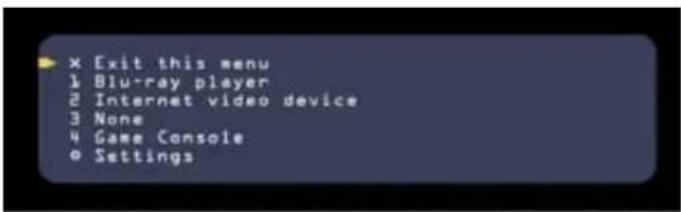
When you touch any button on your ScreenCast remote, the on-screen display will wake and show a screen like the one above. In this screen, you have the choice to exit, to pick one of the four video sources, or to access the Settings menus.
Use the up and down buttons on the remote to move the pointer to the choice you'd like, and then press the "OK" button.
Note: ScreenCast AV can support more video sources than the four included with this product. It can do this because it can connect to multiple ScreenCast AV transmitters. For example, you might add another 4-port AV transmitter for additional AV devices, a transmitter for your laptop, and another one for a tablet. All of the sources from all of those transmitters are gathered here in this list. In cases where you have more than four sources, you will be able to scroll the menu above. To add a WHD ^TM transmitter, please go to the section titled "Adding/Deleting a Transmitter" on page 16.
Switching Video Sources
If you choose a different video source and press "OK," ScreenCast will begin switching. The screen will show you that it is in the process of connecting, like the example below.
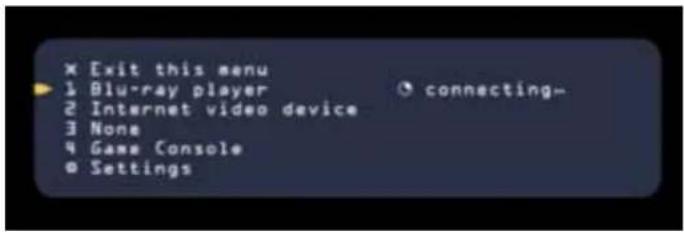
Switching can take up to 10 seconds. This is due to the system making multiple connections between video source, transmitter, receiver, and TV.
If you switch to an AV source on another transmitter, it will take up to 60 seconds.
When the connection is complete, the new video source will show and the on-screen display will close.
SCREENCAST AV SETTINGS
Press any button on the ScreenCast AV remote to wake the on-screen display, and then move the pointer to Settings and press the "OK" button. The Settings menu below will show.
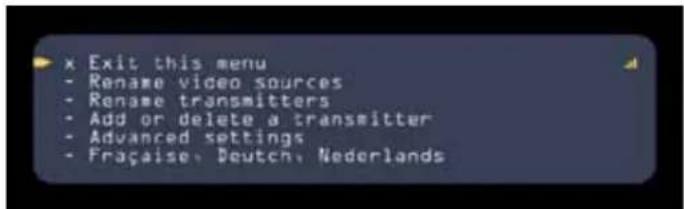
Naming/Renaming Video Sources
This option gives you the ability to choose different names for your video sources. You can rename all four sources, just like you did during setup. You also have the choice to rename just one of the sources.

The list of sources will show all of your video sources, regardless of what transmitter they are coming from.
Renaming All Video Sources
If you choose to rename all sources, you will then see the following message:

Click "OK" and follow the on-screen instructions.
For ease of use, the names on the list are pre-populated with a variety of standard device types; please choose the one that you feel best fits your source device.
Renaming One Video Source
If you decide to just rename one source, that source will be shown and you can choose a useful name from the list of common source names.
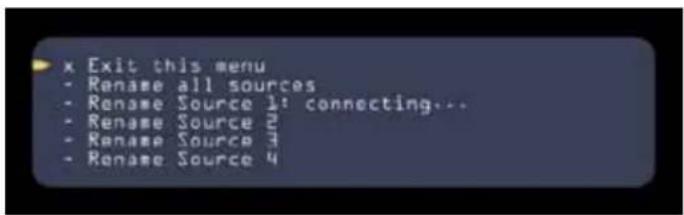
For ease of use, the names on the list are pre-populated with a variety of standard device types; please choose the one that you feel best fits your source device.
Naming/Renaming Transmitters
ScreenCast AV can support up to eight transmitters. So in addition to the 4-port AV transmitter that came with this product, you might add other ScreenCast AV transmitters. For example, you might have a transmitter for your laptop, and another one for a tablet.
Regardless of if you have one transmitter or many, you may find it useful to choose a different name for one of them. Keep in mind that a transmitter name is different from a video source name. There are 1 to 4 video sources per transmitter.
To name or rename a transmitter, go to the Settings menu and select "Rename a transmitter."

You will then see the screen below, which will show you a list of the transmitters that have been connected to your receiver. Select the transmitter you wish to rename and then select "OK" on the remote.
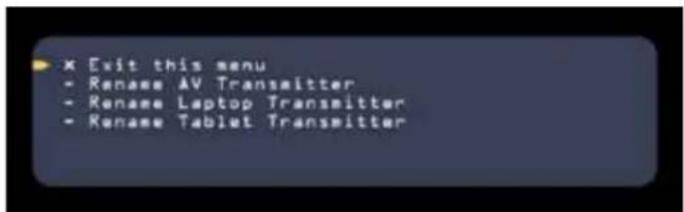
You will now have the opportunity to select a new name for your transmitter from a pre-populated list of common transmitter names.
Adding/Deleting a Transmitter
ScreenCast AV is part of the WHDI ^™ family, so it is possible to connect a variety of other ScreenCast transmitters to your ScreenCast AV receiver.
Some of those transmitters have a single video source, while others have multiple sources. When a transmitter gets added, all of its sources get added to the list of sources to choose from on the main on-screen display (the one used for switching sources).
Transmitters will vary in terms of capabilities, so please refer to the manufacturer info for details on how they would work with your ScreenCast AV receiver.
Using your ScreenCast AV remote, use the menu button to open up the menu screen and navigate to the "Settings" section; you will see the screen below.
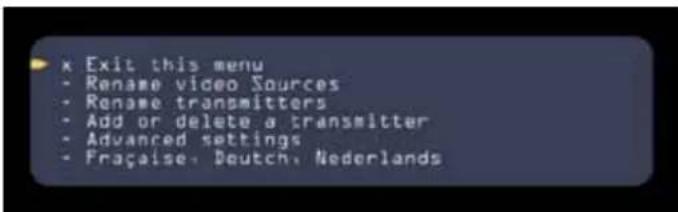
Adding a Transmitter
In the Settings menu, select "Add or Delete a transmitter." On the screen that shows next, you will choose "Add a transmitter."

Next you'll be instructed on how to connect the new transmitter. Press the Pair button on the receiver and then press the Pair button on the new transmitter; the process is similar to how a Bluetooth® headset connects to a mobile phone. The transmitter and receiver will exchange information and create a secure connection with each other. Pairing could take up to 60 seconds.
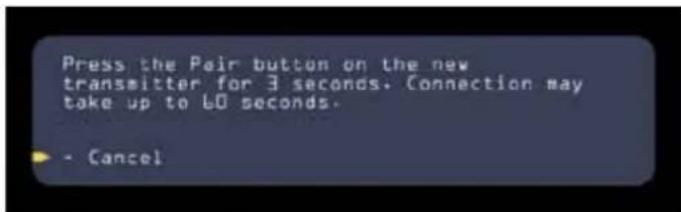
If connection was successful, you will see a screen similar to the one below.

If connection failed, you will see a screen like the one below:

Tip: To improve the range of the transmitter, you can move it so that there are fewer barriers (like walls or cabinets) between it and the receiver. You may find that a simple shift of the product a few inches or feet will bring you to the desired level of connectivity.

Note: It is possible to initiate connection with a new transmitter by pressing the "Pair" button on the back of the receiver. The "Pair" button might be labeled "Connect" on some models. After pressing the button on the receiver, walk to the transmitter and press the same Pair/Connect button there.
Deleting a Transmitter
To delete a transmitter, you will see a menu like this. Select the transmitter you wish to delete.

From your list of transmitters, select the device you want to delete and press "OK."
You will then see a screen asking you to confirm your choice, showing the name of the transmitter in the question.

Once deleted, you will see the following screen.

You can reconnect the transmitter using the instructions in the "Adding a Transmitter" section.
Turning Wireless On/Off
There are very few situations where this would ever be necessary. If the wireless is turned off, ScreenCast AV will not communicate with any transmitters and video will not show.
Even though it is not recommended, you may at some point want to turn off the wireless capabilities of the ScreenCast AV receiver. To do this, navigate to the menu page and select "Settings," and then "turn off wireless."
You should then see a screen that looks like this:

If you select "Yes" and elect to turn off the wireless, you will see the following screen:

Setting/Changing the Language
Using your ScreenCast AV remote, use the menu button to open up the menu screen and navigate to the "Settings" section.
The setting page will look like this:

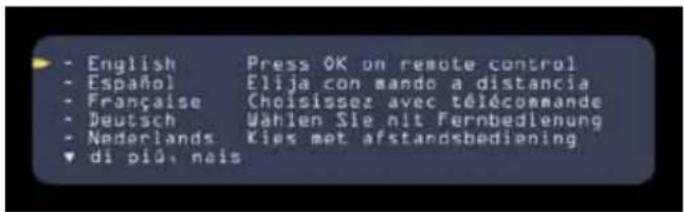
Within "settings" you will see an area marked "languages" at the bottom of the list.
If you select "languages," you will see your language options, as in the example below. You should then select the one you wish to use.
What do the LEDs on the receiver mean?
Most of the information you need will appear on the TV screen, but here's a short list of what the LED light on the transmitter and receiver can tell you.
| When your ScreenCast unit is... | The light will be... |
| Starting up | Slowly blinking blue |
| Establishing a connection | Rapidly blinking blue until the connection is made. If the connection cannot be made after one minute, the light will blink amber to show that a connection failure has occurred. |
| Connected with good signal strength | Solid blue |
| Connected with poor signal strength | Solid amber |
| Receiving Input from the remote control | The light will rapidly turn on and off until the remote button is released. |
Connectivity
How long will it take for my ScreenCast AV system to "wake up" and connect?
- When turning on the receiver and transmitter, it can take up to 15 seconds for the devices to connect with one another.
- If you change sources or video resolution, you may experience up to 10 seconds of connection time as the devices sync with one another.
- If you are adding an additional transmitter to your ScreenCast AV system, it can take up to 60 seconds to pair.
Note: The ScreenCast AV system comes with the receiver and transmitter pre-paired so this should not be necessary unless you add an additional WHD™ transmitter or press the reset button long enough to reset the receiver to factory defaults (5 seconds or more).
Distance and Placement
ScreenCast AV can reach up to 100 feet (30m) line-of-sight and approximately 30 feet (10m) through barriers like walls, cabinets, and doors.
Note: Please remember that every home is different and that the ranges above are estimates. Actual range will depend on the composition of the barriers and other factors.
There are a variety of situations that could require slightly adjusting the position and/or placement of your ScreenCast AV transmitter and/or receiver.
In most, if not all cases, an on-screen message will let you know if you need to adjust the location of your transmitter and/or receiver.

Video and Audio
When I switch sources, why does it often take a few seconds to bring the new source up on screen?
Switching HDMI sources requires a number of "hand offs" to happen between your TV, your source device, and the ScreenCast AV system. Because of this, it may take up to 10 seconds for the HDMI sync to resolve.
When I switch modes within my device (i.e., from Blu-ray disc playback to my BD player's menu), why does the ScreenCast AV system have to reconnect?
Sometimes different modes of an AV device output content in different video resolutions; for instance, menus might be in 720p while a game or Blu-ray disc movie could be in 1080p. When the ScreenCast system switches resolutions, it needs to reconnect the transmitter and receiver, which is why you may experience a slight delay until the two units can sync again.
My remote commands don't seem to work.
Double-check that the IR emitter is fully seated in the back of the ScreenCast AV transmitter. You should also check to make sure that the receiver is flashing blue when you trigger a remote command—that means it is sending the command back to the transmitter. Finally, check to make sure that your remote batteries are fully charged and/or fresh so that you get a full-strength signal from your AV remote.
What video formats can the ScreenCast AV system send to my TV?
• Video Compatibility:
• 480p, 720p (HDTV 2D & 3D), 1080i (HDTV), 1080p (FHDTV 2D & 3D)
• Supports 5.1 channel surround sound (96KHz)
• 2D Video Resolution Compatibility
• Up to 1080p 60Hz: 480i/480p/576i/576p/720p/1080i/1080p VGA, XGA
• 3D Video Support:
• 1920x1080p @ 24Hz and 1920x720p @ 24Hz
What audio formats can the ScreenCast AV system send to my TV?
• 2-6ch LPCM @ 32KHz-192kHz
Other Tech Info
• Industry Standard: WHDI
- WHDI does not compress or decompress; it uses a video-modem approach to deliver the highest video quality.
FCC Statement
DECLARATION OF CONFORMITY WITH FCC RULES FOR ELECTROMAGNETIC COMPATIBILITY
We, Belkin International, Inc., of 12045 E. Waterfront Drive, Playa Vista, CA 90094, declare under our sole responsibility that the product, F7D4515v1, to which this declaration relates, complies with Part 15 of the FCC Rules. Operation is subject to the following two conditions: (1) this device may not cause harmful interference, and (2) this device must accept any interference received, including interference that may cause undesired operation.
Caution: Exposure to Radio Frequency Radiation.
The radiated output power of this device is far below the FCC radio frequency exposure limits. Nevertheless, the device shall be used in such a manner that the potential for human contact during normal operation is minimized. When connecting an external antenna to the device, the antenna shall be placed in such a manner to minimize the potential for human contact during normal operation. In order to avoid the possibility of exceeding the FCC radio frequency exposure limits, human proximity to the antenna shall not be less than 20cm (8 inches) during normal operation.
Federal Communications Commission Notice
This equipment has been tested and found to comply with the limits for a Class B digital device, pursuant to Part 15 of the FCC Rules. These limits are designed to provide reasonable protection against harmful interference in a residential installation.
This equipment generates, uses, and can radiate radio frequency energy. If this equipment does cause harmful interference to radio or television reception, which can be determined by turning the equipment off and on, the user is encouraged to try and correct the interference by one or more of the following measures:
• Reorient or relocate the receiving antenna.
- Increase the distance between the equipment and the receiver.
- Connect the equipment to an outlet on a circuit different from that to which the receiver is connected.
- Consult the dealer or an experienced radio/TV technician for help.
FCC Caution
Any changes or modifications not expressly approved by the party responsible for compliance could void the user's authority to operate this equipment.
Modifications
The FCC requires the user to be notified that any changes or modifications to this device that are not expressly approved by Belkin International, Inc., may void the user's authority to operate the equipment.
Belkin International, Inc., Limited 2-Year Product Warranty
What this warranty covers.
Belkin International, Inc. ("Belkin") warrants to the original purchaser of this Belkin product that the product shall be free of defects in design, assembly, material, or workmanship.
What the period of coverage is.
Belkin warrants the Belkin product for two years.
What will we do to correct problems?
Product Warranty.
Belkin will repair or replace, at its option, any defective product free of charge (except for shipping charges for the product). Belkin reserves the right to discontinue any of its products without notice, and disclaims any limited warranty to repair or replace any such discontinued products. In the event that Belkin is unable to repair or replace the product (for example, because it has been discontinued), Belkin will offer either a refund or a credit toward the purchase of another product from Belkin.com in an amount equal to the purchase price of the product as evidenced on the original purchase receipt as discounted by its natural use.
What is not covered by this warranty?
All above warranties are null and void if the Belkin product is not provided to Belkin for inspection upon Belkin's request at the sole expense of the purchaser, or if Belkin determines that the Belkin product has been improperly installed, altered in any way, or tampered with. The Belkin Product Warranty does not protect against acts of God such as flood, lightning, earthquake, war, vandalism, theft, normal-use wear and tear, erosion, depletion, obsolescence, abuse, damage due to low voltage disturbances (i.e. brownouts or sags), non-authorized program, or system equipment modification or alteration.
How to get service
To get service for your Belkin product you must take the following steps:
- Contact Belkin International, Inc., at 12045 E. Waterfront Drive, Playa Vista, CA 90094, Attn: Customer Service, or call 800-223-5546, within 15 days of the Occurrence. Be prepared to provide the following information:
a. The part number of the Belkin product.
b. Where you purchased the product.
c. When you purchased the product.
d. Copy of original receipt.
- Your Belkin Customer Service Representative will then instruct you on how to forward your receipt and Belkin product and how to proceed with your claim.
Belkin reserves the right to review the damaged Belkin product. All costs of shipping the Belkin product to Belkin for inspection shall be borne solely by the purchaser. If Belkin determines, in its sole discretion, that it is impractical to ship the damaged equipment to Belkin, Belkin may designate, in its sole discretion, an equipment repair facility to inspect and estimate the cost to repair such equipment. The cost, if any, of shipping the equipment to and from such repair facility and of such estimate shall be borne solely by the purchaser. Damaged equipment must remain available for inspection until the claim is finalized. Whenever claims are settled, Belkin reserves the right to be subrogated under any existing insurance policies the purchaser may have.
How state law relates to the warranty
THIS WARRANTY CONTAINS THE SOLE WARRANTY OF BELKIN. THERE ARE NO OTHER WARRANTIES, EXPRESSED OR, EXCEPT AS REQUIRED BY LAW, IMPLIED, INCLUDING THE IMPLIED WARRANTY OR CONDITION OF QUALITY, MERCHANTABILITY OR FITNESS FOR A PARTICULAR PURPOSE, AND SUCH IMPLIED WARRANTIES, IF ANY, ARE LIMITED IN DURATION TO THE TERM OF THIS WARRANTY.
Some states do not allow limitations on how long an implied warranty lasts, so the above limitations may not apply to you.
IN NO EVENT SHALL BELKIN BE LIABLE FOR INCIDENTAL, SPECIAL, DIRECT, INDIRECT, CONSEQUENTIAL OR MULTIPLE DAMAGES SUCH AS, BUT NOT LIMITED TO, LOST BUSINESS OR PROFITS ARISING OUT OF THE SALE OR USE OF ANY BELKIN PRODUCT, EVEN IF ADVISED OF THE POSSIBILITY OF SUCH DAMAGES.
This warranty gives you specific legal rights, and you may also have other rights, which may vary from state to state. Some states do not allow the exclusion or limitation of incidental, consequential, or other damages, so the above limitations may not apply to you.
OTHER INFORMATION
Technical Support
US
http://www.belkin.com/support
BELKIN.
belkin.com
© 2011 Belkin International, Inc. All rights reserved. All trade names are registered trademarks of respective manufacturers listed. HDMI is a trademark or registered trademark of HDMI Licensing LLC in the United States and other countries.
- GETTING STARTED
- Introduction
- What's in the Box?
- Transmitter:
- Receiver:
- Your HDTV
- Your Audio/Video Source Components
- General Info on Range
- ScreenCast AV Receiver
- ScreenCast AV Transmitter
- Controlling Your Video Sources
- IR (Infrared, or "Most Normal AV and TV Remotes")
- HDMI-CEC
- Set Up the ScreenCast AV Transmitter
- Set Up the ScreenCast AV Receiver
- Set Your TV's Input to HDMI
- Use Your ScreenCast AV Remote to Select Languages
- Name Your Video Sources
- Setting Up the IR Emitters
- Switching Video Sources
- SCREENCAST AV SETTINGS
- Naming/Renaming Video Sources
- Renaming All Video Sources
- Renaming One Video Source
- Naming/Renaming Transmitters
- Adding/Deleting a Transmitter
- Adding a Transmitter
- Deleting a Transmitter
- Turning Wireless On/Off
- Setting/Changing the Language
- What do the LEDs on the receiver mean?
- Connectivity
- Distance and Placement
- Video and Audio
- What video formats can the ScreenCast AV system send to my TV?
- What audio formats can the ScreenCast AV system send to my TV?
- Other Tech Info
- FCC Statement
- DECLARATION OF CONFORMITY WITH FCC RULES FOR ELECTROMAGNETIC COMPATIBILITY
- Caution: Exposure to Radio Frequency Radiation.
- Federal Communications Commission Notice
- FCC Caution
- Modifications
- Belkin International, Inc., Limited 2-Year Product Warranty
- What this warranty covers.
- What the period of coverage is.
- What will we do to correct problems?
- What is not covered by this warranty?
- How to get service
- How state law relates to the warranty
- Technical Support
- belkin.com
Brand : BELKIN
Model : ScreenCast AV 4
Category : Audio/video extender