
175432 - Memory reader MANHATTAN - Free user manual and instructions
Find the device manual for free 175432 MANHATTAN in PDF.


| Product Type | Multi-Card Reader/Writer |
| Model Number | 175432 (silver) / 175906 (black) |
| Interface | Hi-Speed USB 2.0 (USB 1.1 compatible) |
| Data Transfer Rate | Up to 480 Mbps |
| Dimensions (L × W × H) | 90 × 102 × 17 mm (3.5 × 4 × 1 in) |
| Weight | 99.25 g (3.5 oz) |
| Material | Plastic |
| Power Source | USB bus power (internal USB connection) |
| LED Indicators | Power LED, Activity LED |
| Compatible Memory Cards | CompactFlash Type I/II, Microdrive, Memory Stick, SD, MMC, SmartMedia, xD, TransFlash (some require adapter) |
| Card Slots | CompactFlash, Memory Stick, SD/MMC, SmartMedia (4 slots) |
| Operating Systems Supported | Windows 98SE/2000/Me/XP, Mac OS 10.3+ |
| Driver Required | Windows 98SE/2000 only; Windows Me/XP and Mac 10.3+ use built-in drivers |
| Special Features | Slot-to-slot read/write/copy, hot swapping, Plug and Play |
| Package Contents | Multi-Card Reader/Writer, internal cable (46 cm), mounting screws, driver and user manual CD |
| Warranty | Lifetime Warranty |
| Certifications | CE, FCC, RoHS, WEEE |
| Operating Temperature | 0°C to 70°C (32°F to 158°F) |
| Storage Temperature | -40°C to 70°C (-40°F to 158°F) |
| Operating Humidity | 50% non-condensing |
| Storage Humidity | 95% non-condensing |
| Maintenance | Wipe with a soft, dry cloth; avoid contact with liquids |
| Safety Precautions | Do not expose to water or high humidity; use in well-ventilated area; do not disassemble |
| Spare Parts & Repairability | Contact manufacturer for replacement parts; not user-serviceable |
Frequently Asked Questions - 175432 MANHATTAN
User questions about 175432 MANHATTAN
0 question about this device. Answer the ones you know or ask your own.
Ask a new question about this device
Download the instructions for your Memory reader in PDF format for free! Find your manual 175432 - MANHATTAN and take your electronic device back in hand. On this page are published all the documents necessary for the use of your device. 175432 by MANHATTAN.
USER MANUAL 175432 MANHATTAN
MULTI-CARD READER/WRITER USER MANUAL
MODEL 175432/175906
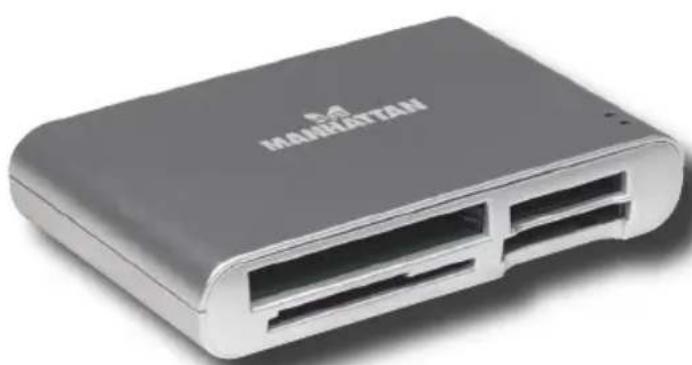
natural_image
Exterior view of a black rectangular electronic device labeled 'MAGHESTTAW' (no additional text or symbols visible)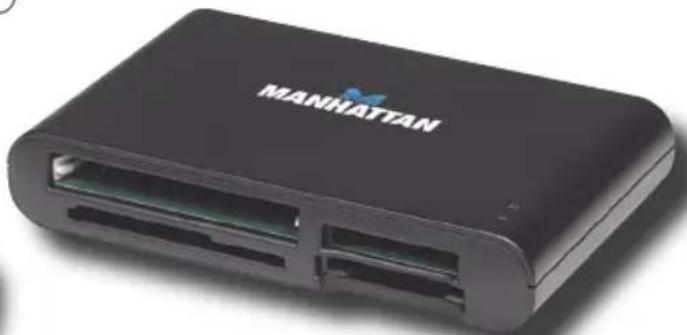
natural_image
Black rectangular electronic device labeled 'MANHATTAN' with two ports and a logo on the front (no additional text or symbols visible)
MANHATTAN
MAN-175432/175906-UM-0107-03
Thank you for purchasing the MANHATTAN®Multi-Card Reader/Writer, Model 175432 (silver) or Model 175906 (black).
Convert any unused PC bay into a digital content management center that lets you access picture files from memory cards without directly connecting a camera or other media device to the computer. Follow the simple instructions in this user manual and enjoy the benefits of these convenient features:
- Easily access cards and manage content with slot-to-slot read/write/copy capability
- Compatible with CompactFlash, Microdrive, Magicstor, Memory Stick, MagicGate, Secure Digital, MultiMedia, SmartMedia, xD and TransFlash
• Supports automatic card detection, hot swapping and Plug and Play - Eliminates need for direct connection with media device
• Data transfer rates up to 480 Mbps - Lifetime Warranty
SOFTWARE INSTALLATION
Windows 98SE and 2000:
- Place the enclosed installation CD in the CD-ROM and double-click on the "Driver" folder.
- Double-click "Setup.exe." This will display the InstallShield Wizard status screen.
- When the Welcome screen appears, plug in the Multi-Card Reader/Writer; click "Next."
- When the Card Reader Utility prompt appears, click "OK."
- When the InstallShield Wizard Complete screen appears, select "Yes, I want to restart my
computer now"; then click "Finish."
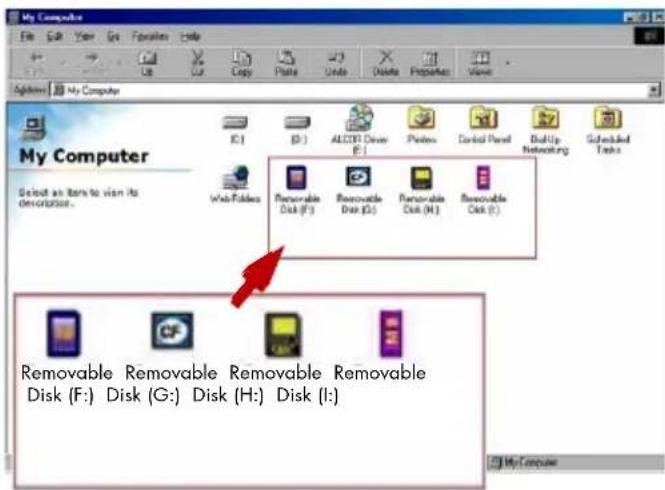
- After the restart and with the Card Reader connected, double-click on "My Computer." Four icons will appear: Compact Flash (CF), Memory Stick (MS), Secure Digital (SD)/MultiMedia Card and Smart Media.
- Insert your memory card(s) in the corresponding slot(s) on the front panel of the Card Reader, then double-click on the matching icon to access the files.
Windows Me and XP:
- With the Card Reader connected, turn on the PC. NOTE: It is not necessary to install a driver with Windows Me or XP. The system automatically finds the driver.
- Four removable disk icons will appear on the My Computer screen, indicating that the Multi-Card Reader/Writer is ready for use.
Memory Card Formatting:

SM (SMC) and xD users may need to format the memory card prior to use, indicated by a "write protection" or "read/write error" message. If this is the case, follow the steps below to use the Flash Ranger tool for formatting the memory card.
- Go to "Start" → "Programs" → "Multimedia Card Reader" → "Flash Ranger."
- Select the SMC/xD icon, then click "Low Level Format."
- When prompted with "Low level format is completed. Please remove the card," click "OK" and remove the memory card.
- Re-insert the memory card and continue using the Multi-Card Reader/Writer.
Mac 10.3 or Above:
If using a Mac operating system of 10.3 or above, a driver is not needed for installation.
Simply connect the Multi-Cart Reader/Writer as instructed above and insert the memory card(s).
SPECIFICATIONS
Standards and Certifications
• Hi-Speed USB 2.0, USB 1.1
- CE, FCC, RoHS, WEEE
Connections
• External USB USB 2.0 A-type female
- Internal 4-pin USB connection (Molex)
- Internal 5-pin connection for card reader (Molex)
Supports: CompactFlash Type I/II, Extreme CF, Extreme III CF, Ultra II CF, CF High Speed, XS-CF, CF Elite Pro, CF PRO I/II, CF Picture, CF Wa, CF UltraX*, IBM and Hitachi Microdrive, MagicSto Memory Stick, Memory Stick PRO, Memory Stick Duo*, Memory Stick PRO Duo*, Memory Stick Extreme PRO, Memory Stick Extreme III PRO, Memory Stick Ultra II PRO, MagicGate, MagicGate PRO, MagicGate Duo*, MagicGate PRO Duo*, High Speed MagicGate PRO, High Speed MagicGate PRO Duo*, High Speed Memory Stick PRO, High Speed Memory Stick PRO Duo*, Memory Stick ROM, Memory Stick Select, SecureDigital (SD), miniSD*, High Speed miniSD*, miniSDHC*, SDHC, Extreme SD*, Extreme III SD, Ultra II SD, Ultra-X SD, Ultra Speed SD, Pro SD, Elite Pro SD, High Speed SD, microSD, TransFlash*, MMC/MMC II, RS-MMC*, High Speed MMC/RS-MMC*, Ultra RS MMC*, DV-RS MMC*, MMCplus/100x/200x, MCCmobile, Smart Media, SmartMedia ROM and XD/Type M/Type H
* Adapter required
General
• LEDs: Power LED, Activity LED
- Transfer rates: 480 Mbps / 12 Mbps / 1.5 Mbps
- Material: plastic
Environmental
- Operating temperature: 0 - 70^ (32 - 158°F); storage temperature: -40 - 70°C (-40 - 158°C).
- Operating humidity: 50% non-condensing; storage humidity: 95% non-condensing
- Dimensions: 90 × 102 × 17 ~mm (3.5 × 4 × 1 in.) L × W × H
• Weight: 99.25 g (3.5 oz.)
System Requirements
- Internal USB connection
• Windows 98SE/2000/Me/XP
Package Contents
- Multi-Card Reader/Writer
- Internal cable, 46 cm (18 in.)
- Mounting screws
- Driver and user manual CD

MANHATTAN

BRINGING COMPUTERS TO LIFE
www.manhattan-products.com
Are you completely satisfied with this product? Please contact your MANHATTAN ^® dealer with comments or questions.
Copyright © MANHATTAN All products mentioned are trademarks or registered trademarks of their respective owners.
Brand : MANHATTAN
Model : 175432
Category : Memory reader