
VP3D1 - Audio/video converter VIEWSONIC - Free user manual and instructions
Find the device manual for free VP3D1 VIEWSONIC in PDF.


| Product Type | Audio/Video Converter |
| Brand | ViewSonic |
| Model | VP3D1 |
| Dimensions (approx.) | 10 x 6 x 2 cm |
| Weight (approx.) | 200 g |
| Power Supply | USB 5V DC (cable included) |
| Input Ports | 1x HDMI, 1x VGA, 1x 3.5mm audio |
| Output Ports | 1x HDMI, 1x Composite AV (RCA) |
| Max Resolution | 1920x1080p @60Hz |
| Supported Video Formats | NTSC, PAL, 480i/p, 576i/p, 720p, 1080i/p |
| Audio Support | Stereo LPCM, up to 48kHz |
| Key Functions | HDMI to AV converter, VGA to HDMI scaler, audio extraction |
| Material | Plastic casing with metal shields |
| Operating Temperature | 0°C to 45°C |
| Care and Cleaning | Wipe with a dry, soft cloth; do not use liquids |
| Safety Precautions | Keep away from water and high temperatures; ensure proper ventilation |
| Spare Parts Availability | Power cable, remote control (if applicable) – contact ViewSonic support |
| Repairability | Repairs should be performed by qualified personnel only |
| Included Accessories | USB power cable, user manual |
| Warranty | Limited 1-year warranty |
Frequently Asked Questions - VP3D1 VIEWSONIC
User questions about VP3D1 VIEWSONIC
0 question about this device. Answer the ones you know or ask your own.
Ask a new question about this device
Download the instructions for your Audio/video converter in PDF format for free! Find your manual VP3D1 - VIEWSONIC and take your electronic device back in hand. On this page are published all the documents necessary for the use of your device. VP3D1 by VIEWSONIC.
USER MANUAL VP3D1 VIEWSONIC
IMPORTANT: Please read this User Guide to obtain important information on installing and using your product in a safe manner, as well as registering your product for future service. Warranty information contained in this User Guide will describe your limited coverage from ViewSonic Corporation, which is also found on our web site at http://www.viewsonic.com in English, or in specific languages using the Regional selection box in the upper right corner of our website. "Antes de operar su equipo lea cu idadosamente las instrucciones en este manual"
Compliance Information
FCC Statement
This device complies with part 15 of FCC Rules. Operation is subject to the following two conditions: (1) this device may not cause harmful interference, and (2) this device must accept any interference received, including interference that may cause undesired operation.
This equipment has been tested and found to comply with the limits for a Class B digital device, pursuant to part 15 of the FCC Rules. These limits are designed to provide reasonable protection against harmful interference in a residential installation. This equipment generates, uses, and can radiate radio frequency energy, and if not installed and used in accordance with the instructions, may cause harmful interference to radio communications. However, there is no guarantee that interference will not occur in a particular installation. If this equipment does cause harmful interference to radio or television reception, which can be determined by turning the equipment off and on, the user is encouraged to try to correct the interference by one or more of the following measures:
- Reorient or relocate the receiving antenna.
- Increase the separation between the equipment and receiver.
- Consult the dealer or an experienced radio/TV technician for help.
- Connect the equipment into an outlet on a circuit different from that to which the receiver is connected.
Warning: You are cautioned that changes or modifications not expressly approved by the party responsible for compliance could void your authority to operate the equipment.
For Canada
CE Conformity for European Countries

The device complies with the EMC Directive 2004/108/EC and Low Voltage Directive 2006/95/EC.
Following information is only for EU-member states:
The mark is in compliance with the Waste Electrical and Electronic Equipment Directive 2002/96/EC (WEEE).
The mark indicates the requirement NOT to dispose the equipment including any spent or discarded batteries or accumulators as unsorted municipal waste, but use the return and collection systems available.
If the batteries, accumulators and button cells included with this equipment, display the chemical symbol Hg, Cd, or Pb, then it means that the battery has a heavy metal content of more than 0.0005% Mercury or more than, 0.002% Cadmium, or more than 0.004% Lead.


Important Safety Instructions
- Read these instructions.
- Keep these instructions.
- Heed all warnings.
- Follow all instructions.
- Do not use this unit near water.
- Clean with a soft, dry cloth.
- Do not block any ventilation openings. Install the unit in accordance with the manufacturer's instructions.
- Do not install near any heat sources such as radiators, heat registers, stoves, or other devices (including amplifiers) that produce heat.
- Do not defeat the safety purpose of the polarized or grounding-type plug. A polarized plug has two blades with one wider than the other. A grounding type plug has two blades and a third grounding prong. The wide blade and the third prong are provided for your safety. If the provided plug does not fit into your outlet, consult an electrician for replacement of the obsolete outlet.
- Protect the power cord from being walked on or pinched particularly at plugs. Convenience receptacles and the point where they exit from the unit. Be sure that the power outlet is located near the unit so that it is easily accessible.
- Only use attachments/accessories specified by the manufacturer.
- Use only with the cart, stand, tripod, bracket, or table specified by the manufacturer, or sold with the unit. When a cart is used, use caution when moving the cart/unit combination to avoid injury from tipping over.
-
Unplug this unit when unused for long periods of time.
-
Refer all servicing to qualified service personnel. Servicing is required when the unit has been damaged in any way, such as: if the power-supply cord or plug is damaged, if liquid is spilled onto or objects fall into the unit, if the unit is exposed to rain or moisture, or if the unit does not operate normally or has been dropped.

Declaration of RoHS Compliance
This product has been designed and manufactured in compliance with Directive 2002/95/EC of the European Parliament and the Council on restriction of the use of certain hazardous substances in electrical and electronic equipment (RoHS Directive) and is deemed to comply with the maximum concentration values issued by the European Technical Adaptation Committee (TAC) as shown below:
| Substance | Proposed Maximum Concentration | Actual Concentration |
| Lead (Pb) 0,1% < 0,1% | ||
| Mercury (Hg) 0,1% < 0,1% | ||
| Cadmium (Cd) 0,01% < 0,01% | ||
| Hexavalent Chromium (Cr6+) 0,1% < 0,1% | ||
| Polybrominated biphenyls (PBB) | 0,1% < 0,1% | |
| Polybrominated diphenyl ethers (PBDE) | 0,1% < 0,1% |
Certain components of products as stated above are exempted under the Annex of the RoHS Directives as noted below:
Examples of exempted components are:
- Mercury in compact fluorescent lamps not exceeding 5 mg per lamp and in other lamps not specifically mentioned in the Annex of RoHS Directive.
- Lead in glass of cathode ray tubes, electronic components, fluorescent tubes, and electronic ceramic parts (e.g. piezoelectronic devices).
- Lead in high temperature type solders (i.e. lead-based alloys containing 85% by weight or more lead).
- Lead as an allotting element in steel containing up to 0.35% lead by weight, aluminium containing up to 0.4% lead by weight and as a cooper alloy containing up to 4% lead by weight.
Copyright Information
Copyright © ViewSonic® Corporation, 2011. All rights reserved.
ViewSonic ® , the three birds logo, On View ® , ViewMatch ™ , and ViewMeter ® are registered trademarks of ViewSonic ® Corporation.
Disclaimer: ViewSonic® Corporation shall not be liable for technical or editorial errors or omissions contained herein; nor for incidental or consequential damages resulting from furnishing this material, or the performance or use of this product.
In the interest of continuing product improvement, ViewSonic® Corporation reserves the right to change product specifications without notice. Information in this document may change without notice.
No part of this document may be copied, reproduced, or transmitted by any means, for any purpose without prior written permission from ViewSonic® Corporation.
Product Registration
To meet your future needs, and to receive any additional product information as it becomes available, please register your product on the Internet at: www.viewsonic.com.
For Your Records
Product Name: VP3D1
ViewSonic 3D Video Processor
Model Number: VS13964
Document Number: VP3D1_UG_ENG Rev. 1A 01-27-11
Serial Number:
Purchase Date: ____
Product disposal at end of product life
ViewSonic respects the environment and is committed to working and living green. Thank you for being part of Smarter, Greener Computing. Please visit ViewSonic website to learn more.
USA & Canada: http://www.viewsonic.com/company/green/recycle-program/
Europe: http://www.viewsoniceurope.com/uk/support/recycling-information/
Taiwan: http://recycle.epa.gov.tw/recycle/index2.aspx
CONTENTS
Introduction ......2
Features 2
Package Contents 2
Product Overview ...... 3
Front View ....3
Rear View ....3
LED Indicators 4
Connection 4
Connecting Video source devices ....5
Using the 3D Video Processor .... 6
PlayStation® 3 Games ....6
3D Blu-rayTM Player 6
3D TV (e.g. SKY 3D)....6
3D Device (e.g. 3D DV/DC) with 2D 1080i side by side signal output ......6
Operation 7
Specifications 8
Timing chart ....8
Supported timing for 3D video input ....8
Computer Compatibility ....8
Troubleshooting 9
Introduction
Features
■ Convert 3D video from several popular formats for display on DLP-Link 3D ready projectors.
■ Automatically identify 3D input signal from 3D Blu-ray TM Disc Player and convert it to 720p 120Hz.
■ Compatible with HDMI 1.4a 3D formats including side-by-side, etc.
■ Pass 2D images unaltered for normal display
■ Manually convert side-by-side 3D signal by pressing SBS Mode button.
■ Environmental conditions:
■ Temperature: Operating: 5°C \~ 35°C (41°F \~ 104°F) Non-operating: -20°C \~ 60°C (-4°F \~ 140°F)
■ Altitude: Operating: Sea level to 16,000 feet Non-operating: Sea Level to 30,000 feet
Package Contents
■ 3D Video Processor
■ Power plug and power adapter
■ HDMI cable
■ ViewSonic CD Wizard
■ Quick Start Guide
Product Overview
Front View

① SBS (Side-By-Side) Mode button
③ HDMI 1 button
② HDMI 2 button POWER button
4
Rear View

5 DC power input HDMI in 1 / HDMI in 2
7
6 Service HDMI out (to projector)
8
LED Indicators
Power LED is red.
SBS MODE LED is blue when this feature is selected.
HDMI 1LED is blue when this input source is selected and detected.
HDMI 2 LED is blue when this input source is selected and detected.
| Status | Power LED (Red) | SBS MODE (Blue) | HDMI 1 (Blue) | HDMI 2 (Blue) |
| Standby state (Input power cord) | Off Off Off Off | |||
| HDMI 1 input source (Default) | Steady light Off Steady light Off | |||
| HDMI 2 input source Steady light Off Off Steady light | ||||
| HDMI 1 input source & SBS mode enable | Steady light Steady light Steady light Off | |||
| Power on & HDMI 2 input source & SBS mode enable | Steady light Steady light Off Steady light | |||
Connection
Connecting the AC adapter

1 AC adapter Power cord
2
Connecting Video source devices
![graph LR A["3D Blu-ray™ Player"] --> B["PlayStation® 3"] B --> C["3D Glasses"] C --> D["3D Capable DLP Projector®"] D --> E["VP3D1 3D Video Processor 3D"] E --> F["3D HD Cable / Satellite box"]](/content/2026/05/1028391/images/de11eff7a239f478c34cc16949f7a26f0912a5ec37ba10adfd73c19dded4fb2c.jpg)
Using the 3D Video Processor
Once you have connected your devices together with HDMI cables, as shown in the diagram, you are ready to begin. Power ON your 3D video source, 3D Video Processor and your 3D projector.(*)
Note*: The 3D video source device must be powered on before the 3D Video Processor.
PlayStation® 3 Games
- Make sure that you have updated your console to the latest software version in PlayStation® 3.
- Go to the "Settings menu → Display settings → Video output → HDMI".
3D Blu-ray™ Player
- Make sure that your player can support 3D Blu-ray ™ disc and that 3D output is enabled.
- Insert the 3D Blu-ray ™ disc into the player, press "Play".
3D TV (e.g. SKY 3D)
- Contact your TV service provider to enable any 3D channels on your channel package.
- Once enabled, switch to the 3D channel. - You should see two images side-by-side.
- Press the "SBS Mode" button on the front of the 3D Video Processor.(*) Note *: If input video is normal 2D, please press SBS mode to "Off".
3D Device (e.g. 3D DV/DC) with 2D 1080i side by side signal output
- Connect your 3D device and switch to out 3D content with 2D side-by-side output to 3D Video Processor. You should see two images side-by-side.
- Press the "SBS Mode" button on the front of the 3D Video Processor.
- When you see "3D" in the top right hand corner of the screen, enable your projector's 3D mode, turn on your 3D glasses and put them on.
- If necessary, use your projector's 3D Sync-Invert option to optimize your 3D experience. The option is located in the "Display" section of the projector OSD menu.
Note: If input video is normal 2D, please press SBS mode to "Off". If SBS mode is active, 2D video content will not display correctly.
Operation
- Connect your VP3D1 3D Video Processor to a 3D Blu-ray™ Player using a HDMI cable
- Connect your VP3D1 3D Video Processor to a 3D Ready DLP projector using another HDMI cable.
- Turn on your sources (3D Blu-ray TM Player, VP3D1 3D Video Processor and 3D Ready DLP projector).
- Press the "PLAY" button on the player.
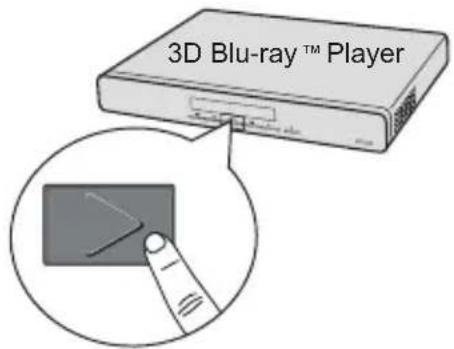
- Make sure the power of the 3D glasses is on.
- Wear the 3D glasses, and then enjoy your 3D experience!
![graph TD A["Viewer with head"] --> B["3D Ready DLP Projector (with HDMI connection)"] B --> C["3D Blu-ray™ Player"] C --> D["VP3D1 3D Video Processor"] D --> E["Monitor"] style A fill:#f9f,stroke:#333 style B fill:#ccf,stroke:#333 style C fill:#cfc,stroke:#333 style D fill:#fcc,stroke:#333](/content/2026/05/1028391/images/6ac930ff83c41c96509adea68c1d11f9024416123779c92465f84e7d0d1e7df2.jpg)
Specifications
| Native 3D output resolution HD | Ready 720p120Hz |
| Maximum output resolution Ful | HD 1080P |
| Inputs 2x HDMI 1.4a (HDCP) - | audio supportedUSB type A for firmware update |
| Outputs 1x HDMI 1.3 (HDCP) - | audio supported |
| 2D video compatibility PAL SE | CAM 576i/p, NTSC 480i/p, HD 720p/1080i/1080p |
| Power supply (AC adapter) AC | 100-240 V, 50 - 60 Hz, 3.0A |
| Power consumption 10W (<1W standby) | |
| Dimension (W x D x H) 430 x 2 | 10 x 36 mm |
| Weight 1.3kg ( 2.9lb) | |
| Note: Design and Specifications are subject to change without prior notice. | |
Timing chart
Supported timing for 3D video input
| Signal mode | Resolution (H x V) | Vertical Frequency (Hz) | 3D format type |
| 720p 1280 x | 720 50Hz Frame packing | ||
| 720p 1280 x | 720 50Hz Top-and-Bottom | ||
| 720p 1280 x | 720 60Hz Frame packing | ||
| 720p 1280 x | 720 60Hz Top-and-Bottom | ||
| 1080i 1920 x | 1080 60Hz | Side-by-Side (Half) | |
| 1080i 1920 x | 1080 50Hz | Side-by-Side (Half) | |
| 1080p | 1920 x 1080 24Hz Frame packing | ||
| 1080p | 1920 x 1080 24Hz Top-and-Bottom |
Computer Compatibility
| Computer Input Resolutions Computer Output Resolutions | |
| 640 x 480 @ 60Hz | 640 x 480 @ 60Hz |
| 800 x 600 @ 60Hz | 800 x 600 @ 60Hz |
| 1024 x 768 @ 60Hz | 1024 x 768 @ 60Hz |
| 1280 x 720 @ 60Hz | 1280 x 720 @ 60Hz |
| 1280 x 800 @ 60Hz | 1280 x 800 @ 60Hz |
| 1280 x 1024 @ 60Hz | 1280 x 1024 @ 60Hz |
| 1400 x 1050 @ 60Hz | 1400 x 1050 @ 60Hz |
| 1440 x 900 @ 60Hz | 1440 x 900 @ 60Hz |
| 1680 x 1050 @ 60Hz | 1680 x 1050 @ 60Hz |
| 1600 x 1200 @ 60Hz | 1600 x 1200 @ 60Hz |
| 1920 x 1080 @ 60Hz | 1920 x 1080 @ 60Hz |
Troubleshooting
■ No image appears on screen.
- Ensure all the cables and power connections are correctly and securely connected as described in the "Connection" section.
- Ensure all the pins of connectors are not bent or broken.
-
Make sure you have powered on all the devices.
■ Blurry double image. -
Press "SBS Mode" button to "Off" to avoid normal 2D image is blurry double image.
- Two images, side-by-side format.
- Press "SBS Mode" button to "On" for input signal is HDMI 1.3 2D 1080i side-by-side.
■ Pseudo-3D Image or uncomfortable depth of field inside the image. - Use you projector's "3D Sync. Invert" option.
■ Image does not display in 3D. - Check if the battery of 3D glasses is drained.
Customer Support
For technical support or product service, see the table below or contact your reseller.
NOTE: You will need the product serial number.
| Country/Region Website | T = TelephoneF = FAX | ||
| Australia/New Zealand | www.viewsonic.com.au | AUS= 1800 880 818NZ= 0800 008 822 | service@au.viewsonic.com |
| Canada www.viewsonic | com | T (Toll-Free)= 1-866-463-4775T (Toll)= 1-424-233-2533F= 1-909-468-3757 | service.ca@viewsonic.com |
| Europe www.viewsoniceurope | www.viewsoniceurope | com/uk/support/call-desk/ | |
| Hong Kong www.hk.viewsonic.com | T= 852 3102 2900 service@hk.viewsonic.com | ||
| India www.in.viewsonic.com | T= 1800 11 9999 service@in.viewsonic.com | ||
| Ireland (Eire) www.viewsoniceurope.com/uk/ | www.viewsoniceurope.com/uk/support/call-desk/ | service_ie@viewsoniceurope.com | |
| Korea www.kr.viewsonic.com | T= 080 333 2131 service@kr.viewsonic.com | ||
| Latin America(Argentina) | www.viewsonic.com/la/ T= 0800-4441185 soporte@viewsonic.com | ||
| Latin America (Chile) | www.viewsonic.com/la/ | T= 1230-020-7975 | soporte@viewsonic.com |
| Latin America(Columbia) | www.viewsonic.com/la/ T= 01800-9-157235 soporte@viewsonic.com | ||
| Latin America (Mexico) | www.viewsonic.com/la/ | T= 001-8882328722 | soporte@viewsonic.com |
| Renta y Datos, 29 SUR 721, COL. LA PAZ, 72160 PUEBLA, PUE. Tel: 01.222.891.55.77 CON 10 LINEASElectroser, Av Reforma No. 403Gx39 y 41, 97000 Mérida, Yucatán. Tel: 01.999.925.19.16Other places please refer to http://www.viewsonic.com/la/soporte/index.htm#Mexico | |||
| Latin America (Peru) | www.viewsonic.com/la/ | T= 0800-54565 | soporte@viewsonic.com |
| Macau | www.hk.viewsonic.com T= 853 2870 0303 service@hk.viewsonic.com | ||
| Middle East | ap.viewsonic.com/me/ | Contact your reseller | service@ap.viewsonic.com |
| Puerto Rico & Virgin Islands | www.viewsonic.com | T= 1-800-688-6688 (English)T= 1-866-379-1304 (Spanish)F= 1-909-468-3757 | service.us@viewsonic.comsoporte@viewsonic.com |
| Singapore/Malaysia/Thailand | www.ap.viewsonic.com | T= 65 6461 6044 service@sg.viewsonic.com | |
| South Africa | ap.viewsonic.com/za/ | Contact your reseller | service@ap.viewsonic.com |
| United Kingdom | www.viewsoniceurope.com/uk/ | www.viewsoniceurope.com/uk/support/call-desk/ | service_gb@viewsoniceurope.com |
| United States | www.viewsonic.com | T (Toll-Free)= 1-800-688-6688T (Toll)= 1-424-233-2530F= 1-909-468-3757 | service.us@viewsonic.com |
Limited Warranty
VIEWSONIC® 3D Video Processor
What the warranty covers:
ViewSonic warrants its products to be free from defects in material and workmanship, under normal use, during the warranty period. If a product proves to be defective in material or workmanship during the warranty period, ViewSonic will, at its sole option, repair or replace the product with a like product. Replacement product or parts may include remanufactured or refurbished parts or components.
How long the warranty is effective:
ViewSonic 3D Video Processor are warranted for 1 year for all parts excluding the light source and 1 year for labor from the date of the first customer purchase.
Who the warranty protects:
This warranty is valid only for the first consumer purchaser.
What the warranty does not cover:
- Any product on which the serial number has been defaced, modified or removed.
- Damage, deterioration or malfunction resulting from:
a. Accident, misuse, neglect, fire, water, lightning, or other acts of nature, unauthorized product modification, or failure to follow instructions supplied with the product.
b. Any damage of the product due to shipment.
c. Removal or installation of the product.
d. Causes external to the product, such as electrical power fluctuations or failure.
e. Use of supplies or parts not meeting ViewSonic's specifications.
f. Normal wear and tear.
g. Any other cause which does not relate to a product defect.
- Any product exhibiting a condition commonly known as "image burn-in" which results when a static image is displayed on the product for an extended period of time.
- Removal, installation, one way transportation, insurance, and set-up service charges.
How to get service:
- For information about receiving service under warranty, contact ViewSonic Customer Support (Please refer to Customer Support page). You will need to provide your product's serial number.
- To obtain warranty service, you will be required to provide (a) the original dated sales slip, (b) your name, (c) your address, (d) a description of the problem, and (e) the serial number of the product.
- Take or ship the product freight prepaid in the original container to an authorized ViewSonic service center or ViewSonic.
- For additional information or the name of the nearest ViewSonic service center, contact ViewSonic.
Limitation of implied warranties:
There are no warranties, express or implied, which extend beyond the description contained herein including the implied warranty of merchantability and fitness for a particular purpose.
Exclusion of damages:
ViewSonic's liability is limited to the cost of repair or replacement of the product. ViewSonic shall not be liable for:
-
Damage to other property caused by any defects in the product, damages based upon inconvenience, loss of use of the product, loss of time, loss of profits, loss of business opportunity, loss of goodwill, interference with business relationships, or other commercial loss, even if advised of the possibility of such damages.
-
Any other damages, whether incidental, consequential or otherwise.
- Any claim against the customer by any other party.
- Repair or attempted repair by anyone not authorized by ViewSonic.
Effect of state law:
This warranty gives you specific legal rights, and you may also have other rights which vary from state to state. Some states do not allow limitations on implied warranties and/or do not allow the exclusion of incidental or consequential damages, so the above limitations and exclusions may not apply to you.
Sales outside the U.S.A. and Canada:
For warranty information and service on ViewSonic products sold outside of the U.S.A. and Canada, contact ViewSonic or your local ViewSonic dealer.
The warranty period for this product in mainland China (Hong Kong, Macao and Taiwan Excluded) is subject to the terms and conditions of the Maintenance Guarantee Card. For users in Europe and Russia, full details of warranty provided can be found in www.viewsoniceurope.com under Support/Warranty Information.
4.3: ViewSonic 3D Video Processor 3DVP_LW01 Rev. 1a 02-11-09

ViewSonic®
- COMPLIANCE INFORMATION
- FCC STATEMENT
- FOR CANADA
- CE CONFORMITY FOR EUROPEAN COUNTRIES
- FOLLOWING INFORMATION IS ONLY FOR EU-MEMBER STATES
- IMPORTANT SAFETY INSTRUCTIONS
- DECLARATION OF ROHS COMPLIANCE
- COPYRIGHT INFORMATION
- PRODUCT REGISTRATION
- FOR YOUR RECORDS
- PRODUCT DISPOSAL AT END OF PRODUCT LIFE
- CONTENTS
- INTRODUCTION ......2
- PRODUCT OVERVIEW ...... 3
- LED INDICATORS 4
- CONNECTION 4
- USING THE 3D VIDEO PROCESSOR .... 6
- SPECIFICATIONS 8
- TIMING CHART ....8
- TROUBLESHOOTING 9
- INTRODUCTION
- FEATURES
- PACKAGE CONTENTS
- PRODUCT OVERVIEW
- FRONT VIEW
- REAR VIEW
- LED INDICATORS
- CONNECTION
- CONNECTING VIDEO SOURCE DEVICES
- USING THE 3D VIDEO PROCESSOR
- PLAYSTATION® 3 GAMES
- 3D BLU-RAY™ PLAYER
- 3D TV (E.G. SKY 3D)
- 3D DEVICE (E.G. 3D DV/DC) WITH 2D 1080I SIDE BY SIDE SIGNAL OUTPUT
- OPERATION
- SPECIFICATIONS
- TIMING CHART
- SUPPORTED TIMING FOR 3D VIDEO INPUT
- COMPUTER COMPATIBILITY
- TROUBLESHOOTING
- CUSTOMER SUPPORT
- LIMITED WARRANTY
- VIEWSONIC® 3D VIDEO PROCESSOR
- WHAT THE WARRANTY COVERS
- HOW LONG THE WARRANTY IS EFFECTIVE
- WHO THE WARRANTY PROTECTS
- WHAT THE WARRANTY DOES NOT COVER
- HOW TO GET SERVICE
- LIMITATION OF IMPLIED WARRANTIES
- EXCLUSION OF DAMAGES
- EFFECT OF STATE LAW
- SALES OUTSIDE THE U.S.A. AND CANADA
Brand : VIEWSONIC
Model : VP3D1
Category : Audio/video converter