IC Intracom 460835 - Barcode Reader

460835 - Barcode Reader IC Intracom - Free user manual and instructions

Find the device manual for free 460835 IC Intracom in PDF.

📄 74 pages English EN Download 💬 AI Question 10 questions ⚙️ Specs
Notice IC Intracom 460835 - page 5
Pick your language and provide your email: we'll send you a specifically translated version.
Product Type Barcode Reader
Brand IC Intracom
Model 460835
Dimensions (W x H x D) Approx. 170 mm x 100 mm x 70 mm
Weight Approx. 150 g
Power Source USB powered (5V DC)
Scanning Technology Laser / CCD (typical)
Supported Barcodes 1D and 2D codes (e.g., UPC, EAN, Code 39, QR, Data Matrix)
Interface USB (HID keyboard emulation or virtual COM)
Scan Rate Up to 200 scans per second
Read Range 5 cm to 30 cm (depending on barcode density)
Operating Temperature 0°C to 40°C
Storage Temperature -20°C to 60°C
Humidity 5% to 95% non-condensing
Light Source Visible red laser or LED
Laser Class Class 2 (safe for incidental eye exposure)
Maintenance Clean lens with soft, dry cloth; avoid solvents
Safety Precautions Do not stare into laser beam; keep away from children
Spare Parts Available Replacement USB cable, stand (optional)
Reparability Limited user serviceable parts; contact support for repairs
Software Compatibility Windows, macOS, Linux (plug-and-play)
Warranty 1 year limited

Frequently Asked Questions - 460835 IC Intracom

How do I connect the barcode reader to my computer?
Plug the USB cable into an available USB port on your computer. The reader will be recognized automatically as a HID keyboard device. No additional drivers are required for basic operation.
Can this barcode reader scan QR codes?
Yes, the IC Intracom 460835 supports both 1D barcodes (like UPC, EAN, Code 39) and 2D codes (including QR codes and Data Matrix).
What should I do if the barcode reader stops working?
First, check the USB connection and try a different port. Ensure the barcode is clean and not damaged. If the issue persists, reset the reader by holding the trigger for 10 seconds. If still not working, contact customer support.
How do I clean the barcode reader?
Use a soft, lint-free cloth slightly dampened with water or a mild cleaner. Gently wipe the lens and housing. Do not use abrasive materials or solvents. Avoid getting moisture into the openings.
Is the laser safe for eyes?
The reader uses a Class 2 laser, which is safe for accidental exposure. However, do not intentionally stare into the laser beam. Keep the device away from children.
Can I use this barcode reader with my smartphone or tablet?
If your smartphone/tablet supports USB OTG, you can connect the reader via an OTG adapter. It may work with some apps but compatibility is not guaranteed for all devices.
What is the maximum scanning distance?
The typical read range is between 5 cm and 30 cm depending on the barcode density and size. For standard 1D codes, the optimal distance is about 10-20 cm.
Does the barcode reader need batteries?
No, the reader is powered via USB. It draws power directly from the computer or USB power source. No batteries required.
How do I configure the barcode reader settings?
Configuration is done by scanning special programming barcodes from the user manual. These barcodes can change baud rate, beep volume, suffixes, and other parameters.
What should I do if the barcode reader scans incorrectly?
Check that the barcode is clean and undamaged. Ensure the reader is within range and the scan angle is correct. Try scanning a test barcode. If problems persist, reset the reader to factory defaults by scanning the reset barcode in the manual.

User questions about 460835 IC Intracom

0 question about this device. Answer the ones you know or ask your own.

Ask a new question about this device

The email remains private: it is only used to notify you if someone responds to your question.

No questions yet. Be the first to ask one.

Download the instructions for your Barcode Reader in PDF format for free! Find your manual 460835 - IC Intracom and take your electronic device back in hand. On this page are published all the documents necessary for the use of your device. 460835 by IC Intracom.

USER MANUAL 460835 IC Intracom

Programming Menu

V3.8 a

Notice

The manufacturer shall not be liable for technical or editorial errors or omissions contained herein; nor for incidental or consequential damages in connection with the furnishing, performance or use of use the publication.

Contents

Chapter 1 Description

1.1 Notice .... 3
1.2 Introduction ...... 4
1.3 Codes Read 4
1.4 Installation 4
1.5 Pin Assignment 6

Chapter 2 Configuration - General

2.1 Flow Chart 8
2.2 Loop of Programming 9
2.3 Factory Default Settings 9
2.4 Main Page of Configuration.... 10

Chapter 3 Interface and Reading Mode Selection

3.1 Interface Selection 11
3.2 Memory Function 11
3.3 Reading Mode Selection 12

Chapter 4 Communication Parameters

4.1 RS232 Mode Parameters 13
4.2 Keyboard Wedge Mode Parameters..... 15
4.3 Output Characters Parameters ...... 17
4.4 Wand Emulation Mode Parameters..... 19

Chapter 5 Bar Codes & Others

5.1 Symbologies Selection 20
5.2 UPC/EAN/JAN Parameters 24
5.3 Code 39 Parameters 26
5.4 Code 128 Parameters 28
5.5 Interleave 25 Parameters .... 30
5.6 Industrial 25 Parameters ...... 32
5.7 Matrix 25 Parameters 34
5.8 CODABAR/NW7 Parameters 36
5.9 Code 93 Parameters 38
5.10 Code 11 Parameters 40
5.11 MSI/PLESSEY Code Parameters ..... 42

5.12 Code 2 of 6 Parameters ...... 44
5.13 LCD 25 Parameters 46
5.14 Telepen Parameters 48
5.15 GS1 DataBar (RSS Code) 50

Chapter 6 Miscellaneous Parameters

6.1 Language Selection 52
6.2 Bar Code ID 54
6.3 Reading Level 57
6.4 Accuracy 57
6.5 Buzzer Beep Tone 57
6.6 LED Control 57
6.7 Same Code Delay Reading Interval ..... 58
6.8 Notebook Function 58
6.9 Reverse Output Characters 59
6.10 Set Up Deletion 59
6.11 Set Up Insertion 62
6.12 Set Up IR Sensor 65

Appendix

A. Decimal Value Tables 67
B. ASCII Tables 68
C. Function Key Tables 72

Chapter 1 Description

1.1 General

Thank you for purchasing this barcode scanner with an advanced and versatile decoder. The decoder works with variety of barcode types, reading devices, and computer interfaces. It discriminates over twenty different symbologies automatically.

This menu provides an easy way to configure the decoding options and interface selections by scanning bar codes listed in the menu.

FCC Approval

IC Intracom 460835 - FCC Approval - 1

This device had been tested in accordance with the procedures and in compliance with Part 15 Subpart B of FCC Rules. And keeps all requirements according ANSI C63.4 & FCC Part 15 B Regulation and CISPR22 Class B.

CE Standards

IC Intracom 460835 - CE Standards - 1

The CE mark as shown here indicates this product had been tested in accordance with the procedures given in European Council Directive 2004/108/EC and confirmed to comply with the Europe Standard EN55022:2006:Class B, EN 55024:1998+A1:2001+A2:2003, IEC61000-3-2:2006, IEC61000-3-3:1995+A1:2005, IEC61000-4-2:2001, IEC61000-4-3:2006, IEC61000-4-4:2004, IEC61000-4-5:2006, IEC61000-4-6:2001, IEC61000-4-8:2001, IEC61000-4-11:2004.

LEGISLATION AND WEEE SYMBOL

This marking shown on the product or its literature, indicates that it should not be disposed with other households wastes at the end of its working life. To prevent possible harm to the environment or human healthy from uncontrolled waste disposal, please separate this from other types of wastes and recycle it responsibly to promote the sustainable reuse of material resources.

Household users should contact either the retailer where they purchased this product, or their local government office, for details of wher and how they can take this item fore environm entally safe recycling. Business users should contact their supplier and check the terms and conditions of the purchase

1.2 Introduction

The Decoder is an advanced and versatile decoding facility for barcoding systems. It works with variety of bar code types, reading devices, and computer interfaces. It discriminates about twenty different symbologies automatically.

This menu provide an easy way to config the decoding options and interface selections by scanning bar codes listed in the menu.

1.3 Codes Read

. Codes Read

ALL UPC/EAN/JAN, Code 39, Code 39 Full ASCII, Code 128, Interleave 25, Industrial 25, Matrix 25, CODABAR/NW7, Code 11, MSI/PLESSEY, Code 93, China Postage, Code32/Italian Pharmacy Others available upon request.

1.4 Installation

Unpacking –

Remove the scanner from its packing and check it for damage. If the scanner was defected in transit, please contact your vendor immediately. Be sure that you keep the packing with all accessories contains in the package for your returning of service.

Connecting the scanner –

Keyboard wedge/RS-232C/USB:

Connect the 10-pins RS-45 male connector into the bottom of the scanner and you will hear a "click" when the connection is made.

Power supply for RS-232C scanner—

There are 3 ways to supplying the power, use external +5V power supply, use optional power cable (KBDC) which taking the power from KB wedge or if the host supports +5V power from pin 9.

Installing the scanner to the Host System –

  1. Turn off the host system.
  2. Connect the power if needed.
  3. Connect to the proper port on the host system.
  4. Turn on the host system.

Switching cable –

Before removing the cable from the scanner, it is recommended that the power on the host system is off and the power supply has been disconnected from unit.

  1. Find the small "Pin-hole" on the bottom of the unit.
  2. Use a bended regular paperclip and insert the tip into the hole.
  3. You will head a "click", then gentle on the strain-relief of the cable and it will slide out of the scanner.
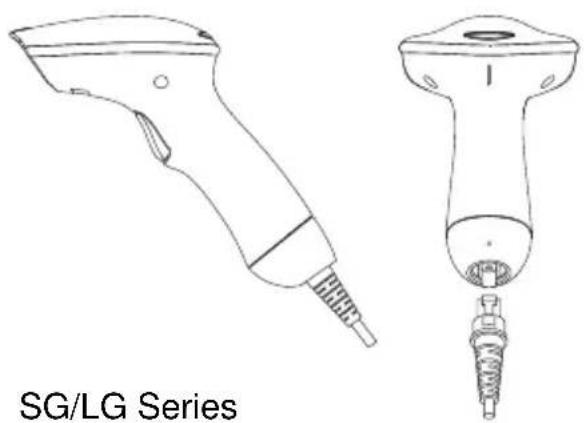
IC Intracom 460835 - Switching cable – - 1

natural_image Line drawings of two different types of hairless tools, one with a threaded handle and the other with a threaded base (no text or symbols on the tool itself)
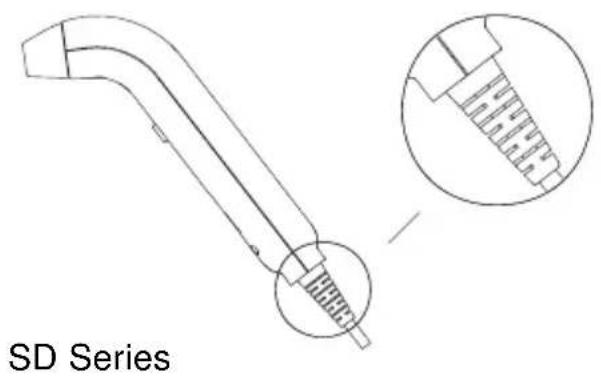
SD Series

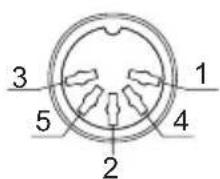
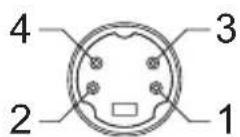
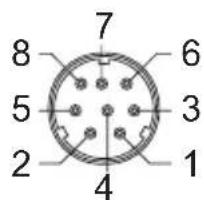
1.5 Pin Assignment

A>Input Port for Mini Decoder

DB 9 Male

Pin No. Wand / CCD / Slot Reader Laser Scanner

1 N.C. S.O.S.
2 DATA DATA
3 N.C. N.C.
4 N.C. N.C.
5 N.C. TRIGGER
6 N.C. P. E.
7 GND GND
8 SHIELD SHIELD
9 +5V +5V

1 5 6 9

B> Output Port

1. PC Keyboard Output

DIN 5 MALE DIN 5 FEMALE

Pin No.FunctionPin No.Function
1HOST CLK1KB CLK
2HOSTDATA2KBDATA
4GND4GND
5Vcc(+5V)5Vcc(+5V)

IC Intracom 460835 - DIN 5 MALE DIN 5 FEMALE - 1

1 2 3 4 5

MiniDIN 6 MALE

Pin No.FunctionPin No.Function
1HOSTDATA1KBDATA
3GND3GND
4Vcc4Vcc
5HOST CLK5KB CLK

5 3 1 2 4 6

6 4 2 5 3 1

2. RS-232 Output

DB 9 Female

Pin No. Function

2 TXD
3 RXD
5 GND
7 CTS
8 RTS

Power Lead Vcc (+5V)
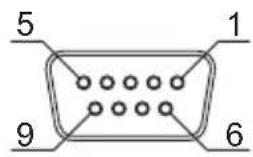
5 1 9 6

IC Intracom 460835 - DB 9 Female - 2

3. WAND Emulation Output

DB 9 Female

Pin No. Function

2 DATA
7 GND
9 Vcc (+5V)

5 1 9 6

4. ADB Interface

MiniDIN 4 MALE MiniDIN 4 FEMALE

Pin No. Function

Pin No. Function

1 ADB 1 ADB
3 Vcc 3 Vcc
4 GND 4 GND

1 2 3 4

IC Intracom 460835 - MiniDIN 4 MALE MiniDIN 4 FEMALE - 2

5. NEC 9801 Interface

MiniDIN 8 MALE MiniDIN 8 FEMALE

Pin No. Function

Pin No. Function

1 RST 1 RST
2 GND 3 GND

3 HOST RDY

4 KB RDY

4 HOST DATA

5 KB DATA

5 RTY

4 RTY

8+5V

5+5V

6 7 8 3 5 1 4 2

7 6 5 3 2 4 1

Chapter 2 Configuration - General

2.1 Flow Chart

IC Intracom 460835 - Flow Chart - 1

flowchart
graph TD
    A["Start Configuration"] --> B["Interface Selection Input Port Selection Communication Parameters Bar Codes Parameters MSR PParameters Misc. Parameters etc."]
    B --> C["Abort Configuration"]
    B --> D["End Configuration"]
    C --> E["Save Parameters"]
    D --> E
    F["Recall Parameter"] --> E
    G["Set All Defaults"] --> E

2.2 Loop of Programming

The philosophy of programming parameters has been shown on the flow chart of 2.1. Basically user should

  1. Scan Start of Configuration.
  2. Scan all necessary labels for parameters that meet applications.
  3. Scan End of Configuration to end the programming.
  4. To permanently save the settings you programmed, just scan label for Save Parameters.
  5. To go back to the Default Settings, just scan label for Set All Defaults.

2.3 Factory Default Settings

The factory default settings are shown with <> and bold in the following sections. You can make your own settings by following the procedures in this manual. If you want to save the settings permanently, you should scan the label of "Save Parameters" in chapter 2.4, otherwise the settings will not be saved after the decoder power is off, and all settings will go back to previous settings.

By scanning "Set All Default" label, the settings will go back to the factory default settings.

2.4 Main Page of Configuration

IC Intracom 460835 - Main Page of Configuration - 1

bar | Category | Value (%) | | :--- | :--- | | Save Parameters | +0 | | Recall Stored Parameters | +1 | | Set All Defaults | +2 | | Start Configuration | +3 | | End Configuration | +4 | | Abort Configuration | +6 | | Version Information | +5 |

Save Parameters -

The parameter settings will be saved permanently.

Recall Stored Parameters -

Replace the current parameters by the parameters you saved last time.

Set All Defaults -

Set all the parameters to the factory default settings.

Abort Configuration -

Terminate current programming status.

Version Information -

Display the decoder version information and date code.

Chapter 3 Interface and Reading Mode Selection

3.1 Interface Selection

%0 0 U0

RS232 Mode

%0 0 U8

WAND Emulation

%0 0 M2

USB Mode

%0X08

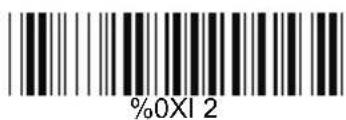
3.2 Memory Function

%0XI 2

Disable

%0X1 0

3.3 Reading Mode Selection


IC Intracom 460835 - Reading Mode Selection - 1

Trigger ON/OFF
%0 270

Continuous/Trigger OFF
%0 2 7 2

Testing
%0 275

Continuous/Auto Power On
%0 273

Flash
%0 2 7 4

Flash/Auto Power On
%0 2 7 6

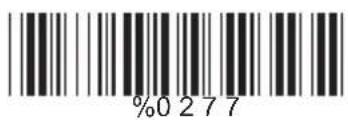
Reserved1
%0 2 7 7

Reserved 2 ( Auto Sense Option)
%09F8

Reserved3
%09 F9

Reserved4
%09 FA

Reserved5
%09 FB

Ch.4 Communication Parameters

4.1 RS232 Communication Parameters

A> Set Up BAUD Rate
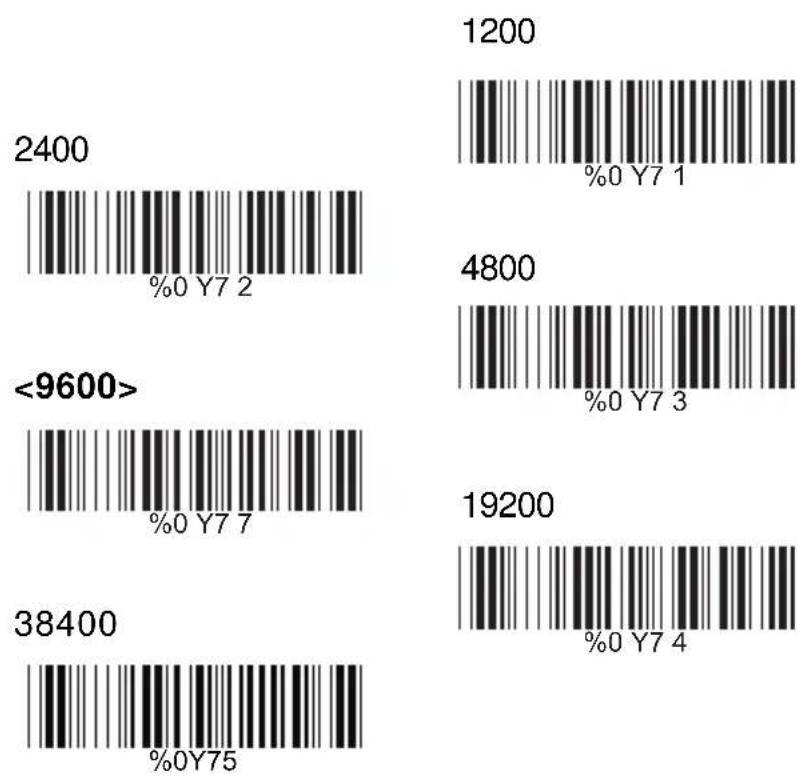
IC Intracom 460835 - RS232 Communication Parameters - 1

B> Set Up Data Bits

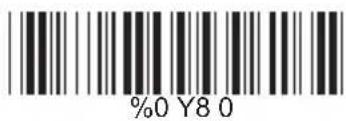
7 Data Bits
%0 Y8 0

<8 Data Bits>
%0 Y8 8

C> Set Up Stop Bits

<1 Bit>
%0 YO8

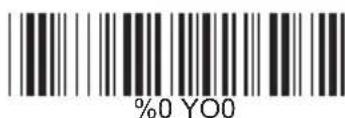
2 Bits
%0 Y00

D> Set Up Parity

IC Intracom 460835 - C&gt; Set Up Stop Bits - 3

Odd
%0 YN3

Space
IC Intracom 460835 - C&gt; Set Up Stop Bits - 5

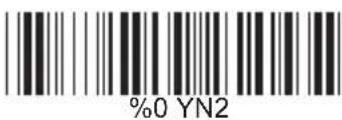
Even
%0 YN2

Mark
%0 YN1

E> Handshaking
RTS/CTS Enable
%0 1 8 8

ACK/NAK Enable
%0 1 4 4

XON/XOFF Enable
IC Intracom 460835 - C&gt; Set Up Stop Bits - 10


IC Intracom 460835 - C&gt; Set Up Stop Bits - 11


IC Intracom 460835 - C&gt; Set Up Stop Bits - 12


IC Intracom 460835 - C&gt; Set Up Stop Bits - 13

4.2 Keyboard Wedge Mode Parameters A> Terminal Type
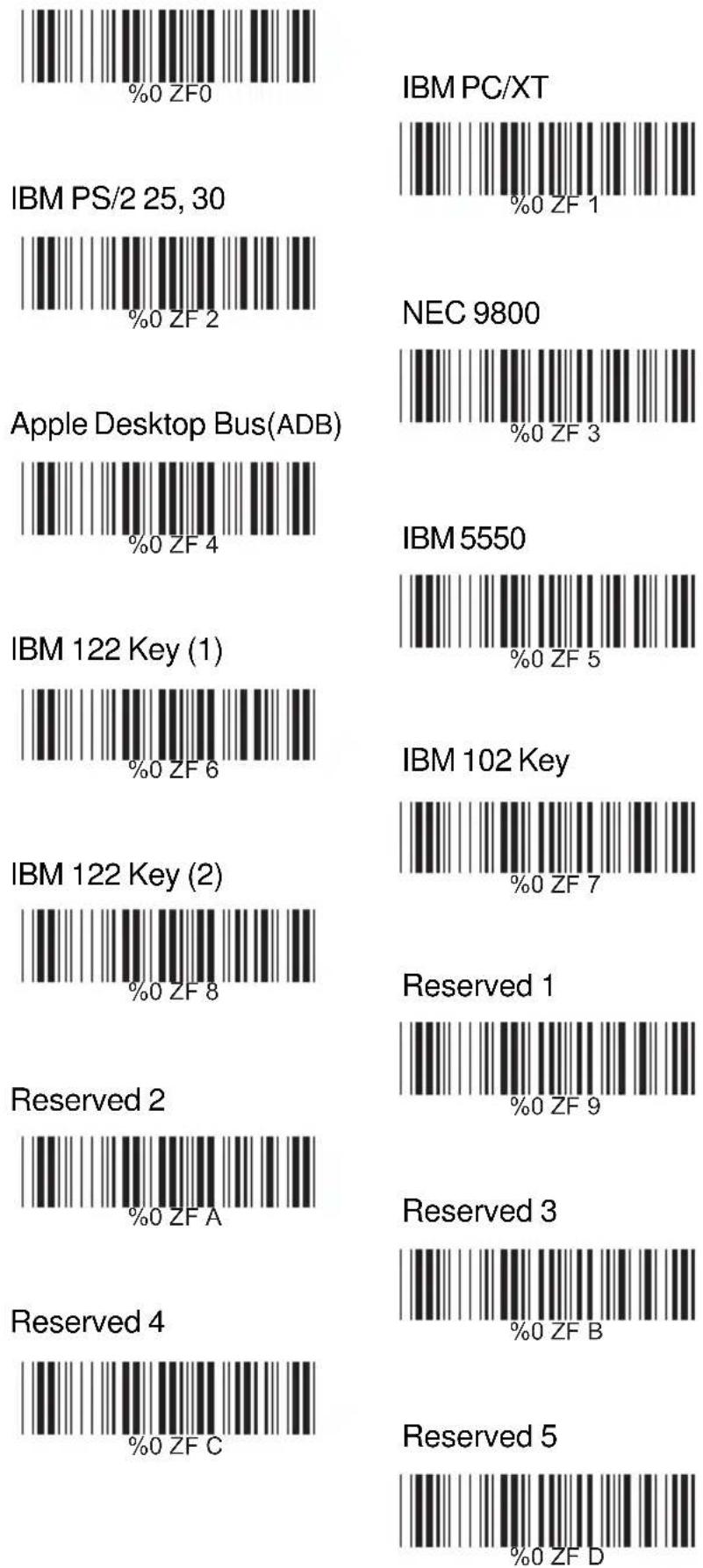

IC Intracom 460835 - Keyboard Wedge Mode Parameters A&gt; Terminal Type - 1

B> Upper/Lower Case

IC Intracom 460835 - Keyboard Wedge Mode Parameters A&gt; Terminal Type - 2

Upper Case
IC Intracom 460835 - Keyboard Wedge Mode Parameters A&gt; Terminal Type - 3

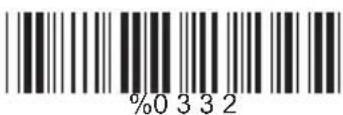
Lower Case
%0 3 3 2

C> Capslock Detection
Enable
%0X88


IC Intracom 460835 - Keyboard Wedge Mode Parameters A&gt; Terminal Type - 6

D> Send Character by ALT Method

Enable
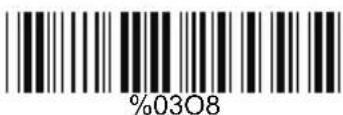
%0308


IC Intracom 460835 - Keyboard Wedge Mode Parameters A&gt; Terminal Type - 8

E>Select Numerical Pad

ON
%01 K4


IC Intracom 460835 - Keyboard Wedge Mode Parameters A&gt; Terminal Type - 10

4.3 Output Characters Parameters

A> Select Terminator
IC Intracom 460835 - Output Characters Parameters - 1

B> Time-out Between Characters

<0 ms>
%0 0 7 0

5 ms
%0 0 7 1

10 ms
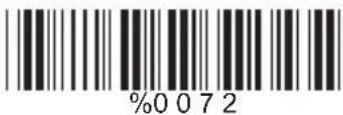
%0 0 7 2

25 ms
IC Intracom 460835 - B&gt; Time-out Between Characters - 4

50 ms
%0 0 7 4

100 ms
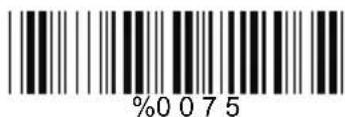
%0 0 7 5

200 ms
%0076

300 ms
%0 0 7 7

4.4 Wand Emulation Mode Parameters

A> TTL Level Representation
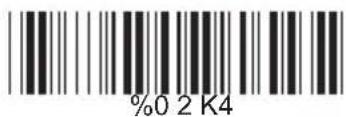
IC Intracom 460835 - Wand Emulation Mode Parameters - 1

Bar Equals Low
%0 2 K0

B> Scan Speed Selection


IC Intracom 460835 - Wand Emulation Mode Parameters - 3

Slow
%0280

C> Output Format Selection

![](images/d72a5ef2e3d89f9d0f7b24b7fe7afe3627a6317289985d43f0145d79c3cf4deb.jpg) Output as Code 39 Full ASCII ![](images/25070e7a3ee1c0ce1e305246991d2fcb2229dbe0b0f6f69da20995517fc4add3.jpg) Output as Original Code Format ![](images/7f796bbcb3998601d61cc517e5c507c980cca0f8687e9684a4fa11245017f92c.jpg)

Ch.5 Bar Codes & Others

5.1 Symbologies Selection

UPC-A ![](images/6fb06217a4a73b32b706a210a8a552eca05c33643c5891cdb713bd2ba14c2ea6.jpg) OFF ![](images/4db4f2137c75b053643c49f443ac16500e6e85b0112a272d5d93e260191c2719.jpg) UPC-E ![](images/15f716469187c0b13a4d890ac3e067d1ac7ff0e769dd2b620de7a3c05472e967.jpg) OFF ![](images/547fbf1ff2fa1b0d7ec0df82f8ba7e5c10fb402eaf475c2a5d19679d31eb407f.jpg) EAN-13/JAN-13/ISBN-13 ![](images/b39ed171c259429c55c3f3f1db29e434af2eeae04e2da022e1786383ba9e236c.jpg) OFF ![](images/b248a7df3308a90c2ac458a3ab3b59956b6240aff1328e0b61a44f1885a2edfc.jpg) EAN-8/JAN-8 ![](images/4f92f8320bac368f8c8a079934e728c26153a06a14bb8ad411a0a3e386c4c502.jpg) OFF ![](images/d42898e4712995448aa7f2319091ab8d6fbd3aec42dab9d23cd3126775f4c796.jpg) CODE 39 ![](images/5d7c606abcf5b1cd20c459c9eb0d416b3adfd10dcf767aa59f3018d1d74a6452.jpg) OFF ![](images/902a180765baec29435b505c12675a27cf0e833dfaefed13b7a1b6978d60d679.jpg) CODE 128 ![](images/3634f29faa7d50c7f68264c4a2976fb632666168ae104a2b70ee4d72878d8bc2.jpg) OFF ![](images/31411e7744197b1efa6636ac167466d08bac9d46ddb5439eec97a141fc19fdcf.jpg) CODABAR/NW7 ![](images/f3de9ec9619f44615551312af5568b6893f7e73fdf92a1fbe5359a321e01aca2.jpg) OFF ![](images/6a4e8da9b6d763063c602a1cdcca7450dfb0b6026ed666f86105bef6a0a79f93.jpg) Interleave 25 ![](images/1425f779b8232ee514862a6c8ae96ebddde8091d50825a2f3f36a3e19322e202.jpg) Industrial 25 ON ![](images/19e154ecd02c571c510b80846172a3614c334c37d1435891f6deaa0276ff3fba.jpg) Matrix 25 ON ![](images/3347e102577ce65515414c53471bbaf4b1c22eb4a4157f1f3d97808a8af5a843.jpg) CODE 93 ON ![](images/d56f4b2fb2f028c1130e38346934554b1404e5b4e94ced4549d589f28ea26d95.jpg) CODE 11 ON ![](images/cb82bac215af18e89fcb58cf4ff1f11880a35a207a05d7a596ac709ea12f3ab3.jpg) China Postage ON ![](images/e4ee9ad4941a0fc759bf57aea11d3211bad9c8a7b97da67d7dbc848574c3ddb9.jpg) MSI/PLESSEY ON ![](images/f34f97cb6638a1bad02e5423196dc1f63590248e63d00490e780ac68c2606b95.jpg) OFF ![](images/7f27599afed1dd24036bd04e61cfc4f8bf0788aae44f89c7bd4994aba149235b.jpg) ![](images/3a806ab106c59f9b089c529af8c65188da2b917dda68ad39bb12057fa03aa5ae.jpg) ![](images/3f26995972d27b258ceca7096a3b2ec1fdf1ce08b10e1933351763cc615b98c9.jpg) ![](images/2ce5698fdbc9f41b71f7e5d970dc6b32d9641cdd83fd9146d65e470448a2b3b5.jpg) ![](images/eb1babd11625e2afe35fa6838d9984bd8d727ff472ff5d53bf906b496ea4117e.jpg) ![](images/784172d7981cff1fabfb6f37a296c0f0065a6f3704be0ffb409b797f73307ff4.jpg) ![](images/461a22f871fdd1a8fe44cb8948ed6278ee386d342144813e4bbe17d590f79bab.jpg) Code 2 of 6 ON ![](images/69e457bc589732ed79ddf829fc10dfa4cf7d2bab2c1939a6601f44fb889de20b.jpg) ![](images/8483e3eb480d652eaaa25e8fa7cfb3d9b8affe004c2a723b30d28b0ddecae66e.jpg) LCD25 ON ![](images/5b8d1f1d99b59bf0ac0e5594a97b792d88574863646046c10a499fb571d975b8.jpg) ![](images/2916bc92108bb055126f7310d23f287aea74a7d081dae79e4801ab88063651ea.jpg) Telepen ON ![](images/045f2997330a66d439eb59b385fdf456f02b2071b5d55f9099b3cde26c779b73.jpg) ![](images/a36b8accafd6f63662d04fb3a23c76977e77ddaea8bafaf48bb7aeb0445aa7de.jpg) Reserved5 ON ![](images/bd02e38d9df4440bf0449a53133445bffd0f856166006bd2f7e286d7cfe220dc.jpg) ![](images/d2a4acaa4afefbe0bf653bf6d11e8b4c345b46970357431b1ea4f5af251ce213.jpg) Reserved6 ON ![](images/1e9c66e1bfe2a050c74d7bfe0c4c67b3443413b79c5ea4aa6df72f3d5e1893f1.jpg) ![](images/515ee9f435aa72e0dad0f96b1e5ed8eae850668be34c736e91a52b960bb9ece3.jpg) GS1 DataBar Omnidirectional ON ![](images/abab5a48f85b33ca0be130d7c466ce61fcaf7333e5f2459b228cf0cbf8fca70a.jpg)

5.2 UPC/EAN/JAN Parameters

A> Reading Type ![](images/634840361c43ca73c395444a89188aabea9eae73b59e8cbf9ff86cb6bad39a74.jpg)

B> Supplementals Set Up

![](images/fb0aa919e0e610d4dde477adcc4f85a3e61fa381f6145fe48eb8e3bddef3ce49.jpg)

C> Check Digit Transmission

UPC-A Check Digit Transmission ![](images/b53e298240e1fb9570011f78fcf17769a420be3c586ddeebfa9e6d8a7d7234b2.jpg) UPC-E Check Digit Transmission ![](images/36364418e0b7c8657f3d1381ca69916095a32a77de4ccb3e2745a40966fc9663.jpg) EAN-8 Check Digit Transmission ![](images/bea93778cc4556367c3ad6a21542e512e6e2d519649a94f14bd27b9e99c6ef85.jpg) EAN-13 Check Digit Transmission ![](images/1494ef2b359a9387384247aa66fea8807cda1a21900a0eec8417056d0f0e3554.jpg) ISSN Check Digit Transmission ![](images/51da863af95733ee9b147043458780e5719a786ad3b597340736623fa737c8be.jpg) ![](images/016d67b1386b6b97c7d4bf28f38cdba4aa8bbee4d942582cf8cc07332d54afe0.jpg) ![](images/00e18bda7fa0cf36a35084b366f1a96928225ee2ce127e5ceb365f53d05fac55.jpg) ![](images/adb72d12ccfadf0ea323a26498d166a1e2ab4c6b5400d1828e1bfba3420271f9.jpg) ![](images/1251453782febb4f30303eedfe16629b86fbcde70896ce3b608c23ee46a66d5f.jpg) ![](images/489712464471600743e3ffe17c79607229f03eacc639eeb50d53a5d4a0f982b9.jpg)

5.3 Code 39 Parameters

A> Type of Code

![](images/b9485ee911eed6a5501ddac166dc11fd6d1c7bbd679e1c0a9f396184a77a9cf8.jpg) Full ASCII ![](images/00bc772a5fd7052234ad77a92c0e1be0b09068c8533786dedb319597215805f6.jpg) Italian Pharmacy/Code 32 ![](images/8123635b2fa7fdfcb41e53f4dd016585a651d074006bfc175a2f2c393d428e70.jpg) Italian Pharmacy/ Code 32 ON ![](images/34dcc074787ddf80d2aa13192a3f5dd1fa0ae10136df69be26a0aed8b46ec34e.jpg)

B> Check Digit Transmission

![](images/21dc5661c06f4e0879c4aa992c5afe79b71076f448a9642301ed8f8c6b67fbc2.jpg) Calculate Check Digit & Transmit ![](images/d3e1af531fea3fb80d58a4a16834d75a6ad82fe5a2aefe880f5a25d4a8914230.jpg) Calculate Check Digit & Not Transmit ![](images/526b77ac29d2bc35713b0f7440b2c196c8db8f404aafbe6ae4976fad75c657af.jpg)

C> Output Start/Stop Character

Enable ![](images/bd29def42f43077a4ec22fcc63a688ef0e3ab072b2408abd1a4322acb28c63f9.jpg) ![](images/704c6790b79c8a0a5db812c1fe52768c306f2dd575dc5ed8c9840fc03449738e.jpg)

D> Decode Asterisk

Enable ![](images/61b6e767ef6e50ea6fef6100533459b20b9e706d40119c7167b220faf7aa8a65.jpg) ![](images/6905e70bb5f959614fbb47191ecab18311206121746b867269f6d75c3a20814a.jpg)

E>Set Up Code Length

To set the fixed length: 1. Scan the "Begin" label of the desired set. 2. Go to the Decimal Value Tables in Appendix A, scan label(s) that represents the length to be read. 3. Scan the "Complete" label of the desired set. Repeat the steps 1 - 3 to set additional lengths. ![](images/2b75ae11899a6e61b0c99b470a2bcd18a94214d6d3a13e9a857aac5cea7147fb.jpg) Fix Length (2 Sets Available) 1. 1st Set Begin ![](images/b528ba8e97b6a20abd7f9c48d396617128c115c75a17ed6897f85512e68e4ad0.jpg) 2. Decimal Value (Appendix A) 3. 1st Set Complete ![](images/71a0bfd1f4d2f138d027b808af37394354243ad2eeaedfbc1f75f96fc967a155.jpg) 1. 2nd Set Begin ![](images/f3834951d0b06052378a47bcc4a4bc962e2a32b6dd0ccfd33ddf376ce2b1c86c.jpg) 2. Decimal Value (Appendix A) 3. 2nd Set Complete ![](images/562d14e0bbe3d75bef161e28850b6e46a4697a0a61748e209cd192709fb13cb3.jpg) Minimum Length 1. Begin ![](images/4c812f6ed57a500f866e7c52fb0cf22840ac1b6f9e422d57689503b3b067f643.jpg) 2. Decimal Value (Appendix A) 3. Complete ![](images/44677e891731c1da7f5bf67917fa22d006ddabc3396dd89d16cde27472faa324.jpg)

5.4 Code 128 Parameters

A> Reading Type

UCC/EAN-128 Enable ![](images/76d6e4dcfa10e406ddcab06474c1742771bd37c1d81f76a13726ca4566329e68.jpg) ![](images/012c2d3df2be884ea222427acd6fb03f7e2b3b29ae3480992674ca613517efc9.jpg) ![](images/881a0e2bc39ea5b72a5d693d0bccde8e139c3fb37ac2a744e4ee1ad8ceeaaebe.jpg) ![](images/5be456aed84e2a134b2d9a0e01435984094447daa4fe8b1e657349c7d1a5fe2d.jpg) Disable']C1'Code Format ![](images/1f61f690fd56c7eb482a7810034727f978ba956e7f133004f7b7e32cf21279aa.jpg) Disable Code128 Group Separators (GS) ![](images/da5cf4822fbb08f43feadff8512cb8e24b336b241b934bca5605b00b8083bc98.jpg)

B> Check Digit Transmission

Do Not Calculate Check Digit ![](images/fb9f16904bffe52c80df3f2faf505f7296b9bd945d3e2d0a619bfc5477ac99f4.jpg) Calculate Check Digit & Transmit ![](images/afb1f30388b99dc496a98878ff72bdde68b1fe8c95060a2363186f8857e65901.jpg) ![](images/e4cb1812db3dd76dca523387d2e44088a2a592e41994ef3f381cd7430fc0a1f6.jpg)

C> Append FNC2

ON ![](images/a87a65599255e8a9d1e6222bba138e06f7057d335e2a0ce58840b9474788b56f.jpg) ![](images/6231b7fe942eb93c1bdea4b3d5a448992a2d2e6a9b0579d46b91728b572c5ce9.jpg)

D> Set Up Code Length

To set the fixed length:

1. Scan the "Begin" label of the desired set. 2. Go to the Decimal Value Tables in Appendix A, scan label(s) that represents the length to be read. 3. Scan the "Complete" label of the desired set. Repeat the steps 1 - 3 to set additional lengths.

![](images/92e02db1aa034e91242e7d2d14b8ad0513f3c1505469c9f4f227d9d8e95d0087.jpg)

Fix Length (2 Sets Available)

1. 1st Set Begin ![](images/e902ae9ad3d1e13467adc9b16b39292dcf9227c76cb1a73fade40090ba3c09fc.jpg) 2. Decimal Value (Appendix A) 3. 1st Set Complete ![](images/0a8caed2af5f34bea4861b116b7d44023e553760873403b1408eedc4ebf9c5bf.jpg) 1. 2nd Set Begin ![](images/b99fb4a1bea6931cabf64d727224fbefe4ad9f3ca5bcf6b0bfac5eb5cac9f5f8.jpg) 2. Decimal Value (Appendix A) 3. 2nd Set Complete ![](images/d58442f27330bbc9b16d6ea6ce02dcd3b446ae94b1f59c8eb90cdc489a7cfe14.jpg)

Minimum Length

1. Begin ![](images/f74b9a939c68a4ff637509e459d71537e5784c8b0de0ecf68339472b8fbee142.jpg) 2. Decimal Value (Appendix A) 3. Complete ![](images/5463f6a43383d56fd095edf07bf18fb6699d347d4d272278ccd63e05e8e5b610.jpg)

5.5 Interleave 25 Parameters

A> Check Digit Transmission

![](images/7099484865e3af58dec8f3ef4d34bc60fad75ab1870430d81c944b40c30d2cbd.jpg) Calculate Check Digit & Transmit Calculate Check Digit & Not Transmit ![](images/61ed21002814ff17b9a58a662976b8ec7c8cfd8d52d9875718bac32354075bf0.jpg) ![](images/9f8d6c75d31c687c748bf0442d198a20f3683af874f1eeb8391da8a9decd0101.jpg)

B> Set Up Number of Character

![](images/7ddd2ca489c53c7f79551254debc08b4594772b2b621c4359f82faec254d9dc4.jpg) Odd ![](images/8dfd80883746ed7f415958b58b7f2bd54267931dcfda6a50473852ac9dc04b82.jpg)

C> Brazilian Banking Code

![](images/ec0417d941dcc13db35c978b5b332257721537c8171f6f68ff8b8a851af2f8c4.jpg) Enable ![](images/6eb1c21ec4095b18d18018a6acb0ea93bceb6db18e5a0a80427c2cbe84acea7f.jpg)

D> Set Up Code Length

To set the fixed length:

1. Scan the "Begin" label of the desired set. 2. Go to the Decimal Value Tables in Appendix A, scan label(s) that represents the length to be read. 3. Scan the "Complete" label of the desired set. Repeat the steps 1 - 3 to set additional lengths.

![](images/5e25a349d9cdf04d0d5a4b40907a612fb283b0da854db5cf8876b1a48befe2a9.jpg)

Fix Length (2 Sets Available)

1. 1st Set Begin ![](images/9b07d42e203bddb1d5854e3d2f5b07dcb23d4630fabf14add9273b4e5320ba8a.jpg) 2. Decimal Value (Appendix A) 3. 1st Set Complete ![](images/f2d71229e369f9accf6336ad148828f618498ae0f6df165b7099d6fc91914e6d.jpg) 1. 2nd Set Begin ![](images/9e45344d12466f57e0d76b1ea708126692894e2cba27081586868f6ccbc49b2f.jpg) 2. Decimal Value (Appendix A) 3. 2nd Set Complete ![](images/fb9fa3ae82b9cd523807856941e36cc19820e403f8bad31865017333dd8825d9.jpg)

Minimum Length

1. Begin ![](images/b7930878f34f8a5e93116b925326b9d72b40842d39a5fd95d837505dc0accd96.jpg) 2. Decimal Value (Appendix A) 3. Complete ![](images/ac465bf4e00a445901cf3c01585026d1a16164b4cdc85e69d9a49174716530e1.jpg)

5.6 Industrial 25 Parameters

A> Reading type

IATA25 Enable ![](images/44a03dc2c1b1c0e9717ce77ab6ef4e14f1226e5ec1ab2e3b893d52dbc0b80649.jpg) ![](images/4122dea0eb2160c286b8f622b0ff094d4693856108f74b2cb537a30eaeba7c20.jpg)

B> Check Digit Transmission

![](images/3ba2cf88dbd1131eb61a7033e7468e32cfbb64f4229645c78c8d92f408b8e884.jpg) Calculate Check Digit & Transmit ![](images/4f21b84708bff9d2ecfbedda0dbff9aa77b8ea9c34cdccf498843b939c0a55f1.jpg) Calculate Check Digit & Not Transmit ![](images/9c020e3be1783019a400d10467dcc44297fc7abff9d95703e469af4aa42582a1.jpg)

C> Set Up Code Length

To set the fixed length: 1. Scan the "Begin" label of the desired set. 2. Go to the Decimal Value Tables in Appendix A, scan label(s) that represents the length to be read. 3. Scan the "Complete" label of the desired set. Repeat the steps 1 - 3 to set additional lengths. ![](images/440c08574280c4818ed3a14274c19bcc7675877470c7a46bfac2c82fd15e90e3.jpg) Fix Length (2 Sets Available) 1. 1st Set Begin ![](images/794ec64967cc3f98956d7a4ff9bf36ac88760ec49f830c8b7b499d94d2964cba.jpg) 2. Decimal Value (Appendix A) 3. 1st Set Complete ![](images/b2ad8759d7e41ac85e4a5f2e4c8b504c4bd93747273a3074edb15b8e3611bd0a.jpg) 1. 2nd Set Begin ![](images/88f1d162daba9974e2440c44afc47096483fc904deb112bdb19d9ddcdf27f3b5.jpg) 2. Decimal Value (Appendix A) 3. 2nd Set Complete ![](images/a4f97265f5134da7f7fe3d2fb01a34e98d5f583d2a666d967ee6da3b7bdf1c58.jpg) Minimum Length 1. Begin ![](images/9264a4b021ae83cc63cb8a6f372f2f8d8312f2beb948b9593483a3f45f2caa1d.jpg) 2. Decimal Value (Appendix A) 3. Complete ![](images/eb6ea434c94cf4e0aabd2ba0e83d4a91df8b9ee333d656f49d67eafbcf5ca68d.jpg)

5.7 Matrix 25 Parameters

A> Check Digit Transmission

![](images/8604ad8501d280bf3e55be1794e55cb13712403d5b868a1e235a8e65ea7d4ff9.jpg) Calculate Check Digit & Transmit ![](images/d686f6f69d60e2e8a50852818ae65070164756d7f5a4101c0516a2a55508ed6b.jpg) Calculate Check Digit & Not Transmit ![](images/dff3fb1a2da03616a084741d72b7fea5a9d18044efde9b0f6050208daf1294d5.jpg)

B> Set Up Code Length

To set the fixed length: 1. Scan the "Begin" label of the desired set. 2. Go to the Decimal Value Tables in Appendix A, scan label(s) that represents the length to be read. 3. Scan the "Complete" label of the desired set. Repeat the steps 1 - 3 to set additional lengths. ![](images/695aedc77af96e9cb64fe578fae12b71131a90aa966b4c80ec88075adfee40b9.jpg) Fix Length (2 Sets Available) 1. 1st Set Begin ![](images/a2b69bd890132d6f1dafadde9ed7400f4aa98cc2bb2937c78fba41dce215778a.jpg) 2. Decimal Value (Appendix A) 3. 1st Set Complete ![](images/a2d2e0bd6ce59e712a6ea6cb6a52e658b0ccbf3931e179d7e052ece33b7b2537.jpg) 1. 2nd Set Begin ![](images/685f8ec1bd7a104e516b40104b0344182ed3badc509c3f092b017a3f279a0f25.jpg) 2. Decimal Value (Appendix A) 3. 2nd Set Complete ![](images/495dd93576e090b8a91e60176de56d897a049b2a308668784ef211b44ca797b0.jpg) Minimum Length 1. Begin ![](images/fc8679304e447b8a82edc13924091e21bbe0f1b7983ffbbcc0ba2a5f8365411c.jpg) 2. Decimal Value (Appendix A) 3. Complete ![](images/9a4463ba7e91079f084a4af236e7ab9198b9de18bd5d97364a85f03ce50a5f3c.jpg)

5.8 CODABAR/NW7 Parameters

A> Set Up Start/Stop Characters Upon Transmission ![](images/ce7a51a3b7f7d4efa75a7668500f2da18db0503e923aebf8281b37948151dc0a.jpg) B> Transmission Type of Start/Stop ![](images/f4532e29d6f9952679c00a0dc1b2563fbe702b2029152d76582439b915149352.jpg)
bar | Group | Start/Stop | Percentage | |-------|------------|----------| | | A Start | %0.4 VF | | | A Start | %0.4 V1 | | | B Start | %0.4 V2 | | | B Start | %0.4 V4 | | | D Start | %0.4 V8 | | | A Stop | %0.4 FF | | | A Stop | %0.4 F1 | | | B Stop | %0.4 F2 | | | C Stop | %0.4 F4 | | | D Stop | %0.4 F8 |

C> Set Up Code Length

To set the fixed length: 1. Scan the "Begin" label of the desired set. 2. Go to the Decimal Value Tables in Appendix A, scan label(s) that represents the length to be read. 3. Scan the "Complete" label of the desired set. Repeat the steps 1 - 3 to set additional lengths. ![](images/7fd8cd729c7cab7273b18655541166ee5f4492724425b0e6f638df8d0e62026e.jpg) Fix Length (2 Sets Available) 1. 1st Set Begin ![](images/4fe5c16da88f8e52382e7b4f232c8302996530d5047dba6ffd6560239445c3b4.jpg) 2. Decimal Value (Appendix A) 3. 1st Set Complete ![](images/ce0eb7a07a98443931519997a27c54783efc8766b3a27aa276fe772bff70f305.jpg) 1. 2nd Set Begin ![](images/6988f397aa029875cd90eb8802a310ee5b7051412124f630637213a543c65a71.jpg) 2. Decimal Value (Appendix A) 3. 2nd Set Complete ![](images/f9dd6bbb2fa9f4d3f9e27b9e9283bbeb3d757e7414e814e3dd86791617dbf33c.jpg) Minimum Length 1. Begin ![](images/17da509f416e06a42b4e132daae807064689b4cc8833e8e50dd92c555654bd4b.jpg) 2. Decimal Value (Appendix A) 3. Complete ![](images/403973fc11ea2a81111b42d786324e5d0a4189ab68871180af1379ced548cfee.jpg)

5.9 Code 93 Parameters

A> Check Digit Transmission

![](images/bd40e1c68dc1bae6e014b4af936208925371d792b263bd9276fedcdd091fe604.jpg) Do Not Calculate Check Digit ![](images/ebc67de1bda93607fd9a0a268cd8817613b057dfb19886c95c0a682aea62ae73.jpg)

B> Set Up Code Length

To set the fixed length: 1. Scan the "Begin" label of the desired set. 2. Go to the Decimal Value Tables in Appendix A, scan label(s) that represents the length to be read. 3. Scan the "Complete" label of the desired set. Repeat the steps 1 - 3 to set additional lengths.

![](images/a4ec6256978e6b9ab01556606cfe37818ce743189fdd62979b0eb1ddd973b5b4.jpg)

Fix Length (2 Sets Available)

1. 1st Set Begin ![](images/d76ca6ad9df0cdf0b05c7ecae21dd1067a87178fb53b4b9fad18f33eb5c9b2ca.jpg) 2. Decimal Value (Appendix A) 3. 1st Set Complete ![](images/900daac025ecc5e1c49428279f548e59480f63f72e7f63dbdffd6569fe30a456.jpg) 1. 2nd Set Begin ![](images/b6fd3a6e8bb230c03a27f1a825a273c8b74b792a82001818291b8ce6193831f5.jpg) 2. Decimal Value (Appendix A) 3. 2nd Set Complete ![](images/e8ab0e5fb0623c8aea9631a9f9f84116aa2f41928c561738b7074142528e6926.jpg)

Minimum Length

1. Begin ![](images/cd4c9714ed330d38384747a54c582a606d5a2a54830fa36ff3c428ca266a63b8.jpg) 2. Decimal Value (Appendix A) 3. Complete ![](images/a5932ea658961d221a11998ac7418ca574e04339ce4678f4caaad4f8b1c0eea9.jpg)

5.10 Code 11 Parameters

A> Check Digit Transmission

![](images/236bfc37cfead965c8f616b0b101df231b7a5c31859f3495aeabba11426b907d.jpg) Calculate Check 1 Digit & Transmit ![](images/68e3eb1cab3f715e1de747f73524487ca3c6733db5a1dd297327f4e7f7c9bea8.jpg) Calculate Check 1 Digit & Not Transmit ![](images/28715c0d35e4536693168116801be4ed5e1b9c27b432e38d52e1d30b35dda0d7.jpg) Calculate Check 2 Digits & Transmit ![](images/d64728cd8eb3164c9229d73ecc426ded5018f01d34103bbced9f65bd54552a81.jpg) Calculate Check 2 Digits & Not Transmit ![](images/724c5c49babb81cba5f9bc57e438777507e5eea1c8deb25509b167b6c6160cba.jpg)

B> Set Up Code Length

To set the fixed length: 1. Scan the "Begin" label of the desired set. 2. Go to the Decimal Value Tables in Appendix A, scan label(s) that represents the length to be read. 3. Scan the "Complete" label of the desired set. Repeat the steps 1 - 3 to set additional lengths. ![](images/f2d35c366c8d56f06529e648d44c9a499ad230e260a94bedc41722a9d0c02eb0.jpg)

Fix Length (2 Sets Available)

1. 1st Set Begin ![](images/d438b782bf0ee2f75d3a11c2c5f7932c79a54b26efc7727137068091add74b0a.jpg) 2. Decimal Value (Appendix A) 3. 1st Set Complete ![](images/e0b90e6ef40c4f389c8e0328710c032b6aabec0084bbc6996e337abced3dda43.jpg) 1. 2nd Set Begin ![](images/fe2d0225d120ec1db22372c8770a21af2811c561b82659cce0dae52188e996da.jpg) 2. Decimal Value (Appendix A) 3. 2nd Set Complete ![](images/892ef08988f38d645967cb2e94703a915e71d52336ec91aaf9910f1cc9890977.jpg)

Minimum Length

1. Begin ![](images/4fc3d7e575ac1889f5005ebfc43b65b7429d0018c6e6055a7b702ebd60d34c07.jpg) 2. Decimal Value (Appendix A) 3. Complete ![](images/f34b102c1cc3065003dd7f9413149c22d5547d790ac1a69c42cdfee2415b05e3.jpg)

5.11 MSI/PLESSEY Code Parameters

A> Check Digit Transmission

Do Not Calculate Check Digit ![](images/9151e688d844c32e2b0be5a5972b27552473c062f350d144cc61efad26a10888.jpg) Calculate Check Digit & Transmit ![](images/1962e5493261b18e7e7141dde6c90dc7987e238e3a5662fd975b79bcc2b8efb5.jpg) ![](images/140c374625fee24c3380d5612c8c3db45b0d3e213f830e9d116b935a5746a857.jpg)

B> Set Up Code Length

To set the fixed length: 1. Scan the "Begin" label of the desired set. 2. Go to the Decimal Value Tables in Appendix A, scan label(s) that represents the length to be read. 3. Scan the "Complete" label of the desired set. Repeat the steps 1 - 3 to set additional lengths. ![](images/adc821bc3fe7f3f0009d395eb161754017a255ebc004c6404085e4f67c733e33.jpg)

Fix Length (2 Sets Available)

1. 1st Set Begin ![](images/e92b9b9f298ae11c293a66b87361d01cb7403177b8f3c094c27c9325d43ea73c.jpg) 2. Decimal Value (Appendix A) 3. 1st Set Complete ![](images/6f747974617a9491ba0cd45b949dd8ed80d9cd5bd86e5cd04240ac36d502b7b8.jpg) 1. 2nd Set Begin ![](images/92fafcc510797a5576d9d2351ecb2ec3cc5b56d0e569ef9c83b45d760562f45d.jpg) 2. Decimal Value (Appendix A) 3. 2nd Set Complete ![](images/de11ef8c54d39fd2d1cecdcd68e09c4597967a81d1d6530d5ef8d89be434d4fc.jpg)

Minimum Length

1. Begin ![](images/09e1af9434c99579d60a609a2ea61fa09e94d30de58a738ac7d765c71f887fab.jpg) 2. Decimal Value (Appendix A) 3. Complete ![](images/15099d9da88e14d8f052c2f28576a85c67087a515c09972a33117af6074f00ac.jpg)

5.12 Code 2 of 6 Parameters

A> Check Digit Transmission

![](images/df4e276897ad7d5b38856d3f2909aafbff98f67f6540238d1a292f26f31cb455.jpg) Calculate Check Digit & Transmit> ![](images/083ef864837da2d53e9af83d33307403e8e50682da0c07f1918cc9853c576a7e.jpg) Calculate Check Digit & Not Transmit ![](images/f25dc341a522f0078fecf945116acb5a2c833e79b2c07061dfc8afed2e031b50.jpg)

B> Set Up Code Length

To set the fixed length: 1. Scan the "Begin" label of the desired set. 2. Go to the Decimal Value Tables in Appendix A, scan label(s) that represents the length to be read. 3. Scan the "Complete" label of the desired set. Repeat the steps 1 - 3 to set additional lengths.

![](images/2fff74509caf9ddd6fc04f78fbd3cc9cca5e6f74729474772b50bfffd3d3aa11.jpg)

Fix Length (2 Sets Available)

1. 1st Set Begin ![](images/e0d2e8ee52e0af7e0a5f828f51693c40ecc27e3dfdf0090269b5345641e0a673.jpg) 2. Decimal Value (Appendix A) 3. 1st Set Complete ![](images/cc95f23797ed9a8b9dae01d45083072a70ab9fdb5c9fb51c5ebd5c4c4fa8f51b.jpg) 1. 2nd Set Begin ![](images/2afdc8117e9614c53a81f0068308a70dccbd683b4a8c365261579c7899b97e63.jpg) 2. Decimal Value (Appendix A) 3. 2nd Set Complete ![](images/4d6f3343c429805ca10327011a364f01726405ce9a409a5b9840c318c672b966.jpg)

Minimum Length

1. Begin ![](images/77e5d3a3f012e900ab01bd1254788ffb0d85afd9ebc489f3ef6508172b457fcc.jpg) 2. Decimal Value (Appendix A) 3. Complete ![](images/a4e49e761ece98d548ba5071829091dfdc3e2b3dc2a232d5c3884ab5f44ce6fc.jpg)

5.13 LCD25 Parameters

A> Check Digit Transmission

![](images/4259a09c47d2c76d5b61c7951ee7cb85d12930b5aeace7007914ad8230710147.jpg) Calculate Check Digit & Transmit ![](images/e47a575a21e695dce08bb33c2e04db9f59dd4d9698f2002c953d3e2549df575c.jpg) Calculate Check Digit & Not Transmit ![](images/822c32da10af87a9564a6ef9fc113dcad40fbb544bddd233ab34e5ec1347da67.jpg)

B> Setup Code Length

To set the fixed length: 1. Scan the "Begin" label of the desired set. 2. Go to the Decimal Value Tables in Appendix A, scan label(s) that represents the length to be read. 3. Scan the "Complete" label of the desired set. Repeat the steps 1 - 3 to set additional lengths. ![](images/dc21bcbd3d9c409d965e70a928e25f26b2d1a401d3b0d9ca19448683e59efb09.jpg)

Fix Length (2 Sets Available)

1. 1st Set Begin ![](images/05978dbf87992db99ebaf8a38eda1e5a70ee6145493843dc842eacfb6418bf87.jpg) 2. Decimal Value (Appendix A) 3. 1st Set Complete ![](images/de6864c4958129c6f762207a0491af533082d21c2cb2ef93db7ff60a3adaedf0.jpg) 1. 2st Set Begin ![](images/1e0bf274d5e4d03d6bd0471b50d84730c215a7d5d5e87211241951bf9fd1d52e.jpg) 2. Decimal Value (Appendix A) 3. 2nd Set Complete ![](images/ee5e02a409ae123713f25eb25618cf4b226c125c4d9c4887810ffc49dfbdfb91.jpg)

Minimum Length

1. Begin ![](images/745089fbc27a0cd05bce97f164f25230ef7c9bb3c99d77b72fdc36bb2d6ff450.jpg) 2. Decimal Value (Appendix A) 3. Complete ![](images/8b0c3eef773e851b95ceab063d14453246332cce8448a003e54c39feae0313a8.jpg)

5.14 Telepen Parameters

A> Type of Code ![](images/e8135a8a66ddd71accfbe879374be9d0b4047e1b8c673e47144219a1996b2f95.jpg) Compressed Numeric Mode ![](images/dde619f5f0018bc5627c34ea7629cb7c59ea3e6e1f7c0e83667a3d0e8e7bd214.jpg)

B> Check Digit Transmission

Do Not Calculate Check Digit ![](images/aca3a79b092617faf3eb71fe0a81cf108e79a50cf6f0c57572ce4e6a3d6c543e.jpg) Calculate Check Digit & Transmit ![](images/159d467f24bee20ac266c0f1e2fd6eb6043a5f92dba4f7a3a6ba8402fe86cd92.jpg) ![](images/24ce8a690e2f0fc4c4a508dd8cc02c4e3fe9263317fe752aeaaf42ff8dfad872.jpg)

C> Set Up Code Length

To set the fixed length: 1. Scan the "Begin" label of the desired set. 2. Go to the Decimal Value Tables in Appendix A, scan label(s) that represents the length to be read. 3. Scan the "Complete" label of the desired set. Repeat the steps 1 - 3 to set additional lengths. ![](images/360c42b70ef98a3b8f89a8db4709f0163742d4f5ad30112d91f51a0ae9348f3c.jpg)

Fix Length (2 Sets Available)

1. 1st Set Begin ![](images/9a17dedaf8ae623cef0b7c12e3304411e4d742f37c11311d2b32b39dc70f5add.jpg) 2. Decimal Value (Appendix A) 3. 1st Set Complete ![](images/f94f0336273d18f3cb536179b04751bfca779eb3f2d75addbcb634f827717bd5.jpg) 1. 2nd Set Begin ![](images/b5fd1b0f9253717b307516486a81cff1bdf80acb4d64e797935981b4a91b8a36.jpg) 2. Decimal Value (Appendix A) 3. 2nd Set Complete ![](images/6299fdfcedf791e91ee1b6b1a5ea6361330e7041f146207b234a08a1abf8e1e5.jpg)

Minimum Length

1. Begin ![](images/dec50dc7eba19aa276bf3a30da435a83e770b42cbeb1e70a91084352e7487643.jpg) 2. Decimal Value (Appendix A) 3. Complete ![](images/10cc35d0bb940fbd51ed638b7fc9a47b07b89af4dae3b69e2c992608bc4a1771.jpg)

5.15 GS1 Databar(RSS Code)

A> GS1 DataBar Omnidirectional ON ![](images/90103c0708124145da06e83065285a00df1bb19007c846e0f70fe5b1203b63a5.jpg) Don't Transmit Check Digit ![](images/e6f0775dc6ece73c9f95fe3bcdb534858ecea818d55ab424eea051b118306472.jpg) ![](images/5a1da8d96f9603d1840b008873f59289783e7918c7c5423b6ab6cd3a9658b6b9.jpg) Don't Transmit Application ID ![](images/2ce74c10216d1787f817c9f0405f8bdda1aa051e81dbd46f46dc1c350e02aa35.jpg) Transmit Symbology ID ![](images/d328904b56a981245c5547d50af135d4c6dd9b5834799dc243afb1619e4caf8f.jpg) ![](images/033c0a4b3b4e55b22e3fee0c9665c7d8072531bb50530b9c171d297976cfcafd.jpg) B> GS1 DataBar Limited Parameters ![](images/3048ec62e91f1c3d1da79ff9020835c07aab290ecbeddaca4e2ece59ed4384bf.jpg) Don't Transmit Check Digit ![](images/a7b3fecf51dc1a59ee806085e4675973478c478d191eea1be07207dd6306eeee.jpg) ![](images/a551d1d36e0d7a3902622d8f70a17dc86627728bb8243be975d7c4c445aad38a.jpg) Don't Transmit Application ID Transmit Symbology ID ![](images/760b7c9bd4dc610ca5144a25a8b9cfdd90e43df47cd1382207ed85f1c3ec739b.jpg) ![](images/5ab8e4bf8cc6b1ee77e645be736a39ab0878828ec6d49f422619f155c56213d8.jpg) ![](images/c9052da9802d9ddfa07191cae95bedc6d1abb8b65b680d91ff72d832679d2c0c.jpg)

C> GS1 DataBar Expanded Parameters

Transmit Symbology ID ![](images/866db8f4fa4a43e367d5f17595462e558e14858fba995dc739011b6bebd33b5b.jpg) ![](images/be597db8bc2e2adaa3c8b535e37a53ae2c22897cade2868a1c58e9405bc55fa0.jpg)

Ch.6 Miscellaneous Parameters

6.1 Language Selection

![](images/88a9f8ed1d10c49f2fa50e12536d17922521a6c512c0986ebc1ac25c13fc8ef6.jpg) Belgium ![](images/5eec727ca904ac50b212d4f78f2e608ca8f4bfd5851f7526b806691b71abca93.jpg) Portuguese ![](images/fb6788ba23acc280e1d72eb11b00bde58c5ab88b8e16d054ec0cac680037dd9f.jpg) Denmark ![](images/7bbd7fe5d91861151aec2ce86b5e32e9b81c016623ee5a2e2dc2f9f0c3bf8932.jpg) Netherlands ![](images/4de28db31ac3569bdde0c043cd200be868ecda51d2b2bd4a4b80bf599d845392.jpg) Turkey ![](images/c747f64930c7b14ccb8b83097986b076dac8adb4dc2ee1124d595860874785eb.jpg) Reserved2 ![](images/7e1f488274f512a4f9f1f0379f473683b4d6db5d07339168dfba54386ea28f40.jpg)

6.2 Bar Code ID

ON ![](images/b499f7c6edf951159d6202ac3f6b6dfc7b9ad309966ad312055b6ba141c00092.jpg) ![](images/8f0f64ebad14b52d866ff37f56c459e8458121874bc1fa9ba98ce8636e3cb7c0.jpg) Default ![](images/35a303977c827258f82b005618f6b48a2552630df07d011c47a7136b1baef9e5.jpg) With this function ON, a leading character will be added to the output string while scanning code, user may refer to the following table to know what kind of bar code is being scanned. Please refer to the table below for matching code ID of codes read in.
Code TypeIDCode TypeID
UPC-AA UPC-E B
EAN-8C EAN-13 D
CODE 39E CODE 128 F
Interleave 25 G Industrial 25 H
Matrix 25ICodabar/NW7J
CODE 93KCODE 11L
China PostageMMSI/PLESSEYN
Code 2 of 6PLCD25Q
TelepenTRSS-14U
RSS LimitedVRSS ExpandedW

User Define Code ID

To set the code ID: 1. Scan the symbologies label. 2. Go to the ASCII Tables in Appendix B, scan label that represents the desired code ID. Note: User define code ID will override default value. Program will not check the conflict. It is possible to have more than two symbologies which have same code ID. UPC-A ![](images/ee55162fe66ebd49b2ed2b992243a70c2b20e4007372a0c7d4aab7fed68a188d.jpg) UPC-E ![](images/cb8cc37b7a017ef3d0b1c4ead40cc076122f35812f8d68ac94480cf05239a8b7.jpg) EAN-13/JAN-13 ![](images/602ab1b4ea0d052f97be1f56f02a9578b03f80467aac5ee8d6316b2485199561.jpg) EAN-8/JAN-8 ![](images/85369a4a9e3dbca48d727e9c8856571af3ee8d8b6ff9b3af638f6014e39521b9.jpg) CODE 39 ![](images/1d53dc8a1d73a6b9cbbb56bad83c6285c54fd3a0738130bea01e5910552e3c79.jpg) CODE 128 ![](images/4b881ee565561e9bdef63993607d41d0b3816905846e3dca4228394b89ae501f.jpg) CODABAR/NW7 ![](images/080f3f9aa257fcb137f64b5eed89881d28000c53a9b532d83e940e447f71ce07.jpg) Interleave 25 ![](images/7d1f90b12de553d801701b981613acce6118e9a5d8e1328bb213f6c36f40f35c.jpg) Industrial 25 ![](images/eb5f5d42b276f3179aea0e50dbd010169398287794154905d8694ccffc6652a8.jpg) Matrix 25 ![](images/2b5cbf583ba59c248bd1242b1b7f66ab647fd85c450cca10339ce1cfe0b72580.jpg) CODE 93 ![](images/0b30ca949d1dc49501fde3e86cc2270d144a637f49ff912efd4ba0889ee330c2.jpg) CODE 11 ![](images/b602c05d8df45f675bbdc5f667656f4d759458bb6281bcfc51717802283b852c.jpg) China Postage ![](images/4a575ea3156f08db8c64cc126c7a0669262b79532e8a8a197a9e7e7c4f97153e.jpg) MSI/PLESSEY ![](images/3a3b0f9bfc2d4aa5cea4f9640d2a8ab4b270676e7e788526532d919e1577be58.jpg) Code 2 of 6 ![](images/734a2bd478f02c0b4ead2116ed3522c56080978f59a93c7507117980a22f87a7.jpg) Telepen ![](images/46d28d0dcfa65d9ad27c70d07fc81eec4b596cd931aae724d1f7676afec1d7fc.jpg) LCD25 ![](images/396820a7b1e469f53e871d6ab47502a71a23963f01ad0b6dc969727fb2c2fd46.jpg) RSS-14 ![](images/26e19adcfd9bd73504b2ead9b2816782fa6e3422ac0d65458549d89fa8df0a7e.jpg) RSS Limited ![](images/67a479ba10d304034b203c831771045f35f3e5ea8567c371a11c941e4d5ceaf9.jpg) RSS Expanded ![](images/bb5568a006fd7ba05458a22516818044054bfbc71d7c338aeff9917ea317bbc1.jpg) Reserved5 ![](images/7e762753147a707635d3793c0315a0cfaa3c2ca8556937df7c0a6120b8735ee5.jpg) Reserved6 ![](images/8abad06315920f08ac8c55fd20b3385befa75ef920aa9d23fa13c735633be90f.jpg)

6.3 Reading Level

Bar Equals High ![](images/46984705698edb91dbf38925890c0809d7cbaa212195da8cfebad704faa4bfe8.jpg) ![](images/4edecfef3976ccadb3b262f71253b0e5837d160fbe97398ccad200bb91238b75.jpg)

6.4 Accuracy

<1 Time> ![](images/033ca4d32364c95a6c6cef75790ccd4ad2b2b7863a6256f51e662613ee7b5c52.jpg) 2 Times ![](images/3912923c134c9dadbd5345b50cd134e4b1a1c308d624d97990eeb22ffe14a7d3.jpg) 3 Times ![](images/b976068f833c8d56349e43a433f39084108290ae3468062d97a233cdc445c997.jpg) 4 Times ![](images/05c8026361c8b6ddd9278fedd3ad709da1199f77582c4b9e6950773fcc75a613.jpg)

6.5 Buzzer Beep Tone

![](images/b450a515fe5fd7f15ce21654a6ca03e6e6a6f0c25293c536c73de3ebe44b1e44.jpg) Medium ![](images/1a4c695092c1b800a7e3ab742a90eacfcca95d68ff3a0c30e53755874702d3b0.jpg) Low ![](images/69040f843577a9edcd5e8b3a92a0a89c1b72a48e4305d1179e300cfc009f734f.jpg) Off ![](images/0798eec49d45f63ca6da97f03a3cbe0d43ae9f3d2d6755942fac600539c174b3.jpg)

6.6 LED Control(SV700 only)

![](images/9081b3dd63bd3d97d505a296e044f378ec575bb446ba6bedf5d79e852dcbf964.jpg) OFF ![](images/f39609423d8f918faa90c0e470b67a6e57eb2f97f6b3a30c68176177efe52135.jpg)

6.7 Sensitivity of Continuous Reading Mode

A> Quick Setting: ![](images/c8336800b2ba50f672f37ee458b677195a621548ef0234128a80462cdc97626f.jpg) Slow ![](images/083ab4f0d0437f6732fd5fed1c3a720b81bd638c22d38fc58f53972c177407d2.jpg)

B> Same Code Delay Reading Interval

Following code sequences represent the length of time before a barcode can be rescanned at continuous and flash reading mode. The value can be defined from 1-50 and they represent 100ms to 5 seconds in 100ms interval. Default value is 3 (0.3 seconds).

To setup same code delay reading interval:

1. Scan the "Begin" label 2. Go the Decimal Value Tables in Appendix A, Scan label(s), that represents the same code delay reading interval. They are ranged from 1-50. One step is represented 0.1second. So the interval is from 0.1 to 5 seconds. 3. Scan the "Complete" label

Repeat the steps 1-3 to set time out of same symbol

1.Begin ![](images/8eedeea371235bb91f9974fca4fd1c4cfeb2e592092ecef9b6c48024db5a592a.jpg) 2. Decimal Value (1-50) (Appendix A) 3.Complete ![](images/2d62a743aa4ee45cd8d974f43eb8dfa95d1cf7227ecf44a448182b634a6e908f.jpg)

6.8 Notebook Function

Enable ![](images/85aa005d9adaf05424172a1c2f6b8fe2a8f6b22f99ce15ab1e06f366c73375a0.jpg) ![](images/78cbba2a4138ebbfb26ea4c4e251d0622996a6253f7a8a76016eddfebb1ac30e.jpg)

6.9 Reverse Output Characters

![](images/328dc57e52894d0cb0a5897806a075382af68a5bbf7927b5555ba3a644397efa.jpg) Enable ![](images/9af295e6ac45821c32ce08aea0c1faab89ff0d5268789771b91cb94a67a12f63.jpg)

6.10 Setup Deletion

To setup the deletion of output characters: 1. Scan the label of the desired set below. 2. Scan the label of the desired symbology. 3. Go to the Decimal Value Tables in Appendix A, scan label(s) that represents the desired position to be deleted. 4. Scan the "Complete" label of "Character Position to be Deleted". 5. Go to the Decimal Value Tables in Appendix A, scan label(s) that represents the number of characters to be deleted. 6. Scan the "Complete" label of "Number of Characters to be Deleted". Repeat the steps 1 - 6 to set additional deletion.

A> Select Deletion Set Number

1. 1st Set ![](images/30ff3c08a89b4f709dec16d2e44a3071e507b6d96c3803126528b1153b2244a2.jpg) 2. 2nd Set ![](images/291e4dd7019e46f1bd915192f600657bcf111ffaec91fd70aeff645d85c4eb33.jpg) 3. 3rd Set ![](images/ad737cf7543f8b21b9192c9ba58d6fe53ddff70363344e40533cbc5df112d880.jpg) 4. 4th Set ![](images/ed1fe2c45890dc7660339b8fca2d1a2ca0394b7789f44aaa4a5f02b867797943.jpg) 5. 5th Set ![](images/a967f389ed715951269102d4970331cfe8bcd912d61b2dad57f2b0241b7b464f.jpg) 6. 6th Set ![](images/069887d63b01f1c4ecb2011aa574f6a7988c650e3980926200f0cf07601f431b.jpg)

B> Symbologies Selection

UPC-A ![](images/6829754c92a4ff41be30c1056670d0dca630671184d7323cac122d207112ea59.jpg) EAN-13/JAN-13/ISBN-13 ![](images/d71a6e86d451a8a30c7d7086907553a85023ce01e4e27d2f7a9be136e8f76962.jpg) CODE 39 ![](images/1f7e099537be0f6fa6541b54d25ef42df4c6fa1700e74c89a73293e0f9f61155.jpg) CODABAR/NW7 ![](images/e6d30ae1ee7416b38e631c64532531899b3bc0442727e77de385a7bfacb30f46.jpg) Industrial 25 ![](images/2fe72d3f3f73b3a393a3c1a9b5337c6e977fd6bd3b3fc37db33b5e37e8c45859.jpg) CODE 93 ![](images/cf4e5607229ff176502e5225976a823992441d38c3432ef44b65b871ec21de5a.jpg) China Postage ![](images/90a072a0cb910497b00990f8d855fabd094d6cac73f6485123aa9a7aaf78ce5b.jpg) UPC-E ![](images/d7a09d5fa28b5c583fa31f812c17d8be168f058679c9951e53b5d2e1d4475fc7.jpg) EAN-8/JAN-8 ![](images/555300ef886f5746711d3f643af3756c6e347f1ebb8d3a0788f5d2f638b18615.jpg) CODE 128 ![](images/8d4d7cd3f234037815e2a8f42507a8a575fcccdf5003623772744e4dbfe947c9.jpg) Interleave 25 ![](images/8128d426b820fb62f0e8cf1ca43a8c331ce93c2b0c3cc116efe49c5d75432ac5.jpg) Matrix 25 ![](images/514ad2afc6cb5659cf5088d91ae1af1215b3dbe2bc5f3281754a4ec65b61675f.jpg) CODE 11 ![](images/938277b21f7eea49b9a9ca1f865e46338b86f40cad5a52f1854fe76373aae347.jpg) MSI/PLESSEY ![](images/ef40865a7ea2eac28c23192079ecaef1ffbb6ba96477c3963c58d6e00409979c.jpg) ![](images/5ee3eff6c7f75c3059cf0b371e4988e1b3c211ae98d170ee5bfc2844b46d6ae8.jpg)

C> Character Position to be Deleted

1. Decimal Value (Appendix A) 2. Complete ![](images/ca61c3368f9ddbf02f2f9534c02d0078f207de92ca25aedc4e2f4aa298a87215.jpg)

D> Number of Characters to be Deleted

1. Decimal Value (Appendix A) 2. Complete ![](images/ddeaa3acf4ae1dab3cc989482d4dbe14e03157f89685bac1ccde590c06f2ed83.jpg)

6.11 Setup Insertion

To setup the insertion of output characters: 1. Scan the label of the desired set. 2. Scan the label of the desired symbology. 3. Go to the Decimal Value Tables in Appendix A, scan label(s) that represents the desired position to be inserted. 4. Scan the "Complete" label of "Character Position to be Inserted". 5. Go to the ASCII Tables in Appendix B or Function Key Tables in Appendix C, scan label(s) that represents the desired characters to be inserted. 6. Scan the "Complete" label of "Characters to be Inserted". Repeat the steps 1 - 6 to set additional insertion.

A> Select Insertion Set Number

1. 1st Set ![](images/8751555ca6a70c2f09998c2e5ca7e31baff62df52d6abb0d2936da08b56d33ee.jpg) 2. 2nd Set ![](images/04709f7732ae2232c5776a499425cdf80ed23c08e63c2b0a187dbbcbe095495d.jpg) 3. 3rd Set ![](images/3db0d111b4f9f0f9569c101425660a26ffc150d51db2a898efb5feccd8ec2fab.jpg) 4. 4th Set ![](images/c93947165a18f0e0c22002ef9fe092b48e9707436808ac2fdd6e324f40793b8a.jpg) 5. 5th Set ![](images/202114d3e78b0ecbeecfde477fc8b26eea32683ef1b166d4d08fab309288b1ce.jpg) 6. 6th Set ![](images/3bdf06ed81773628fce5f2122c69ae47d3b1619c922cfd0bef8021ab894f5f45.jpg)

B> Symbologies Selection

UPC-A ![](images/ea49e390cc6d1772fa10a2045f0164cb6535d116588db36631602b98f221cdb3.jpg) ![](images/f306163524272c8d9a6906c4206233a7d8ab4dfbe328df449ebe5916bfc1c144.jpg)
bar | Category | Value Label | | -------------- | ----------- | | Telepen | %5 1 T+ | | RSS-14 | %5 1 U+ | | RSS Expanded | %5 1 W+ | | None | %51 4 + | | Code 2 of 6 | %5 1 P+ | | LCD25 | %5 1 Q+ | | RSS Limited | %5 1 V+ | | All Codes | %51 S+ |

C> Character Position to be Inserted

1. Decimal Value (Appendix A) 2. Complete ![](images/30d59770180208d75fd895644bf76c83b521ef1e0705cda1b390ec60b633608d.jpg)

D> Characters to be Inserted

1. ASCII Table (Appendix B) 2. Complete ![](images/ca12b10c1f962b47f0dae1e0918c1a77df4a9404b8fe72eef0f531b4df27b50a.jpg)

6.12 Setup IR Sensor (LG303 only)

![](images/fc40d3d78c0f301afc44246a909ad8feedb3d8df28382b15cf0f46e80c3cec28.jpg) Enable ![](images/c86631acfb04d65b3fa59d92617e0b790d619809f33ae307b5164a021c1d266a.jpg) Appendix A Decimal Value Table ![](images/8f5173cf9ca2a2b3da379e9f7bc31afe828bfa7890e7082d78395e04d3935da9.jpg)

Appendix B ASCII Table

NULL SOH ![](images/cdf220527a0161fefccb398d3a73b90649fa10cb56a4cc3ffa6dc50bdd45605c.jpg) ETX EOT ![](images/fb152774e92b8cc5675812c92e4117745fc19d1f3eb6b7be0577bbf1784d1698.jpg) ACK BEL ![](images/bec9df029657648452700959b76522b8c63f3bbe7aa6e62b14d716f72811207c.jpg) HT LF ![](images/39922a6f402afa44334138de149640098cb4243fa14b38c598026d4e6316e894.jpg) FFCR ![](images/ee121d7ba6f755b2f05259e085b4c9ab19c8d967212626ff4cc6dbd454f1bf9a.jpg) SIDLE ![](images/528ed12bfbcf09f3c9d49584deaab023295308f180209032c8619f05b9cc0364.jpg) DC2 DC3 ![](images/78c4335c5531b3ee37d2adbe62b94177f5cb2a4963603c3587a2cbf4c656804e.jpg) NAK SYN ![](images/e967e3c919eb13a808fe0e9e01edb645c9e0f60b315dabeb0b099eb8b73e87aa.jpg) CAN EM ![](images/99b523ccae5752d66ad81b33bd7cce5545f05571dbb49a25997fd55d602c6d5a.jpg) ESC FS ![](images/5d4b8e9ed80e5d80c0e546840f0c9d143793e0d38982aff8557549e7f5816d2f.jpg) RS US ![](images/d8464242a2f8974ae4ae0d1f817e2126e40c4817946b7b8e19e1dfa9ee281269.jpg) STX ![](images/f4be9d4d4b1fc6bf280c949c1117fc14baedf0a7d27ff6757c350f106819cd49.jpg) ENQ ![](images/258262c17cc0f9cb33ed46cd4c5b5e3f1cad395c8784d8759136e0bb94a3d7d2.jpg) BS ![](images/f5d4323d796a5e083f344a2de192500f6232189e19cfe436344b079b344b7954.jpg) VT ![](images/14c243ebc7bd45bdc80dddb677024405591e7a8b9581f5e7fd190da0f58841d6.jpg) SO ![](images/cf4130fa62c7d77b120077ab4cf8911bcb1b6711c07dd338899a55d334b18618.jpg) DC1 ![](images/0e39842d4fbc5ee4673338ba2d4ddd271b0ddff824dd5899b67601bbd9c3a514.jpg) DC4 ![](images/7f4ff03d117f0e29ab0a1cc4f6aea346d78f491e9282c9eca5bb079790ad85b7.jpg) ETB ![](images/b0c1f121a82a095e280b2676289969a8d09b1c18238de6fc5332395eb691412f.jpg) SUB ![](images/ecbdd088fcd5116ff035ac720ed59edfab484d66e3752bee359aa6e11c44a2f2.jpg) GS ![](images/17da19c1e35229a9912bef8103970f9bab59e5c6dbe52705406e2fff45082d19.jpg) ![](images/cb26245816d35c071b58875ccef25c97e9f0b4ccc26024c3048a86efa206ab1e.jpg) ![](images/1482592720e2e9dd2dbea3cd34dfa3676357644c513e00df997e7281268c07a2.jpg) ![](images/57d5efbedec89c8d5a83973262b814aa6aa00c612e83da292b070d7e3ec42c0f.jpg) ![](images/a6c42464b3d5efd5a3ca39e06fe3a3dc38c0a50662865eb52ea7ad43626969b0.jpg) ![](images/2767ad12ebf432fd6ffd9fe85da2bcd9065f6985ccba9ad359490880020f118c.jpg) ![](images/db342b791057a03518a6987c5bca2791622a1e2ad7a3dcbce980a9c2c280af83.jpg) ![](images/1b92886aca93e6e601c5edb11c5d53f8594142754e2b0136259516ce422a63f7.jpg) ![](images/b8d1083e6b722b28614e68c0e79905d91ef8c14248cb34a880e3c2d8c7171aa3.jpg) ![](images/b4df41c1be56d33c9309e160cda6c379abff21cf1ee4e6b99a912f6ca2f791f0.jpg) ![](images/5e76866ea725bf7328745247aa4a0069cce9975d69e6537cb6bb6656fbcfadaa.jpg) ![](images/98e4af41d6996e964dc37fb818c438dbb4ddbc713e13ae1cbeb8d71dbca57177.jpg) SPACE! ![](images/cdb258309c3f79537a8a8fc2cb4456da33be54d5b576172b868b699f5ea37a5e.jpg) ![](images/5d2e05419618aee7b481e80c1df6e6df323538a3770625c85b572daad035698e.jpg) ![](images/8d0a71f9a8c13fc80b227b5fd9cf9b1113604f293570fca5c690ab29e307d908.jpg)

Appendix C Function Key Table

![](images/90403051ebd38eb6d1d6a1de60afe025c83774f81d1c91aaf9143baa77e1bafe.jpg) ![](images/db0439f2c88e8ee4847ed409a34d5d4abad123e0cf3cb596400a0a5c1b821f89.jpg)
Table of contents Click a title to access it
Manual assistant
Powered by Anthropic
Waiting for your message
Product information

Brand : IC Intracom

Model : 460835

Category : Barcode Reader