
Hurricane 1101 - Light Effect Chauvet - Free user manual and instructions
Find the device manual for free Hurricane 1101 Chauvet in PDF.


| Product Type | Fog Machine |
| Brand | Chauvet |
| Model | Hurricane 1101 |
| Dimensions (L x W x H) | 9.9 x 9.6 x 8.8 in (252 x 243 x 222 mm) |
| Weight | 7.4 lb (3.4 kg) |
| Power Supply Type | Fixed voltage (120 VAC, 60 Hz or 230 VAC, 50 Hz) |
| Power Consumption | 612 W (120 V) / 716 W (230 V) |
| Fuse Rating | F 8 A, 250 V (120 V) / F 5 A, 250 V (230 V) |
| Heat-up Time | 5 minutes |
| Fluid Tank Capacity | 0.3 gal (1.3 L) |
| Fluid Consumption | 30 ml/min |
| Fog Output | 8,000 cfm |
| Control Options | Manual button, Manual Fog Controller (FC-M), optional FC-T and FC-W remotes |
| Included Accessories | FC-M controller, hanging bracket, warranty card, quick reference guide |
| Recommended Fluid | CHAUVET water-based fog fluid |
| Cleaning Interval | Every 40 hours of continuous use |
| Cleaning Agent | CHAUVET Fog Cleaner Quart (FCQ) |
| Storage Notes | Drain tank and run cleaning solution before storage; test-run monthly |
| Safety: Indoor Use Only | Yes (IP20) |
| Safety: Minimum Distance | 6.5 ft (2 m) from nozzle to objects |
| User-Serviceable Parts | Fuse (replace with same type and rating) |
| Mounting | Level surface only, overhead rigging with safety cable |
| Warranty | Standard Chauvet warranty (see manual) |
| Item Code (120V) | 05070794 |
| Item Code (230V) | 05070797 |
Frequently Asked Questions - Hurricane 1101 Chauvet
User questions about Hurricane 1101 Chauvet
0 question about this device. Answer the ones you know or ask your own.
Ask a new question about this device
Download the instructions for your Light Effect in PDF format for free! Find your manual Hurricane 1101 - Chauvet and take your electronic device back in hand. On this page are published all the documents necessary for the use of your device. Hurricane 1101 by Chauvet.
USER MANUAL Hurricane 1101 Chauvet
CHAUVET®2
TABLE OF CONTENTS
1. Before You Begin....3
What Is Included....3
Unpacking Instructions .... 3
Claims 3
Text Conventions ...... 3
Symbols....3
Disclaimer....3
Product at a Glance....4
Safety Notes 4
2. Introduction .... 5
Overview......5
Dimensions....6
3. Setup....7
AC Power 7
Fuse Replacement 7
Mounting 8
Orientation....8
Rigging 8
4. Operation 9
Remote or Manual Operation....9
Manual Fog Controller (FC-M) 9
Fluid Tank Indicator LED 9
5. Technical Information ....10
Fogger Maintenance .... 10
Storage 10
6. General Troubleshooting....11
7. Technical Specifications....12
Returns ....13
RMA....13
Contact Us....14
1. BEFORE YOU BEGIN
What Is Included
- Hurricane™ 1101
• Manual Fog Controller (FC-M) -
Hanging Bracket with Mounting Hardware
-
Warranty Card
- Quick Reference Guide
Unpacking Instructions
Carefully unpack the product immediately and check the container to make sure all the parts are in the package and are in good condition.
Claims
If the box or the contents (the product and included accessories) appear damaged from shipping, or show signs of mishandling, notify the carrier immediately, not Chauvet. Failure to report damage to the carrier immediately may invalidate your claim. In addition, keep the box and contents for inspection.
For other issues, such as missing components or parts, damage not related to shipping, or concealed damage, file a claim with Chauvet within 7 days of delivery.
Text Conventions
| Convention Meaning | |
| 1—512 | A range of values |
| 50/60 | A set of values |
| Settings | A menu option |
| Menu > Settings | A sequence of menu options |
| A button | |
Symbols
| Symbol Meaning | |
 | Critical installation, configuration, or operation information. Not following these instructions may make the product not work, cause damage to the product, or cause harm to the operator. |
 | Important installation or configuration information. The product may not function correctly if this information is not used. |
 | Useful information. |
Disclaimer
The information and specifications contained in this User Manual are subject to change without notice. Chauvet assumes no responsibility or liability for any errors or omissions, and reserves the right to revise or recreate this manual at any time. Download the latest version from www.chauvetlighting.com.
© Copyright 2014 Chauvet. All rights reserved.
Electronically published by Chauvet in the United States of America.
| Author Date | Editor Date | ||
| M. Trouard | 06/23/2014 | A. Leon | 10/23/14 |
Product at a Glance
| Use on Dimmer | X | Auto Programs | X |
| Outdoor Use | X | Fixed voltage (120 V or 230 V) | P |
| Sound-Activated | X | Replaceable Fuse | P |
| DMX | X | User-Serviceable | X |
| Master/Slave | X | Duty Cycle | X |
Safety Notes
These notes include important information about the mounting, usage, and maintenance of this product; read before using the product.

• Always connect the product to a grounded circuit to avoid the risk of electrocution.
- Always disconnect the product from the power source before cleaning or replacing the fuse.
• Make sure the power cord is not crimped or damaged.
• Never disconnect the product from power by pulling or tugging on the cord.
- If mounting the product overhead, always secure to a fastening device using a safety cable.
• Make sure there are no flammable materials close to the product when operating.
- Do not touch the product's housing when operating because it may be very hot.
- Do not mount the product on a flammable surface (linoleum, carpet, wood, paper, carton, plastic, etc.).
- The product's nozzle is very hot during operation and it remains hot for a long time after operation has stopped.
- The fog exits the nozzle at a very high temperature. Keep a minimum distance of 6.5 ft (2 m) from the nozzle to the nearest object.
• Do not use the product as a space heater.
- Do not drink or come in contact with the fog fluid. If you do, call your local emergency service (911 in the US) for help.
• Do not add perfume, alcohol, gasoline, or any other flammables to the fog fluid.

- Always make sure that the voltage of the outlet to which you are connecting the product is within the range stated on the decal or rear panel of the product.
- The product is for indoor use only! (IP20) To prevent risk of fire or shock, do not expose the product to rain or moisture.
- Always install the product in a location with adequate ventilation, at least 20 in (50 cm) from adjacent surfaces.
- Be sure that no ventilation slots on the product's housing are blocked.
• Never connect the product to a dimmer.
• Make sure to replace the fuse with another of the same type and rating. - Never carry the product from the power cord or any moving part. Always use the hanging/mounting bracket.
- The maximum ambient temperature (Ta) is 104 °F (40 °C). Do not operate the product at higher temperatures.
• In the event of a serious operating problem, stop using the product immediately. - Never try to repair the product. Repairs carried out by unskilled people can lead to damage or malfunction. Contact the nearest authorized technical assistance center.
• This product is not intended for permanent installation.
• Use only CHAUVET® water-based fog fluid.
• Drain the tank before transporting the product. - To eliminate unnecessary wear and improve its lifespan, during periods of non-use completely disconnect the product from power via breaker or by unplugging it.

Keep this User Manual for future use. If you sell the product to another user, be sure to give this document to the next owner.

FCQ (Fog Cleaner Quart) was specifically developed by Chauvet to clean your Hurricane™ 1101. Make sure you use FCQ regularly, no longer than 90 days between cleanings, to increase the life of your fogger.
2. INTRODUCTION
Overview

Dimensions


3. SETUP
AC Power
This Hurricane ™ 1101 has a fixed voltage power supply and it can work with an input voltage of either 120 VAC, 60 Hz or 230 VAC, 50 Hz, depending on the specific model.
To determine the product's power requirements (circuit breaker, power outlet, and wiring), use the current value listed on the label affixed to the product's back panel, or refer to the product's specifications chart. The listed current rating indicates the product's average current draw under normal conditions.

Always connect the product to a protected circuit (circuit breaker or fuse). Make sure the product has an appropriate electrical ground to avoid the risk of electrocution or fire.

Never connect the product to a rheostat (variable resistor) or dimmer circuit, even if the rheostat or dimmer channel serves only as a 0 to 100% switch.
Fuse
Replacement
- Disconnect the product from power.
- With a Phillips #2 head screwdriver, unscrew the fuse holder cap from the housing.
- Remove the blown fuse.
- Replace with a fuse of the same type and rating.
- Screw the fuse holder cap back in place and reconnect power.


Disconnect the product from power before replacing the fuse.

Always replace a blown fuse with another of the same type and rating.
Mounting
Before mounting the product, read and follow the safety recommendations indicated in the Safety Notes.
Orientation

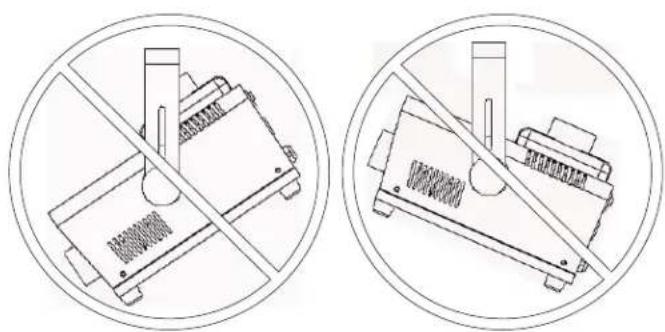
This product may not be tilted. This product should only be mounted/used on a level surface.
Rigging
- Before deciding on a location, always make sure there is easy access to the product for maintenance and fluid replenishment.
- Make sure that the structure or surface onto which you are mounting the product can support the product's weight (see the Technical Specifications).
- When mounting the product overhead, always use a safety cable. Mount the product securely to a rigging point, such as an elevated platform or a truss.
- When rigging the product onto a truss, you should use a mounting clamp of appropriate weight capacity. The bracket has 13-mm holes, which are appropriate for this purpose.
- The rubber feet also serve as floor supports and allow for surface mounting. When mounting the product on the floor, make sure that the product and cables are away from people and vehicles.


While operating the Hurricane ™ 1101, make sure there is adequate fog fluid in the machine to prevent pump and heater damage. When the fog fluid level becomes low, as a safety feature, the heat sensor will make a very loud noise. Simply add more fog fluid to continue using the Hurricane ™ 1101.
4. OPERATION
Remote or Manual Operation
The Hurricane™ 1101 can be operated manually, or with the included manual fog controller. Two other optional remote controls are also available: a timer remote (FC-T) and a wireless remote (FC-W). The Manual button is located on the rear of the unit. See the product Overview.
Manual Fog Controller (FC-M)
- Connect the fog machine to power.
- Plug the manual fog controller (FC-M) into the Manual Controller socket on the rear of the fog machine.
- Wait for the Status LED to turn green.
- Press the button located on the controller to trigger the fog output.

The FC-M button is momentary, which means that the fog machine will only output while the button is pressed. Once the button is released, the fog will stop outputting.
FC-M Overview


The FC-M has a magnetic back that can affix to most metal surfaces for easy placement while the unit is in use.
Fluid Tank Indicator LED
Indicator LED on the back of the Hurricane™ 1101 shows the status of the fogger, as follows:
• Orange - pump is not detecting fluid
Note: The Hurricane™ 1101 may output fog for a short duration to allow for a self-checking cycle.
5. TECHNICAL INFORMATION
Fogger Maintenance
Do not allow the fogger to become clogged. After every 40 hours of continuous operation, use CHAUVET® Fog Cleaner Quart (FCQ) through the system to prevent the accumulation of particulate matter in the heating element.
The recommended cleaning procedure is as follows.
- Unplug the product from power.
- Empty all fog fluid from the machine.
- Add cleaning solution to the tank.
- Connect the product to power and allow it to warm up.
- Run the unit in a well-ventilated area until the tank is almost empty. Do not allow the pump to run dry.
- Refill with fogger fluid to continue using the fogger. Run the machine briefly to clear any remaining cleaning solution from the pump and heater.

Do Not operate the machine without fluid at any time.

Fog Cleaner Quart (FCQ) was specifically developed by Chauvet to clean your Hurricane™ 1101. Make sure you use FCQ regularly, no longer than 90 days between cleanings, to increase the life of your product.
Storage
Before storing the fogger, run FCQ through the system as described in the cleaning procedure above; however, only follow steps 1 through 5. Do not refill the tank with fog fluid if storing the fogger. Cleaning the system prior to storage will help prevent any particles from condensing inside the pump or heater while not in use.

Test-run your Hurricane™ 1101 on a monthly basis to achieve the best performance.
6. GENERAL TROUBLESHOOTING
| Symptom | Possible Cause | Indicator Status | Possible Action |
| No output or short output | Line blockage or air in fluid line | Orange | Make sure there is fluid in the tank |
| Turn fog machine 45° to flatten out the bubble and allow the fog fluid to flow properly | |||
| Prime by setting output to the highest setting | |||
| Turn off the product for 5 seconds, and then turn it back on. Repeat as necessary.Note: After more than 10 attempts, contact Customer Service. | |||
| Incorrect fluid Off | Clean thoroughly with CHAUVET® FCQ. For full instructions, see Fogger Maintenance. Refill with CHAUVET® water-based haze fluid. | ||
| No output or spitting fluid | Incorrect fluid | Off | Clean thoroughly with CHAUVET® FCQ. For full instructions, see Fogger Maintenance. Refill with CHAUVET® water-based haze fluid. |
| Blocked pipes | Contact Customer Service | ||
| Failing part | Contact Customer Service | ||
| Fuse keeps blowing | Excessive load on the circuit | Make sure that the total load does not exceed 80% of the breaker or fuse nominal current | |
| Short circuit along the power lines | Check the power lines and power cords | ||
| Product does not power up | No energy on power outlet | Check power outletChange to another outlet | |
| Loose or damaged power cord | Check the power cord | ||
| Blown fuse | Replace blown fuse with a good one of the same type and rating | ||
| Internal problem | Send product for repair | ||
| Product stops pumping/ Loud noise | Low/No Fluid | Refill product with fluid | |
| Pump protection system engaged | Release manual fog button, and press it again to reset pump protection system | ||

If you still experience problems after trying the solutions presented here, contact Chauvet Technical Support. See Contact Us.
7. TECHNICAL SPECIFICATIONS
| Dimensions and Weight | Length | Width | Height | Weight |
| 9.9 in (252 mm) | 9.6 in (243 mm) | 8.8 in (222 mm) | 7.4 lb (3.4 kg) | |
| Note: Dimensions in inches rounded to the nearest decimal digit. | ||||
| Power | Power Supply Type | Range | Voltage Selection | |
| Model-specific | 120 VAC, 60 Hz or 230 VAC, 50 Hz | Fixed | ||
| Parameter | 120 V, 60 Hz | 230 V, 50 Hz | ||
| Consumption | 612 W | 716 W | ||
| Operating / Inrush current | 5.1 A | 3.1 A | ||
| Fuse | F 8 A, 250 V | F 5 A, 250 V | ||
| Power I/O | US/Worldwide | UK/Europe | ||
| Power input connector | Hard-wired | Hard-wired | ||
| Power Cord plug | Edison (US) | Local plug | ||
| Operation | Heat-up Time | Tank Capacity | Fluid Consumption | |
| 5 min | 0.3 gal (1.3 l) | 30 ml/min | ||
| Fog Output | Output | |||
| 8,000 cfm | ||||
| Thermal | Maximum External Temp. | Cooling System | ||
| 104 °F (40 °C) | Convection | |||
| Ordering | Product Name | Item Code | Item Number | |
| HurricaneTM 1101 (120 V) | 05070794 | 781462211424 | ||
| HurricaneTM 1101 (230 V) | 05070797 | 781462211455 | ||


RETURNS
To return a product or request support:
• In the U.S., contact Chauvet World Headquarters (see Contact Us).
• In the UK or Ireland, contact Chauvet Europe Ltd. (see Contact Us).
• In Mexico, contact Chauvet Mexico (see Contact Us).
• In any other country, DO NOT contact Chauvet. Contact your distributor. See www.chauvetlighting.com for distributors outside the U.S., United Kingdom, Ireland, or Mexico.

If you live outside the U.S., United Kingdom, Ireland, or Mexico, contact your distributor of record and follow their instructions on how to return Chauvet products to them. Visit our website for contact details.
RMA
Call the corresponding Chauvet Technical Support office and request a Return Merchandise Authorization (RMA) number before shipping the product Be prepared to provide the model number, serial number, and a brief description of the cause for the return.
You must send the merchandise prepaid, in its original box, and with its original packing and accessories. Chauvet will not issue call tags.
Clearly label the package with the RMA number. Chauvet will refuse any product returned without an RMA number.

Write the RMA number on a properly affixed label. DO NOT write the RMA number directly on the box.
Before sending the product, clearly write the following information on a piece of paper and place it inside the box:
- Your name
- Your address
- Your phone number
- RMA number
• A brief description of the problem
Be sure to pack the product properly. Any shipping damage resulting from inadequate packaging will be your responsibility. FedEx packing or double-boxing are recommended.

Chauvet reserves the right to use its own discretion to repair or replace returned product(s).
CONTACT Us
WORLD HEADQUARTERS - Chauvet
General Information
Address: 5200 NW 108th Avenue
Sunrise, FL 33351
Voice: (954) 577-4455
Fax: (954) 929-5560
Toll free: (800) 762-1084
UNITED KINGDOM AND IRELAND - Chauvet Europe Ltd.
General Information
Address: Unit 1C
Brookhill Road Industrial Estate
Pinxton, Nottingham, UK
NG16 6NT
Voice: +44 (0)1773 511115
Fax: +44 (0)1773 511110
MEXICO - Chauvet Mexico
General Information
Address: Av. Santa Ana 30
Parque Industrial Lerma
Lerma, Mexico C.P. 52000
Voice: +52 (728) 285-5000
Outside the U.S., United Kingdom, Ireland, or Mexico, contact your dealer. Follow their instructions to request support or to return a product. Visit our website for contact details.
Technical Support
Voice: (954) 577-4455 (Press 4)
Fax: (954) 756-8015
Email: tech@chauvetlighting.com
World Wide Web www.chauvetlighting.com
Technical Support
Email: uktech@chauvetlighting.com
World Wide Web www.chauvetlighting.co.uk
Technical Support
Email: servicio@chauvet.com.mx
World Wide Web www.chauvet.com.mx
- TABLE OF CONTENTS
- BEFORE YOU BEGIN....3
- INTRODUCTION .... 5
- SETUP....7
- OPERATION 9
- TECHNICAL INFORMATION ....10
- GENERAL TROUBLESHOOTING....11
- TECHNICAL SPECIFICATIONS....12
- RETURNS ....13
- CONTACT US....14
- BEFORE YOU BEGIN
- WHAT IS INCLUDED
- UNPACKING INSTRUCTIONS
- CLAIMS
- TEXT CONVENTIONS
- SYMBOLS
- DISCLAIMER
- PRODUCT AT A GLANCE
- SAFETY NOTES
- INTRODUCTION
- OVERVIEW
- DIMENSIONS
- SETUP
- AC POWER
- FUSE
- REPLACEMENT
- MOUNTING
- ORIENTATION
- RIGGING
- OPERATION
- REMOTE OR MANUAL OPERATION
- MANUAL FOG CONTROLLER (FC-M)
- FC-M OVERVIEW
- FLUID TANK INDICATOR LED
- TECHNICAL INFORMATION
- FOGGER MAINTENANCE
- STORAGE
- GENERAL TROUBLESHOOTING
- TECHNICAL SPECIFICATIONS
- RETURNS
- RMA
- CONTACT US
Brand : Chauvet
Model : Hurricane 1101
Category : Light Effect