15E1 - Desktop computer ELO - Free user manual and instructions
Find the device manual for free 15E1 ELO in PDF.


| Product Type | Desktop Computer |
| Brand | ELO |
| Model | 15E1 |
| Dimensions (approx) | 400 x 200 x 400 mm |
| Weight (approx) | 8 kg |
| Power Supply | 300W internal power supply |
| Processor | Intel Core i5 (typical configuration) |
| RAM | 8 GB DDR4 |
| Storage | 512 GB SSD |
| Operating System | Windows 10 Pro (pre-installed) |
| Connectivity | USB 3.0, HDMI, Ethernet, Wi-Fi |
| Main Functions | General computing, office applications, web browsing, multimedia |
| Intended Use | Home and office |
| Cleaning and Maintenance | Clean with a soft dry cloth; avoid liquids and abrasives. Ensure proper ventilation. |
| Safety Precautions | Operate in a well-ventilated area. Keep away from water and heat sources. Unplug before cleaning. |
| Spare Parts and Repairability | Contact authorized service center for replacement parts. Do not open the power supply. |
| General Information | This ELO desktop computer is designed for reliable performance in business and home environments. |
Frequently Asked Questions - 15E1 ELO
User questions about 15E1 ELO
0 question about this device. Answer the ones you know or ask your own.
Ask a new question about this device
Download the instructions for your Desktop computer in PDF format for free! Find your manual 15E1 - ELO and take your electronic device back in hand. On this page are published all the documents necessary for the use of your device. 15E1 by ELO.
USER MANUAL 15E1 ELO
natural_image
Exterior view of a black electronic computer monitor displaying the 'elo' logo on a blue abstract background (no additional text or symbols visible)USER MANUAL
Elo Touch Solutions
15.6" Widescreen E-Series All-in-One Touchcomputer
SW601671 Rev D
Copyright © 2013 Elo Touch Solutions, Inc. All Rights Reserved.
No part of this publication may be reproduced, transmitted, transcribed, stored in a retrieval system, or translated into any language or computer language, in any form or by any means, including, but not limited to, electronic, magnetic, optical, chemical, manual, or otherwise without prior written permission of Elo Touch Solutions, Inc.
Disclaimer
The information in this document is subject to change without notice. Elo Touch Solutions, Inc. and its Affiliates (collectively "Elo") makes no representations or warranties with respect to the contents herein, and specifically disclaims any implied warranties of merchantability or fitness for a particular purpose. Elo reserves the right to revise this publication and to make changes from time to time in the content hereof without obligation of Elo to notify any person of such revisions or changes.
Trademark Acknowledgments
AccuTouch, CarrollTouch, Elo, Elo (logo), Elo Touch, Elo Touch Solutions, Elo TouchSystems, IntelliTouch, iTouch, SecureTouch, TouchTools and VuPoint are trademarks of Elo and its Affiliates. Windows is a trademark of Microsoft Corporation.
Table of Contents
Chapter 1: Setup .... 4
Unpacking Your Touchcomputer ....4
Adjusting the Display ....5
Calibrating the Touchscreen 6
Additional Mounting Option for Your System....7
Chapter 2: Operation .... 8
Elo Touch Solutions – E-Series Hardware Monitoring Utility 8
LED Functionality 9
Accessing the Input/Output Panel....10
Chapter 3: Safety and Maintenance .... 11
Safety 11
Care and Handling 12
Chapter 4: Technical Support .... 14
Technical Assistance....14
Chapter 5: REGULATORY INFORMATION ...... 15
I. Electrical Safety Information ....15
II. Emissions and Immunity Information....15
III. Agency Certifications....17
IV. China RoHS....17
Chapter 6: WARRANTY INFORMATION ...... 19
This chapter discusses how to set up and test your touchcomputer.
Unpacking Your Touchcomputer
Check that the following items are present and in good condition:
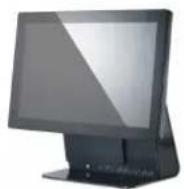
Touchcomputer
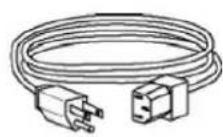
Power cable US/Canada
← AND →
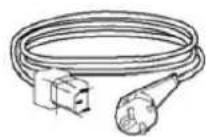
Power cable Europe
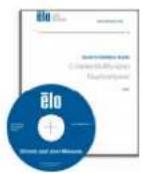
Driver CD and Quick Install Guide
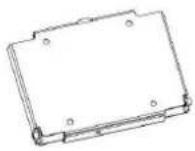
Wall Mounting
Brackets and Screws
(8 x M4, 1 x M3)
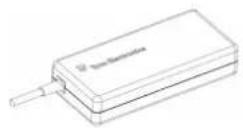
Power Adapter
The display screen can be adjusted from -17 to +75 degrees, as shown below.
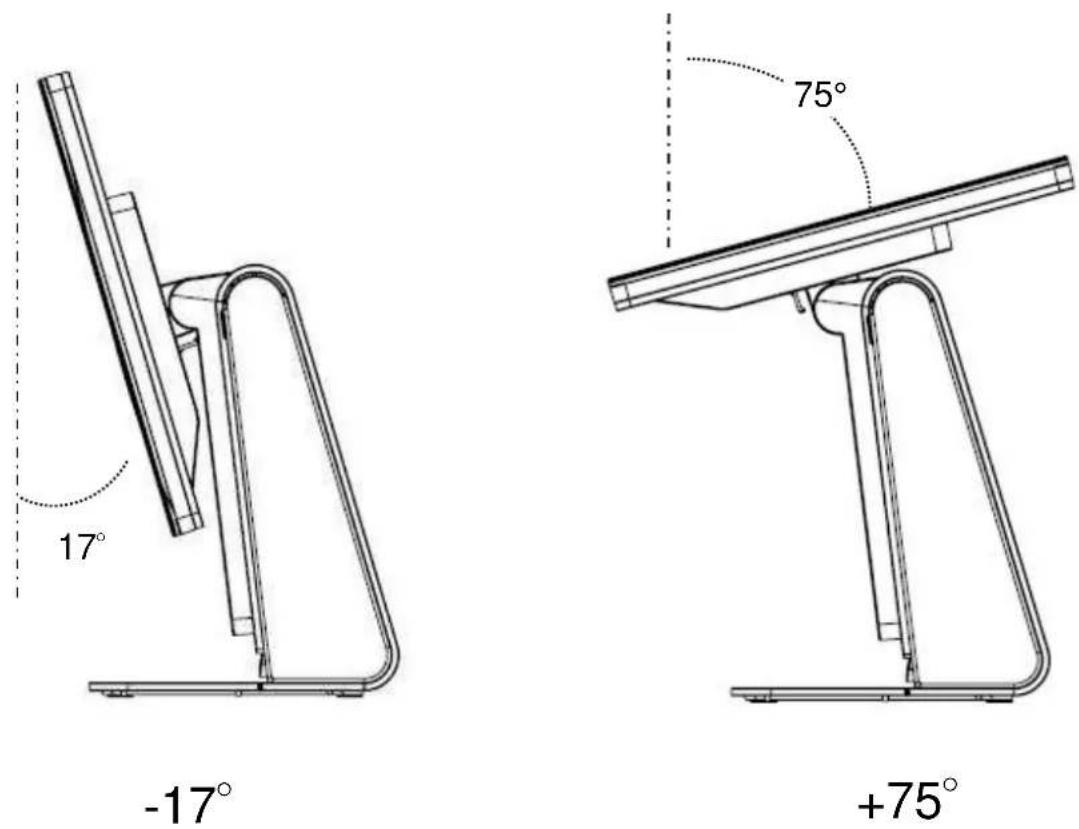
CAUTION: To prevent tipping or dropping, be sure to hold the base when adjusting the display.
Calibrating the Touchscreen
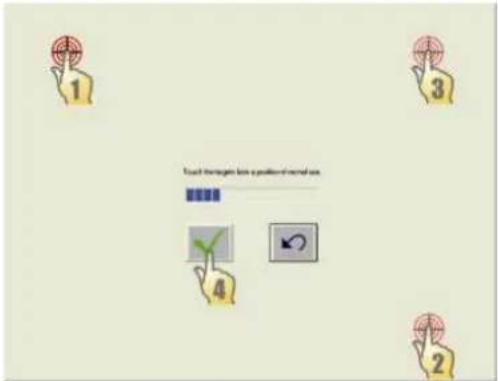
The touchscreen is pre-calibrated for accurate touch response.
If for any reason the touchscreen needs to be recalibrated, (For Windows XP) right-click the Elo icon in the Taskbar and then click "Align" (for Windows XP), or double-click the Elo Alignment shortcut on the system desktop (for Windows 7)
This launches the calibration program. The window shown below opens. Follow the instructions to calibrate the touchscreen.
1) Mounting on the wall or pole
WALL / POLE MOUNT WITH PROVIDED BRACKET ASSEMBLY
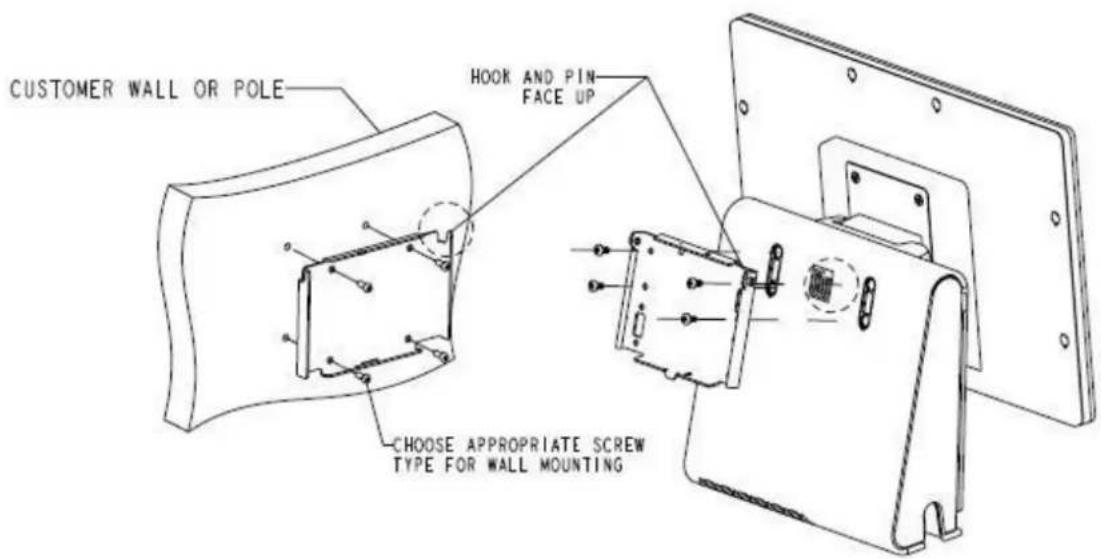
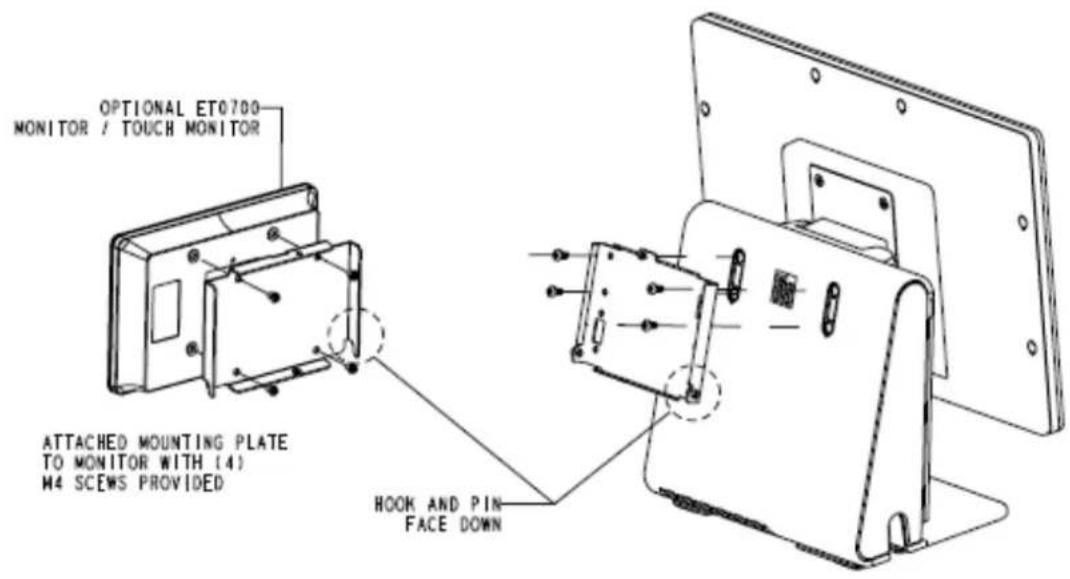
2) Second monitor mount onto your system (any monitor under 2.5 Kg with 75mm VESA mount)
This chapter describes how to interact with the Elo Touch Solutions diagnostic tool, power LED, and input/output panel.
Elo Touch Solutions – E-Series Hardware Monitoring Utility
How to Install
The utility is included in the driver CD. Please go to "E-Series Hardware Monitor" folder located on the driver CD to install the utility.
E-Series Hardware Monitor Menu
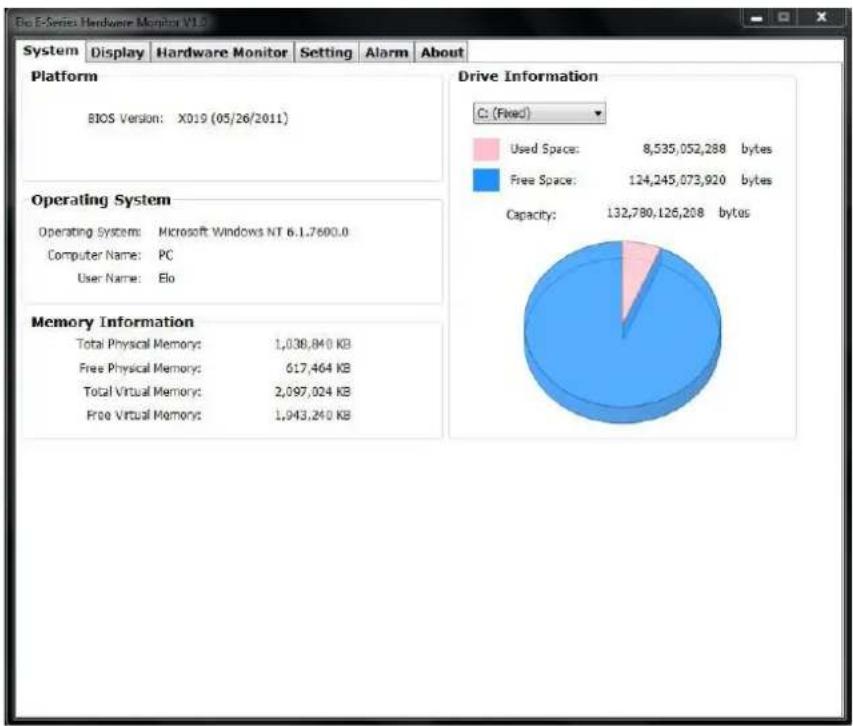
pie
Drive Information | Category | Value | |---|---| | Used Space: | 8,535,052,288 bytes | | Free Space: | 124,245,073,920 bytes | | Capacity: | 132,780,126,208 bytes |The Hardware Monitor tool provides the following features.
| Feature Description | |
| System Display | the BIOS version, operating system version, memory information, and drive information. |
| Display Adjust brightness. • Brightness: Adjust the backlight of the monitor. | |
| Hardware Monitor | Monitor the CPU temperature, system temperature, and system output voltages. |
| Setting Set alarms when the CPU temperature, system temperature, and output voltages that meet the setting criterion. | |
| Alarm | Display the record of all alarms. |
| About General information for the E-Series diagnostic tool. | |
LED Functionality
The E-Series base has a LED indicating the state of the touchcomputer. The table below shows LED state and corresponding color.
| LED Color to Observer State | |
| Off No input power — Off mode | |
| Red Input power present – Off or Hibernation mode | |
| Orange Input power present — Standby mode S3 | |
| Blinking Green Input power present — Standby mode S1 | |
| Green Input power present — Power on |
Accessing the Input/Output Panel
To access the input/output (I/O) ports, remove the I/O cover at the left of the unit. A security screw is included and may be used to secure the front cover to the touchcomputer. Below are the I/O descriptions:
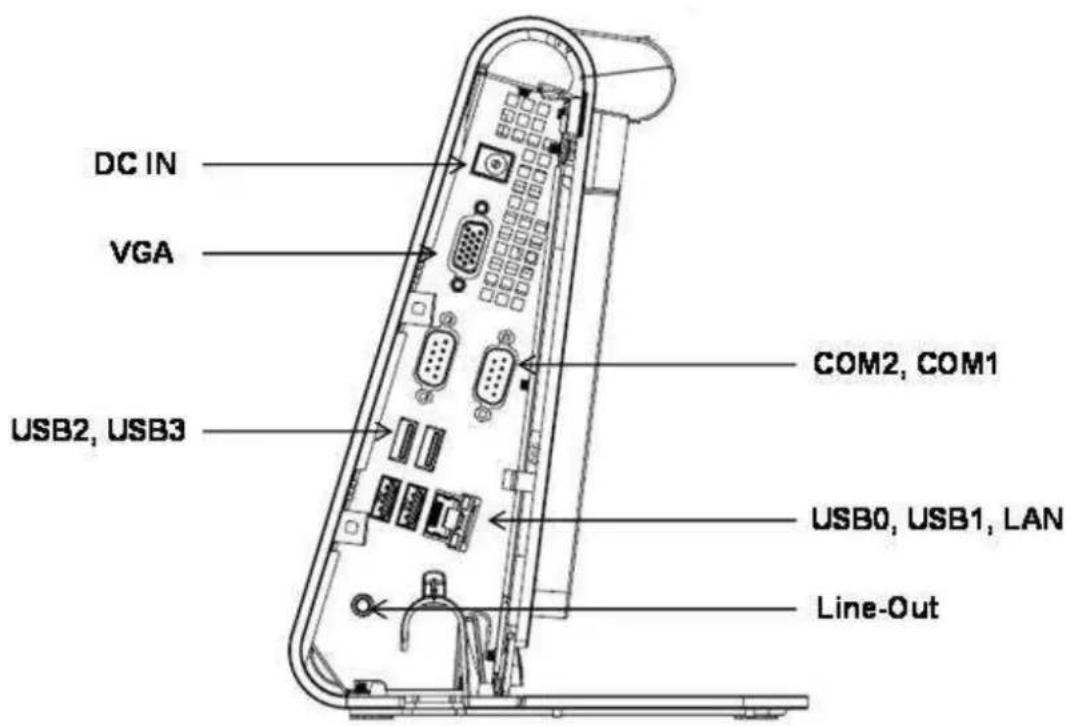
Note: As a safety precaution, always leave the I/O cover attached when the system is powered on.
SAFETY AND MAINTENANCE
Safety
Important information regarding the proper setup and maintenance of your touchcomputer:
- To reduce the risk of electric shock, follow all safety notices and never open the touchcomputer case.
- Turn off the product before cleaning (refer to “Care and Handling” for proper cleaning methods).
- Your touchcomputer is equipped with a 3-wire, grounding power cord. The power cord plug only fits into a grounded outlet. Do not attempt to fit the plug into an outlet that has not been configured for this purpose. Do not use a damaged power cord. Only use the power cord that comes with your Elo Touch Solutions touchcomputer. Use of an unauthorized power cord might invalidate your warranty.
- The slots located on the sides and top of the touchcomputer case are for ventilation. Do not block or insert anything inside the ventilation slots.
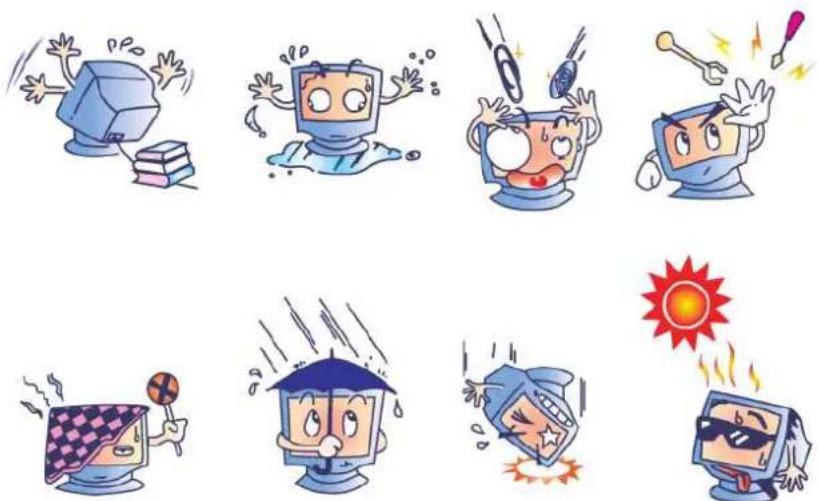
- It is important that your touchcomputer remains dry. Do not pour liquid into or onto your touchcomputer. If your touchcomputer becomes wet, do not attempt to repair it yourself. Contact Elo Customer Service for instructions.
Care and Handling
The following tips help keep your touchcomputer functioning at the optimal level.
To avoid risk of electric shock, do not disassemble the power adapter or display unit cabinet. The unit is not user serviceable. Remember to unplug the display unit from the power outlet before cleaning.
Do not use alcohol (methyl, ethyl, or isopropyl) or any strong solvent. Do not use thinner or benzene, abrasive cleaners, or compressed air.
To clean the display unit cabinet, use a cloth lightly dampened with a mild detergent.
Avoid getting liquids inside your touchcomputer. If liquid does get inside, have a qualified service technician check it before you power it on again.
Do not wipe the screen with a cloth or sponge that could scratch the surface.
To clean the touchscreen, use window or glass cleaner. Put the cleaner on the rag and wipe the touchscreen. Never apply the cleaner directly on the touchscreen.
natural_image
Cartoon illustration of eight different computer and game-related characters, including a robot, monitor, and character (no text or symbols)WEEE Directive
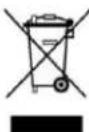
In the European Union, the Waste Electrical and Electronic Equipment (WEEE) directive label shown to the left indicates that this product should not be disposed of with household waste. It should be deposited at an appropriate facility for recovery and recycling.
UL Directive
E-Series touchcomputer has included a lithium battery on the motherboard. There is a risk of explosion if battery is replaced by an incorrect type. Please dispose of used batteries according to the region instructions.
Technical Assistance
There are two methods to obtain contact information for technical assistance on the touchcomputer:
- The web
- The phone
Using the Web
For online self-help, go to www.elotouch.com/go/websupport.
For technical support, go to www.elotouch.com/go/contactsupport.
For current Elo news, product updates, and announcements, or to register to receive our Touchcomputer newsletter, go to www.elotouch.com/go/news.
Using the Phone
For technical support, see the table at the end of the user guide for contact information.
REGULATORY INFORMATION
I. Electrical Safety Information
A) Compliance is required with respect to the voltage, frequency, and current requirements indicated on the manufacturer's label. Connection to a different power source than those specified herein may result in improper operation, damage to the equipment, invalidation of warranty, or a fire hazard if the requirements are not followed.
B) There are no operator-serviceable parts inside this equipment. There are hazardous voltages generated by this equipment which constitute a safety hazard. Service should be provided only by a qualified service technician.
C) This equipment is provided with a detachable power cord which has an integral safety ground wire intended for connection to a grounded safety outlet.
1) Do not substitute the cord with other than the provided approved type. Under no circumstances use an adapter plug to connect to a 2-wire outlet as this defeats the continuity of the grounding wire.
2) The equipment requires the use of the ground wire as a part of the safety certification. Modification or misuse can provide a shock hazard that can result in serious injury or death.
3) Contact a qualified electrician or the manufacturer if there are questions about the installation prior to connecting the equipment to main power.
II. Emissions and Immunity Information
A) Notice to Users in the United States: This equipment has been tested and found to comply with the limits for a Class B digital device, pursuant to Part 15 of FCC Rules. These limits are designed to provide reasonable protection against harmful interference in a residential or commercial installation. This equipment generates, uses, and can
radiate radio frequency energy, and if not installed and used in accordance with the instructions, may cause harmful interference to radio communications.
B) Notice to Users in Canada: This equipment complies with the Class B limits for radio noise emissions from digital apparatus as established by the Radio Interference Regulations of Industry Canada.
C) Notice to Users in the European Union: Use only the provided power cords and interconnecting cabling provided with the equipment. Substitution of provided cords and cabling may compromise electrical safety or CE Mark Certification for emissions or immunity as required by the following standards: This Information Technology Equipment (ITE) is required to have a CE Mark on the manufacturer's label which means that the equipment has been tested to the following Directives and Standards:
This equipment has been tested to the requirements for the CE Mark as required by EMC Directive 2004/108/EC indicated in European Standard EN 55022 Class B and the Low Voltage Directive 2006/95/EC as indicated in European Standard EN 60950-1.
D) General Information to all Users: This equipment generates, uses, and can radiate radio frequency energy. If not installed and used according to this manual, the equipment may cause interference with radio and television communications. There is, however, no guarantee that interference will not occur in any particular installation due to site-specific factors.
1) In order to meet emission and immunity requirements, the user must observe the following:
a) Use only the provided cables to connect the Elo touchcomputer.
b) To ensure compliance, use only the provided manufacturer's approved power cord.
c) The user is cautioned that changes or modifications to the equipment not expressly approved by the party responsible for compliance could void the user's authority to operate the equipment.
2) If this equipment appears to cause interference with radio or television reception, or any other device:
a) Verify as an emission source by turning the equipment off and on.
b) If you determine that this equipment is causing the interference, try to correct the interference by using one or more of the following measures:
i) Move the digital device away from the affected receiver.
ii) Reposition (turn) the digital device with respect to the affected receiver.
iii) Reorient the affected receiver's antenna.
iv) Plug the digital device into a different AC outlet so the digital device and the receiver are on different branch circuits.
v) Disconnect and remove any I/O cables that the digital device does not use. (Unterminated I/O cables are a potential source of high RF emission levels.) vi) Plug the digital device into only a grounded outlet receptacle. Do not use AC adapter plugs. (Removing or cutting the line cord ground may increase RF emission levels and may also present a lethal shock hazard to the user.) vii) If you need additional help, consult your dealer, manufacturer, or an experienced radio or television technician.
III. Agency Certifications
The following certifications have been issued for the touchcomputer:
| CE China (CCC) Russia | (GOST) | |
| Ukraine(UKSERTCOMPUTER) | Belarus (BelGiss) Croatia | (KONCAR) |
| Serbia (KVALITET) Bosnia | (KVALITET) Israel (SII) | |
| Mexico (NOM CoC) |
IV. China RoHS
In accordance to Chinese law (Administration on the Control of Pollution Caused by Electronic Information Products), the section below lists out the name and amount of the toxic and/or hazardous materials that this product may contain.
| Component Name | Toxic or Hazardous Substances and Elements | |||||
| Lead(Pb) | Mercury(Hg) | Cadmium(Cd) | Hexavalent Chromium (Cr6+) | Polybrominated Biphenyls (PBB) | Polybrominated Diphenyl Ethers (PBDE) | |
| Plastic Parts | O O O | O O O | ||||
| Metal Parts | X O O | O O O | ||||
| Wire and Cable Assembly | X O O | O O O | ||||
| LCD Panel | X O O | O O O | ||||
| Touch Screen Panel | X O O | O O O | ||||
| PCBA X O | O O O O | O | ||||
| Software (CD, etc.) | O O O | O O O | ||||
| O: Indicates that this toxic or hazardous substance contained in all of the homogeneous materials for this component is below the limit requirement in SJ/T11363-2006. X: Indicates that this toxic or hazardous substance contained in at least one of the homogeneous materials used for this component is above the limit requirement in SJ/T11363-2006. For items marked with X, exemptions were taken according to EU RoHS. | ||||||
Explanation of Markings
(1). In accordance with the SJ/T11364-2006 requirement, the electronic information products are marked with the following pollution control logo. The Environment-Friendly Use Period for this product is 10 years. The product will not leak or mutate under normal operating conditions listed below, so that the use of this electronic information product will not result in any severe environmental pollution, any bodily injury, or damage to any assets.
Operating Temperature: 0-35°C / Humidity: 20%-80% (non-condensing).
Storage Temperature: -30\~60 °C / Humidity: 5%\~95% (non-condensing).

(2). It is encouraged and recommended that this product be recycled and reused according to local laws. The product should not be thrown away casually.

WARRANTY INFORMATION
Except as otherwise stated herein, or in an order acknowledgment delivered to Buyer, Seller warrants to Buyer that the Product shall be free of defects in materials and workmanship. With the exception of the negotiated warranty periods; the warranty for the touchcomputer and components of the product is one (1) year.
Seller makes no warranty regarding the model life of components. Seller's suppliers may at any time and from time to time make changes in the components delivered as Products or components. Buyer shall notify Seller in writing promptly (and in no case later than thirty (30) days after discovery) of the failure of any Product to conform to the warranty set forth above; shall describe in commercially reasonable detail in such notice the symptoms associated with such failure; and shall provide to Seller the opportunity to inspect such Products as installed, if possible. The notice must be received by Seller during the Warranty Period for such product, unless otherwise directed in writing by the Seller. Within thirty (30) days after submitting such notice, Buyer shall package the allegedly defective Product in its original shipping carton(s) or a functional equivalent and shall ship to Seller at Buyer's expense and risk.
Within a reasonable time after receipt of the allegedly defective Product and verification by Seller that the Product fails to meet the warranty set forth above, Seller shall correct such failure by, at Seller's options, either (i) modifying or repairing the Product or (ii) replacing the Product. Such modification, repair, or replacement and the return shipment of the Product with minimum insurance to Buyer shall be at Seller's expense. Buyer shall bear the risk of loss or damage in transit, and may insure the Product. Buyer shall reimburse Seller for transportation cost incurred for Product returned but not found by Seller to be defective. Modification or repair, of Products may, at Seller's option, take place either at Seller's facilities or at Buyer's premises. If Seller is unable to modify,
repair, or replace a Product to conform to the warranty set forth above, then Seller shall, at Seller's option, either refund to Buyer or credit to Buyer's account the purchase price of the Product less depreciation calculated on a straight-line basis over Seller's stated Warranty Period.
THESE REMEDIES SHALL BE THE BUYER'S EXCLUSIVE REMEDIES FOR BREACH OF WARRANTY. EXCEPT FOR THE EXPRESS WARRANTY SET FORTH ABOVE, SELLER GRANTS NO OTHER WARRANTIES, EXPRESS OR IMPLIED BY STATUTE OR OTHERWISE, REGARDING THE PRODUCTS, THEIR FITNESS FOR ANY PURPOSE, THEIR QUALITY, THEIR MERCHANTABILITY, THEIR NONINFRINGEMENT, OR OTHERWISE. NO EMPLOYEE OF SELLER OR ANY OTHER PARTY IS AUTHORIZED TO MAKE ANY WARRANTY FOR THE GOODS OTHER THAN THE WARRANTY SET FORTH HEREIN. SELLER'S LIABILITY UNDER THE WARRANTY SHALL BE LIMITED TO A REFUND OF THE PURCHASE PRICE OF THE PRODUCT. IN NO EVENT SHALL SELLER BE LIABLE FOR THE COST OF PROCUREMENT OR INSTALLATION OF SUBSTITUTE GOODS BY BUYER OR FOR ANY SPECIAL, CONSEQUENTIAL, INDIRECT, OR INCIDENTAL DAMAGES.
Buyer assumes the risk and agrees to indemnify Seller against and hold Seller harmless from all liability relating to (i) assessing the suitability for Buyer's intended use of the Products and of any system design or drawing and (ii) determining the compliance of Buyer's use of the Products with applicable laws, regulations, codes, and standards. Buyer retains and accepts full responsibility for all warranty and other claims relating to or arising from Buyer's products, which include or incorporate Products or components manufactured or supplied by Seller. Buyer is solely responsible for any and all representations and warranties regarding the Products made or authorized by Buyer. Buyer will indemnify Seller and hold Seller harmless from any liability, claims, loss, cost, or expenses (including reasonable attorney's fees) attributable to Buyer's products or representations or warranties concerning same.
Get the latest...
• Product information
- Specifications
• News on upcoming events
- Press release
- Software drivers
Getting in Touch with Us
To find out more about the extensive range of Elo touch solutions, visit our website at www.elotouch.com, or simply call the office nearest you:
Europe
Tel +32 (0) 16 70 45 00
Fax +32 (0)16 70 45 49
elosales@elotouch.com
Asia-Pacific
Tel +86 (21) 3329 1385
Fax +86 (21) 3329 1400
www.elotouch.com.cn
Latin America
Tel 786-923-0251
Fax 305-931-0124
www.elotouch.com
Copyright 2013 Elo Touch Solutions, Inc. All rights reserved.
- Elo Touch Solutions
- Copyright © 2013 Elo Touch Solutions, Inc. All Rights Reserved.
- Disclaimer
- Trademark Acknowledgments
- Table of Contents
- Chapter 1: Setup .... 4
- Chapter 2: Operation .... 8
- Chapter 3: Safety and Maintenance .... 11
- Chapter 4: Technical Support .... 14
- Chapter 5: REGULATORY INFORMATION ...... 15
- Chapter 6: WARRANTY INFORMATION ...... 19
- Unpacking Your Touchcomputer
- Calibrating the Touchscreen
- 1) Mounting on the wall or pole
- 2) Second monitor mount onto your system (any monitor under 2.5 Kg with 75mm VESA mount)
- Elo Touch Solutions – E-Series Hardware Monitoring Utility
- How to Install
- E-Series Hardware Monitor Menu
- LED Functionality
- Accessing the Input/Output Panel
- SAFETY AND MAINTENANCE
- Safety
- Care and Handling
- WEEE Directive
- UL Directive
- Technical Assistance
- Using the Web
- Using the Phone
- REGULATORY INFORMATION
- Electrical Safety Information
- Emissions and Immunity Information
- Agency Certifications
- China RoHS
- Explanation of Markings
- WARRANTY INFORMATION
- Get the latest...
- Getting in Touch with Us
Brand : ELO
Model : 15E1
Category : Desktop computer