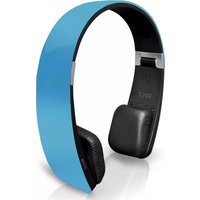
PHBT6 - Headphones Pyle - Free user manual and instructions
Find the device manual for free PHBT6 Pyle in PDF.


| Product Type | Wireless Bluetooth Headphones |
| Brand | Pyle |
| Model | PHBT6 |
| Color | Black |
| Dimensions (L x W x H) | 7.0 x 6.0 x 2.0 inches |
| Weight | 0.5 lbs |
| Power Source | Rechargeable lithium-ion battery (3.7V, 200mAh) |
| Battery Life | Up to 10 hours |
| Charging Time | Approximately 2 hours |
| Wireless Technology | Bluetooth 5.0 |
| Wireless Range | Up to 30 feet (10 meters) |
| Driver Size | 40mm |
| Impedance | 32 Ohms |
| Frequency Response | 20Hz - 20kHz |
| Microphone | Built-in, omnidirectional |
| Controls | Volume up/down, play/pause, call answer/end, power on/off |
| Compatibility | Smartphones, tablets, laptops, and devices with Bluetooth |
| Care Instructions | Wipe clean with a soft, dry cloth. Do not use liquids or solvents. |
| Safety Warnings | Avoid exposure to moisture and extreme temperatures. Do not disassemble. |
| Spare Parts Availability | Parts not user-replaceable; contact Pyle support for service |
| Warranty | Limited 1-year warranty |
Frequently Asked Questions - PHBT6 Pyle
User questions about PHBT6 Pyle
0 question about this device. Answer the ones you know or ask your own.
Ask a new question about this device
Download the instructions for your Headphones in PDF format for free! Find your manual PHBT6 - Pyle and take your electronic device back in hand. On this page are published all the documents necessary for the use of your device. PHBT6 by Pyle.
USER MANUAL PHBT6 Pyle
Sensitive Touch Control Panel Stereo Bluetooth Headphone with Microphone
natural_image
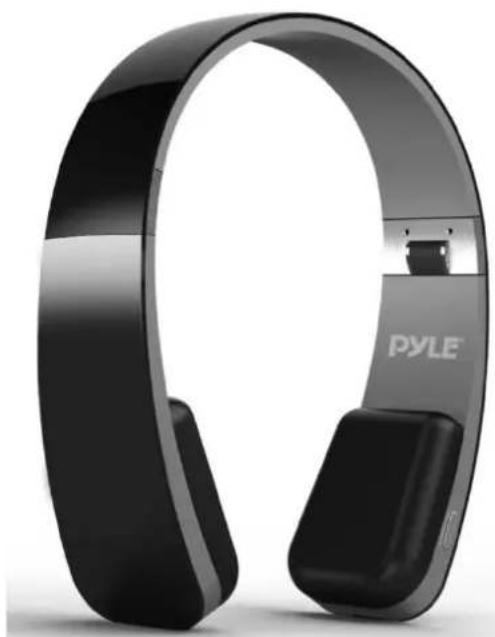
Black PYLE-branded hardcover with silver bezel (no visible text or symbols)www.pyleaudio.com
Owner's Manual
PHBT6 with the latest technology is a stereo Bluetooth headphone with high sensitive touch control panel. It supports the following profiles:
*HSP - Headset profile
*HFP - Hands-free profile
*A2DP - Advanced audio distribution profile
*AVRCP - Audio / video remote control profile
Overview
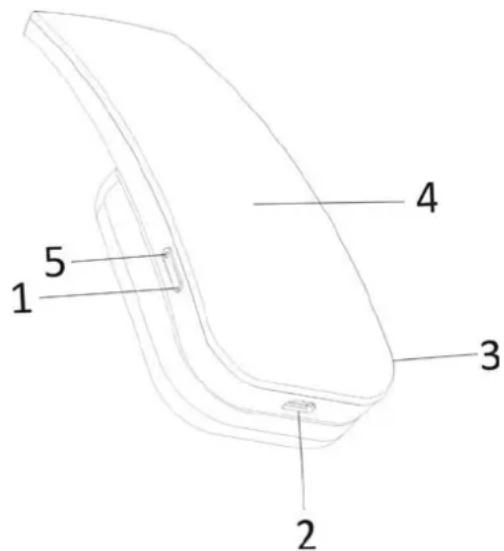
1) MFB (Multifunction button):
Switch on / off, pairing,
make /answer / end/ reject call.
2) Micro USB charging port
3) Built-in microphone
4) Touch panel: volume up / down, last / next tracking, play / pause,
Charging the battery
When the headset is nearly exhausted, the Led flashes in red and "beep" sound is heard. You will need to charge it according to the following two steps.
Step 1: Plug the USB charging cable into USB port of PC.
Step 2: Connect charging cable with the micro USB charge port of the headset.
Note:
1) Before using this headset for the first time, please charge the battery fully.
2) It takes about 3 hours for a full charge of the headset.
3) The LED keeps in red when the headset is charging and will turn off when fully charged.
Switch on / off the headset
1) To switch on the headset
Press and hold the MFB button (1) for 2 seconds and the LED (5) flashes in red. Afterwards the LED flashes in red and blue alternatively, the headset enters into pairing mode automatically.
2) To switch off the headset
Press and hold the MFB button (1) for 6 seconds until the LED flashes red and a "beep" sound is heard.
Pairing the headset with your phone
1) Ensure the headset is turned off.
2) Place the headset and the mobile phone where they are easily viewable and no more than one meter apart.
3) Press and hold the MFB for 3 seconds until the LED quick flashes blue and red alternatively, and a "beep" is heard.
3) Activate your mobile phones' Bluetooth function; please refer to your mobile phone user guide for details.
4) Set the mobile phone to search for Bluetooth devices within range and select "PHBT6" from the list of devices shown.
5) Enter pass code "0000" and press "OK" to pair your headset with mobile phone, when the pairing is completed, the LED will flash blue regularly and the headset in standby mode.
6) Go back to your mobile phone's main menu.
Note:
1) The pairing mode will last for 5 minutes. If the pairing failed, the headset will automatically turn off.
2) After the initial connection, each time the headset is turned on it will seek the last device it was connected to. If the device is turned on and in range, it will connect automatically.
3) The battery meter will display automatically at the status bar of iPhone, iPad and iPod once it is connected successfully. The headset will automatically power off if no paired device is in range for 5 minutes.
Wearing the headset
The headband of the headset is retractable. Please adjust the headset according to the actual use. Mark “L” of headset represents left ear. Mark “R” represents right ear. Please wear the headset according to the indication of the marks.
Playing music
Thanks to the sensitive touch panel (4) on the right side of PHBT6, it is possible to play/stop, control the music selection on your device, and adjust the volume as well, simply by touch.
1) To play / stop music, tap the middle area of the touch panel once.
2) Slide your finger vertically on the touch panel (4) to adjust the volume of your music or the caller voice. You will hear a “beep” when the volume reaches to its maximum / minimum.
3) Sliding your finger horizontally on the touch sensitive control panel to play the next track or return to the previous one.
4) It is even possible to use the control of all the functions previously explained through the paired device, if supported.
5) While you are listening to the music the LED (2) keeps blue.
Warning:
Before using the headset to play music without wearing it to be sure that the volume is not too loud, in order to avoid ear damage.

Make and receive calls
Thanks to the internal microphone (3), if PHBT6 is paired to a mobile phone, it is possible to make and receive calls.
1) Answer a call.
When a call is coming, the LED flashes blue and "beep" sound heard. To answer a call, press briefly the MFB button (1).
2) End a call.
To end a call, press briefly the MFB button (1) during the call.
3) Reject an incoming call.
To reject an incoming call hold the MFB button (1) for 3 seconds until you hear a long tone, then release the MFB button. The incoming call is rejected.
4) Activate voice dialing / voiceover / Siri.
If your phone supports voice dialing / voiceover / Siri you can activate it when no call is in progress.
To activate voice dialing / voiceover / Siri hold button (1) for 3 seconds until you hear a tone from the PHBT6; When you hear the second tone you can say the command.
5) Call the last selected number.
Press twice (double click) the MFB button (1).
6) Transferring a Call
While speaking, press and hold the MFB button (1) for 3 seconds to transfer a call from your headset to your mobile phone (Please check if your mobile phone has this function), repeat the above procedure to transfer the call from your mobile phone to your headset.
Note:
1) If the paired device supports it, you can perform all the functions described in this chapter while you are listening to the music.
2) The LED flashes blue during the call.
3) You can move your finger on the touch panel (4) upward or downward to adjust the volume during the call.
Specifications
● Bluetooth version: 4.0
● Frequency: 2.4GHz
● Audio impedance: 32 Ohm
● Battery life: 10-13 hours (Music Play Time)
15-20 hours (Talk Time)
● Battery duration on standby: 350 hours
● Charging Time: about 3.0 hours
● Charging: Micro USB
● Operating range: 33' feet
● Dimension: 7"x 6"x 1.1" inches
● Weight: 5.2 ounces
Troubleshooting
If you are unable to connect your headset with your mobile phone, please try the following:
*Ensure your headset is turned off and is properly charged.
*Ensure the headset is paired with your mobile phone.
*Ensure your mobile phone's Bluetooth feature is activated. Please refer to your mobile phone user guide for specific instruction.
*Ensure the headset is within a 33' foot range of your mobile phone and there are no obstructions, such as walls or other electronic devices in between.
If the above steps do not solve your problem, please recharge the headset and remove your mobile phone battery for a short time.
Safety Information
-Avoid listening to the music at loud volume for a long time: risk of ear damage.
-Follow the local rules about mobile phones usage and their accessories while driving.
-Keep PHBT6 out of the reach of small children to avoid choking hazard.
-Switch off PHBT6 before a flight. Do not use it on a plane if not permitted by the airline.
-Keep PHBT6 dry and avoid humidity.
-Disconnect PHBT6 from charging cable before cleaning or polishing it.
-Do not use PHBT6 if it does get wet.
-Do not try to open, disassemble or overcharging the lithium-ion battery of PHBT6 : danger of explosion.
-At the end of battery lifecycle do not dispose it as household waste. Dispose of batteries according to local regulations.
-Please recycle when possible.
Brand : Pyle
Model : PHBT6
Category : Headphones