
E303s-2 - 3G/4G Key HUAWEI - Free user manual and instructions
Find the device manual for free E303s-2 HUAWEI in PDF.


| Product Type | 3G/4G USB Modem |
| Model | E303s-2 |
| Brand | Huawei |
| Dimensions | Approx. 90 × 30 × 15 mm |
| Weight | Approx. 30 g |
| Power Supply | USB powered (5V, 500mA) |
| Network Support | 3G/4G LTE (up to 150 Mbps DL) |
| Interface | USB 2.0 |
| Memory Card Slot | MicroSD up to 32 GB |
| Operating Systems | Windows, macOS, Linux |
| Plug and Play | Yes (driverless on most systems) |
| LED Indicators | Power, Network signal, Data activity |
| Antenna | Internal |
| Functions | Internet access, SMS, Data storage (via microSD) |
| Care and Cleaning | Keep dry; wipe with soft cloth; avoid solvents |
| Safety | Do not disassemble; avoid exposure to liquids; unplug during storms |
| Spare Parts and Repairability | Not user-serviceable; contact Huawei support for repairs |
| General Information | Frequency bands: 800/900/1800/2100/2600 MHz (varies by region) |
Frequently Asked Questions - E303s-2 HUAWEI
User questions about E303s-2 HUAWEI
0 question about this device. Answer the ones you know or ask your own.
Ask a new question about this device
Download the instructions for your 3G/4G Key in PDF format for free! Find your manual E303s-2 - HUAWEI and take your electronic device back in hand. On this page are published all the documents necessary for the use of your device. E303s-2 by HUAWEI.
USER MANUAL E303s-2 HUAWEI
Thank you for choosing Tattoo Prepaid Mobile Broadband!
With your Tattoo Prepaid Kit, you can access the internet anytime, anywhere! This guide will help you live without limits with Tattoo!
Table of Contents:
The Tattoo Prepaid Broadband Kit 2
System Requirements 3
Getting to Know Your Tattoo Prepaid Broadband Kit 3
Preparations 4
Installation and User Interface 5
Tattoo User Interface 6
SMS Features 8
Call Feature 10
The Tattoo Prepaid Kit includes:
- Tattoo Prepaid Stick
- Tattoo SIM Card
- User Guide
- Safety Information
The Tattoo Prepaid Mobile Broadband
Globe's Tattoo Prepaid Stick allows you to experience faster internet speed without limits anytime, anywhere!
Send or receive texts or calls instantly from your laptop or desktop! You can even check your load even without internet for free!
Be ready to live without limits!
System Requirements
Operating System: Windows XP SP2/SP3, Windows Vista SP1/SP2, Windows 7; Mac OS X 10.5, 10.6 and 10.7 with latest upgrades
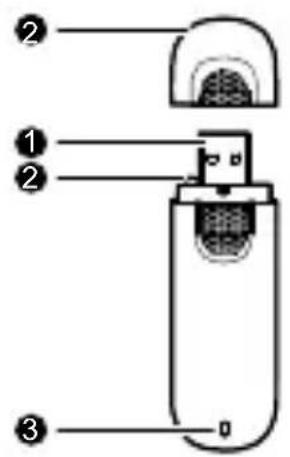
Getting to Know Your Tattoo Prepaid Broadband Kit
- USB Connector
- Strap Hole
- Indicator
- SIM/USIM Card Slot
- microSD Card Slot
*the microSD card is optional and is not included in the kit

Preparations

- Slide the top cover of the stick to the opposite side of the USB cap
- Insert the SIM card into the SIM card slot
- Reattach the cover
- Plug the Tattoo Stick into a USB port of your laptop or desktop
Installation and User Interface
Installation:
- Upon plugging the Tattoo Prepaid Stick into the USB port of your laptop/desktop, the OS will automatically start the installation wizard. (Note: If the auto-run program does not respond, find the AutoRun.exe file in the driver path. Double-click the file to run the program)
- Follow the on-screen instructions of the installation wizard.
User Interface:
- The user interface will automatically start once the installation is complete or every time the Tattoo Prepaid Stick is connected. You can also start the program by running the shortcut icon.
Tattoo User Interface
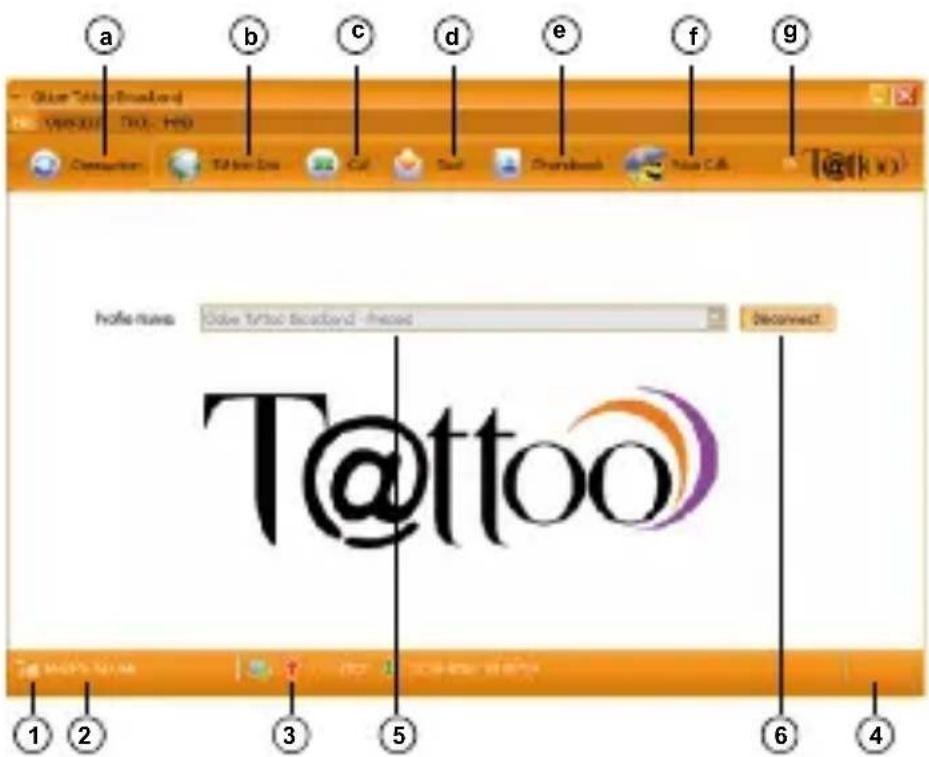
Legend:
- Shows the signal strength
- Shows signal type
- Shows connection, upload and download speed
- Notification area
- Allows you to indicate if your service (default to prepaid)
- Allows you to connect or disconnect the internet service
a. Connection Page
b. Tattoo Site Link
c. Voice Call
d. SMS Feature
e. Phonebook
f. Web Calls
g. Others (Call History, Data Usage History, Statistics)
SMS Features
Maximize the features of your Tattoo Prepaid Kit!
- Send and receive SMS
- Store messages in your inbox
- Forward messages
- Check and reload your account balance for free

Call Feature
Use your laptop/desktop like a mobile phone
- Make a call
- Receive calls
- Add contacts to your phonebook


LIVE WITHOUT LIMITS
For more information, visit tattoo.globe.com.ph
POWERED BY:

Globe
- THANK YOU FOR CHOOSING TATTOO PREPAID MOBILE BROADBAND
- TABLE OF CONTENTS
- THE TATTOO PREPAID KIT INCLUDES
- THE TATTOO PREPAID MOBILE BROADBAND
- SYSTEM REQUIREMENTS
- GETTING TO KNOW YOUR TATTOO PREPAID BROADBAND KIT
- PREPARATIONS
- INSTALLATION AND USER INTERFACE
- INSTALLATION
- USER INTERFACE
- TATTOO USER INTERFACE
- LEGEND
- SMS FEATURES
- CALL FEATURE
Brand : HUAWEI
Model : E303s-2
Category : 3G/4G Key