PH 30.3 - Uncategorized AVM - Free user manual and instructions
Find the device manual for free PH 30.3 AVM in PDF.


| Product Type | Cordless DECT Phone |
| Brand | AVM |
| Model | PH 30.3 |
| Dimensions (Base) | Approx. 100 x 100 x 50 mm |
| Dimensions (Handset) | Approx. 160 x 48 x 28 mm |
| Weight (Handset) | Approx. 110 g |
| Display | Monochrome LCD, backlit |
| Power Supply | AC adapter 230V/50Hz, 2 NiMH AAA batteries |
| Battery Life | Up to 20 hours talk time, 200 hours standby |
| Range (Indoor) | Up to 50 m |
| Range (Outdoor) | Up to 300 m |
| Key Features | Caller ID, phonebook for 100 contacts, handsfree, redial |
| Ringer Types | Polyphonic, melody, vibration |
| Additional Functions | Alarm clock, mute, keypad lock |
| Cleaning | Wipe with dry soft cloth, avoid liquids |
| Safety | Use only approved power adapter, keep away from water |
| Spare Parts | Batteries, charger base, handset available |
| Repairability | Battery replacement possible by user, other repairs by service center |
Frequently Asked Questions - PH 30.3 AVM
User questions about PH 30.3 AVM
0 question about this device. Answer the ones you know or ask your own.
Ask a new question about this device
Download the instructions for your Uncategorized in PDF format for free! Find your manual PH 30.3 - AVM and take your electronic device back in hand. On this page are published all the documents necessary for the use of your device. PH 30.3 by AVM.
USER MANUAL PH 30.3 AVM
Getting Started Guide
PH 30.3
natural_image
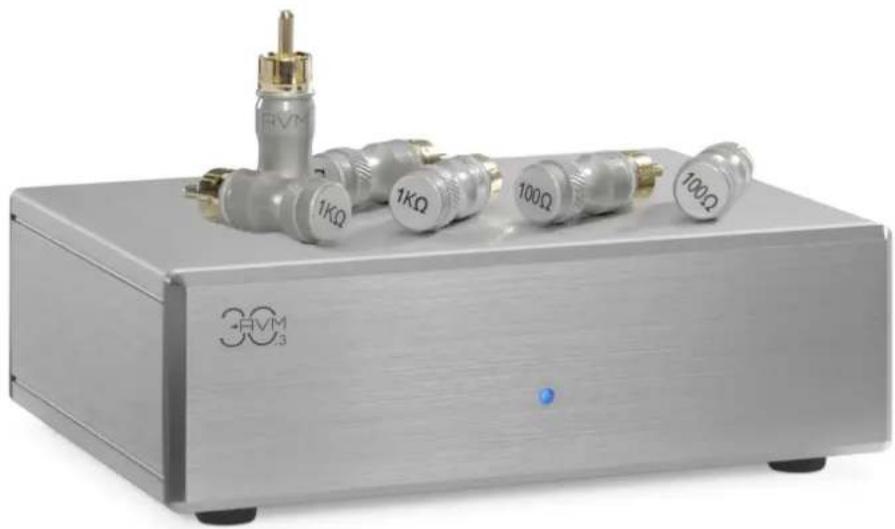
Exterior view of a silver 30V3 microcontroller with attached metallic connectors (no text or symbols visible on the device body)
Declaration of conformity (for EU only)
We herewith confirm, that the unit to which this manual belongs fulfils the EU rules necessary to obtain the sign
CE
the necessary measurements were taken with positive results.
We are pleased you have chosen an audiophile masterpiece of the AVM 30.3 series and thank you for your trust. With the PH 30.3 phono stage you own an extraordinary HiFi component with excellent sound and a wide range of functions.
Should you have any questions which we have not been able to answer with this getting started guide, please contact your dealer or distributor who will be able to configure the unit according to your needs and personal requirements and also give you instructions for daily use.

Udo Besser – AVM Owner & General Manager
Getting started
What's in the box?
• PH 30.3 Phono Pre-Stage
• Power supply unit
• Load resistor plugs (100Ω, 200Ω, 1000Ω)
CAUTION: After unpacking, please check the scope of delivery to ensure that all the parts have been supplied and are undamaged. In case the original packing has already been opened, please contact your local dealer. Often, your dealer prepares your new device prior to delivery to adapt and change the configuration to your personal needs.
Control and operating elements
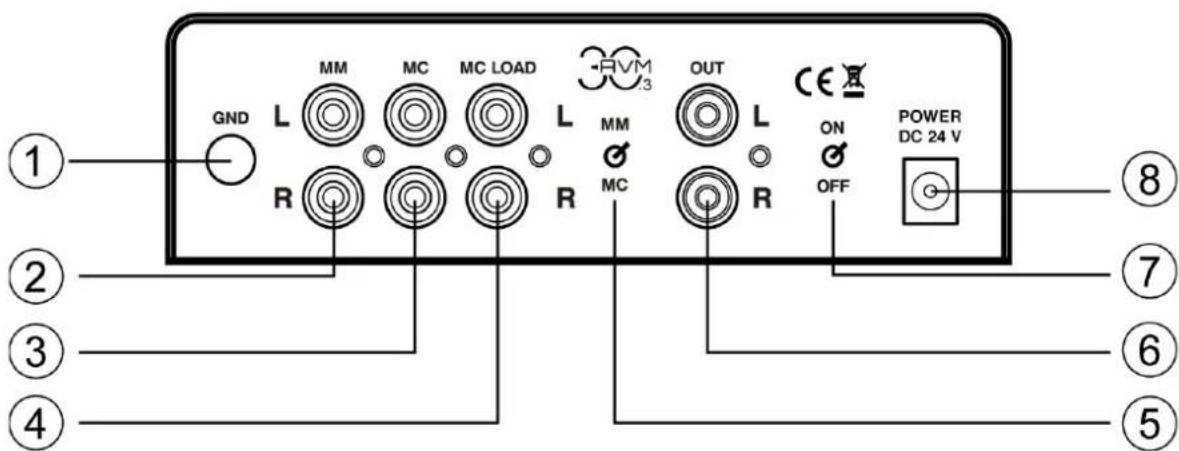
- Ground connection
- MM input sockets (from turntable)
- MC input sockets (from turntable)
-
MC cartridge loading sockets
-
MM / MC selector switch
- Output sockets (to amplifier)
- Power switch
- Power socket (from power adaptor)
Connect your turntable with the ground connection „GND“ (1) and one of the available input sockets “MM” (2) or “MC” (3). Depending on the operating principle of your cartridge, please choose one of the available phono inputs for electromagnetic transducers (MM = Moving Magnet) (2) or electrodynamic transducers (MC = Moving Coil) (3). Please refer to the manual of your cartridge system to find out on which principle it is based. Depending on the desired load resistor of your MC system, your MC system may solely be connected with the MC input sockets (3) or additionally be adapted via the MC cartridge loading sockets (4) and the supplied load resistor plugs (100Ω, 200Ω, 1000Ω).
Specifications
| Operating modes | MM / MC switchable |
| Inputs | |
| Outputs |
| Gain at 1 kHz (MM) | 40 dB |
| Gain at 1 kHz (MM) | 60 dB |
| Input impedance (MM) |
| Input impedance (MC) |
| Output impedance | |
| Frequency response (±0,3 dB) | |
| Frequency response (±3 dB) | |
| RIAA Curve Fidelity | < ±0,3dB |
| THD+N (MM) |
| THD+N (MC) |
| Signal-to-noise ratio 1 kHz (MM) |
| Signal-to-noise ratio 1 kHz (MC) |
| Crosstalk | ≥ 0 | 40 dB |
| Input sensitivity at 1 kHz (MM) | ||
| Input sensitivity at 1 kHz (MC) | ||
| Maximum output voltage at 1 kHz | |
| Power supply | 24 V DC |
| Power consumption | 3,5W / 15mA |
| Power consumption incl. power supply unit | |
| Power consumption power supply unit with device switched off | |
| Weight |
| Dimensions (B x H x T) |
Changes reserved without prior notice. 2020/11/24.
| 3 x RCA Pair (Cinch) (left/right) |
| 1 x RCA Pair (Cinch) (left/right) |
| 47 kΩ / 220 pF (fix) |
| 47 kΩ / 1 nF (plus adjustment) |
| 47 Ω |
| 20 Hz – 20 kHz |
| 8 Hz – 100 kHz |
| < 0,013 % |
| < 0,055 % |
| 72 dB / 82 dB(A) at 5 mV input voltage |
| 66 dB / 73,5 dB(A) at 0,5 mV input voltage |
| 5 mV for 500 mV output voltage |
| 0,5 mV for 500 mV output voltage |
| 6,5 V |
| 3,6 W (operation) |
| 0,1 W (standby) |
| 0,5 kg (without power supply) |
| 150 x 52 x 108 mm |
Brand : AVM
Model : PH 30.3
Category : Uncategorized