SmartRadar - Radar detector Escort - Free user manual and instructions
Find the device manual for free SmartRadar Escort in PDF.


| Product Type | Radar/Laser Detector with Bluetooth |
| Brand | Escort |
| Model | SmartRadar |
| Receiver Unit Dimensions | 3.20 x 1.20 x 3.50 inches |
| Mini Display Controller Dimensions | 1.00 x 2.25 x 0.50 inches |
| Power Requirement | 12VDC, Negative Ground |
| Radar Bands Detected | X (10.525 GHz), K (24.150 GHz), SuperWide Ka (34.700 GHz) |
| Laser Detection | 900nm, 33 MHz Bandwidth |
| Display Type | HP AlGaAs 280 LED Matrix/Text |
| Display Modes | Bar Graph, ExpertMeter, SpecDisplay |
| Bluetooth Compatibility | iPhone 4S, iPhone 4, iPhone 3GS (iOS) |
| ESCORT Live App Compatible | Yes (subscription may apply) |
| AutoMute | Patented, reduces volume automatically after initial alert |
| TSR (Traffic Sensor Rejection) | Rejects false alerts from traffic flow sensors |
| Laser Shifter (Optional) | Compatible with SHIFTER ZR4 system |
| User-Selectable Settings | 7 customizable features (Pilot, Power-On, Meter, AutoMute, Voice, Bands, Tones) |
| Software Updates | Via USB connection to computer (www.escortinc.com/download) |
| Mounting | Receiver unit mounts behind rearview mirror; includes suction cup and adhesive mounts |
| Warranty | One-year limited warranty |
| Accessories Included | Receiver, mini display controller, power connection kits, zip ties, quick reference guide, user manual on disc |
| FCC Compliance | Class B digital device, Part 15 |
Frequently Asked Questions - SmartRadar Escort
User questions about SmartRadar Escort
0 question about this device. Answer the ones you know or ask your own.
Ask a new question about this device
Download the instructions for your Radar detector in PDF format for free! Find your manual SmartRadar - Escort and take your electronic device back in hand. On this page are published all the documents necessary for the use of your device. SmartRadar by Escort.
USER MANUAL SmartRadar Escort
SmartRadar™
With ESCORT®

Ultimate Out-of-Site Protection

Made for
iPhone 4S, iPhone 4, iPhone 3GS
Your new SmartRadar™ device is a complete, supercharged, quick-install radar/laser detector with built-in Bluetooth® wireless technology for conneccon to mobile phones and other Bluetooth devices.
SmartRadar includes full X, K, and SuperWide Ka radar capability, digital signal processing for superior range and reduced false alarms, our patented Mute and AutoMute, audible and visual band alerts, plus all the state-of-the-art performance and features you'd expect from ESCORT®:
- Receiver unit mounts behind your rearview mirror for hidden radar and laser protecon.
- Miniature display controller allows easy access to informaon and controls.
- Ultra-bright alphanumeric display uses 280 LEDs for crystal-clear informaon.
- Exclusive ExpertMeter ^TM tracks and displays up to eight radar signals.
- SpecDisplay ^TM provides actual numeric frequency for any radar signal.
• TSR soware automacally rejects trac ow sensors. - Program mode lets you instantly customize seven features.
- Comparable with ESCORT's SHIFTER ZR4™ laser-shiing system.
And, SmartRadar is fully compatible with the new ESCORT Live™ iPhone® applicaon!
Using Bluetooth® technology, SmartRadar communicates with your iPhone so you can access your detector sengs and manage alerts with just a touch of the screen. This combinaon of technologies also gives you access to the most powerful driver alert network—ESCORT Live! (Subscripon may apply.)
With ESCORT Live, you and your fellow drivers will instantly communicate all radar/laser encounters automatically, providing the most up-to-date and accurate protecon on the road. Imagine millions of other drivers helping you Drive Smarter™!
ESCORT Live Features (Enabled only while running the ESCORT Live app)
- Mul-view interactive display, allowing you to manage alerts and detector sengs
- Access to our exclusive real-me cket protecon network, which warns you of upcoming alerts received by other users in the area
- Access to our DEFENDER® Database, which warns you of veried speed traps, speed cameras, and red light cameras
- Our most popular GPS-powered features, including speed-limit data for over-speed alerts, live trac data for your current locaon, and TrueLock™ to help eliminate false alerts. You can also mark locaons for future reference.
We recommend you read this manual in detail to get the most out of your detector's performance and features.
Please drive safely.
Table of Contents
Seng Up SmartRadar 4
Connecons and Controls 4
Features 5
Sengs and Preferences 9
Specicaons 14
Understanding Your Detector 15
Troubleshoong 18
FCC Compliance Noce 20
Soware Updates 20
Parts and Accessories 21
Warranty 22
Service 22
Seng Up SmartRadar
What's Included
- Radar/laser receiver with built-in Bluetooth wireless technology
- 2 receiver moung brackets (sucon cup and adhesive mount)
— Mini display controller and mounng bracket
— 2 power conncon kits (for rearview mirror or fuse panel conncon) - Zip es (for securing any loose/dangling wires)
- Quick Reference Guide
- User Manual (on disc)
Registraon and Installaon
For detailed registraon and installaon informaon, see your SmartRadar Quick Reference Guide.
ESCORT Live!
For details on pairing SmartRadar to your iPhone and downloading ESCORT Live, see your SmartRadar Quick Reference Guide.
Connecons and Controls
Receiver Unit
For an overview of receiver unit connecons and controls, see your SmartRadar Quick Reference Guide. Mini Display Controller
Power Buon
Press to power on or o.
Matrix Display
Shows current radar sensitivity mode. During an alert, shows band and signal strength or actual radar frequency.
Preferences
Press and hold both BRT and SENS to enter Preferences. Then, easily review or change your sengs, pressing BRT to scroll through preference categories and SENS to select an opon within the category.
Volume/Mute Buon (V-MUTE)
Press and hold to set volume for alerts. Press and release to mute an alert in progress. When connected to ESCORT Live, press three mes during an alert to lock out or unlock the alert.

Brightness Buon (BRT)
Display brightness adjusts automacally. Press BRT to set a xed brightness or to select Dark mode.
Sensitivity Buon (SENS)
Toggles between radar sensitivity modes: Highway, Auto, and Auto No X. ESCORT recommends the Auto mode.
Features
Power-On Indicaon
Once the start-up sequence is complete, the display will show your current radar sensitivity mode. If you prefer, you can select alternate power-on displays. See the Sengs and Preferences secon for details.
Volume/Mute
To adjust SmartRadar to your preferred audio level for alerts, simply press and hold the V-MUTE buon on the mini display controller. The audio will increase/decrease while it is depressed. Once you reach the desired audio level, simply release the buon. SmartRadar will retain this seng in its memory, even if the system is turned o.
The V-MUTE buon can also be used for mung the audio during a single alert. Simply press the buon during the alert. Once the radar encounter has passed, the mute will disengage, and the audio will return to your preset level.
AutoMute
Your SmartRadar device includes ESCORT's patented AutoMute feature. After SmartRadar alerts you to a radar encounter at your selected volume level, it automacally reduces the volume more than 50%. This keeps you informed without the annoyance of a connuous full-volume alert. If you prefer, you can turn the AutoMute feature o. See the Sengs and Preferences secon for details.
SmartMute
If AutoMute has already reduced the volume for one alert and a higher-priority band is detected, SmartRadar will sound an alert at your set volume for the second band before adjusting the volume back down to the AutoMute level.
Display Brightness
The mini display controller's brightness is automacally adjusted to suit ambient lightng condions in your car. (The light sensor is located inside the controller, so the display may dim momentarily when you access the buons.) If you prefer, you can press the BRT buon to set a xed brightness level:
BRT AUTO Automacally adjusts brightness (factory seng)
BRT DARK Dark mode
BRT MIN Minimum brightness
BRT MED Medium brightness
BRT MAX Maximum brightness
Note: If you select Dark mode, the mini display controller will not provide any indicaon that it is on.
Therefore, only audible alerts will nofy you of detected signals.
Radar Sensitivity
The SENS buon allows you to select your preferred radar sensitivity: Highway, Auto, or Auto No X. In general, ESCORT recommends Auto for everyday driving.
Highway
In this seng, SmartRadar will detect all radar signals on all bands at maximum range.
Auto
In this seng, SmartRadar will connuously analyze all incoming signals and intelligently adjust the sensitivity circuits, providing long-range warning with minimal false alarms.
Auto No X
Auto No X works the same as Auto mode; however, X-band is completely turned o.

Warning: Do not use SmartRadar in Auto No X unless you are absolutely certain that there are no trac radar guns using X-band in your area.
Alert Tones
SmartRadar's factory default for alert tones is Mild mode, which oers soer, simpler alert tones that are less obtrusive to the driving experience:
• X-band, K-band, Ka-band, and Pop = Doorbell chime
○ Low signal strength = Double chime
○ High signal strength = Triple chime
○ If alert remains in area more than 15 seconds = Single chime (as a reminder)
- Laser = Solid brap tone (Since laser signals are a possible threat no maer how weak,
SmartRadar alerts you to all laser signals with a full laser alert.)
If you prefer, you can change your alert tone sengs to the ESCORT Classic mode, in which SmartRadar uses a Geiger counter-type sound to indicate the signal strength and type of radar signal being encountered. When you encounter radar, a disnct audible alert will sound and will increase as the signal gets stronger. This allows you to judge the distance from the signal source without taking your eyes o of the road. Each band has a disnct tone for easy idencaon:
• X-band = beep tone
- K-band = brap tone
- Ka-band = double-brap tone
- Laser = solid brap tone
- Pop = solid brap tone
See the Sengs and Preferences secon for details on switching your alert tones.
Voice Alerts
SmartRadar provides digital voice announcements for alerts and selecon feedback. If you prefer, you can turn o the voice feature. See the Sengs and Preferences secon for details.
The matrix display consists of 280 individual LEDs to provide an intuitive ultra-bright display of signal strength and text messages. When it detects radar, it displays the band of the radar (X, K, or Ka) and a precise bar graph of the signal's strength.
ExpertMeter
ESCORT's exclusive ExpertMeter opon is an advanced display for experienced detector users. Please use SmartRadar for a few weeks to get fully familiar with its other features before using ExpertMeter.
To use the ExpertMeter instead of the standard bar graph meter, you must select it (MeterEXP) in Preferences.
ExpertMeter simultaneously tracks up to eight radar signals: two Ka-band, two K-band, and four X-band signals. The ExpertMeter is actually a miniature spectrum analyzer. It shows what band each signal is, its relave frequency within the band, and its signal strength. ExpertMeter can help you spot a change in your normal driving environment (e.g., a trac radar unit being operated in an area where there are normally other signals present).
KA||K||X||||
Above is the ExpertMeter display if SmartRadar was detectng two strong Ka-band, two strong K-band, and four strong X-band signals.
As you can see, there are vercal lines aer each band designator. Each line shows a signal being detected. The height of each line shows the relave signal strength. On very weak signals, there will not be a vercal line at all. The posion of the line shows the relave frequency of the signal within the band.
The band designators (X, K, Ka) will stay on the display for a few seconds aer the signal has passed. This allows you to see what the unit detected, even on very brief signals. However, the vercal lines representing individual signals constantly change (several mes a second) to give you a connuous view of the signal strength of all radar signals present.
Note: If you use ExpertMeter, the brief signal shown in the power-on sequence when you turn on your SmartRadar device will also be in ExpertMeter: an "X" with a single vercal line.
SpecDisplay
The SpecDisplay opon is also designed for the advanced detector user. In this mode, it will display the actual numeric radar frequency being received. To use SpecDisplay instead of the standard bar graph meter, you must select it (MeterSPC) in Preferences.
K 24.150
Display shows a K-band signal at 24.150 GhZ.
Ka 34.700
Display shows a Ka-band signal at 34.700 GhZ.
X 10.525
Display shows an X-band signal at 10.525 GhZ.
Note: Even long-me detector users will require a significant amount of me to get familiar with this new level of informaon.
SHIFTER ZR4 Laser-Shiing System (oponal, sold separately)
Our oponal SHIFTER ZR4 laser-shiing system is the most advanced defense against targeng laser guns. It includes three (two front, one rear) highly sensitive laser transceivers that detect laser signals and transmit back a pulsed signal to "shi" or confuse the targeng laser gun.
To avoid undue aenon somemes caused by laser guns providing "jamming" codes to the ocer, simply press the V-MUTE buon on the mini display controller twice to manually shut o the laser transceivers once you have corrected your speed. The transceivers will refrain from shiing for approximately 60 seconds, giving you me to pass the speed trap.
To turn the laser shiers o, or to switch to Receive Only mode, simply select the opon in your SmartRadar Preferences.
ESCORT Live iPhone Applicaon
SmartRadar is fully compatible with the new ESCORT Live iPhone applicaon. For comprehensive informaon on ESCORT Live's features and funcons, visit www.escornc.com and download the ESCORT Live for iPhone User Manual. Available on the App Store.
Sengs and Preferences
SmartRadar oers seven user-selectable opons so you can customize it to your preferences.
To access Preferences, press and hold both the BRT and SENS buons on the mini display controller for two seconds. SmartRadar will beep and display "Prefs," indicang it is in program mode. (Display brightness will automatically change to maximum during this process.)
Once the unit is in program mode, the BRT buon is used to review the preference categories, and the SENS buon is used to change the individual sengs within the selected opon. You can either tap the buons to switch from item to item or hold to scroll through all the categories/opons.
To exit Preferences, simply wait eight seconds without pressing a buon. The unit will display "Complete," accompanied by a voice conrmaon, and return to normal operaon.
Example
Here's how you would turn the AutoMute feature o:
- Enter Preferences by pressing and holding both the BRT and SENS buons for two seconds. SmartRadar will beep and display "Prefs."
- Press and hold the BRT buon. SmartRadar will scroll through the categories, starng with Pilot Light (Pilot), then Power-On Sequence (PwrOn), Signal-Strength Meter (Meter), and AutoMute (aMute).
- Release the BRT buon when the display shows "aMute." Since the factory seng is for AutoMute to be on, SmartRadar will display "aMute ON." (If you accidentally don't release the BRT buon in me, and it goes to the next category, simply hold the BRT buon down again unl "aMute" is displayed.)
- Press the SENS buon to change from "aMute ON" to "aMute OFF."
- To complete this change, simply wait eight seconds without pressing a buon. The unit will display "Complete," accompanied by a voice conrmaon. This is an indicaon that SmartRadar has returned to its normal operaon.
OVERVIEW OF PREFERENCES
* = Factory default
To reset SmartRadar to its original factory sengs, press and hold the BRT and SENS buons on the mini display controller while turning the power on. The display will provide a "Reset" message, accompanied by an audible tone, acknowledging the reset.
Pilot Light
(Power-on indicaon)
Pilot HWY *Radar sensitivity, full word (Highway, Auto, or AutoNoX)
Pilot H Radar sensitivity, leer only (H, A, or ANX)
Pilot H.> Radar sensitivity, leer with scanning dot
Pilot V Vehicle voltage
Power-On Sequence
PwrOn FST *Fast power-on sequence (one beep)
PwrOn STD Standard power-on sequence
Meter SPC SpecDisplay (numeric frequency)
AutoMute
aMute ON *AutoMute on
aMute OFF AutoMute o
Voice
Voice ON *Voice alerts on
Voice OFF Voice alerts o
Bands
Bands DEF *Default sengs
Bands MOD One or more bands have been modified
Turn selected bands on and o by pressing and holding the V-MUTE buon.
X *ON / OFF
K *ON / OFF
Ka *ON / OFF
POP ON / *OFF
LSR *ON / OFF
*SHFT / RECV / OFF (when connected to SHIFTER ZR4 Laser-Shiing System)
TSR *ON / OFF
Alert Tones
Tones MILD *Mild doorbell chime alert tones
Tones CLASSIC Standard ESCORT alert tones
PREFERENCES IN DETAIL
* = Factory default
Pilot Light (power-on indicaon)
\* Pilot HWY
SmartRadar displays a full descripon of your radar sensitivity: "Highway," "Auto" or "AutoNoX."
Pilot H
SmartRadar displays "H" for Highway, "A" for Auto, and "ANX" for Auto No X.
Pilot H.>
SmartRadar displays "H" for Highway, "A" for Auto, and "ANX" for Auto No X. In addition, a single dot connuously scrolls across the display.
Pilot V
SmartRadar displays the vehicle's baery voltage.
Note: If the vehicle's voltage drops below 10.5 volts, a low-voltage warning will be displayed, followed by an audible alert. A high-voltage warning is also given when the vehicle's voltage goes above 16.5 volts.
Note: When operang in Dark mode, the display will be completely dark.
Power-On Sequence
\*PwrOnFST
SmartRadar's power-on sequence is shortened to a single beep. If any bands have been disabled, or if any communicaon errors occur between the components, the appropriate messages will be displayed at this me.
PwrOnSTD
Each me you turn on SmartRadar, it will display the product name, the bands being detected, and the selected meter display. If any communicaon errors occur between the components, the appropriate messages will be displayed at this me.
The standard meter displays the band, along with a bar graph indicang the signal strength.
Meter EXP
ExpertMeter simultaneously tracks up to two Ka-band, two K-band, and four X-band signals, with accompanying bar graphs indicating the signal strengths.
Meter SPC
SpecDisplay shows the actual numeric frequency of the radar signal being received.
AutoMute
\*aMute ON
Audio alerts are initially set to the volume level you selected; however, aer a few seconds, the audio level is automatically reduced to keep you informed but not annoyed.
aMute OFF
Audio alerts remain at the volume you set for the duraon of the encounter.
Voice
\*Voice ON
All alerts and instrucons are communicated using a voice announcement.
Voice OFF
Only tones are used for alerts.
Alert Tones
\*Tones MILD
This seng oers soer, simpler alert tones that are less obtrusive to the driving experience:
• X-band, K-band, Ka-band, and Pop = Doorbell chime
○ Low signal strength = Double chime
○ High signal strength = Triple chime
- If alert remains in area more than 15 seconds = Single chime (as a reminder)
- Laser = Solid brap tone (Since laser signals are a possible threat no maer how weak, SmartRadar alerts you to all laser signals with a full laser alert.)
Tones CLASSIC
This seng uses the standard ESCORT radar alert tones:
• X-band = beep tone
• K-band = raspy brap tone
- Ka-band = double brap tone
- Pop = solid brap tone
- Laser = solid brap tone
Bands
\*Bands DFT
In this seng, the factory default sengs for North America radar and laser are monitored. It is highly recommended that you use your SmartRadar device in this mode.
Bands MOD
If the bands are changed from the factory default sengs, SmartRadar will warn you with an audible alert and associated text message that one or more bands have been turned o (e.g., "X-band OFF"). This warning is displayed during the start-up sequence.
Cauon: Only modify bands if you are absolutely certain that there are no trac radar guns using that specific band in your area.
SHIFTER ZR4 Laser-Shiing System (oponal, sold separately)
\*LSR SHFT
Laser transceivers detect laser signals and transmit back a pulsed signal to "shi" or confuse the targeng laser gun. To avoid undue aenon somemes caused by laser guns providing "jamming" codes to the ocer, once you correct your speed, you can press the V-MUTE buon on the mini display controller twice to temporarily switch to Receive Only mode and shut o the laser transceivers. The transceivers will refrain from shiing for approximately 60 seconds, giving you me to pass the speed trap.
LSR REC
In this mode, the transceivers will sll detect laser, but they will refrain from shiing. This mode is helpful when you want to avoid undue aenon somemes caused by laser guns providing "jamming" codes to the ocer or in states where shiers are illegal.
LSR OFF
Laser transceivers are o.
Specicaons
Operang Bands
X-Band: 10.525 GHz ± 25 MHz
K-Band: 24.150 GHz ± 100 MHz
Ka-Band: 34.700 GHz ± 1300 MHz
Laser: 900nm, 33 MHz Bandwidth
Radar Receiver/Detector Type
Superheterodyne, GaAs FET VCO
Scanning Frequency Discriminator
Digital Signal Processing
4-Bit High-Resoluon A-to-D Converter
Laser Detecon
Quantum Limited Video Receiver
Mulple Laser Sensor Diodes (2F)
Display Type
HP AlGaAs 280 LED Matrix/Text
Bar Graph, ExpertMeter, or SpecDisplay
Automac Brightness Control, Plus Four Levels
of Fixed Brightness, Including Full Dark
Power Requirement
12VDC, Negave Ground
Programmable Features
Display Brightness
Power-On Indicaon
Power-On Sequence
Highway, Auto, and Auto No X
Auto Calibraon Circuitry
Dimensions
Mini Display Controller: 1.00 x 2.25 x 0.50 inches
Receiver Unit: 3.20 x 1.20 x 3.50 inches
Understanding Your Detector
Interpreng Alerts
Although SmartRadar has a comprehensive warning system, only experience will teach you what to expect from your detector and how to interpret what it tells you. The specific type of radar being used, the type of transmission (connuous or instant-on), and the location of the radar source act the alerts you receive.
The following examples will give you an introducon to understanding your detector's warning system for radar and laser alerts.
| Alert | Explanaon |
| Detector begins to sound slowly; rate of alert increases unl it becomes a solid tone. The signal meter ramps accordingly. | You are approaching a connuous radar source aimed in your direcon. |
| Detector emits short alerts for a few seconds, then falls silent, only to briefy alert and fall silent again. | An instant-on radar source is being used ahead of you and out of your view. |
| Detector suddenly sounds a connuous tone for the appropriate band received. | An instant-on radar or laser source is being used nearby. This kind of alert requires immediate aenon. |
| Detector sends a brief laser alert. | Laser is being used in the area. Because laser is inherently difficult to detect, any laser alert may indicate a source very close by. |
| Detector receives weak signals. Signals may be a lile stronger as you pass large, roadside objects. Signals increase in frequency. | A moving patrol car with connuous radar is overtaking you from behind. Because these signals are reected (reecons are increased by large objects), they may or may not eventually melt into a solid point, even when the patrol car is directly behind you. |
| Detector alerts slowly for a while, then abruptly jumps to a strong alert. | You are approaching a radar unit concealed by a hill or an obstructed curve. |
| Detector alerts intermiently. Rate and strength of alerts may be consistent or vary wildly. | A patrol car is traveling in front of you with a radar source aimed forward. Because signals are sometimes reected o of large objects and sometimes not, the alerts may seem inconsistent. |
| Detector alerts intermiently; rate and strength of signal increases with each alert. | A patrol car is approaching from the other direcon, sampling trac with instant-on radar. Such alerts should be taken seriously. |
| Detector gives an X-band alert intermiently. | You are driving through an area populated with radar moon sensors (e.g., door openers or burglar alarms). Since these transmiers are usually contained inside buildings or aimed toward or away from you, they are typically not as strong or lasng as a real radar encounter. |
Cauon: Overcondence in an unfamiliar area can be dangerous. Likewise, if an alert in a commonly traveled area is suddenly stronger or on a dierent band than usual, speed radar may be set up nearby.
How Radar Works
Trac radar, which consists of microwaves, travels in straight lines and is easily reected by objects such as cars, trucks, and even guardrails and overpasses. Radar works by direcng its microwave beam down the road. As your vehicle travels into range, the microwave beam bounces o your car, and the radar antenna looks for the reecons. Using the Doppler principle, the radar equipment then calculates your speed by comparing the frequency of the reecon of your car to the original frequency of the beam sent out.
Trac radar has limitaons, the most significant of these being that it typically can monitor only one target at a me. If there is more than one vehicle within range, it is up to the radar operator to decide which target is producing the strongest reecon. Since the strength of the reecon is aected by both the size of the vehicle and its proximity to the antenna, it is difficult for the radar operator to determine if the signal is from a sports car nearby or a semi truck several hundred feet away.
Radar range also depends on the power of the radar equipment itself. The strength of the radar unit's beam diminishes with distance. The farther the radar has to travel, the less energy it has for speed detecon.
Because intrusion alarms and moon sensors oen operate on the same frequency as X- and K-band radar, your detector will occasionally receive non-police radar signals. Since these X-band transmiers are usually contained inside of a building or aimed toward the ground, they will generally produce much weaker readings than will a true radar encounter. As you become familiar with the sources of these pseudo alarms in your daily driving, they will serve as conrmaon that the device's radar detecon abilities are fully operaonal.
How Pop Works
Pop mode is a relatively new feature for radar gun manufacturers. It works by transming an extremely short burst, within the allocated band, to identify speeding vehicles in trac. Once the target is idened, or “popped,” the gun is then turned to its normal operang mode to provide a vehicle tracking history (required by law).
Note: According to radar gun manufacturers, ckets should not be issued in pop mode.
How Laser Works
Laser speed detecon is actually light detecon and ranging (LIDAR). LIDAR guns project a beam of invisible infrared light. The signal is a series of very short infrared-light energy pulses that move in a straight line, reecng o your car and returning to the gun. LIDAR uses these light pulses to measure the distance to a vehicle. Speed is then calculated by measuring how quickly these pulses are reacted, given the known speed of light.
LIDAR is a newer technology whose use is not as widespread as convenonal radar; therefore, you may not encounter it on a daily basis. And unlike radar detecon, LIDAR is not prone to false alarms. Because LIDAR transmits a much narrower beam than does radar, it is much more accurate in its ability to
disguish between targets and is also more difficult to detect. As a result, even the briefest laser (LIDAR) alert should be taken seriously.
There are limitaons to LIDAR equipment. LIDAR is much more sensitive to weather conditions than radar, and a LIDAR gun's range will be decreased by anything aecng visibility, such as rain, fog, or smoke. A LIDAR gun cannot operate through glass, and it must be stationary in order to get an accurate reading. Because LIDAR must have a clear line of sight and is subject to cosine error (an inaccuracy that increases as the angle between the gun and the vehicle increases), police typically use LIDAR equipment parallel to the road or from an overpass. LIDAR can be used day or night.
How TSR Works
SmartRadar includes a new boost in an-falsing soware to eliminate excessive alerts from erroneous X- and K-band sources, such as trac ow-monitoring systems. These systems, which are becoming more widely used in several countries, generate K-band signals to measure the ow of trac on a given road. Unfortunately, most detectors see this as a real threat and will alert you to it unnecessarily. Our new proprietary soware—TSR—intelligently sorts, ranks, and rejects these types of false alarms automacally. The result is ulmate protecon without excessive false alarms.
Troubleshoong
| Problem | Explanaon(s)/Soluon(s) |
| Detector beeps brief at the same locaon every day, but no radar source is in sight. | An X-band moon sensor or intrusion alarm is located within range of your route. |
| Detector did not alert when a police car was in view. | VASCAR (Visual Average Speed Computer and Recorder), a stopwatch method of speed detecon, may be in use. |
| Ocer may not have radar or laser unit turned on. | |
| Detector's audible alerts become soer aer the rst few alerts. | Detector is in AutoMute mode. See “AutoMute” in the Sengs and Preferences secon for details. |
| The power-on sequence reoccurs while you are driving. | A loose power conncon can cause SmartRadar to be brief disconnected and will retrigger the power-on sequence. Check all conncons. |
| You wish to restore the factory default sengs for Preferences. | You can return your SmartRadar Preferences to the factory default sengs by holding down the BRT and SENS buons while you turn SmartRadar on. |
| The device will not turn on. | Check that vehicle ignion is on. |
| Check all conncons. | |
| The display feels warm. | It is normal for the device to feel warm. |
Explanaon of Displays
| Display reads ... | Explanaon |
| Pilot HWY | One of the many opons in your SmartRadar Preferences (pages 9–13) |
| KA|| K|| | SmartRadar is in ExpertMeter mode (pages 6–7) |
| Reset Power | SmartRadar needs to cycle power. Unplug it from power and restart. |
| The display is blank. | SmartRadar is in Dark mode. Press the BRT buon to change the brightness (page 5) |
Bluetooth Pairing Tips
If you're having trouble with your Bluetooth conneccon, try any of the following suggesons:
- Turn o your detector, wait 30 seconds, then turn it back on. On your iPhone, turn Bluetooth o and then on again.
- In the Bluetooth Sengs menu of your iPhone, tap the arrow icon next to SmartRadar, then tap Forget this Device. Unplug the power cord from SmartRadar, wait 10 seconds, and plug it back in. SmartRadar should appear again under Devices in your Bluetooth Sengs. Tap SmartRadar to reinitialize pairing.
FCC Compliance Noce
This equipment has been tested and found to comply with the limits for a Class B digital device, pursuant to Part 15 of the FCC Rules. These limits are designed to provide reasonable protecon against harmful interference in a residential installaon. This equipment generates uses and can radiate radio frequency energy, and, if not installed and used in accordance with the instrucons, may cause harmful interference to radio communicaons. However, there is no guarantee that interference will not occur in a parcular installaon. If this equipment does cause harmful interference to radio or television reception, which can be determined by turning the equipment o and on, the user is encouraged to try to correct the interference by one of the following measures:
- Reorient or relocate the receiving antenna.
- Increase the separaon between the equipment and receiver.
- Connect the equipment into an outlet on a circuit dierent from that to which the receiver is connected.
- Consult the dealer or an experienced radio/TV technician for help.
This device complies with Part 15 of the FCC Rules. Operaon is subject to the following two conditions: (1) This device may not cause harmful interference, and (2) this device must accept any interference received, including interference that may cause undesired operaon.
Any changes or modicaons not expressly approved by the party responsible for compliance could void the user's authority to operate this equipment.
This device complies with FCC's RF radiaon exposure limits set forth for general population (uncontrolled exposure). This device must not be collocated or operang in conjuncon with any other antenna or transmier.
Soware Updates
You can easily update the operang soware for your detector by vising our Web site. To access updates, you must rst register your SmartRadar device at www.escornc.com. Once registered, you will receive e-mail nocaons that updates are now available.
To update your soware, follow these simple steps:
- Connect the mini USB end of a USB data cable to the SmartRadar receiver.
- Plug the standard USB connector end of the cable into your computer.
- Log on to www.escornc.com/download.
- Follow the instrucons online.
Parts and Accessories
Replacement parts are available through your dealer.
The following oponal accessories are available for use with SmartRadar:
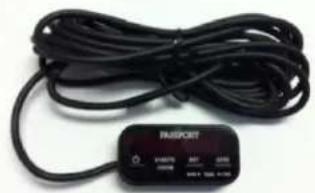
Mini Display Controller with 12- Cord.....Call for pricing

natural_image
Close-up of a black flexible cable with a connector (no text or symbols visible)Standard Coiled SmartCord......\$29.95
Available in red or blue
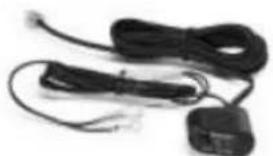
natural_image
Coiled black cables and connectors with wires, no visible text or symbolsDirect-Wire SmartCord......\$29.95
Zippered Travel Case......\$14.95
SHIFTER ZR4™ \$249.95
Warranty
ESCORT One-Year Limited Warranty
ESCORT warrants your SmartRadar device against all defects in materials and workmanship for a period of one (1) year from the date of the original purchase, subject to the following terms and conditions:
- The sole responsibility of ESCORT under this warranty is limited to either repair or, at the opon of ESCORT, replacement of SmartRadar. There are no expressed or implied warranties, including those of tness for a particular purpose or merchantability, which extend beyond the face hereof. Some states do not allow limitaons on how long an implied warranty lasts, so the above limitaons may not apply to you.
- This warranty does not cover installaon, removal, or reinstallaon charges.
- ESCORT is not liable for any incidental or consequential damages arising from the use, misuse, installaon, or moung of SmartRadar. Some states do not allow the exclusion or limitaon of incidental or consequential damages, so the above limitaon or exclusion may not apply to you
This warranty gives you specific rights. You may have other legal rights, which vary from state to state. This warranty does not apply if the serial number on the SmartRadar housing has been removed or if your SmartRadar device has been subjected to physical abuse, improper installaon, or modicaon.
Service
To obtain service, contact ESCORT (800-543-1608) to obtain a Return Authorizaon Number. Properly pack your product and include: your name, complete return address, written descripon of the problem with your product, dayme telephone number, and a copy of the original purchase receipt. Label the outside of the package clearly with your Return Authorizaon Number. Ship the product prepaid (insured, for your protecon) to: ESCORT Inc., 5440 West Chester Road, West Chester, OH 45069.
ESCORT Extended Service Plan
ESCORT oers an oponal extended service plan. Contact ESCORT Sales for details at 800-433-3487.
ESCORT Inc.
5440 West Chester Road
West Chester, OH 45069
Sales/Service 800.543.1608
www.escornc.com
©2012 ESCORT Inc. ESCORT ^® , ESCORT Live! ^™ , SmartRadar ^™ , SpecDisplay ^™ , and TrueLock ^™ are trademarks of ESCORT Inc.
iPhone is a trademark of Apple Inc., registered in the U.S. and other countries.
"Made for iPhone" means that an electronic accessory has been designed to connect specially to iPhone and has been cered by the developer to meet Apple performance standards. Apple is not responsible for the operaon of this device or its compliance with safety and regulatory standards. Please note that the use of this accessory with iPhone may aect wireless performance.
Features, specicaons, and prices subject to change without noce
Made for
iPhone 4S, iPhone 4, iPhone 3GS
Premium automove accessories from ESCORT
- SmartRadar™
- And, SmartRadar is fully compatible with the new ESCORT Live™ iPhone® applicaon!
- ESCORT Live Features (Enabled only while running the ESCORT Live app)
- Table of Contents
- Seng Up SmartRadar
- What's Included
- Registraon and Installaon
- ESCORT Live!
- Connecons and Controls
- Receiver Unit
- Power Buon
- Matrix Display
- Preferences
- Volume/Mute Buon (V-MUTE)
- Brightness Buon (BRT)
- Sensitivity Buon (SENS)
- Features
- Power-On Indicaon
- Volume/Mute
- AutoMute
- SmartMute
- Display Brightness
- Radar Sensitivity
- Highway
- Auto
- Auto No X
- Alert Tones
- Voice Alerts
- ExpertMeter
- KA||K||X||||
- SpecDisplay
- SHIFTER ZR4 Laser-Shiing System (oponal, sold separately)
- ESCORT Live iPhone Applicaon
- Sengs and Preferences
- Example
- OVERVIEW OF PREFERENCES
- Pilot Light
- Power-On Sequence
- Voice
- Bands
- PREFERENCES IN DETAIL
- Pilot Light (power-on indicaon)
- \* Pilot HWY
- Pilot H
- Pilot H.>
- Pilot V
- \*PwrOnFST
- PwrOnSTD
- Meter EXP
- Meter SPC
- \*aMute ON
- aMute OFF
- \*Voice ON
- Voice OFF
- \*Tones MILD
- Tones CLASSIC
- \*Bands DFT
- Bands MOD
- \*LSR SHFT
- LSR REC
- LSR OFF
- Specicaons
- Operang Bands
- Radar Receiver/Detector Type
- Laser Detecon
- Display Type
- Power Requirement
- Programmable Features
- Dimensions
- Understanding Your Detector
- Interpreng Alerts
- How Radar Works
- How Pop Works
- How Laser Works
- How TSR Works
- Bluetooth Pairing Tips
- FCC Compliance Noce
- Soware Updates
- Parts and Accessories
- Warranty
- ESCORT One-Year Limited Warranty
- Service
- ESCORT Extended Service Plan
- ESCORT Inc.
Brand : Escort
Model : SmartRadar
Category : Radar detector